
The enterprise software landscape has fundamentally shifted. For years, building highly scalable, real-time applications required developers to wrestle with complex mental models, steep learning curves, and difficult-to-debug code. In the frontend ecosystem, managing state and asynchronous data streams often meant relying heavily on RxJS, bringing immense power but also significant overhead and complexity. On the backend, traditional thread-per-request models in Java hit their limits under extreme concurrency, necessitating a move toward asynchronous, non-blocking architectures.
With the release of Angular 22 and Spring Boot 4, the paradigms have evolved dramatically. Angular has fully embraced Signals as its reactive core, offering a much simpler, more predictable, and highly performant alternative to RxJS for most state management tasks. Simultaneously, Spring Boot 4 continues to refine its reactive stack with WebFlux and R2DBC, providing robust, end-to-end non-blocking capabilities that seamlessly handle massive scale.
In this comprehensive masterclass, we will explore the architectural shift from RxJS to Signals in Angular 22, dive deep into the modern reactive APIs of Spring Boot 4, and learn how to bridge these two powerful technologies to build a highly scalable, real-time enterprise application. We will cover architectural decisions, best practices, and the code required to implement a robust full-stack reactive solution.
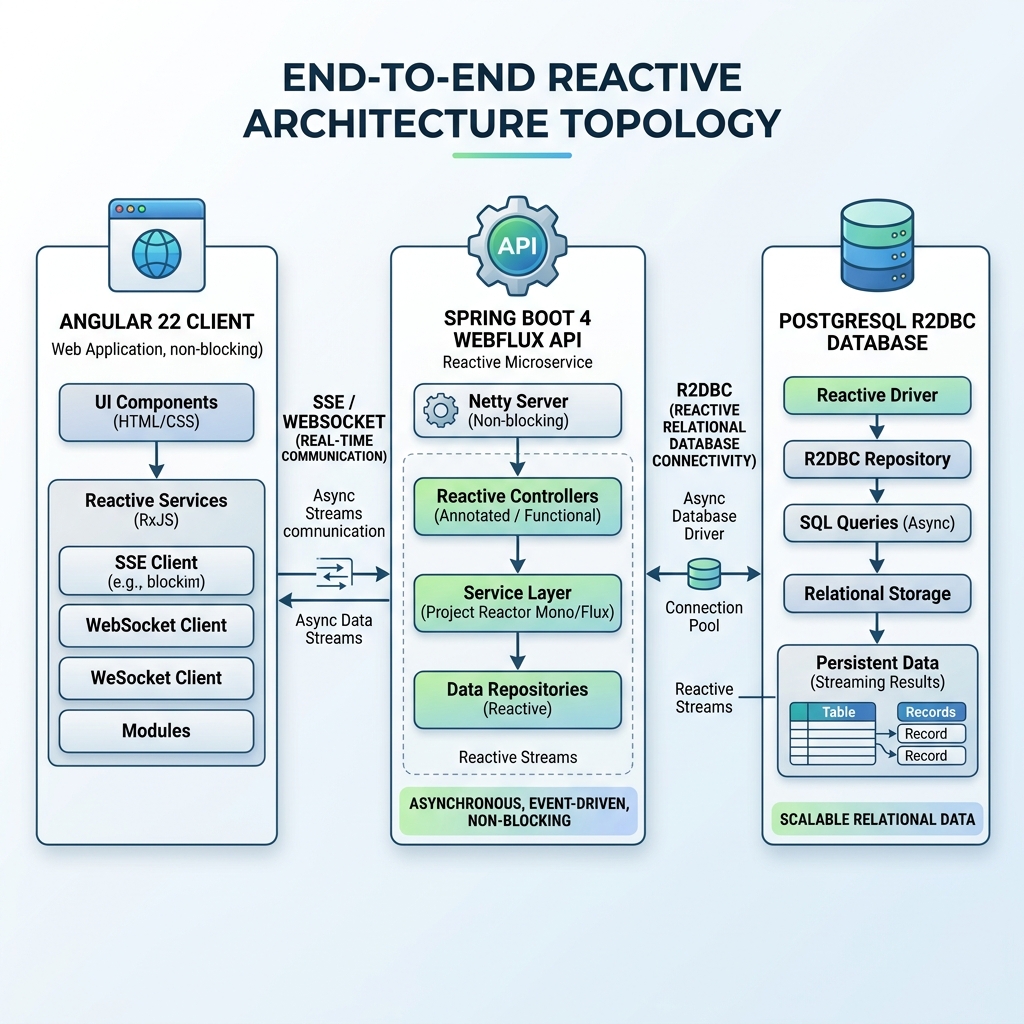
1. The End of the Default RxJS Era in Angular 22
For a long time, RxJS was the undisputed king of reactivity in Angular. From HttpClient to ReactiveFormsModule, Observables were deeply ingrained in the framework. While RxJS remains an incredibly powerful tool for managing complex asynchronous events (like debouncing user input or coordinating multiple race conditions), it was often overkill for simple state management. The mental overhead of managing subscriptions, understanding higher-order mapping operators (like switchMap vs. mergeMap), and preventing memory leaks added significant friction to frontend development.
The Signal Revolution
Angular 22 solidifies the framework’s transition to Signals as the primary reactive primitive. Signals provide fine-grained reactivity, meaning Angular knows exactly which parts of the UI depend on which pieces of state and only updates the specific DOM nodes that change, rather than running top-down change detection checks.
A Signal is essentially a wrapper around a value that can notify interested consumers when that value changes. It introduces a synchronous, intuitive mental model where you simply read the value when you need it, without worrying about subscribing or unsubscribing.
Let’s look at how a modern Angular 22 standalone component uses Signals to manage state instead of RxJS BehaviorSubjects:
import { Component, computed, inject } from '@angular/core';
import { toSignal } from '@angular/core/rxjs-interop';
import { CommonModule } from '@angular/common';
import { HttpClient } from '@angular/common/http';
import { FormsModule } from '@angular/forms';

@Component({
  selector: 'app-task-list',
  standalone: true,
  imports: [CommonModule, FormsModule],
  template: `
    <div class="task-container">
      <h2>Angular 22 Signals + Spring Boot 4 WebFlux</h2>

      <div class="stats">
        <p>Total Tasks: {{ totalTasks() }}</p>
        <p>Completed: {{ completedTasks() }}</p>
      </div>
      <!-- ... -->
    </div>
  `
})
export class TaskListComponent {
  private http = inject(HttpClient);

  // State Signals mapping RxJS to Signals
  tasks = toSignal(this.http.get<Task[]>('http://localhost:8080/api/tasks'), { initialValue: [] });
  // ...

  // Computed Signals automatically derive state
  totalTasks = computed(() => this.tasks().length);
  completedTasks = computed(() => this.tasks().filter(t => t.completed).length);

  // ...
}
Notice the absence of ngOnDestroy, takeUntil, or the async pipe. The state is purely synchronous from the developer’s perspective, yet deeply reactive under the hood. The computed signal automatically tracks its dependency on currentPrice and re-evaluates only when necessary. This results in incredibly clean, maintainable, and bug-free code.
2. Spring Boot 4: Reactive APIs with WebFlux and R2DBC
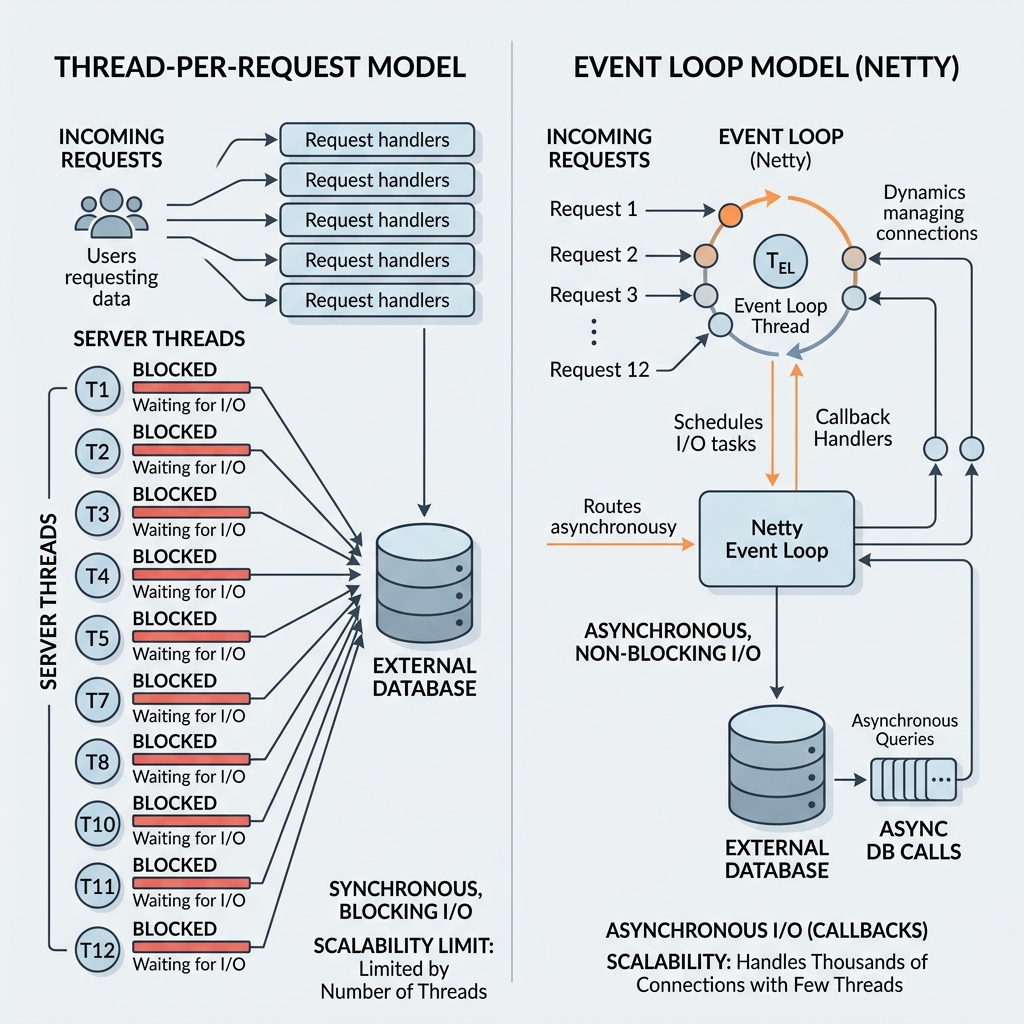
While the frontend is simplifying its state management, the backend must evolve to handle thousands of concurrent, long-lived connections without exhausting system resources. Traditional Spring MVC, built on the Servlet API and a thread-per-request model, blocks an entire OS thread whenever it makes a database call or external network request. Under high load, thread pools exhaust quickly.
Spring Boot 4 continues to champion Project Reactor through Spring WebFlux, providing a true non-blocking, event-loop driven architecture. When combined with R2DBC (Reactive Relational Database Connectivity), you achieve an end-to-end non-blocking pipeline. A thread is never blocked waiting for a Postgres query to return; it is freed up to handle other requests, scaling massively with minimal memory footprint.
Building a Reactive API with R2DBC
Let’s build a reactive backend to stream stock price updates. We will use Spring Boot 4, Kotlin, Spring Data R2DBC, and PostgreSQL. The goal is to provide an API that streams data indefinitely to the client using Server-Sent Events (SSE).
First, we define our entity and R2DBC repository:
package com.webcodein.fullstack.reactive.model;

import org.springframework.data.annotation.Id;
import org.springframework.data.relational.core.mapping.Table;

@Table("tasks")
public class Task {
    @Id
    private Long id;
    private String title;
    private boolean completed;

    // ... constructors, getters, setters ...
}
package com.webcodein.fullstack.reactive.repository;

import com.webcodein.fullstack.reactive.model.Task;
import org.springframework.data.repository.reactive.ReactiveCrudRepository;

public interface TaskRepository extends ReactiveCrudRepository<Task, Long> {
    // R2DBC allows for non-blocking queries returning Reactor types
}
The magic happens in the Controller. We use WebFlux to expose a Flux (a reactive stream of 0 to N items) mapped to text/event-stream. This instructs Spring to keep the HTTP connection open and push data to the client as it becomes available.
package com.webcodein.fullstack.reactive.controller;

import com.webcodein.fullstack.reactive.model.Task;
import com.webcodein.fullstack.reactive.service.TaskService;
import org.springframework.web.bind.annotation.*;
import reactor.core.publisher.Flux;
import reactor.core.publisher.Mono;

@RestController
@RequestMapping("/api/tasks")
@CrossOrigin(origins = "*")
public class TaskController {

    private final TaskService taskService;

    public TaskController(TaskService taskService) {
        this.taskService = taskService;
    }

    @GetMapping
    public Flux<Task> getAllTasks() {
        return taskService.getAllTasks();
    }

    // ... create, toggle, delete endpoints ...
}
This API is radically different from a standard REST endpoint. It does not return a single JSON array and close the connection. Instead, it returns a continuous stream. This requires a shift in how the Angular frontend consumes the data.
3. End-to-End Reactivity: Bridging Angular Signals and Spring WebFlux
We now have a highly scalable, non-blocking backend streaming data via SSE. How do we consume this efficiently in Angular 22 without reverting to the complexity of heavy RxJS architectures?
The solution is to use the browser’s native EventSource API to consume the SSE stream and immediately bridge the incoming data into an Angular Signal. This isolates the asynchronous stream boundary at the service layer, exposing purely synchronous Signals to the components.
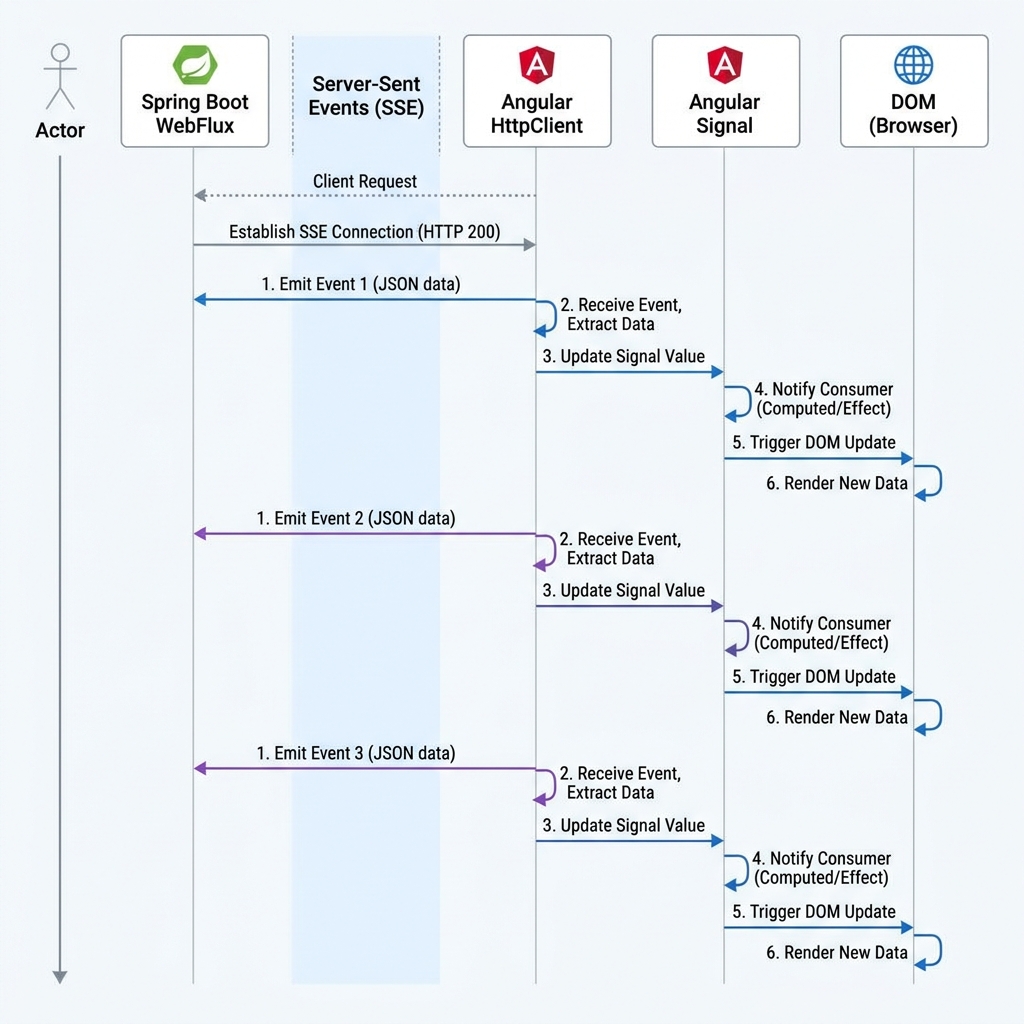
The Angular Streaming Service
We create an Angular service that manages the connection and exposes a Signal representing the latest state.
import { Injectable, inject } from '@angular/core';
import { HttpClient } from '@angular/common/http';
import { toSignal } from '@angular/core/rxjs-interop';

export interface Task {
  id: number;
  title: string;
  completed: boolean;
}

@Injectable({
  providedIn: 'root'
})
export class TaskService {
  private http = inject(HttpClient);

  // Expose the state as a read-only signal to components
  // Bridging the HTTP observable stream into a reactive Signal
  public readonly tasks = toSignal(
    this.http.get<Task[]>('http://localhost:8080/api/tasks'),
    { initialValue: [] }
  );

  // ... other methods to update tasks ...
}
Now, any Angular component can simply inject this service and read the latestPrice() signal directly in its template. The component is completely unaware of the SSE connection, the asynchronous nature of the stream, or the serialization process. It simply reacts to the Signal.
4. Enterprise Architecture: Scaling Reactive Systems
While bridging WebFlux and Signals handles the client-server communication elegantly, scaling this architecture for millions of enterprise users requires robust backend infrastructure. You cannot simply have thousands of WebFlux instances directly hitting a single PostgreSQL database, even with R2DBC.
Integrating Message Brokers
In a true enterprise environment, the source of truth for real-time data is often a message broker like Apache Kafka or RabbitMQ. WebFlux excels at bridging Kafka topics to SSE streams.
Instead of querying R2DBC directly in the controller for live updates, the Spring Boot application would use Reactor Kafka to subscribe to a topic. When a microservice publishes a price update to Kafka, the WebFlux instance consumes the message and pushes it out to all currently connected Angular clients via the open SSE connection.
// Example concept of Reactor Kafka integration
public Flux<Task> streamFromKafka(String filterKeyword) {
    return kafkaReceiver.receive()
            .map(record -> deserialize(record.value()))
            .filter(task -> task.getTitle().contains(filterKeyword));
}
Backpressure Management
One of the core tenets of Reactive Streams (the specification underpinning Project Reactor) is backpressure. Backpressure allows a consumer to signal to a producer that it is overwhelmed, requesting the producer to slow down. If the backend is pushing data faster than the client network can transmit it, WebFlux will gracefully buffer and eventually apply backpressure to the source (e.g., Kafka or R2DBC) rather than crashing with an OutOfMemoryError.
However, note that standard SSE over HTTP/1.1 does not natively support true bi-directional backpressure all the way to the browser client. For use cases requiring strict client-to-server backpressure over the network, RSocket or WebSockets over STOMP are often preferred over SSE.
5. Best Practices & Performance Optimization
When architecting full-stack reactive applications, keep these best practices in mind to ensure stability and performance.
Angular Signals Optimization
- Keep Computations Pure:
computed()signals must be pure functions. Never perform side effects (like HTTP calls or DOM manipulation) inside a computed signal. Useeffect()for side effects. - Minimize Effect Overuse: Rely on template binding to derive UI state. Only use
effect()when integrating with external, non-reactive systems (like charting libraries or legacy code). - RxJS Interoperability: Angular 22 provides
toSignal()andtoObservable()to bridge the two worlds. UsetoSignal()to convert legacy RxJS services into Signals at the boundary, keeping your components clean.
Spring WebFlux Optimization
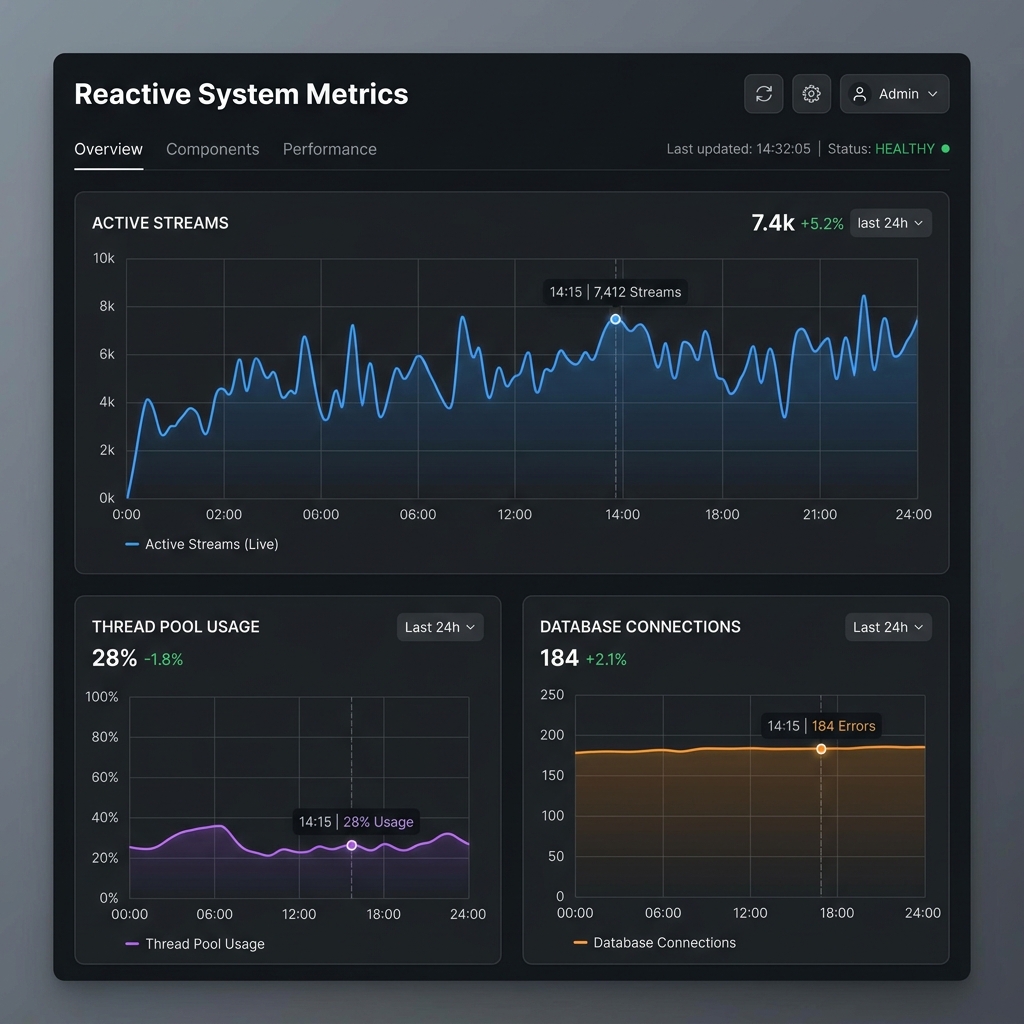
- Never Block the Event Loop: This is the golden rule of WebFlux. If you must call a legacy blocking API (like a standard JDBC call or a synchronous REST client), you must explicitly wrap it and offload it to a dedicated thread pool using
subscribeOn(Schedulers.boundedElastic()). A single blocking call on the main event loop will grind the entire application to a halt. - Use Virtual Threads Strategically: Spring Boot 4 supports Java Virtual Threads (Project Loom). While Virtual Threads make blocking code cheaper, WebFlux remains superior for heavy streaming and long-lived connections due to its integrated backpressure and rich operator vocabulary. Evaluate Virtual Threads for simpler CRUD applications, but stick to WebFlux for complex data pipelines.
- Connection Pooling: Ensure your R2DBC connection pool (e.g.,
r2dbc-pool) is properly configured for the expected concurrency. Connection exhaustion will manifest as delayed streams.
6. Common Mistakes to Avoid
Migrating to this new architecture presents several common pitfalls.
Mistake 1: Memory Leaks in Angular Effects
While Signals don’t require manual unsubscription like RxJS Observables, if you use effect() to register global DOM event listeners or external callbacks without cleaning them up, you will cause memory leaks. Always use the provided onCleanup callback within the effect.
Mistake 2: Ignoring Cold vs. Hot Publishers in WebFlux
In Project Reactor, nothing happens until you subscribe. A Flux returned from a database query is “cold”—every subscriber triggers a new query. If multiple clients connect to an SSE stream that hits the database, you might overwhelm your DB. Use operators like share() or publish() to convert the stream to “hot”, allowing multiple clients to share a single database subscription.
Mistake 3: Over-engineering with Signals
Do not try to force every single variable into a Signal. If a value is purely local to a component method and doesn’t affect the template or derived state, a standard let/const variable is perfectly fine. Signals are meant for reactive state, not generic variable storage.
7. Conclusion
The transition from RxJS-heavy frontends to Angular 22 Signals dramatically reduces the cognitive load required to build complex UIs. It allows developers to reason synchronously about state while the framework handles the reactive updates efficiently under the hood.
Coupling this streamlined frontend with the immense scalability of Spring Boot 4’s WebFlux and R2DBC creates a formidable technology stack. By leveraging Server-Sent Events to bridge the non-blocking backend pipeline directly into Angular Signals, you achieve true end-to-end reactivity. This architecture is capable of handling the extreme throughput requirements of modern enterprise applications, from financial trading dashboards to real-time IoT monitoring systems.
The era of threading bottlenecks and RxJS spaghetti code is ending. The future is scalable, non-blocking, and fine-grained.
Companion Code Repository
To see these concepts in action, check out the complete, compilable workshop companion project on GitHub. It includes the full Angular 22 frontend, the Spring Boot 4 WebFlux backend, and Docker Compose files to spin up the PostgreSQL database.
Link: Workshop Companion Code: Angular 22 & Spring Boot 4 Reactive APIs
References & Further Reading
- Official Angular Signals Documentation
- Spring WebFlux Reference Guide
- Spring Data R2DBC
- Project Reactor Reference Guide
FAQ
Q: Should I completely remove RxJS from my Angular 22 apps?
A: No. Signals are perfect for state management, but RxJS is still the superior tool for complex asynchronous event coordination, such as debouncing search inputs, handling WebSocket retry logic, or managing complex race conditions. Use them together via the toSignal() interoperability API.
Q: Does Spring Boot 4 with Virtual Threads replace WebFlux?
A: No. Virtual Threads (Project Loom) allow blocking code to scale better by avoiding OS thread pinning. However, WebFlux provides a declarative functional API (Project Reactor) that offers built-in backpressure, powerful stream manipulation operators, and non-blocking I/O all the way down to the database (R2DBC). For pure streaming use cases, WebFlux remains the gold standard.
Q: Why use Server-Sent Events (SSE) instead of WebSockets?
A: SSE is significantly simpler to implement than WebSockets. It uses standard HTTP/1.1, works seamlessly with existing load balancers and firewalls, and automatically handles reconnections. If you only need one-way streaming from server to client (like a live dashboard), SSE is highly recommended. Use WebSockets if you require low-latency, bi-directional communication.