
Technical debt is a silent killer in enterprise software development. Over years of rapid feature delivery, clean architectures degrade into a “Big Ball of Mud.” Modules become tightly coupled, services depend directly on web controllers, and database access logic leaks into the presentation layer. When architecture rules are ignored, refactoring becomes dangerous, and releasing new features slows to a crawl.
Re-writing the entire application from scratch is rarely a viable business option. Instead, you need a strategy to stop the bleeding immediately. You must prevent new architectural violations while giving your team the time to gradually refactor the existing technical debt. This is where ArchUnit’s Freezing feature becomes your most powerful tool.
In this guide, we will explore how to use FreezingArchRule in a Spring Boot 4 application to freeze legacy architecture violations, enforce boundaries, and safely strangle a monolithic system into a clean, modern architecture.
The Legacy Architecture Problem
Imagine a typical Spring Boot monolith that has grown over five years. Originally designed with a clean layered architecture, the pressure of deadlines caused developers to cut corners.
Now, utilities call business services, domain models contain REST annotations, and controllers directly access repositories. This tangled web of dependencies makes testing difficult and deployments risky.

If you introduce ArchUnit to this project and write strict rules (e.g., “Services should not access Controllers”), the test suite will fail with hundreds, or even thousands, of violations. You cannot fix them all in one sprint. However, if you disable the tests, the team will continue adding new violations.
ArchUnit Freezing to the Rescue
ArchUnit provides a brilliant solution called Freezing. When you wrap an architectural rule in FreezingArchRule.freeze(), ArchUnit does something very clever:
- It runs the test against your codebase.
- Instead of failing the build, it writes all existing violations to a plain text file (the Violation Store).
- On subsequent runs, it compares the current violations against the stored ones.
- It allows the known violations but strictly fails the build if any new violations are introduced.
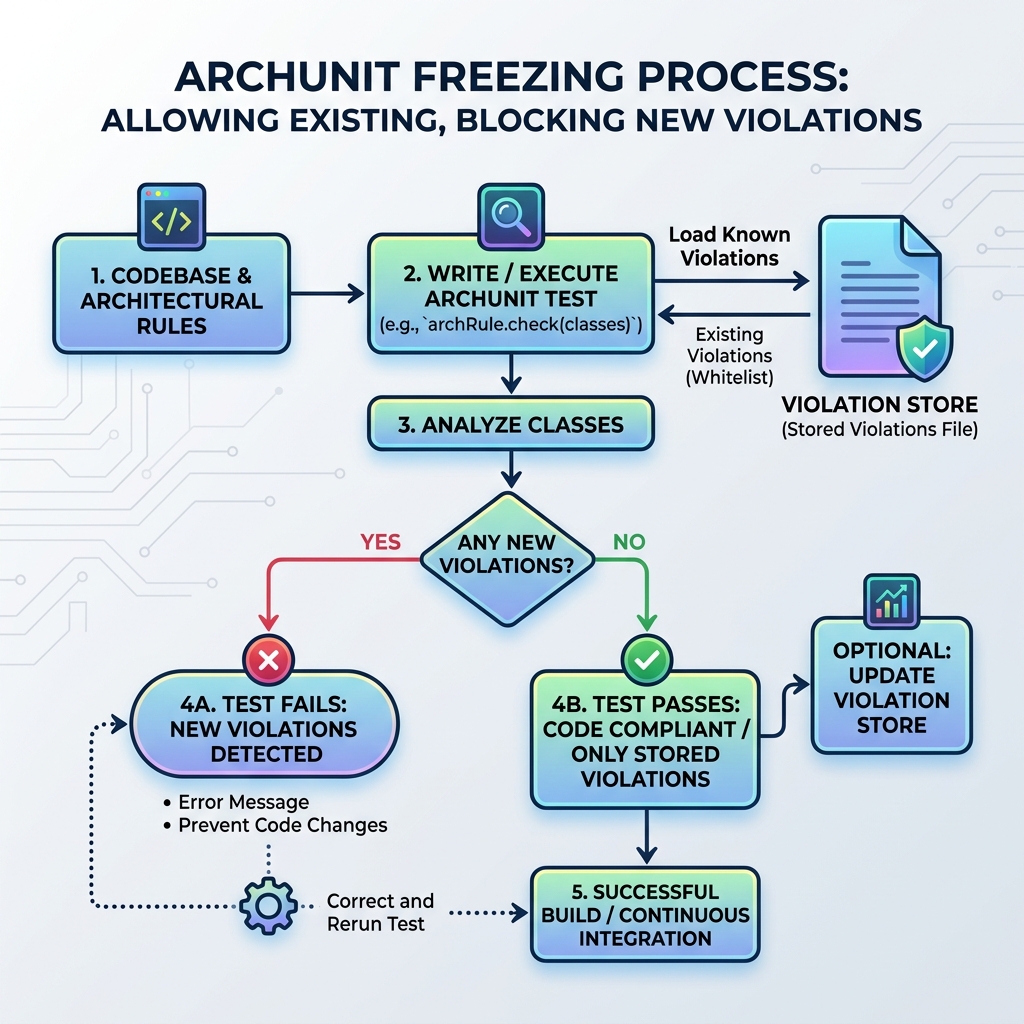
This approach instantly stops architectural degradation. Your team can confidently write new features knowing they are compliant, while slowly chipping away at the technical debt recorded in the Violation Store.
Implementing FreezingArchRule in Spring Boot 4
Let’s implement this in a Java 25 and Spring Boot 4 project. First, ensure you have the ArchUnit dependency in your pom.xml:
<dependency>
    <groupId>com.tngtech.archunit</groupId>
    <artifactId>archunit-junit5</artifactId>
    <version>1.3.0</version>
    <scope>test</scope>
</dependency>
Next, we need to configure the Violation Store. By default, ArchUnit stores frozen violations in the archunit_store directory. We can customize this by creating an archunit.properties file in src/test/resources/:
# Allow creating the store on the first run
freeze.store.default.allowStoreCreation=true
# Allow updating the store when violations are fixed
freeze.store.default.allowStoreUpdate=true
# Define the path to store the text files
freeze.store.default.path=src/test/resources/archunit-violations
Writing the Frozen Rules
Now, let’s write our architecture tests. We will use the @AnalyzeClasses annotation and wrap our rules in FreezingArchRule.freeze().
package com.webcodein.legacy;

import com.tngtech.archunit.junit.AnalyzeClasses;
import com.tngtech.archunit.junit.ArchTest;
import com.tngtech.archunit.lang.ArchRule;
import com.tngtech.archunit.library.freeze.FreezingArchRule;

import static com.tngtech.archunit.lang.syntax.ArchRuleDefinition.noClasses;
import static com.tngtech.archunit.library.Architectures.layeredArchitecture;

@AnalyzeClasses(packages = "com.webcodein.legacy")
public class ArchitectureTest {

    // 1. Strict layered architecture (Frozen to allow legacy violations)
    @ArchTest
    static final ArchRule layerDependenciesAreRespected = FreezingArchRule.freeze(
            layeredArchitecture()
                    .consideringAllDependencies()
                    .layer("Controllers").definedBy("..user..")
                    .layer("Services").definedBy("..order..")
                    .layer("Utils").definedBy("..util..")
                    .whereLayer("Controllers").mayNotBeAccessedByAnyLayer()
                    .whereLayer("Services").mayOnlyBeAccessedByLayers("Controllers")
                    .whereLayer("Utils").mayNotAccessAnyLayer()
    );

    // 2. Services should not depend on Controllers (Frozen)
    @ArchTest
    static final ArchRule servicesShouldNotDependOnControllers = FreezingArchRule.freeze(
            noClasses()
                    .that().resideInAPackage("..order..")
                    .should().dependOnClassesThat().resideInAPackage("..user..")
                    .allowEmptyShould(true)
    );
}
When you run mvn clean verify for the first time, the tests will pass. However, ArchUnit will create a text file inside src/test/resources/archunit-violations detailing every legacy component that breaks the rules. You must commit these files to your Git repository.
Gradual Refactoring and the Strangler Pattern
Once the legacy architecture is frozen, you can begin the long process of refactoring. This is often done using the Strangler Fig pattern, where you slowly carve out well-structured, compliant modules from the legacy monolith.
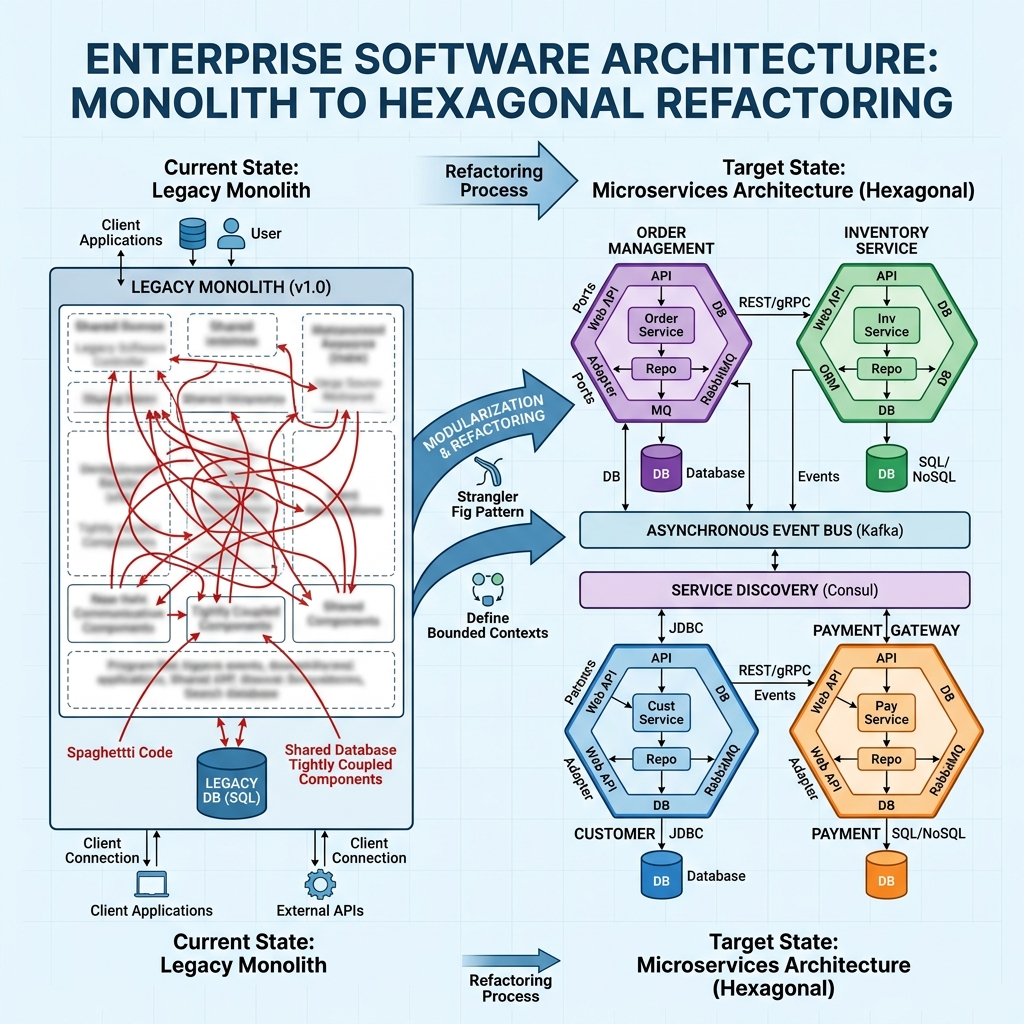
Because you enabled freeze.store.default.allowStoreUpdate=true, ArchUnit will automatically remove lines from the Violation Store text file as developers fix the underlying issues. Over time, the text file shrinks. If a developer accidentally re-introduces a fixed violation, the build will immediately fail because that violation is no longer in the whitelist.
If you want to read more about organizing these new clean modules, check out our guide on Enforcing Hexagonal Architecture with ArchUnit.
Enforcing Architecture in CI/CD
The true power of ArchUnit Freezing is realized when it runs automatically in your Continuous Integration (CI/CD) pipeline. When a developer submits a Pull Request, GitHub Actions or Jenkins will run the ArchUnit tests.
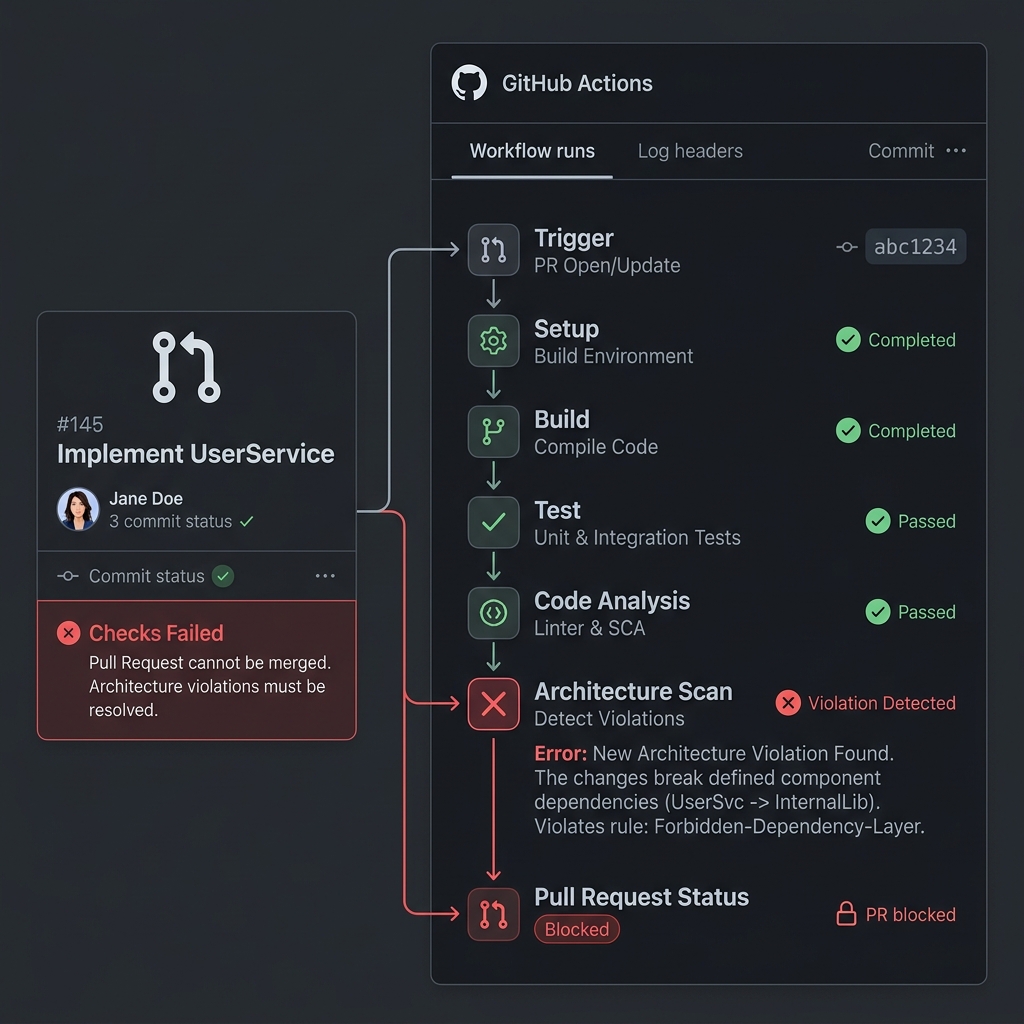
If the PR introduces a new illegal dependency, the build fails with a clear message. The reviewer does not need to manually spot the architectural mistake; the pipeline guarantees that the technical debt will never increase.
Advantages and Limitations
Advantages
- Immediate Impact: Stops architectural degradation instantly without requiring a massive upfront refactoring effort.
- Gamification: Teams can track the shrinking size of the Violation Store file, providing a measurable metric for technical debt reduction.
- Safety: Provides a safety net for junior developers who might not fully understand the system’s intended architecture.
Limitations
- Merge Conflicts: In highly active repositories, multiple developers fixing violations concurrently might experience Git merge conflicts on the Violation Store text files.
- False Sense of Security: Freezing hides the violations. If leadership forgets about the text files, the technical debt will remain forever.
Best Practices
- Commit the Violation Store: Always commit the generated text files to source control so the whole team shares the same baseline.
- Disable Creation in CI: In your CI/CD pipeline, pass
-Darchunit.freeze.store.default.allowStoreCreation=falseto ensure the pipeline never silently accepts new violations by overwriting the store. - Review Store Changes: During code reviews, closely monitor any modifications to the Violation Store files to ensure developers aren’t manually adding their new violations to the whitelist.
Frequently Asked Questions
Can I use FreezingArchRule with existing ArchUnit rules?
Yes. FreezingArchRule.freeze() acts as a wrapper around any standard ArchRule. You can use it with custom rules or predefined rules like layeredArchitecture().
How do I handle merge conflicts in the violation store?
Because the violation store is plain text, Git can usually merge changes if developers fix different violations. If a severe conflict occurs, a developer can simply delete their local store, rerun the tests against the main branch, and re-apply their fix.
Does ArchUnit analyze runtime behavior?
No. ArchUnit is a static analysis tool that inspects compiled Java bytecode. It does not monitor runtime dependency injection or reflection.
Conclusion
Managing technical debt in enterprise Java applications is challenging. ArchUnit’s FreezingArchRule provides a pragmatic, developer-friendly way to draw a line in the sand. By allowing existing violations while strictly preventing new ones, you can stop the bleeding and begin a safe, gradual refactoring journey.
You can find the complete, compilable source code for this article in our companion workshop repository on GitHub:
Webcodein Workshop: ArchUnit Freezing Legacy Architecture