
What You’ll Build
In this tutorial, you will build a complete Domain-Driven Design (DDD) core for an e-commerce application using Java 25 and Spring Boot 4.0. You will learn how to properly model an Order Aggregate Root, protect its invariants, and use Java 25 record types (preparing for Valhalla Value Types) to model immutable Value Objects like Money and IDs.
By the end of this guide, you will have a fully tested domain layer that compiles to a native image and runs against a PostgreSQL database using Testcontainers.
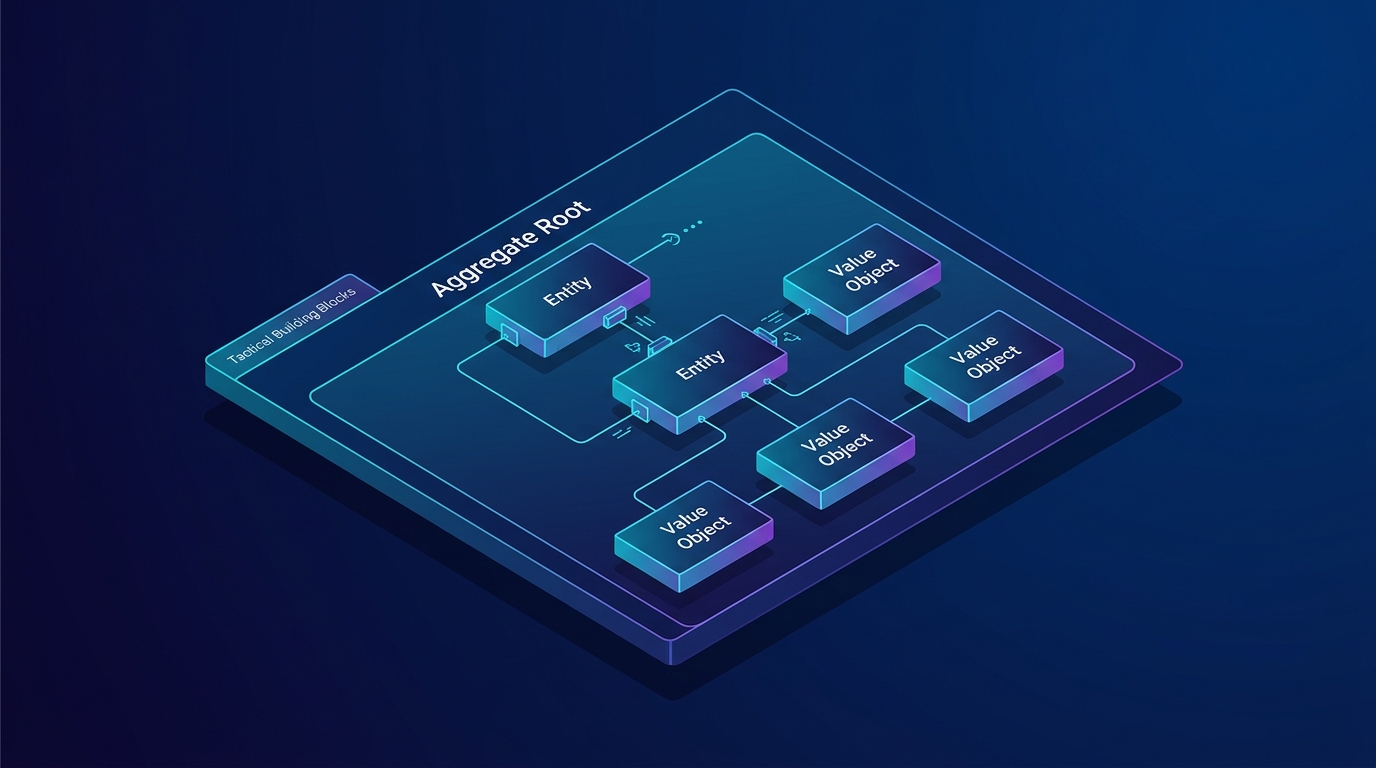
Prerequisites
- Java 25 installed (or Java 21+ with preview features enabled)
- Maven 3.9+ for building the project
- Docker Desktop running (required for Testcontainers)
- Basic understanding of Spring Data JPA and REST APIs
Step 1: Create the Spring Boot Project
First, we need to set up a Spring Boot 4.0 application with the required dependencies. We will use Spring Data JPA, PostgreSQL, and Testcontainers.
Create a pom.xml file in your root directory:
pom.xml
<?xml version="1.0" encoding="UTF-8"?>
<project xmlns="http://maven.apache.org/POM/4.0.0"
         xmlns:xsi="http://www.w3.org/2001/XMLSchema-instance"
         xsi:schemaLocation="http://maven.apache.org/POM/4.0.0 https://maven.apache.org/xsd/maven-4.0.0.xsd">
    <modelVersion>4.0.0</modelVersion>

    <parent>
        <groupId>org.springframework.boot</groupId>
        <artifactId>spring-boot-starter-parent</artifactId>
        <version>4.0.0-M1</version>
        <relativePath/>
    </parent>

    <groupId>com.webcodein.workshop.architecture</groupId>
    <artifactId>ddd-building-blocks</artifactId>
    <version>1.0.0-SNAPSHOT</version>

    <properties>
        <java.version>25</java.version>
    </properties>

    <dependencies>
        <dependency>
            <groupId>org.springframework.boot</groupId>
            <artifactId>spring-boot-starter-web</artifactId>
        </dependency>
        <dependency>
            <groupId>org.springframework.boot</groupId>
            <artifactId>spring-boot-starter-data-jpa</artifactId>
        </dependency>
        <dependency>
            <groupId>org.postgresql</groupId>
            <artifactId>postgresql</artifactId>
            <scope>runtime</scope>
        </dependency>
        <dependency>
            <groupId>org.springframework.boot</groupId>
            <artifactId>spring-boot-starter-test</artifactId>
            <scope>test</scope>
        </dependency>
        <dependency>
            <groupId>org.springframework.boot</groupId>
            <artifactId>spring-boot-starter-webmvc-test</artifactId>
            <scope>test</scope>
        </dependency>
        <dependency>
            <groupId>org.springframework.boot</groupId>
            <artifactId>spring-boot-testcontainers</artifactId>
            <scope>test</scope>
        </dependency>
        <dependency>
            <groupId>org.testcontainers</groupId>
            <artifactId>testcontainers-junit-jupiter</artifactId>
            <scope>test</scope>
        </dependency>
        <dependency>
            <groupId>org.testcontainers</groupId>
            <artifactId>testcontainers-postgresql</artifactId>
            <scope>test</scope>
        </dependency>
    </dependencies>
</project>- We include spring-boot-starter-data-jpa for Hibernate 7 integration.
- spring-boot-testcontainers allows us to automatically spin up a PostgreSQL instance during our integration tests without mocks.
Step 2: Model the Value Objects
A Value Object represents a descriptive aspect of the domain with no conceptual identity. Two Value Objects are equal if all their properties are equal. In Java 25, we model these perfectly using record.

Create the Money value object:
src/main/java/com/webcodein/ecommerce/domain/Money.java
package com.webcodein.ecommerce.domain;

import jakarta.persistence.Embeddable;
import java.math.BigDecimal;
import java.util.Objects;

@Embeddable
public record Money(BigDecimal amount, String currency) {

    public Money {
        if (amount == null || amount.compareTo(BigDecimal.ZERO) < 0) {
            throw new IllegalArgumentException("Amount cannot be negative");
        }
        if (currency == null || currency.isBlank()) {
            throw new IllegalArgumentException("Currency must be defined");
        }
    }

    public static Money of(BigDecimal amount, String currency) {
        return new Money(amount, currency);
    }

    public Money add(Money other) {
        if (!this.currency.equals(other.currency)) {
            throw new IllegalArgumentException("Cannot add different currencies");
        }
        return new Money(this.amount.add(other.amount), this.currency);
    }
}- We use
@Embeddableso Hibernate knows this is a component, not an independent table. - The compact constructor
public Money { ... }guarantees that invalid money can never exist in our system.
Step 3: Model the OrderItem Entity
An Entity is an object defined primarily by its identity over time. Even if an order item’s quantity changes, it remains the same conceptual item.

Create the OrderItem entity:
src/main/java/com/webcodein/ecommerce/domain/OrderItem.java
package com.webcodein.ecommerce.domain;

import jakarta.persistence.AttributeOverride;
import jakarta.persistence.Column;
import jakarta.persistence.Embeddable;
import jakarta.persistence.Embedded;

@Embeddable
public class OrderItem {

    private String productId;

    @Embedded
    @AttributeOverride(name = "amount", column = @Column(name = "unit_price_amount"))
    @AttributeOverride(name = "currency", column = @Column(name = "unit_price_currency"))
    private Money unitPrice;

    private int quantity;

    protected OrderItem() {
        // Required by JPA
    }

    public OrderItem(String productId, Money unitPrice, int quantity) {
        if (quantity <= 0) {
            throw new IllegalArgumentException("Quantity must be greater than zero");
        }
        this.productId = productId;
        this.unitPrice = unitPrice;
        this.quantity = quantity;
    }

    public Money getTotalPrice() {
        return Money.of(unitPrice.amount().multiply(java.math.BigDecimal.valueOf(quantity)), unitPrice.currency());
    }

    public String getProductId() {
        return productId;
    }
}- We map it as
@Embeddablebecause it belongs entirely to the Order aggregate. - We use
@AttributeOverrideto rename the database columns for the nestedMoneyvalue object.
Step 4: Create the Aggregate Root
The Aggregate Root is the primary entry point to a cluster of related objects. It enforces business rules and consistency boundaries. External clients can only hold references to the Aggregate Root.

Create the Order class:
src/main/java/com/webcodein/ecommerce/domain/Order.java
package com.webcodein.ecommerce.domain;

import jakarta.persistence.*;
import java.util.ArrayList;
import java.util.Collections;
import java.util.List;
import java.util.UUID;

@Entity
@Table(name = "orders")
public class Order {

    @Id
    private String id;

    private String customerId;

    @ElementCollection
    @CollectionTable(name = "order_items", joinColumns = @JoinColumn(name = "order_id"))
    private List<OrderItem> items = new ArrayList<>();

    protected Order() {
        // Required by JPA
    }

    public Order(String customerId) {
        this.id = UUID.randomUUID().toString();
        this.customerId = customerId;
    }

    public void addItem(String productId, Money price, int quantity) {
        this.items.add(new OrderItem(productId, price, quantity));
    }

    public List<OrderItem> getItems() {
        return Collections.unmodifiableList(items);
    }

    public String getId() {
        return id;
    }
}- The Order is an
@Entitywith its own@Id. - It uses
@ElementCollectionto manage its internal Order Items. - It exposes
getItems()as an unmodifiable list, ensuring external code cannot bypass the aggregate’s business rules.
Step 5: Implement the Repository
The Repository is an abstraction over the persistence mechanism. We only create repositories for Aggregate Roots.
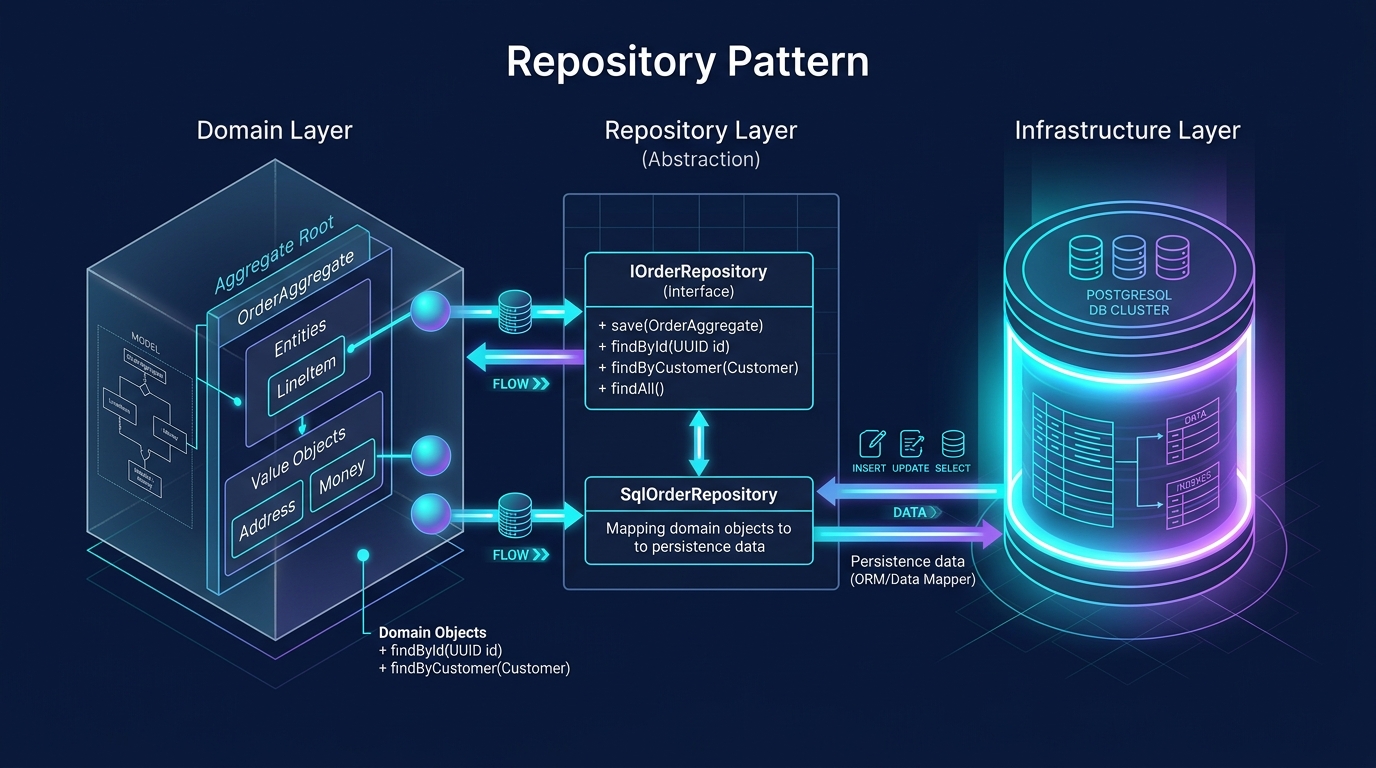
Create the Spring Data repository:
src/main/java/com/webcodein/ecommerce/repository/OrderRepository.java
package com.webcodein.ecommerce.repository;

import com.webcodein.ecommerce.domain.Order;
import org.springframework.data.jpa.repository.JpaRepository;
import org.springframework.stereotype.Repository;

@Repository
public interface OrderRepository extends JpaRepository<Order, String> {
}
Step 6: Build the REST API
We expose our domain via a simple Web Controller.
src/main/java/com/webcodein/ecommerce/web/OrderController.java
package com.webcodein.ecommerce.web;

import com.webcodein.ecommerce.domain.Money;
import com.webcodein.ecommerce.domain.Order;
import com.webcodein.ecommerce.repository.OrderRepository;
import org.springframework.http.HttpStatus;
import org.springframework.web.bind.annotation.*;

import java.math.BigDecimal;

@RestController
@RequestMapping("/api/orders")
public class OrderController {

    private final OrderRepository orderRepository;

    public OrderController(OrderRepository orderRepository) {
        this.orderRepository = orderRepository;
    }

    @PostMapping
    @ResponseStatus(HttpStatus.CREATED)
    public Order createOrder(@RequestParam String customerId) {
        Order order = new Order(customerId);
        return orderRepository.save(order);
    }

    @PostMapping("/{orderId}/items")
    public Order addItem(@PathVariable String orderId,
                         @RequestParam String productId,
                         @RequestParam BigDecimal price,
                         @RequestParam String currency,
                         @RequestParam int qty) {
        Order order = orderRepository.findById(orderId)
                .orElseThrow(() -> new IllegalArgumentException("Order not found"));

        order.addItem(productId, Money.of(price, currency), qty);
        return orderRepository.save(order);
    }
}- The controller orchestrates the request by fetching the Aggregate, executing an action on it, and saving it back.
Testing the Application
Let’s write a comprehensive integration test. We will use Testcontainers to boot up a real PostgreSQL database automatically.
src/test/java/com/webcodein/ecommerce/OrderIntegrationTest.java
package com.webcodein.ecommerce;

import org.junit.jupiter.api.Test;
import org.springframework.beans.factory.annotation.Autowired;
import org.springframework.boot.webmvc.test.autoconfigure.AutoConfigureMockMvc;
import org.springframework.boot.test.context.SpringBootTest;
import org.springframework.boot.testcontainers.service.connection.ServiceConnection;
import org.springframework.test.web.servlet.MockMvc;
import org.testcontainers.containers.PostgreSQLContainer;
import org.testcontainers.junit.jupiter.Container;
import org.testcontainers.junit.jupiter.Testcontainers;

import static org.springframework.test.web.servlet.request.MockMvcRequestBuilders.post;
import static org.springframework.test.web.servlet.result.MockMvcResultMatchers.jsonPath;
import static org.springframework.test.web.servlet.result.MockMvcResultMatchers.status;

@SpringBootTest
@AutoConfigureMockMvc
@Testcontainers
class OrderIntegrationTest {

    @Container
    @ServiceConnection
    static PostgreSQLContainer<?> postgres = new PostgreSQLContainer<>("postgres:16-alpine");

    @Autowired
    private MockMvc mockMvc;

    @Test
    void shouldCreateOrderAndAddItem() throws Exception {
        // 1. Create Order
        String response = mockMvc.perform(post("/api/orders").param("customerId", "CUST-100"))
                .andExpect(status().isCreated())
                .andReturn().getResponse().getContentAsString();

        String orderId = com.jayway.jsonpath.JsonPath.read(response, "$.id");

        // 2. Add Item to Order
        mockMvc.perform(post("/api/orders/" + orderId + "/items")
                        .param("productId", "PROD-55")
                        .param("price", "99.99")
                        .param("currency", "USD")
                        .param("qty", "2"))
                .andExpect(status().isOk())
                .andExpect(jsonPath("$.items[0].productId").value("PROD-55"))
                .andExpect(jsonPath("$.items[0].quantity").value(2));
    }
}- The
@ServiceConnectionannotation automatically wires the PostgreSQL properties to Spring Boot without any custom property mappers. - We use
MockMvcto execute end-to-end web requests against our controller.
Run the test:
mvn clean verifyRunning with Docker
To run the application locally, you can use Docker Compose to spin up the database.
compose.yaml
services:
  postgres:
    image: postgres:16-alpine
    environment:
      POSTGRES_DB: ecommerce
      POSTGRES_USER: myuser
      POSTGRES_PASSWORD: secret
Start it up:
docker compose up -d
./mvnw spring-boot:run
What You Learned
- Value Objects: Used Java 25
recordclasses to model immutable, side-effect-free concepts like Money. - Entities: Modeled database rows that possess a unique identity using
@Entity. - Aggregate Roots: Protected internal consistency boundaries by only modifying order items through the
Orderaggregate. - Testing: Ran zero-mocking integration tests using Spring Boot Testcontainers and PostgreSQL.
Next Steps
- Check out Introduction to DDD with Jakarta EE 11.
- Learn about Project Valhalla Value Types in Java 25.
- Read about TDD in Spring Boot 4 with Testcontainers.
Companion Code
You can find the complete, runnable code for this tutorial on GitHub:
Companion Workshop Code