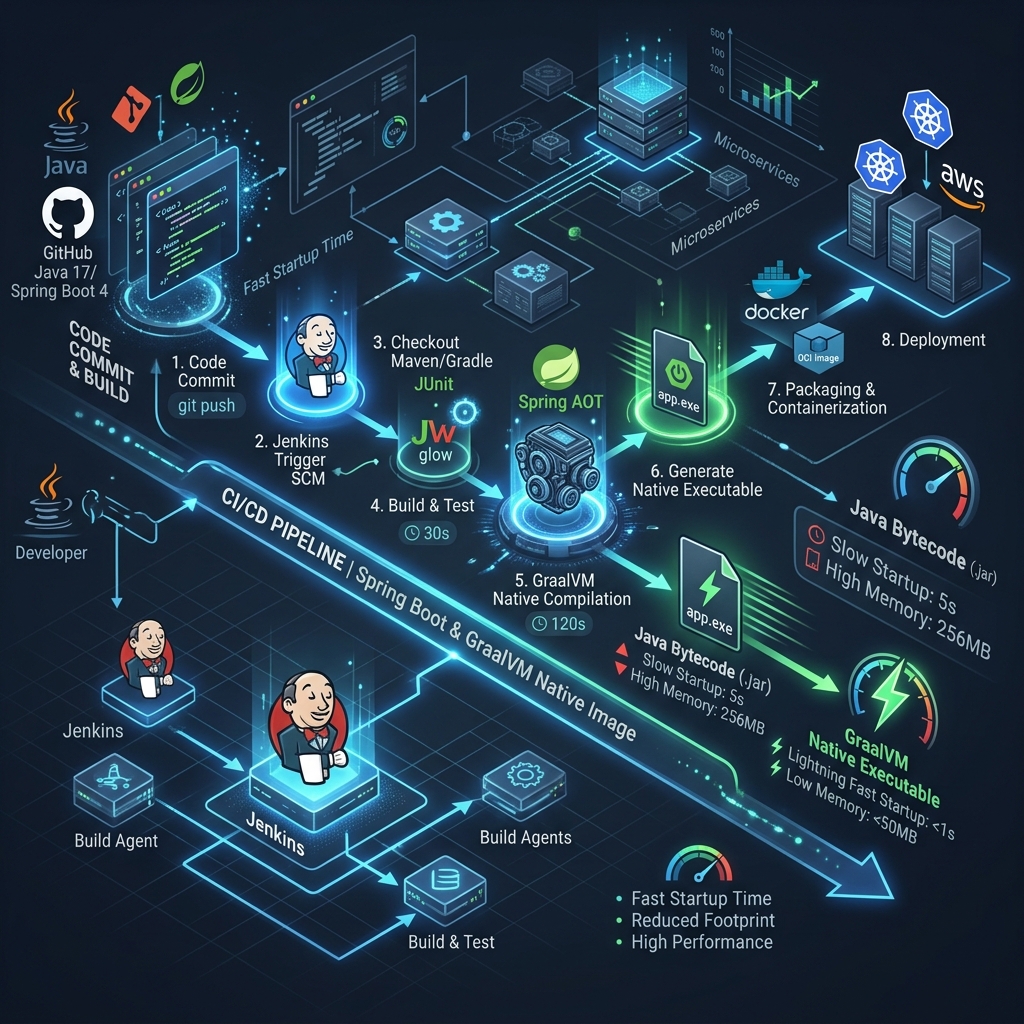
While newer CI/CD tools like GitHub Actions are incredibly popular, Jenkins remains the undisputed king of complex, enterprise-grade continuous integration. Many Fortune 500 companies rely on Jenkins because it can be customized to do absolutely anything.
However, running a legacy Jenkins server with manual UI configurations (“ClickOps”) is a nightmare. In the modern cloud-native era, we treat our CI/CD pipelines as code. Furthermore, with the rise of Java 25, Spring Boot 4, and GraalVM, our build environments need to be highly dynamic and robust.
In this guide, we will explore how to build a highly optimized, declarative Jenkins pipeline that uses dynamic Docker agents to compile Spring Boot 4 applications, run integration tests using Testcontainers, and compile ultra-fast GraalVM Native Images.
The Architecture: Dynamic Docker Agents
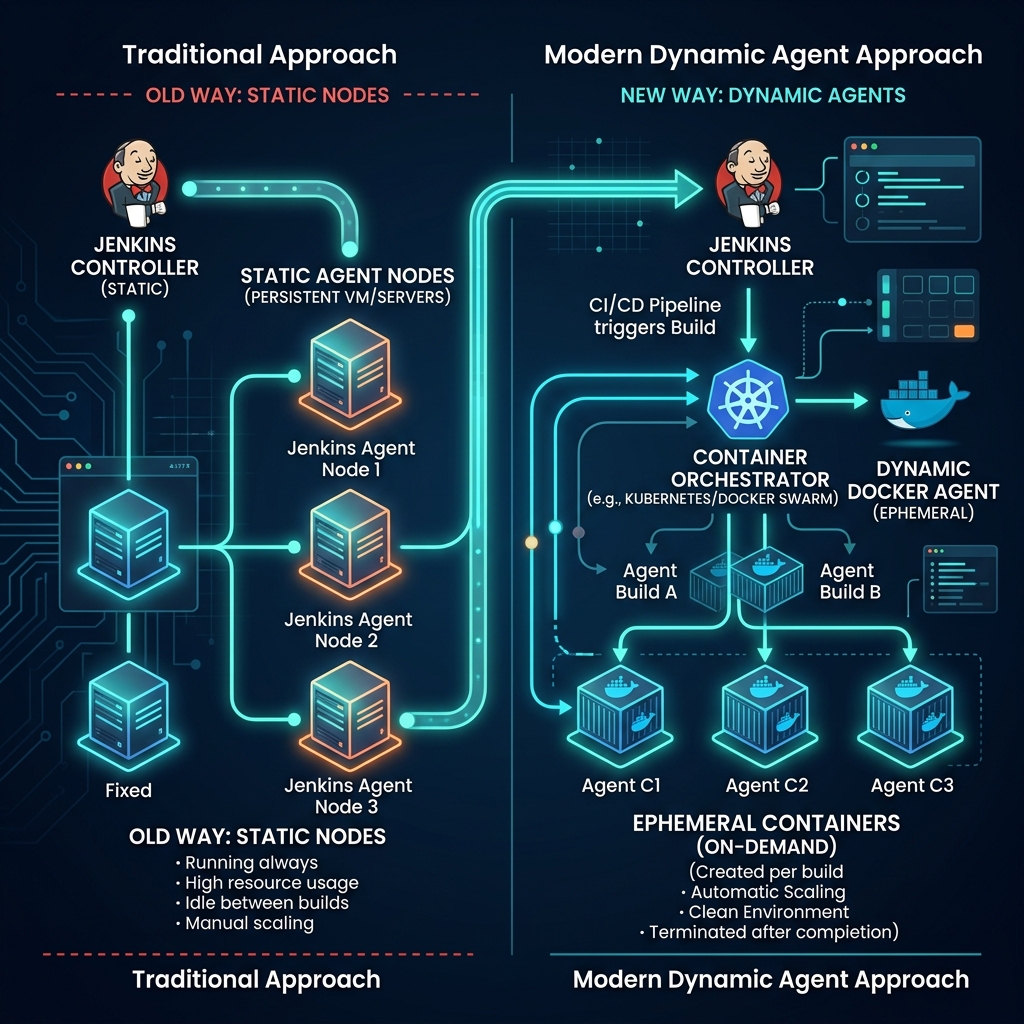
In the past, Jenkins administrators would set up static “Worker Nodes”—virtual machines pre-installed with Java, Maven, Node.js, and other tools. Over time, these servers become cluttered and difficult to maintain.
The modern approach uses Docker as the Jenkins Agent. Instead of maintaining static tools, your pipeline asks Jenkins to spin up a fresh, ephemeral Docker container containing the exact JDK version you need. Once the build finishes, the container is destroyed.
Writing the Declarative Jenkinsfile
To use dynamic agents, we write a Jenkinsfile using Jenkins Declarative Pipeline syntax. We will instruct Jenkins to launch a GraalVM-enabled JDK 25 container to act as our build environment.
pipeline {
    agent {
        docker {
            image 'ghcr.io/graalvm/graalvm-ce:ol9-java17-22.3.1' // Uses GraalVM JDK
            args '-v /var/run/docker.sock:/var/run/docker.sock -v maven-repo:/root/.m2'
        }
    }
    options {
        timeout(time: 30, unit: 'MINUTES')
        disableConcurrentBuilds()
    }
    stages {
        stage('Checkout') {
            steps {
                checkout scm
            }
        }
        stage('Build & Test') {
            steps {
                sh './mvnw -B -ntp clean verify'
            }
        }
    }
}
Solving the Testcontainers Problem (Docker-out-of-Docker)
If you look closely at the args block in the Jenkinsfile above, you will notice we mount /var/run/docker.sock. Why is this necessary?
Modern Spring Boot testing relies heavily on Testcontainers to spin up real PostgreSQL databases or Redis caches during the integration test phase. Because our Jenkins build is already running inside a Docker container (the GraalVM agent), Testcontainers needs to launch additional containers.
By mounting the host’s Docker socket into the Jenkins agent container, we utilize the Docker-out-of-Docker (DooD) pattern. When Testcontainers requests a new database container, it communicates with the host Docker daemon, which spins up the database next to the Jenkins agent, rather than inside it. This keeps the pipeline fast and stable.
Building GraalVM Native Images in Jenkins
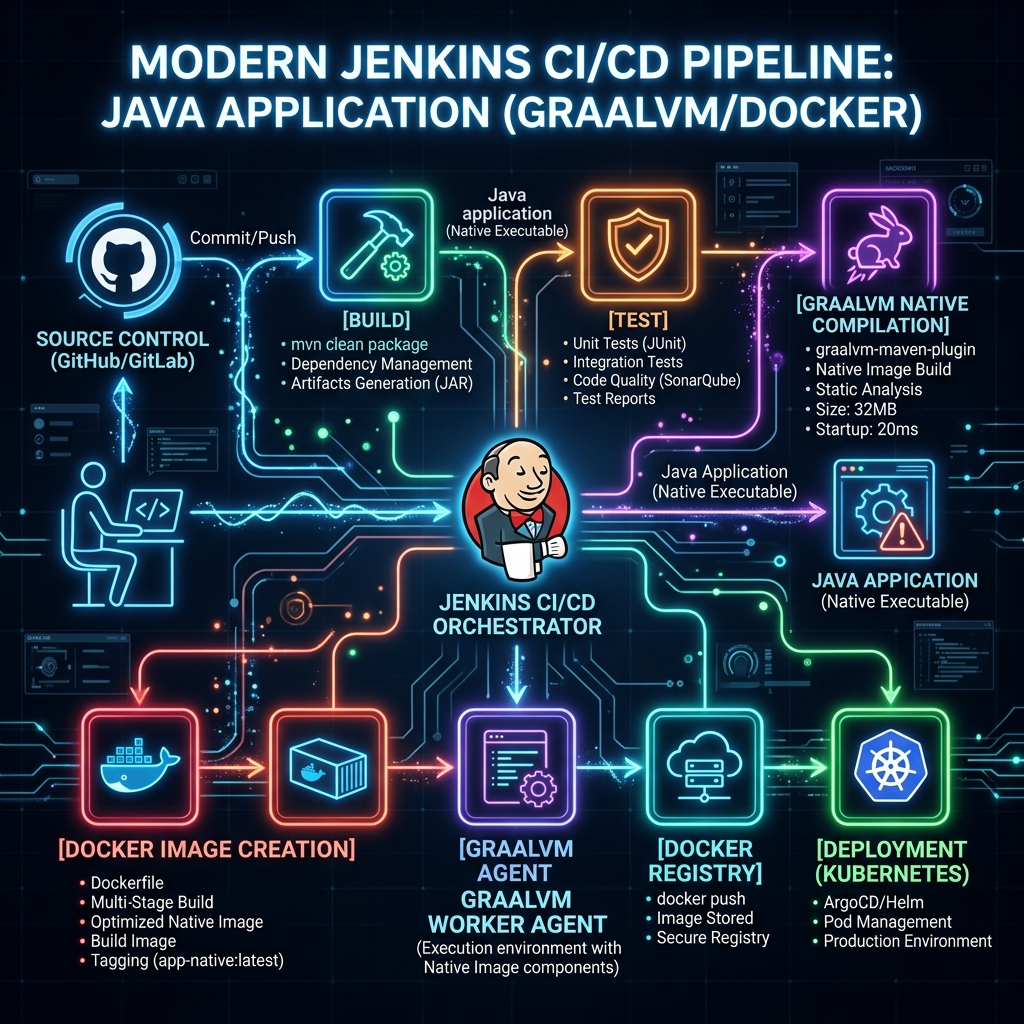
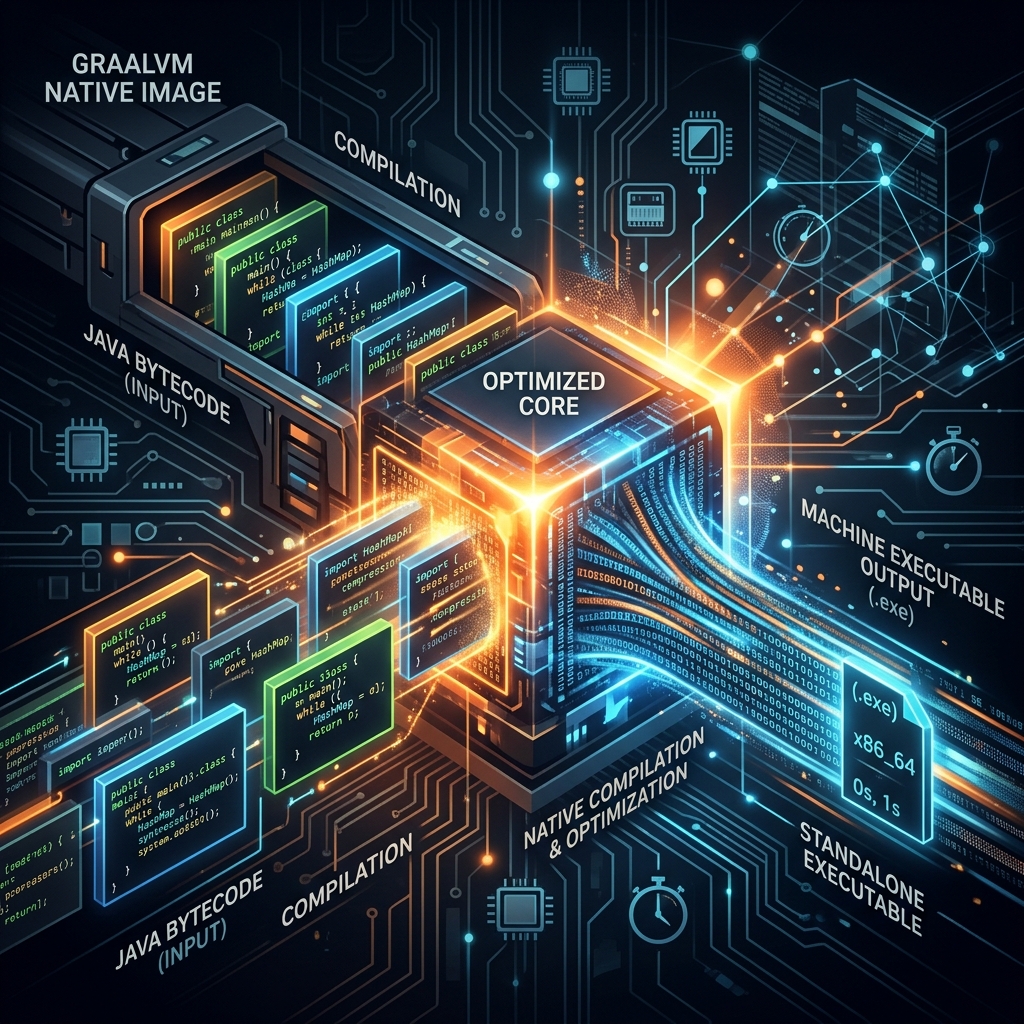
Spring Boot 4 provides excellent support for compiling your application into a standalone native executable using GraalVM. Native images start in milliseconds and use a fraction of the memory, making them perfect for Kubernetes deployments.
However, Ahead-of-Time (AOT) compilation is incredibly resource-intensive. It requires significant CPU and RAM. Trying to compile a native image on a tiny GitHub Actions runner often leads to OutOfMemory (OOM) errors.
This is where enterprise Jenkins shines. You can route the native build stage to a dedicated, high-performance Jenkins node.
        stage('Build GraalVM Native Image') {
            steps {
                echo 'Compiling Native Executable...'
                sh './mvnw -B -ntp -Pnative native:compile'
            }
        }
Real-World Use Cases
In the real world, this Jenkins and GraalVM pipeline shines in scenarios where performance and resource control are critical:
- High-Frequency Trading Platforms: Financial systems require absolute minimal latency. Compiling Spring Boot 4 applications to native images guarantees millisecond startup times and stable memory footprints.
- Large-Scale Kubernetes Deployments: When scaling hundreds of microservices, native images drastically reduce cloud compute costs by keeping RAM usage low compared to standard JVM deployments.
- Air-Gapped Environments: Enterprise organizations with strict security requirements often use Jenkins because it can be entirely self-hosted without relying on external SaaS CI/CD runners.
Advantages and Limitations
While powerful, this setup has clear trade-offs.
Advantages
- Speed and Efficiency: The final GraalVM native image starts incredibly fast and uses a fraction of the memory of a traditional JVM.
- Total Control: You have full control over the Jenkins worker nodes, allowing you to allocate the massive amounts of RAM and CPU required for native AOT compilation.
- Clean Build Environments: Dynamic Docker agents ensure every build starts from a clean slate, eliminating the dreaded “it works on my machine” or “it works on the old Jenkins node” syndrome.
Limitations
- High CI Resource Costs: Native image compilation is extremely CPU and memory-intensive. Your Jenkins worker nodes must be beefy (often 8GB+ RAM per concurrent build).
- Complexity: Managing Jenkins infrastructure, Docker-out-of-Docker socket mounting, and agent lifecycles requires dedicated DevOps expertise.
- Slower Build Times: While the final application starts in milliseconds, the CI pipeline itself is significantly slower because GraalVM AOT compilation takes several minutes.
Best Practices for Jenkins Pipelines
- Cache Maven Dependencies: Notice how we mounted a volume to
/root/.m2in the Jenkinsfile. If you do not cache your dependencies, Jenkins will redownload the entire internet on every build, slowing down your pipeline drastically. - Always use Declarative Pipelines: Avoid the older Scripted Pipeline syntax unless absolutely necessary. Declarative syntax is much easier to read, maintain, and validate.
- Archive Test Reports: Always include a
postblock to archive JUnit XML reports. This allows the Jenkins UI to display beautiful test trend graphs over time.
Conclusion
Jenkins is far from obsolete. By combining it with Jenkinsfiles, dynamic Docker agents, and modern Java 25 capabilities, you can build enterprise-grade CI/CD pipelines capable of handling massive GraalVM native image compilations and complex Testcontainers integration tests.
Companion Workshop Code
We have prepared a complete companion project demonstrating this setup. It includes a Spring Boot 4 REST API, a Testcontainers integration test, and a fully configured Declarative Jenkinsfile.
View the Companion Code on GitHub
Frequently Asked Questions (FAQ)
Is Jenkins better than GitHub Actions?
Not necessarily better, but different. GitHub Actions is fantastic for open-source and modern cloud-hosted projects. Jenkins excels in highly secure, on-premise enterprise environments where you need complete control over the build hardware.
Why did my Testcontainers build fail in Jenkins?
The most common reason is a missing Docker socket. Ensure that your Jenkins agent has the Docker CLI installed and that you have bound /var/run/docker.sock from the host to the agent container.
Can I run Jenkins without Docker?
Yes, but installing build tools directly on the Jenkins server leads to dependency conflicts over time. Using ephemeral Docker containers is the recommended industry best practice.