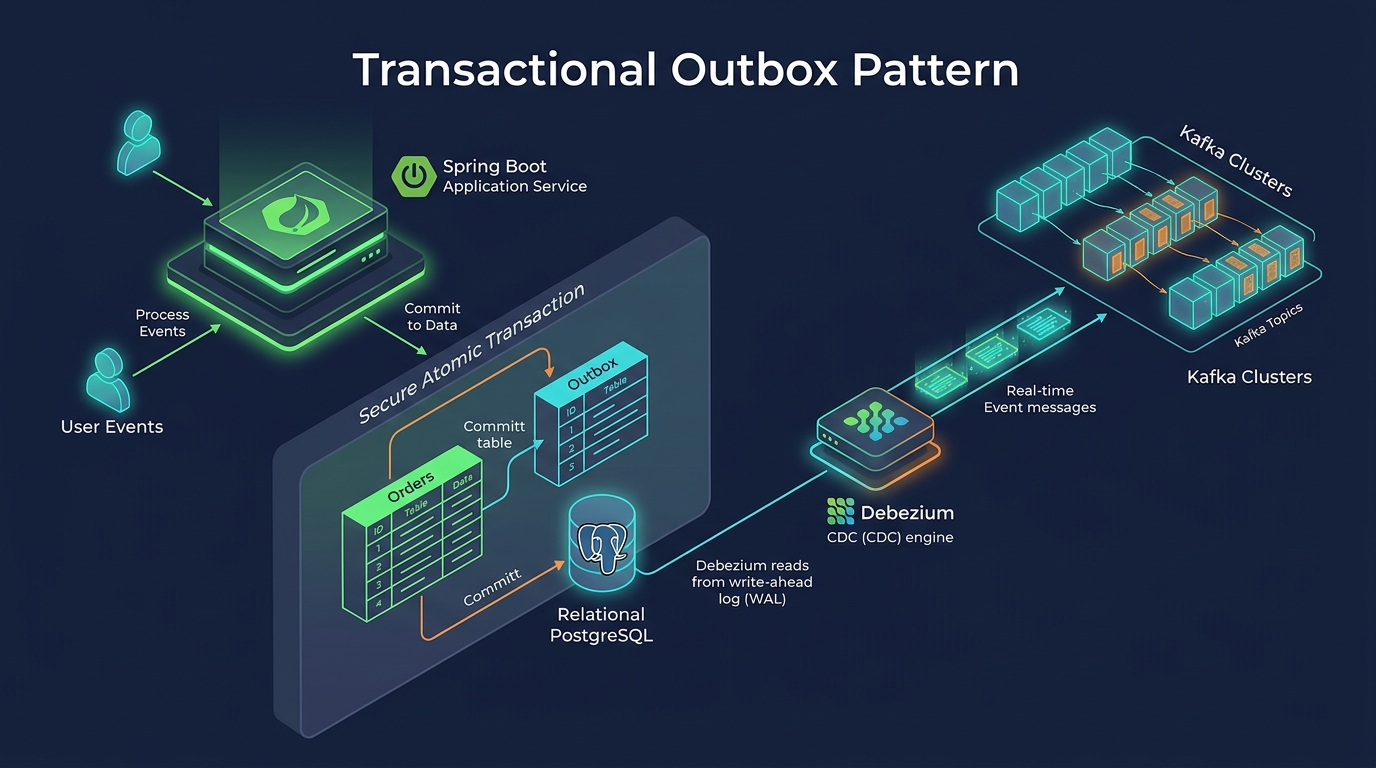
In a microservices architecture, a single business transaction often requires updating a local database and publishing a message to a message broker like Apache Kafka (see our comprehensive guide on event-driven architecture with Spring Boot 4 and Kafka). If these two operations are not executed atomically, your system will inevitably face data inconsistencies.
This is commonly known as the Dual Write Problem. In this article, we will explore why the dual write problem happens and how to solve it permanently using the Transactional Outbox Pattern with Spring Boot 4, PostgreSQL, Apache Kafka, and Debezium.
The Dual Write Problem
Imagine an e-commerce application. When a user places an order, the OrderService must save the order to its PostgreSQL database and immediately publish an OrderCreated event to Kafka so the InventoryService can reserve the items.
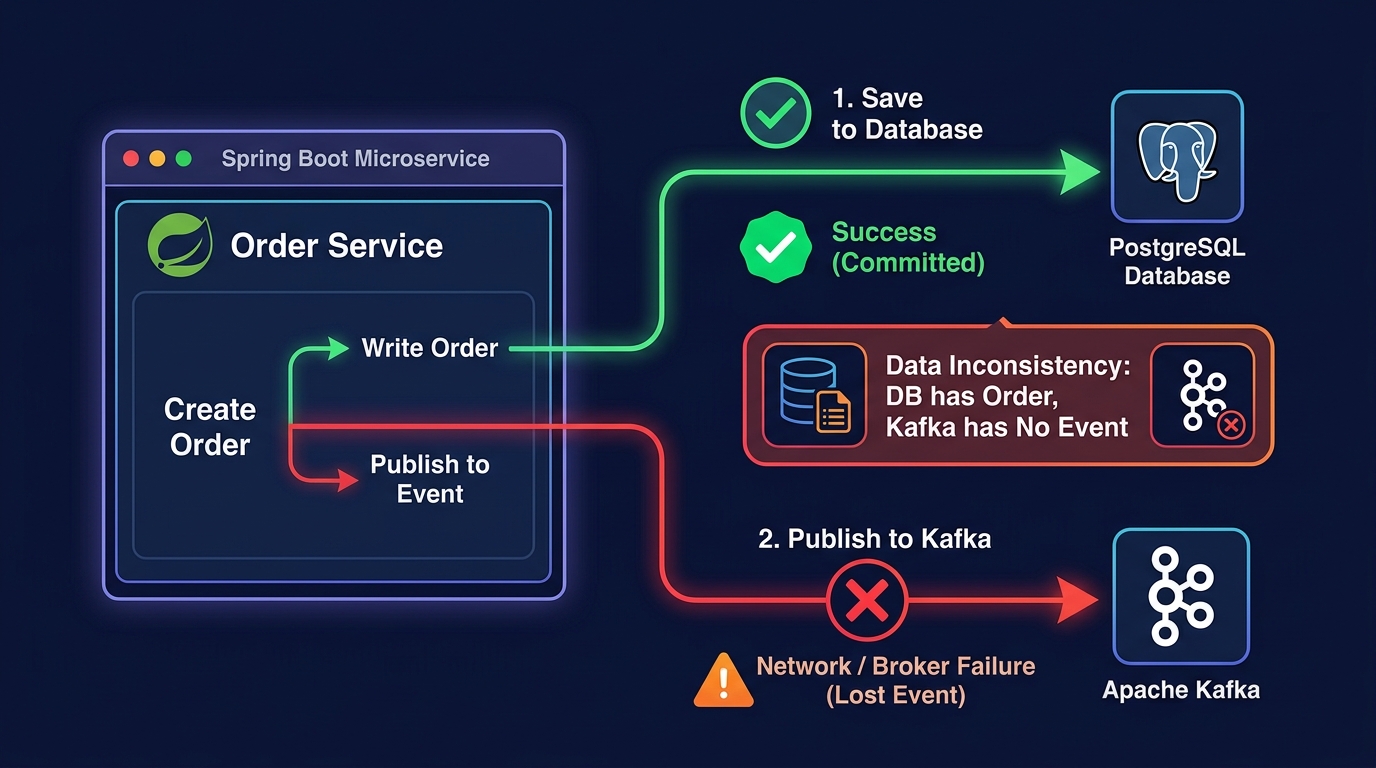
Here is how a naive implementation looks:
@Transactional
public void placeOrder(Order order) {
    // 1. Save to database
    orderRepository.save(order);

    // 2. Publish to Kafka
    kafkaTemplate.send("orders.topic", order);
}
What happens if the database commit succeeds, but the Kafka cluster is temporarily unreachable, or the application crashes right before line 2 executes? The order is saved in the database, but the event is never published. The inventory will never be updated, and the customer will never receive their item.
The Transactional Outbox Pattern
The Transactional Outbox Pattern solves this problem by using a local database transaction to atomically save the business entity and the message to be published.
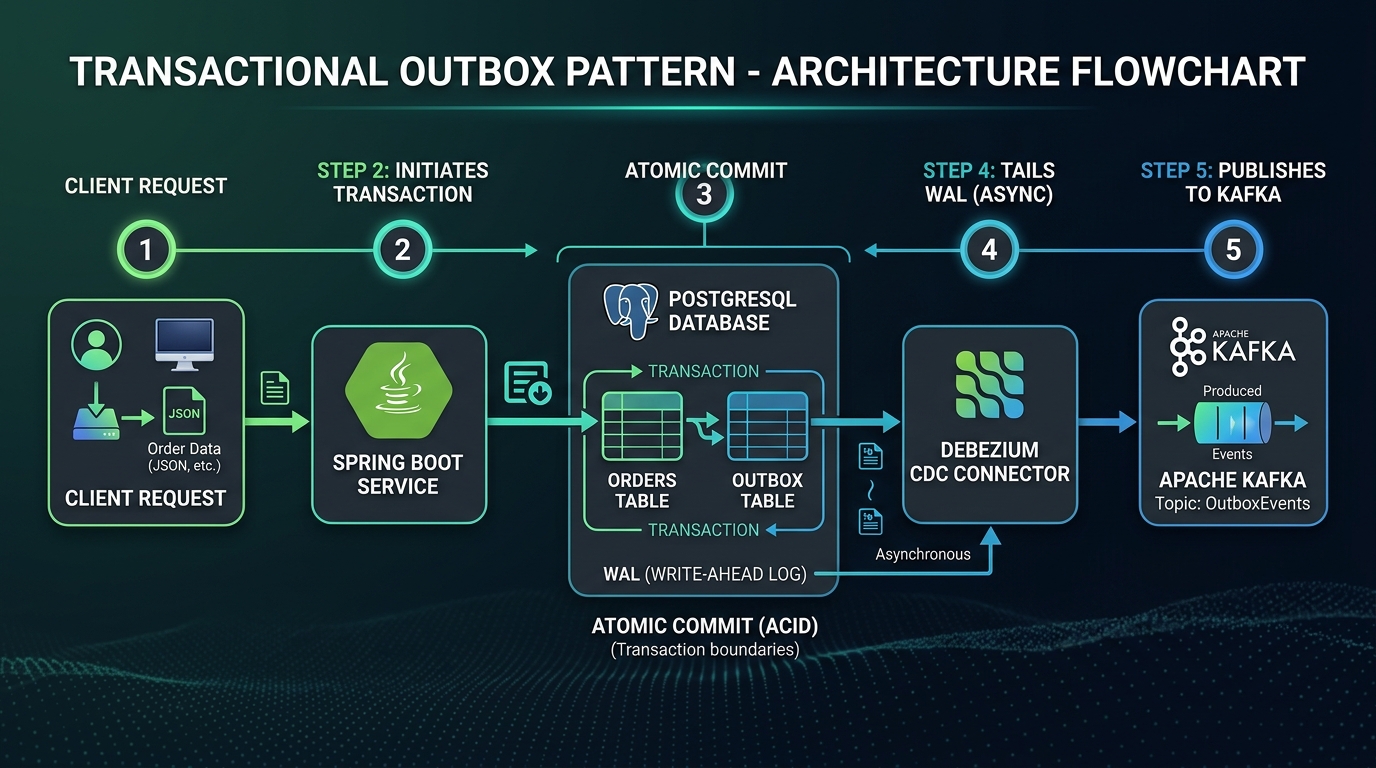
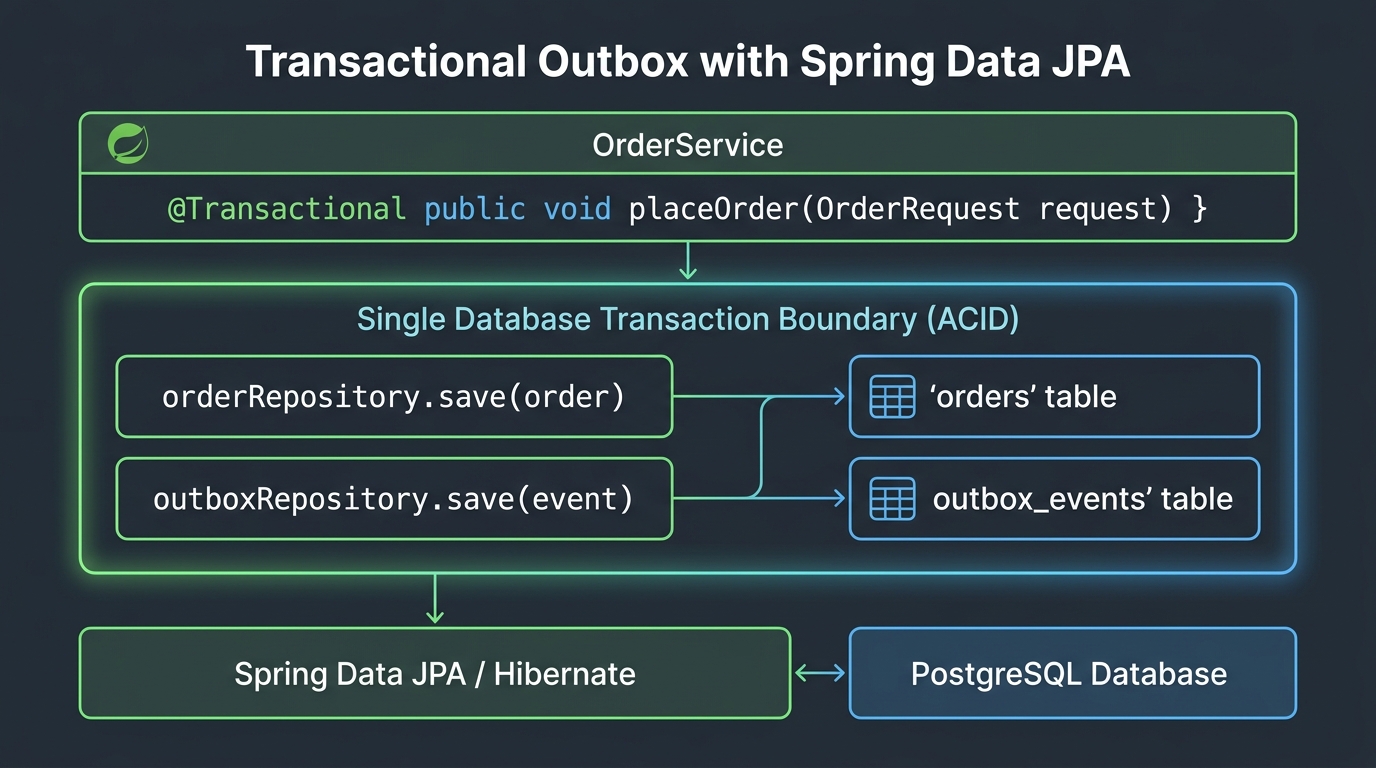
Instead of sending the message directly to Kafka, the application saves an OutboxEvent record to an outbox_events table in the same PostgreSQL database. Because both the Order and the OutboxEvent are saved in the same @Transactional method, they either both succeed or both fail. There is no partial state.
Once the event is safely stored in the database, a separate process—often a Change Data Capture (CDC) tool like Debezium—tails the database transaction logs (WAL) and publishes the event to Kafka.
Implementing the Outbox with Spring Boot 4
Let’s implement the Spring Boot 4 side of this architecture.
1. The Business Entity (Order)
First, we define our standard JPA entity for the Order.
@Entity
@Table(name = "orders")
public class Order {
    @Id
    @GeneratedValue(strategy = GenerationType.IDENTITY)
    private Long id;

    private String product;
    private BigDecimal price;

    // Constructors and Getters omitted
}
2. The Outbox Event Entity
Next, we create an OutboxEvent entity. Notice that the payload is stored as a jsonb column in PostgreSQL. We annotate it with @JdbcTypeCode(SqlTypes.JSON) so Hibernate binds the JSON string directly as PostgreSQL JSONB without type casting issues.
@Entity
@Table(name = "outbox_events")
public class OutboxEvent {
    @Id
    private UUID id;

    private String aggregateType;
    private String aggregateId;
    private String eventType;

    @JdbcTypeCode(SqlTypes.JSON)
    @Column(columnDefinition = "jsonb")
    private String payload;

    private Instant createdAt;

    public OutboxEvent(String aggregateType, String aggregateId, String eventType, String payload) {
        this.id = UUID.randomUUID();
        this.aggregateType = aggregateType;
        this.aggregateId = aggregateId;
        this.eventType = eventType;
        this.payload = payload;
        this.createdAt = Instant.now();
    }
    // Getters omitted
}
3. The Transactional Service
Finally, we modify our OrderService. We serialize the Order to JSON and save the OutboxEvent.
@Service
public class OrderService {
    private final OrderRepository orderRepository;
    private final OutboxEventRepository outboxEventRepository;
    private final ObjectMapper objectMapper;

    // Constructor injection omitted

    @Transactional
    public Order placeOrder(String product, BigDecimal price) {
        // 1. Save the Business Entity
        Order order = new Order(product, price);
        order = orderRepository.save(order);

        // 2. Serialize payload
        String payload = serialize(order);

        // 3. Save the Outbox Event in the same transaction
        OutboxEvent event = new OutboxEvent(
                "Order",
                order.getId().toString(),
                "OrderCreated",
                payload
        );
        outboxEventRepository.save(event);

        return order;
    }
}
Tailing the Database with Debezium
Now that our events are safely stored in the outbox_events table, we need to move them to Kafka. We use Debezium for this.
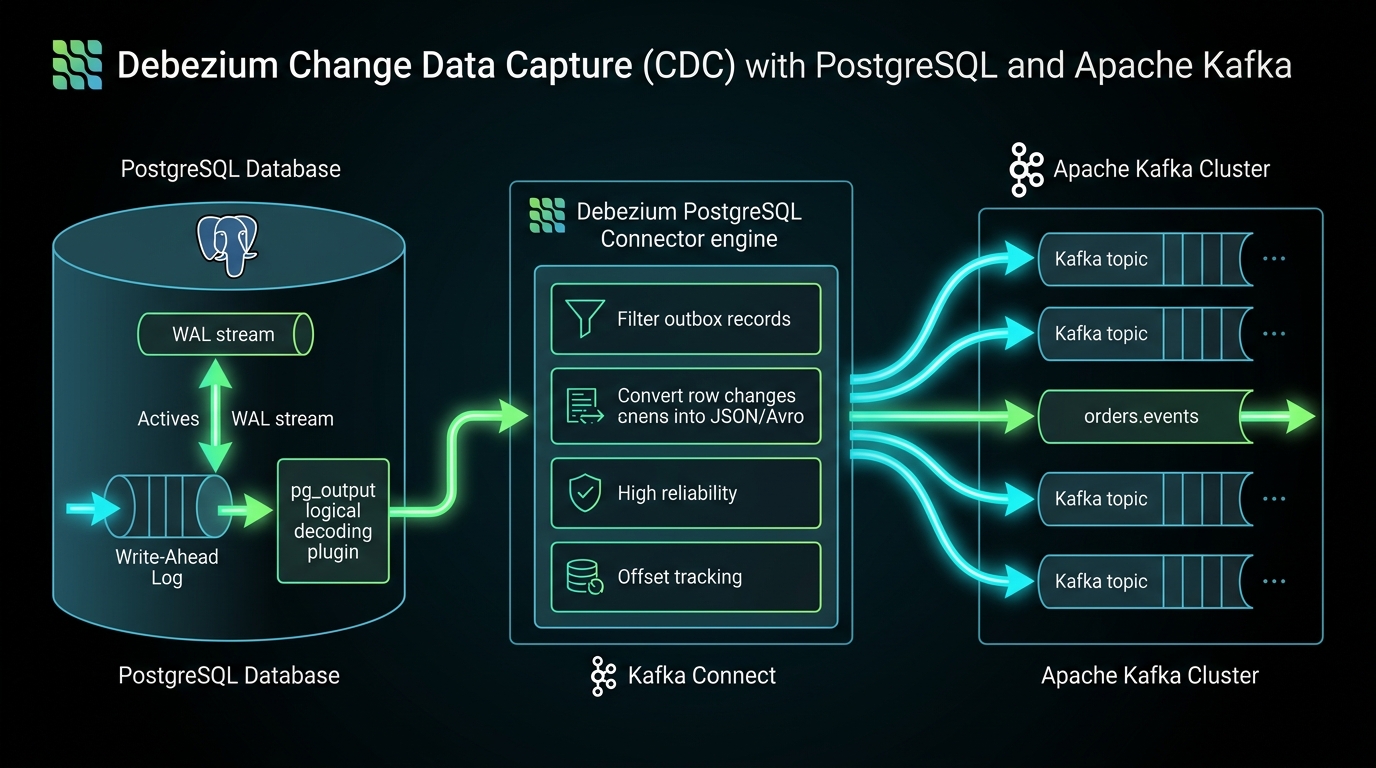
Debezium connects to PostgreSQL and reads the Write-Ahead Log (WAL). Every time an insert happens in the outbox_events table, Debezium detects the change and immediately publishes the event to a Kafka topic. Because Debezium reads the transaction logs, it has near-zero impact on your database performance.
To enable this, PostgreSQL must be configured with wal_level=logical.
Best Practices and Considerations
- Idempotent Consumers: The Outbox Pattern guarantees “At-Least-Once” delivery. Under rare failure scenarios, Debezium might publish the same event twice. Your Kafka consumers must be idempotent (able to safely process duplicate messages; see our guide on building reliable & idempotent webhook consumers in Spring Boot 4).
- Cleanup: The
outbox_eventstable will grow infinitely. You should run a scheduled cron job (or use a Debezium SMT) to periodically delete processed events. - Latency: While Debezium is extremely fast (typically sub-millisecond), it is technically asynchronous. The event will appear in Kafka slightly after the HTTP request completes.
Conclusion
The Transactional Outbox Pattern is the industry standard for reliable event publishing in microservices. By combining Spring Boot 4’s transaction management with Debezium’s log tailing, we can completely eliminate the Dual Write Problem and guarantee data consistency across our distributed architecture.
Companion Code
The complete, runnable Spring Boot 4 project for this article, including automated tests with Testcontainers, PostgreSQL, Kafka, and Debezium, is available on our public GitHub repository:
Workshop Companion Code: Transactional Outbox Pattern with Spring Boot 4, Kafka, and Debezium