Why Naming Things is the Hardest Problem in Software Development
There is an old and famous joke in software development that you have probably heard before. “There are only two hard things in Computer Science: cache invalidation and naming things.” While caching is clearly a deeply technical problem that requires understanding memory, networks, and expiration policies, naming is a fundamentally human problem.
When you build software, you are constantly translating human ideas, business rules, and real-world concepts into code. If you use the wrong words during this translation process, the translation fails completely. This is exactly why naming things is so incredibly hard. A single word can mean one specific thing to a software developer and an entirely different thing to a business expert or a product manager.
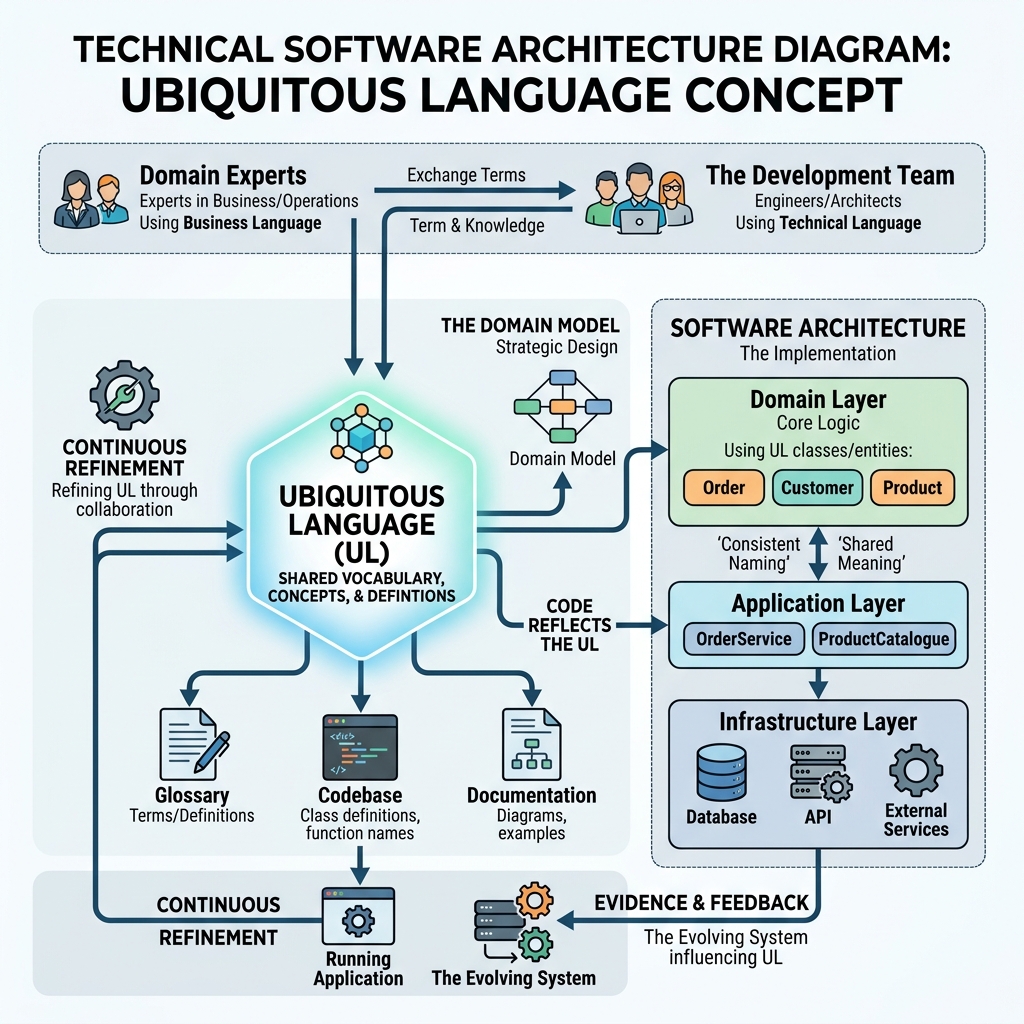
In Domain-Driven Design (DDD), we solve this fundamental communication problem using a core concept called Ubiquitous Language. It is arguably one of the most powerful and transformative tools in all of DDD, and the best part is that it requires absolutely no coding skills to understand or apply.
What Exactly is Ubiquitous Language?
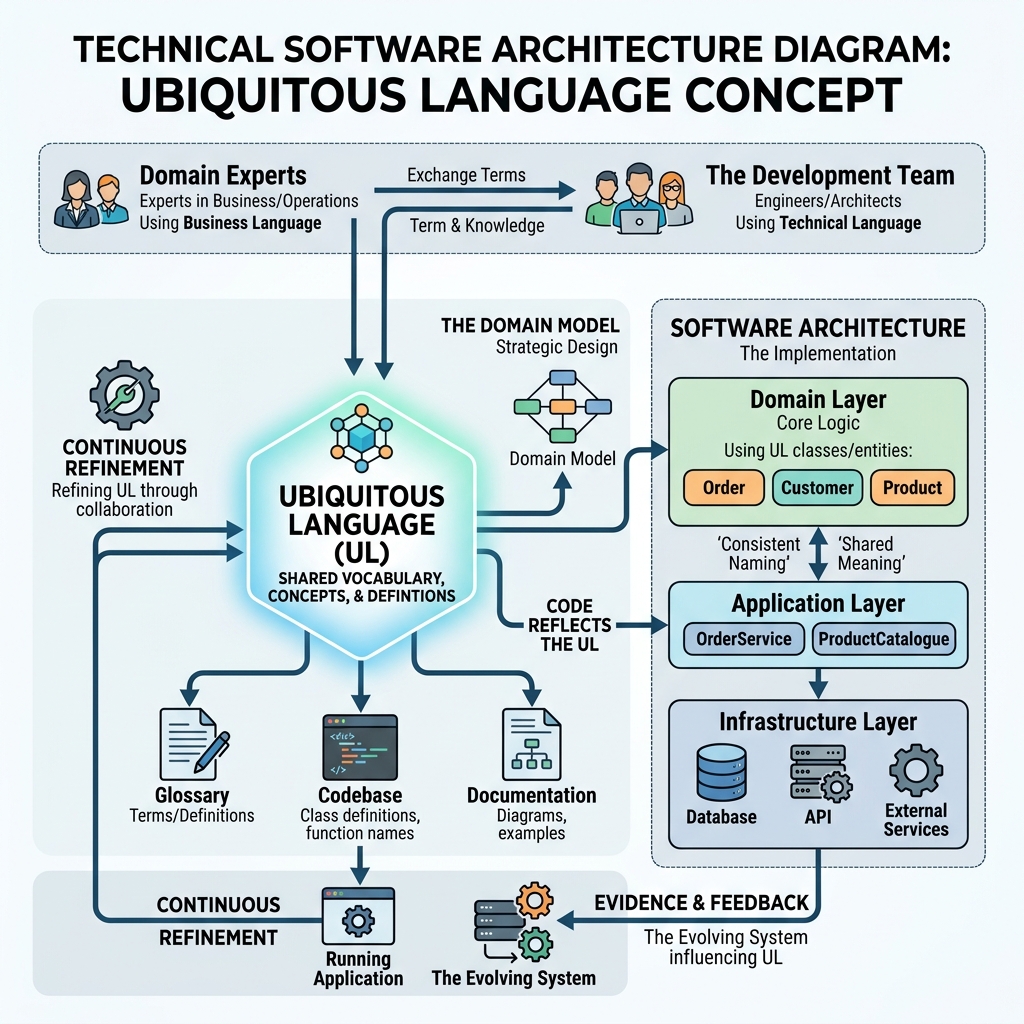
Ubiquitous Language is a strict, shared, and universally accepted language used by absolutely everyone on a software project. This means that software developers, project managers, testers, and domain experts all use the exact same words when talking about the software system.
For example, let’s say the business team calls a person who buys things from your website a “Customer”. In this case, the developers must not call them a “User” or a “Client” in the source code. The word “Customer” must be used everywhere without exception. It must be used in the planning meetings, in the requirement documents, in the database tables, and in the Java classes.
The word “ubiquitous” literally means “found everywhere.” The language must be truly everywhere for it to be effective.
To learn more about the foundations of DDD and why these concepts matter, check out our comprehensive Introduction to DDD.
The True Cost of Bad Naming: A Real-World Disaster
Let’s imagine a real-world scenario involving a team building a large e-commerce system. The shipping team and the sales team both constantly use the word “Order.”
For the sales team, an “Order” is a formal request from a customer to buy items. It has a total price, a list of items, a tax amount, and a payment status (like “Paid” or “Pending”).
However, for the shipping team, an “Order” is a physical cardboard box with a shipping label on it. It has a physical weight, physical dimensions, and a courier tracking number.
If the software developers decide to build a single giant Order class in Java to handle both of these concepts, the class quickly becomes huge, bloated, and incredibly confusing to work with. Soon, a critical bug happens in production. A junior developer changes the status field to indicate that an item is ready for shipping, and accidentally breaks all the financial sales reports because the sales system thought status meant payment status.
This massive bug happened for one simple reason: the word “Order” meant two completely different things, and the code failed to reflect that reality.
In Domain-Driven Design, we fix this fundamental problem by creating specific, unambiguous terms for specific contexts (which DDD calls Bounded Contexts). The sales team works with a SalesOrder, and the shipping team works with a Shipment. The confusion is completely gone, and bugs like this become impossible.
How to Create a Ubiquitous Language Step-by-Step
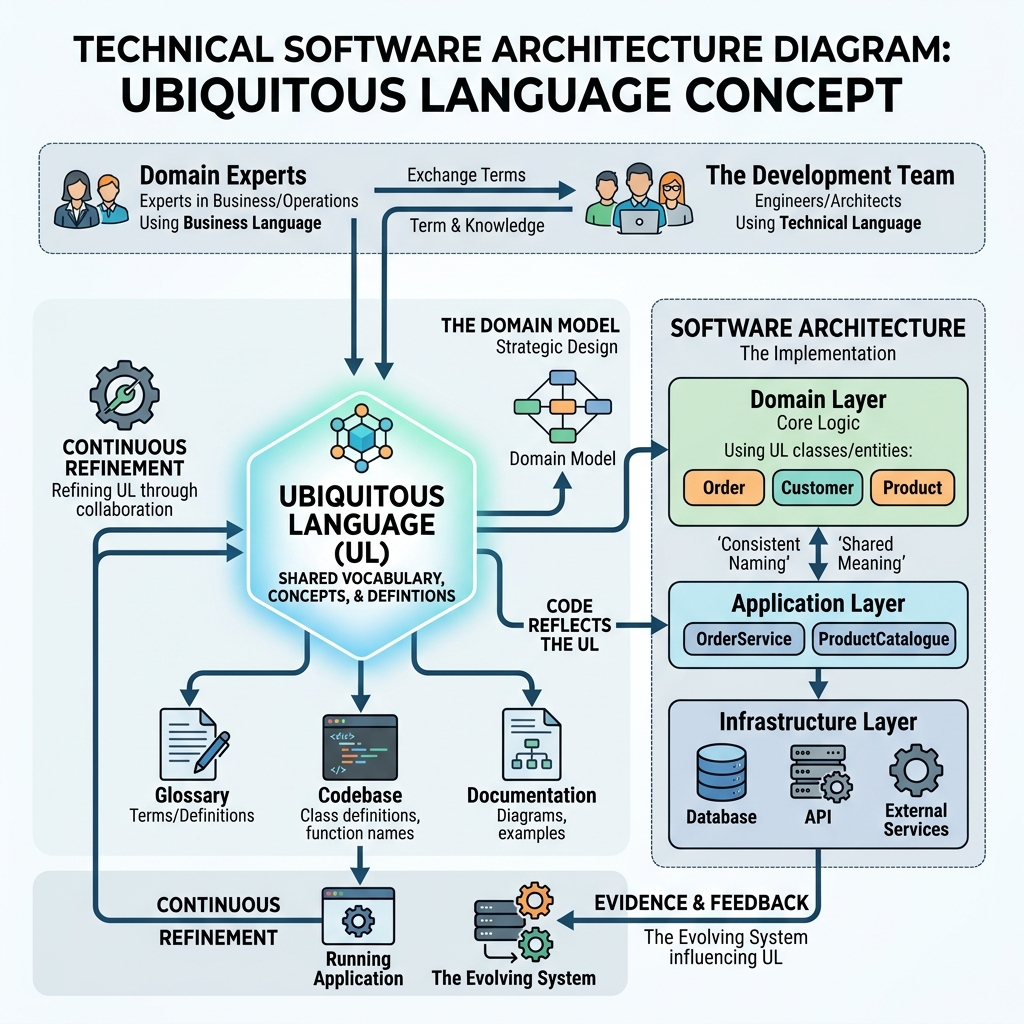
Creating this shared language takes time, patience, and deliberate practice. Here is a simple, actionable step-by-step guide you can use with your team starting tomorrow.
- Listen Carefully to the Experts: When business experts talk during meetings, pay very close attention to the specific nouns and verbs they use naturally. These are the building blocks of your language.
- Challenge Vague and Lazy Words: If someone uses a vague, catch-all word like “Item”, “Record”, or “Process”, stop them and ask what it really means in that specific context. Is it a “Product”? Is it a “PaymentTransaction”?
- Create a Living Glossary: Write down the agreed-upon terms in a shared document, wiki, or whiteboard that everyone can see and edit.
- Relentlessly Update the Code: Refactor your Java code to perfectly match the new terms. If a business term changes in a Tuesday meeting, the source code must change by Wednesday.
- Enforce the Rules Politely: Politely correct people if they use the wrong term in conversation. For example: “Just to be clear, do you mean the Subscriber or the Guest?”
Event Storming: A Workshop to Discover Your Domain Language
How do you find the right words quickly without spending months in boring meetings? The absolute best way is a collaborative workshop called Event Storming.
Event Storming is a simple but incredibly powerful exercise. You get developers, testers, and business experts in a single room (or a virtual whiteboard like Miro). You give everyone digital or physical sticky notes. You ask them to write down everything that happens in the business as an event, using the past tense.
For example, in a library management system, they might write sticky notes like: “Book Registered”, “Book Borrowed”, “Patron Fined”, “Fine Paid”.
By looking at these past-tense events on the wall, you instantly discover the most important nouns (Book, Patron, Fine) and verbs (Register, Borrow, Pay). These exact words immediately become the foundation of your Ubiquitous Language. It is a fast, highly engaging, and fun way to build deep understanding.
From Words to Code: Translating the Glossary
Once you have your glossary, the next critical step is moving those exact words into your Java source code. This is where many teams fail. They have a great meeting, but the code stays exactly the same.
If your glossary defines a “Patron” who “Borrows” a “Book”, your Java code must look exactly like this:
public class Patron {
    public void borrow(Book book) {
        // Implementation here
    }
}
If your code says UserManager.assignItem(User user, Item item), you have failed to use the Ubiquitous Language. The code must read like a sentence spoken by the business expert.
A Complete Glossary Template You Can Use Today
A glossary is a living, breathing document. It dramatically helps new team members learn the domain language quickly without having to guess. Here is a comprehensive template you can copy and paste into your team’s Confluence or Notion wiki right now.
| Approved Term | Clear Definition | Synonyms (Do Not Use These) | Real-World Example |
|---|---|---|---|
| Patron | A person who is officially registered and approved to borrow books from the library network. | User, Customer, Client, Member | John Doe is a Patron with a valid, unexpired card. |
| Loan | The official record of a specific book being physically borrowed by a specific patron, always including a strict due date. | Checkout, Borrowing, Transaction, Record | The Loan for the book “1984” is due next Tuesday at 5 PM. |
| Reservation | A formal hold placed on a specific book that is currently checked out by another patron. | Hold, Waitlist, QueueItem | Mary placed a Reservation on the newly released Java programming book. |
| Fine | A monetary penalty applied to a Patron’s account when a Loan is returned past its official due date. | Fee, Penalty, Charge, Cost | A Fine of .00 was applied because the book was 5 days late. |
| Catalog | The complete, searchable collection of all physical and digital books currently owned by the library system. | Database, Inventory, Collection, List | The new Harry Potter book was added to the Catalog yesterday. |
Best Practices for Naming in Domain-Driven Design
To truly master Ubiquitous Language, you must follow some strict best practices when writing your Java code:
- Never use technical terms for business concepts: Don’t call a class
PatronDataRecord. Call itPatron. - Use intention-revealing methods: Don’t use
setApproved(true). Useapprove(). - Avoid primitive obsession: If a concept has rules (like a ISBN number), don’t use a simple
String. Create anIsbnclass. - Update the code immediately: The moment a term changes in a meeting, open your IDE and use Shift+F6 to rename the class. Never wait.
Examples: Bad Names vs. Good Names in Java (10 Pairs)
Let’s look at 10 very common, real-world examples. See how changing the names makes the code read like a formal business document. This exact transformation is what we cover deeply in our DDD Masterclass Guide.
Example 1: The Vague User
// BAD - Too generic, tells you nothing about the business
class User { }

// GOOD - Extremely specific to the library domain
class Patron { }
Example 2: The Generic Manager Anti-Pattern
// BAD - "Manager" is a lazy word that usually means procedural code
class BookManager {
    void process(Book book) { }
}

// GOOD - Represents a real business concept
class LibraryCatalog {
    void registerNewBook(Book book) { }
}
Example 3: Meaningless, Weak Verbs
// BAD - "Handle" means nothing. What are you actually doing?
void handleLoan(Loan loan) { }

// GOOD - Precise, unambiguous business verbs
void approveLoan(Loan loan) { }
void rejectLoan(Loan loan) { }
Example 4: Boolean Blindness
// BAD - What happens when active is true? Or false?
void updateStatus(boolean active) { }

// GOOD - The intention is instantly clear to any reader
void activateAccount() { }
void suspendAccount() { }
Example 5: CRUD Thinking in Domain Code
// BAD - CRUD operations do not reflect business intent
void updateBook(Book book) { }

// GOOD - Captures exactly WHY the book is being updated
void markBookAsLost(Book book) { }
void correctBookTitle(Book book) { }
Example 6: Pointless Data Container Names
// BAD - "Data" and "Info" are redundant noise words
class UserDataInfo { }

// GOOD - Clean, professional, domain-focused
class PatronProfile { }
Example 7: Tech-Focused Infrastructure Names in Domain
// BAD - The domain should not know about databases
class PatronDatabaseRecord { }

// GOOD - Pure domain concept
class Patron { }
Example 8: Missing Concepts (Primitive Obsession)
// BAD - Uses primitives instead of rich domain objects
void payFine(double amount, String currency) { }

// GOOD - Uses a Value Object that encapsulates rules
void payFine(Money amount) { }
Example 9: Redundant Action Suffixes
// BAD - Suffixes like "Action" or "Process" add zero value
class BookCheckoutAction { }

// GOOD - Clean service name
class LoanService { }
Example 10: Dangerous Inconsistent Terms
// BAD - Mixing Customer and Client in the exact same class causes massive confusion
class ClientService {
    void billCustomer(Customer customer) { }
}

// GOOD - Using the Ubiquitous Language strictly and consistently
class PatronService {
    void chargeFine(Patron patron) { }
}
When Domain Experts and Developers Completely Disagree
Sometimes, developers and domain experts will fiercely disagree on a specific name. For example, developers might desperately want to use the word “User” because it is a standard tech term they have used for 10 years. The domain experts, however, want to use the word “Subscriber.”
Who wins this argument? The Domain Experts always win. Always.
The software only exists to solve the business problem. The code must relentlessly reflect the business, not the other way around. If the business calls them a Subscriber, the code must say Subscriber everywhere. The ultimate goal is to make the code speak the business language flawlessly.
Your Language Dictates Your Architecture
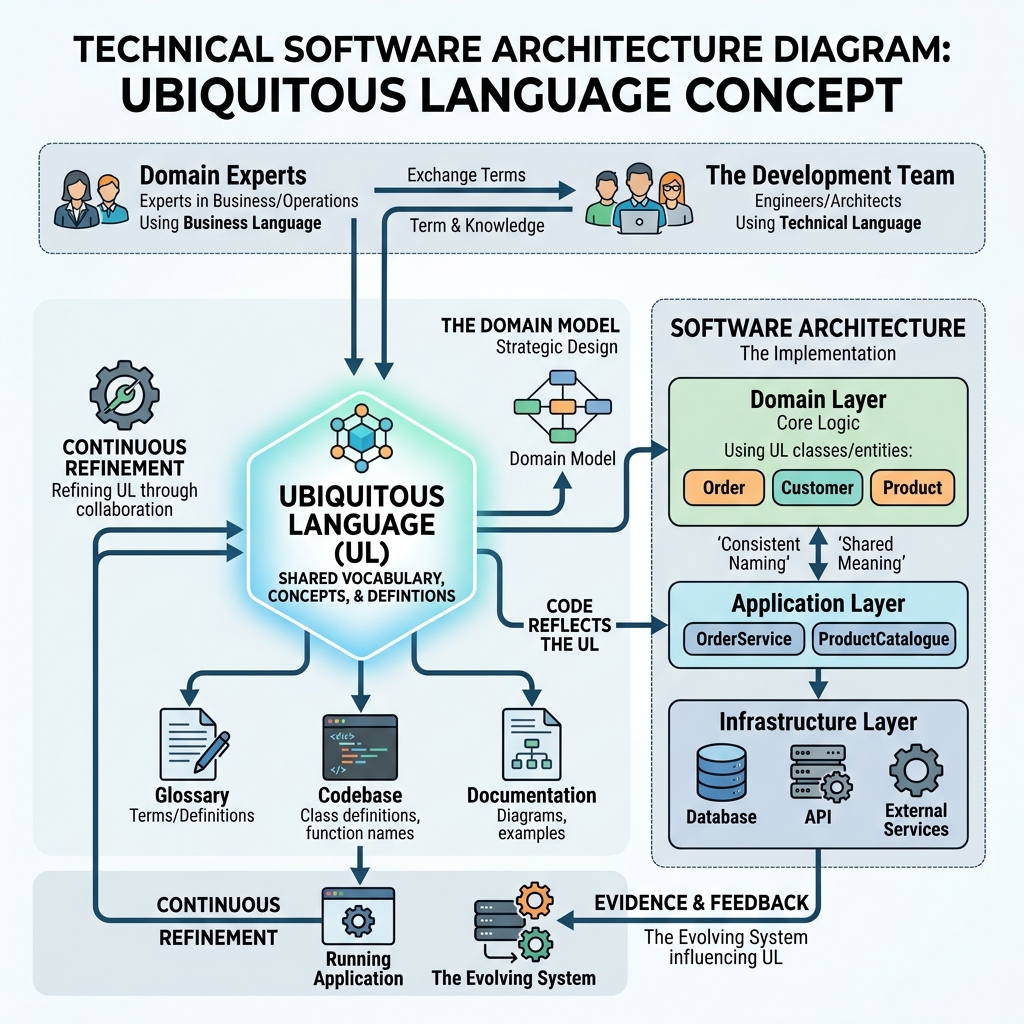
Ubiquitous Language is not just about human communication or writing pretty code. It directly shapes your actual system architecture. When you define strict boundaries around specific words, you are simultaneously defining boundaries around your microservices and modules.
To see exactly how this fits into the broader architectural picture, deeply read our guide on Hexagonal Architecture, where the domain model sits perfectly at the center, completely protected from messy technical details.
Conclusion
Ubiquitous Language is the absolute foundation of successful Domain-Driven Design. It bridges the massive gap between the business team and the development team. By using the exact same words everywhere without exception, you prevent terrible misunderstandings, you eliminate costly bugs before they happen, and you create Java code that acts as highly readable living documentation.
Start applying this today. Listen closely to your domain experts. Challenge vague terms immediately. Build a living glossary. And most importantly, refactor your Java code right now to speak the precise language of the business.
Companion Code
Check out the complete, working Library Domain example demonstrating excellent naming practices on GitHub: ubiquitous-language-ddd-naming-things repository.
Frequently Asked Questions (FAQ)
Does using Ubiquitous Language mean we can never use technical terms in our codebase?
No. Technical terms like “Database”, “Cache”, or “MessageQueue” are perfectly fine for your infrastructure layer. However, your core domain logic (your business rules) should only use business terms. The key is to never mix them together.
Who is ultimately responsible for maintaining the Ubiquitous Language?
The entire team is responsible. Developers, testers, product owners, and domain experts must actively work together to define, refine, and enforce the language every single day.
How do we handle it if the business decides to change a core term later on?
If the business changes a term, the code must be refactored immediately to match it. Modern Java IDEs like IntelliJ or Eclipse make renaming classes and variables incredibly fast and safe. The long-term cost of not renaming is much higher due to confusion.
What if different departments use the exact same word to mean completely different things?
This is where DDD’s concept of ‘Bounded Contexts’ comes in. You separate the system into different contexts (e.g., Sales Context and Shipping Context). Inside the Sales Context, ‘Order’ means one thing. Inside Shipping, ‘Order’ means another. You do not try to force a single, universal definition if one does not exist.
Is Ubiquitous Language only useful for massive enterprise projects?
Absolutely not. Even a small startup with two developers and one founder benefits massively from speaking the exact same language. It prevents bugs and speeds up development regardless of the project size.