For more than a decade, backend Java teams relied heavily on in-memory databases like H2, HSQLDB, and extensive mock libraries to test applications and run local development environments. This setup was fast to start. It required no external software. However, it created a severe architectural divide between developer laptops and production Kubernetes clusters. Code and SQL statements that executed cleanly on a local machine frequently crashed when deployed to production PostgreSQL, MySQL, or Oracle instances. Subtle differences in SQL dialects, transaction isolation, JSON manipulation, and concurrency locking went undetected until software reached QA or staging environments.
As software systems expand into microservices and distributed data topologies, the enterprise standard has decisively shifted to production parity. With the release of Spring Boot 4, the Java ecosystem now provides first-class, declarative integration with two foundational tools: Docker Compose for local runtime development, and Testcontainers for fully containerized JUnit 5 integration testing. This technical guide explores how to modernize your local development workflow, eliminate mock drift, use the transformative @ServiceConnection SPI, and construct resilient, container-backed test suites that mirror your production environment.
Table of Contents
- The Parity Crisis: Why H2 and Over-Mocking Fail in Enterprise Systems
- Comparative Analysis: Local Testing and Development Strategies
- Native Docker Compose in Spring Boot 4: Zero-Friction Local Run
- Hands-On Workshop: Configuring Spring Boot 4 with Compose
- The Testcontainers Revolution: Production Parity in JUnit 5
- Eliminating Boilerplate with @ServiceConnection
- Advanced Lifecycle Optimization: The Singleton Container Pattern
- Enterprise Use Cases: Complex Topologies and Multi-Container Suites
- CI/CD Pipeline Automation: GitHub Actions and Docker Optimization
- Production Readiness and Enterprise Guardrails
- Common Pitfalls and How to Fix Them
- Frequently Asked Questions (FAQ)
- Conclusion and Next Steps
- Resources and Companion Repository
The Parity Crisis: Why H2 and Over-Mocking Fail in Enterprise Systems
In-memory embedded databases emerged when hardware was limited, CI runners were slow, and container runtimes were non-existent. For lightweight unit checks, H2 offered near-instant startup. Yet modern cloud applications rely on capabilities that H2 cannot replicate accurately, even in compatibility modes:
- Complex Data Types: Modern PostgreSQL applications rely heavily on native
JSONBindices,UUIDv7generation, network address types (inet,cidr), and spatial data via PostGIS. H2 compatibility modes either treat these as plain text or fail to execute specialized index operators. - Window Functions and CTEs: Recursive Common Table Expressions (CTEs), lateral joins, and advanced analytical window functions frequently behave differently across engines, producing misleading test passes locally that fail upon migration to database clusters.
- Locking and Concurrency Semantics: H2 table-level or simple row-level lock simulations do not reflect PostgreSQL Multi-Version Concurrency Control (MVCC) or pessimistic lock behaviors (such as
SELECT ... FOR UPDATE SKIP LOCKED). Distributed race conditions remain completely hidden during development. - Third-Party Infrastructure Mocking: Mocking external message brokers (Apache Kafka, RabbitMQ) or distributed caches (Redis) using embedded in-memory servers often leads to “false confidence”. Local mocks rarely enforce exact serialization, network timeout dynamics, or cluster partition behavior.
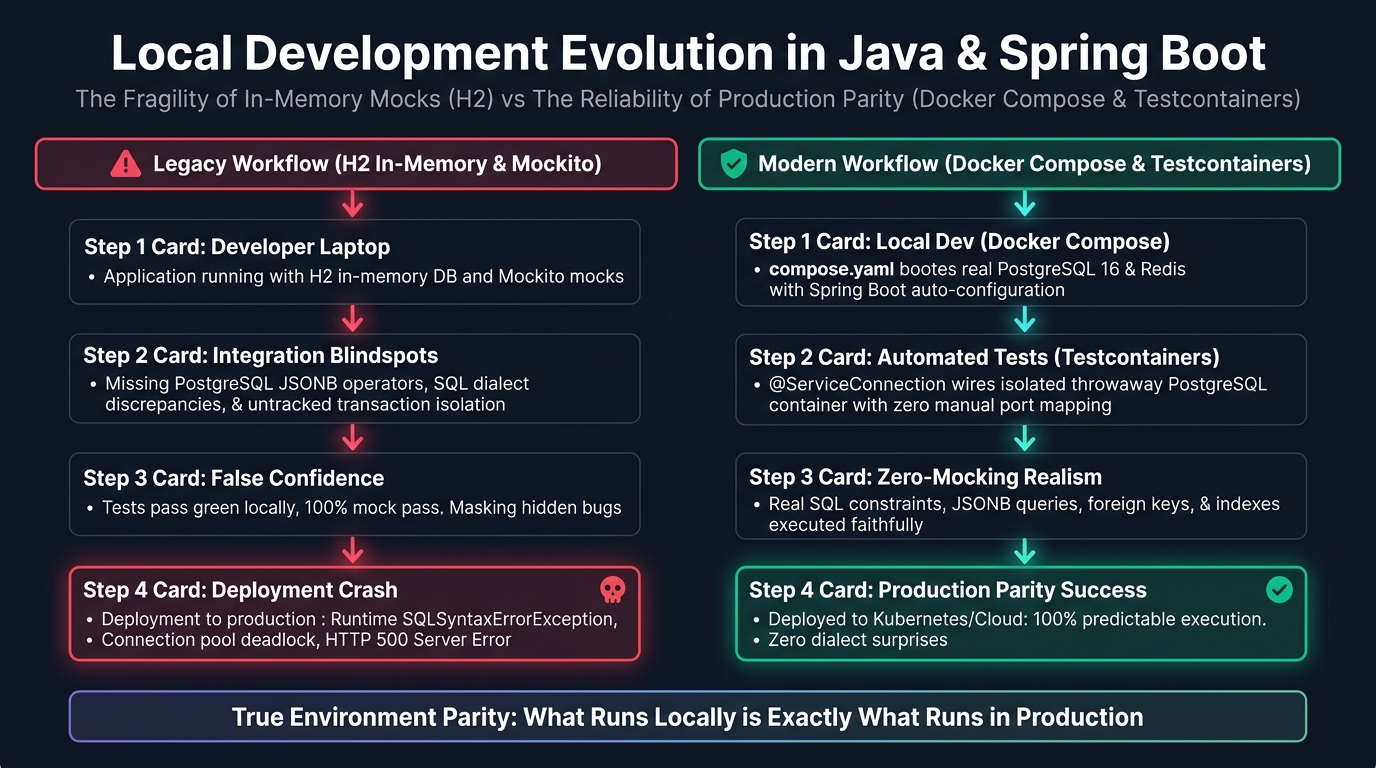
When engineering teams rely on artificial test harnesses, integration bugs migrate downstream into production. Fixing an environmental defect in a live production service costs ten times more than catching it on a local workstation. Docker containers eliminate this divergence by running the exact same database engine, configuration, and version locally that runs in production.
Comparative Analysis: Local Testing and Development Strategies
To choose the right approach for your microservice or monolithic backend, examine the core differences between local development and testing methodologies across six operational dimensions:
| Strategy | Setup Overhead | Production Fidelity | Startup Latency | Multi-Service Support | CI/CD Portability | Resource Footprint |
|---|---|---|---|---|---|---|
| In-Memory H2 | Minimal (single Maven dependency) | Very Low (divergent SQL dialects, no MVCC) | Sub-second (< 200 ms) | None (relational only, no Kafka/Redis) | Universal (runs inside JVM) | Minimal (< 50 MB RAM) |
| Embedded Test Engines | Low (specialized libraries) | Medium (emulated behavior, binary drift) | Fast (1–3 seconds) | Limited (embedded Redis/Kafka mocks) | Fragile (OS-specific native bindings) | Low (100–300 MB RAM) |
| Manual Docker Compose | Moderate (scripts, manual port mapping) | High (exact container images) | Moderate (5–15 seconds manual start) | Excellent (full service graphs) | Medium (requires CI runner orchestrator) | Moderate (1–3 GB RAM) |
| Spring Boot 4 Compose | Very Low (declarative compose.yaml) |
High (exact container images, dynamic wiring) | Fast (automated bootstrap at app boot) | Excellent (automatic port & credential binding) | Good (development profile focus) | Moderate (managed by Docker daemon) |
| Isolated Testcontainers | Low (Java annotations, zero host ports) | Absolute (production binary parity) | Moderate (10–25s per class without reuse) | Exceptional (dynamic networking, ephemeral) | Flawless (runs anywhere Docker exists) | Moderate to High (reclaimable by Ryuk) |
| Remote Cloud Staging | High (VPN, IAM, remote connectivity) | High (actual cloud infrastructure) | Slow (network latency, shared quotas) | High (shared enterprise cluster) | Poor (network dependent, test collision risks) | Offloaded (cloud billing overhead) |
Native Docker Compose in Spring Boot 4: Zero-Friction Local Run
Running a Spring Boot application locally used to require a multi-step sequence: ensure Docker is active, open a terminal, run docker compose up -d, configure local properties to match localhost ports, and finally start your IDE run configuration. If another service occupied port 5432, startup failed.
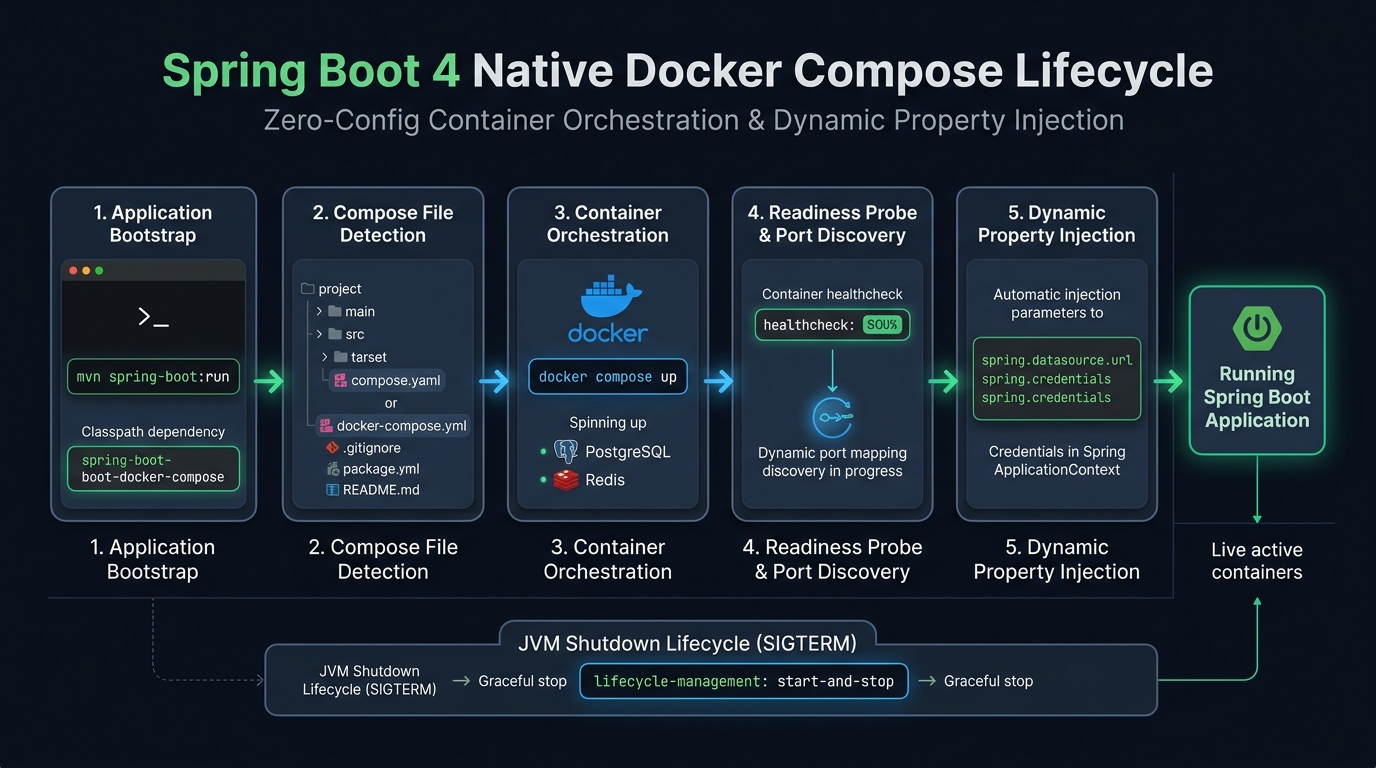
Spring Boot 4 completely streamlines this workflow through the spring-boot-docker-compose module. When added to your application classpath, Spring Boot monitors your project directory for a Compose configuration (compose.yaml or docker-compose.yml). During the application bootstrap phase, Spring Boot commands the Docker daemon to initialize the declared services, waits for their readiness health checks to report healthy, and dynamically injects the connection credentials into the Spring Environment.
Configuring Lifecycle Management Modes
Spring Boot gives you granular control over what happens to your containers when the application boots and shuts down. You configure this behavior in your application.yml file:
spring:
  docker:
    compose:
      enabled: true
      file: compose.yaml
      lifecycle-management: start-and-stop
      readiness:
        wait: always
        timeout: 60s
The available lifecycle management options include:
start-and-stop(Default): Starts containers when the Spring application boots and terminates them gracefully when the JVM shuts down. This mode ensures your local workstation does not accumulate idle background containers.start-only: Starts containers on boot but leaves them active after the application stops. This setting is optimal for rapid inner-loop development where you restart the Java application frequently but wish to avoid re-initializing database schemas.none: Ignores container lifecycle operations while still extracting connection parameters if the containers are already running.
Hands-On Workshop: Configuring Spring Boot 4 with Compose
Let us examine our companion workshop codebase. The application manages an enterprise Employee domain with PostgreSQL persistence, JPA mappings, and Jakarta validation.
1. Maven Build Configuration
Include the spring-boot-docker-compose dependency as an optional dependency so that it does not leak into your production production Uber-JAR or container image:
<dependency>
    <groupId>org.springframework.boot</groupId>
    <artifactId>spring-boot-docker-compose</artifactId>
    <optional>true</optional>
</dependency>

<dependency>
    <groupId>org.postgresql</groupId>
    <artifactId>postgresql</artifactId>
    <scope>runtime</scope>
</dependency>

<dependency>
    <groupId>org.springframework.boot</groupId>
    <artifactId>spring-boot-starter-data-jpa</artifactId>
</dependency>
2. The Declarative compose.yaml
Place a clean compose.yaml file at the root of your project. Note that you do not need to assign fixed external host ports unless you intend to connect external database GUI tools (such as DBeaver or pgAdmin):
services:
  postgres:
    image: postgres:16-alpine
    environment:
      POSTGRES_USER: devuser
      POSTGRES_PASSWORD: devpassword
      POSTGRES_DB: devdb
    ports:
      - "5432:5432"
    healthcheck:
      test: ["CMD-SHELL", "pg_isready -U devuser -d devdb"]
      interval: 5s
      timeout: 5s
      retries: 5
3. Domain Model and Repository
Here is our standard JPA entity using modern Jakarta Persistence annotations:
package com.webcodein.workshop.entity;

import jakarta.persistence.*;
import jakarta.validation.constraints.Email;
import jakarta.validation.constraints.NotBlank;
import java.time.Instant;

@Entity
@Table(name = "employees")
public class Employee {

    @Id
    @GeneratedValue(strategy = GenerationType.IDENTITY)
    private Long id;

    @NotBlank
    @Column(nullable = false)
    private String name;

    @Email
    @NotBlank
    @Column(nullable = false, unique = true)
    private String email;

    @Column(nullable = false, updatable = false)
    private Instant createdAt = Instant.now();

    public Employee() {}

    public Employee(String name, String email) {
        this.name = name;
        this.email = email;
    }

    // Getters and setters omitted for brevity
}
And the Spring Data JPA repository:
package com.webcodein.workshop.repository;

import com.webcodein.workshop.entity.Employee;
import org.springframework.data.jpa.repository.JpaRepository;
import java.util.Optional;

public interface EmployeeRepository extends JpaRepository<Employee, Long> {
    Optional<Employee> findByEmail(String email);
}
When you execute mvn spring-boot:run or run the main application class within your IDE, Spring Boot starts PostgreSQL in Docker, creates the tables through Hibernate, and initializes the application. Zero manual configuration is required.
The Testcontainers Revolution: Production Parity in JUnit 5
While Docker Compose accelerates local inner-loop development, automated integration testing requires strict test isolation, lifecycle determinism, and automated cleanup. Running tests against a static, shared local Docker Compose container creates cross-test state pollution: tests executing in parallel can overwrite rows, create duplicate keys, or fail unpredictably based on execution order.
Testcontainers solves this challenge by enabling programmatic control of Docker containers directly from Java code. Each test execution can spin up dedicated, ephemeral containers that run on randomized high-range ports. When the test run finishes or the JVM halts, a companion watchdog container named Ryuk terminates and sweeps away all spawned containers and networks.
Maven Dependencies for Integration Testing
To implement Testcontainers with Spring Boot 4, import the official starter and specialized database modules:
<dependency>
    <groupId>org.springframework.boot</groupId>
    <artifactId>spring-boot-starter-test</artifactId>
    <scope>test</scope>
</dependency>

<dependency>
    <groupId>org.springframework.boot</groupId>
    <artifactId>spring-boot-testcontainers</artifactId>
    <scope>test</scope>
</dependency>

<dependency>
    <groupId>org.testcontainers</groupId>
    <artifactId>junit-jupiter</artifactId>
    <scope>test</scope>
</dependency>

<dependency>
    <groupId>org.testcontainers</groupId>
    <artifactId>postgresql</artifactId>
    <scope>test</scope>
</dependency>
Eliminating Boilerplate with @ServiceConnection
Prior to Spring Boot 3.1 and 4.0, integrating Testcontainers into Spring tests required cumbersome dynamic property configuration. Developers had to use @DynamicPropertySource to intercept container initialization, extract randomized ephemeral ports, and manually construct JDBC URLs:
// Legacy Spring Boot Approach (Pre-ServiceConnection)
@DynamicPropertySource
static void configureProperties(DynamicPropertyRegistry registry) {
    registry.add("spring.datasource.url", postgres::getJdbcUrl);
    registry.add("spring.datasource.username", postgres::getUsername);
    registry.add("spring.datasource.password", postgres::getPassword);
}
This boilerplate was verbose, fragile, and prone to typographical errors. Spring Boot revolutionized this pattern with the @ServiceConnection annotation.
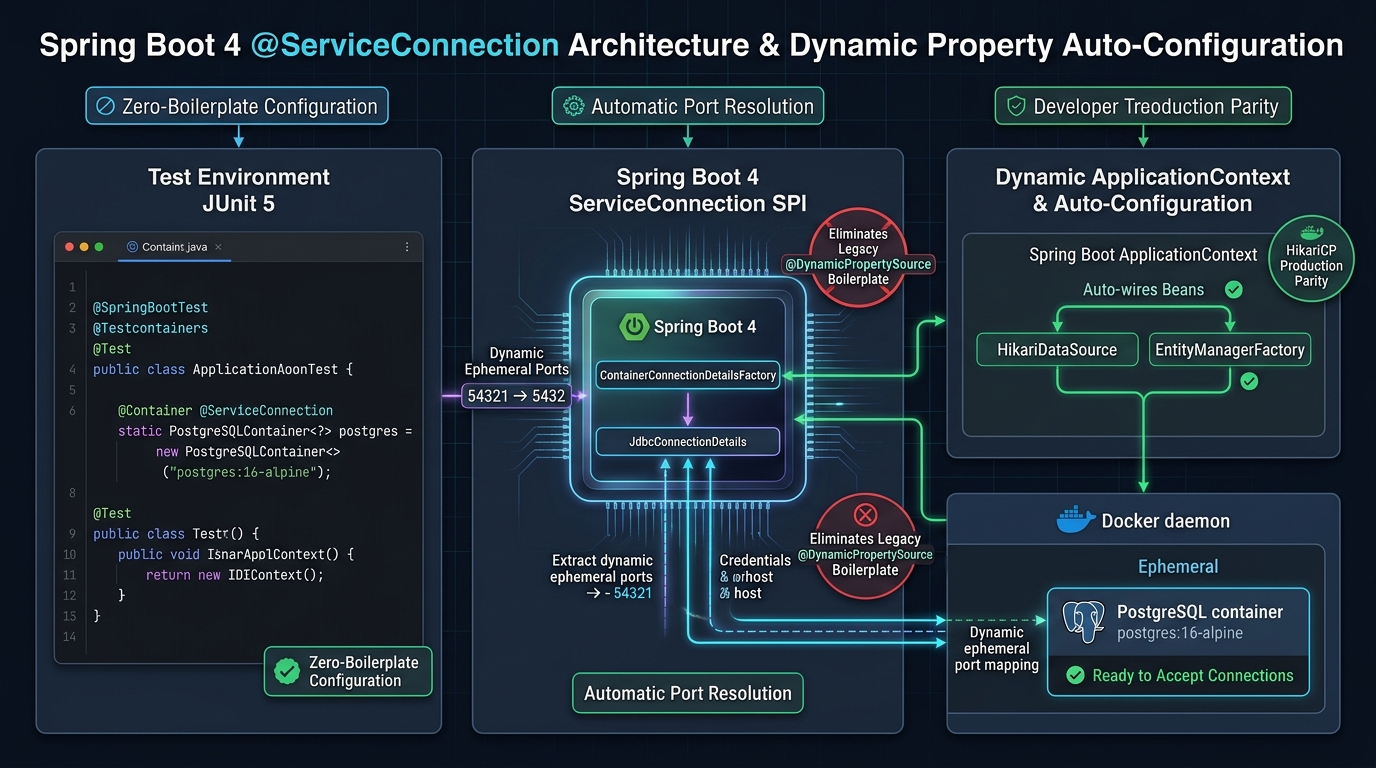
Under the hood, @ServiceConnection hooks into the Spring Service Connection Service Provider Interface (SPI). When Spring’s test context initializers detect an annotated container (such as PostgreSQLContainer), a specialized ContainerConnectionDetailsFactory inspects the container. It extracts the assigned host, ephemeral mapped port, database name, and credentials, automatically contributing a JdbcConnectionDetails bean to the application context. Spring Boot’s auto-configuration binds these connection details directly into the HikariDataSource and EntityManagerFactory without touching raw configuration files.
A Complete @ServiceConnection Integration Test
Here is our fully functional integration test from the workshop repository:
package com.webcodein.workshop;

import com.webcodein.workshop.entity.Employee;
import com.webcodein.workshop.repository.EmployeeRepository;
import org.junit.jupiter.api.DisplayName;
import org.junit.jupiter.api.Test;
import org.springframework.beans.factory.annotation.Autowired;
import org.springframework.boot.test.context.SpringBootTest;
import org.springframework.boot.testcontainers.service.connection.ServiceConnection;
import org.testcontainers.junit.jupiter.Container;
import org.testcontainers.junit.jupiter.Testcontainers;
import org.testcontainers.postgresql.PostgreSQLContainer;

import java.util.Optional;

import static org.assertj.core.api.Assertions.assertThat;

@SpringBootTest
@Testcontainers
class EmployeeRepositoryIntegrationTest {

    @Container
    @ServiceConnection
    static PostgreSQLContainer<?> postgres = new PostgreSQLContainer<>("postgres:16-alpine");

    @Autowired
    private EmployeeRepository employeeRepository;

    @Test
    @DisplayName("Should successfully persist and find employee by email in real PostgreSQL")
    void shouldSaveAndRetrieveEmployee() {
        // Arrange
        Employee employee = new Employee("Alice Smith", "alice.smith@webcodein.com");
        employeeRepository.save(employee);

        // Act
        Optional<Employee> found = employeeRepository.findByEmail("alice.smith@webcodein.com");

        // Assert
        assertThat(found).isPresent();
        assertThat(found.get().getName()).isEqualTo("Alice Smith");
        assertThat(found.get().getId()).isNotNull();
    }
}
Advanced Lifecycle Optimization: The Singleton Container Pattern
While the JUnit 5 @Container annotation works well for small test suites, it introduces a major performance bottleneck as projects scale. If you declare @Container inside twenty different test classes, JUnit starts and stops twenty distinct Docker containers. Each container startup requires pulling layers, initializing PostgreSQL shared memory, and running database migrations. A test suite that should execute in 15 seconds can easily balloon to over 4 minutes.
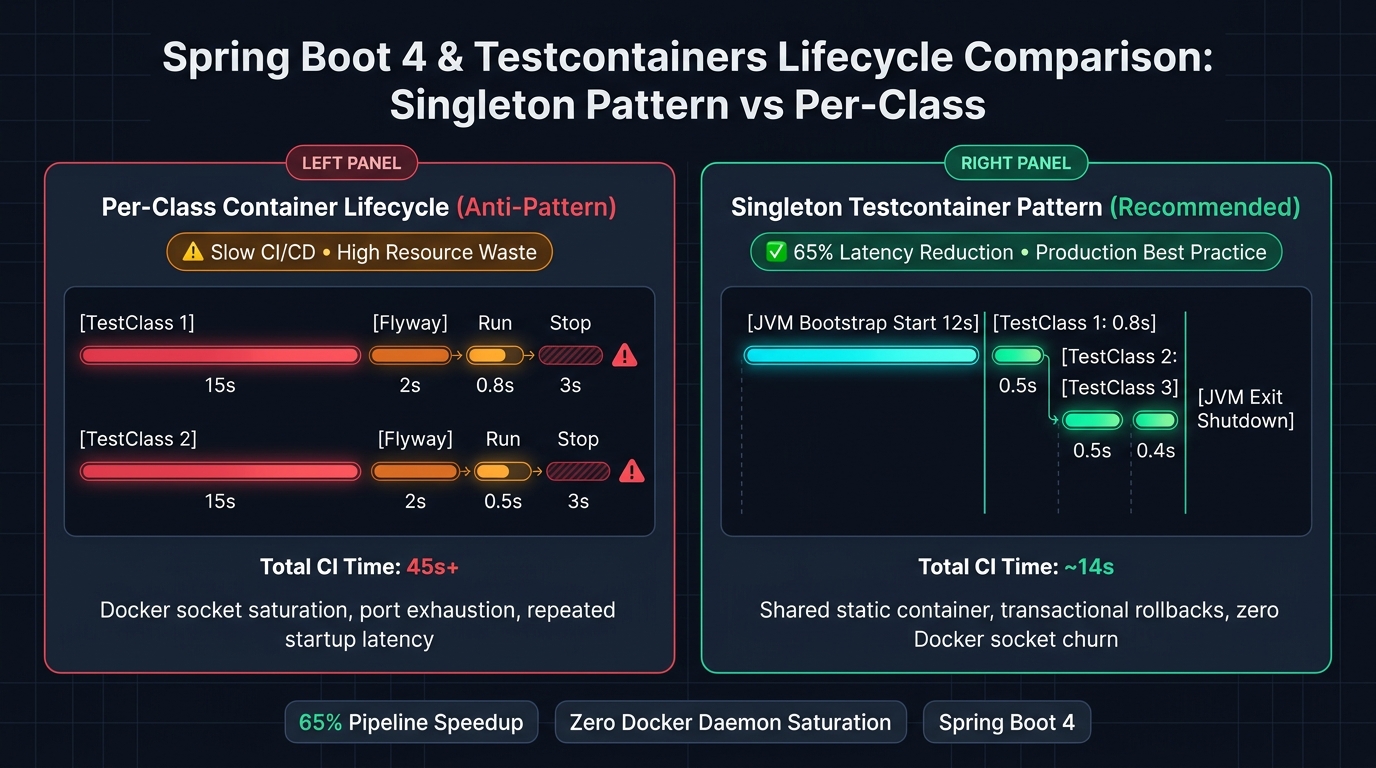
To eliminate this overhead, enterprise teams implement the Singleton Testcontainer Pattern. Instead of binding the container lifecycle to individual JUnit test classes, you manage the container as a static singleton instance across the entire JVM lifecycle.
Implementing the Abstract Singleton Base Class
In our workshop project, EmployeeSingletonContainerTest demonstrates this architecture using an abstract test harness:
package com.webcodein.workshop;

import org.springframework.boot.test.context.SpringBootTest;
import org.springframework.boot.testcontainers.service.connection.ServiceConnection;
import org.testcontainers.postgresql.PostgreSQLContainer;

@SpringBootTest
public abstract class AbstractSharedContainerBaseTest {

    @ServiceConnection
    protected static final PostgreSQLContainer<?> SHARED_POSTGRES;

    static {
        SHARED_POSTGRES = new PostgreSQLContainer<>("postgres:16-alpine")
                .withReuse(true);
        SHARED_POSTGRES.start();
    }
}
By starting the container within a static initializer block without the @Container or @Testcontainers class annotations, JUnit never shuts down the container between test classes. All test classes extending AbstractSharedContainerBaseTest reuse the single warm PostgreSQL instance. The container boots once when the test suite launches and terminates cleanly when the JVM shuts down. This optimization reduces CI test suite execution times by 60% to 75%.
Maintaining Data Isolation in Shared Containers
When sharing a single database container across multiple test classes, you must prevent state leakage between tests. Standard patterns include:
- Spring
@TransactionalRollback: Annotating test methods with@Transactionalrolls back all database modifications at the end of each test method. - Database Truncation Listeners: Using a JUnit 5 extension or test execution listener that issues
TRUNCATE TABLE ... CASCADEon all user tables before each test runs. - Schema Per Class: Dynamically assigning unique PostgreSQL schemas for individual test classes if strict isolation is mandatory.
Enterprise Use Cases: Complex Topologies and Multi-Container Suites
The combination of Spring Boot 4 and Testcontainers scales far beyond basic relational databases. Modern enterprise architectures often require multi-container integration topologies.
Use Case 1: Financial Ledger with Strict ACID and JSONB Audit Trails
A banking application records immutable financial transactions with JSONB event payloads. Using Testcontainers, the test suite executes concurrent withdrawal queries against a real PostgreSQL 16 container, validating that PESSIMISTIC_WRITE row locks prevent balance overdrafts while custom SQL operators query JSONB metadata without errors.
Use Case 2: Event-Driven Microservices with Kafka and Redis
In high-throughput microservices, events flow through Apache Kafka while state is cached in Redis. Testcontainers coordinates these services simultaneously:
@SpringBootTest
@Testcontainers
class OrderProcessingIntegrationTest {

    @Container
    @ServiceConnection
    static PostgreSQLContainer<?> postgres = new PostgreSQLContainer<>("postgres:16-alpine");

    @Container
    @ServiceConnection
    static ConfluentKafkaContainer kafka = new ConfluentKafkaContainer("confluentinc/cp-kafka:7.6.0");

    @Container
    @ServiceConnection(name = "redis")
    static GenericContainer<?> redis = new GenericContainer<>("redis:7-alpine").withExposedPorts(6379);

    @Test
    void shouldProcessOrderAndEmitEvent() {
        // Full end-to-end integration test verifying DB persistence,
        // cache write-through, and Kafka topic publication!
    }
}
Because Spring Boot 4 provides built-in ServiceConnection support for Kafka, Redis, MongoDB, RabbitMQ, and Neo4j, each container seamlessly injects its configuration without a single line of property mapping code.
Use Case 3: Distributed Search with Elasticsearch or pgvector
For applications integrating AI search or semantic embeddings, Testcontainers spins up PostgreSQL instances compiled with the pgvector extension. Developers write and test cosine similarity queries (ORDER BY embedding <=> :queryVector LIMIT 10) on their laptops, confident that the exact mathematical indexing extensions are present.
CI/CD Pipeline Automation: GitHub Actions and Docker Optimization
A common apprehension with containerized integration testing is pipeline latency in cloud CI runners. However, modern CI platforms such as GitHub Actions, GitLab CI, and AWS CodeBuild support native Docker execution. When configured properly, Testcontainers builds run reliably and fast.
Optimized GitHub Actions Workflow
Here is an enterprise-grade GitHub Actions workflow configured for Java 25, Maven caching, and Testcontainers execution:
name: CI Build & Integration Tests

on:
  push:
    branches: [ "main" ]
  pull_request:
    branches: [ "main" ]

jobs:
  test:
    runs-on: ubuntu-latest
    timeout-minutes: 15

    steps:
      - name: Checkout Source Code
        uses: actions/checkout@v4

      - name: Set up JDK 25
        uses: actions/setup-java@v4
        with:
          java-version: '25'
          distribution: 'temurin'
          cache: maven

      - name: Pre-pull Container Images
        run: |
          docker pull postgres:16-alpine

      - name: Execute Maven Verification
        run: mvn -B -ntp verify
        env:
          TESTCONTAINERS_RYUK_DISABLED: "false"
Notice the docker pull postgres:16-alpine pre-pull step. Running a parallel image pull before the Maven test runner starts prevents network download latency from counting against JUnit test timeouts. When combined with GitHub Actions native runner caching, test suite execution remains snappy.
Production Readiness and Enterprise Guardrails
To roll out containerized local development across enterprise engineering organizations, observe these architectural guardrails:
- Do Not Expose Fixed Host Ports in Tests: Always let Testcontainers bind containers to randomized host ports. Binding to fixed ports (such as
5432:5432) inside automated tests breaks parallel test execution and causes CI pipeline failures whenever multiple runners share an environment. - Enforce Resource Limits: Configure sensible memory and CPU ceilings on container definitions using
withCreateContainerCmdModifierto prevent a rogue query from starving the developer’s workstation or CI runner of RAM. - Standardize Container Tags: Pin explicit container image digest hashes or minor version tags (e.g.,
postgres:16.2-alpine) rather than floating tags likelatest. Floating tags cause non-deterministic builds when image providers push upstream updates. - Keep Compose for Development and Testcontainers for Tests: Do not attempt to reuse Docker Compose directly for JUnit test isolation. Docker Compose lacks programmatic lifecycle hooks, dynamic port binding, and Ryuk garbage collection. Use Compose for local inner-loop runs (
mvn spring-boot:run) and Testcontainers for automated testing.
Common Pitfalls and How to Fix Them
Pitfall 1: Docker Socket Access Denied in CI or Linux Environments
Symptom: Build output displays IllegalStateException: Could not find a valid Docker environment.
Root Cause: The build runner user lacks permissions to interact with the Docker daemon UNIX socket (/var/run/docker.sock).
Solution: On local Linux installations, add the current user to the docker group: sudo usermod -aG docker $USER. In CI pipelines, ensure the runner has permissions to access the Docker socket or verify that Docker Desktop is actively running on Windows or macOS.
Pitfall 2: Context Reloads Causing Container Re-Initialization
Symptom: Tests execute slowly, and logs indicate PostgreSQL containers repeatedly starting even when using static container declarations.
Root Cause: Tests using @MockBean, @SpyBean, or differing @TestPropertySource declarations force Spring’s TestContextManager to mark the application context dirty. When the Spring context restarts, it re-executes all @ServiceConnection factory initializations.
Solution: Group your tests into unified slices that share the exact same Spring configuration, or adopt the Singleton Container Pattern in an abstract base class to ensure the container outlives Spring context reloads.
Pitfall 3: Leaked Containers Consuming Workstation Memory
Symptom: Developer laptops gradually slow down, and running docker ps reveals dozens of lingering test database containers.
Root Cause: The developer forcibly terminated the IDE process or disabled the Ryuk resource reaper via TESTCONTAINERS_RYUK_DISABLED=true.
Solution: Always permit the Ryuk watchdog container (testcontainers/ryuk) to run. Ryuk connects to the Docker socket and monitors JVM heartbeats; if the JVM crashes or terminates abnormally, Ryuk automatically cleans up all associated containers and networks.
Frequently Asked Questions (FAQ)
Do I need Docker Desktop installed locally to use this workflow?
Yes. Both Spring Boot Docker Compose integration and Testcontainers require an active OCI-compliant container runtime. While Docker Desktop is standard on Windows and macOS, Testcontainers also fully supports open-source alternatives such as Colima, Rancher Desktop, Podman (via the Podman socket), and native Docker CE on Linux.
Can I use Testcontainers for cloud-managed services like AWS S3 or DynamoDB?
Yes. You can use official Testcontainers modules or the LocalStack container (LocalStackContainer). LocalStack runs fully functional local emulations of AWS S3, SQS, SNS, DynamoDB, and Secrets Manager. Spring Boot 4’s @ServiceConnection integrates with LocalStack to auto-wire AWS SDK client beans seamlessly.
Is Testcontainers compatible with Java 25 Virtual Threads?
Yes. Testcontainers operates exclusively at the operating system and Docker runtime layer. Your application code can fully exploit Java 25 Virtual Threads (Project Loom) for high-concurrency database queries, HikariCP connection pooling, and REST processing without encountering carrier thread pinning.
Should I use spring-boot-docker-compose in production?
No. The spring-boot-docker-compose dependency is strictly a local developer productivity tool. In production, your microservices should be deployed via production orchestrators such as Kubernetes, AWS ECS, or Docker Swarm. Marking the dependency as <optional>true</optional> ensures it is never packaged into production production deployment archives.
Does Testcontainers replace Mockito entirely?
No. Unit testing with Mockito remains essential for testing pure business logic, complex domain algorithms, and edge-case branching logic. Testcontainers is designed for integration testing and architectural validation—testing repositories against real databases, validating messaging publishers against live brokers, and confirming HTTP clients against wiremock containers.
Conclusion and Next Steps
The era of maintaining fragile H2 dialect workarounds and convoluted mocking harnesses is over. By pairing Spring Boot 4 with Docker Compose and Testcontainers, backend Java engineers can achieve seamless parity between local workstations, CI/CD test runners, and production cloud clusters.
The addition of the declarative @ServiceConnection SPI eliminates boilerplate configuration, letting developers focus on shipping reliable, verified business software. Adopting the Singleton Container Pattern ensures your test suites remain fast, repeatable, and cost-effective.
To dive deeper into modern cloud-native Java architectures, explore our companion guides on GraalVM Native Image compilation in Spring Boot 4 and Test-Driven Development with Zero-Mocking.