The way Java applications talk to large language models changed twice in the last year. First, Spring AI 2.0 shipped in June 2026 on top of Spring Boot 4 and Spring Framework 7, folding tool calling directly into the ChatClient advisor chain. Second, the Model Context Protocol (MCP) — the open standard Anthropic introduced for connecting AI models to external tools and data — reached a stable specification that Spring AI now implements natively, including an annotation-driven server model and streamable HTTP transport.
Put together, these two changes mean a Spring Boot service can expose its business logic as AI-callable tools, or consume tools published by other systems, using the same dependency-injection and auto-configuration patterns Java developers already know. This guide walks through what MCP actually solves, what is new in Spring AI 2.0, and how to build a working MCP server and client with Spring Boot 4 — including the production pitfalls, security considerations, and performance trade-offs that tutorials tend to skip.
Why This Matters Now
Every major model provider shipped its own function-calling format: OpenAI’s tool schema, Anthropic’s tool_use blocks, Google’s function declarations. Before MCP, a Java team building an “AI agent” that needed to query a database, call an internal REST API, and read a file had to write and maintain bespoke tool-calling glue for every model they wanted to support, and every one of those integrations only worked inside that one application.
MCP standardizes the other half of the problem: not how a model calls a tool, but how a server exposes a set of tools, resources, and prompts over a well-defined JSON-RPC protocol that any compliant client — Claude Desktop, an IDE agent, or a Spring Boot application — can discover and call. Spring AI 2.0 is significant because it is the first major release where MCP support is not a side plugin; it is built into the framework’s tool-calling and auto-configuration model, with dedicated Boot starters for both consuming and producing MCP servers.
What Is the Model Context Protocol?
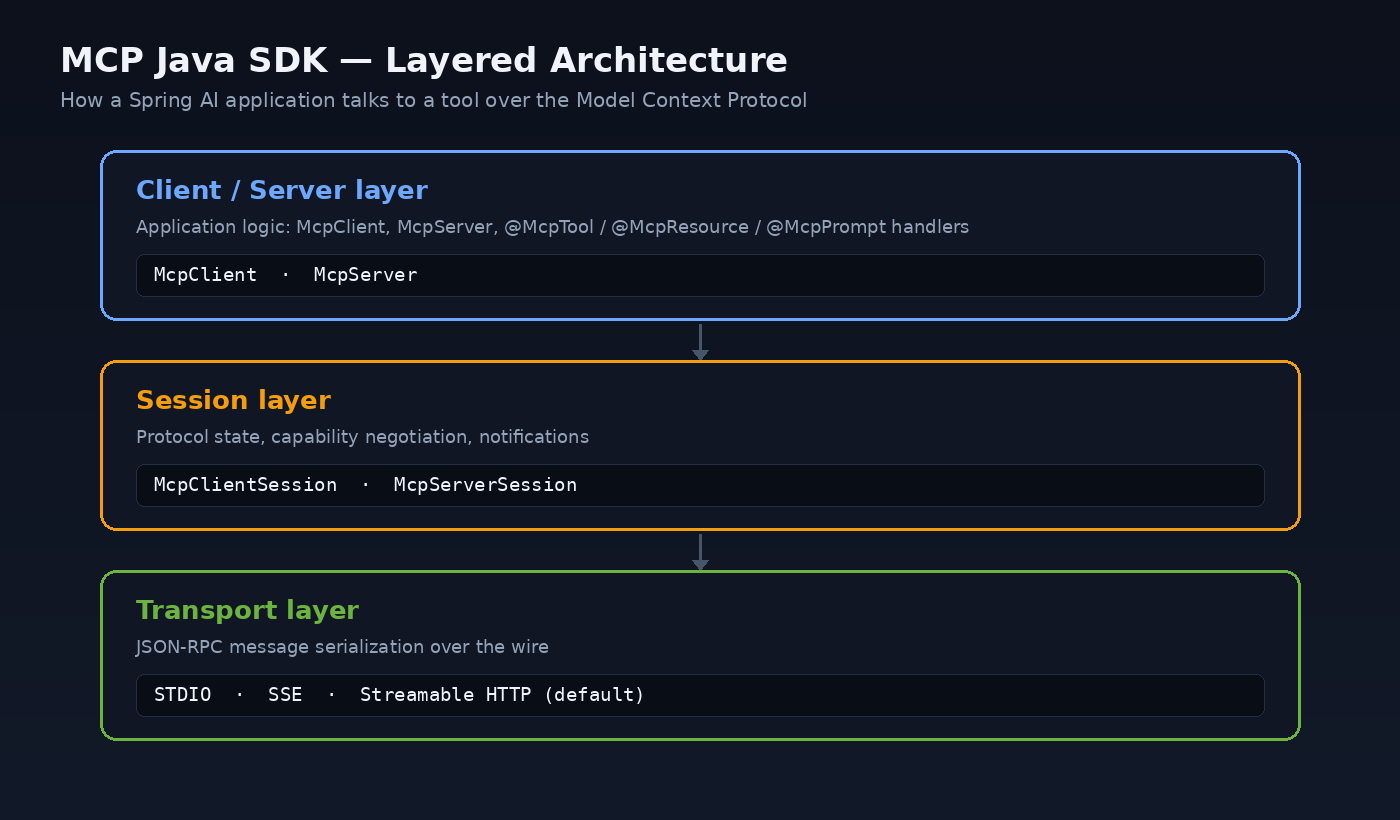
MCP defines a client-server architecture with three layers:
- Client/Server layer — application-level objects (
McpClient,McpServer) that expose tools, resources, and prompts. - Session layer —
McpClientSessionandMcpServerSessionmanage protocol state, capability negotiation, and notifications. - Transport layer — handles JSON-RPC message serialization over STDIO, HTTP with Server-Sent Events, or the newer Streamable HTTP transport, which is now the default in the MCP Java SDK.
A tool exposed through MCP is not tied to a single model vendor or even a single programming language. A Spring Boot service can publish a tool over MCP once, and it becomes usable from any MCP-compliant client — a Python agent, an internal chat assistant built with Spring AI, or a developer’s IDE.
What’s New in Spring AI 2.0
Spring AI 2.0.0 went GA on June 12, 2026. It targets Spring Boot 4.0.x/4.1.x and Spring Framework 7, and brings several changes that matter for anyone building agentic Java applications:
| Area | What changed |
|---|---|
| Foundation | Rebuilt on Spring Boot 4 / Framework 7, Jackson 3, and full JSpecify null-safety annotations across the codebase. |
| Tool-calling architecture | The tool-execution loop moved into the ChatClient advisor chain as a first-class, composable component (ToolCallingAdvisor) instead of being hidden inside the model call. |
| Tool discovery at scale | ToolSearchToolCallingAdvisor adds progressive tool disclosure: instead of sending hundreds of tool definitions on every request, the model searches for relevant tools by natural-language query. |
| Output reliability | StructuredOutputValidationAdvisor automatically retries or corrects model output that fails to conform to a requested JSON schema. |
| MCP integration | Ships the official MCP Java SDK, compliant with the November 2025 MCP specification, plus an annotation model (@McpTool, @McpResource, @McpPrompt, @McpComplete) and dedicated client/server Boot starters. |
| Provider consolidation | Focuses on a core set of actively maintained model integrations — OpenAI, Anthropic, Amazon Bedrock, Google GenAI, Mistral AI, DeepSeek, and Ollama among them — with some vendor integrations now maintained externally. |
If you are already running Spring Boot 4, adding Spring AI 2.0 is a natural next step rather than a parallel migration.
Step 1 — Tool Calling Inside a Single Application
Before reaching for MCP, it’s worth knowing that Spring AI’s ChatClient can call Java methods directly as tools, with no protocol overhead, whenever the tool and the model live in the same application.
class OrderTools {

    private final OrderRepository orders;

    OrderTools(OrderRepository orders) {
        this.orders = orders;
    }

    @Tool(description = "Look up the status of a customer order by its order number")
    public String getOrderStatus(
            @ToolParam(description = "The order number, e.g. ORD-10432") String orderNumber) {
        return orders.findByNumber(orderNumber)
                .map(o -> "Order %s is currently %s".formatted(orderNumber, o.getStatus()))
                .orElse("No order found with number " + orderNumber);
    }
}
@RestController
class SupportController {

    private final ChatClient chatClient;

    SupportController(ChatClient.Builder builder, OrderTools orderTools) {
        this.chatClient = builder.defaultTools(orderTools).build();
    }

    @PostMapping("/support/ask")
    String ask(@RequestBody String question) {
        return chatClient.prompt(question).call().content();
    }
}
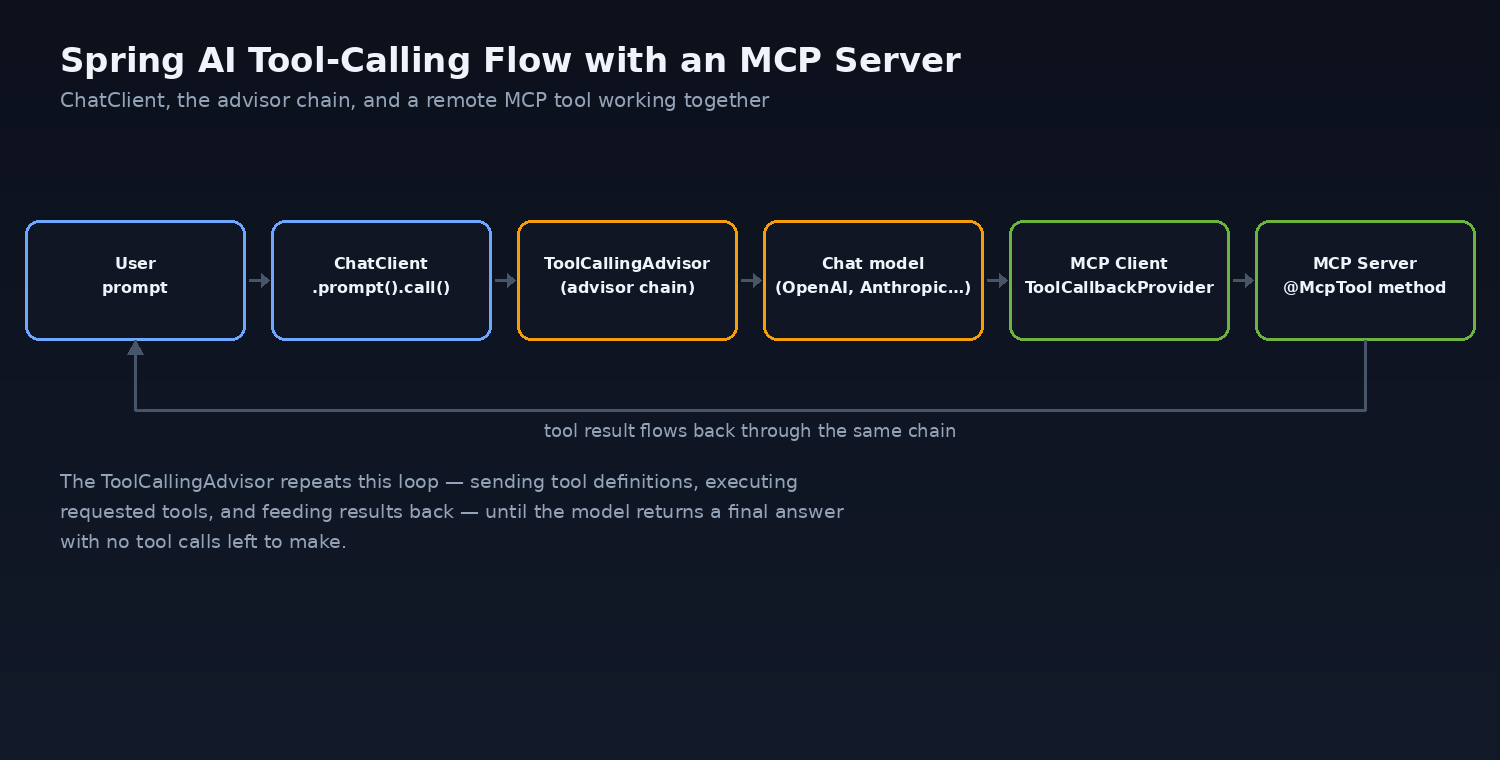
Behind the scenes, the auto-registered ToolCallingAdvisor sends the tool’s JSON schema to the model, executes getOrderStatus when the model requests it, feeds the result back, and loops until the model produces a final answer — all without any explicit orchestration code.
Step 2 — Exposing the Same Logic as an MCP Server
Direct @Tool methods only work inside one JVM process. To make the same capability available to other applications — a separate agent, a different team’s service, or an external MCP-compatible client — expose it through an MCP server instead.
pom.xml
<dependencyManagement>
  <dependencies>
    <dependency>
      <groupId>org.springframework.ai</groupId>
      <artifactId>spring-ai-bom</artifactId>
      <version>2.0.1</version>
      <type>pom</type>
      <scope>import</scope>
    </dependency>
  </dependencies>
</dependencyManagement>

<dependency>
  <groupId>org.springframework.ai</groupId>
  <artifactId>spring-ai-starter-mcp-server-webmvc</artifactId>
</dependency>
application.properties
spring.ai.mcp.server.protocol=STREAMABLE
spring.application.name=order-tools-mcp-server
server.port=8081
OrderMcpTools.java
@Service
public class OrderMcpTools {

    private final OrderRepository orders;

    OrderMcpTools(OrderRepository orders) {
        this.orders = orders;
    }

    @McpTool(description = "Look up the status of a customer order by its order number")
    public String getOrderStatus(
            @McpToolParam(description = "The order number, e.g. ORD-10432", required = true) String orderNumber) {
        return orders.findByNumber(orderNumber)
                .map(o -> "Order %s is currently %s".formatted(orderNumber, o.getStatus()))
                .orElse("No order found with number " + orderNumber);
    }
}
That is the entire server. Spring Boot’s component scan discovers the @McpTool-annotated method, generates its JSON schema automatically, and serves it over Streamable HTTP at startup — no manual protocol handling required.
Step 3 — Consuming the MCP Server from a Spring AI Client
pom.xml (client application)
<dependency>
  <groupId>org.springframework.ai</groupId>
  <artifactId>spring-ai-starter-mcp-client</artifactId>
</dependency>
<dependency>
  <groupId>org.springframework.ai</groupId>
  <artifactId>spring-ai-starter-model-openai</artifactId>
</dependency>
application.yaml
spring:
  ai:
    mcp:
      client:
        streamable-http:
          connections:
            order-tools:
              url: http://localhost:8081
@Component
class SupportAgentDemo {

    @Bean
    CommandLineRunner demo(ChatClient.Builder builder, ToolCallbackProvider mcpTools) {
        ChatClient chatClient = builder.defaultTools(mcpTools).build();
        return args -> {
            String answer = chatClient
                    .prompt("What's the status of order ORD-10432?")
                    .call()
                    .content();
            System.out.println(answer);
        };
    }
}
The client discovers every tool the MCP server publishes through the auto-configured ToolCallbackProvider bean and hands them to ChatClient exactly like a local @Tool method. The model never knows — or needs to know — that the tool call crossed a network boundary.
Real-World Use Cases
- Internal developer platforms: expose deployment status, log search, or incident lookups as MCP tools so any approved AI assistant — including IDE agents — can answer “why did the last deploy fail?” without a bespoke integration per tool.
- Cross-team agent composition: a customer-support agent built by one team can call inventory and billing tools published by other teams’ MCP servers, without those teams exposing new REST contracts or coupling to a specific LLM.
- Enterprise data governance: centralizing tool access behind an MCP server lets a platform team enforce authentication, rate limits, and audit logging in one place, rather than in every application that talks to an LLM.
- Multi-agent orchestration: larger systems that coordinate several specialized agents (retrieval, planning, execution) can use MCP as the common interface between agents built with different frameworks or even different languages.
Scaling Tool Discovery: ToolSearchToolCallingAdvisor
Sending fifty or a hundred tool schemas on every model call is expensive in tokens and can degrade tool-selection accuracy. Spring AI 2.0 addresses this with progressive disclosure:
spring.ai.chat.client.tool-search-advisor.enabled=true
With this enabled, the advisor indexes the full tool catalog once per session and gives the model a single built-in toolSearchTool it uses to retrieve relevant tools by natural-language query. Only the tools the model actually asks for are included in subsequent requests, which keeps context small even when a Spring Boot application aggregates tools from several MCP servers.
Security Considerations
- Treat tools as an API surface. Every
@McpToolmethod is effectively a public endpoint once the server is reachable. Apply the same authentication and authorization you would to a REST controller — Spring AI’s MCP support includes OAuth 2.0 integration for exactly this reason. - Never expose destructive operations without guardrails. A tool that can delete records or trigger payments should require explicit confirmation, scoped credentials, or a human-in-the-loop step — not just a well-written description telling the model to “be careful.”
- Validate tool parameters server-side. The model can hallucinate or be manipulated into passing unexpected input; a tool implementation must validate exactly as if the caller were untrusted, because it effectively is.
- Watch for indirect prompt injection. Text returned by one tool (a document, a web page, a database comment field) can contain instructions aimed at the model. Treat tool output as data, and be cautious about chaining tools where one tool’s untrusted output feeds directly into another tool’s arguments.
Performance Considerations
Prefer Streamable HTTP over the older SSE transport for new servers — it is the MCP Java SDK’s default and supports both stateful and stateless deployment. For MCP servers that scale horizontally behind a load balancer, the stateless Streamable HTTP mode (spring.ai.mcp.server.protocol=STATELESS) avoids sticky-session requirements. On the client side, enabling ToolSearchToolCallingAdvisor once a tool catalog grows past a couple dozen tools measurably reduces prompt size and latency, since only relevant tool schemas are sent per turn. Because MCP server methods run on ordinary Spring MVC or WebFlux controllers under the hood, the same virtual-thread guidance that applies to any Java 25 Spring Boot service applies here too — keep blocking I/O off the event loop in WebFlux-based servers, and avoid synchronized blocks in hot tool-execution paths.
Common Mistakes and Pitfalls
- Skipping tool descriptions.
@Tooland@McpTooldescriptions are the only signal the model has for choosing between tools. A vague description leads to wrong tool selection more often than any model limitation. - Registering a second
ToolAdvisor.DefaultChatClientenforces exactly one tool advisor in the chain; adding a custom one alongside the default causes a startup error, not silent double execution. - Forgetting the 2.0 package migration. Spring-specific MCP transport classes moved from
io.modelcontextprotocol.sdktoorg.springframework.aiin the 2.0 release. Projects upgrading from Spring AI 1.x need to update both the Maven coordinates and the import statements — the starters handle this automatically for new projects, but hand-rolled transport configuration does not. - Not enabling tool search at scale. Aggregating tools from several MCP servers without
ToolSearchToolCallingAdvisorquietly inflates every request’s token cost as the catalog grows. - Blocking calls in reactive MCP servers. If you choose the WebFlux server starter for its non-blocking transport, a JDBC call inside an
@McpToolmethod still blocks the event loop just as it would in any other reactive controller.
Advantages and Limitations
| Advantages | Limitations |
|---|---|
| Vendor-neutral: the same MCP server works with any compliant client, not just Spring AI. | Adds a network hop and protocol overhead compared to in-process @Tool calls. |
| Centralizes tool governance, auth, and audit logging in one place. | Requires operating and securing an additional service. |
| Annotation-driven model keeps server code close to ordinary Spring MVC/WebFlux idioms. | Still a young ecosystem; tooling and observability patterns are evolving quickly. |
| Progressive tool disclosure keeps large tool catalogs affordable in tokens. | Debugging multi-hop agent-to-MCP-server-to-database chains is harder than a single-process call stack. |
Practical Implementation Checklist
- Add the
spring-ai-bom(2.0.x) to your dependency management and pick a model starter (for examplespring-ai-starter-model-openai). - Start with local
@Toolmethods for capabilities that only your application needs. - When a capability should be shared across services or agents, extract it into a dedicated Spring Boot service using
spring-ai-starter-mcp-server-webmvc(or-webflux) and annotate the method with@McpTool. - Choose
STREAMABLEprotocol mode for new servers; useSTATELESSif the server needs to scale horizontally without sticky sessions. - Consume the server from any client with
spring-ai-starter-mcp-clientand the auto-configuredToolCallbackProvider. - Once you’re aggregating more than a couple dozen tools, enable
spring.ai.chat.client.tool-search-advisor.enabled=true. - Put authentication, input validation, and audit logging on every MCP server before it leaves a development environment.
Conclusion
Spring AI 2.0’s MCP support turns “add AI to a Java service” from a one-off integration project into an application of patterns Spring developers already know: starters, auto-configuration, annotations, and the advisor chain. The interesting design decisions are no longer about wiring an SDK together — they are about which capabilities deserve their own MCP server, how tool catalogs stay fast and cheap as they grow, and how much trust a tool implementation should extend to the model calling it. Teams that treat MCP servers as the production APIs they actually are — with authentication, validation, and monitoring — will get far more value out of this stack than teams that treat it as a demo.
Frequently Asked Questions
Do I need MCP if my AI feature only lives inside one Spring Boot application?
No. If a tool is only ever called by the ChatClient in the same JVM, a plain @Tool-annotated method is simpler and has no network or protocol overhead. Reach for MCP when a tool needs to be shared across applications, teams, or non-Spring clients.
Is Spring AI’s MCP support compatible with non-Java MCP clients?
Yes. MCP is a language-agnostic, open protocol. A Spring Boot MCP server can be called by any compliant client, including Claude Desktop, IDE-based agents, or MCP clients written in Python or TypeScript, and a Spring AI MCP client can call servers written in other languages.
What Java and Spring Boot versions does Spring AI 2.0 require?
Spring AI 2.0.x targets Spring Boot 4.0.x and 4.1.x, which support Java 17 as a minimum with first-class support for Java 21 and Java 25. New projects should target Java 21 or later to get the full benefit of the current Spring Boot and Spring AI feature set.
What transport should a new MCP server use?
Streamable HTTP is the default and recommended transport in the current MCP Java SDK. Use STDIO only for local, process-per-client tools (like a CLI-invoked tool), and reach for the stateless Streamable HTTP mode when the server needs to run behind a load balancer with multiple instances.
How is @Tool different from @McpTool?
@Tool (with @ToolParam) registers a Java method as a tool directly on a ChatClient within the same application. @McpTool (with @McpToolParam) exposes a method as a tool on an MCP server, making it callable over the network by any MCP client, not just the application that defines it.
Resources & References
Official documentation and specifications
- Model Context Protocol (MCP) — Spring AI Reference, VMware/Broadcom Spring team — architecture of the MCP Java SDK, client/server starters, and the annotation model used throughout this article.
- Tool Calling — Spring AI Reference, VMware/Broadcom Spring team —
@Tool/@ToolParamsyntax,ToolCallingAdvisorbehavior, andToolSearchToolCallingAdvisorprogressive disclosure. - Getting Started — Spring AI Reference, VMware/Broadcom Spring team — BOM coordinates and Spring Boot version requirements for Spring AI 2.0.x.
- Getting Started with MCP — Spring AI Reference, VMware/Broadcom Spring team — end-to-end MCP server and client example used as the basis for the code samples above.
- Task Execution and Scheduling — Spring Boot Reference, VMware/Broadcom Spring team — background on
spring.threads.virtual.enabledreferenced in the performance section.
Official announcements
- Spring AI 2.0.0 GA Available Now, Spring Blog — release date, foundation upgrades, and headline features used in the “What’s New” section.
- Spring Boot 4.0.0 available now, Spring Blog — Spring Boot 4 release date and minimum Java version, used for context on the underlying platform.
Project repository
- spring-projects/spring-ai, GitHub — source for the framework and starters referenced in the code examples.
All code samples in this article were written for this guide to illustrate the APIs described in the documentation above; they are illustrative and should be adapted and tested before production use.