Modern enterprise applications need intelligent capabilities. Businesses want automated customer assistance, smart data extraction, and natural language query systems. However, integrating Large Language Models (LLMs) into production backends has often caused severe challenges. Developers had to write custom HTTP clients, parse raw JSON schemas manually, and risk vendor lock-in to a single proprietary provider.
Spring AI 2.0 changes this completely. Designed specifically for Spring Boot 4, Spring Framework 7, and Java 25, Spring AI 2.0 provides a clean, unified abstraction layer for artificial intelligence. Just as Spring Data revolutionized relational databases, Spring AI brings portability, declarative tool execution, and stateful conversational memory to Java developers.
In this comprehensive guide, we explore the core concepts and production patterns of Spring AI 2.0. You will learn how to build fluent AI clients, execute autonomous tool calling with the @Tool annotation, manage multi-turn chat memory, and extract strongly-typed Java 25 records with zero boilerplate.
Spring AI 2.0 Core Abstractions & Provider Portability
Enterprise systems must never depend on a single AI vendor. Model capabilities, operational pricing, and regulatory data compliance policies change constantly. If your application code directly couples with a vendor-specific SDK, migrating to another provider requires expensive code rewrites.
Spring AI 2.0 solves this challenge through clear, interface-based abstractions. The core architecture separates the client interface, prompt management, and execution engines into distinct decoupled layers.
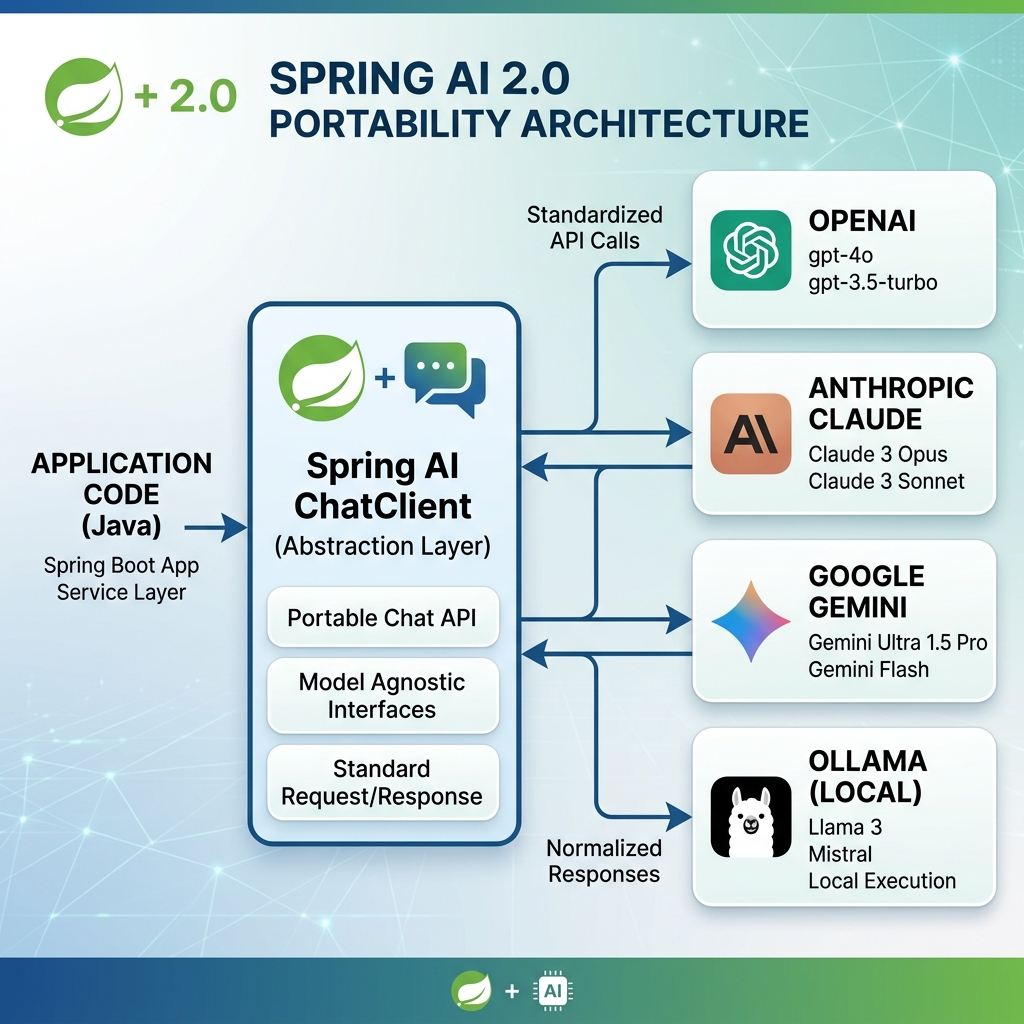
As shown in Figure 1, your business logic interacts exclusively with high-level Spring AI interfaces. The underlying engine translates prompts and parameters into the target model’s native format automatically.
Key Architectural Components
Spring AI 2.0 introduces four primary architectural abstractions:
- ChatModel Interface: The fundamental low-level contract representing an AI model. Implementations exist for OpenAI, Anthropic Claude, Google Gemini, Azure OpenAI, Mistral AI, and local Ollama instances.
- ChatClient Interface: The modern, high-level conversational client. It provides a fluent builder pattern for request construction, context propagation, and prompt templating.
- Prompt & Message Hierarchy: Structured message representations including
SystemMessage,UserMessage,AssistantMessage, andToolResponseMessage. - Advisor Chain: Pluggable interceptors that modify prompts and responses around the model execution, such as conversation memory and security checks.
When you combine these abstractions with the modular principles of Clean Architecture in Spring Boot 4, your core domain remains completely isolated from external AI API changes.
System Prerequisites
To use Spring AI 2.0 in production, ensure your project meets the modern baseline requirements:
- Java 25 (or 21 LTS): Spring AI relies on modern Java features. It utilizes records for schema generation and pattern matching for response handling. It works seamlessly with Java 25 Virtual Threads for scalable non-blocking I/O.
- Spring Boot 4.0.0: Provides automated component configuration, health metrics, and starter dependency management.
- Spring Framework 7: Delivers modern HTTP client interfaces and core dependency injection foundations.
The ChatClient Fluent Builder & Advisor Pipeline
In early versions of Spring AI, developers used low-level ChatModel calls with complex parameter maps. Spring AI 2.0 introduces the revamped ChatClient. It features a fluent, chainable builder API that makes configuring AI requests intuitive and concise.
The ChatClient acts as an execution pipeline. It processes incoming user prompts, evaluates system instructions, invokes the configured advisor chain, and handles response serialization.
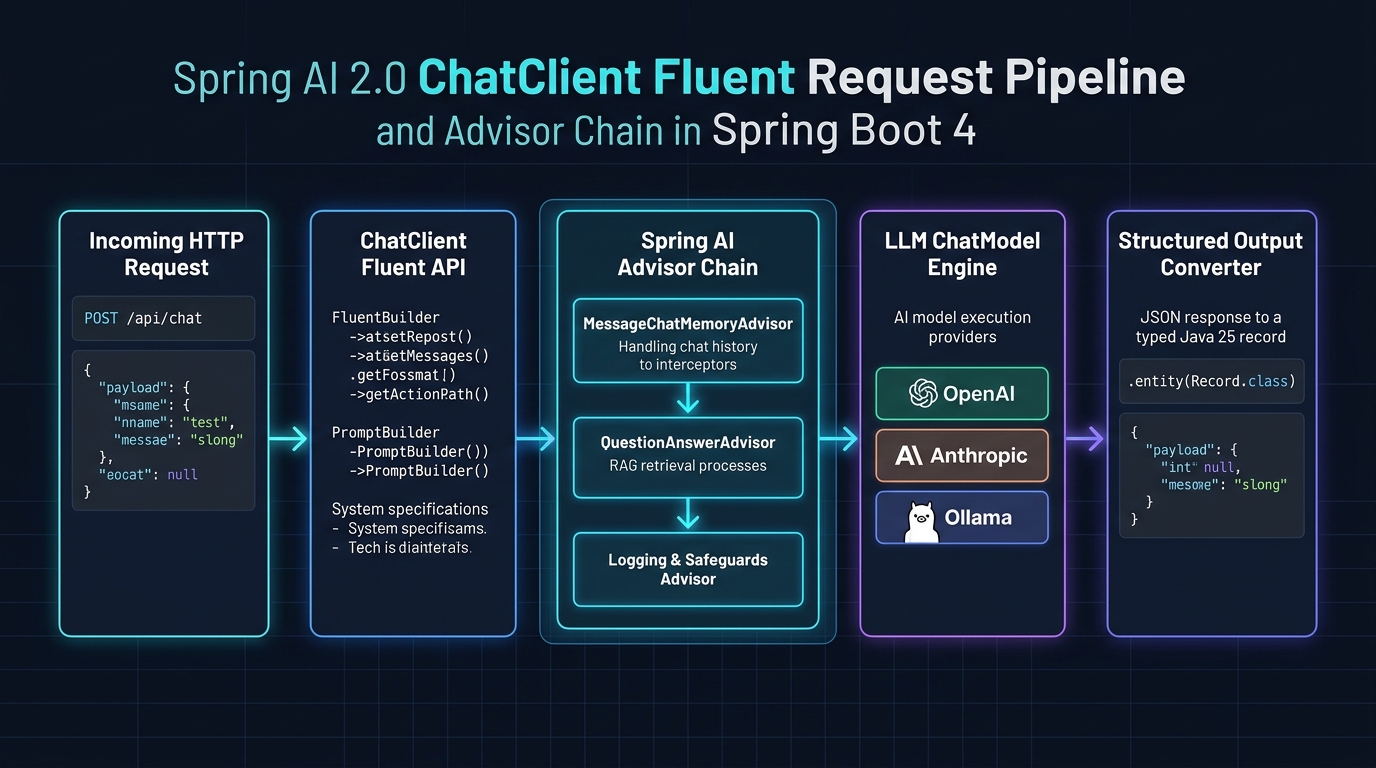
Figure 2 illustrates how a request flows through the pipeline. When a REST endpoint receives an HTTP request, the ChatClient passes the prompt through sequential advisors before dispatching the payload to the LLM engine.
Configuring the ChatClient Bean
Spring Boot 4 automatically provisions a ChatClient.Builder bean in your application context. You configure this builder with default system instructions and shared advisors, then build an immutable ChatClient instance.
Below is the recommended configuration pattern in a Spring configuration class:
package com.webcodein.ai;

import org.springframework.ai.chat.client.ChatClient;
import org.springframework.context.annotation.Bean;
import org.springframework.context.annotation.Configuration;

@Configuration
public class AiConfiguration {

    @Bean
    public ChatClient chatClient(ChatClient.Builder builder) {
        return builder
                .defaultSystem("You are a helpful and polite technical assistant for WebCodein.")
                .build();
    }
}
Every call initiated through this client automatically inherits the default system prompt. You can override or supplement system instructions per call whenever specialized behavior is required.
Fluent Request Execution
Executing an AI query is simple and expressive. You chain methods to define user inputs, parameters, and return types:
String response = chatClient.prompt()
        .user("Explain the primary benefits of virtual threads in Java 25.")
        .call()
        .content();
The .prompt() method starts the fluent builder. The .user() method sets the user message. Finally, .call() executes the network request synchronously, and .content() extracts the plain text response.
Because Spring Boot 4 integrates Virtual Threads out-of-the-box, blocking on .call() does not pin OS threads. For high-throughput services, explore our dedicated guide on High-Concurrency APIs with Java 25 Virtual Threads.
Autonomous Tool Execution with @Tool
Standard language models have static knowledge. Their training data cuts off at a fixed date, and they cannot access private internal systems. Function calling allows models to execute code inside your application to fetch live data or trigger business workflows.
Spring AI 2.0 introduces the @Tool annotation. This feature eliminates the need to write complex JSON schemas manually. You simply annotate standard Spring service methods, and Spring AI handles schema reflection, registration, and invocation routing.
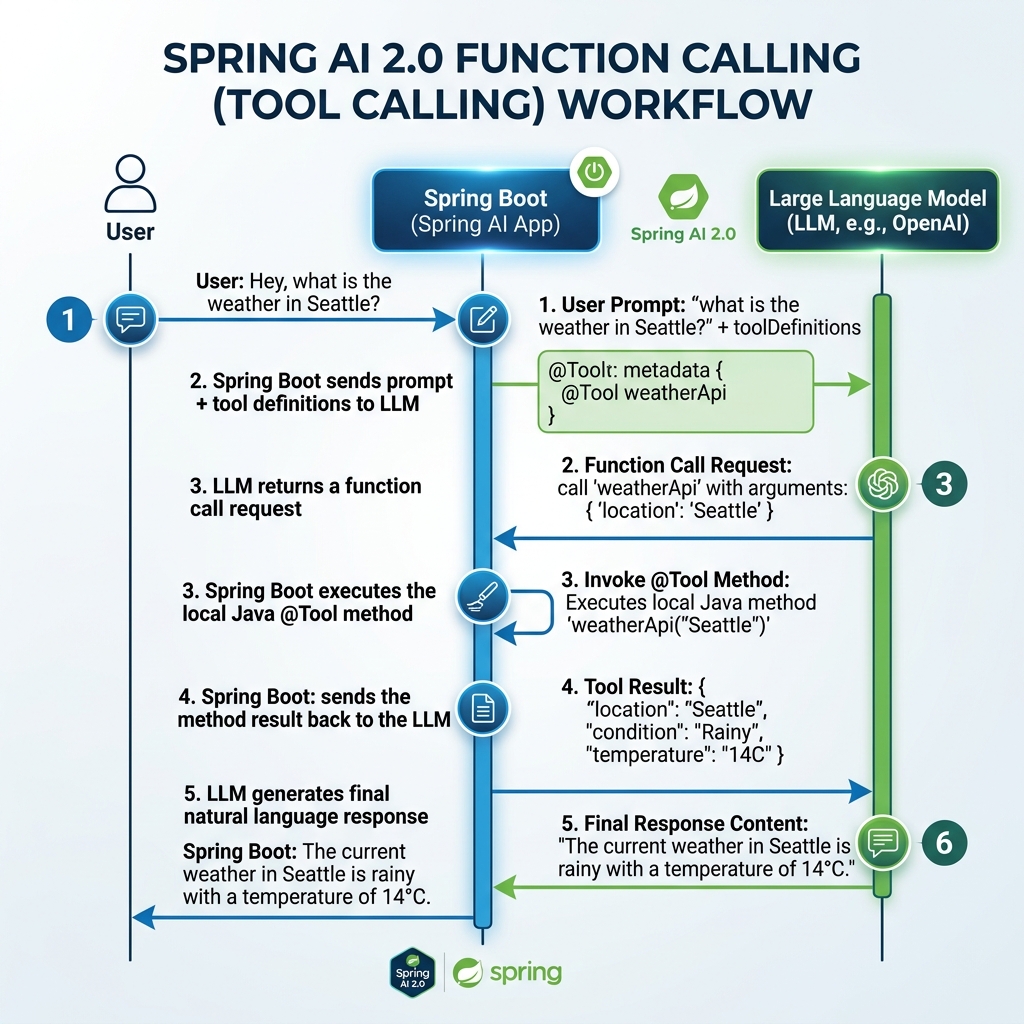
As demonstrated in Figure 3, the tool execution lifecycle is completely automated. The model never executes code directly; it only requests tool execution with structured arguments.
Defining a Tool Service
To expose a Java method as an AI tool, create a standard Spring @Service. Define the input arguments and return values using immutable Java 25 records. Then annotate the method with @Tool.
package com.webcodein.ai;

import org.springframework.ai.tool.annotation.Tool;
import org.springframework.stereotype.Service;

@Service
public class WeatherService {

    public record WeatherRequest(String city) {}
    public record WeatherResponse(String city, String condition, int temperatureC) {}

    @Tool(description = "Get the current weather and temperature for a specific city")
    public WeatherResponse getWeather(WeatherRequest request) {
        // In production, invoke an external weather API or database query.
        return new WeatherResponse(request.city(), "Sunny", 24);
    }
}
Spring AI parses the WeatherRequest record components via reflection. It generates an accurate JSON schema and provides the method description to the model. The model reads this description to decide whether the tool is needed to answer the query.
Enabling Tools in ChatClient
You attach tools to your prompt by passing the service class or bean reference to the .tools() builder method:
@GetMapping("/api/weather")
public String weatherInfo(@RequestParam String city) {
    return chatClient.prompt()
            .user("What is the current weather in " + city + "?")
            .tools(WeatherService.class)
            .call()
            .content();
}
When the user asks about the weather in Paris, the model returns a tool call request for getWeather with {"city": "Paris"}. Spring AI intercepts the response, invokes the method on WeatherService, passes the returned WeatherResponse back to the model, and produces the natural language answer.
Stateful Chat Memory & Conversation Windows
Large Language Models are completely stateless. Each HTTP request sent to an AI provider is treated as an isolated event. Without conversation history, an AI model cannot answer follow-up questions or remember user context.
Spring AI 2.0 solves conversational state through the ChatMemory abstraction and the MessageChatMemoryAdvisor. It intercepts incoming prompts, retrieves historical dialog for the specific session, and saves the new exchange automatically.
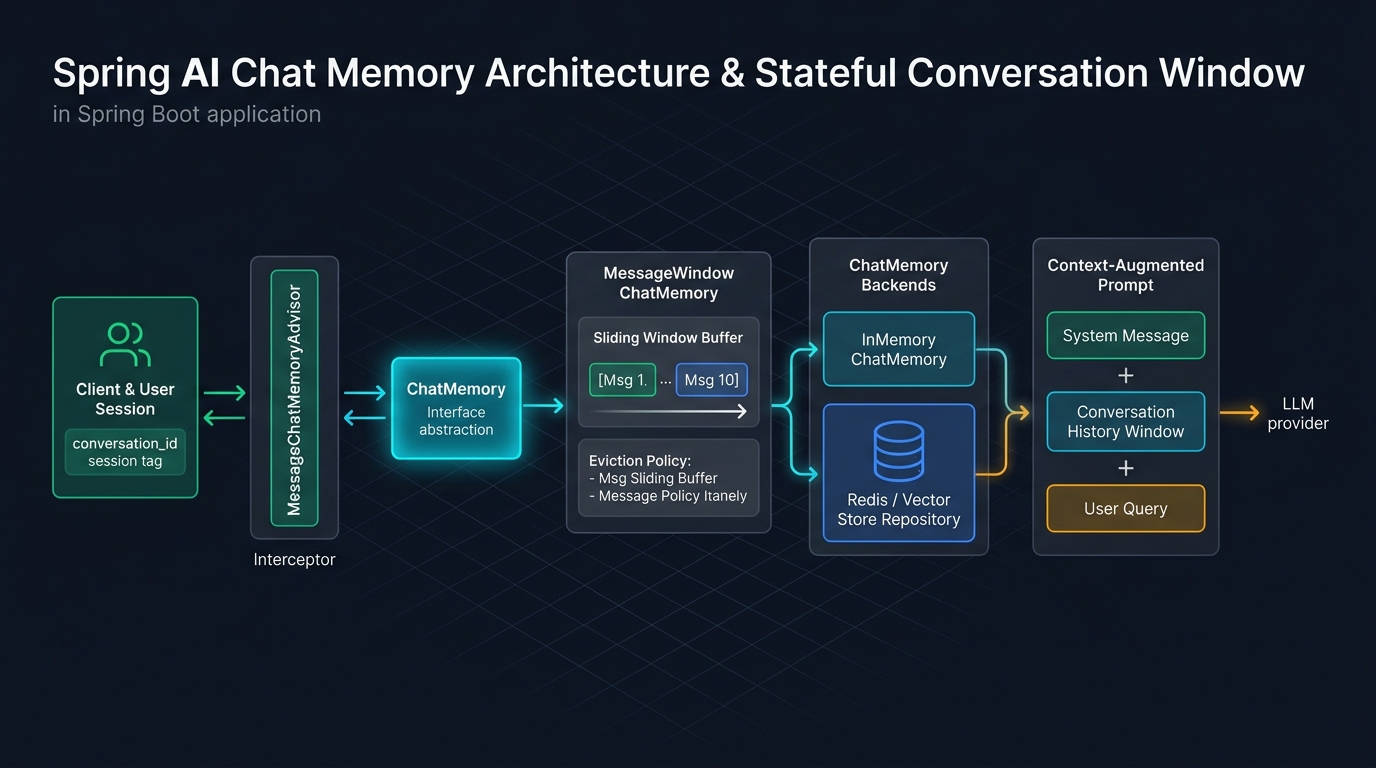
Figure 4 shows how session state is managed. Every user request includes a unique conversation identifier. The advisor queries the memory repository, injects the window into the prompt, and stores the completed interaction.
Configuring MessageWindowChatMemory
Unbounded conversational history leads to model context window exhaustion and huge cloud token costs. Spring AI provides MessageWindowChatMemory, which maintains a sliding window of the most recent messages.
Define the ChatMemory bean in your application configuration:
package com.webcodein.ai;

import org.springframework.ai.chat.memory.ChatMemory;
import org.springframework.ai.chat.memory.InMemoryChatMemoryRepository;
import org.springframework.ai.chat.memory.MessageWindowChatMemory;
import org.springframework.context.annotation.Bean;
import org.springframework.context.annotation.Configuration;

@Configuration
public class MemoryConfiguration {

    @Bean
    public ChatMemory chatMemory() {
        return MessageWindowChatMemory.builder()
                .chatMemoryRepository(new InMemoryChatMemoryRepository())
                .maxMessages(10)
                .build();
    }
}
For single-instance development and unit testing, InMemoryChatMemoryRepository works perfectly. In distributed multi-node production clusters, replace the repository with a persistent Redis or database implementation.
Attaching the Memory Advisor
Attach the MessageChatMemoryAdvisor when building your ChatClient. During request execution, pass the active chatId as an advisor parameter:
public AiController(ChatClient.Builder builder, ChatMemory chatMemory) {
    this.chatClient = builder
            .defaultAdvisors(MessageChatMemoryAdvisor.builder(chatMemory).build())
            .build();
}

@GetMapping("/api/chat")
public String chat(
        @RequestParam(defaultValue = "Tell me a joke") String message,
        @RequestParam(defaultValue = "default-user") String chatId) {

    return chatClient.prompt()
            .user(message)
            .advisors(a -> a.param("chat_memory_conversation_id", chatId))
            .call()
            .content();
}
When user session “user-42” submits a prompt, Spring AI queries the history matching “user-42”. The model retains full conversational context across subsequent HTTP requests.
Retrieval-Augmented Generation (RAG) Architecture
Enterprises need AI models that answer questions based on internal documentation, policies, and private knowledge bases. Retraining or fine-tuning foundation models for every document update is expensive and impractical.
Retrieval-Augmented Generation (RAG) overcomes this limitation. It searches a vector database for relevant document chunks and injects them directly into the prompt context.
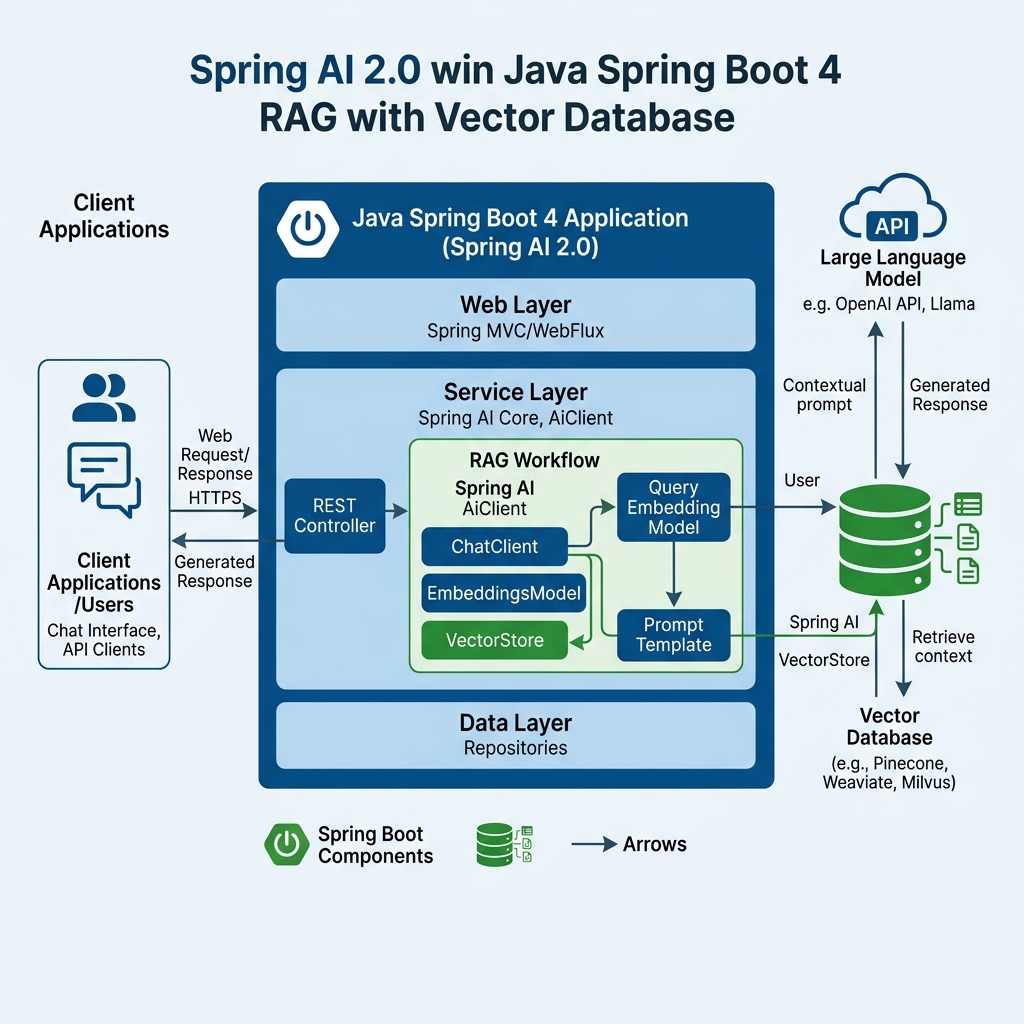
As illustrated in Figure 5, the RAG architecture consists of two distinct stages: document ingestion (ETL) and runtime question answering.
- Ingestion Pipeline: Raw documents are read using
DocumentReader, divided into token chunks byTokenTextSplitter, transformed into mathematical vectors viaEmbeddingModel, and stored in aVectorStore. - Query Pipeline: When a user asks a question, the vector store calculates cosine similarity to locate the most relevant passages. The
QuestionAnswerAdvisorappends these passages to the prompt context.
For a complete step-by-step implementation using PostgreSQL and pgvector, refer to our comprehensive guide on Enterprise RAG with Spring AI and PgVector.
Structured Output Mapping to Java 25 Records
In enterprise software, natural language strings are difficult to process downstream. Backend systems need strongly-typed domain objects to perform business rules, persist records, or return clean JSON API responses.
In previous frameworks, developers used regex patterns or custom JSON parsers. If the LLM returned unexpected markdown code fences, deserialization failed. Spring AI 2.0 introduces native structured output converters that guarantee schema enforcement.
Defining Domain Records
Declare your target data structure as an immutable Java 25 record:
public record Author(
        String name,
        String biography,
        List<String> famousBooks
) {}
Extracting Typed Entities with .entity()
Call the .entity() method on your fluent builder pipeline. Spring AI synthesizes schema instructions, injects format constraints, and automatically parses the output:
@GetMapping("/api/author")
public Author getAuthorInfo(@RequestParam(defaultValue = "J.R.R. Tolkien") String name) {
    return chatClient.prompt()
            .user("Provide a concise biography and famous book titles for author: " + name)
            .call()
            .entity(Author.class);
}
The method directly returns an instance of Author. Jackson deserialization, schema retries, and formatting validation occur transparently under the hood.
Practical Implementation: The Complete REST Controller
Let us assemble all these capabilities into a single production-ready REST controller. This controller exposes three endpoints: conversational chat with memory, autonomous tool calling, and typed entity extraction.
Below is the complete implementation of AiController.java:
package com.webcodein.ai;

import org.springframework.ai.chat.client.ChatClient;
import org.springframework.ai.chat.client.advisor.MessageChatMemoryAdvisor;
import org.springframework.ai.chat.memory.ChatMemory;
import org.springframework.web.bind.annotation.GetMapping;
import org.springframework.web.bind.annotation.RequestParam;
import org.springframework.web.bind.annotation.RestController;

import java.util.List;

@RestController
public class AiController {

    private final ChatClient chatClient;

    public AiController(ChatClient.Builder chatClientBuilder, ChatMemory chatMemory) {
        this.chatClient = chatClientBuilder
                .defaultAdvisors(MessageChatMemoryAdvisor.builder(chatMemory).build())
                .build();
    }

    @GetMapping("/api/chat")
    public String chat(
            @RequestParam(defaultValue = "Tell me a joke") String message,
            @RequestParam(defaultValue = "default-user") String chatId) {

        return chatClient.prompt()
                .user(message)
                .advisors(a -> a.param("chat_memory_conversation_id", chatId))
                .call()
                .content();
    }

    @GetMapping("/api/weather")
    public String weatherInfo(@RequestParam String city) {
        return chatClient.prompt()
                .user("What is the weather like in " + city + "?")
                .tools(WeatherService.class)
                .call()
                .content();
    }

    public record Author(String name, String biography, List<String> famousBooks) {}

    @GetMapping("/api/author")
    public Author getAuthorInfo(@RequestParam(defaultValue = "J.R.R. Tolkien") String name) {
        return chatClient.prompt()
                .user("Give me a brief biography of " + name + " and list some famous books.")
                .call()
                .entity(Author.class);
    }
}
Every dependency is injected cleanly through constructor injection. The controller remains concise, readable, and fully testable with standard unit and slice tests.
Comparative Analysis: Spring AI 2.0 vs Alternatives
Java developers currently have multiple options for AI integration. Understanding how Spring AI compares to alternative approaches helps architects make informed technical decisions.
| Evaluation Dimension | Spring AI 2.0 | LangChain4j | Direct Vendor SDKs |
|---|---|---|---|
| Spring Boot Integration | Native autoconfiguration, Actuator metrics, and standard starter POMs | Community starter integration; requires manual glue configuration | Manual configuration; no native Spring Boot lifecycle integration |
| Provider Portability | Unified ChatClient and ChatModel abstractions across all providers | High provider portability with AiServices abstraction | Zero portability; tightly coupled to proprietary vendor APIs |
| Tool Calling API | Declarative @Tool annotation with reflection schema extraction |
Declarative @Tool annotation on service methods |
Manual JSON schema authoring and custom HTTP routing |
| Stateful Memory | Pluggable Advisor chain with MessageWindowChatMemory |
ChatMemory interface with TokenWindow and MessageWindow | Manual session management, state storage, and prompt concatenation |
| Java 25 & Virtual Threads | Full non-blocking compatibility with Java 25 virtual threads | Compatible with modern Java versions | Varies; some vendor SDKs block carrier threads |
| Enterprise Observability | Native Micrometer observation metrics and OpenTelemetry tracing | Requires external logging listeners and manual wiring | Custom HTTP interceptor instrumentation required |
While LangChain4j offers excellent capabilities, Spring AI 2.0 provides unmatched alignment with the Spring ecosystem. For comparison with alternative frameworks, check our tutorial on LangChain4j RAG in Spring Boot 4.
Real-World Enterprise Use Cases
Spring AI 2.0 delivers value across a wide range of corporate software domains. Here are three proven production use cases:
1. Grounded Technical Support Agents
Enterprise customer support teams handle thousands of routine inquiries daily. By combining Spring AI RAG with internal product documentation, applications generate precise answers with document citations. By attaching @Tool services, the agent can check order statuses or verify warranty coverage automatically.
2. Unstructured Document Ingestion & Extraction
Financial and healthcare systems receive unstructured data such as scanned invoices, medical notes, and email tickets. Spring AI structured output converters map messy natural language directly into validated domain records. This eliminates manual data entry and accelerates straight-through processing.
3. Privacy-Preserving Offline Financial Analysis
Banking organizations often prohibit sending confidential transaction data to public cloud AI providers. Using Spring AI’s Ollama integration, teams deploy local open-weights models (such as Llama 3 or Mistral) inside on-premise Kubernetes clusters. The code remains identical to cloud deployments while guaranteeing complete data sovereignty.
Architectural Advantages and Limitations
Adopting an AI framework involves trade-offs that architects must evaluate before production deployment.
Architectural Advantages
- Eliminates Vendor Lock-In: Switching from OpenAI to Anthropic or local Ollama requires updating only configuration properties, not application code.
- Developer Productivity: The fluent
ChatClientbuilder removes hundreds of lines of boilerplate HTTP networking and JSON parsing code. - Strongly Typed Schemas: Automatic reflection on Java 25 records guarantees type safety between AI models and backend entities.
- Production Observability: Built-in integration with Spring Boot Actuator and Micrometer enables tracing token consumption and request latencies.
Technical Limitations
- Non-Deterministic Outputs: Large language models can hallucinate or produce unexpected responses. Always validate critical output fields before writing to databases.
- Network Latency: Remote model inference takes between 500 milliseconds and several seconds. Design user interfaces with streaming responses or asynchronous queues.
- Token Pricing Costs: Careless conversation history management can consume excessive tokens. Always enforce strict sliding window limits.
Common Mistakes and Production Best Practices
When running Spring AI in production environments, teams frequently encounter several avoidable mistakes.
Pitfall 1: Unbounded Chat Memory Causing Token Exhaustion
The Mistake: Storing every historical message in a user’s session without eviction. Over long conversations, the prompt exceeds the model’s context window limit, throwing HTTP 400 Bad Request errors and generating massive cloud bills.
The Fix: Always configure a bounded sliding window using MessageWindowChatMemory. Keep only the last 10 to 20 messages in active memory.
Pitfall 2: Ambiguous @Tool Descriptions Leading to Hallucinations
The Mistake: Omitting descriptions or providing vague summaries on @Tool methods. The AI model cannot deduce the tool’s intended purpose and either never calls it or invokes it with invalid arguments.
The Fix: Write detailed, unambiguous descriptions on the @Tool annotation and use descriptive record component names with clear validation rules.
Pitfall 3: Blocking Thread Exhaustion Under Heavy Load
The Mistake: Running synchronous AI calls on traditional platform thread pools. Because LLM queries take seconds to resolve, the thread pool starves rapidly, causing server timeouts.
The Fix: Enable Java 25 Virtual Threads in your application.properties:
spring.threads.virtual.enabled=trueVirtual threads park efficiently during remote HTTP waits, allowing your Spring Boot server to handle thousands of concurrent AI conversations simultaneously.
Practical Conclusion
Spring AI 2.0 represents a major milestone in Java enterprise development. By providing fluent client builders, declarative tool calling, stateful chat memory, and provider-agnostic abstractions, it brings enterprise-grade AI capabilities into the familiar Spring ecosystem.
Whether you deploy cutting-edge cloud models from OpenAI and Anthropic or privacy-preserving local LLMs using Ollama, Spring AI 2.0 ensures your application code remains clean, maintainable, and decoupled from vendor-specific APIs.
Frequently Asked Questions
What is the difference between Spring AI 1.x and Spring AI 2.0?
Spring AI 2.0 replaces the low-level ChatModel imperative API with the fluent ChatClient builder pipeline. It introduces the declarative @Tool annotation for reflection-based function calling, native Advisor interceptor chains, and full alignment with Spring Boot 4.0 and Java 25.
How does the @Tool annotation generate function schemas?
Spring AI inspects the method signature, argument types, and docstrings of @Tool annotated methods using Java reflection and Jackson modules. It automatically constructs a compliant JSON Schema that describes required parameters and data types to the language model.
Can I run Spring AI 2.0 completely offline without cloud API keys?
Yes. By including the spring-ai-starter-model-ollama dependency, you can connect your Spring Boot application to local inference servers running Ollama. This setup requires zero internet connectivity and ensures complete data confidentiality.
What are Advisors in Spring AI 2.0?
Advisors are interceptors that wrap the execution of AI requests. They can inspect and alter prompts before they reach the model and modify responses before returning them to callers. Common advisors include MessageChatMemoryAdvisor for state management and QuestionAnswerAdvisor for RAG retrieval.
Which Java and Spring Boot versions are required for Spring AI 2.0?
Spring AI 2.0 requires at least Java 21 or Java 25, Spring Boot 4.0.0, and Spring Framework 7.0. It leverages modern record features, pattern matching, and virtual thread concurrency throughout its core codebase.
Companion Workshop Project
The complete, compilable companion code for this article is available in our official GitHub repository. It includes the complete AiController, WeatherService with tool calling, comprehensive Mockito and Spring context tests, and Docker Compose configurations for local Ollama execution:
Browse Companion Project on GitHub (ai/spring-ai-2-0-spring-boot-4)