
The Enterprise Need for Retrieval-Augmented Generation
Artificial Intelligence is changing modern enterprise software. Commercial Large Language Models (LLMs) like OpenAI GPT-4o, Anthropic Claude, and Google Gemini possess vast public knowledge. They can write elegant poetry, explain complex historical events, and solve difficult coding puzzles. However, when placed inside an enterprise environment, raw LLMs encounter a fundamental limitation: they have zero access to your company’s private, proprietary data.
Public foundation models know nothing about your internal customer contracts, private HR policies, proprietary source code repositories, or microservice architecture diagrams. If an employee or customer asks a generic chatbot: “What is our refund policy for enterprise tier-3 support contracts?”, the model faces a dilemma. It will either state that it does not know, or worse, it will hallucinate plausible but entirely fabricated terms. In mission-critical sectors like banking, healthcare, and insurance, hallucinated answers create severe legal and financial risks.
Fine-tuning an LLM on private data is expensive, slow, and quickly outdated whenever documentation updates. Furthermore, fine-tuning risks leaking sensitive confidential data across unauthorized user roles. Retrieval-Augmented Generation (RAG) solves this challenge cleanly. Instead of retraining the model, a RAG system retrieves the exact, relevant paragraphs from your private database at runtime. It injects those verified facts into the prompt context right before the LLM generates its response. For developers building autonomous agents that also execute actions, check out our companion guide on Building AI Agents with Spring AI 2.0 and Function Calling.
Understanding Vector Embeddings and Vector Databases
Traditional SQL databases search using lexical keywords, regular expressions, or wildcards like LIKE '%refund%'. Lexical search fails when users ask questions using synonyms or descriptive concepts. For example, a user asking “How do I get my money back?” will not match an internal policy document titled “Customer Remittance and Cancellation Guidelines” under keyword search.
Vector databases solve this problem by indexing semantic meaning rather than literal text. When you ingest a document, an embedding model (such as OpenAI’s text-embedding-3-small) converts the text into a high-dimensional mathematical vector — an array of 1,536 floating-point numbers. Words and sentences with similar meanings occupy nearby coordinates in this mathematical space.
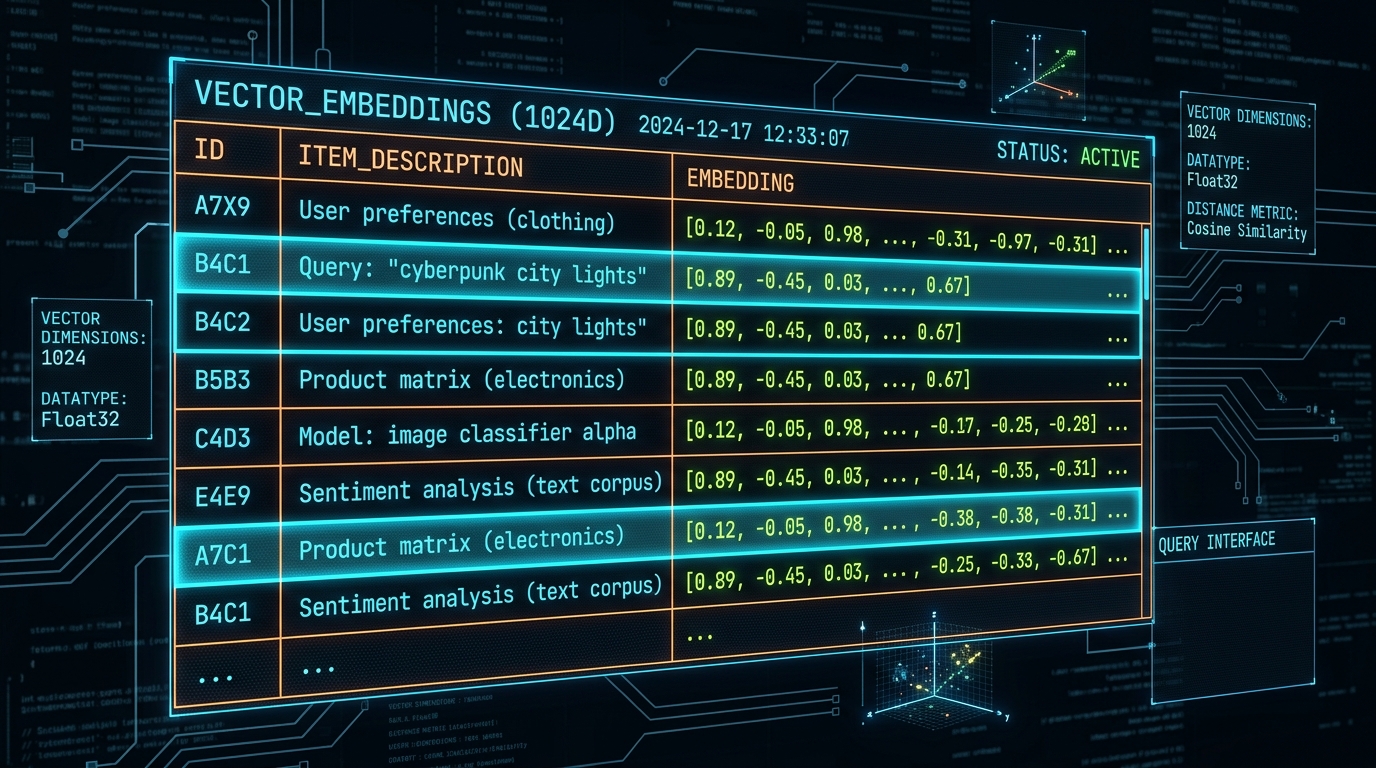
When a user submits a query, your application converts that question into an embedding vector. The vector database computes the geometric distance — commonly using Cosine Similarity — between the query vector and millions of stored document chunks. The database retrieves the top-K closest chunks in milliseconds, providing semantically relevant facts even when keywords do not overlap.
Spring AI and PgVector Architectural Overview
Enterprise Java developers often assumed that building RAG architectures required separate Python microservices running LangChain or LlamaIndex. With the release of Spring AI 2.0, Spring Boot 4, and Java 25, developers can build end-to-end RAG systems directly within their native Spring ecosystem.
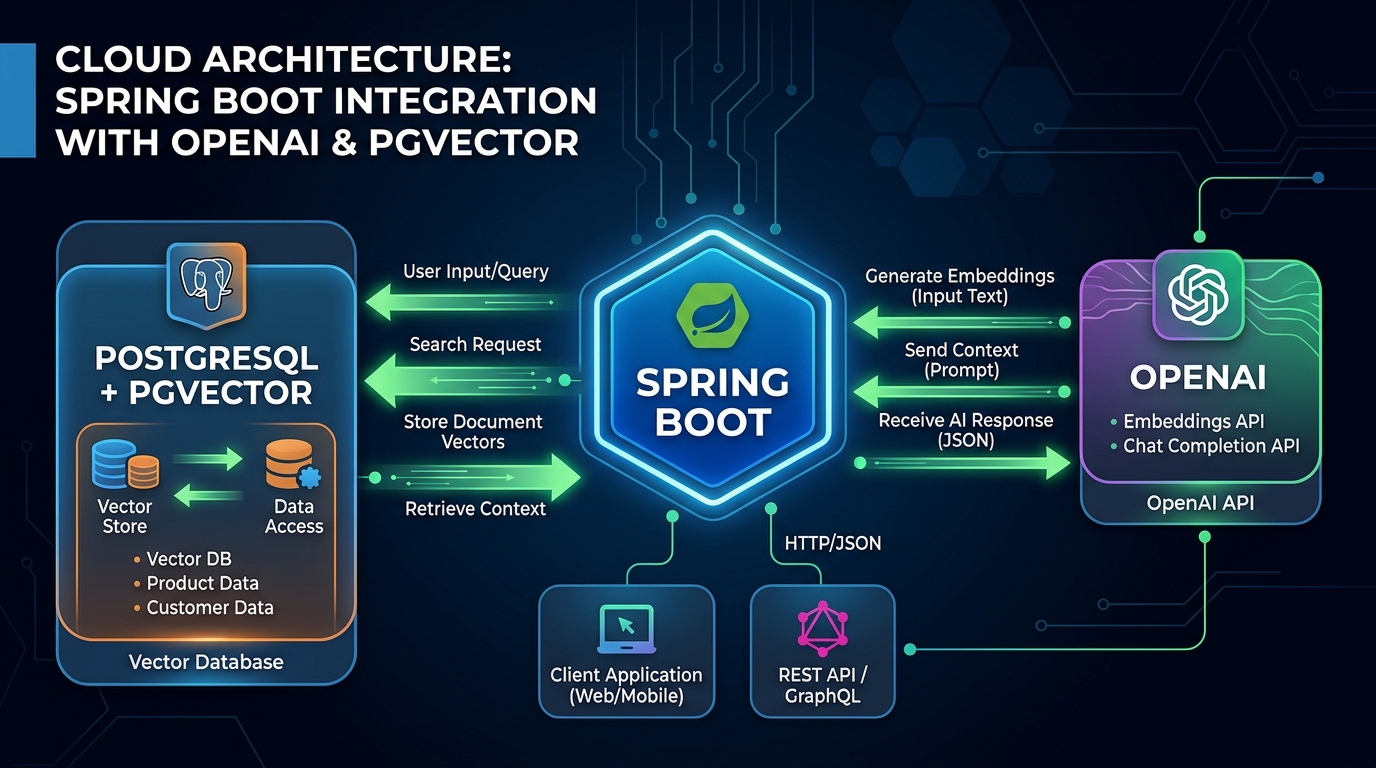
The enterprise RAG pipeline consists of two decoupled operational phases:
- Document Ingestion Pipeline (Offline / Asynchronous): Raw documents (PDFs, Markdown manuals, Word documents) are parsed by a
DocumentReader, split into token chunks with aTokenTextSplitter, converted to embeddings via anEmbeddingModel, and stored in PgVector with associated metadata tags. - Runtime Query Augmentation Pipeline (Online / Synchronous): A user submits a query through a REST API. The Spring AI
RetrievalAugmentationAdvisorqueries PgVector for the top relevant chunks, injects them into a system prompt template, and sends the enriched prompt to the LLM.
To understand the core design principles of the Spring AI framework, see our complete guide in Spring AI 2.0 with Spring Boot 4: The Complete Guide.
Configuring Spring Boot 4 and PgVector
Let us configure a Spring Boot 4 project with Java 25. We leverage the spring-ai-starter-model-openai and spring-ai-starter-vector-store-pgvector starters, which provide out-of-the-box auto-configuration for embeddings, chat clients, and vector tables.
First, review the Maven dependencies in pom.xml:
<dependencies>
    <!-- Web Ingress -->
    <dependency>
        <groupId>org.springframework.boot</groupId>
        <artifactId>spring-boot-starter-web</artifactId>
    </dependency>

    <!-- Spring AI OpenAI Starter (Embeddings & Chat) -->
    <dependency>
        <groupId>org.springframework.ai</groupId>
        <artifactId>spring-ai-starter-model-openai</artifactId>
    </dependency>

    <!-- Spring AI PgVector Starter -->
    <dependency>
        <groupId>org.springframework.ai</groupId>
        <artifactId>spring-ai-starter-vector-store-pgvector</artifactId>
    </dependency>

    <!-- Spring AI RAG Module -->
    <dependency>
        <groupId>org.springframework.ai</groupId>
        <artifactId>spring-ai-rag</artifactId>
    </dependency>

    <!-- PostgreSQL JDBC Driver -->
    <dependency>
        <groupId>org.postgresql</groupId>
        <artifactId>postgresql</artifactId>
        <scope>runtime</scope>
    </dependency>
</dependencies>
Next, configure the database connection and vector indexing options in application.properties. We choose the HNSW (Hierarchical Navigable Small World) index type and Cosine Distance for high-speed, sub-millisecond approximate nearest neighbor searches:
spring.application.name=enterprise-rag-spring-ai
spring.ai.openai.api-key=${OPENAI_API_KEY:demo-key}

# PgVector Index and Distance Metrics
spring.ai.vectorstore.pgvector.index-type=HNSW
spring.ai.vectorstore.pgvector.distance-type=COSINE_DISTANCE
spring.ai.vectorstore.pgvector.dimensions=1536

# PostgreSQL Connection Properties
spring.datasource.url=jdbc:postgresql://localhost:5432/vectordb
spring.datasource.username=user
spring.datasource.password=password
Building the Document Ingestion Pipeline
Document ingestion must be deterministic and robust. You cannot feed an entire 200-page employee handbook into an embedding model as a single block; embedding models have strict token limits, and massive chunks dilute semantic specificity.
The DocumentIngestionService reads incoming resources, attaches custom metadata (such as filenames and tenant IDs), splits documents into tokens with overlap, and persists the resulting vectors into PgVector:
package com.webcodein.rag.service;

import org.springframework.ai.document.Document;
import org.springframework.ai.reader.TextReader;
import org.springframework.ai.transformer.splitter.TokenTextSplitter;
import org.springframework.ai.vectorstore.VectorStore;
import org.springframework.core.io.Resource;
import org.springframework.stereotype.Service;

import java.util.List;

/**
 * Service orchestrating the ingestion, tokenization, and vector indexing of enterprise documents.
 */
@Service
public class DocumentIngestionService {

    private final VectorStore vectorStore;

    public DocumentIngestionService(VectorStore vectorStore) {
        this.vectorStore = vectorStore;
    }

    /**
     * Ingests a text or markdown resource into PostgreSQL PgVector.
     * Splits content into 500-token chunks with 100-token overlaps.
     */
    public void ingestDocument(Resource resource) {
        // Step 1: Read the raw document and enrich with metadata
        TextReader textReader = new TextReader(resource);
        textReader.getCustomMetadata().put("filename", resource.getFilename());
        List<Document> documents = textReader.get();

        // Step 2: Split text into chunks to preserve context across boundaries
        TokenTextSplitter textSplitter = new TokenTextSplitter(500, 100, 5, 10000, true);
        List<Document> splitDocuments = textSplitter.apply(documents);

        // Step 3: Compute embeddings and persist in PostgreSQL
        vectorStore.add(splitDocuments);
    }
}
The 100-token overlap is critical. It guarantees that concepts spanning across chunk boundaries do not get clipped in half, preserving semantic continuity during similarity lookups.
Building the RAG Chat Service
Once documents are stored in PgVector, we build the runtime query interface. Spring AI 2.0 introduces the RetrievalAugmentationAdvisor, which hooks directly into the ChatClient request pipeline.
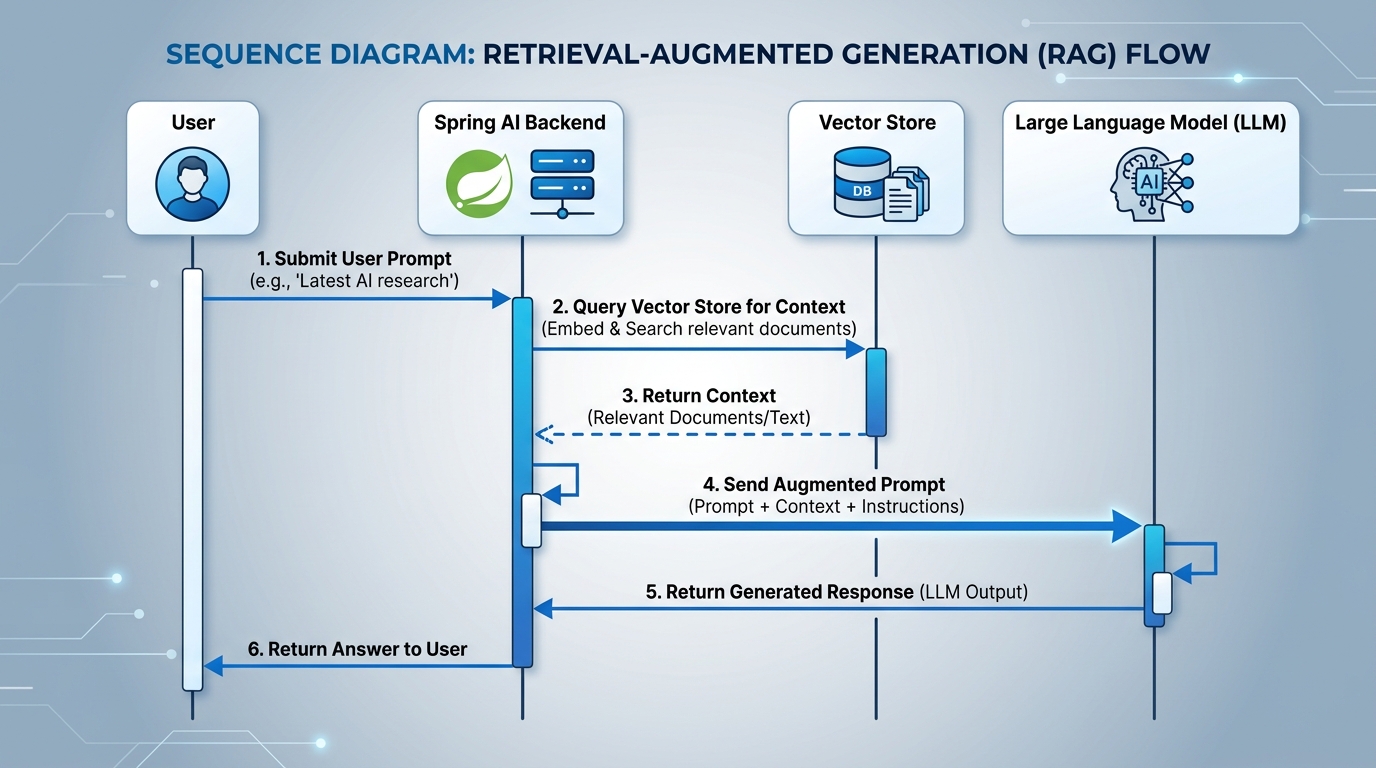
When the user submits a prompt, the advisor automatically queries PgVector for the top 3 most relevant documents, appends them to the system prompt, and directs the model to answer strictly based on the retrieved context:
package com.webcodein.rag.service;

import org.springframework.ai.chat.client.ChatClient;
import org.springframework.ai.rag.advisor.RetrievalAugmentationAdvisor;
import org.springframework.ai.rag.retrieval.search.VectorStoreDocumentRetriever;
import org.springframework.ai.vectorstore.VectorStore;
import org.springframework.stereotype.Service;

/**
 * RAG Chat Service connecting user queries to PgVector knowledge bases.
 */
@Service
public class ChatService {

    private final ChatClient chatClient;

    public ChatService(ChatClient.Builder chatClientBuilder, VectorStore vectorStore) {
        this.chatClient = chatClientBuilder
                .defaultAdvisors(RetrievalAugmentationAdvisor.builder()
                        .documentRetriever(VectorStoreDocumentRetriever.builder()
                                .vectorStore(vectorStore)
                                .topK(3)
                                .build())
                        .build())
                .build();
    }

    /**
     * Executes the augmented prompt against the configured LLM.
     */
    public String chat(String query) {
        return chatClient.prompt()
                .user(query)
                .call()
                .content();
    }
}
The companion REST controller exposes this service through a clean GET endpoint:
package com.webcodein.rag.controller;

import com.webcodein.rag.service.ChatService;
import org.springframework.web.bind.annotation.GetMapping;
import org.springframework.web.bind.annotation.RequestParam;
import org.springframework.web.bind.annotation.RestController;

@RestController
public class RagController {

    private final ChatService chatService;

    public RagController(ChatService chatService) {
        this.chatService = chatService;
    }

    @GetMapping("/chat")
    public String chat(@RequestParam String query) {
        return chatService.chat(query);
    }
}
To handle thousands of concurrent queries without blocking operating system threads, configure Spring Boot 4 on Java 25 Virtual Threads. Read our detailed guide on Java 25 Virtual Threads: Production Pitfalls and Best Practices for Spring Boot.
Advanced Hybrid Search and Re-Ranking
While standard vector similarity search is powerful, it has weaknesses. Pure vector embeddings struggle with exact part numbers, product SKUs, and specialized medical terms (e.g., “Error Code 0x80070005”). In contrast, traditional full-text search excels at exact keywords but fails at conceptual reasoning.
High-reliability enterprise architectures combine both approaches in a Hybrid Search and Re-Ranking Pipeline:
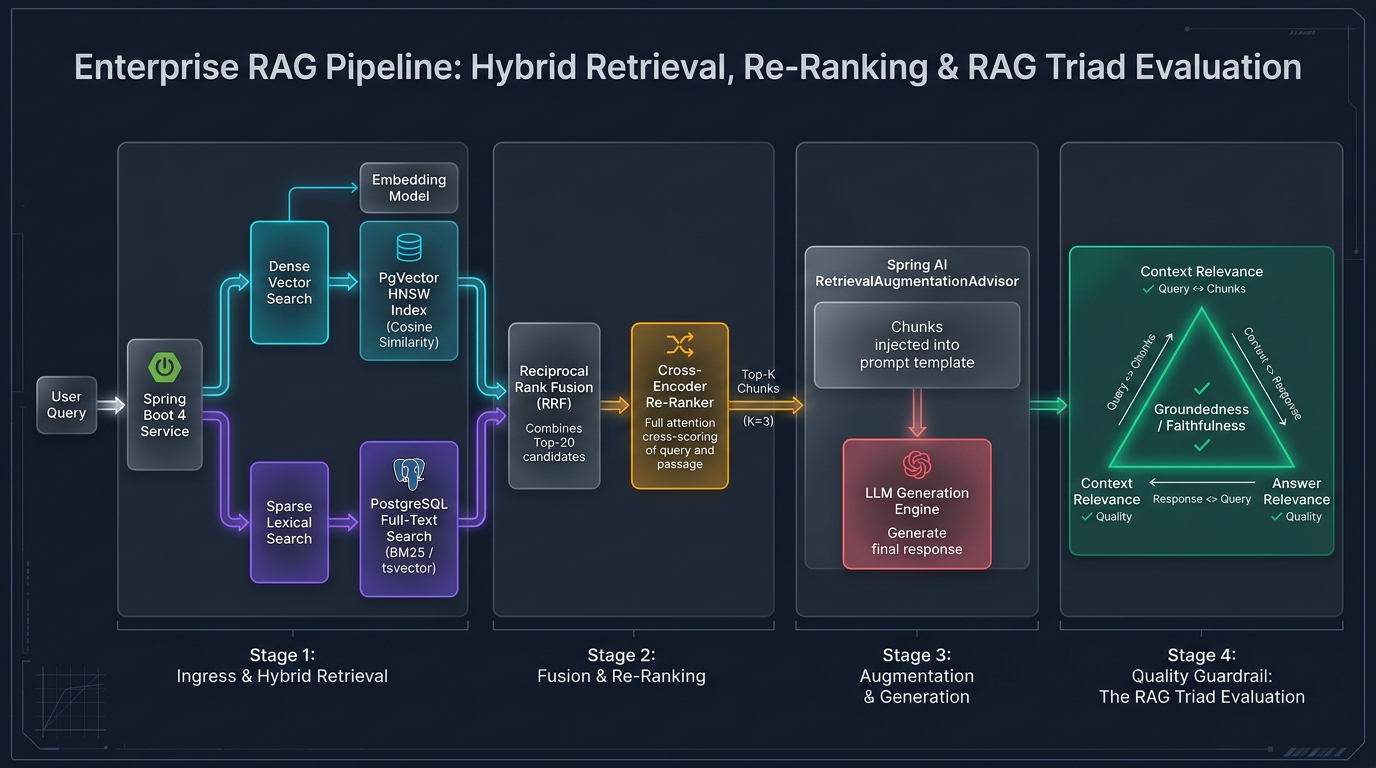
The hybrid pipeline functions in four coordinated stages:
- Dual-Branch Retrieval: The system splits the user query into two parallel paths. Path A performs dense vector search against PgVector HNSW indexes. Path B performs sparse keyword search against PostgreSQL
tsvectorindexes using BM25 scoring. - Reciprocal Rank Fusion (RRF): The pipeline merges the top 20 candidate documents from both branches using rank-based weighting, eliminating scoring discrepancies between vector distances and BM25 values.
- Cross-Encoder Re-Ranking: A secondary cross-encoder model evaluates the query and the top candidates together, outputting an exact relevance score and selecting the top 3 chunks.
- The RAG Triad Evaluation: The system evaluates quality using three metrics: Context Relevance (did we retrieve the right information?), Groundedness / Faithfulness (is the answer 100% derived from the context without hallucinations?), and Answer Relevance (does the response solve the user query?).
Automated Testing with Testcontainers and PgVector
You should never test vector databases using an in-memory database like H2. In-memory databases do not support vector math, distance algorithms, or HNSW indexes. Testing against mocks gives false confidence and misses real database bugs.
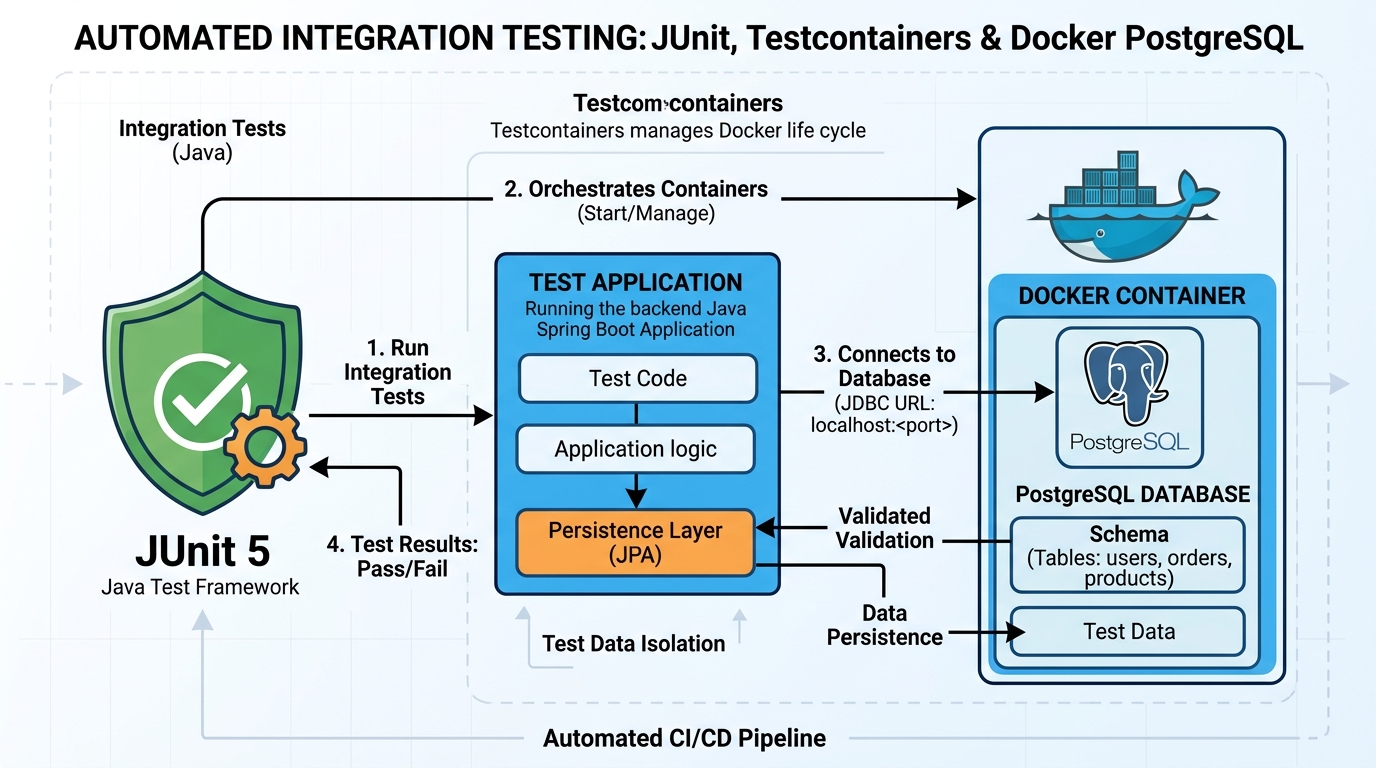
Using Spring Boot 4’s native @ServiceConnection with Testcontainers, we can run tests against a real, ephemeral PostgreSQL container with the pgvector extension pre-installed:
package com.webcodein.rag;

import com.webcodein.rag.controller.RagController;
import com.webcodein.rag.service.ChatService;
import com.webcodein.rag.service.DocumentIngestionService;
import org.junit.jupiter.api.DisplayName;
import org.junit.jupiter.api.Test;
import org.springframework.beans.factory.annotation.Autowired;
import org.springframework.boot.test.context.SpringBootTest;
import org.springframework.boot.testcontainers.service.connection.ServiceConnection;
import org.testcontainers.containers.PostgreSQLContainer;
import org.testcontainers.junit.jupiter.Container;
import org.testcontainers.junit.jupiter.Testcontainers;
import org.testcontainers.utility.DockerImageName;

import static org.assertj.core.api.Assertions.assertThat;

@SpringBootTest
@Testcontainers
class EnterpriseRagApplicationTests {

    @Container
    @ServiceConnection
    static PostgreSQLContainer<?> pgvector =
        new PostgreSQLContainer<>(DockerImageName.parse("pgvector/pgvector:pg16"));

    @Autowired
    private RagController ragController;

    @Autowired
    private DocumentIngestionService ingestionService;

    @Autowired
    private ChatService chatService;

    @Test
    @DisplayName("Verify Spring application context loads and all RAG beans are initialized with PgVector")
    void contextLoadsAndBeansAreInitialized() {
        assertThat(ragController).isNotNull();
        assertThat(ingestionService).isNotNull();
        assertThat(chatService).isNotNull();
    }
}
For more details on realistic, zero-mocking testing strategies in modern Spring Boot, check out our guides on TDD with Spring Boot 4 and Testcontainers and Modern Local Development: Testcontainers & Docker Compose in Spring Boot 4.
Architectural Comparison Matrix
The table below summarizes the key trade-offs between different data injection and retrieval strategies for enterprise AI applications:
| Architectural Strategy | Freshness & Latency | Cost per Query | Hallucination Risk | Access Control Support | Recommended Enterprise Scope |
|---|---|---|---|---|---|
| Pure Foundation LLM (No Retrieval) | Static (Frozen at training date) | Lowest (Single prompt call) | Extreme (High hallucination rate) | None (Public model scope) | General creative writing and code syntax drafting |
| Static Context Window Stuffing | Instant (Passed in user prompt) | High (Exhausts context tokens) | Low (Provided in context) | Manual (Application level) | Single document summarization (short contracts, emails) |
| Naive Dense Vector Search (PgVector) | Real-time (Immediate DB lookup) | Low (Retriever filters top-K) | Low (Grounded in chunks) | Native (SQL metadata filtering) | Internal company wikis and FAQ customer self-service |
| Hybrid Search (Dense + BM25 Sparse) | Real-time (Dual-branch execution) | Low (Combined index query) | Very Low (Eliminates keyword gaps) | Native (SQL metadata + RLS) | Technical manuals, SKU catalogs, and legal contract archives |
| Agentic RAG with Query Decomposition | Moderate (Multi-step agent loop) | Moderate (Multiple tool calls) | Minimal (Iterative self-correction) | High (Spring Security ACL integration) | Complex multi-step financial and medical investigations |
| Fine-Tuned Custom Model | Slow (Requires periodic training runs) | Moderate (Specialized model hosting) | Medium (Can still drift and hallucinate) | Difficult (Baked into model weights) | Domain-specific jargon, styling, or specialized dialect translation |
Enterprise Production Use Cases
Retrieval-Augmented Generation unlocks massive operational efficiencies across enterprise domains. Here are three proven production implementations:
1. Internal Enterprise HR & Policy Knowledge Engine
Large enterprises with tens of thousands of global employees maintain complex policy documents covering healthcare benefits, parental leave, expense allowances, and travel guidelines. A Spring AI RAG application indexes these documents with country and department metadata tags. When an employee in Germany asks: “How many days of notice do I need before taking parental leave?”, the system filters for German labor policies and provides exact, legally accurate answers with direct citations to the official policy PDF.
2. Regulatory Compliance & Audit Intelligence in FinTech
Financial institutions operate under strict regulatory scrutiny (SEC, Basel III, GDPR). When compliance officers review transactions or prepare for regulatory audits, searching through decades of regulatory filings is labor-intensive. By combining PgVector semantic search with SQL Row-Level Security, audit officers query historical compliance records instantly. The system returns answers accompanied by paragraph numbers and dates, reducing audit prep time from weeks to minutes.
3. Clinical Decision Support & Medical Guideline Search
Hospitals use RAG systems to help clinicians quickly locate treatment protocols and drug interaction warnings. Doctors query symptoms and medication pairings in plain English. The RAG pipeline retrieves validated medical literature and hospital-approved clinical pathways from PostgreSQL, verifying that drug recommendations do not conflict with a patient’s documented allergies or existing prescriptions.
Production Guardrails and Resilience
Operating a production RAG application requires strict operational safeguards to protect against latency spikes, data corruption, and unauthorized data leakage:
- Distance Threshold Filtering: Never pass retrieved documents to the LLM if their similarity score is below an acceptable threshold. If the best match has a cosine distance greater than 0.35 (similarity < 0.65), instruct the system to respond: “I cannot find verified company documentation to answer this question” rather than hallucinating.
- Multi-Tenant Metadata Filtering: In SaaS environments, never rely on vector proximity alone to isolate tenant data. Always include
tenant_idanduser_rolein your document metadata and enforce SQL filters during retrieval to prevent cross-tenant data leakage. - Asynchronous Ingestion via Kafka: Document parsing and embedding generation are compute-heavy operations. Do not process document uploads synchronously inside web requests. Instead, publish document events to an event stream and process them in background workers. For building reliable event-driven pipelines, explore our guide on Event-Driven Microservices in Java 25: Apache Kafka & Spring Boot 4.
- HNSW Index Parameter Tuning: In PostgreSQL, configure HNSW with appropriate build parameters. Setting
m = 16andef_construction = 64provides an optimal balance between index build time and nearest-neighbor recall accuracy. - Token Usage & Latency Observability: Use Spring Boot Actuator and Micrometer to track embedding model latency, PgVector query duration, and LLM token usage. Set alerts on sudden latency increases or spikes in prompt token consumption.
Common Pitfalls and Solutions
When deploying RAG architectures to production, teams regularly encounter three critical pitfalls. Here is how to diagnose and resolve them:
Pitfall 1: Chunk Boundary Context Fragmentation
Symptom: The system fails to answer questions whose facts span across two consecutive paragraphs, returning incomplete or contradictory answers.
Solution: Configure the TokenTextSplitter with a substantial overlap buffer (typically 15% to 20% of the chunk size). Ensure that every chunk retains reference metadata linking to its parent document and adjacent chunk indices:
// Configure TokenTextSplitter with 500-token chunks and 100-token overlap
TokenTextSplitter splitter = new TokenTextSplitter(
        500,  // defaultChunkSize
        100,  // minChunkSizeChars
        5,    // minChunkLengthToEmbed
        10000,// maxNumChunks
        true  // keepSeparator
);

List<Document> chunks = splitter.apply(documents);
for (int i = 0; i < chunks.size(); i++) {
    chunks.get(i).getMetadata().put("chunk_index", i);
    chunks.get(i).getMetadata().put("total_chunks", chunks.size());
}
Pitfall 2: Missing HNSW Indexes Causing Sequential Table Scans
Symptom: As the vector database grows past 50,000 documents, query response times degrade from 20 milliseconds to several seconds, saturating database CPU cores.
Solution: Ensure that an HNSW index is explicitly created on the vector_store embedding column. Without an index, PostgreSQL executes a brute-force sequential scan comparing the query vector against every row in the table:
-- Explicitly create an HNSW index on the embedding vector column
CREATE INDEX IF NOT EXISTS vector_store_hnsw_idx
ON vector_store
USING hnsw (embedding vector_cosine_ops)
WITH (m = 16, ef_construction = 64);

-- Set query search depth for optimal recall
SET hnsw.ef_search = 40;
Pitfall 3: Hallucinations from Low-Relevance Retrieved Context
Symptom: When a user asks an off-topic question (such as “What is the capital of France?”), the system retrieves the least irrelevant internal company document and forces a confusing, nonsensical answer.
Solution: Enforce strict similarity thresholds inside your VectorStoreDocumentRetriever and instruct the model in its system prompt to acknowledge missing information:
VectorStoreDocumentRetriever retriever = VectorStoreDocumentRetriever.builder()
        .vectorStore(vectorStore)
        .topK(3)
        .similarityThreshold(0.70) // Only retrieve chunks with >= 70% similarity
        .build();

ChatClient chatClient = chatClientBuilder
        .defaultSystem("""
                You are an enterprise assistant. Answer the user query using ONLY the provided context.
                If the provided context does not contain enough information to answer the question with 100% certainty,
                politely respond: 'I am sorry, but I do not have verified company documentation to answer this question.'
                Never guess or extrapolate facts beyond the retrieved context.
                """)
        .defaultAdvisors(RetrievalAugmentationAdvisor.builder()
                .documentRetriever(retriever)
                .build())
        .build();
Frequently Asked Questions
What is the difference between standard semantic search and RAG?
Semantic search locates and displays matching documents or paragraphs to the user, similar to a search engine results page. RAG takes semantic search a step further: it passes those retrieved documents directly to an LLM, which reads the facts, synthesizes the information, and generates a cohesive, natural language response answering the user’s specific question.
Why should enterprise teams choose PgVector over standalone vector databases?
Standalone vector databases (like Pinecone or Weaviate) introduce an additional distributed database into your architecture, requiring separate backups, security audits, and synchronization pipelines. PgVector allows you to keep relational business records and vector embeddings in the same PostgreSQL database, supporting atomic ACID transactions, join queries, and familiar enterprise security tooling.
What is the difference between HNSW and IVFFlat index types in PgVector?
IVFFlat partitions vectors into clusters and searches only a subset of clusters. It builds quickly and uses less memory, but suffers lower recall accuracy. HNSW builds a multi-layer graph of vectors. While HNSW takes longer to build and uses more memory, it provides significantly superior query performance, higher recall accuracy, and sub-millisecond query latencies, making it the industry standard for production RAG.
How does Spring AI’s RetrievalAugmentationAdvisor work under the hood?
The RetrievalAugmentationAdvisor is a request-response interceptor. When ChatClient.call() is invoked, the advisor intercepts the user prompt, sends it to the DocumentRetriever to fetch the top-K matching documents from PgVector, and augments the prompt by injecting the retrieved text into the system context before forwarding the request to the LLM provider.
How do you prevent data leaks across multi-tenant applications in a RAG system?
Multi-tenant security requires two layers of defense: first, tag every document chunk with a tenant_id metadata attribute during ingestion; second, configure your SearchRequest with a mandatory metadata filter (e.g., tenant_id == 'tenant-abc') so that vector similarity calculations only scan documents belonging to the authenticated tenant.
Conclusion and Architectural Takeaways
Building production-grade Retrieval-Augmented Generation systems no longer requires abandoning the Java ecosystem. By combining Java 25, Spring Boot 4, Spring AI 2.0, and PostgreSQL with PgVector, enterprise teams can construct secure, scalable, and mathematically grounded AI applications using the battle-tested architectural patterns they trust.
RAG eliminates the hallucination risk of generic language models by grounding answers in verified internal documentation. When paired with sliding-window token chunking, HNSW vector indexing, hybrid search re-ranking, and rigorous Testcontainers integration testing, Java developers have a complete, production-ready foundation for enterprise AI.
Companion Code and References
The companion code for this guide is open-source and available on GitHub in the learn.webcodein.workshop repository. It provides the complete Spring Boot 4 application, document ingestion service, REST controllers, and automated Testcontainers integration tests.