Modern software delivery moves fast. Engineering teams must release updates multiple times every day without causing downtime. Manual server configuration and slow build scripts create errors and delay critical bug fixes. By automating builds, testing, and deployment, developers can focus on building high-value business features.
In this comprehensive guide, we build a complete cloud-native continuous integration and continuous deployment (CI/CD) pipeline. We compile a Spring Boot 4 application into a lightweight GraalVM native binary using GitHub Actions. Next, we provision infrastructure with Terraform. Finally, we execute a zero-downtime rolling update on a Docker Swarm cluster.
Modern Cloud-Native CI/CD Architecture
A cloud-native deployment pipeline connects code repositories to production clusters without manual friction. When an engineer merges code to the main branch, automated automation runners take control. The system runs unit tests, verifies endpoint contracts, compiles binaries, builds container images, and updates running services.
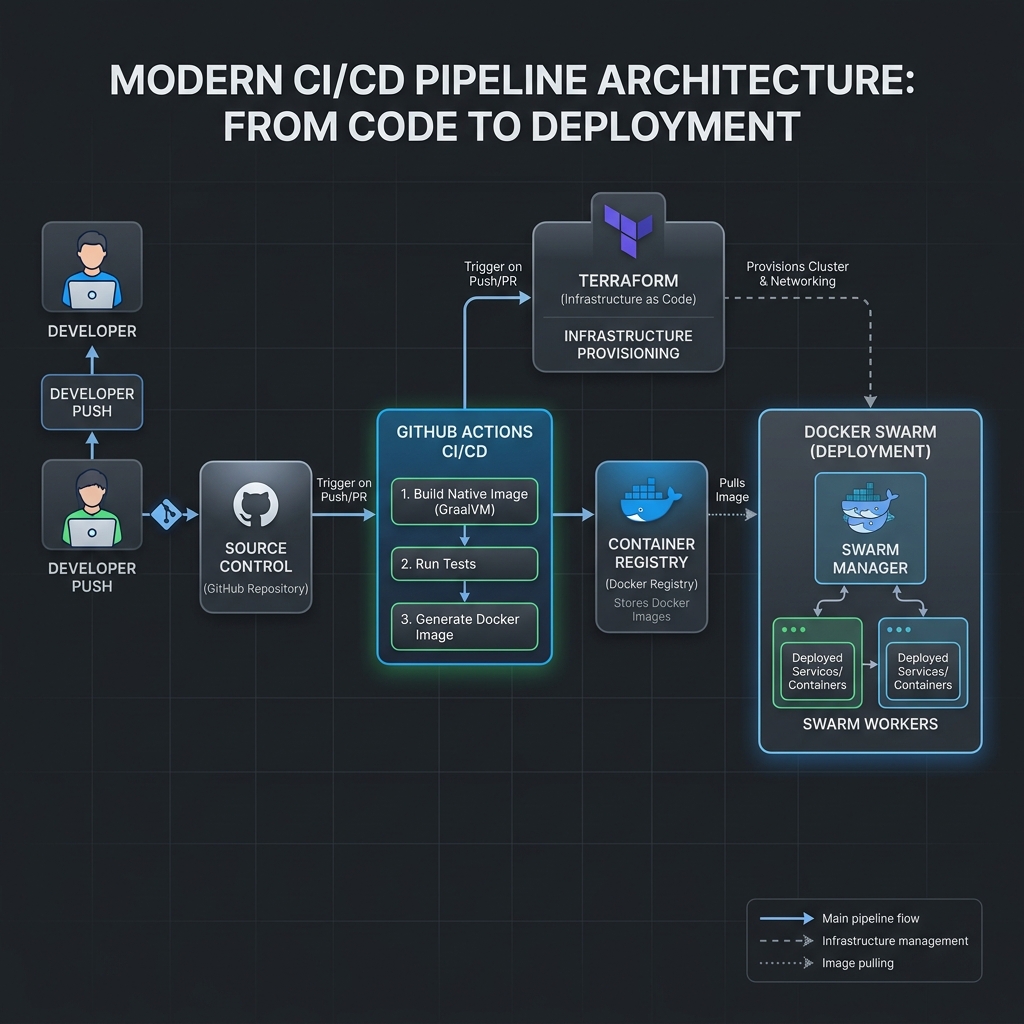
The architecture relies on four core stages:
- Source Code and Automation: GitHub repository hosts Java source code, Terraform scripts, and GitHub Actions workflow definitions.
- Automated Testing and Compilation: GitHub Actions spins up an Ubuntu runner, configures JDK 25, runs MockMvc integration tests, and triggers GraalVM Ahead-of-Time (AOT) compilation.
- Artifact Registry and Security: The pipeline packages a minimal scratch container, verifies security policies, and pushes the immutable image to Docker Hub.
- Infrastructure Orchestration: Terraform provisions target virtual machines and network boundaries. Docker Swarm then pulls the new image and updates replicas with zero downtime.
Compiling Spring Boot 4 to GraalVM Native Images in CI
Standard Java applications run on a Java Virtual Machine (JVM). The JVM offers high peak throughput through Just-In-Time (JIT) compilation. However, JVM containers often need several hundred megabytes of memory and take multiple seconds to boot. For modern cloud platforms, fast startup and low memory usage are essential.
Spring Boot 4 features native support for GraalVM native images. During the build, GraalVM processes the bytecode Ahead-of-Time (AOT). It strips unused classes and compiles the application directly into a machine binary. The resulting container starts in less than 40 milliseconds and uses under 50 megabytes of RAM. You can explore deep configuration options in our GraalVM Native Image Spring Boot 4 Cloud-Native Java Guide.
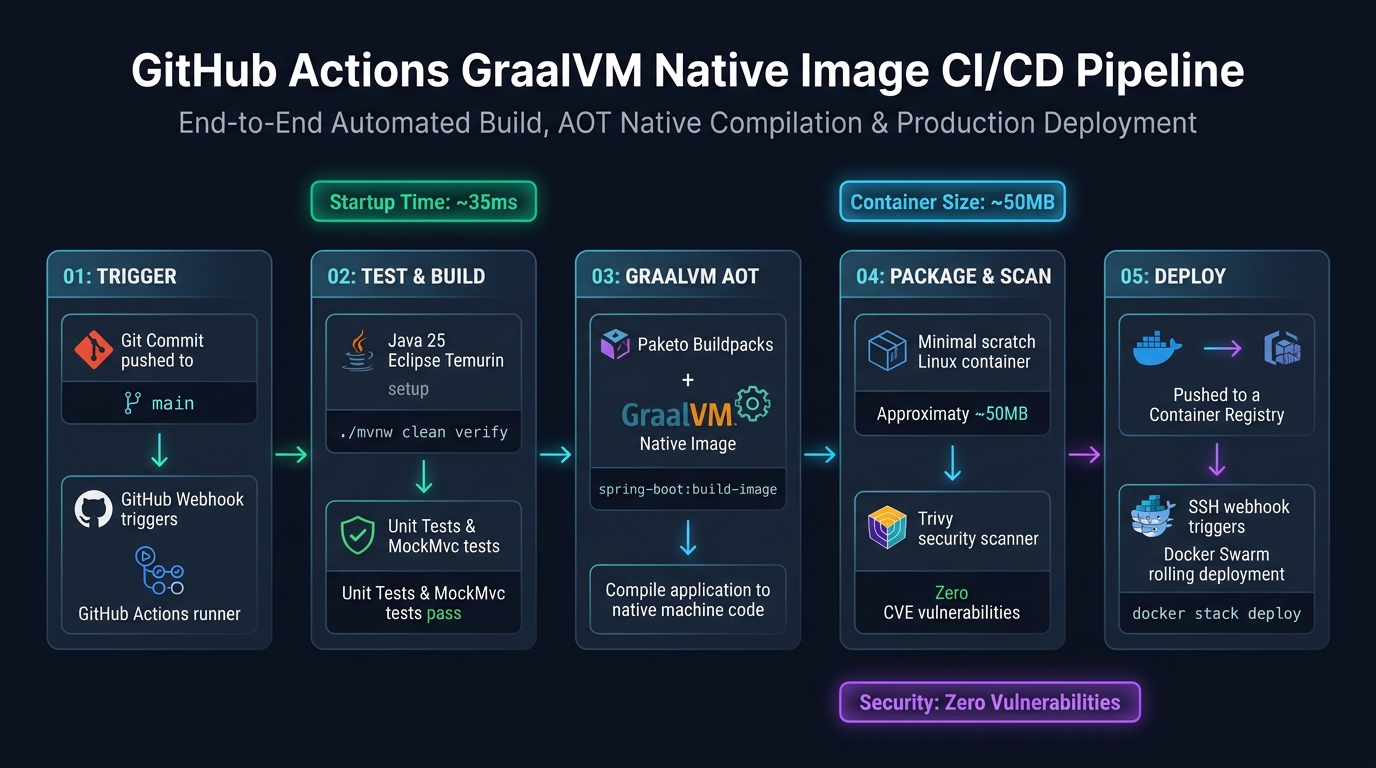
Here is the GitHub Actions workflow definition. Save this file at .github/workflows/deploy.yml in your repository:
name: Cloud-Native Spring Boot CI/CD Pipeline

on:
  push:
    branches: [ "main" ]
  pull_request:
    branches: [ "main" ]

jobs:
  build-and-test:
    name: Verify and Test Spring Boot 4 App
    runs-on: ubuntu-latest
    steps:
      - name: Check out repository
        uses: actions/checkout@v4

      - name: Set up Java 25 (Eclipse Temurin)
        uses: actions/setup-java@v4
        with:
          java-version: '25'
          distribution: 'temurin'
          cache: maven

      - name: Run Unit and Integration Tests
        run: ./mvnw -B -ntp clean test

  package-and-deploy:
    name: Build Native Image and Deploy
    needs: build-and-test
    if: github.ref == 'refs/heads/main'
    runs-on: ubuntu-latest
    steps:
      - name: Check out repository
        uses: actions/checkout@v4

      - name: Set up Java 25 (Eclipse Temurin)
        uses: actions/setup-java@v4
        with:
          java-version: '25'
          distribution: 'temurin'
          cache: maven

      - name: Log in to Container Registry
        uses: docker/login-action@v3
        with:
          username: ${{ secrets.DOCKER_USERNAME }}
          password: ${{ secrets.DOCKER_PASSWORD }}

      - name: Build and Push Docker Container Image
        run: |
          ./mvnw -B -ntp spring-boot:build-image \
            -Dspring-boot.build-image.imageName=${{ secrets.DOCKER_USERNAME }}/cicd-app:${{ github.sha }}

          docker tag ${{ secrets.DOCKER_USERNAME }}/cicd-app:${{ github.sha }} ${{ secrets.DOCKER_USERNAME }}/cicd-app:latest
          docker push ${{ secrets.DOCKER_USERNAME }}/cicd-app:${{ github.sha }}
          docker push ${{ secrets.DOCKER_USERNAME }}/cicd-app:latest

      - name: Deploy Stack to Docker Swarm via SSH
        uses: appleboy/ssh-action@v1.0.3
        with:
          host: ${{ secrets.SWARM_MANAGER_HOST }}
          username: ${{ secrets.SWARM_SSH_USER }}
          key: ${{ secrets.SWARM_SSH_PRIVATE_KEY }}
          script: |
            docker login -u ${{ secrets.DOCKER_USERNAME }} -p ${{ secrets.DOCKER_PASSWORD }}
            docker service update --image ${{ secrets.DOCKER_USERNAME }}/cicd-app:${{ github.sha }} cicd_stack_api
This workflow guarantees that code is tested before packaging. If any test fails, the runner stops immediately. No broken container image ever reaches the production registry.
Provisioning Swarm Infrastructure with Terraform
Creating servers manually in a cloud web console is slow and error-prone. One engineer might configure a security group incorrectly. Another might pick the wrong operating system image. Infrastructure as Code (IaC) eliminates these problems by storing infrastructure definitions in declarative text files.
Terraform uses HashiCorp Configuration Language (HCL). You write your desired end state, and Terraform creates, updates, or destroys cloud resources to match that state.
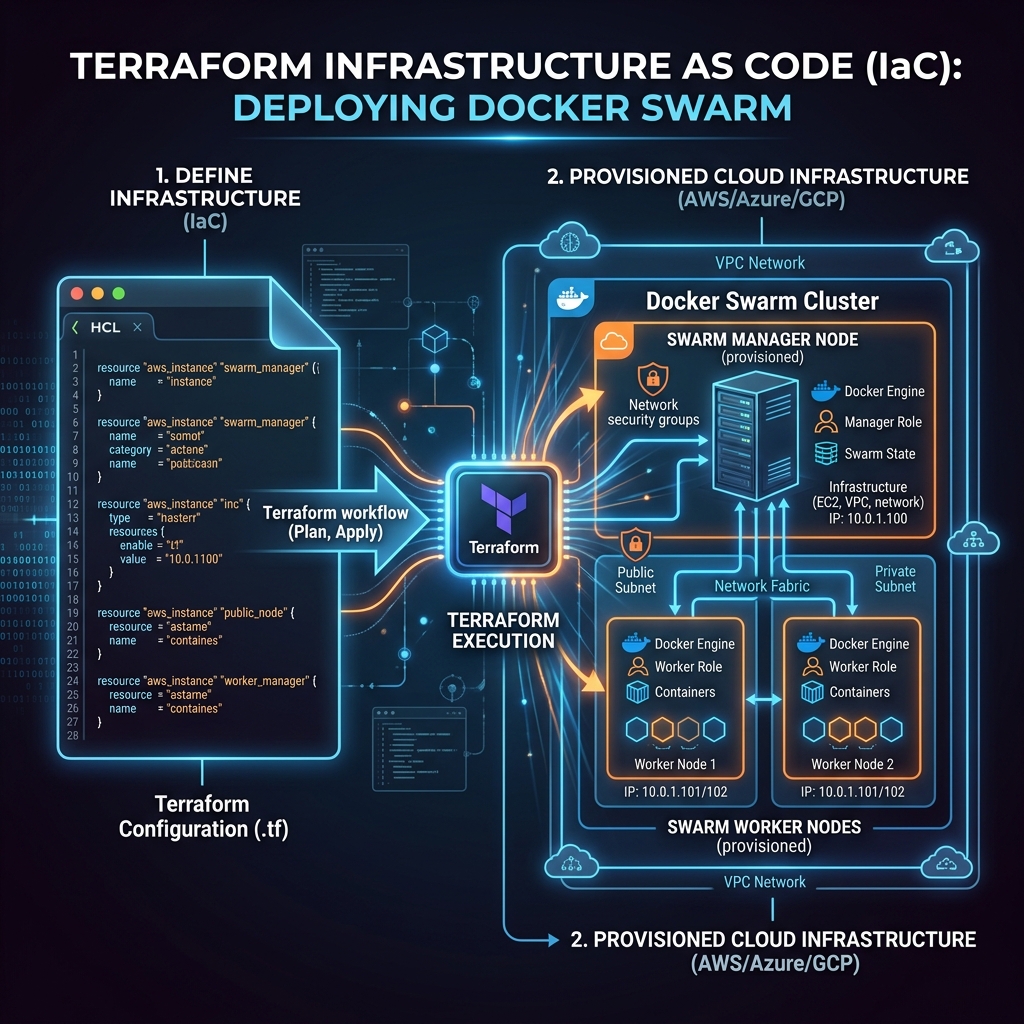
Here is an example Terraform configuration file (main.tf). It provisions an AWS EC2 instance, installs Docker, and initializes Docker Swarm automatically using cloud-init user data:
terraform {
  required_version = ">= 1.8.0"
  required_providers {
    aws = {
      source  = "hashicorp/aws"
      version = "~> 5.50.0"
    }
  }
}

provider "aws" {
  region = var.aws_region
}

variable "aws_region" {
  type    = string
  default = "us-east-1"
}

resource "aws_security_group" "swarm_sg" {
  name        = "docker-swarm-security-group"
  description = "Allow inbound SSH, HTTP, and Swarm cluster management"

  ingress {
    description = "SSH from trusted bastion"
    from_port   = 22
    to_port     = 22
    protocol    = "tcp"
    cidr_blocks = ["10.0.0.0/16"]
  }

  ingress {
    description = "Public HTTP web traffic"
    from_port   = 80
    to_port     = 80
    protocol    = "tcp"
    cidr_blocks = ["0.0.0.0/0"]
  }

  egress {
    from_port   = 0
    to_port     = 0
    protocol    = "-1"
    cidr_blocks = ["0.0.0.0/0"]
  }
}

resource "aws_instance" "swarm_manager" {
  ami                    = "ami-0c55b159cbfafe1f0" # Ubuntu 24.04 LTS
  instance_type          = "t3.medium"
  vpc_security_group_ids = [aws_security_group.swarm_sg.id]

  user_data = <<-EOF
              #!/bin/bash
              set -e
              apt-get update -y
              apt-get install -y docker.io
              systemctl enable --now docker
              docker swarm init
              EOF

  tags = {
    Name        = "Production-Swarm-Manager"
    Environment = "Production"
  }
}
When you run terraform apply, Terraform calculates the differences between your cloud provider and your local files. It applies changes safely and stores state in a secure remote backend like AWS S3 with state locking.
Docker Swarm High Availability and Raft Consensus
Container orchestrators must survive hardware failures. If a single physical server crashes, your application must remain online. Docker Swarm provides native cluster management directly inside the Docker engine.
A production Docker Swarm cluster divides nodes into two roles: Managers and Workers. Swarm managers run the Raft consensus algorithm. This algorithm ensures that all managers agree on the exact state of running services and task placements.
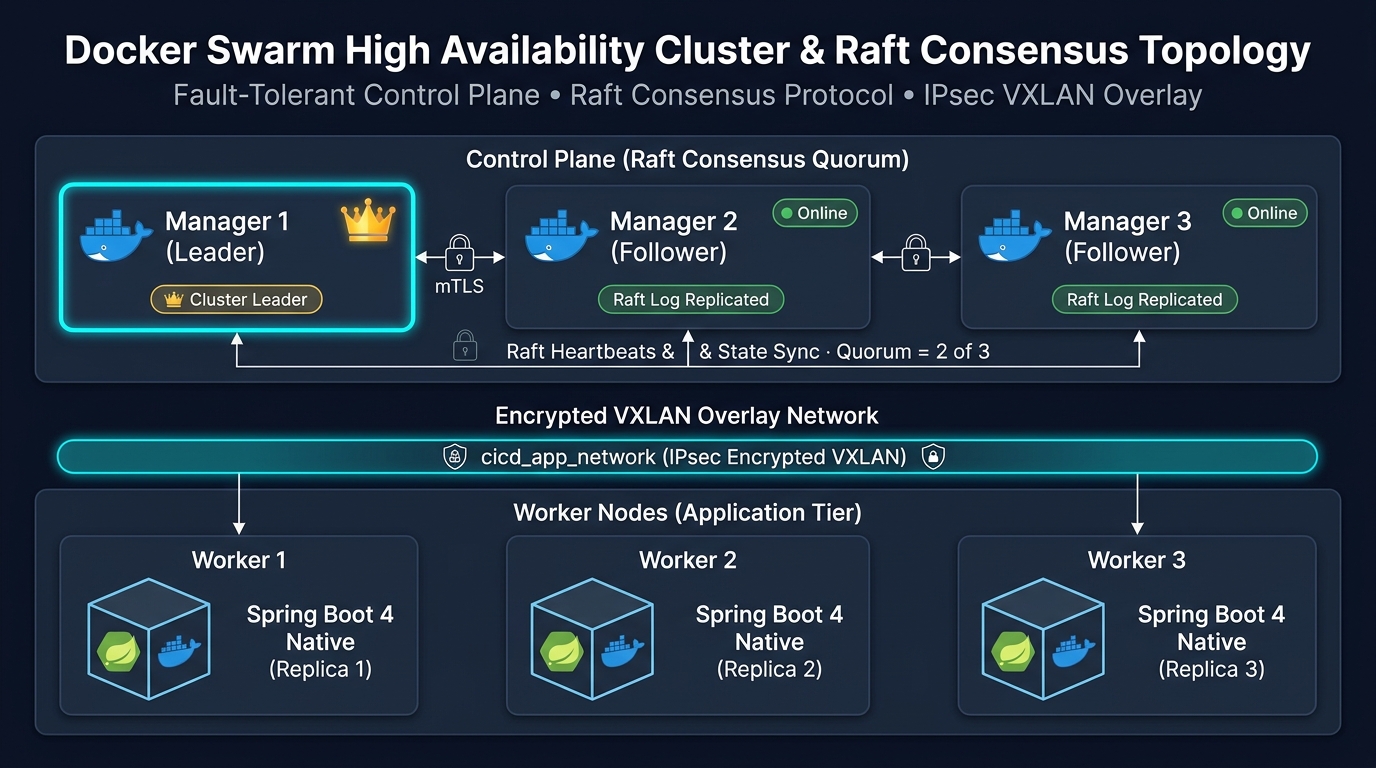
Here are the key characteristics of the Swarm control plane:
- Raft Quorum: A cluster requires an odd number of managers (typically 3 or 5). To make decisions, the cluster requires a majority quorum calculated as
(N / 2) + 1. A 3-manager cluster tolerates 1 manager failure. - Leader Election: One manager acts as the active Leader. The remaining managers act as Followers. If the Leader goes offline, Followers elect a new Leader in milliseconds.
- Encrypted Overlay Network: Swarm uses VXLAN overlay networks with IPsec data plane encryption (
cicd_app_network). Containers communicate securely across physical host boundaries without exposing internal ports to the internet. - Mutual TLS (mTLS): All communication between Swarm nodes is encrypted using TLS. Docker Swarm rotates certificates automatically every 90 days.
Configuring Zero-Downtime Rolling Updates
How do we deploy a new application version without dropping active HTTP requests? Docker Swarm achieves this through its Ingress Routing Mesh and declarative update policies.
The ingress routing mesh exposes a public port on every node in the cluster. When traffic hits any node, the Linux IPVS routing engine redirects the packet to a healthy running container. During a rollout, Swarm stops sending traffic to containers that are shutting down.
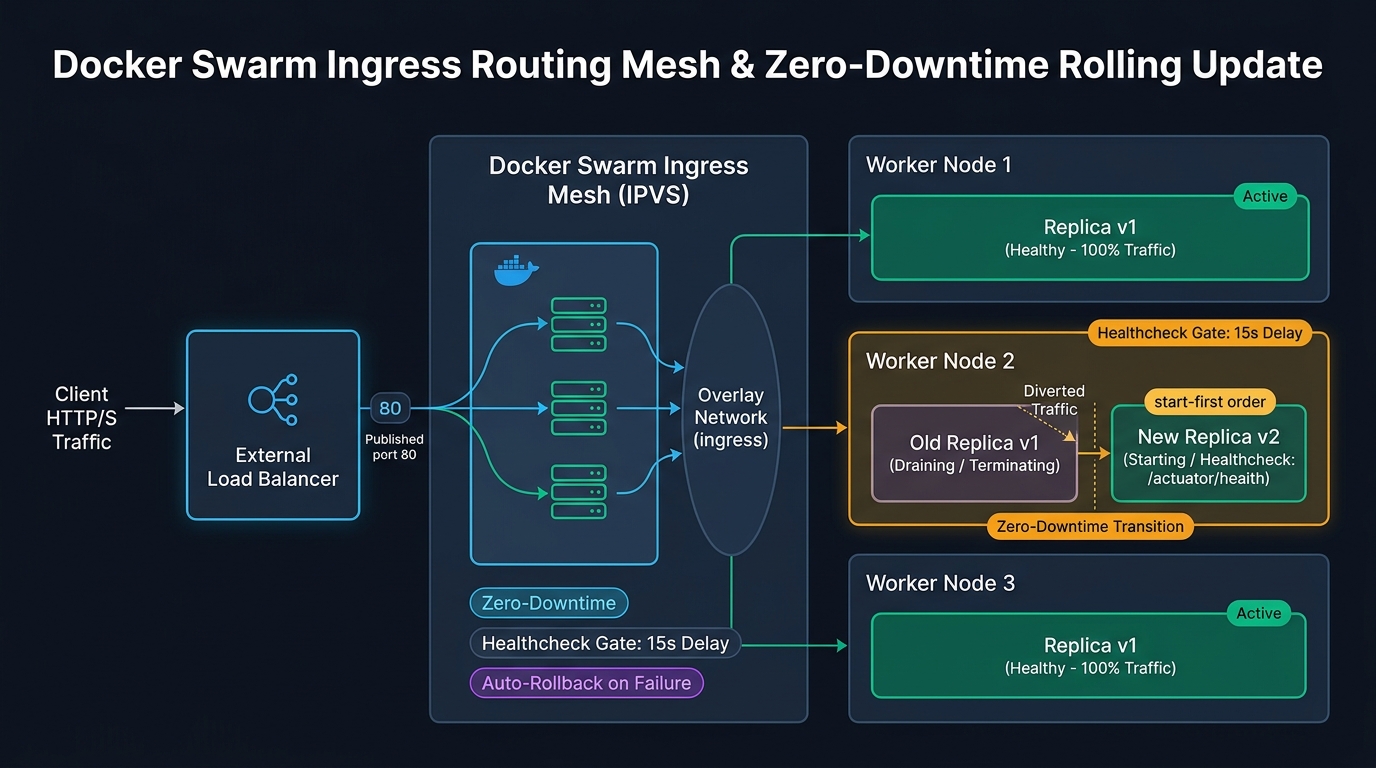
To configure zero-downtime updates, define your services in a docker-compose.yml file using the deploy.update_config block:
version: "3.8"

services:
  api:
    image: webcodein/cicd-app:1.0.0
    ports:
      - "80:8080"
    environment:
      - SPRING_PROFILES_ACTIVE=prod
    healthcheck:
      test: ["CMD", "wget", "--quiet", "--tries=1", "--spider", "http://localhost:8080/actuator/health"]
      interval: 10s
      timeout: 5s
      retries: 3
      start_period: 20s
    deploy:
      replicas: 3
      update_config:
        parallelism: 1
        delay: 15s
        order: start-first
        failure_action: rollback
      restart_policy:
        condition: on-failure
Let's examine why these four parameters guarantee zero downtime:
parallelism: 1: Swarm updates one container replica at a time. Two replicas remain active and handle live customer traffic.order: start-first: Swarm starts the new container version before stopping the old version. Traffic only cuts over once the new container is healthy.delay: 15s: Swarm waits 15 seconds after a container turns healthy before updating the next replica. This allows caches to warm up.failure_action: rollback: If the new version fails its Actuator healthcheck, Swarm stops the rollout and rolls back to the previous stable release automatically.
Building the Spring Boot 4 REST Microservice
To demonstrate this deployment model, our companion workshop project implements a Spring Boot 4 REST controller. The controller exposes health and runtime diagnostic metadata.
Here is the controller implementation from src/main/java/com/webcodein/cicd/controller/AppController.java:
package com.webcodein.cicd.controller;

import org.springframework.beans.factory.annotation.Value;
import org.springframework.web.bind.annotation.GetMapping;
import org.springframework.web.bind.annotation.RestController;

import java.net.InetAddress;
import java.net.UnknownHostException;
import java.util.Map;

@RestController
public class AppController {

    @Value("${app.version:1.0.0}")
    private String version;

    @GetMapping("/api/status")
    public Map<String, String> getStatus() {
        String hostname = "unknown";
        try {
            hostname = InetAddress.getLocalHost().getHostName();
        } catch (UnknownHostException e) {
            // Fallback for isolated containers
        }

        return Map.of(
            "status", "UP",
            "version", version,
            "hostname", hostname,
            "message", "Zero-downtime deployment successful!"
        );
    }
}
Notice that the controller returns the container's hostname. In Docker Swarm, each container replica receives a unique hostname. As you refresh your browser, the Ingress Mesh routes requests across different replicas.
Spring Boot Actuator Health Configuration
Docker Swarm health checks require Spring Boot Actuator. In src/main/resources/application.properties, expose the health endpoint:
management.endpoints.web.exposure.include=health,info
management.endpoint.health.show-details=always
management.endpoint.health.probes.enabled=true
app.version=1.0.0
This configuration exposes /actuator/health, /actuator/health/liveness, and /actuator/health/readiness for container orchestrators.
Integration Testing with MockMvc
Spring Boot 4 favors MockMvc for rapid controller verification. Here is the integration test from src/test/java/com/webcodein/cicd/controller/AppControllerIntegrationTest.java:
package com.webcodein.cicd.controller;

import org.junit.jupiter.api.BeforeEach;
import org.junit.jupiter.api.Test;
import org.springframework.beans.factory.annotation.Autowired;
import org.springframework.boot.test.context.SpringBootTest;
import org.springframework.http.MediaType;
import org.springframework.test.web.servlet.MockMvc;
import org.springframework.test.web.servlet.setup.MockMvcBuilders;

import static org.springframework.test.web.servlet.request.MockMvcRequestBuilders.get;
import static org.springframework.test.web.servlet.result.MockMvcResultMatchers.jsonPath;
import static org.springframework.test.web.servlet.result.MockMvcResultMatchers.status;

@SpringBootTest
public class AppControllerIntegrationTest {

    private MockMvc mockMvc;

    @Autowired
    private AppController appController;

    @BeforeEach
    void setUp() {
        this.mockMvc = MockMvcBuilders.standaloneSetup(appController).build();
    }

    @Test
    public void testGetStatus() throws Exception {
        mockMvc.perform(get("/api/status")
                .accept(MediaType.APPLICATION_JSON))
                .andExpect(status().isOk())
                .andExpect(jsonPath("$.status").value("UP"))
                .andExpect(jsonPath("$.message").value("Zero-downtime deployment successful!"));
    }
}
The test boots the Spring application context and verifies that the JSON payload contains status: UP. When developers commit code, GitHub Actions executes this test suite before triggering image builds.
Real-World Enterprise Use Cases
Cloud-native deployment pipelines solve critical business challenges across various operational environments:
- High-Availability SaaS Platforms: SaaS providers deploy microservice updates multiple times a day. Rolling updates guarantee that active customer checkouts and transactions complete without disconnection.
- Edge and IoT Gateways: In branch offices, factories, and retail stores, running heavy Kubernetes clusters is impractical. Docker Swarm provides high availability with minimal hardware overhead.
- Internal Tooling and Staging Environments: Engineering organizations maintain staging environments for hundreds of services. Automated pipelines ensure that staging environments match production configurations exactly.
Advantages and Limitations: Docker Swarm vs Kubernetes
Choosing the right container orchestrator depends on your team size and operational complexity. Here is an objective comparison between Docker Swarm and Kubernetes:
| Evaluation Dimension | Docker Swarm | Kubernetes (K8s) |
|---|---|---|
| Setup Complexity | Extremely Simple (docker swarm init) |
High (Control plane, kubelets, CNI, etcd) |
| Memory Overhead | Low (~50 MB per node for daemon) | High (~500 MB to 1 GB per node for agents) |
| Configuration Language | Standard docker-compose.yml |
Extensive Kubernetes manifests or Helm charts |
| Rolling Updates | Built-in declarative update policies | Flexible Deployments with complex strategy options |
| Auto-Scaling | Manual or external script triggers | Native Horizontal Pod Autoscaler (HPA) |
| Ecosystem & Plugins | Limited native extensions | Massive CNCF ecosystem (operators, service meshes) |
For small to medium teams, Docker Swarm provides 90% of Kubernetes capabilities with 10% of the operational complexity. If your application requires advanced service meshes, custom controllers, or hundreds of nodes, Kubernetes is the industry standard.
Production Best Practices
Follow these proven guidelines to maintain reliable CI/CD pipelines:
- Use Immutable Image Tags: Never deploy using the
:latesttag in production. Tag every image with the git commit SHA (e.g.,cicd-app:a758990). This ensures exact reproducibility and makes rollbacks deterministic. - Run Containers as Non-Root Users: In your Dockerfile, create a dedicated system group and user (e.g.,
USER spring:spring). If an attacker breaches the application container, they do not gain root access to the host kernel. - Automate Resiliency Testing: Verify how your pipeline responds when nodes fail. You can simulate network latency and failures using our guide on Chaos Engineering with Spring Boot 4 and Toxiproxy.
- Secure Pipeline Secrets: Store cloud credentials and deployment tokens in GitHub Repository Secrets. Never commit passwords or private SSH keys into Git repositories.
- Enforce Local Container Parity: Test your multi-container stacks locally using Docker Compose before pushing code. Learn more in our guide on Modern Local Development with Testcontainers and Docker Compose.
Common Pitfalls and How to Fix Them
Engineers often encounter these common stumbling blocks when building Swarm CI/CD pipelines:
1. Brief Downtime with Stop-First Ordering
The Mistake: Setting order: stop-first in your deploy update configuration. Docker Swarm stops the existing container before starting the replacement container. If initialization takes 5 seconds, incoming users receive HTTP 502 Bad Gateway errors.
The Fix: Always configure order: start-first. Docker Swarm keeps the old container serving traffic until the new container passes its health checks.
2. Flapping Health Checks During Container Startup
The Mistake: Omitting the start_period setting in container health checks. The health check runs immediately after container creation. If the application takes 10 seconds to initialize, the health check fails and triggers premature container termination.
The Fix: Define a generous start_period (e.g., start_period: 25s). This gives the Spring Boot context sufficient time to establish database connection pools and start the embedded web server.
3. Quorum Loss with Even Manager Counts
The Mistake: Provisioning an even number of Swarm managers (such as 2 or 4 nodes). In a 2-manager cluster, quorum requires 2 nodes. If 1 manager crashes, quorum is lost, and the cluster cannot process new deployments.
The Fix: Always maintain an odd number of managers: 3 managers (tolerates 1 failure) or 5 managers (tolerates 2 failures).
Conclusion
A cloud-native CI/CD pipeline turns software deployment into a routine, low-risk process. Combining GitHub Actions, GraalVM native images, Terraform, and Docker Swarm provides a fast, automated workflow. You achieve millisecond container startups, infrastructure as code, and zero-downtime rolling updates with minimal operational overhead.
Companion Workshop Code
You can test and run this entire pipeline yourself. We have prepared an open-source companion project featuring the Spring Boot 4 REST API, MockMvc test suite, Dockerfile, Docker Compose stack, Terraform scripts, and GitHub Actions workflows.
View the Companion Code on GitHub
Frequently Asked Questions
How does Docker Swarm achieve zero-downtime deployments?
Docker Swarm uses an Ingress Routing Mesh combined with declarative rolling updates (parallelism: 1 and order: start-first). It spins up a new container replica, waits for the health check to pass, routes traffic to the new replica, and then terminates the old container gracefully.
Is Docker Swarm still relevant in 2026?
Yes. While Kubernetes dominates large multi-cloud enterprises, Docker Swarm remains popular for small to mid-sized teams. It is built directly into Docker, requires zero external agents, and runs efficiently on single servers or modest clusters.
Why use GraalVM native images for Docker containers?
GraalVM Ahead-of-Time compilation strips unused JVM classes and generates machine executables. This reduces container memory consumption from 350MB to under 50MB and accelerates startup time from seconds to under 40 milliseconds, allowing instant scaling.
Can Terraform manage Docker Swarm services directly?
Yes. Terraform supports the community Docker provider (kreuzwerker/docker). However, standard practice uses Terraform to provision virtual machines and network topologies, while delegating application rolling updates to GitHub Actions and Docker Compose.
How do I rollback a failed deployment in Docker Swarm?
If you configure failure_action: rollback in your stack file, Docker Swarm automatically detects failed health checks and reverts to the previous task definition. You can also trigger an immediate manual rollback by running docker service rollback <service_name>.