
Delivering over-the-air (OTA) updates to millions of devices is a huge challenge. Modern mobile operating systems are massive. An Android system image can easily be 2GB or 3GB in size. If you send the full image to every user, you will consume massive amounts of bandwidth and user data.
To solve this problem, modern systems use Delta Updates (also called differential updates). Instead of sending the full file, the server only sends the difference between the user’s current version and the new version. This patch can be as small as 50MB.
In this guide, we will learn how to build a scalable Delta Firmware Update Service using Spring Boot 4 and Java 25. We will explore how differential patches work and how to stream them efficiently.
What are Delta Updates?
A delta update contains only the bytes that changed between Version A and Version B. When a device receives a delta patch, it applies the patch to its current firmware to create the new firmware locally.
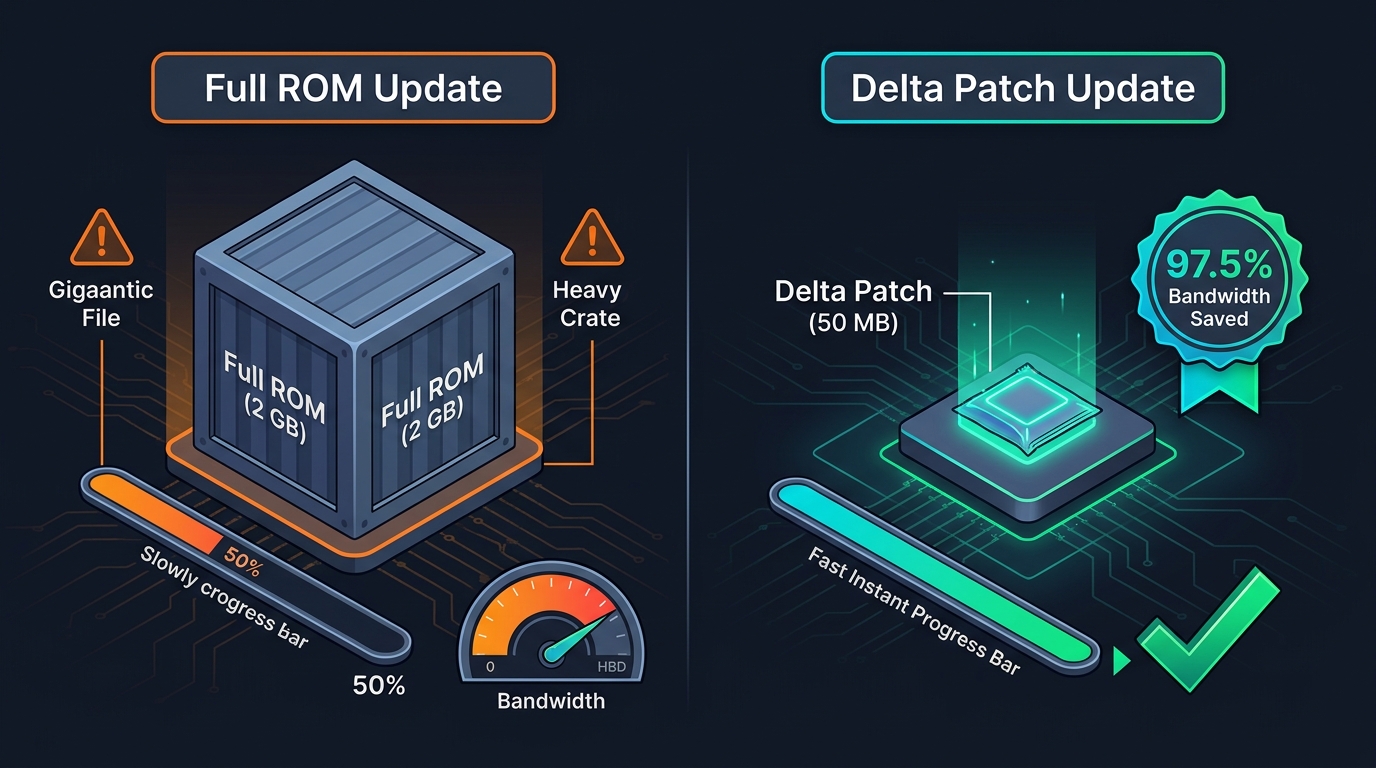
This approach has three major advantages:
- Saves Bandwidth: A 2GB firmware can be updated with a 50MB patch, reducing server costs by 95%.
- Faster Downloads: Users get the update much faster, especially on slow mobile networks.
- Saves Battery: Downloading a smaller file keeps the phone radio active for less time.
How Differential Patching Works (bsdiff)
To create a patch, we need an algorithm that compares two binary files. One of the most famous algorithms for this is bsdiff.
The bsdiff tool takes the old file and the new file. It finds the differences and creates a patch file. Because executable files (like Android libraries) change slightly when compiled, bsdiff is optimized to find data that simply shifted positions.
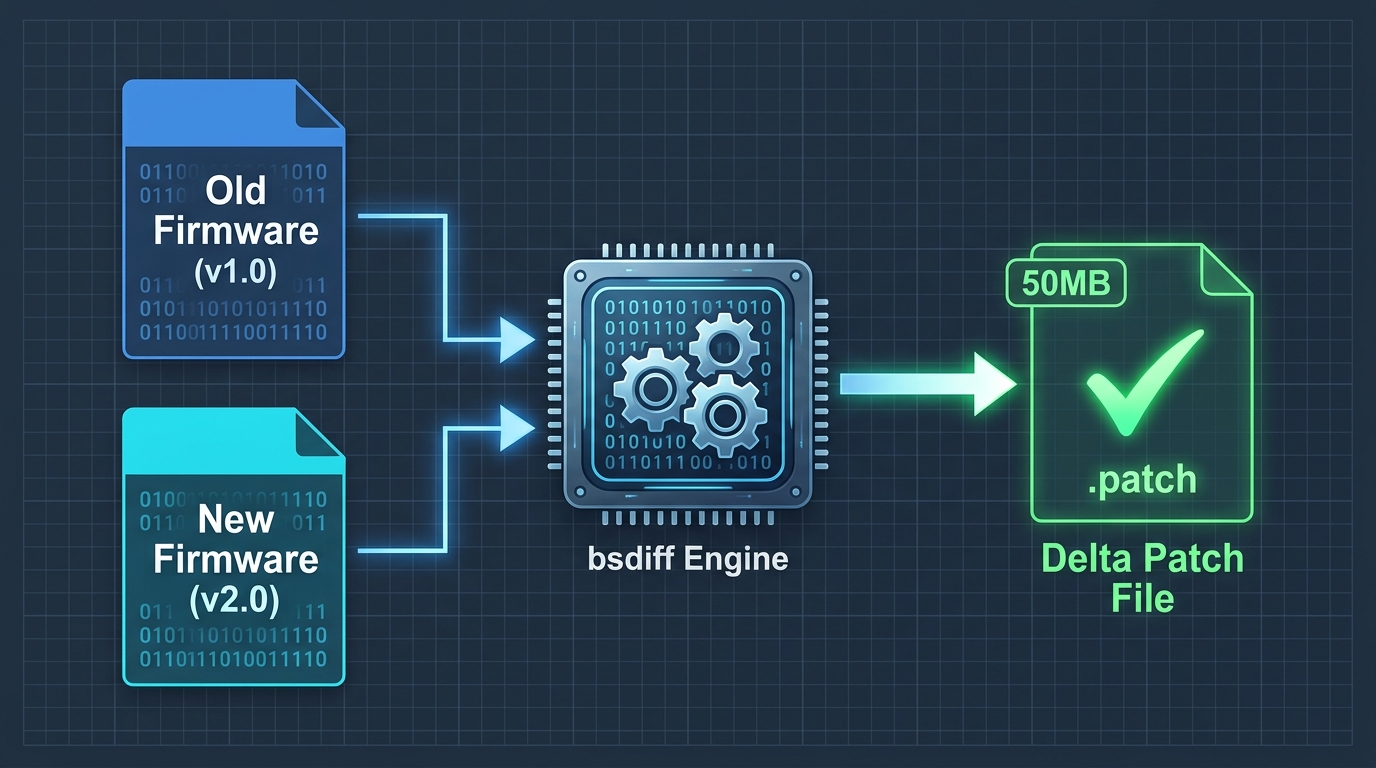
When the phone receives the patch, it uses a tool called bspatch to combine its old firmware with the patch, generating the perfect new firmware.
Spring Boot Architecture
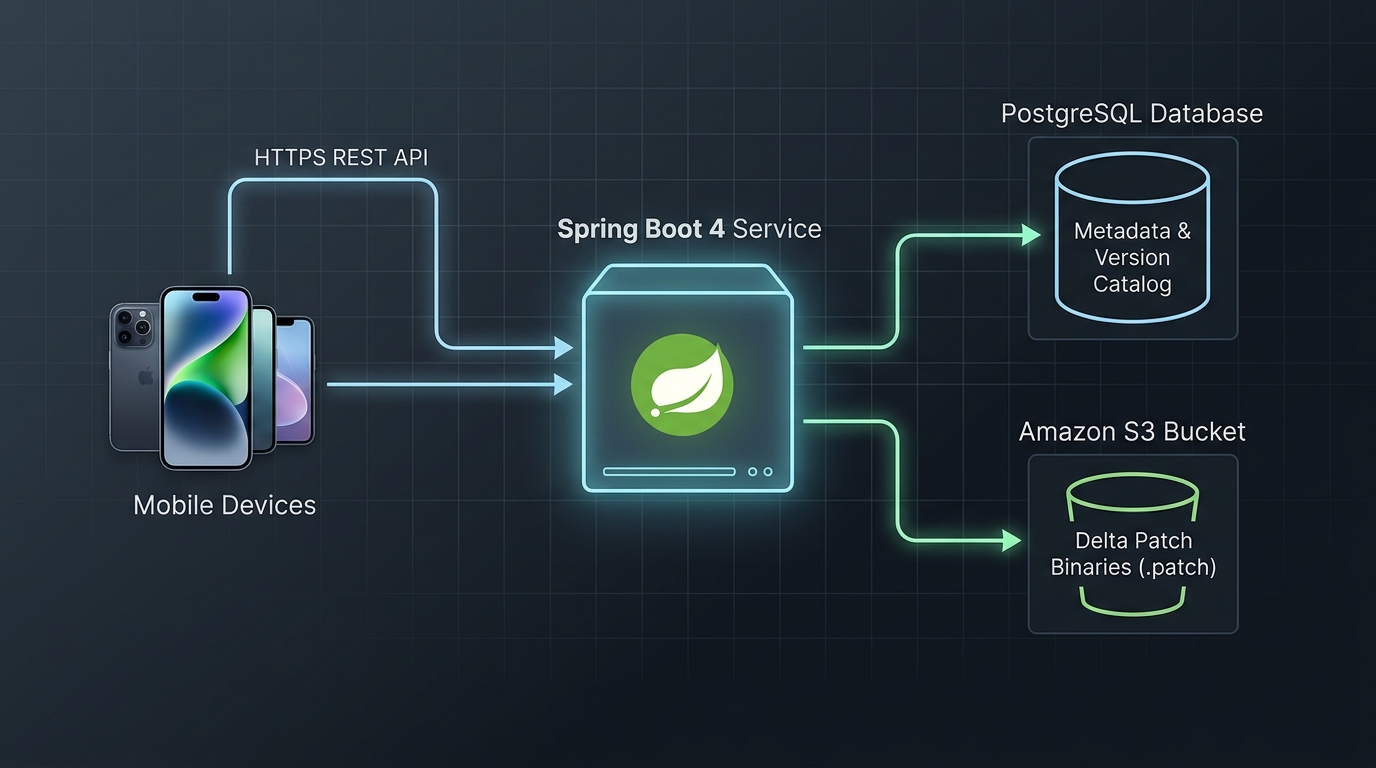
Our Spring Boot 4 service will act as the OTA backend. It will not generate the patches on the fly, because that is too CPU-intensive. Instead, patches are pre-generated in a CI/CD pipeline and stored in an S3 bucket (or MinIO).
The Spring Boot application is responsible for:
- Knowing which devices run which firmware versions (using PostgreSQL).
- Checking if a patch exists from the device’s specific version to the latest version.
- Providing a secure download link (using Spring Security and pre-signed S3 URLs).
Building the Service in Spring Boot 4
Let’s implement the core logic. We will use Java 25, Spring Boot 4.0.0, and Spring Data JPA 4.
1. Defining the Entities
First, we need to model our firmware versions and the patches available between them.
import jakarta.persistence.*;
import java.time.Instant;

@Entity
@Table(name = "firmware_versions")
public class FirmwareVersion {

    @Id
    @GeneratedValue(strategy = GenerationType.IDENTITY)
    private Long id;

    @Column(unique = true, nullable = false)
    private String version; // e.g., "1.2.0"

    @Column(nullable = false)
    private String fullRomSha256;

    @Column(nullable = false)
    private Instant releaseDate;

    // Getters and Setters omitted for brevity
}
Next, we model the Delta Patch. A patch links a specific “from” version to a specific “to” version.
@Entity
@Table(name = "delta_patches")
public class DeltaPatch {

    @Id
    @GeneratedValue(strategy = GenerationType.IDENTITY)
    private Long id;

    @ManyToOne
    @JoinColumn(name = "from_version_id", nullable = false)
    private FirmwareVersion fromVersion;

    @ManyToOne
    @JoinColumn(name = "to_version_id", nullable = false)
    private FirmwareVersion toVersion;

    @Column(nullable = false)
    private String patchObjectKey; // S3 Bucket Key

    @Column(nullable = false)
    private Long sizeBytes;

    @Column(nullable = false)
    private String patchSha256;
}
2. Exposing the Update API
When a device asks for an update, it sends its current version. We query the database to find a `DeltaPatch` that upgrades it to the latest active version.
import org.springframework.web.bind.annotation.*;
import org.springframework.http.ResponseEntity;

@RestController
@RequestMapping("/api/v1/ota")
public class OtaUpdateController {

    private final UpdateService updateService;

    public OtaUpdateController(UpdateService updateService) {
        this.updateService = updateService;
    }

    @GetMapping("/check")
    public ResponseEntity<UpdateResponse> checkForUpdate(
            @RequestParam String currentVersion,
            @RequestParam String deviceModel) {

        return updateService.findUpdate(currentVersion, deviceModel)
                .map(ResponseEntity::ok)
                .orElse(ResponseEntity.noContent().build());
    }
}
The `UpdateResponse` is a Java record that contains the download URL and the checksum. The checksum is critical. If the patch file is corrupted during download, applying it will break the phone.
public record UpdateResponse(
    String targetVersion,
    String downloadUrl, // Pre-signed S3 URL
    String patchSha256,
    Long sizeBytes,
    boolean isCritical
) {}
Applying the Patch on the Device
When the phone receives the JSON response, it downloads the file from the provided URL. Then, the real magic happens on the device itself.
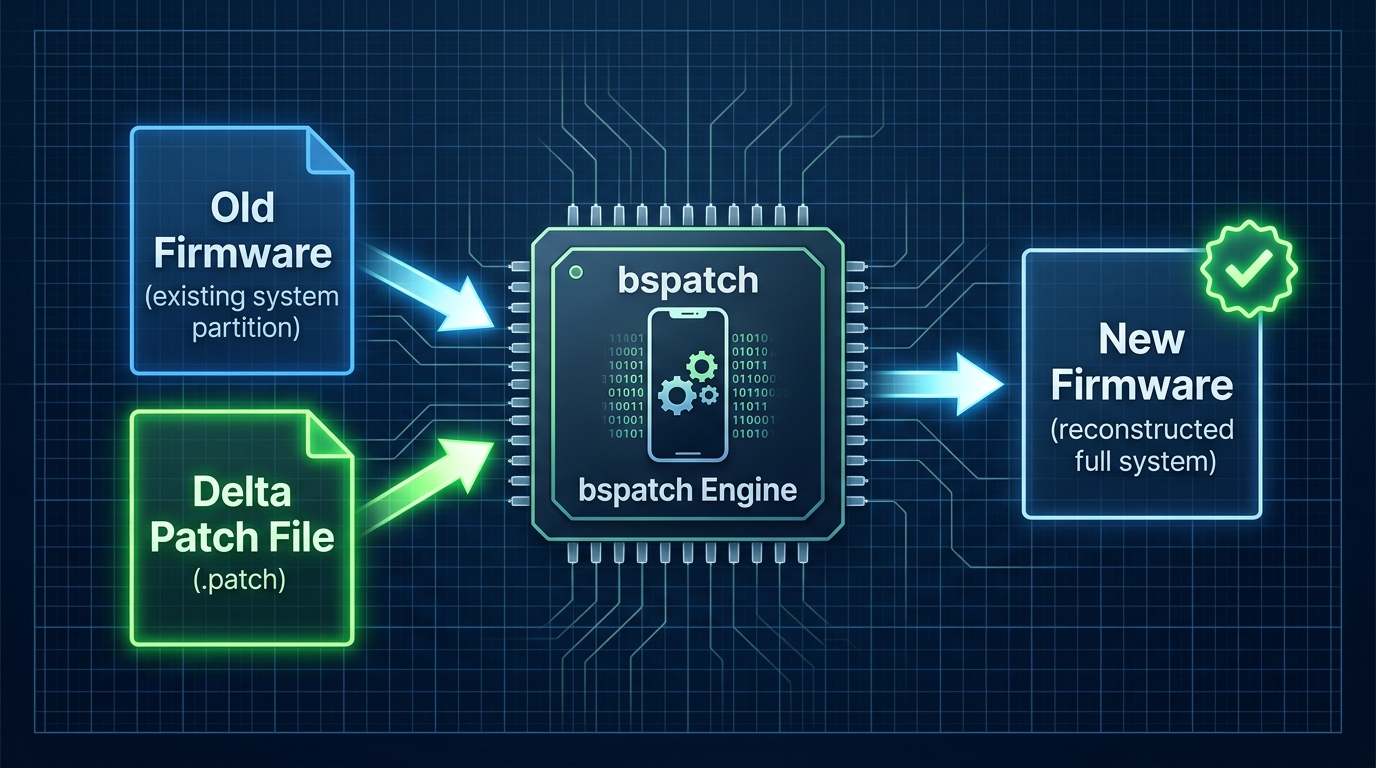
The device validates the SHA-256 hash of the downloaded patch. If it matches, the device enters Recovery mode (or uses Android A/B seamless system updates) and runs bspatch. It reads the active partition (old firmware), applies the patch, and writes the output to the new partition.
Best Practices and Common Mistakes
1. Do Not Generate Patches on the Fly
Binary diffing requires a lot of RAM and CPU. Never run bsdiff inside your Spring Boot request thread. Generate patches in your CI/CD pipeline (e.g., GitHub Actions) when a new release is built, and upload the static files to S3. To safely test new firmware releases across a fraction of your fleet before full deployment, see our guide on managing OTA canary rollouts with Spring Boot 4 and Redis.
2. Always Provide a Fallback
Sometimes, a device misses several updates. If a user is on Version 1.0, and the latest is 1.5, you might not have a patch for `1.0 -> 1.5`. In this case, your Spring Boot API must intelligently fallback to providing the Full ROM download URL.
3. Verify the Base Hash
If a user modified their system partition (e.g., rooting their phone), their base firmware will have a different hash. Applying a delta patch to a modified base will completely corrupt the system. Ensure the device verifies its base partition hash before requesting a patch.
Conclusion
Building a delta firmware update server with Spring Boot 4 is an excellent way to learn about content delivery and scalable architecture. By serving small differential patches instead of massive ROMs, you save infrastructure costs and provide a much better experience for your users.
If you want to see how to protect these endpoints using JWT, check out our guide on Jakarta Security 4 vs Spring Security 7.
Companion Code
The complete, runnable Spring Boot 4 project for this article, including automated tests with Testcontainers and PostgreSQL, is available on our public GitHub repository:
Workshop Companion Code: Building a Delta Firmware Update Service in Spring Boot 4