
Deploying firmware and operating system updates across millions of connected devices is one of the most critical challenges in distributed systems engineering. Whether managing Android smartphones, connected vehicles, smart medical devices, or industrial IoT sensors, an Over-The-Air (OTA) update carries immense operational risk. If a faulty firmware binary containing a critical regression is simultaneously broadcast to an entire fleet, millions of devices can be permanently bricked within minutes. Furthermore, millions of devices attempting to download gigabyte-sized payloads at the exact same moment will overwhelm cloud infrastructures and cause catastrophic network outages (see our architectural guide on building a resilient OTA firmware delivery server).
The definitive industry solution to this challenge is a Canary Rollout. By releasing an update incrementally—beginning with a 0.1% internal test ring, expanding to 1% canary cohorts, scaling through 10% and 50% broad deployments, and culminating in 100% General Availability (GA)—engineering teams can monitor telemetric health and halt deployments before defects propagate. In this technical architectural guide, we demonstrate how to design and implement a high-throughput, low-latency OTA canary rollout engine capable of managing tens of millions of devices using Java 25, Spring Boot 4, and Redis Bitmaps.
Table of Contents
- The Scale Challenge: Why Relational Databases Fail at OTA Heartbeats
- Comparative Analysis: Rollout State Storage Strategies
- Designing the Multi-Stage Canary Rollout Strategy
- End-to-End System Architecture for 10M+ Fleet Devices
- Redis Bitmaps Deep Dive: O(1) Bitwise Allocation Mechanics
- Hands-On Implementation: Spring Boot 4 and StringRedisTemplate
- Scaling Concurrency: Java 25 Virtual Threads and Non-Blocking I/O
- Integration Testing with Redis Testcontainers
- Enterprise Use Cases: Automotive, Mobile, and Smart Grid Rollouts
- CI/CD Pipeline Automation: GitHub Actions and Docker Optimization
- Production Readiness and Enterprise Guardrails
- Common Pitfalls and How to Fix Them
- Frequently Asked Questions (FAQ)
- Conclusion and Next Steps
- References and Companion Code
The Scale Challenge: Why Relational Databases Fail at OTA Heartbeats
In enterprise IoT and mobile ecosystems, connected edge devices transmit periodic heartbeat requests to verify firmware compatibility and check for pending software upgrades. When an operating system rollout begins, tens of millions of devices poll the OTA gateway concurrently:
- Query Contention and Connection Starvation: If your OTA check executes a relational SQL query such as
SELECT eligible FROM device_rollouts WHERE device_id = ? AND version = ?, database connection pools are rapidly overwhelmed. Even with B-Tree indexing, executing 150,000 queries per second causes disk I/O bottlenecks and connection timeouts. - Memory Inefficiency: Storing eligibility tables for 20 million devices in PostgreSQL or MongoDB requires hundreds of megabytes of RAM for table rows and auxiliary index structures. Relational storage formats introduce significant object overhead for storing simple binary (true/false) rollout decisions.
- Write Lock Contention During Staged Expansions: When expanding a rollout from 1% to 10%, a relational database must execute massive batch update statements (
UPDATE device_rollouts SET eligible = true WHERE ...). This generates row-level or table-level locks that block incoming check queries, triggering cascading timeouts.
To support massive request concurrency with sub-millisecond response times, the eligibility verification layer must be completely decoupled from relational transactional storage. The ideal solution utilizes an in-memory, bitwise data structure: Redis Bitmaps.
Comparative Analysis: Rollout State Storage Strategies
To evaluate the architectural trade-offs of different data storage strategies when managing eligibility checks for 10 million active devices, consider the following benchmark matrix:
| Storage Strategy | Memory (10M Devices) | Lookup Latency (P99) | Write / Toggle Speed | Concurrency Overhead | Data Persistence | Scalability Ceiling |
|---|---|---|---|---|---|---|
| Relational SQL (PostgreSQL) | ~450 MB (table + index) | 35–65 ms | Moderate (WAL disk logging) | High (connection pool bottleneck) | ACID durable on disk | ~10k–25k req/sec per node |
| In-Memory Java Heap (Set<Long>) | ~320 MB (JVM object headers) | < 0.1 ms | Fast (synchronized hash table) | High (JVM GC pause risks) | Transient (lost on restart) | Single JVM instance only |
| Document Store (MongoDB) | ~720 MB (BSON formatting) | 25–50 ms | Moderate (WiredTiger journal) | Moderate (cursor limits) | Durable with replica sets | ~20k–40k req/sec per cluster |
| Redis Sets (SISMEMBER) | ~210 MB (Integer set encoding) | 1–3 ms | Very Fast (in-memory hash) | Low (single-threaded event loop) | RDB snapshots / AOF | ~80k–120k req/sec per node |
| Redis Bitmaps (GETBIT) | 1.19 MB (1 bit per device) | < 0.8 ms | Instantaneous O(1) | Minimal (bitwise memory access) | RDB snapshots / AOF | 150k+ req/sec per node |
| Cloud KV (DynamoDB) | Offloaded to cloud | 10–25 ms | Fast (managed auto-scale) | Low (provisioned capacity) | Fully managed SLA | High (cloud cost scales linearly) |
Designing the Multi-Stage Canary Rollout Strategy
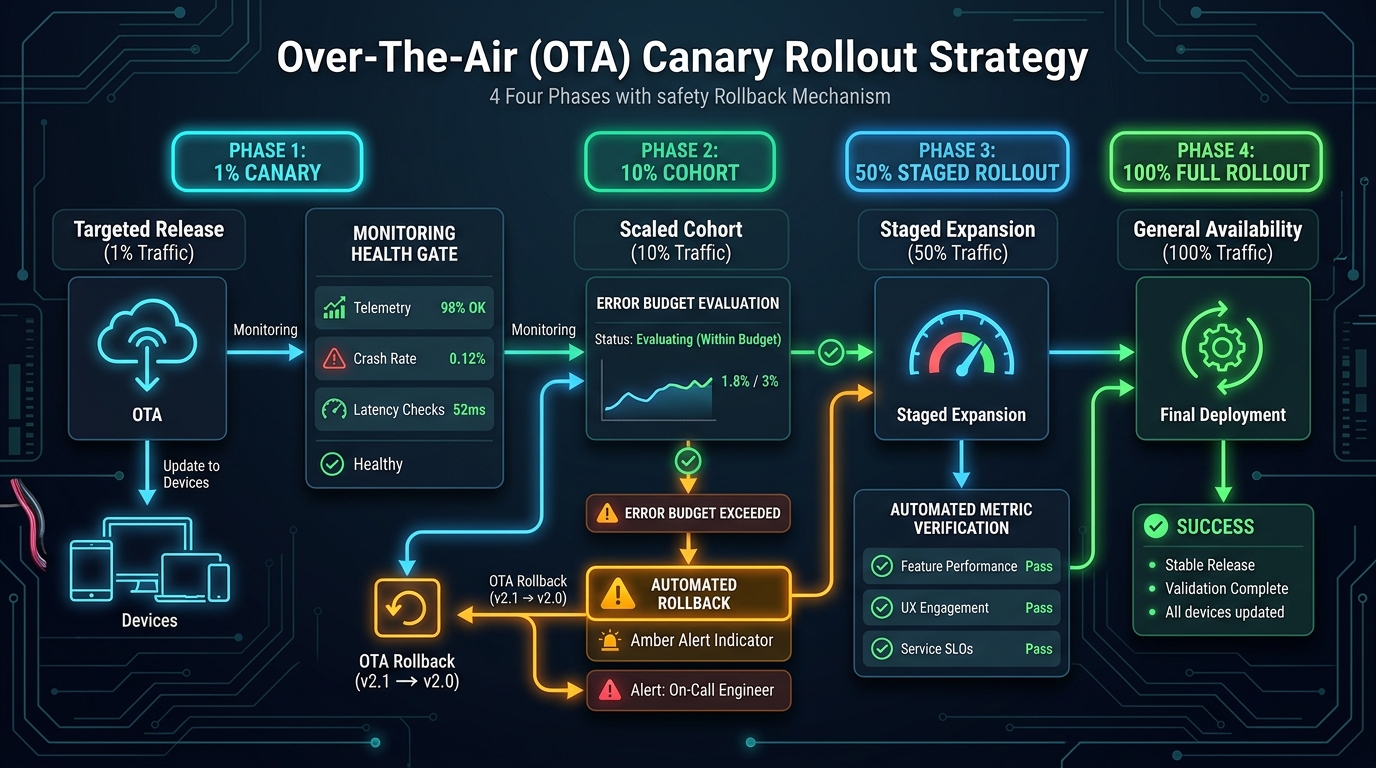
A resilient canary deployment strategy balances delivery velocity against operational safety. In mission-critical environments (such as Android OS upgrades or connected vehicle telematics), rollouts proceed through four distinct phases:
The Four Rollout Phases
- Phase 1: Dogfooding & Internal Ring (0.1%): Deployed exclusively to internal engineering devices and automated QA test benches. Validates installation scripts, partition tables, and basic health telemetry.
- Phase 2: Canary Ring (1%): Deployed to a randomized 1% cohort of active production devices. Automated monitors observe crash rates, battery consumption, and network reconnect telemetry. If anomalies exceed strict thresholds, the rollout is halted automatically.
- Phase 3: Broad Progressive Ring (10% to 50%): Expands across geographic and demographic clusters. If zero-downtime updates pair with A/B partitioning, see our companion guide on Android A/B Seamless System Updates.
- Phase 4: General Availability (100%): The update is unlocked for the entire device fleet. All edge nodes receive green-light authorization.
End-to-End System Architecture for 10M+ Fleet Devices
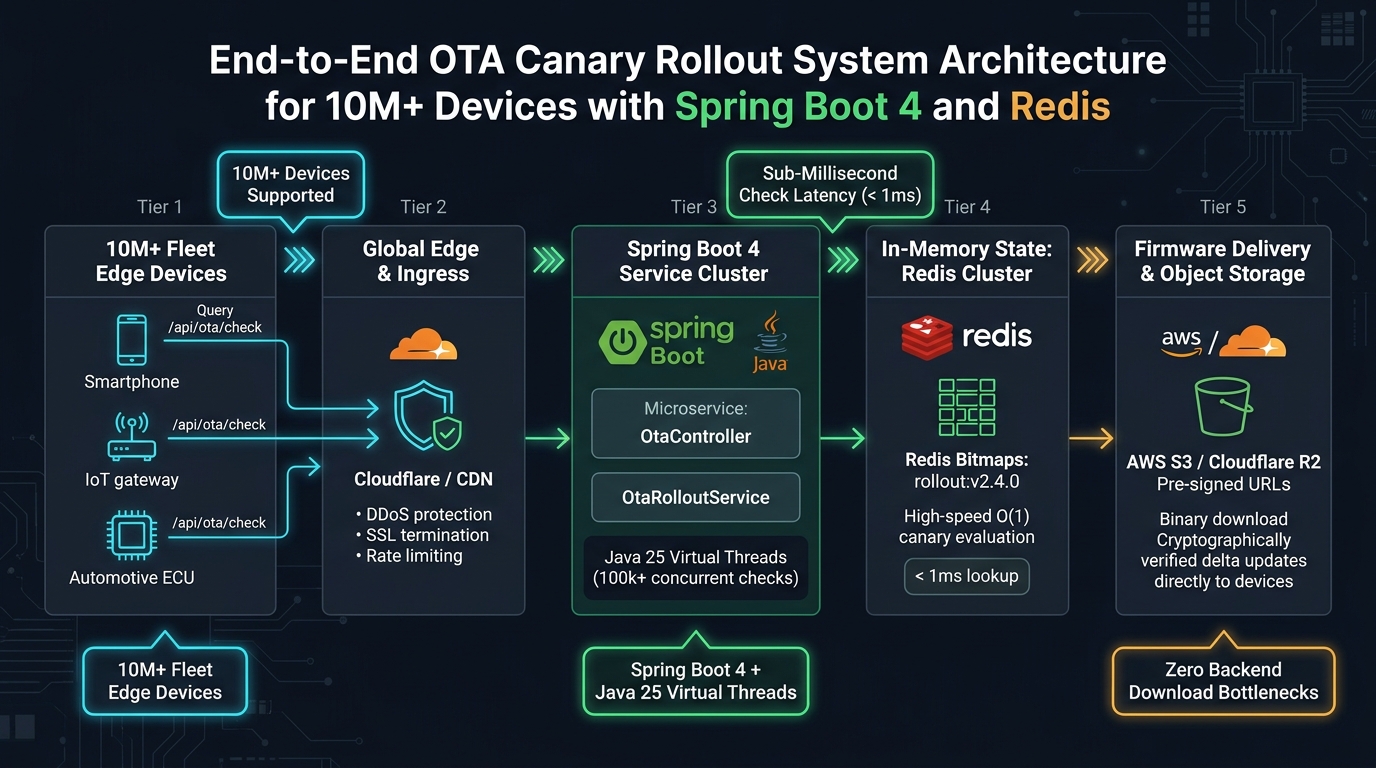
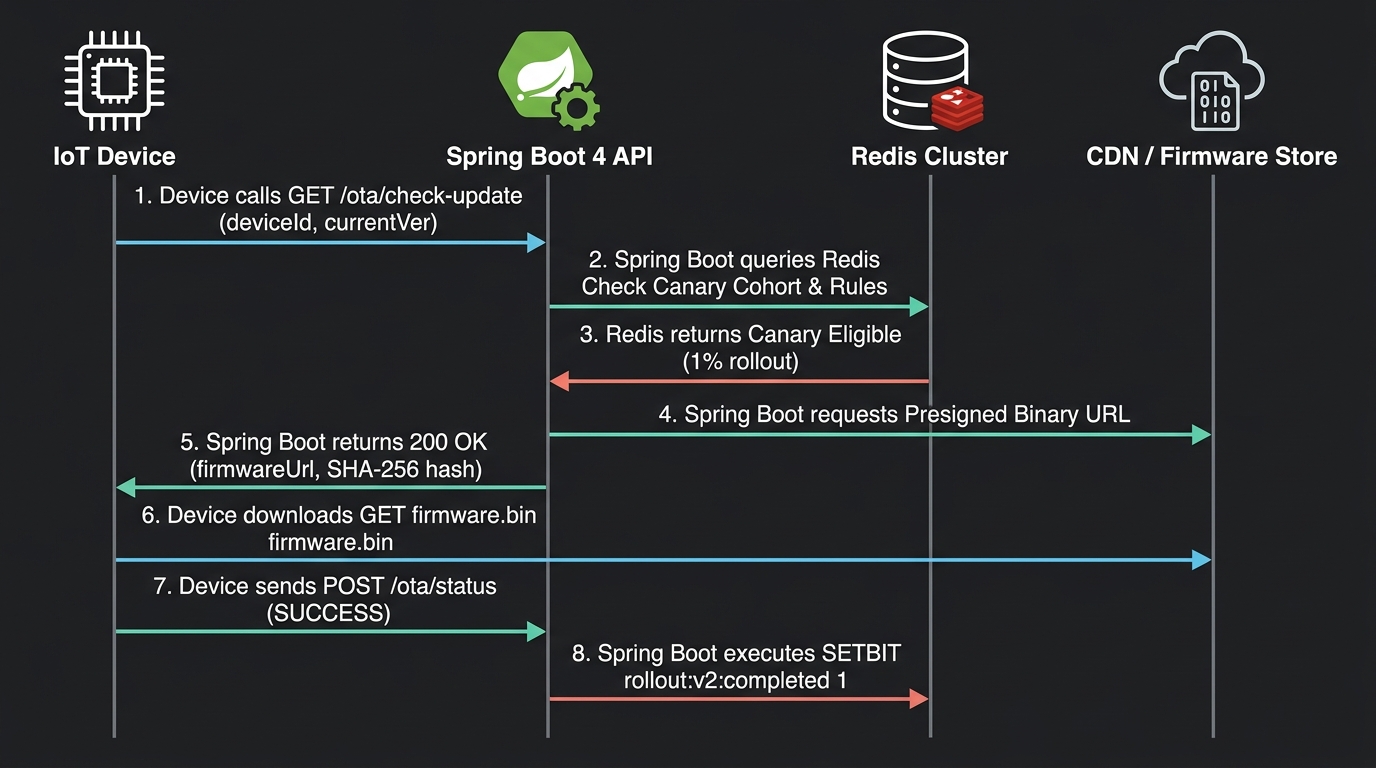
To safely handle ten million devices without latency degradation, the system architecture separates the eligibility verification plane from the binary distribution plane:
Architectural Components
- Global Edge CDN / Ingress: Terminates TLS connections, absorbs Distributed Denial of Service (DDoS) traffic, and applies edge rate limiting. Ensures rogue devices cannot flood the application tier.
- Spring Boot 4 Service Cluster: Powered by Java 25 Virtual Threads, the application layer processes thousands of concurrent HTTP requests without thread starvation. It interacts with Redis to evaluate rollout logic.
- Redis Cluster / Sentinel: Houses the in-memory Bitmaps for active rollout campaigns. Bitmaps deliver deterministic O(1) read latency regardless of whether your fleet contains 1,000 or 50,000,000 devices.
- Relational Metadata Store (PostgreSQL): Stores immutable release records, cryptographic SHA-256 binary checksums, and tenant policies. Relational databases are never queried during high-frequency heartbeat checks.
- Object Storage & Content Delivery Network: Binary payloads (e.g., 2 GB delta update archives) are stored in cloud object storage (AWS S3 or Cloudflare R2). The Spring Boot service generates temporary pre-signed download URLs, ensuring payload traffic never traverses your application servers. For delta compression strategies, consult our guide on Delta Firmware Update Services in Spring Boot 4.
Redis Bitmaps Deep Dive: O(1) Bitwise Allocation Mechanics
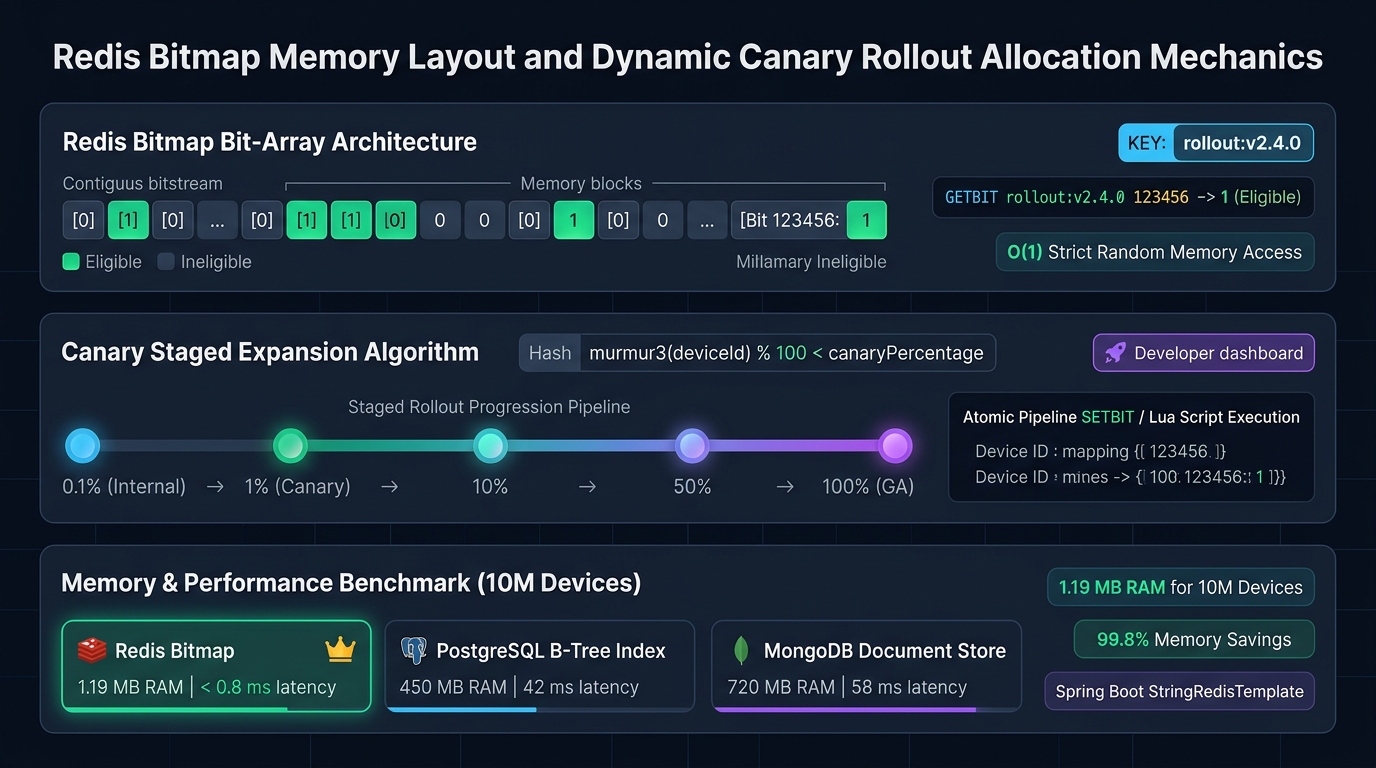
A Redis Bitmap is not a separate data type; it is a set of bit-oriented operations defined on the standard Redis String type. Because Redis Strings are binary-safe and can grow up to 512 megabytes, a single Redis key can track up to 232 distinct bits (over 4.29 billion individual device IDs).
The Mathematical Proof of Memory Efficiency
Consider an IoT enterprise managing 10,000,000 active devices with contiguous numerical IDs ranging from 1 to 10,000,000. In a Redis Bitmap, each device requires exactly 1 bit of memory:
10,000,000 bits / 8 bits per byte = 1,250,000 bytes
1,250,000 bytes / 1,048,576 bytes per megabyte = 1.192 MB of RAM
A single 1.19 MB allocation in Redis holds the eligibility status for ten million devices! Comparing 1.19 MB in Redis to the 450 MB required by PostgreSQL demonstrates a 99.7% reduction in memory overhead.
Hands-On Implementation: Spring Boot 4 and StringRedisTemplate
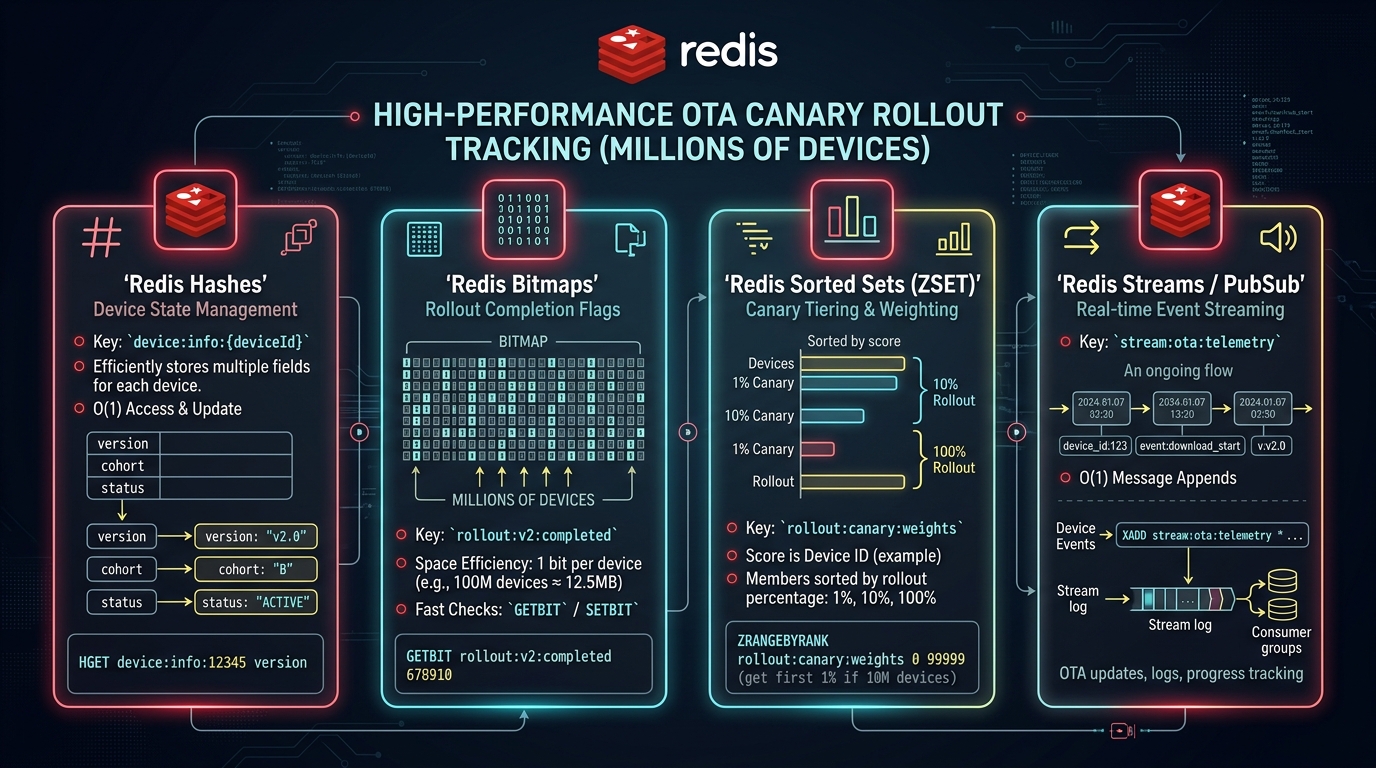
Let us explore the companion workshop project located in workshop/architecture/managing-ota-canary-rollouts-spring-boot-redis. The codebase implements high-throughput rollout evaluation using Spring Boot 4.0.0 and Spring Data Redis.
1. Maven Build Configuration
Import the Spring Boot Web and Spring Data Redis starters:
<dependency>
    <groupId>org.springframework.boot</groupId>
    <artifactId>spring-boot-starter-web</artifactId>
</dependency>

<dependency>
    <groupId>org.springframework.boot</groupId>
    <artifactId>spring-boot-starter-data-redis</artifactId>
</dependency>

<dependency>
    <groupId>org.springframework.boot</groupId>
    <artifactId>spring-boot-docker-compose</artifactId>
    <scope>runtime</scope>
    <optional>true</optional>
</dependency>
2. The OtaRolloutService
The service uses StringRedisTemplate to execute getBit and setBit operations against key patterns formatted as rollout:{version}:
package com.webcodein.ota;

import org.slf4j.Logger;
import org.slf4j.LoggerFactory;
import org.springframework.data.redis.core.StringRedisTemplate;
import org.springframework.stereotype.Service;

@Service
public class OtaRolloutService {

    private static final Logger log = LoggerFactory.getLogger(OtaRolloutService.class);
    private static final String ROLLOUT_PREFIX = "rollout:";

    private final StringRedisTemplate redisTemplate;

    public OtaRolloutService(StringRedisTemplate redisTemplate) {
        this.redisTemplate = redisTemplate;
    }

    /**
     * Verifies if a specific device ID is eligible for a given firmware version.
     * Executes Redis GETBIT in strict O(1) time complexity.
     */
    public boolean isEligibleForUpdate(long deviceId, String version) {
        if (deviceId < 0) {
            throw new IllegalArgumentException("Device ID must be a non-negative integer");
        }
        String key = ROLLOUT_PREFIX + version;
        Boolean isSet = redisTemplate.opsForValue().getBit(key, deviceId);
        log.debug("Eligibility check for device [{}] on version [{}]: {}", deviceId, version, isSet);
        return Boolean.TRUE.equals(isSet);
    }

    /**
     * Activates rollout eligibility for a single device ID.
     * Executes Redis SETBIT in O(1) time complexity.
     */
    public void enableUpdateForDevice(long deviceId, String version) {
        String key = ROLLOUT_PREFIX + version;
        redisTemplate.opsForValue().setBit(key, deviceId, true);
        log.info("Activated update eligibility for device [{}] on version [{}]", deviceId, version);
    }

    /**
     * Revokes update eligibility (e.g., during emergency rollback).
     */
    public void disableUpdateForDevice(long deviceId, String version) {
        String key = ROLLOUT_PREFIX + version;
        redisTemplate.opsForValue().setBit(key, deviceId, false);
        log.warn("Revoked update eligibility for device [{}] on version [{}]", deviceId, version);
    }
}
3. The OtaController REST API
The REST controller exposes the heartbeat verification endpoint and administrative enablement hooks:
package com.webcodein.ota;

import org.springframework.http.ResponseEntity;
import org.springframework.web.bind.annotation.*;
import java.util.Map;

@RestController
@RequestMapping("/api/ota")
public class OtaController {

    private final OtaRolloutService otaRolloutService;

    public OtaController(OtaRolloutService otaRolloutService) {
        this.otaRolloutService = otaRolloutService;
    }

    @GetMapping("/check")
    public ResponseEntity<Map<String, Object>> checkUpdate(
            @RequestParam long deviceId,
            @RequestParam String version) {

        boolean eligible = otaRolloutService.isEligibleForUpdate(deviceId, version);
        if (eligible) {
            return ResponseEntity.ok(Map.of(
                    "status", "UPDATE_AVAILABLE",
                    "version", version,
                    "downloadUrl", "https://cdn.webcodein.com/firmware/" + version + "/update.bin"
            ));
        }

        return ResponseEntity.ok(Map.of(
                "status", "UP_TO_DATE",
                "message", "No updates available for your device cohort"
        ));
    }

    @PostMapping("/enable/{version}")
    public ResponseEntity<Void> enableDevice(
            @PathVariable String version,
            @RequestParam long deviceId) {
        otaRolloutService.enableUpdateForDevice(deviceId, version);
        return ResponseEntity.ok().build();
    }
}
Scaling Concurrency: Java 25 Virtual Threads and Non-Blocking I/O
Under conventional Java thread-per-request models (Platform Threads), serving 50,000 concurrent device heartbeat connections consumes gigabytes of OS thread memory and causes CPU thrashing during context switching.
In Spring Boot 4 and Java 25, you can activate lightweight Virtual Threads (Project Loom) with a single configuration flag in application.yml:
spring:
  threads:
    virtual:
      enabled: true
When virtual threads are enabled, each incoming HTTP check request runs on an ephemeral virtual thread. When the thread blocks waiting for Redis socket I/O, the underlying carrier thread is unmounted and released to serve other device requests. For deep-dive production tuning, see our guide on Java 25 Virtual Threads: Production Pitfalls and Best Practices.
Integration Testing with Redis Testcontainers
To verify our Redis Bitmap rollout logic without relying on an external pre-existing Redis server, we use Testcontainers to orchestrate an ephemeral, containerized Redis instance in JUnit 5:
package com.webcodein.ota;

import org.junit.jupiter.api.DisplayName;
import org.junit.jupiter.api.Test;
import org.springframework.beans.factory.annotation.Autowired;
import org.springframework.boot.test.context.SpringBootTest;
import org.springframework.boot.webmvc.test.autoconfigure.AutoConfigureMockMvc;
import org.springframework.test.context.DynamicPropertyRegistry;
import org.springframework.test.context.DynamicPropertySource;
import org.springframework.test.web.servlet.MockMvc;
import org.testcontainers.containers.GenericContainer;
import org.testcontainers.junit.jupiter.Container;
import org.testcontainers.junit.jupiter.Testcontainers;

import static org.springframework.test.web.servlet.request.MockMvcRequestBuilders.get;
import static org.springframework.test.web.servlet.request.MockMvcRequestBuilders.post;
import static org.springframework.test.web.servlet.result.MockMvcResultMatchers.jsonPath;
import static org.springframework.test.web.servlet.result.MockMvcResultMatchers.status;

@SpringBootTest
@AutoConfigureMockMvc
@Testcontainers
class OtaRolloutIntegrationTest {

    @Container
    static GenericContainer<?> redis = new GenericContainer<>("redis:7.2-alpine")
            .withExposedPorts(6379);

    @DynamicPropertySource
    static void redisProperties(DynamicPropertyRegistry registry) {
        registry.add("spring.data.redis.host", redis::getHost);
        registry.add("spring.data.redis.port", redis::getFirstMappedPort);
    }

    @Autowired
    private MockMvc mockMvc;

    @Test
    @DisplayName("Should correctly evaluate device eligibility lifecycle from ineligible to active")
    void testCanaryRolloutFlow() throws Exception {
        long deviceId = 123456L;
        String version = "v2.0";

        // Step 1: Device is initially ineligible
        mockMvc.perform(get("/api/ota/check")
                .param("deviceId", String.valueOf(deviceId))
                .param("version", version))
                .andExpect(status().isOk())
                .andExpect(jsonPath("$.status").value("UP_TO_DATE"));

        // Step 2: Administrative API activates device bit in Redis
        mockMvc.perform(post("/api/ota/enable/{version}", version)
                .param("deviceId", String.valueOf(deviceId)))
                .andExpect(status().isOk());

        // Step 3: Subsequent check returns update authorization with CDN URL
        mockMvc.perform(get("/api/ota/check")
                .param("deviceId", String.valueOf(deviceId))
                .param("version", version))
                .andExpect(status().isOk())
                .andExpect(jsonPath("$.status").value("UPDATE_AVAILABLE"))
                .andExpect(jsonPath("$.downloadUrl").exists());
    }
}
For more integration testing techniques using Docker containers, see our tutorial on Modern Local Development with Testcontainers & Docker Compose.
Enterprise Use Cases: Automotive, Mobile, and Smart Grid Rollouts
Use Case 1: Automotive Telematics & Electronic Control Units (ECU)
Modern connected vehicles contain over 100 ECUs controlling critical powertrain, braking, and infotainment features. Automotive OTA rollouts use Redis Bitmaps combined with strict cryptographic vehicle identifiers (VIN mapping). Rollouts begin with test track vehicles before expanding to consumer fleets. If an anomaly is reported over telemetry, a single Redis command revokes the rollout bitmask instantly.
Use Case 2: Smart Metering and Utility Grids
An electric utility operator manages 15 million smart meters. Network bandwidth over cellular IoT (NB-IoT / LTE-M) is constrained and expensive. Using Redis Bitmaps, updates are scheduled in rotating time-windows per geographic substation bitmask. Meters verify eligibility during off-peak night hours, avoiding cellular carrier congestion.
Use Case 3: Mobile Operating System Staged Deployments
A smartphone manufacturer releases security patches to 40 million handsets. By using Murmur3 consistent hashing on device UUIDs, devices are grouped into 100 deterministic buckets. The system progressively activates bucket bitmasks in Redis, ensuring balanced server load and rapid blast-radius containment.
CI/CD Pipeline Automation: Fast GitHub Actions Execution
To run automated integration tests against Redis containers in cloud continuous integration environments, configure a clean GitHub Actions pipeline:
name: CI Build & Redis Integration Tests

on:
  push:
    branches: [ "main" ]
  pull_request:
    branches: [ "main" ]

jobs:
  test:
    runs-on: ubuntu-latest
    timeout-minutes: 10

    steps:
      - name: Checkout Code
        uses: actions/checkout@v4

      - name: Set up JDK 25
        uses: actions/setup-java@v4
        with:
          java-version: '25'
          distribution: 'temurin'
          cache: maven

      - name: Pre-pull Redis Container Image
        run: docker pull redis:7.2-alpine

      - name: Run Maven Tests
        run: mvn -B -ntp clean test
Production Readiness and Enterprise Guardrails
Observe these architectural guardrails when running Redis-backed canary rollouts in production:
- Never Serve Binary Payloads from Spring Boot: Application instances should strictly evaluate eligibility and return signed URLs pointing to cloud object storage or CDN distributions. Streaming multi-gigabyte binary files through Spring Boot exhausts connection pools and causes memory bloat.
- Use Contiguous Device Offsets: Redis allocates memory up to the highest bit offset specified. If you set bit 0 and bit 4,000,000,000, Redis immediately allocates 512 MB of RAM. Ensure device IDs are sequential or map non-contiguous UUIDs to integer sequences via an internal mapping registry.
- Configure Redis Persistence (AOF & RDB): Ensure Redis Append-Only File (AOF) persistence is enabled with
appendfsync everysec. If a Redis node restarts, rollout state is restored immediately without reverting deployed canary cohorts. - Implement Emergency Kill Switches: Provide an administrative endpoint that deletes or overwrites the rollout key (
DEL rollout:v2.0). If a catastrophic defect is identified, deleting the key instantly revokes update eligibility for the entire fleet in under 1 millisecond.
Common Pitfalls and How to Fix Them
Pitfall 1: Memory Bloat from Sparse Offset Keys
Symptom: Redis memory usage spikes unexpectedly to hundreds of megabytes for only a few thousand devices.
Root Cause: The application passed raw 64-bit timestamps or randomly generated high-order integers as device ID offsets (e.g., SETBIT rollout:v1 9223372036854775807 1).
Fix: Restrict device offsets to dense, sequential integer IDs (0 to N). If using UUIDs, map them to auto-incrementing surrogate IDs in PostgreSQL before setting bits.
Pitfall 2: Lettuce Connection Pool Exhaustion
Symptom: Spring Boot logs display RedisConnectionFailureException: Unable to connect to Redis during traffic spikes.
Root Cause: The default Lettuce connection pool configuration was overwhelmed by tens of thousands of concurrent requests.
Fix: Configure non-blocking connection pooling via commons-pool2 in application.yml, increase maximum active connections, and activate Java 25 Virtual Threads.
Pitfall 3: Thundering Herd on General Availability (GA)
Symptom: When a rollout hits 100%, millions of devices simultaneously hammer the CDN, causing regional edge throttling.
Root Cause: All devices were programmed to poll at the exact same minute.
Fix: Enforce random exponential backoff and client-side jitter on device polling intervals (e.g., poll every 24 hours ± 3 hours of randomized jitter).
Frequently Asked Questions (FAQ)
Why not store rollout percentages in a database table?
Storing percentages in SQL requires every device check to query the database, generate random numbers, or perform complex table scans. Under 100,000 requests per second, database CPU saturates. Redis Bitmaps evaluate device eligibility in memory in under 0.8 milliseconds with deterministic consistency.
What happens if our device IDs are not sequential?
If your device IDs are sparse (e.g., random UUIDs), hashing them to bits directly can waste memory. In sparse environments, use Redis Sets (SISMEMBER) or a compact Roaring Bitmap implementation before transitioning to dense Redis Bitmaps.
Can we instantly rollback an update using Redis Bitmaps?
Yes. By executing SETBIT rollout:v2.0 <deviceId> 0 or clearing the entire key with DEL rollout:v2.0, update authorization is instantly revoked across all application nodes with sub-millisecond propagation.
Does Spring Data Redis support Java 25 Virtual Threads?
Yes. In Spring Boot 4, enabling spring.threads.virtual.enabled=true mounts web request handlers onto lightweight virtual threads. Redis socket operations unmount the carrier thread during network I/O, dramatically increasing concurrency throughput.
Why should firmware binaries never be downloaded through the Spring Boot API?
Serving large binary payloads (100 MB to 2 GB) through application servers ties up HTTP worker threads, consumes server memory, and exhausts egress network cards. Always generate pre-signed URLs that redirect devices directly to CDN edge nodes.
Conclusion and Next Steps
Managing Over-The-Air canary rollouts across millions of edge devices requires uncompromising performance, deterministic consistency, and bulletproof safety mechanisms. By pairing Spring Boot 4 and Java 25 with Redis Bitmaps, engineering teams can build an enterprise rollout engine capable of serving tens of millions of devices with sub-millisecond latency while consuming less than 2 megabytes of RAM.
To continue building resilient cloud-native architectures, explore our companion guides on Delta Firmware Update Services and Android A/B Seamless System Updates.