
The Evolution of Android System Updates
If you used an Android phone ten years ago, you remember the stress of a system update. The phone downloaded a large file over Wi-Fi. Then, the screen turned black. The device rebooted into a special recovery mode. A small green robot animation appeared on the screen for ten minutes. During this entire time, you could not make a phone call, send a text message, or call emergency services.
The traditional update model carried high operational risk. The installer unpacked new system files directly over the active operating system partitions. If your battery died halfway through the write operation, or if the flash storage encountered a write error, the core operating system became corrupt. Your phone entered a permanent crash loop, known as a hard brick. Recovering a bricked phone required specialized technical knowledge, desktop flashing tools, or physical hardware replacement. For a comprehensive review of these low-level flashing primitives, see our deep dive on The Architecture of Safely Flashing a Phone: Bootloader, Fastboot, and Recovery.
To eliminate user downtime and prevent broken devices, Google introduced A/B (Seamless) System Updates in Android 7.0 (Nougat). The core idea is simple and elegant: the device hardware contains two complete sets of system partitions. One set runs the operating system while the user browses the web or plays games. The second set receives the new firmware update silently in the background. Once the write finishes and passes cryptographic checks, a quick restart switches active slots. In this guide, we examine the low-level Android partition layout, analyze the fallback state machine, and construct a robust fleet orchestrator backend using Spring Boot 4 and Hibernate 7.
Understanding A/B Partition Architecture
To understand seamless updates, we must look at how disk storage is divided. Flash memory on a smartphone or IoT device is divided into isolated sections called partitions. In an old single-slot architecture, the flash storage contains one /boot partition, one /system partition, and one /vendor partition.
In an A/B architecture, all partitions that belong to the base operating system are duplicated. Engineers designate these twin partition groups as Slot A and Slot B. For example, instead of a single system partition, the flash storage contains system_a and system_b. Similarly, the device provides boot_a and boot_b, alongside vendor_a and vendor_b. However, personal user files, installed applications, and runtime databases do not duplicate. All user records live in a single shared userdata partition (mounted at /data), preserving disk capacity.
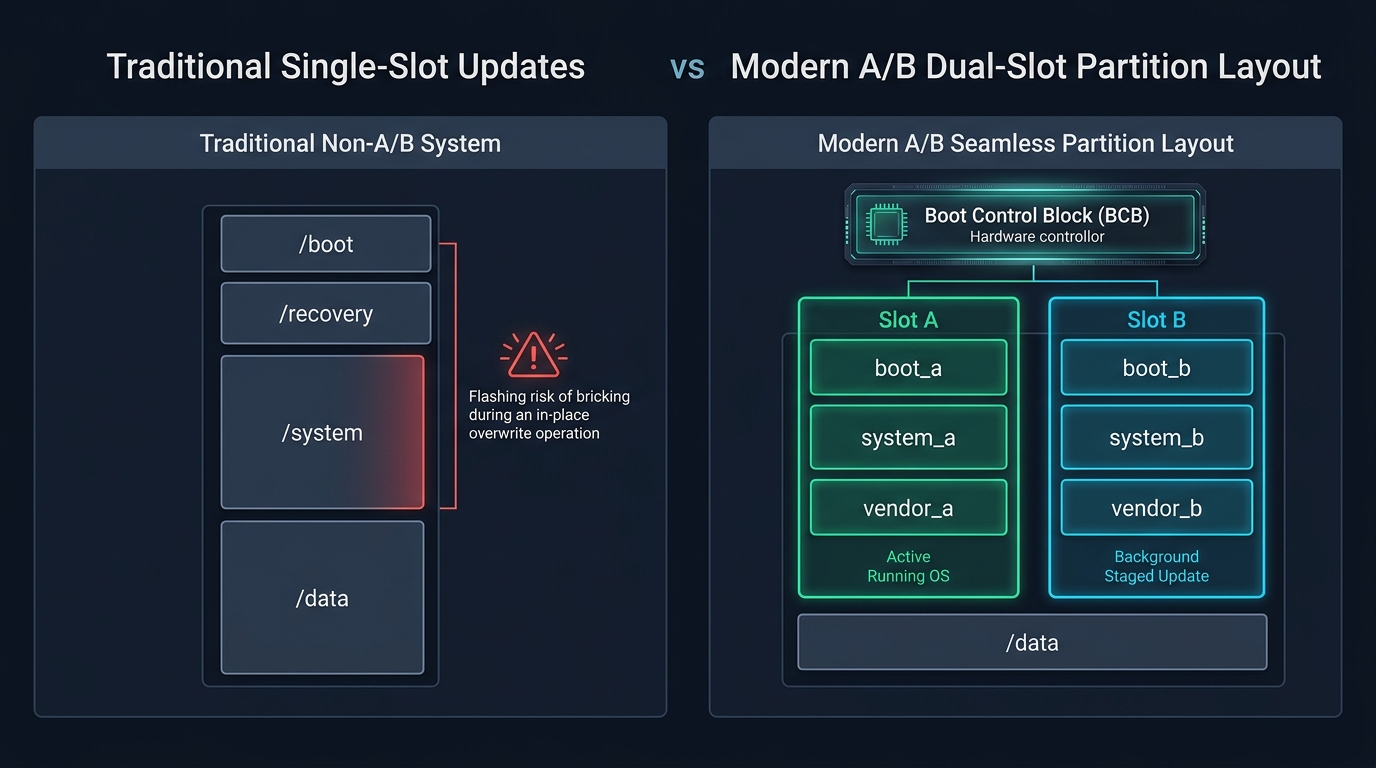
Duplicating the core OS partitions provides two major structural benefits:
- Zero User Downtime: The device does not need an offline recovery mode to unpack files. The user can watch videos or draft emails while the background installer writes new system blocks to the dormant slot.
- Guaranteed Fallback: The active operating system is never touched during the installation. If the download is corrupt or the installation aborts, the device continues running on the current slot without missing a beat.
Background Streaming and the Update Engine
The component responsible for executing seamless updates inside Android is a native background daemon called update_engine. When an update becomes available, the system update application passes the payload URL to update_engine via inter-process communication (Binder IPC).
Rather than downloading a massive 3 GB archive file to internal storage and then extracting it, update_engine streams the payload block by block. As network chunks arrive over HTTPS, the engine decompresses them in memory, verifies their cryptographic hashes, and writes the raw blocks directly into the inactive storage partition.
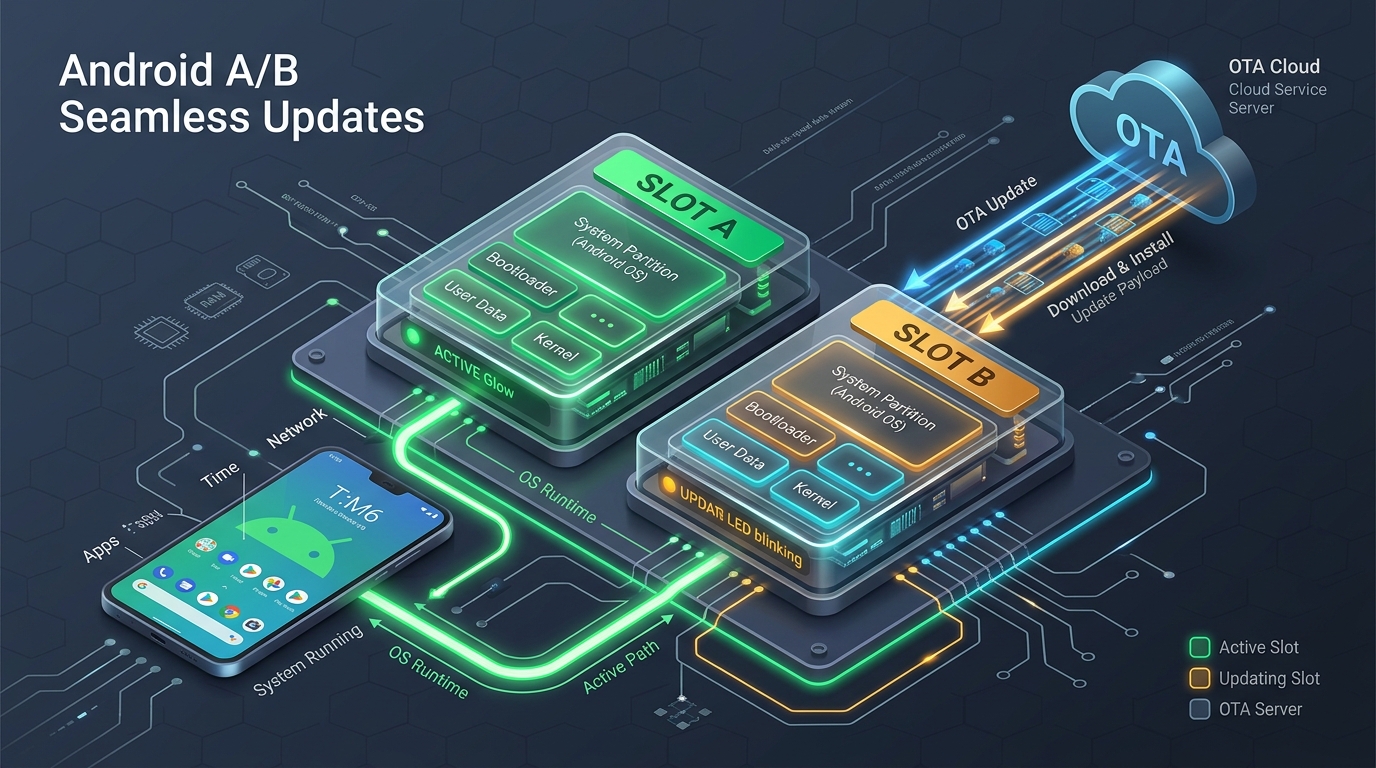
To prevent the background update from slowing down user apps, Android assigns strict process limits to update_engine. The daemon runs with lower CPU priority (nice levels) and throttles disk write operations whenever the screen is active or the CPU temperature rises. In enterprise fleets, update servers can send delta patches instead of full system images. To learn how to construct a high-throughput binary diff service, explore our companion tutorial on building a Delta Firmware Update Service in Spring Boot 4.
The Boot Control Block (BCB) and Hardware HAL
How does the hardware know which slot to boot when you turn on the phone? The decision happens long before Android or the Linux kernel loads. The low-level bootloader reads a small, dedicated metadata structure stored in non-volatile memory called the Boot Control Block (BCB).
Android defines a standardized interface called the Boot Control Hardware Abstraction Layer (HAL). Device manufacturers (such as Qualcomm, Google Tensor, or MediaTek) implement this HAL to expose slot control primitives to the operating system. The Boot Control HAL tracks four critical attributes for each slot:
- Active Slot: Identifies which slot the bootloader will attempt to load on the next system power cycle.
- Bootable Flag: A boolean flag indicating whether the slot contains a valid, fully flashed operating system image.
- Successful Flag: A boolean flag indicating whether the installed operating system has booted cleanly and verified its runtime integrity.
- Tries Remaining: An integer retry counter (typically initialized to 7). Every time the bootloader attempts to start from a slot, it decrements this counter.
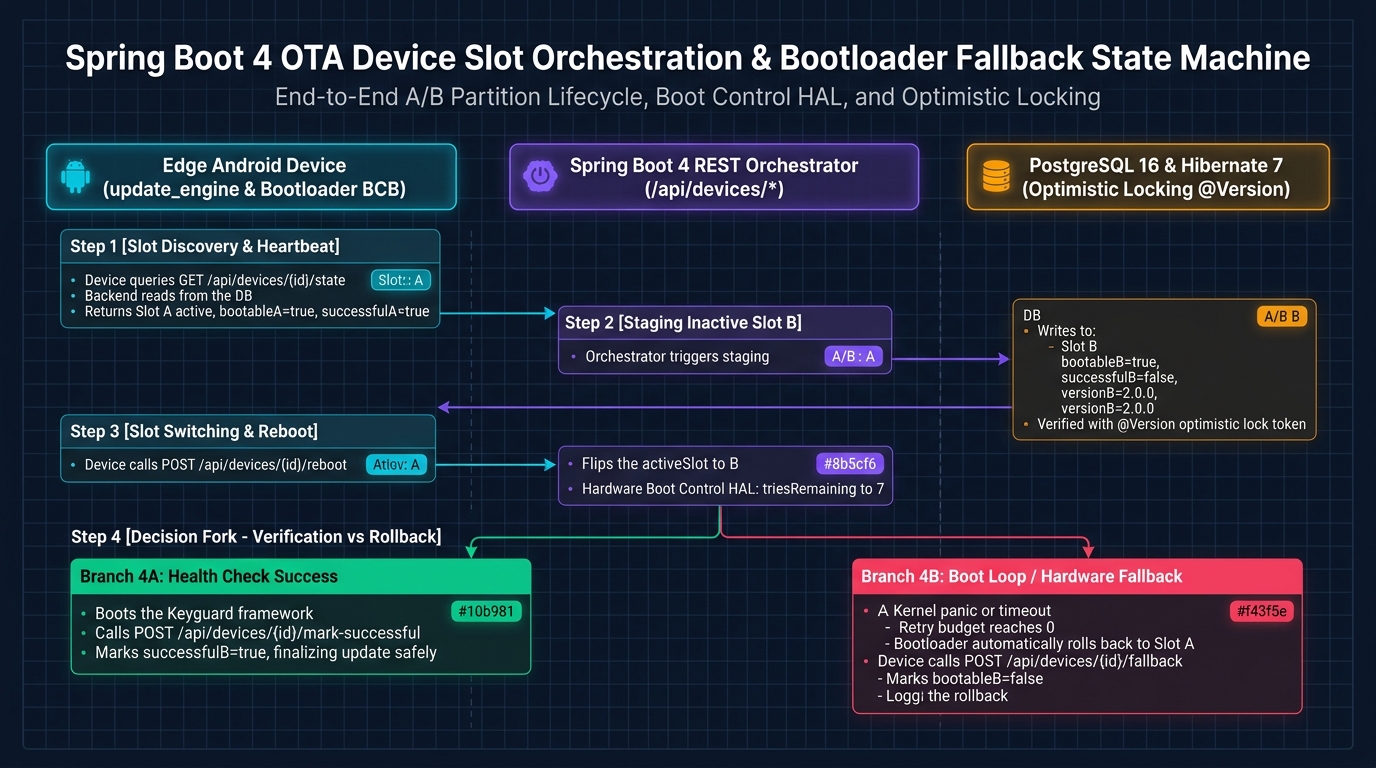
When update_engine finishes writing all data blocks to the inactive slot, it calls the Boot Control HAL. It marks the target slot as bootable = true, resets its successful = false flag, sets triesRemaining = 7, and designates the target slot as active. At this point, the installation is complete. The Android UI prompts the user with a notification: “Restart to finish update.”
The Fallback Mechanism: Preventing Bootloops
The true genius of A/B system updates is the automated self-healing rollback mechanism. What happens if the newly installed operating system contains a critical bug that causes the Linux kernel to panic during boot? In a traditional single-slot system, the device would remain trapped in a permanent bootloop.
In an A/B architecture, the bootloader protects the device using the retry counter. When the user taps restart, the bootloader reads the BCB and attempts to boot the new slot (for example, Slot B). It immediately decrements the retry counter from 7 to 6. If the kernel panics or the system crashes before completing the boot sequence, the hardware watchdog timer restarts the device. On the second attempt, the bootloader decrements the counter to 5.
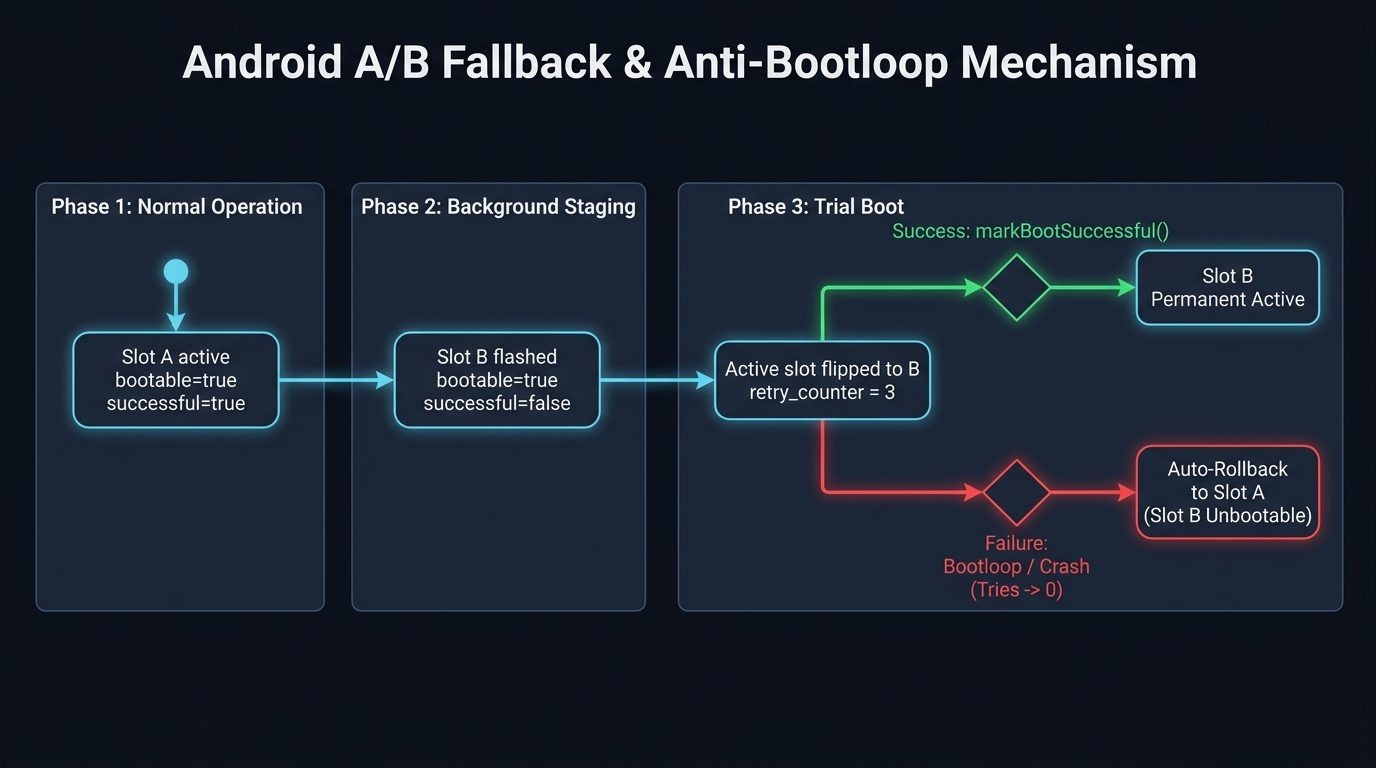
To confirm that an update is good, the operating system must actively prove its stability. Android requires the system framework to initialize core services and display the lock screen (Keyguard). Once the user authentication screen loads, a system daemon calls the Boot Control HAL method markBootSuccessful(). This call sets successful = true and clears the retry counter.
If the device crashes repeatedly and the retry counter reaches zero without reaching this confirmation milestone, the bootloader recognizes that Slot B is defective. The bootloader automatically marks Slot B as bootable = false, flips the active slot pointer back to Slot A, and initiates a clean reboot. The phone reboots into the original, stable operating system within seconds. The user never experiences an unusable phone.
Virtual A/B and Dynamic Partitions
While standard A/B updates solved the bootloop problem, hardware manufacturers initially hesitated to adopt them. Duplicating large partitions like /system, /vendor, and /product consumed between 3 GB and 6 GB of raw flash memory. On budget devices with only 32 GB or 64 GB of total storage, this overhead was substantial.
To eliminate this storage penalty, Google introduced Dynamic Partitions in Android 10, followed by Virtual A/B (V-A/B) in Android 11. Instead of allocating fixed physical flash partitions for both Slot A and Slot B, the device creates a single large physical container called the super partition.
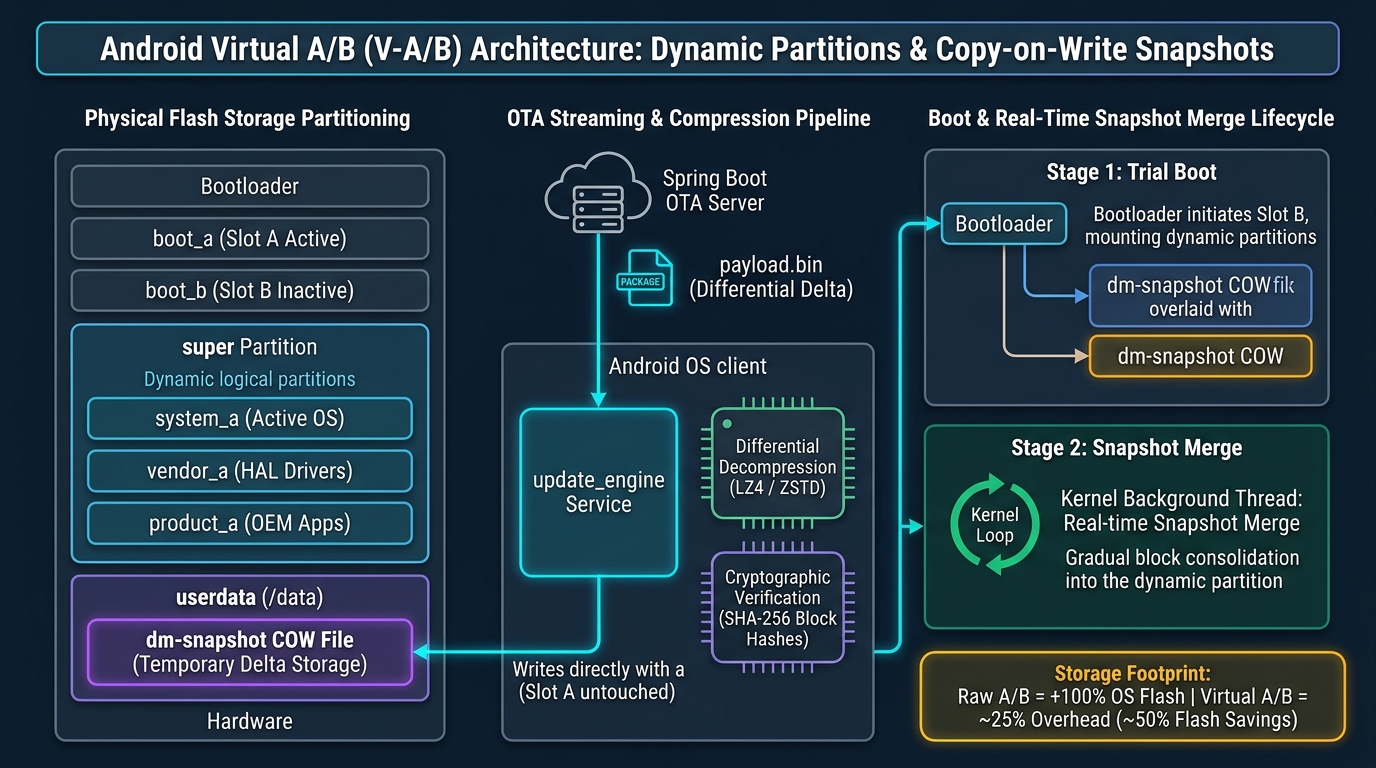
Virtual A/B uses the Linux kernel’s device-mapper snapshot (dm-snapshot) driver to achieve seamless updates without doubling physical storage:
- Single Dynamic OS Base: Only the active slot exists as a full partition inside the
superblock. The inactive slot does not take up dedicated physical space. - Copy-on-Write (COW) Snapshots: When an OTA update installs,
update_enginewrites only the modified data blocks into temporary Copy-on-Write files located on the shareduserdatapartition. Unchanged files remain shared. - Transparent Trial Boot: On reboot, the kernel mounts a virtual block device combining the old base partition and the COW snapshot overlay. The OS boots the updated version smoothly.
- Background Merge: Once the boot succeeds, a kernel background thread merges the snapshot blocks back into the
superpartition while the device is running. Once merged, the temporary COW space is freed.
Virtual A/B cuts the storage overhead of seamless updates by up to 50%, allowing even cost-sensitive hardware to benefit from zero-downtime updates and automated rollback safety.
Implementing an OTA Orchestrator in Spring Boot 4
Managing firmware rollouts across thousands of enterprise tablets, delivery scanners, or automotive head units requires a central orchestration backend. The backend must track the active slot of each device, record firmware version numbers, manage staging transitions, and detect rollbacks.
When orchestrating updates at scale, backend servers face severe concurrency challenges. If multiple background workers, fleet polling threads, or device heartbeats update the same device record simultaneously, database lost-update anomalies occur. We can solve this cleanly by combining Spring Boot 4, Hibernate 7, and Jakarta Persistence with optimistic locking.
To safely scale firmware releases across large cohorts without overwhelming cloud infrastructure, read our guide on Managing OTA Canary Rollouts with Spring Boot and Redis.
Designing the Device Slot State Entity
Let us implement the domain model in Java 25. The DeviceSlotState entity stores the current partition status for a physical device. It mirrors the attributes tracked by the Android Boot Control HAL, including slot indicators, bootability flags, and success flags.
Notice the inclusion of the @jakarta.persistence.Version annotation on the version field. Hibernate 7 automatically checks this version counter during updates. If two threads read version 1 and both attempt to write changes, the first transaction succeeds and increments the version to 2. The second transaction immediately throws an OptimisticLockException, protecting slot data integrity.
package com.webcodein.ota.ab;

import jakarta.persistence.Entity;
import jakarta.persistence.Id;
import jakarta.persistence.Table;
import jakarta.persistence.Version;

/**
 * Domain entity representing the dual-slot A/B partition state of an edge device.
 * Tracks active slot designation, bootability, and verification status.
 */
@Entity
@Table(name = "device_slot_states")
public class DeviceSlotState {

    @Id
    private String deviceId;

    @Version
    private Long version;

    private String activeSlot = "A";

    private boolean bootableA = true;
    private boolean successfulA = true;
    private String versionA = "1.0.0";

    private boolean bootableB = false;
    private boolean successfulB = false;
    private String versionB = "";

    public DeviceSlotState() {
        // Required by JPA specification
    }

    public DeviceSlotState(String deviceId) {
        this.deviceId = deviceId;
    }

    public String getDeviceId() {
        return deviceId;
    }

    public void setDeviceId(String deviceId) {
        this.deviceId = deviceId;
    }

    public Long getVersion() {
        return version;
    }

    public String getActiveSlot() {
        return activeSlot;
    }

    public void setActiveSlot(String activeSlot) {
        this.activeSlot = activeSlot;
    }

    public boolean isBootableA() {
        return bootableA;
    }

    public void setBootableA(boolean bootableA) {
        this.bootableA = bootableA;
    }

    public boolean isSuccessfulA() {
        return successfulA;
    }

    public void setSuccessfulA(boolean successfulA) {
        this.successfulA = successfulA;
    }

    public String getVersionA() {
        return versionA;
    }

    public void setVersionA(String versionA) {
        this.versionA = versionA;
    }

    public boolean isBootableB() {
        return bootableB;
    }

    public void setBootableB(boolean bootableB) {
        this.bootableB = bootableB;
    }

    public boolean isSuccessfulB() {
        return successfulB;
    }

    public void setSuccessfulB(boolean successfulB) {
        this.successfulB = successfulB;
    }

    public String getVersionB() {
        return versionB;
    }

    public void setVersionB(String versionB) {
        this.versionB = versionB;
    }

    /**
     * Calculates the currently dormant inactive slot.
     */
    public String getInactiveSlot() {
        return "A".equals(activeSlot) ? "B" : "A";
    }

    /**
     * Prepares the target slot for a new firmware update.
     */
    public void setSlotBootable(String slot, String firmwareVersion) {
        if ("A".equals(slot)) {
            this.bootableA = true;
            this.successfulA = false;
            this.versionA = firmwareVersion;
        } else {
            this.bootableB = true;
            this.successfulB = false;
            this.versionB = firmwareVersion;
        }
    }

    /**
     * Marks the specified slot as healthy after a successful boot confirmation.
     */
    public void setSlotSuccessful(String slot) {
        if ("A".equals(slot)) {
            this.successfulA = true;
        } else {
            this.successfulB = true;
        }
    }
}
The repository interface extends standard Spring Data JPA repository capabilities:
package com.webcodein.ota.ab;

import org.springframework.data.jpa.repository.JpaRepository;
import org.springframework.stereotype.Repository;

@Repository
public interface DeviceSlotStateRepository extends JpaRepository<DeviceSlotState, String> {
}
Building the State Machine REST Controller
Next, we build a REST controller that exposes endpoints for each phase of the Android A/B update lifecycle. The edge client interacts with these endpoints during background flashing, device reboot, and runtime verification.
package com.webcodein.ota.ab;

import org.springframework.http.ResponseEntity;
import org.springframework.web.bind.annotation.GetMapping;
import org.springframework.web.bind.annotation.PathVariable;
import org.springframework.web.bind.annotation.PostMapping;
import org.springframework.web.bind.annotation.RequestBody;
import org.springframework.web.bind.annotation.RequestMapping;
import org.springframework.web.bind.annotation.RestController;

import java.util.Map;

/**
 * REST controller coordinating device slot state machine transitions.
 */
@RestController
@RequestMapping("/api/devices")
public class OtaAbController {

    private final DeviceSlotStateRepository repository;

    public OtaAbController(DeviceSlotStateRepository repository) {
        this.repository = repository;
    }

    /**
     * Retrieves current partition slot state for a device, auto-registering new hardware.
     */
    @GetMapping("/{deviceId}/state")
    public DeviceSlotState getState(@PathVariable String deviceId) {
        return repository.findById(deviceId)
                .orElseGet(() -> repository.save(new DeviceSlotState(deviceId)));
    }

    /**
     * Simulates update_engine writing new firmware into the inactive partition slot.
     */
    @PostMapping("/{deviceId}/stage-update")
    public ResponseEntity<DeviceSlotState> stageUpdate(
            @PathVariable String deviceId,
            @RequestBody Map<String, String> payload) {

        DeviceSlotState state = getState(deviceId);
        String targetVersion = payload.get("version");

        // Flash target firmware into the dormant inactive slot
        state.setSlotBootable(state.getInactiveSlot(), targetVersion);
        DeviceSlotState updated = repository.save(state);

        return ResponseEntity.ok(updated);
    }

    /**
     * Simulates device reboot and bootloader active slot switching.
     */
    @PostMapping("/{deviceId}/reboot")
    public ResponseEntity<DeviceSlotState> simulateReboot(@PathVariable String deviceId) {
        DeviceSlotState state = getState(deviceId);

        // Hardware bootloader switches execution to the updated slot
        state.setActiveSlot(state.getInactiveSlot());
        DeviceSlotState updated = repository.save(state);

        return ResponseEntity.ok(updated);
    }

    /**
     * Invoked when Android Keyguard framework confirms a stable runtime boot.
     */
    @PostMapping("/{deviceId}/mark-successful")
    public ResponseEntity<DeviceSlotState> markSuccessful(@PathVariable String deviceId) {
        DeviceSlotState state = getState(deviceId);

        // Mark active slot verified and clear fallback counters
        state.setSlotSuccessful(state.getActiveSlot());
        DeviceSlotState updated = repository.save(state);

        return ResponseEntity.ok(updated);
    }

    /**
     * Simulates hardware watchdog failure and automatic rollback to the previous slot.
     */
    @PostMapping("/{deviceId}/fallback")
    public ResponseEntity<DeviceSlotState> simulateFallback(@PathVariable String deviceId) {
        DeviceSlotState state = getState(deviceId);

        // Revert active pointer back to the previous stable slot
        String fallbackSlot = state.getInactiveSlot();
        state.setActiveSlot(fallbackSlot);

        // Mark the corrupted slot as unbootable
        if ("A".equals(state.getInactiveSlot())) {
            state.setBootableA(false);
        } else {
            state.setBootableB(false);
        }

        DeviceSlotState updated = repository.save(state);
        return ResponseEntity.ok(updated);
    }
}
Integration Testing with Testcontainers and PostgreSQL
To ensure our backend handles state transitions correctly, we must test it against a real production database rather than an in-memory mock. In modern software engineering, running automated tests against real infrastructure guarantees production parity. For an in-depth philosophy on realistic slice testing, check out TDD in Spring Boot 4 with Testcontainers and Zero Mocking.
The following integration test uses Testcontainers to launch an ephemeral PostgreSQL 16 container. It validates both the happy path (stage update, reboot, confirm success) and the failure path (stage update, reboot, watchdog crash, fallback rollback).
package com.webcodein.ota.ab;

import org.junit.jupiter.api.DisplayName;
import org.junit.jupiter.api.Test;
import org.springframework.boot.test.context.SpringBootTest;
import org.springframework.boot.test.web.server.LocalServerPort;
import org.springframework.test.context.DynamicPropertyRegistry;
import org.springframework.test.context.DynamicPropertySource;
import org.testcontainers.containers.PostgreSQLContainer;
import org.testcontainers.junit.jupiter.Container;
import org.testcontainers.junit.jupiter.Testcontainers;

import java.net.URI;
import java.net.http.HttpClient;
import java.net.http.HttpRequest;
import java.net.http.HttpResponse;

import static org.assertj.core.api.Assertions.assertThat;

@SpringBootTest(webEnvironment = SpringBootTest.WebEnvironment.RANDOM_PORT)
@Testcontainers
class AbOtaApplicationTests {

    @Container
    static PostgreSQLContainer<?> postgres = new PostgreSQLContainer<>("postgres:16-alpine");

    @DynamicPropertySource
    static void configureProperties(DynamicPropertyRegistry registry) {
        registry.add("spring.datasource.url", postgres::getJdbcUrl);
        registry.add("spring.datasource.username", postgres::getUsername);
        registry.add("spring.datasource.password", postgres::getPassword);
    }

    @LocalServerPort
    private int port;

    private final HttpClient httpClient = HttpClient.newHttpClient();

    private String getBaseUrl() {
        return "http://localhost:" + port + "/api/devices";
    }

    @Test
    @DisplayName("Verify complete successful update lifecycle from Slot A to Slot B")
    void testSuccessfulUpdateLifecycle() throws Exception {
        String deviceId = "device-123";

        // Step 1: Query initial state
        HttpRequest request = HttpRequest.newBuilder()
                .uri(URI.create(getBaseUrl() + "/" + deviceId + "/state"))
                .GET().build();
        HttpResponse<String> response = httpClient.send(request, HttpResponse.BodyHandlers.ofString());
        assertThat(response.statusCode()).isEqualTo(200);
        assertThat(response.body()).contains("\"activeSlot\":\"A\"");
        assertThat(response.body()).contains("\"successfulA\":true");

        // Step 2: Stage firmware update 2.0.0 onto Slot B
        request = HttpRequest.newBuilder()
                .uri(URI.create(getBaseUrl() + "/" + deviceId + "/stage-update"))
                .header("Content-Type", "application/json")
                .POST(HttpRequest.BodyPublishers.ofString("{\"version\":\"2.0.0\"}")).build();
        response = httpClient.send(request, HttpResponse.BodyHandlers.ofString());
        assertThat(response.statusCode()).isEqualTo(200);
        assertThat(response.body()).contains("\"activeSlot\":\"A\"");
        assertThat(response.body()).contains("\"bootableB\":true");
        assertThat(response.body()).contains("\"successfulB\":false");

        // Step 3: Trigger device restart (bootloader flips active slot to B)
        request = HttpRequest.newBuilder()
                .uri(URI.create(getBaseUrl() + "/" + deviceId + "/reboot"))
                .POST(HttpRequest.BodyPublishers.noBody()).build();
        response = httpClient.send(request, HttpResponse.BodyHandlers.ofString());
        assertThat(response.statusCode()).isEqualTo(200);
        assertThat(response.body()).contains("\"activeSlot\":\"B\"");
        assertThat(response.body()).contains("\"successfulB\":false");

        // Step 4: System framework reaches Keyguard and confirms success
        request = HttpRequest.newBuilder()
                .uri(URI.create(getBaseUrl() + "/" + deviceId + "/mark-successful"))
                .POST(HttpRequest.BodyPublishers.noBody()).build();
        response = httpClient.send(request, HttpResponse.BodyHandlers.ofString());
        assertThat(response.statusCode()).isEqualTo(200);
        assertThat(response.body()).contains("\"activeSlot\":\"B\"");
        assertThat(response.body()).contains("\"successfulB\":true");
    }

    @Test
    @DisplayName("Verify automatic rollback fallback when updated slot fails trial boot")
    void testFailedUpdateLifecycle() throws Exception {
        String deviceId = "device-fail";

        // Step 1: Stage update onto Slot B
        HttpRequest request = HttpRequest.newBuilder()
                .uri(URI.create(getBaseUrl() + "/" + deviceId + "/stage-update"))
                .header("Content-Type", "application/json")
                .POST(HttpRequest.BodyPublishers.ofString("{\"version\":\"2.0.0\"}")).build();
        httpClient.send(request, HttpResponse.BodyHandlers.discarding());

        // Step 2: Reboot switches active execution to Slot B
        request = HttpRequest.newBuilder()
                .uri(URI.create(getBaseUrl() + "/" + deviceId + "/reboot"))
                .POST(HttpRequest.BodyPublishers.noBody()).build();
        HttpResponse<String> response = httpClient.send(request, HttpResponse.BodyHandlers.ofString());
        assertThat(response.body()).contains("\"activeSlot\":\"B\"");

        // Step 3: Watchdog timer triggers fallback after repeated boot crashes
        request = HttpRequest.newBuilder()
                .uri(URI.create(getBaseUrl() + "/" + deviceId + "/fallback"))
                .POST(HttpRequest.BodyPublishers.noBody()).build();
        response = httpClient.send(request, HttpResponse.BodyHandlers.ofString());
        assertThat(response.statusCode()).isEqualTo(200);
        assertThat(response.body()).contains("\"activeSlot\":\"A\"");
        assertThat(response.body()).contains("\"bootableB\":false");
    }
}
Architectural Comparison Matrix
The table below summarizes the key trade-offs between traditional single-slot updates, pure dual-slot A/B updates, Virtual A/B snapshots, and centralized backend orchestration:
| Architecture Pattern | Downtime Duration | Flash Memory Cost | Rollback Safety | Primary Failure Mode | Recommended Application Scope |
|---|---|---|---|---|---|
| Traditional Non-A/B Recovery | High (5 to 15 minutes offline) | Zero extra partition overhead | None (Power failure causes hard brick) | Corrupted file system during flashing | Legacy microcontrollers and low-cost embedded sensors |
| Pure Dual-Slot A/B | Near Zero (Standard reboot duration) | High (Doubles core OS flash allocation) | Automatic (Hardware bootloader rollback) | Storage capacity constraints on low-end hardware | Mission-critical devices with abundant eMMC/UFS storage |
| Virtual A/B (Dynamic Partitions) | Near Zero (Fast reboot + background merge) | Minimal (Dynamic COW snapshots on /data) | Automatic (dm-snapshot discard on panic) | Snapshot merge exhaustion if userdata is full | Modern Android 11+ smartphones, tablets, and smart TVs |
| Spring Boot 4 Fleet Orchestrator | Zero (Centralized API coordination) | Negligible (Small database record per device) | Enforced (Auditable slot state transitions) | Lost updates from concurrent worker race conditions | Enterprise fleet management and IoT gateway controllers |
| Optimistic Locking (@Version) | Zero (Sub-millisecond validation) | One additional integer column in SQL table | Deterministic (Rejects stale concurrent writes) | StaleObjectStateExceptions during high contention | High-throughput cloud control planes with many worker nodes |
| Canary Phased Delivery (Redis Bitmaps) | Zero (Deterministic cohort hashing) | Extremely low (1.2 MB RAM per 10 million devices) | Instant (Abort campaign toggles single bit) | Skewed random distribution if hashing algorithm is weak | Global consumer electronics and automotive fleets |
Enterprise Production Use Cases
Modern connected devices rely heavily on seamless system updates to deliver security patches without impacting operations. Here are three real-world enterprise deployments:
1. Connected Automotive Infotainment (IVI) & Telematics Units
In modern connected cars, the digital instrument cluster and in-vehicle infotainment (IVI) run on Android Automotive OS (AAOS). Taking a vehicle screen offline for 15 minutes while driving is dangerous and unacceptable. Using Virtual A/B updates, the vehicle downloads and flashes map updates and security patches into the dormant slot while driving down the highway. When the driver parks and turns off the ignition, the system switches active slots. If an update fails, the car boots back into the previous release immediately, satisfying strict ISO 26262 functional safety requirements.
2. Mission-Critical Smart Retail Point-of-Sale (POS) Kiosks
Retail chains and fast-food restaurants operate thousands of Android-powered self-checkout kiosks and payment terminals. If a firmware update bricks a kiosk on Black Friday, stores lose thousands of dollars per hour. Dual-slot A/B updates allow headquarters to push overnight patches silently. When the store opens in the morning, workers turn on the terminals. If an update encounters an issue, the hardware falls back automatically, preventing store downtime and eliminating costly on-site IT dispatches.
3. Industrial Healthcare Gateways & Patient Bedside Monitors
Hospitals deploy edge gateways to collect telemetry from infusion pumps and heart monitors. These devices must maintain continuous uptime SLAs. With Spring Boot orchestrating firmware deliveries, health network administrators can verify which slot each hospital gateway is running. Staging updates in dormant partitions ensures that patient monitoring continues uninterrupted. Cryptographic verification guarantees that only signed, validated firmware executes in sensitive clinical environments.
Production Guardrails, Telemetry, and Resilience
Deploying OTA updates to millions of edge devices requires strict operational guardrails. Below are architectural practices to follow in production:
- Optimistic Locking on Device Records: In high-throughput cloud environments, multiple worker threads process incoming device telemetry. Always protect your JPA state machine using
@Versionto prevent concurrent threads from overwriting slot transitions. - Thermal and Battery Gating: Never allow an edge client to begin flashing the inactive slot if battery power is below 50% (unless connected to AC power). Heavy flash writes generate substantial heat; ensure the client pauses streaming if CPU temperatures exceed 45°C.
- Cryptographic Block Hash Verification: Before flipping the active slot pointer in the Boot Control Block,
update_enginemust compute SHA-256 hashes for every written block against a signed payload manifest. If a single block hash mismatches, abort the update and leave the current slot untouched. - Network-Resilient Chunk Streaming: Mobile devices frequently travel through cellular dead zones. The firmware delivery server must support HTTP Range requests (RFC 7233). This allows devices to resume interrupted downloads at the exact byte offset without wasting bandwidth. For full implementation details, see our guide on Building an OTA Firmware Delivery Server in Spring Boot.
Common Pitfalls and Solutions
When developing backend orchestrators and managing A/B partition updates, engineers frequently encounter three subtle pitfalls. Here is how to diagnose and resolve them:
Pitfall 1: Concurrent Worker Race Conditions
Symptom: Under high device fleet load, two backend workers process status pings from the same device simultaneously. Worker A marks Slot B as bootable, but Worker B’s stale save overwrites it, resetting the slot back to unbootable.
Solution: Enforce optimistic locking in Jakarta Persistence with an automated retry loop. If a conflict occurs, catch the ObjectOptimisticLockingFailureException, reload the latest entity from PostgreSQL, and reapply the state transition:
public DeviceSlotState updateWithRetry(String deviceId, Consumer<DeviceSlotState> updater) {
    int maxAttempts = 3;
    for (int attempt = 1; attempt <= maxAttempts; attempt++) {
        try {
            DeviceSlotState state = repository.findById(deviceId)
                    .orElseThrow(() -> new IllegalArgumentException("Device not found: " + deviceId));
            updater.accept(state);
            return repository.save(state);
        } catch (org.springframework.orm.ObjectOptimisticLockingFailureException ex) {
            if (attempt == maxAttempts) {
                throw ex;
            }
            try {
                Thread.sleep(50 * attempt);
            } catch (InterruptedException ie) {
                Thread.currentThread().interrupt();
                throw new IllegalStateException("Retry interrupted", ie);
            }
        }
    }
    throw new IllegalStateException("Failed to update device state after retries");
}
Pitfall 2: Premature Boot Success Acknowledgment
Symptom: The device boots the kernel successfully and immediately calls markBootSuccessful(). Five seconds later, the user interface crashes in a fatal loop. Because the slot was already marked successful, the bootloader will not trigger the automatic fallback mechanism.
Solution: Never mark a boot successful at the Linux kernel or low-level init stage. Android requires a two-phase verification. The call to markBootSuccessful() must occur only after the Android System Server starts, the Keyguard lock screen displays, and critical background services report healthy status:
// Inside Android System Server initialization
public void onBootPhase(int phase) {
    if (phase == PHASE_BOOT_COMPLETED) {
        if (HealthCheckManager.verifyCriticalServices()) {
            IBootControl bootControl = IBootControl.getService();
            bootControl.markBootSuccessful();
            Slog.i(TAG, "Active slot marked successful after UI initialization");
        } else {
            Slog.e(TAG, "Critical service failure detected! Aborting success handshake");
        }
    }
}
Pitfall 3: Virtual A/B Snapshot Merge Starvation
Symptom: On devices with nearly full internal storage, Virtual A/B updates fail during staging or corrupt the user partition during the post-reboot snapshot merge.
Solution: The OTA client must inspect available free disk space on the userdata partition before starting the download. The client must verify that free space exceeds the uncompressed Copy-on-Write budget plus a safety margin (typically 1.5 GB). If storage is insufficient, the client aborts cleanly and notifies the user to clear disk space:
public boolean hasSufficientSnapshotSpace(long cowEstimateBytes) {
    File dataDirectory = Environment.getDataDirectory();
    long usableBytes = dataDirectory.getUsableSpace();
    long safetyBufferBytes = 1_500_000_000L; // 1.5 GB safety buffer

    return usableBytes > (cowEstimateBytes + safetyBufferBytes);
}
Frequently Asked Questions
What is the main difference between traditional Android updates and A/B updates?
Traditional updates download an installation package, turn off the phone, and flash system partitions inside an offline recovery mode. During this time, the phone is unusable. If an error occurs, the operating system can become corrupt. In contrast, A/B updates write new system files into a dormant background slot while the phone is running. A quick restart is all that is required to switch to the new version.
How does the A/B architecture prevent device bootloops?
The device bootloader maintains a retry counter for each slot. When you restart into a new update, the bootloader decrements this counter. If the operating system fails to boot and cannot display the lock screen, the counter eventually hits zero. The bootloader detects the failure, flags the updated slot as unbootable, and automatically restarts into the previous working slot.
Does A/B partitioning double the storage space required by the operating system?
In the original dual-slot implementation, base OS partitions were duplicated, using 3 GB to 6 GB of extra flash memory. However, modern Android devices use Virtual A/B (V-A/B) with Dynamic Partitions. Virtual A/B shares identical files and writes only modified blocks into temporary Copy-on-Write snapshot files on the user partition. This reduces the extra storage requirement by up to 50%.
What happens to user photos and apps during an A/B update?
Personal data, installed apps, and user settings are never duplicated. They live in a single shared userdata partition (mounted at /data). Both Slot A and Slot B share this partition. When the device switches slots, the new operating system mounts the exact same user data partition, keeping all personal files intact.
Why use optimistic locking in the Spring Boot OTA orchestrator?
When managing thousands of connected devices, multiple backend workers or fleet polling tasks may attempt to update a device’s partition state at the same time. Using Jakarta Persistence @Version optimistic locking prevents lost updates and ensures that every slot state transition is atomic and consistent.
Conclusion and Architectural Takeaways
Android’s A/B seamless system update architecture represents a benchmark in resilient, zero-downtime distributed systems design. By decoupling the active runtime environment from the update installation target, modern mobile operating systems eliminated the anxiety of device updates. If an update succeeds, users enjoy new features with almost no downtime. If an update fails, automated hardware bootloader fallbacks restore the previous working state seamlessly.
When developing backend cloud systems to orchestrate firmware updates for enterprise fleets, applying the same state machine principles guarantees stability. By combining Spring Boot 4, Hibernate 7 optimistic locking, and rigorous Testcontainers integration testing, engineering teams can manage large-scale device rollouts with absolute confidence.
Companion Code and References
The companion code for this guide is open-source and available on GitHub in the learn.webcodein.workshop repository. It provides the complete Spring Boot 4 application, JPA entities, REST controllers, and automated Testcontainers integration tests.