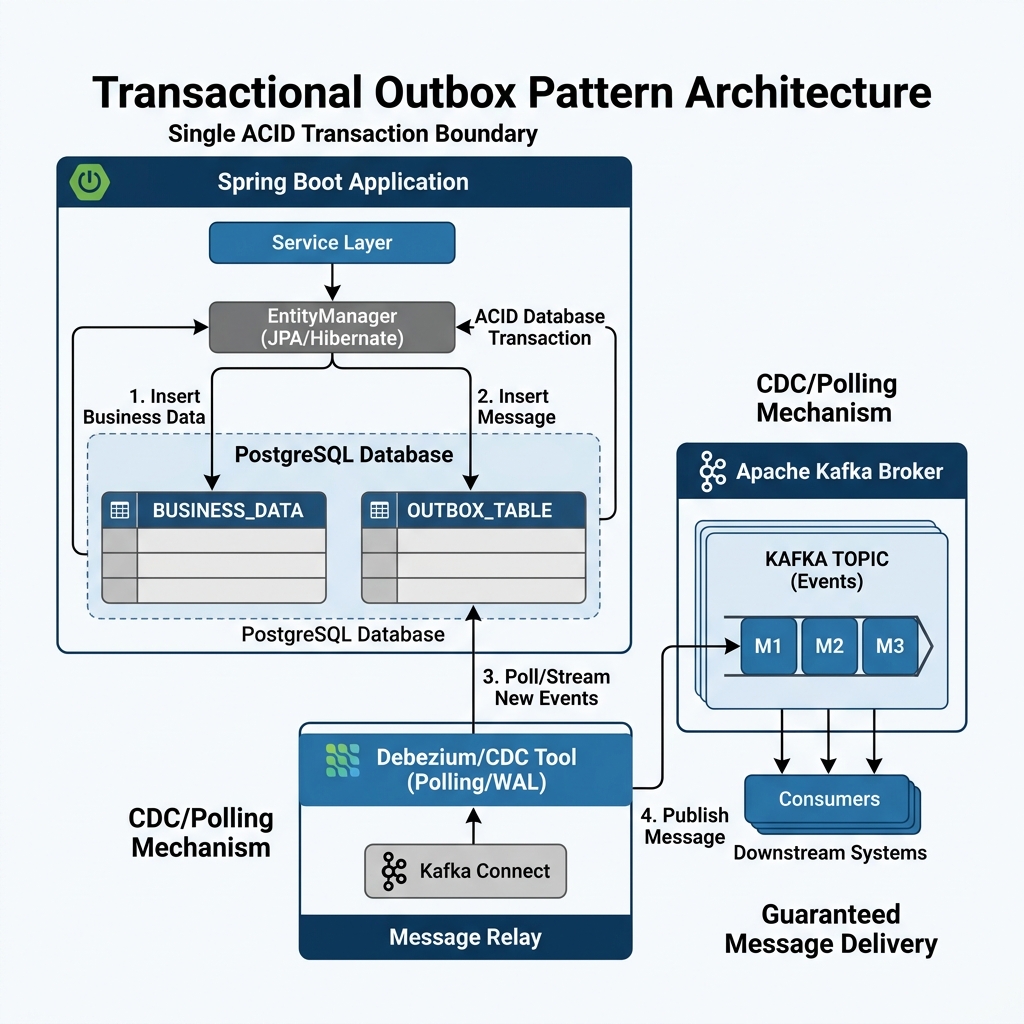
Modern microservices depend heavily on asynchronous message brokers. When an application changes data in a database, it usually needs to inform other systems. For instance, when an order service creates a new customer order, downstream shipping, billing, and notification services must receive an event. Developers often try to save the order to the database and immediately publish a message to Apache Kafka. However, doing both actions across separate network systems leads directly to the dangerous Dual Write Problem.
In this comprehensive architectural guide, you will learn how to implement the Transactional Outbox Pattern using Spring Boot 4 and Java 25. We explore why direct dual writes fail, compare asynchronous Polling Publishers with log-based Change Data Capture (CDC) using Debezium, review high-scale enterprise use cases, and inspect complete runnable code backed by automated Testcontainers verification suites.
Table of Contents
- The Dual Write Problem in Event-Driven Architecture
- Core Tenets of the Transactional Outbox Pattern
- Dual Write vs Outbox Architectural Deep Dive
- Project Setup & Dependencies with Spring Boot 4 and Java 25
- Domain Entities and Outbox Event Schemas
- Implementing the Transactional Order Service
- Approach 1: The Polling Publisher Pattern
- Approach 2: Change Data Capture (CDC) with Debezium
- Architectural Comparison Matrix: Polling vs CDC vs 2PC
- Enterprise Real-World Use Cases
- Production Hardening and Reliability Patterns
- Common Pitfalls and How to Avoid Them
- Frequently Asked Questions & References
The Dual Write Problem in Event-Driven Architecture
Distributed microservice architectures communicate through domain events. In an ideal world, state mutations and event notifications happen simultaneously. In the real world, relational databases and message brokers are distinct distributed systems. They reside on separate servers and communicate over distinct physical network connections.
When an application attempts to write to a relational database and publish to Apache Kafka sequentially, failure is inevitable. Consider what happens when your service saves an order to PostgreSQL and immediately calls kafkaTemplate.send(). If the network hiccups, the Kafka broker restarts, or the application pod crashes right after the database commit, the event is lost forever. Downstream inventory and payment services never learn about the new order. Your data enters an inconsistent state.
Reversing the execution order creates an equally catastrophic bug. If you publish the Kafka event first and then attempt to commit the database transaction, the database write might fail due to a primary key collision, validation constraint, or disk shortage. In that case, downstream systems process an order that does not actually exist in the primary system of record. These phantom transactions corrupt downstream accounting and customer balances.
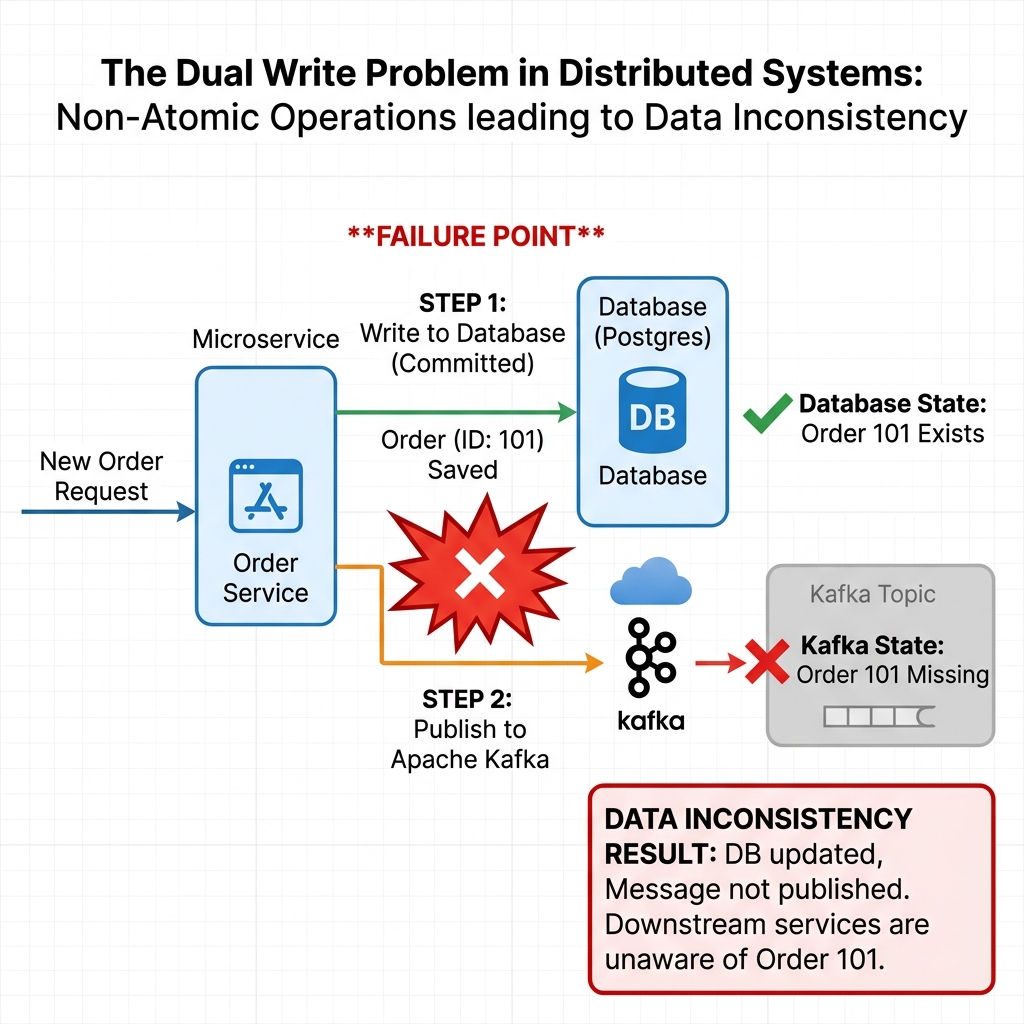
Neither order of execution guarantees data consistency across distributed boundaries. The fundamental reason is that an ACID (Atomicity, Consistency, Isolation, Durability) database transaction cannot span across an external network call to an asynchronous message broker without heavy distributed locking protocols. For further background on reactive microservices and event loops, read our guide on Spring Boot 4 Architecture in 2026.
Core Tenets of the Transactional Outbox Pattern
The Transactional Outbox Pattern solves the dual write dilemma by eliminating the distributed transaction entirely. Instead of attempting to write to two different systems at once, the application writes exclusively to its local database. The design relies on four primary architectural tenets:
- Single ACID Boundary: The business entity and the corresponding event payload are stored inside the exact same local database transaction. They either both commit or both roll back together.
- At-Least-Once Delivery: A decoupled background process reads committed events from the outbox table and publishes them to the message broker. Because the record persists until successful dispatch, messages cannot be lost.
- Asynchronous Decoupling: The user-facing HTTP request does not wait for Kafka network acknowledgments. The API returns quickly, increasing system responsiveness and overall throughput.
- Consumer-Side Idempotence: Since network failures can trigger duplicate deliveries during publisher retries, downstream consumers must use deduplication keys to achieve exactly-once processing semantics.
By enforcing a single atomic transaction boundary, you guarantee that an event is saved if and only if the underlying business data changes. If the database crashes or constraint checks fail, the outbox record rolls back automatically. The application never emits orphan messages or suffers silent event loss.
Dual Write vs Outbox Architectural Deep Dive
Understanding the architectural difference between naive dual writes and the Transactional Outbox Pattern requires looking at failure modes. In a naive dual write architecture, the application code acts as an uncoordinated coordinator between PostgreSQL and Kafka. If any network partition occurs between the application node and the broker, the state machine breaks down.
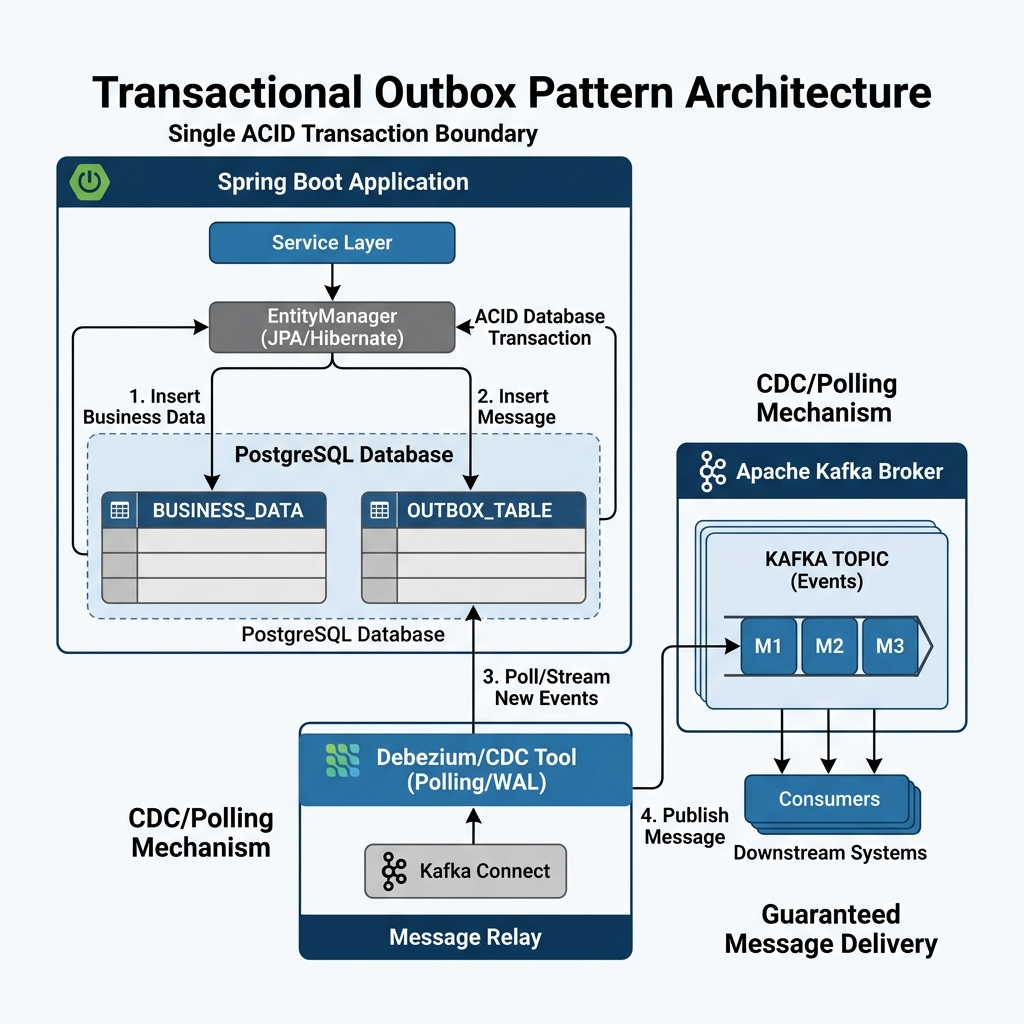
In contrast, the Transactional Outbox Pattern splits the operation into two distinct phases. Phase one is strictly synchronous and transactional within the local database. The business logic executes inside a standard database transaction. It writes to the orders table and inserts a corresponding record into the outbox_events table.
Phase two is asynchronous and decoupled from the user request. A message relay worker inspects the outbox table, reads unprocessed events, transmits them to the designated Kafka topic, and updates the record status. If the relay worker crashes mid-transmission, it restarts and retries publishing. This separation guarantees that temporary broker downtime never blocks customer checkouts or compromises relational integrity.
Project Setup & Dependencies with Spring Boot 4 and Java 25
Implementing the Transactional Outbox Pattern in modern Java requires up-to-date dependencies. We use Spring Boot 4.0.0 and Java 25. Spring Boot 4 provides first-class support for Docker Compose and modern Testcontainers modules.
Below is the Maven dependency configuration from pom.xml. We include Spring Data JPA (Jakarta Persistence API), Spring for Apache Kafka, the PostgreSQL runtime driver, Jackson for JSON serialization, and Testcontainers 2.x for integration verification:
<dependencies>
    <!-- Spring Boot 4 Core Web & Data Starters -->
    <dependency>
        <groupId>org.springframework.boot</groupId>
        <artifactId>spring-boot-starter-web</artifactId>
    </dependency>
    <dependency>
        <groupId>org.springframework.boot</groupId>
        <artifactId>spring-boot-starter-data-jpa</artifactId>
    </dependency>

    <!-- Apache Kafka Integration -->
    <dependency>
        <groupId>org.springframework.kafka</groupId>
        <artifactId>spring-kafka</artifactId>
    </dependency>

    <!-- JSON Serialization Support -->
    <dependency>
        <groupId>com.fasterxml.jackson.core</groupId>
        <artifactId>jackson-databind</artifactId>
    </dependency>
    <dependency>
        <groupId>com.fasterxml.jackson.datatype</groupId>
        <artifactId>jackson-datatype-jsr310</artifactId>
    </dependency>

    <!-- PostgreSQL Driver -->
    <dependency>
        <groupId>org.postgresql</groupId>
        <artifactId>postgresql</artifactId>
        <scope>runtime</scope>
    </dependency>

    <!-- Testcontainers and Integration Testing -->
    <dependency>
        <groupId>org.springframework.boot</groupId>
        <artifactId>spring-boot-starter-test</artifactId>
        <scope>test</scope>
    </dependency>
    <dependency>
        <groupId>org.testcontainers</groupId>
        <artifactId>testcontainers-junit-jupiter</artifactId>
        <scope>test</scope>
    </dependency>
    <dependency>
        <groupId>org.testcontainers</groupId>
        <artifactId>testcontainers-postgresql</artifactId>
        <scope>test</scope>
    </dependency>
    <dependency>
        <groupId>org.testcontainers</groupId>
        <artifactId>testcontainers-kafka</artifactId>
        <scope>test</scope>
    </dependency>
    <dependency>
        <groupId>org.awaitility</groupId>
        <artifactId>awaitility</artifactId>
        <scope>test</scope>
    </dependency>
</dependencies>
Notice that Testcontainers artifacts in Spring Boot 4 use the official 2.x naming convention without hardcoded versions. Spring Boot manages dependency versions automatically, eliminating classpath collisions across transitive libraries.
Domain Entities and Outbox Event Schemas
To implement this pattern cleanly, we define two JPA entities: Order and OutboxEvent. The Order class represents our business aggregate root. It contains business attributes such as customer identifiers, product codes, quantities, order totals, and status codes.
package com.webcodein.workshop.architecture.outbox.entity;

import jakarta.persistence.*;
import java.math.BigDecimal;
import java.time.Instant;
import java.util.UUID;

@Entity
@Table(name = "orders")
public class Order {

    @Id
    @GeneratedValue(strategy = GenerationType.UUID)
    private UUID id;

    @Column(nullable = false)
    private String customerId;

    @Column(nullable = false)
    private String productCode;

    @Column(nullable = false)
    private int quantity;

    @Column(nullable = false)
    private BigDecimal totalAmount;

    @Enumerated(EnumType.STRING)
    @Column(nullable = false)
    private OrderStatus status;

    @Column(nullable = false)
    private Instant createdAt;

    // Constructors, getters, and setters
}
Next, we define the generic OutboxEvent table. The outbox table must be schema-agnostic so any aggregate type can emit events without requiring new database migrations. We store the payload as JSON (JavaScript Object Notation) or text, accompanied by routing metadata:
package com.webcodein.workshop.architecture.outbox.entity;

import jakarta.persistence.*;
import java.time.Instant;
import java.util.UUID;

@Entity
@Table(name = "outbox_events")
public class OutboxEvent {

    @Id
    @GeneratedValue(strategy = GenerationType.UUID)
    private UUID id;

    @Column(nullable = false)
    private String aggregateType;

    @Column(nullable = false)
    private String aggregateId;

    @Column(nullable = false)
    private String eventType;

    @Column(nullable = false, columnDefinition = "TEXT")
    private String payload;

    @Column(nullable = false)
    private Instant createdAt;

    @Column(nullable = false)
    private boolean processed;

    // Constructors, getters, and setters
}
The aggregateId acts as the Kafka message partition key. This guarantees that all state changes for a specific order route to the exact same Kafka partition. Kafka preserves strict order per partition. In addition, the processed boolean column allows our polling publisher to quickly filter pending events with an index.
Implementing the Transactional Order Service
The core of the Transactional Outbox Pattern lives in the application service layer. The service method uses Spring’s @Transactional annotation. Inside this transactional boundary, the method persists both the business entity and the serialized outbox event.
package com.webcodein.workshop.architecture.outbox.service;

import com.fasterxml.jackson.core.JsonProcessingException;
import com.fasterxml.jackson.databind.ObjectMapper;
import com.webcodein.workshop.architecture.outbox.dto.OrderCreatedEvent;
import com.webcodein.workshop.architecture.outbox.dto.OrderRequest;
import com.webcodein.workshop.architecture.outbox.entity.Order;
import com.webcodein.workshop.architecture.outbox.entity.OrderStatus;
import com.webcodein.workshop.architecture.outbox.entity.OutboxEvent;
import com.webcodein.workshop.architecture.outbox.repository.OrderRepository;
import com.webcodein.workshop.architecture.outbox.repository.OutboxEventRepository;
import org.springframework.stereotype.Service;
import org.springframework.transaction.annotation.Transactional;

import java.time.Instant;

@Service
public class OrderService {

    private final OrderRepository orderRepository;
    private final OutboxEventRepository outboxEventRepository;
    private final ObjectMapper objectMapper;

    public OrderService(OrderRepository orderRepository,
                        OutboxEventRepository outboxEventRepository,
                        ObjectMapper objectMapper) {
        this.orderRepository = orderRepository;
        this.outboxEventRepository = outboxEventRepository;
        this.objectMapper = objectMapper;
    }

    @Transactional
    public Order createOrder(OrderRequest request) {
        Instant now = Instant.now();

        // 1. Persist the business aggregate
        Order order = new Order();
        order.setCustomerId(request.customerId());
        order.setProductCode(request.productCode());
        order.setQuantity(request.quantity());
        order.setTotalAmount(request.totalAmount());
        order.setStatus(OrderStatus.CREATED);
        order.setCreatedAt(now);

        Order savedOrder = orderRepository.save(order);

        // 2. Build the domain event transfer object
        OrderCreatedEvent eventPayload = new OrderCreatedEvent(
                savedOrder.getId(),
                savedOrder.getCustomerId(),
                savedOrder.getProductCode(),
                savedOrder.getQuantity(),
                savedOrder.getTotalAmount(),
                now
        );

        String jsonPayload;
        try {
            jsonPayload = objectMapper.writeValueAsString(eventPayload);
        } catch (JsonProcessingException e) {
            throw new IllegalStateException("Failed to serialize order event payload", e);
        }

        // 3. Persist the outbox record within the same ACID transaction
        OutboxEvent outboxEvent = new OutboxEvent();
        outboxEvent.setAggregateType("Order");
        outboxEvent.setAggregateId(savedOrder.getId().toString());
        outboxEvent.setEventType("OrderCreated");
        outboxEvent.setPayload(jsonPayload);
        outboxEvent.setCreatedAt(now);
        outboxEvent.setProcessed(false);

        outboxEventRepository.save(outboxEvent);

        return savedOrder;
    }
}
If serializing the JSON payload throws an exception, the entire transaction aborts. Neither the order nor the event is saved to PostgreSQL. When this method completes successfully, both records exist safely in the database. For complex multi-step sagas spanning multiple business services, review our companion guide on the Saga Pattern with Spring Boot 4 and Temporal.
Approach 1: The Polling Publisher Pattern
Once events reside safely in the database, a background relay worker must publish them to Kafka. The most accessible implementation is the Polling Publisher pattern. In Spring Boot, we implement this using a scheduled task via @Scheduled.
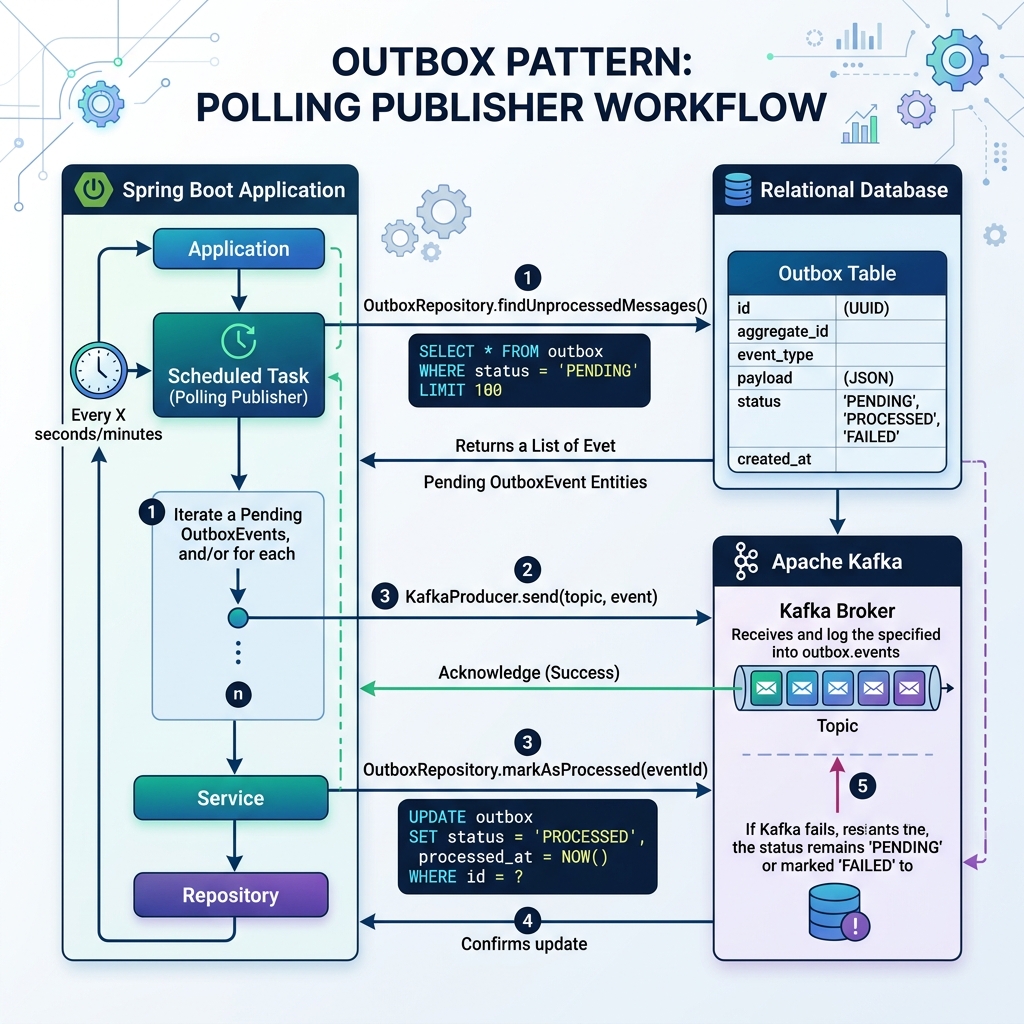
The scheduler queries the database at fixed intervals for records where processed = false. It loops over the batch, sends each message to Kafka using KafkaTemplate, and marks the event as processed upon confirmation:
package com.webcodein.workshop.architecture.outbox.publisher;

import com.webcodein.workshop.architecture.outbox.entity.OutboxEvent;
import com.webcodein.workshop.architecture.outbox.repository.OutboxEventRepository;
import org.slf4j.Logger;
import org.slf4j.LoggerFactory;
import org.springframework.kafka.core.KafkaTemplate;
import org.springframework.scheduling.annotation.Scheduled;
import org.springframework.stereotype.Component;
import org.springframework.transaction.annotation.Transactional;

import java.util.List;

@Component
public class OutboxPollingPublisher {

    private static final Logger log = LoggerFactory.getLogger(OutboxPollingPublisher.class);
    public static final String TOPIC = "order-events";

    private final OutboxEventRepository outboxEventRepository;
    private final KafkaTemplate<String, String> kafkaTemplate;

    public OutboxPollingPublisher(OutboxEventRepository outboxEventRepository,
                                  KafkaTemplate<String, String> kafkaTemplate) {
        this.outboxEventRepository = outboxEventRepository;
        this.kafkaTemplate = kafkaTemplate;
    }

    @Scheduled(fixedDelayString = "${outbox.publisher.fixed-delay-ms:500}")
    @Transactional
    public void publishPendingEvents() {
        List<OutboxEvent> pendingEvents = outboxEventRepository
                .findTop10ByProcessedFalseOrderByCreatedAtAsc();

        if (pendingEvents.isEmpty()) {
            return;
        }

        log.info("Polling publisher found {} pending outbox event(s)", pendingEvents.size());
        for (OutboxEvent event : pendingEvents) {
            try {
                // Synchronously wait for broker acknowledgment to ensure in-order delivery
                kafkaTemplate.send(TOPIC, event.getAggregateId(), event.getPayload()).get();
                event.setProcessed(true);
                outboxEventRepository.save(event);
                log.info("Successfully published outbox event {} to topic {}", event.getId(), TOPIC);
            } catch (Exception e) {
                log.error("Failed to publish outbox event {}: {}", event.getId(), e.getMessage());
                // Break immediately to prevent out-of-order event publishing
                break;
            }
        }
    }
}
The primary advantage of the Polling Publisher is simplicity. It requires no additional external infrastructure or cluster agents. Everything runs within the existing Spring Boot application. However, continuous polling introduces database query overhead. It also creates a small delivery latency proportional to the polling delay interval.
Approach 2: Change Data Capture (CDC) with Debezium
For high-throughput systems processing thousands of events per second, database polling can overload primary database connections. The enterprise solution is Change Data Capture (CDC) using Debezium and Kafka Connect. Instead of executing SQL queries, Debezium tails the database transaction log directly.
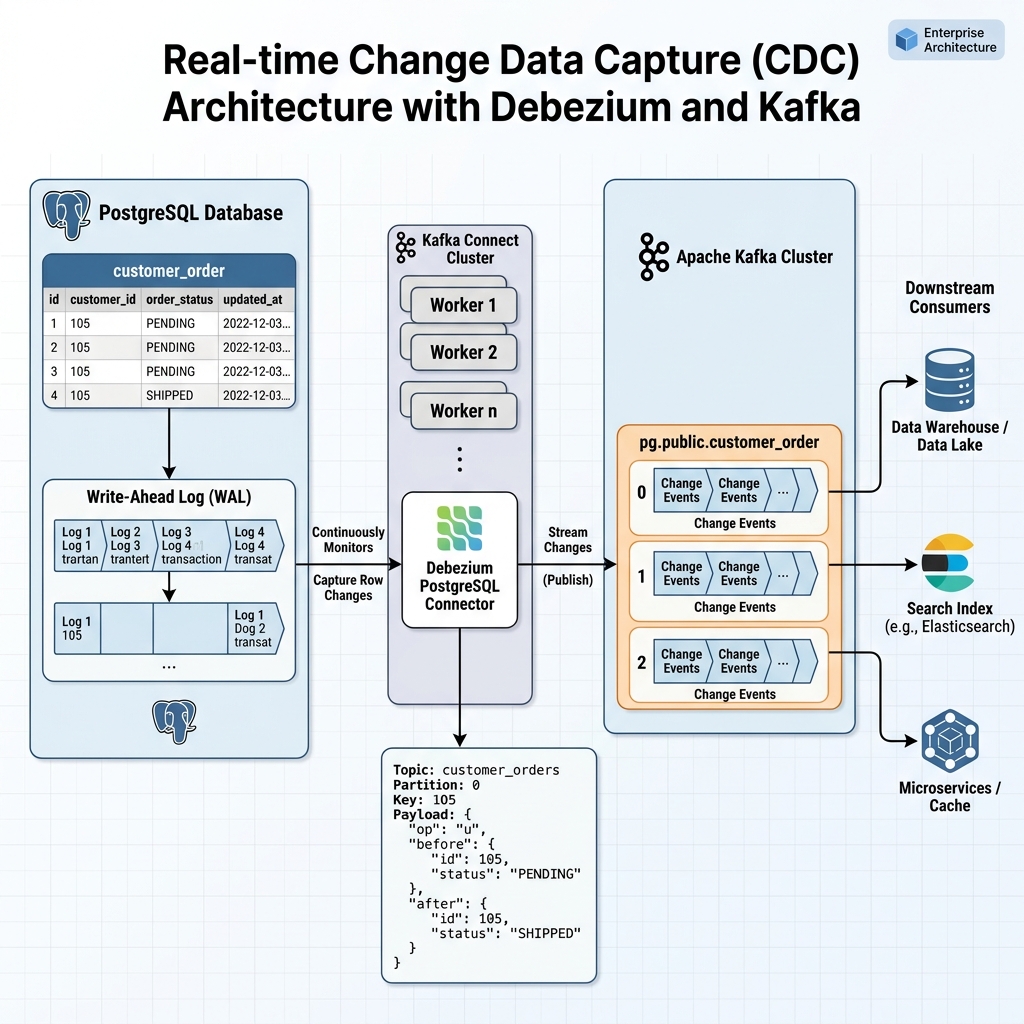
In PostgreSQL, every committed transaction writes to the Write-Ahead Log (WAL). Debezium connects using PostgreSQL logical replication slots. Whenever a new row appears in outbox_events, Debezium captures the row mutation and streams it directly to Apache Kafka. The application does not run any polling background threads.
Debezium includes a dedicated Outbox Event Router Single Message Transform (SMT). The SMT unpacks the outbox payload and dynamically routes the event to the topic specified in the outbox table. Furthermore, it extracts the aggregateId and assigns it as the Kafka record key. This approach achieves sub-millisecond latency with near-zero database CPU overhead.
Architectural Comparison Matrix: Polling vs CDC vs 2PC
Choosing the right outbox implementation depends on your team’s throughput requirements, latency constraints, and operational capacity. The comparison table below evaluates the four primary architectural approaches:
| Dimension | Naive Dual Write | Polling Publisher | Debezium CDC | Two-Phase Commit (2PC) |
|---|---|---|---|---|
| Consistency | None (Data loss / silent drift) | Guaranteed At-Least-Once | Guaranteed At-Least-Once | Strict Atomicity (XA) |
| Delivery Latency | Sub-millisecond | Medium (Polling delay interval) | Near-instantaneous (<10ms) | High (Two-phase network roundtrips) |
| Database Overhead | Minimal | Medium (Frequent SELECT queries) | Negligible (Reads binary WAL log) | Severe (Locks held during commit phase) |
| Operational Complexity | Very Low | Low (In-application Spring scheduler) | Medium-High (Kafka Connect + Debezium) | Extremely High (Rarely supported by Kafka) |
| Infrastructure Cost | Zero added cost | Zero added cost | Requires Kafka Connect cluster | Requires specialized XA coordinator |
Teams should adopt the Polling Publisher pattern for low-to-moderate volume systems. As traffic scales into millions of events per day, migrating to Debezium CDC removes query pressure from primary database replicas. For more details on multi-tenant data architecture and database scaling, see our tutorial on PostgreSQL Row-Level Security in Spring Boot 4.
Enterprise Real-World Use Cases
The Transactional Outbox Pattern is essential in mission-critical software systems across multiple industries. Here are three primary enterprise scenarios where this pattern prevents critical business outages:
1. Financial Ledger and Payment Reconciliation: In banking software, when a customer initiates a funds transfer, the core ledger must deduct the amount and emit an audit event. A naive dual write could debit the bank account while failing to publish the transfer event. The customer would lose money without the recipient receiving credit. By inserting both the ledger entry and the transfer event in one ACID transaction, funds never vanish.
2. High-Volume E-Commerce Order Fulfillment: During major promotional sales events, checkout endpoints receive hundreds of requests per second. Direct calls to a Kafka cluster can fail when the broker experiences broker election pauses or disk pressure. With the Transactional Outbox Pattern, customer checkouts commit instantly to the database. The background outbox processor drains events at a sustained pace, shielding customers from broker latency spikes.
3. B2B Multi-Tenant Audit Trails and Compliance: SaaS platforms operating under SOC 2 and GDPR compliance must produce tamper-proof audit trails. When an administrator modifies access policies or deletes sensitive user records, an audit log must stream to an external security monitoring tool. Storing the audit event in the transactional outbox ensures that no administrative change can occur without producing a matching immutable event in Kafka. For event streaming details, review our guide on Event-Driven Architecture with Kafka in Spring Boot 4.
Production Hardening and Reliability Patterns
Deploying the Transactional Outbox Pattern to production requires defensive engineering. Below are the three essential hardening patterns for enterprise resilience:
Consumer Idempotence and Deduplication: Because the outbox pattern guarantees At-Least-Once delivery, consumers will occasionally receive duplicate messages during network timeouts or container restarts. Downstream consumers must maintain an idempotency table or use database unique constraints on the event identifier. If a message ID already exists in the processed store, the consumer acknowledges and ignores the duplicate.
Poison Pill and Dead Letter Queue (DLQ) Isolation: If a corrupted outbox message causes the publisher or consumer to fail repeatedly, the entire pipeline must not stall. Configure the publisher to track retry counts. If an event fails more than three times, the relay moves the row to an outbox dead letter table and alerts operations engineers while continuing to process healthy records.
Outbox Table Purging and Partitioning: Over time, the outbox_events table accumulates millions of rows. Left uncleaned, the table bloats and degrades query performance. Implement an automated maintenance job that purges or archives processed records older than seven days. In PostgreSQL, use table partitioning by creation date to allow dropping entire historical partitions instantly without table locks.
Common Pitfalls and How to Avoid Them
Developers encountering the Transactional Outbox Pattern often stumble over subtle architectural traps. Here are the three most common pitfalls and their direct solutions:
- Pitfall 1: Publishing Inside the Database Transaction: Some developers inject
KafkaTemplatedirectly inside the@Transactionalservice method, hoping that an error rolls back the database. This is a severe anti-pattern. If Kafka takes five seconds to acknowledge, your database connection remains locked for five seconds, exhausting your connection pool. Fix: Save only to the outbox table in the transaction; never execute external network calls inside a database transaction. - Pitfall 2: Unordered Event Publishing: If your polling worker queries pending events without a strict
ORDER BY created_at ASCclause, events can publish out of sequence. AnOrderCancelledEventcould reach Kafka before the correspondingOrderCreatedEvent. Fix: Always sort by sequential creation timestamps and break the polling loop if an individual event fails to transmit. - Pitfall 3: Assuming Exactly-Once Semantics: Developers frequently assume Kafka transactions provide end-to-end exactly-once delivery across external databases. In reality, external consumer side effects require consumer-side deduplication. Fix: Design all downstream handlers to be strictly idempotent using unique aggregate keys.
Frequently Asked Questions & References
1. Does the Transactional Outbox Pattern guarantee Exactly-Once message delivery?
No. The Transactional Outbox Pattern guarantees At-Least-Once Delivery. It guarantees that an event will never be lost. However, if the publisher dispatches a message to Kafka and crashes before updating the outbox table to processed = true, the record will be republished upon restart. Downstream consumers must implement idempotent message handling.
2. What is the performance impact of polling the outbox table?
For low to moderate workloads, polling adds negligible overhead if the processed column is indexed alongside created_at. However, under high loads (thousands of transactions per second), repeated polling queries consume database CPU. For high-scale deployments, Change Data Capture (CDC) with Debezium is recommended because it tails the binary transaction log without executing SQL queries.
3. How should processed outbox records be cleaned up?
Processed events should not remain in the primary outbox table indefinitely. You should implement a scheduled archiving job that deletes processed rows older than a specific retention period (e.g., 7 days). Alternatively, use PostgreSQL table partitioning by date, allowing old partitions to be dropped instantly without generating heavy database vacuuming overhead.
4. Can I use the Outbox Pattern with NoSQL databases like MongoDB?
Yes. Any database supporting multi-document transactions or atomic document updates can support the outbox pattern. In MongoDB, you can store the outbox event array directly inside the business document or use multi-document ACID transactions across distinct collections.
Companion Workshop Code
The complete, runnable Spring Boot 4 companion project for this guide—including unit tests and Testcontainers integration tests running against real PostgreSQL and Apache Kafka instances—is available on GitHub:
GitHub: Transactional Outbox Pattern with Spring Boot 4 & Kafka