
In modern multi-tenant cloud software, tenant isolation is the most critical requirement. A tenant is a customer, company, or organization sharing your application. If Customer A sees private financial data from Customer B, your business faces catastrophic legal penalties, loss of customer trust, and severe regulatory fines.
Most development teams rely on application-level filtering. Developers add WHERE tenant_id = ? to every database query. Alternatively, they configure Hibernate tenant filters. But humans make mistakes. When a developer writes a custom native SQL query, creates a complex reporting join, or forgets a filter, data leaks happen immediately.
In this comprehensive architectural guide, we explore a much safer approach: PostgreSQL 16 Row-Level Security (RLS) integrated with Spring Boot 4 and Hibernate 7. By pushing data access rules down into the PostgreSQL database engine, we build a hard physical security barrier that application code cannot bypass.
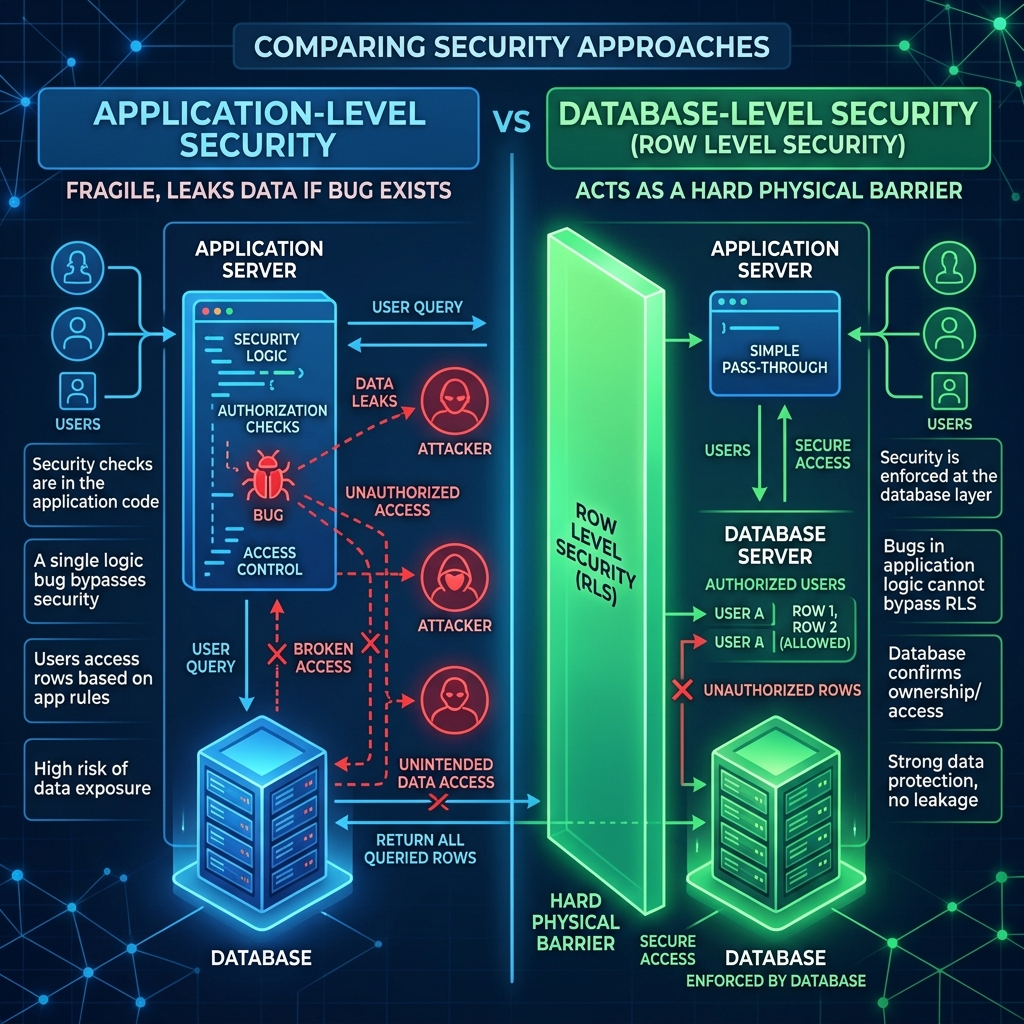
The Architecture of Row-Level Security (RLS)
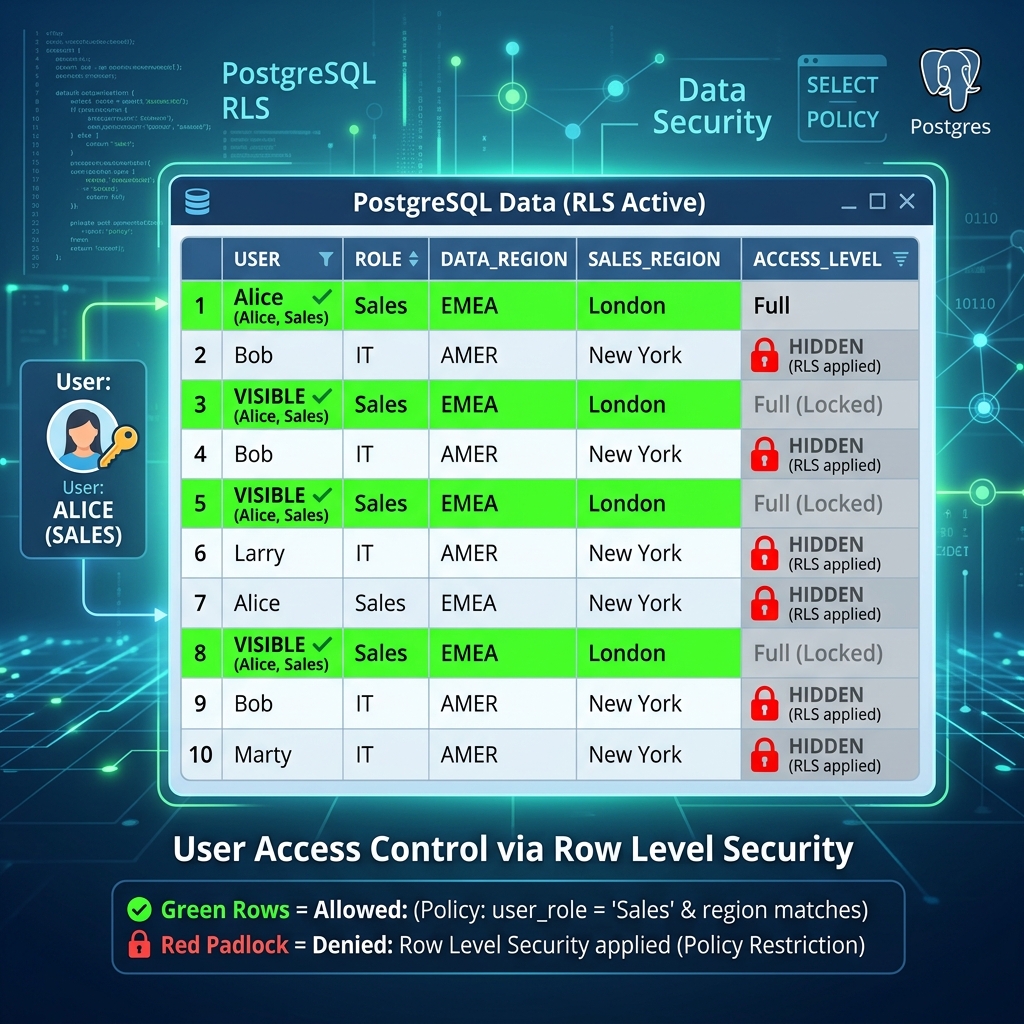
PostgreSQL includes a native security subsystem called Row-Level Security. In standard SQL databases, table permissions are binary. A database user can either read all rows in a table or read none. RLS changes this model completely. It allows database administrators to attach fine-grained security policies to individual database tables.
When a security policy is active on a table, PostgreSQL intercepts every incoming SQL query at the query planner stage. The database engine inspects the SQL Abstract Syntax Tree (AST). It rewrites the query internally to inject the policy condition before executing the query plan. Even if your Java code executes a broad query like SELECT * FROM documents, PostgreSQL rewrites the statement internally into SELECT * FROM documents WHERE tenant_id = current_setting('rls.tenant_id').
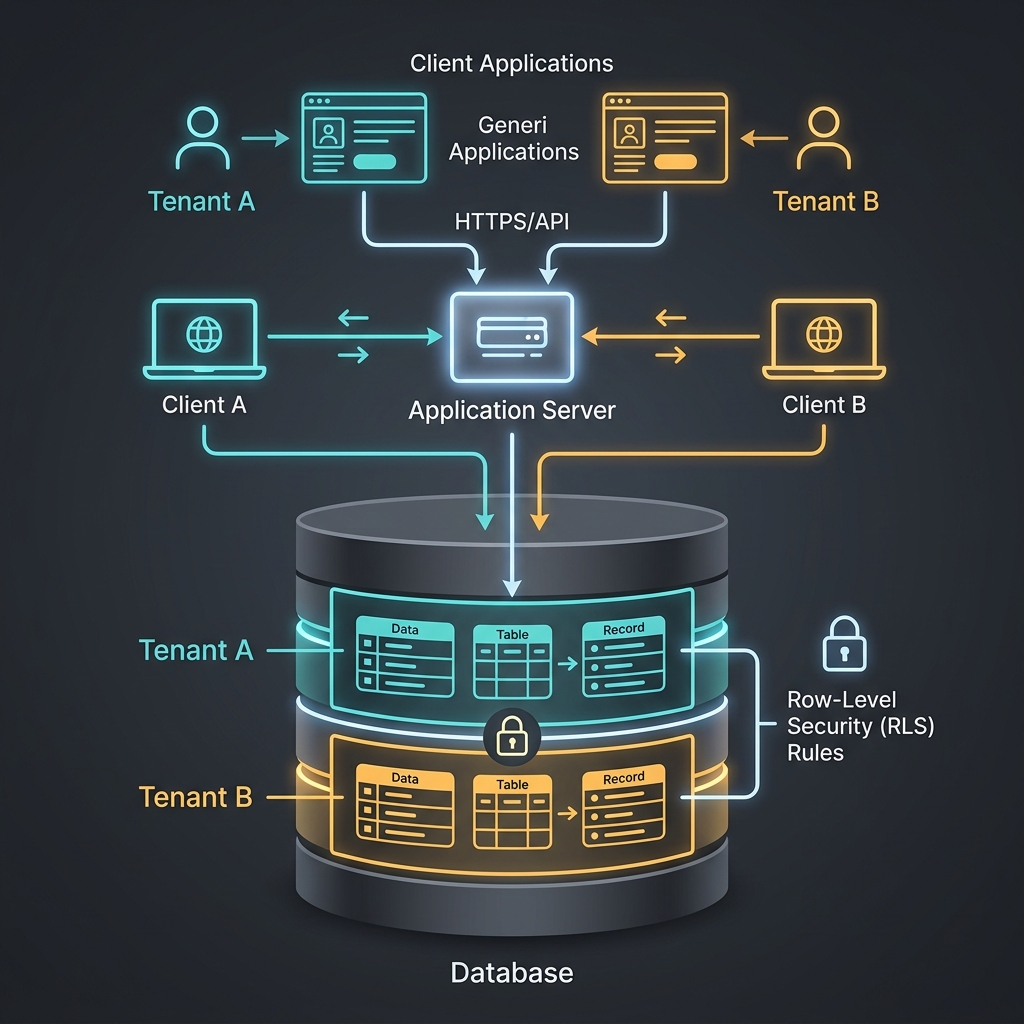
This internal rewriting provides three major architectural benefits:
- Zero Code Leakage: Application bugs, missing JPA criteria filters, and raw SQL queries cannot read unauthorized rows.
- External Tool Protection: Database administrators, BI analytics dashboards, and reporting scripts connected to PostgreSQL respect the exact same security boundaries.
- Simplified Codebase: Java developers write clean business logic without constantly repeating tenant filtering clauses in services and repositories.
Comparative Analysis: Tenant Isolation Strategies
Choosing the correct data isolation strategy is a key architectural decision. Let us compare the four dominant tenant isolation patterns used in modern Java enterprise backends:
| Strategy | Isolation Boundary | Performance Impact | Developer Complexity | Risk of Data Leakage |
|---|---|---|---|---|
| Manual SQL / JPA Filter | Application Layer | Lowest (direct indexed query) | High (must repeat everywhere) | Very High (one missed clause leaks data) |
| Hibernate @TenantId | ORM Framework | Very Low | Low (handled by Hibernate 7) | Medium (native queries bypass Hibernate) |
| PostgreSQL RLS (This Guide) | Database Engine | Low (< 0.1 ms session setup) | Very Low (transparent to code) | Near Zero (enforced by DB kernel) |
| SpiceDB / Zanzibar Graph | Dedicated Auth Service | Medium (remote gRPC check) | Medium (requires schema & sync) | Near Zero (centralized ACL engine) |
For relational SaaS architectures using shared database schemas, PostgreSQL RLS provides the best balance of safety, operational simplicity, and raw performance. For distributed microservice topologies requiring complex graph relationships across multiple independent databases, consider pairing this with a distributed authorization engine like Zanzibar and SpiceDB.
Setting Up the PostgreSQL 16 Schema
To implement RLS, we configure our PostgreSQL database schema. In Spring Boot 4, we define our schema in src/main/resources/schema.sql. This script executes automatically during application startup:
-- 1. Create the business entity table
CREATE TABLE IF NOT EXISTS documents (
    id BIGSERIAL PRIMARY KEY,
    content TEXT NOT NULL,
    tenant_id VARCHAR(50) NOT NULL
);

-- 2. Enable Row-Level Security on the table
ALTER TABLE documents ENABLE ROW LEVEL SECURITY;

-- 3. Define the tenant isolation policy
CREATE POLICY tenant_isolation_policy ON documents
    USING (tenant_id = current_setting('rls.tenant_id', true));

-- 4. Force RLS for table owners
ALTER TABLE documents FORCE ROW LEVEL SECURITY;

-- 5. Create an application role without superuser privileges
CREATE ROLE app_user;
GRANT ALL PRIVILEGES ON TABLE documents TO app_user;
GRANT ALL PRIVILEGES ON ALL SEQUENCES IN SCHEMA public TO app_user;
Let us analyze every SQL statement in detail:
ENABLE ROW LEVEL SECURITY: Activates the security engine on thedocumentstable. Normal queries without matching policies now return zero rows.current_setting('rls.tenant_id', true): Reads a transaction-scoped session variable namedrls.tenant_id. The second parametertruetells PostgreSQL to returnNULLinstead of throwing an error if the variable is not set.FORCE ROW LEVEL SECURITY: By default, the PostgreSQL table owner bypasses all RLS policies. This command forces the database to apply policies even when the table owner executes queries.CREATE ROLE app_user: In PostgreSQL, database superusers always bypass RLS policies. By creating a dedicated non-superuser application role, we guarantee that all SQL execution strictly respects row security.
Integrating with Spring Boot 4 and Hibernate 7
Our database schema is now protected. Next, we must pass the current user’s tenant identity from the Spring Security context to the PostgreSQL database session.
Enterprise applications use connection pools like HikariCP. Connections in the pool are shared across many concurrent HTTP requests. Therefore, we must never set a persistent global session variable. Instead, we must set a transaction-local variable using SET LOCAL. When the database transaction commits or rolls back, PostgreSQL resets the variable automatically.
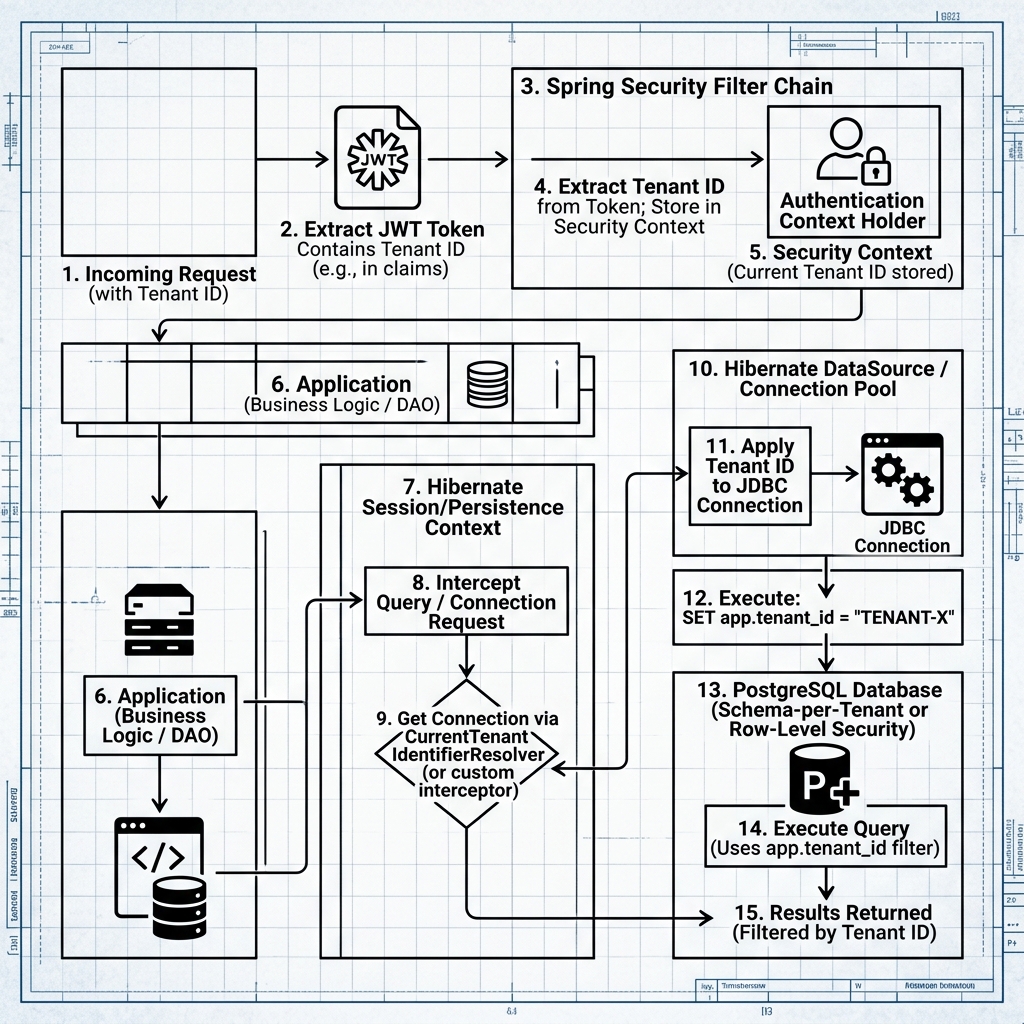
The Spring AOP Aspect
The cleanest and most maintainable way to inject the tenant context is a Spring AOP Aspect. We intercept all method executions on our Spring Data JPA repositories:
package com.webcodein.security.rls.config;

import org.aspectj.lang.annotation.Aspect;
import org.aspectj.lang.annotation.Before;
import org.springframework.security.core.Authentication;
import org.springframework.security.core.context.SecurityContextHolder;
import org.springframework.stereotype.Component;

import jakarta.persistence.EntityManager;
import jakarta.persistence.PersistenceContext;

@Aspect
@Component
public class RlsAspect {

    @PersistenceContext
    private EntityManager entityManager;

    @Before("execution(* com.webcodein.security.rls.repository.*.*(..))")
    public void setTenantContext() {
        Authentication authentication = SecurityContextHolder.getContext().getAuthentication();

        if (authentication != null && authentication.isAuthenticated()) {
            String tenantId = authentication.getName();

            // Switch session role to non-superuser app_user
            entityManager.createNativeQuery("SET LOCAL ROLE app_user").executeUpdate();

            // Set the tenant ID for the current transaction
            entityManager.createNativeQuery("SET LOCAL rls.tenant_id = '" + tenantId + "'").executeUpdate();
        }
    }
}
Notice the two commands inside the aspect:
SET LOCAL ROLE app_user: Switches the connection session to the application role. This ensures that even if the connection pool logs into PostgreSQL as the database owner, row-level security is enforced.SET LOCAL rls.tenant_id = '...': Sets the session setting read by our database policy. Because we useSET LOCAL, this setting exists only within the boundaries of the current database transaction.
The JPA Entity and Clean Repository
Our JPA entity maps cleanly to the documents table. Notice that the entity stores the tenantId, but our repository contains zero custom query logic:
package com.webcodein.security.rls.entity;

import jakarta.persistence.Column;
import jakarta.persistence.Entity;
import jakarta.persistence.GeneratedValue;
import jakarta.persistence.GenerationType;
import jakarta.persistence.Id;
import jakarta.persistence.Table;

@Entity
@Table(name = "documents")
public class Document {

    @Id
    @GeneratedValue(strategy = GenerationType.IDENTITY)
    private Long id;

    private String content;

    @Column(name = "tenant_id")
    private String tenantId;

    public Document() {
    }

    public Document(String content, String tenantId) {
        this.content = content;
        this.tenantId = tenantId;
    }

    public Long getId() { return id; }
    public void setId(Long id) { this.id = id; }
    public String getContent() { return content; }
    public void setContent(String content) { this.content = content; }
    public String getTenantId() { return tenantId; }
    public void setTenantId(String tenantId) { this.tenantId = tenantId; }
}
Our Spring Data JPA repository interface is completely standard:
package com.webcodein.security.rls.repository;

import com.webcodein.security.rls.entity.Document;
import org.springframework.data.jpa.repository.JpaRepository;
import org.springframework.stereotype.Repository;

@Repository
public interface DocumentRepository extends JpaRepository<Document, Long> {
    // No custom tenant filtering methods required!
}
The REST Controller
Now look at how clean our web layer becomes. In our Spring Web controller, we never add findByTenantId filters:
package com.webcodein.security.rls.controller;

import com.webcodein.security.rls.entity.Document;
import com.webcodein.security.rls.repository.DocumentRepository;
import org.springframework.security.core.Authentication;
import org.springframework.web.bind.annotation.*;

import java.util.List;

@RestController
@RequestMapping("/api/documents")
public class DocumentController {

    private final DocumentRepository documentRepository;

    public DocumentController(DocumentRepository documentRepository) {
        this.documentRepository = documentRepository;
    }

    @PostMapping
    public Document createDocument(@RequestBody Document document, Authentication authentication) {
        document.setTenantId(authentication.getName());
        return documentRepository.save(document);
    }

    @GetMapping
    public List<Document> getAllDocuments() {
        // Plain findAll() automatically returns only the caller's tenant rows!
        return documentRepository.findAll();
    }
}
Real-World Enterprise Use Cases
PostgreSQL Row-Level Security is used across major enterprise industries where data isolation is mandatory:
1. B2B Multi-Tenant SaaS Platforms
In B2B SaaS software, enterprise clients demand strict data partitioning. Creating separate databases or separate schemas for thousands of small tenants causes massive connection pool exhaustion and deployment overhead. With RLS, all tenants share a unified database schema. RLS guarantees that tenant queries are physically isolated at zero extra infrastructure cost.
2. Healthcare and Patient Privacy (HIPAA)
Healthcare backends manage Electronic Health Records (EHR). Regulations like HIPAA in the United States and GDPR in Europe require strict access segregation. RLS policies restrict patient records so doctors can only view patients within their assigned medical department or clinic branch. Even if a junior engineer writes an unindexed query, medical records from other clinics remain invisible.
3. Financial Multi-Brand Banking Ledgers
Modern fintech platforms often run multiple independent banking brands on a shared core ledger. Using RLS, transaction journals and account balances are partitioned by brand identity. Regulatory compliance auditors can inspect the PostgreSQL database engine directly to verify that data isolation rules exist inside the database kernel rather than relying on application code reviews.
Advantages and Limitations
Advantages
- Physical Engine Protection: Security rules live inside the PostgreSQL storage engine. Bugs in Java code, misconfigured JPA mappings, or compromised ORM caches cannot bypass database policies.
- Radical Code Simplification: Application developers do not need to write custom filtering logic or maintain separate repository methods for multi-tenancy.
- Direct Tooling Safety: When database engineers connect to the production database via pgAdmin, DBeaver, or psql, they cannot accidentally view another tenant’s data without intentionally overriding the session role.
- High Throughput: PostgreSQL compiles security policies into the native query plan. It uses indexes on
tenant_idwith zero network hops.
Limitations
- Database Lock-in: This architecture relies heavily on PostgreSQL features. Migrating to MySQL, SQLite, or Microsoft SQL Server requires altering your security implementation.
- Connection Pool Overhead: Executing
SET LOCALqueries per transaction adds a tiny fraction of a millisecond to query time. In high-frequency microbenchmarks, this overhead is approximately 50 to 100 microseconds. - Background Worker Context: Asynchronous background jobs and scheduled tasks (such as Spring
@Scheduledmethods or Kafka message consumers) do not have an incoming HTTP request or Spring Security context. You must explicitly set a system tenant ID before accessing repositories. - Hibernate Second-Level Cache: If you use an external distributed second-level cache (like Redis or Hazelcast), you must partition cache keys by tenant ID to prevent cache hits across tenants.
Best Practices & Production Guidelines
1. Always Use SET LOCAL, Never SET
Never execute SET rls.tenant_id = '...' without the LOCAL keyword. A standard SET command modifies the connection state permanently. When the thread finishes and the HikariCP connection returns to the pool, the next HTTP request borrowing that physical connection inherits the previous tenant’s identity. SET LOCAL guarantees that the variable automatically reverts when the transaction ends.
2. Index Every Tenant Column
Because PostgreSQL injects WHERE tenant_id = ... into every query plan, every table with RLS must have a B-tree index on the tenant_id column:
CREATE INDEX idx_documents_tenant_id ON documents (tenant_id);For composite queries, create compound indexes matching your query patterns, such as CREATE INDEX idx_docs_tenant_created ON documents (tenant_id, created_at DESC).
3. Avoid Database Superusers for Application Connections
In PostgreSQL, superusers (such as the default postgres administrative user) always bypass Row-Level Security, even when FORCE ROW LEVEL SECURITY is configured. In production, your Spring Boot application datasource must connect as a standard application role with table grants, never as a database superuser.
4. Manage Background Jobs Cleanly
When running background jobs or Kafka consumers, use a dedicated programmatic execution template:
@Service
public class TenantExecutionTemplate {

    @PersistenceContext
    private EntityManager entityManager;

    @Transactional
    public <T> T executeAsTenant(String tenantId, Supplier<T> action) {
        entityManager.createNativeQuery("SET LOCAL ROLE app_user").executeUpdate();
        entityManager.createNativeQuery("SET LOCAL rls.tenant_id = '" + tenantId + "'").executeUpdate();
        return action.get();
    }
}
Common Mistakes & Pitfalls (With Fixes)
Pitfall 1: Forgetting FORCE ROW LEVEL SECURITY
The Mistake: Enabling RLS with ALTER TABLE documents ENABLE ROW LEVEL SECURITY but failing to add FORCE ROW LEVEL SECURITY.
The Hazard: By default, PostgreSQL exempts the table owner from RLS rules. If your Spring Boot application connects using the credentials that created the schema, RLS will silently do nothing!
The Fix: Always add ALTER TABLE <table> FORCE ROW LEVEL SECURITY; to every table.
Pitfall 2: Hibernate First-Level Cache Pollution
The Mistake: Switching tenants within a single long-running @Transactional method.
The Hazard: The Hibernate EntityManager maintains a first-level cache of managed entities. If you load documents for Tenant A, switch the session variable, and query again within the exact same transaction, Hibernate may return cached entity instances without executing a SQL query!
The Fix: Keep transactions short and focused on a single tenant. If you must switch contexts within a transaction, invoke entityManager.clear() immediately before switching.
Pitfall 3: HikariCP Connection Contamination
The Mistake: Setting session parameters outside an active transaction boundary.
The Hazard: If SET LOCAL is executed when autocommit is enabled (outside a transaction), the command takes effect globally or throws an error, leaving dirty state on the pooled JDBC connection.
The Fix: Ensure all repository operations and AOP interceptors execute inside an active Spring transaction (@Transactional).
Conclusion
PostgreSQL Row-Level Security represents a major step forward for multi-tenant application design. By moving the security boundary from fragile application code down into the database kernel, you eliminate an entire category of catastrophic data leak vulnerabilities.
Combined with Spring Boot 4, Hibernate 7, and Spring AOP, PostgreSQL RLS delivers clean Java code, high database throughput, and unmatched enterprise security. To inspect and run the complete, tested companion codebase, explore the GitHub repository linked below.
Frequently Asked Questions (FAQ)
What is the performance overhead of PostgreSQL Row-Level Security?
The overhead of RLS in PostgreSQL is minimal. PostgreSQL compiles RLS policies directly into the SQL Abstract Syntax Tree (AST) before optimization. If you have an index on tenant_id, query execution time is identical to an explicit WHERE tenant_id = ? clause. The only extra cost is the SET LOCAL command, which takes less than 100 microseconds per transaction.
How does PostgreSQL RLS compare to Hibernate 7’s @TenantId annotation?
Hibernate 7 includes the @TenantId annotation, which automatically adds tenant filters to JPA criteria queries and entity operations. However, @TenantId is enforced entirely by the Java application layer. If an engineer runs a native SQL query, uses JDBC directly, or connects via an external database reporting tool, Hibernate filters are completely bypassed. PostgreSQL RLS operates inside the database engine, ensuring protection regardless of how queries are generated.
How can I verify PostgreSQL RLS in automated integration tests?
The recommended approach is using Testcontainers 2.0 with Spring Boot 4’s @ServiceConnection. In your test suite, spin up a real postgres:16-alpine container. Seed records for multiple tenants, authenticate as Tenant A using SecurityContextHolder or Spring Security MockMvc, and assert that querying the repository returns strictly Tenant A records. Then switch authentication to Tenant B and assert that Tenant A records are completely invisible.
Is SET LOCAL safe with HikariCP connection pooling?
Yes, SET LOCAL is completely safe with connection pooling. The LOCAL modifier binds the configuration parameter strictly to the lifetime of the active database transaction. As soon as the transaction commits or rolls back, PostgreSQL automatically resets the setting to the connection default. When HikariCP returns the connection to the pool, no tenant state remains.
Companion Workshop Code
The complete, runnable source code for this guide—including Spring Boot 4 configuration, Spring AOP interceptors, schema definitions, and automated Testcontainers integration tests—is available on GitHub:
Get the PostgreSQL RLS Spring Boot 4 Companion Code on GitHub
Related Architecture Guides
- Building a Secure Multi-Tenant SaaS Backend with Spring Boot 4, Hibernate 7, and PostgreSQL RLS
- Zanzibar in Practice: Distributed ACLs with SpiceDB and Spring Boot
- Spring Security ACL: Domain Object Security in Spring Boot 4
- TDD with Spring Boot 4 and Testcontainers: The Zero-Mocking Approach
- Optimistic vs. Pessimistic Locking in JPA & Hibernate 7: Handling Race Conditions in Spring Boot 4