
Modern software security is difficult. In traditional monolithic applications, developers stored user roles in a single database table. When your architecture splits into dozens of microservices, checking user permissions becomes a massive bottleneck. Every microservice must either query a shared database or duplicate complex access logic.
In this guide, we explore how to build a high-performance, distributed authorization system using Google Zanzibar principles, SpiceDB, and Spring Boot 4. You will learn how Relationship-Based Access Control (ReBAC) solves the limits of traditional Access Control Lists (ACL) and how to verify your security rules using Testcontainers in Java 25.
The Problem with Traditional ACL in Microservices
Traditional Access Control Lists (ACL) map users directly to roles and permissions. In a monolith, Spring Security checks permissions using local database queries. You can explore standard domain security in our guide on Spring Security ACL Domain Object Security in Spring Boot 4.
However, distributed microservices break this pattern. When multiple services need to verify access, three major problems emerge:
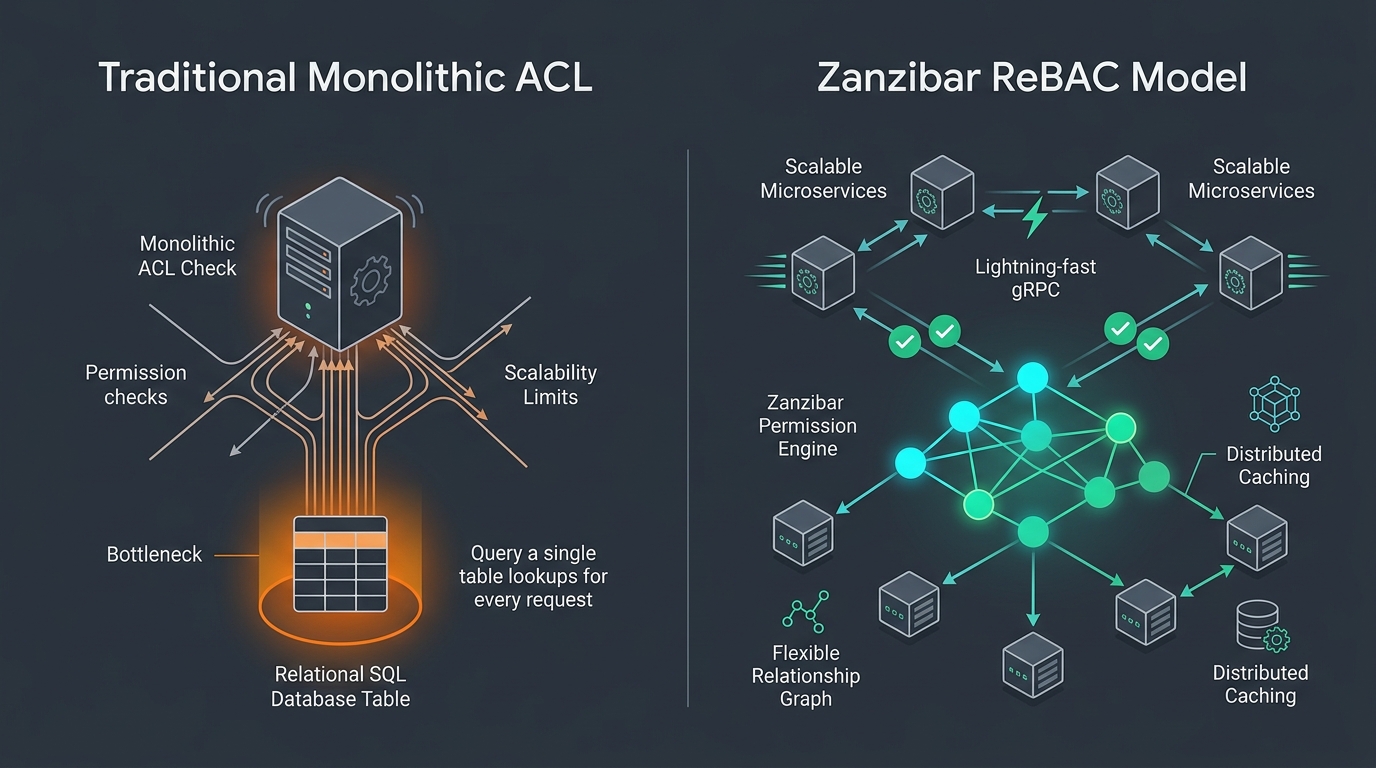
- The Distributed N+1 Query Problem: When a user lists 50 documents, the application must query the database 50 times to check individual permissions. In a microservice network, this triggers dozens of slow network calls.
- Siloed Authorization Data: If the billing service, document service, and user service keep separate permission tables, rules quickly become out of sync.
- Complex Nested Sharing: Traditional role-based access control (RBAC) struggles with deep folder hierarchies. Granting access to a parent folder should grant access to all nested child documents automatically. Relational SQL recursive joins become slow under heavy load.
What is Google Zanzibar and ReBAC?
In 2019, Google published the Zanzibar whitepaper. The paper describes the global authorization engine powering Google Docs, Drive, YouTube, and Google Cloud. Zanzibar handles trillions of access checks every day with millisecond latency.
Zanzibar introduces Relationship-Based Access Control (ReBAC). Instead of asking “Does Alice have the role of Editor?”, ReBAC asks “Does a relationship path exist between Alice and Document 1?”.
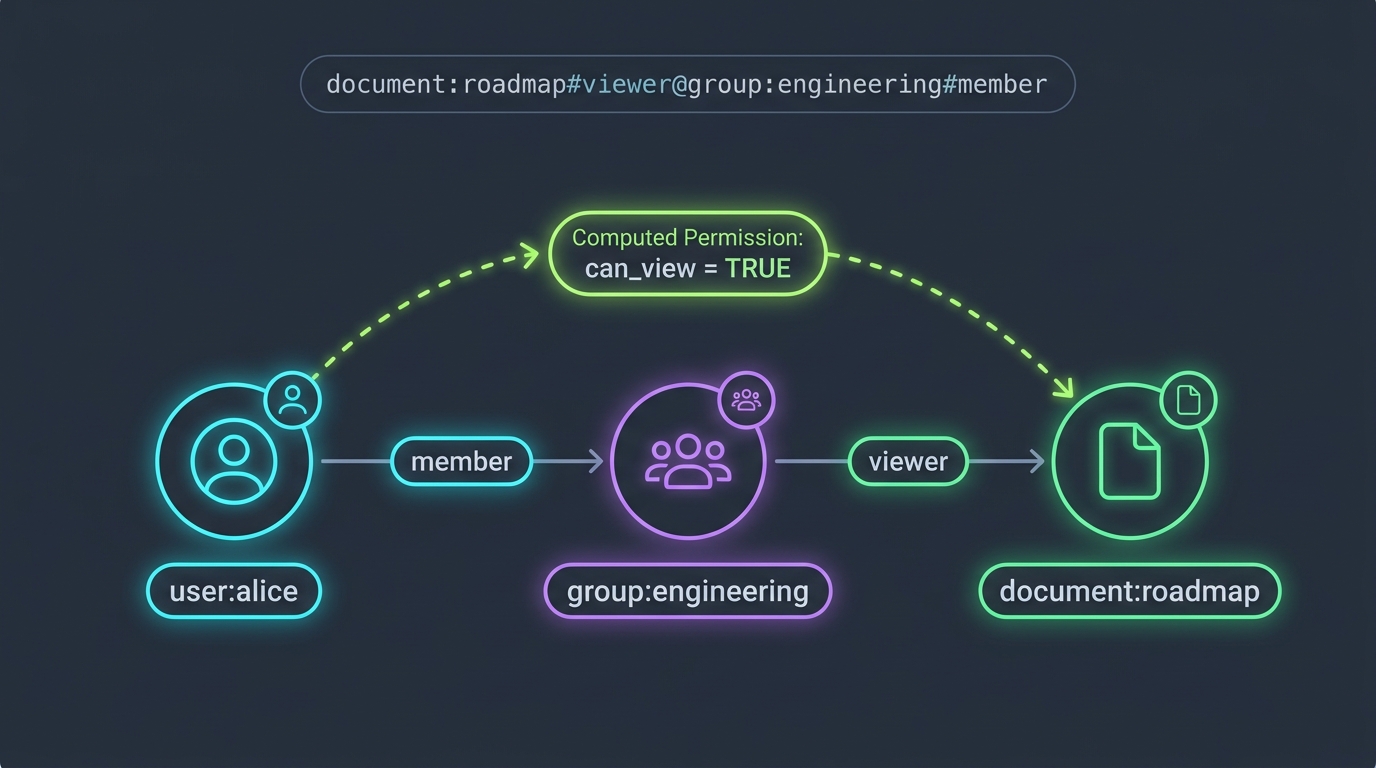
Every permission rule in Zanzibar is stored as a simple Relation Tuple. A tuple follows this exact structure:
resource_namespace:resource_id#relation@subject_namespace:subject_idFor example, consider these three simple statements:
group:engineering#member@user:alice(Alice is a member of Engineering)folder:roadmaps#owner@group:engineering(Engineering owns the Roadmaps folder)document:q4_plan#parent@folder:roadmaps(The Q4 Plan document lives in Roadmaps)
When Alice tries to read document:q4_plan, Zanzibar traverses the graph. It sees that Alice belongs to Engineering, Engineering owns the parent folder, and folder owners can view all child documents. Zanzibar computes this path in milliseconds.
Introducing SpiceDB
SpiceDB is an open-source, production-ready authorization database created by Authzed. It implements the complete Google Zanzibar architecture. You run SpiceDB as an independent service in your cluster.
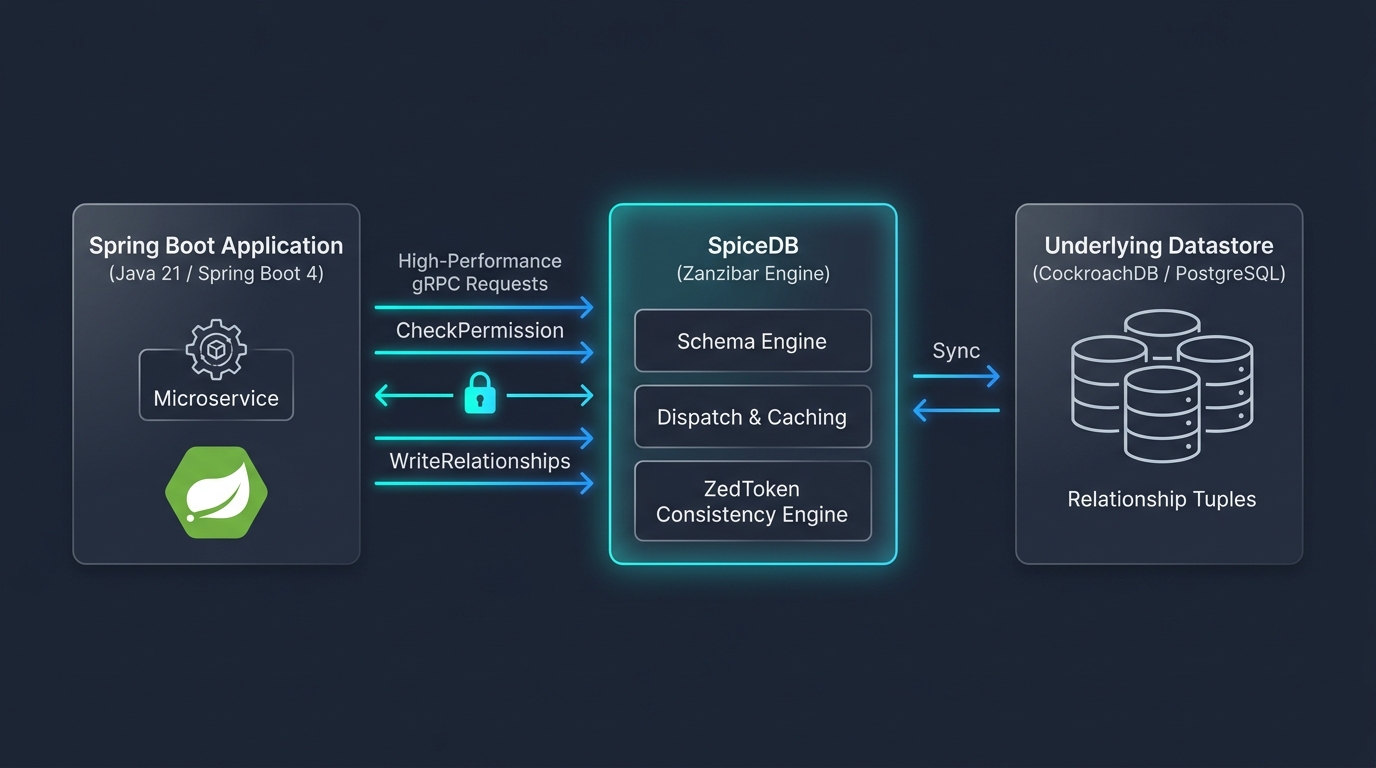
Here are the core architectural pillars of SpiceDB:
- Declarative Schema (Zed Language): You define your security model in a clean, human-readable schema file. You can version-control your security schema alongside your application code.
- High-Speed gRPC API: Microservices communicate with SpiceDB using binary gRPC protocols. This ensures low network latency and minimal serialization overhead.
- Zookie Consistency (ZedTokens): Distributed databases often suffer from the “New Enemy” problem. For example, you remove an ex-employee, but a stale replica still allows them access. SpiceDB solves this using snapshot tokens (ZedTokens) to guarantee strict causal consistency.
- Pluggable Storage: In development, SpiceDB runs completely in memory. In production, SpiceDB scales horizontally using CockroachDB or PostgreSQL. For database-level security comparisons, review our guide on PostgreSQL Row-Level Security in Spring Boot 4.
Defining the Security Schema in Zed Language
SpiceDB uses a domain-specific language called Zed to describe types, relations, and computed permissions. Here is the schema for our document management service:
definition user {}

definition organization {
    relation administrator: user
    relation member: user
}

definition document {
    relation org: organization
    relation owner: user
    relation viewer: user

    permission edit = owner + org->administrator
    permission read = edit + viewer + org->member
}
Let’s break down this schema:
definition user {}: Defines our base user identity subject.relation owner: user: A document can have an owner who is a user.permission edit = owner + org->administrator: Both the direct owner and organization administrators can edit the document. The+symbol represents a logical union.permission read = edit + viewer + org->member: Anyone who can edit the document can also read it. Additionally, explicit viewers and all organization members receive read access automatically.
Implementing SpiceDB with Spring Boot 4
Now let’s connect a modern Spring Boot 4 application to SpiceDB using Java 25. We use the official Authzed Java client library, which communicates over gRPC.
Step 1: Configure the gRPC Client
We create a Spring configuration class that initializes the gRPC channel and client stubs. We attach a Bearer token interceptor to authenticate every request with SpiceDB.
package com.webcodein.security.zanzibar;

import com.authzed.api.v1.PermissionsServiceGrpc;
import com.authzed.api.v1.SchemaServiceGrpc;
import io.grpc.ManagedChannel;
import io.grpc.ManagedChannelBuilder;
import io.grpc.Metadata;
import io.grpc.stub.MetadataUtils;
import org.springframework.beans.factory.annotation.Value;
import org.springframework.context.annotation.Bean;
import org.springframework.context.annotation.Configuration;

@Configuration
public class SpiceDbClientConfig {

    @Value("${spicedb.host:localhost}")
    private String host;

    @Value("${spicedb.port:50051}")
    private int port;

    @Value("${spicedb.preshared-key:test-key-1234}")
    private String presharedKey;

    @Bean
    public ManagedChannel managedChannel() {
        return ManagedChannelBuilder.forAddress(host, port)
                .usePlaintext() // Used for local development and internal VPC networks
                .build();
    }

    @Bean
    public PermissionsServiceGrpc.PermissionsServiceBlockingStub permissionsServiceBlockingStub(ManagedChannel channel) {
        Metadata metadata = new Metadata();
        metadata.put(Metadata.Key.of("authorization", Metadata.ASCII_STRING_MARSHALLER), "Bearer " + presharedKey);
        return PermissionsServiceGrpc.newBlockingStub(channel)
                .withInterceptors(MetadataUtils.newAttachHeadersInterceptor(metadata));
    }

    @Bean
    public SchemaServiceGrpc.SchemaServiceBlockingStub schemaServiceBlockingStub(ManagedChannel channel) {
        Metadata metadata = new Metadata();
        metadata.put(Metadata.Key.of("authorization", Metadata.ASCII_STRING_MARSHALLER), "Bearer " + presharedKey);
        return SchemaServiceGrpc.newBlockingStub(channel)
                .withInterceptors(MetadataUtils.newAttachHeadersInterceptor(metadata));
    }
}
Step 2: The Authorization Service
Next, we build a service layer that wraps the low-level gRPC calls. This service provides high-level methods to check permissions and apply schema updates.
package com.webcodein.security.zanzibar;

import com.authzed.api.v1.CheckPermissionRequest;
import com.authzed.api.v1.CheckPermissionResponse;
import com.authzed.api.v1.Consistency;
import com.authzed.api.v1.ObjectReference;
import com.authzed.api.v1.PermissionsServiceGrpc;
import com.authzed.api.v1.SchemaServiceGrpc;
import com.authzed.api.v1.SubjectReference;
import com.authzed.api.v1.WriteSchemaRequest;
import org.slf4j.Logger;
import org.slf4j.LoggerFactory;
import org.springframework.stereotype.Service;

@Service
public class AuthorizationService {

    private static final Logger log = LoggerFactory.getLogger(AuthorizationService.class);

    private final PermissionsServiceGrpc.PermissionsServiceBlockingStub permissionsService;
    private final SchemaServiceGrpc.SchemaServiceBlockingStub schemaService;

    public AuthorizationService(PermissionsServiceGrpc.PermissionsServiceBlockingStub permissionsService,
                                SchemaServiceGrpc.SchemaServiceBlockingStub schemaService) {
        this.permissionsService = permissionsService;
        this.schemaService = schemaService;
    }

    public boolean checkPermission(String resourceType, String resourceId, String permission, String subjectType, String subjectId) {
        ObjectReference resource = ObjectReference.newBuilder()
                .setObjectType(resourceType)
                .setObjectId(resourceId)
                .build();

        SubjectReference subject = SubjectReference.newBuilder()
                .setObject(ObjectReference.newBuilder()
                        .setObjectType(subjectType)
                        .setObjectId(subjectId)
                        .build())
                .build();

        CheckPermissionRequest request = CheckPermissionRequest.newBuilder()
                .setConsistency(Consistency.newBuilder().setFullyConsistent(true).build())
                .setResource(resource)
                .setPermission(permission)
                .setSubject(subject)
                .build();

        CheckPermissionResponse response = permissionsService.checkPermission(request);
        log.info("CheckPermission for {} {} on {}:{}: {}", subjectType, subjectId, resourceType, resourceId, response.getPermissionship());
        return response.getPermissionship() == CheckPermissionResponse.Permissionship.PERMISSIONSHIP_HAS_PERMISSION;
    }

    public void writeSchema(String schemaText) {
        WriteSchemaRequest request = WriteSchemaRequest.newBuilder()
                .setSchema(schemaText)
                .build();
        schemaService.writeSchema(request);
    }
}
Notice the Consistency.newBuilder().setFullyConsistent(true) configuration. This guarantees that permission checks immediately see freshly written relationships without replication delay.
Step 3: Protecting the REST Controller
Now we protect our REST API endpoints. When a user sends a request, we extract their username from the Spring Security context and verify their access through SpiceDB.
package com.webcodein.security.zanzibar;

import org.springframework.http.HttpStatus;
import org.springframework.http.ResponseEntity;
import org.springframework.security.core.Authentication;
import org.springframework.security.core.context.SecurityContextHolder;
import org.springframework.web.bind.annotation.GetMapping;
import org.springframework.web.bind.annotation.PathVariable;
import org.springframework.web.bind.annotation.RequestMapping;
import org.springframework.web.bind.annotation.RestController;

import java.util.Map;

@RestController
@RequestMapping("/api/documents")
public class DocumentController {

    private final AuthorizationService authorizationService;

    public DocumentController(AuthorizationService authorizationService) {
        this.authorizationService = authorizationService;
    }

    @GetMapping("/{id}")
    public ResponseEntity<?> getDocument(@PathVariable String id) {
        Authentication auth = SecurityContextHolder.getContext().getAuthentication();
        String username = auth.getName();

        boolean hasAccess = authorizationService.checkPermission(
                "document", id, "read", "user", username);

        if (!hasAccess) {
            return ResponseEntity.status(HttpStatus.FORBIDDEN)
                    .body(Map.of("error", "Access Denied"));
        }

        return ResponseEntity.ok(Map.of(
                "id", id,
                "content", "Confidential business roadmap.",
                "accessedBy", username
        ));
    }
}
If the user has permission in the SpiceDB graph, the controller returns the document payload with HTTP 200. If access is missing, the controller returns HTTP 403 Forbidden.
Testing with Testcontainers and JUnit 5
Security logic must never be deployed without comprehensive automated tests. We use Testcontainers to spin up a disposable SpiceDB instance inside a Docker container during our JUnit 5 integration tests. To explore zero-mocking testing philosophies, check out our tutorial on TDD with Spring Boot 4 and Testcontainers.
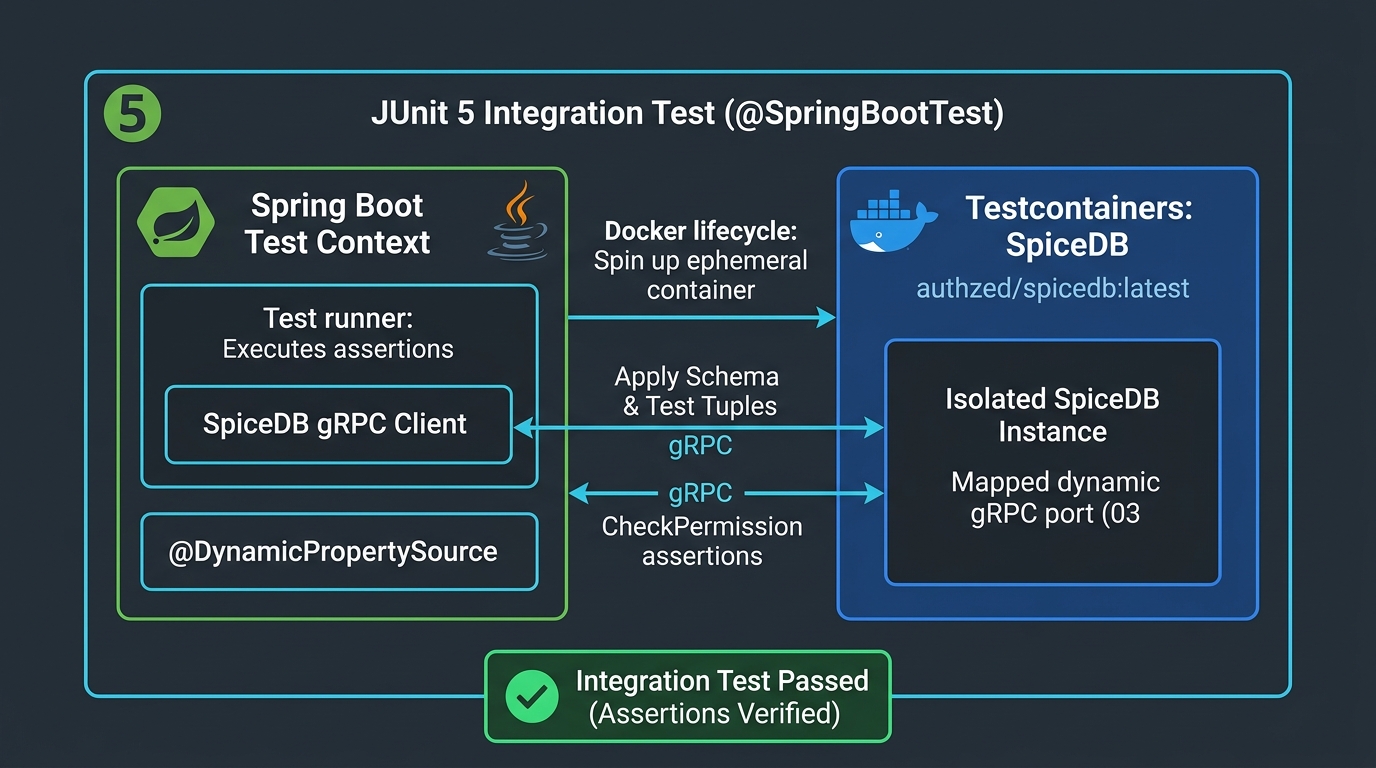
Here is our complete integration test (src/test/java/com/webcodein/security/zanzibar/ZanzibarAclApplicationTests.java):
package com.webcodein.security.zanzibar;

import com.authzed.api.v1.ObjectReference;
import com.authzed.api.v1.PermissionsServiceGrpc;
import com.authzed.api.v1.Relationship;
import com.authzed.api.v1.RelationshipUpdate;
import com.authzed.api.v1.SubjectReference;
import com.authzed.api.v1.WriteRelationshipsRequest;
import org.junit.jupiter.api.BeforeEach;
import org.junit.jupiter.api.Test;
import org.springframework.beans.factory.annotation.Autowired;
import org.springframework.boot.test.context.SpringBootTest;
import org.springframework.boot.webmvc.test.autoconfigure.AutoConfigureMockMvc;
import org.springframework.test.context.DynamicPropertyRegistry;
import org.springframework.test.context.DynamicPropertySource;
import org.springframework.test.web.servlet.MockMvc;
import org.testcontainers.containers.GenericContainer;
import org.testcontainers.junit.jupiter.Container;
import org.testcontainers.junit.jupiter.Testcontainers;

import static org.springframework.security.test.web.servlet.request.SecurityMockMvcRequestPostProcessors.httpBasic;
import static org.springframework.test.web.servlet.request.MockMvcRequestBuilders.get;
import static org.springframework.test.web.servlet.result.MockMvcResultMatchers.status;

@SpringBootTest
@AutoConfigureMockMvc
@Testcontainers
public class ZanzibarAclApplicationTests {

    @Container
    static final GenericContainer<?> spicedb = new GenericContainer<>("authzed/spicedb:v1.30.0")
            .withCommand("serve", "--grpc-preshared-key", "test-key-1234")
            .withExposedPorts(50051);

    @DynamicPropertySource
    static void registerProperties(DynamicPropertyRegistry registry) {
        registry.add("spicedb.host", spicedb::getHost);
        registry.add("spicedb.port", spicedb::getFirstMappedPort);
        registry.add("spicedb.preshared-key", () -> "test-key-1234");
    }

    @Autowired
    private MockMvc mockMvc;

    @Autowired
    private AuthorizationService authorizationService;

    @Autowired
    private PermissionsServiceGrpc.PermissionsServiceBlockingStub permissionsService;

    @BeforeEach
    void setupSpiceDB() {
        String schema = """
                definition user {}
                definition document {
                    relation viewer: user
                    permission read = viewer
                }
                """;
        authorizationService.writeSchema(schema);

        Relationship relationship = Relationship.newBuilder()
                .setResource(ObjectReference.newBuilder().setObjectType("document").setObjectId("1").build())
                .setRelation("viewer")
                .setSubject(SubjectReference.newBuilder().setObject(
                        ObjectReference.newBuilder().setObjectType("user").setObjectId("alice").build()
                ).build())
                .build();

        RelationshipUpdate update = RelationshipUpdate.newBuilder()
                .setOperation(RelationshipUpdate.Operation.OPERATION_TOUCH)
                .setRelationship(relationship)
                .build();

        permissionsService.writeRelationships(WriteRelationshipsRequest.newBuilder()
                .addUpdates(update)
                .build());
    }

    @Test
    void aliceCanReadDocument1() throws Exception {
        mockMvc.perform(get("/api/documents/1").with(httpBasic("alice", "password")))
                .andExpect(status().isOk());
    }

    @Test
    void bobCannotReadDocument1() throws Exception {
        mockMvc.perform(get("/api/documents/1").with(httpBasic("bob", "password")))
                .andExpect(status().isForbidden());
    }
}
When you run ./mvnw clean test, Testcontainers starts SpiceDB in Docker, writes the relationship tuple assigning Alice as a viewer of Document 1, and verifies that Bob is strictly rejected with HTTP 403.
Real-World Enterprise Use Cases
Zanzibar-style authorization excels in scenarios where traditional relational database tables break down:
- SaaS Multi-Tenant Collaboration Tools: Applications like Google Workspace, Notion, and Figma require instant sharing across individuals, teams, and external guest accounts. ReBAC handles these relationships naturally without complex schema changes.
- Zero-Trust Service Meshes: In microservice networks, services must verify if a calling service or end user has permission to invoke specific operations. For network-level policies, see our guide on Zero-Trust Spring Security 7 and eBPF Service Meshes.
- Healthcare and Financial Compliance: Regulated industries require immutable audit logs and centralized authorization rules. SpiceDB provides a single place to review and enforce security policies.
Advantages and Limitations: Architectural Comparison
Choosing the right authorization model depends on your system architecture and performance requirements:
| Feature Dimension | Traditional Spring Security ACL | PostgreSQL Row-Level Security | SpiceDB (Google Zanzibar) |
|---|---|---|---|
| Authorization Model | Role-Based (RBAC) & Domain ACL | Attribute-Based (ABAC) in SQL | Relationship-Based (ReBAC) |
| Query Performance | Slow (Suffers from N+1 query problem) | Fast (Enforced directly in SQL planner) | Ultra-Fast (Graph traversal in memory) |
| Microservice Fit | Poor (Requires shared database) | Moderate (Tied to single database) | Excellent (Independent gRPC service) |
| Cross-Domain Traversal | Difficult (Requires complex SQL joins) | Limited to database tables | Native (Graph relationships across services) |
| Operational Overhead | Low (Standard JPA tables) | Low to Moderate (PostgreSQL policies) | Moderate (Requires running SpiceDB cluster) |
Production Best Practices
Follow these operational principles when deploying SpiceDB in production environments:
- Reuse gRPC Channels: Never create a new
ManagedChannelfor every HTTP request. Managed channels are heavy objects with internal thread pools and connection state. Always register the channel as a singleton Spring Bean. - Use OPERATION_TOUCH for Idempotent Writes: When updating relationships, prefer
OPERATION_TOUCHoverOPERATION_CREATE. If a relationship already exists,OPERATION_CREATEthrows anALREADY_EXISTSgRPC exception, whereasOPERATION_TOUCHupdates or creates the tuple idempotently. - Leverage ZedTokens for Read Consistency: To avoid race conditions, store the
ZedTokenreturned by write operations in the user session. Pass that token in subsequent read requests to guarantee that the user immediately sees changes they just made. - Deploy SpiceDB on CockroachDB for Global Scale: While PostgreSQL is excellent for single-region deployments, CockroachDB allows SpiceDB to scale multi-region clusters with zero single points of failure.
Common Pitfalls and How to Fix Them
Here are common mistakes developers make when integrating Zanzibar authorization:
1. Stale Reads Due to Minimize Latency
The Mistake: Leaving the consistency setting empty on CheckPermissionRequest. SpiceDB defaults to minimizing latency, which reads from snapshots that might be milliseconds behind your most recent write.
The Fix: In test suites or critical read-after-write workflows, configure Consistency.newBuilder().setFullyConsistent(true) or supply the exact ZedToken from the write response.
2. Already Exists Exceptions on Relationship Creation
The Mistake: Using RelationshipUpdate.Operation.OPERATION_CREATE in retry loops or repeated workflows. If the tuple exists, SpiceDB aborts the call with an error.
The Fix: Use RelationshipUpdate.Operation.OPERATION_TOUCH to execute safe upsert operations.
3. Recreating gRPC Stubs on Every Request
The Mistake: Initializing new gRPC connections inside Spring controllers. This exhausts ephemeral ports and degrades throughput.
The Fix: Inject singleton PermissionsServiceBlockingStub instances into your Spring services.
Companion Workshop Code
You can run and test this complete implementation yourself. We have prepared an open-source companion project featuring Spring Boot 4, Testcontainers, and MockMvc integration tests:
View the Companion Code on GitHub
Frequently Asked Questions
What is the difference between RBAC, ABAC, and ReBAC?
RBAC assigns static roles (e.g., ADMIN, USER) to users. ABAC evaluates dynamic attributes (e.g., IP address, department, time of day). ReBAC (Relationship-Based Access Control) computes permissions dynamically by traversing a graph of relationships between users, groups, and resources.
Does SpiceDB replace Spring Security?
No. Spring Security handles authentication (verifying who the user is via OAuth2, JWT, or passwords). SpiceDB handles authorization (determining what resources the authenticated user can access). They work together seamlessly.
How does SpiceDB prevent the New Enemy problem?
The “New Enemy” problem occurs in distributed systems when a permission revocation takes seconds to replicate, allowing unauthorized access in the interim. SpiceDB prevents this using ZedTokens (Zookies), which enforce strict causal consistency across distributed nodes.
What storage engines does SpiceDB support in production?
SpiceDB supports PostgreSQL, CockroachDB, MySQL, and Spanner for persistent storage. For local automated integration testing, it includes a fast, in-memory datastore.
Conclusion
Google Zanzibar’s relationship-based authorization model represents a generational upgrade for distributed microservice architectures. By combining SpiceDB with Spring Boot 4 and Java 25, you eliminate database ACL bottlenecks, avoid the N+1 query problem, and centralize security policies across your entire enterprise.