
Modern enterprise web applications have strict security requirements. In many systems, standard Role-Based Access Control (RBAC) works well. For example, an administrator can access an administrative dashboard, and a regular user cannot. However, RBAC cannot solve row-level data security problems. In a multi-user application, many users have the exact same role, such as ROLE_USER. But each user must only view and modify their own personal documents.
Consider an online banking portal or a medical health system. Alice and Bob are both regular customers. If Alice knows the primary key of Bob’s private document, RBAC alone cannot prevent Alice from loading that document if both users have read permissions on the generic endpoint. To prevent data leaks, the application needs Domain Object Security, also known as Access Control Lists (ACL).
In this comprehensive guide, we will master Domain Object Security using the official Spring Security ACL module in a modern Spring Boot 4 application backed by PostgreSQL 16 and Java 25. We will explore the internal database architecture, configure high-performance caching with Caffeine, secure business services with method-level security expressions, solve real-world PostgreSQL schema traps, and review production best practices.
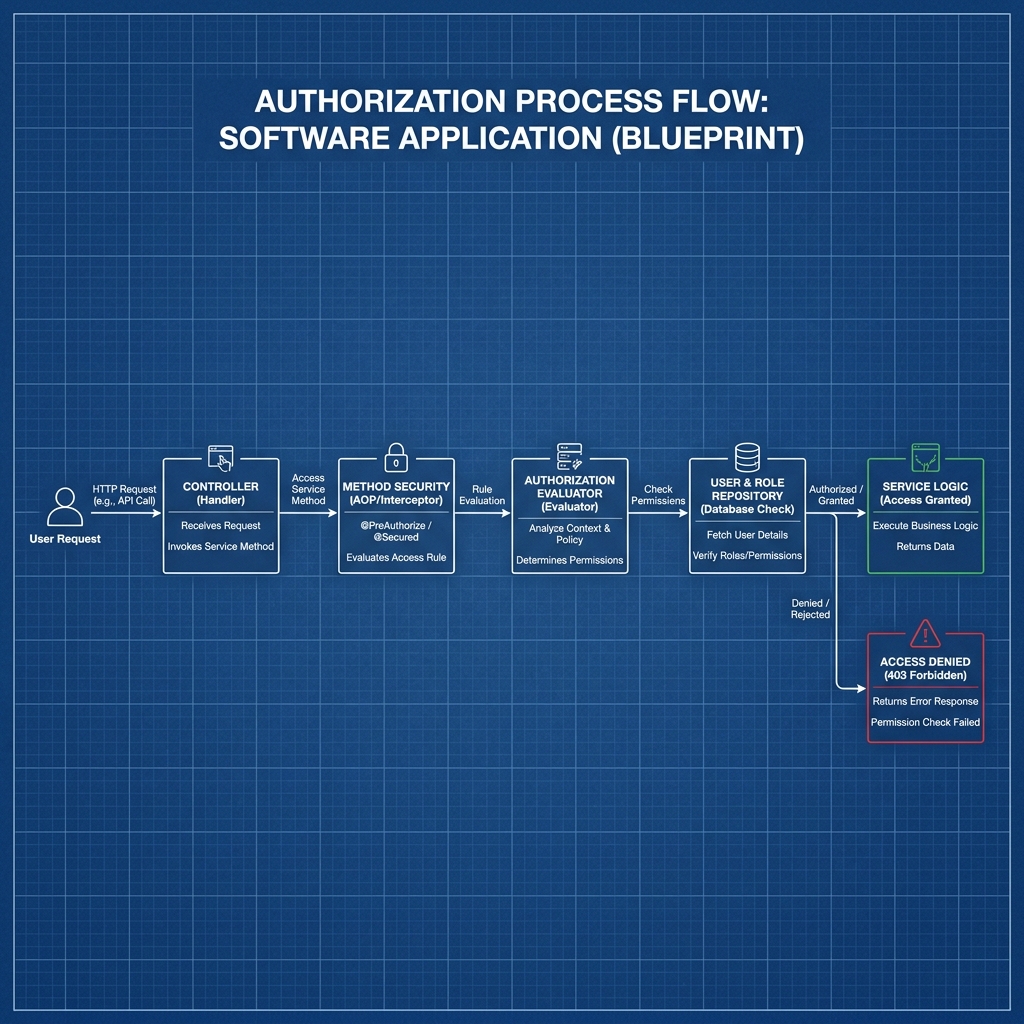
Understanding Domain Object Security
Before writing code, let us understand how domain object security differs from traditional authorization strategies. In standard web security, authorization decisions happen at the URL level or the service interface level. Spring Security inspects the HTTP request path or the method signature, reads the granted authorities from the security context, and allows or denies access.
Domain Object Security operates at the individual data instance level. When a service retrieves an object or receives an object ID as an argument, Spring Security evaluates whether the current user has specific permissions (such as READ, WRITE, or DELETE) for that specific record in the database.
The Spring Security ACL module provides an enterprise-grade framework for managing these object permissions. Instead of writing custom SQL filters or manual if statements inside every service method, you define declarative security rules using Spring Expression Language (SpEL) and annotations like @PreAuthorize and @PostAuthorize.
Core Concepts of the Spring Security ACL Module
The Spring Security ACL module relies on four fundamental concepts that model users, domain entities, permissions, and grants.
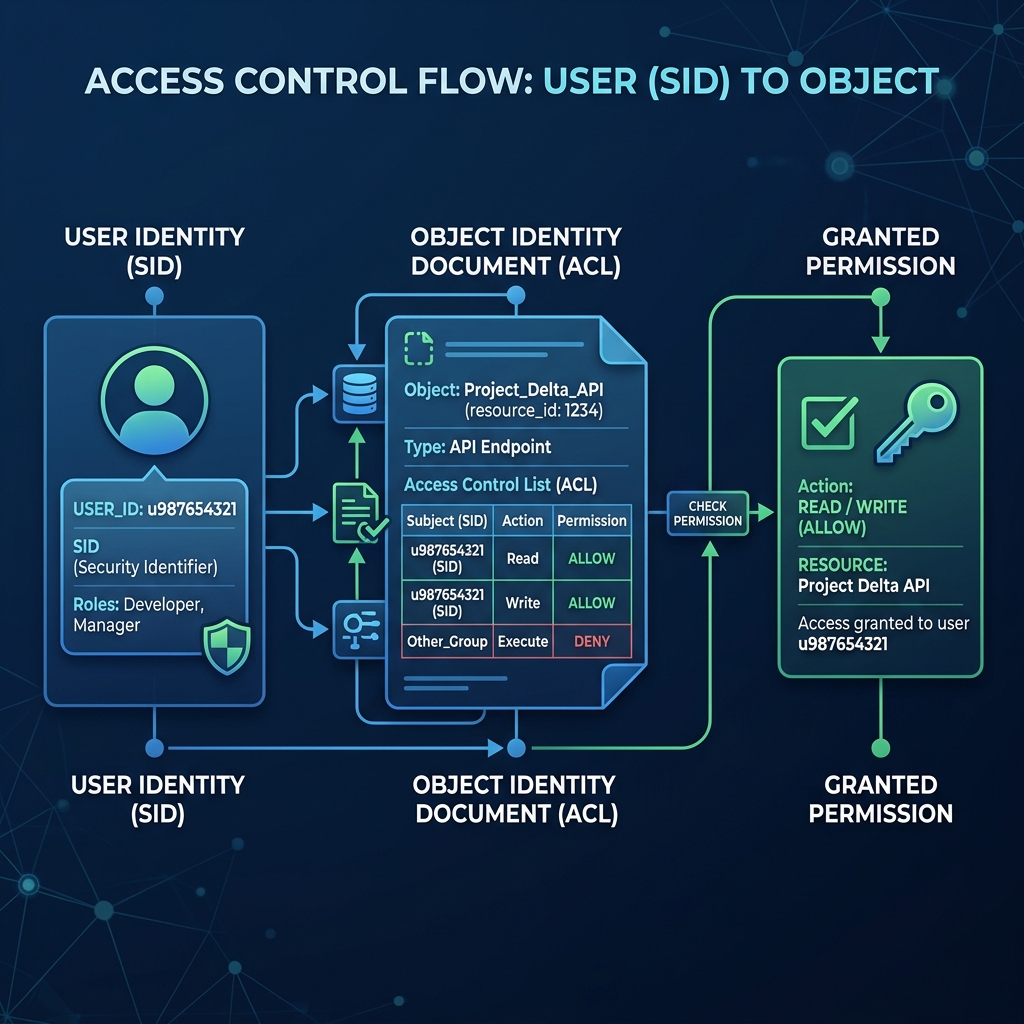
1. Security Identity (SID)
A Security Identity (SID) represents the security actor in the system. A SID can represent either an individual user principal (such as the username alice) or a granted authority (such as ROLE_MANAGER or ROLE_EDITOR). In the database, a boolean column called principal distinguishes between individual users (true) and collective roles (false). This allows you to grant permissions directly to specific users or to entire user groups.
2. Object Identity
An Object Identity represents the exact data record being protected. The ACL module does not serialize Java objects into the database. Instead, it tracks objects using two pieces of information: the fully qualified Java class name (such as com.webcodein.security.acl.entity.Document) and the unique identifier of the entity instance (such as a database primary key 42 or a UUID). This decoupled design means your domain models remain clean and independent of the security tables.
3. Permissions and Bitmasks
Permissions define what actions a SID can perform on an Object Identity. Spring Security uses numeric bitmasks to represent permissions efficiently. The framework defines standard permissions in BasePermission:
- READ (1 << 0 = 1): The user can view or retrieve the domain object.
- WRITE (1 << 1 = 2): The user can modify or update the domain object.
- CREATE (1 << 2 = 4): The user can create child objects associated with this object.
- DELETE (1 << 3 = 8): The user can remove or purge the domain object.
- ADMINISTRATION (1 << 4 = 16): The user can modify the ACL permissions and transfer ownership of the object.
4. Access Control Entry (ACE)
An Access Control Entry (ACE) is a single permission assignment. Each ACE links an Object Identity, a SID, and a permission bitmask. In addition, an ACE includes a boolean flag called granting. When granting is true, the permission is granted. When granting is false, the permission is explicitly denied. Each ACE also has an ace_order integer that determines evaluation priority when multiple rules apply.
The Spring Security ACL Database Schema Deep Dive
The Spring Security ACL module requires four dedicated relational database tables. Understanding these tables is critical for debugging queries and planning database migrations.
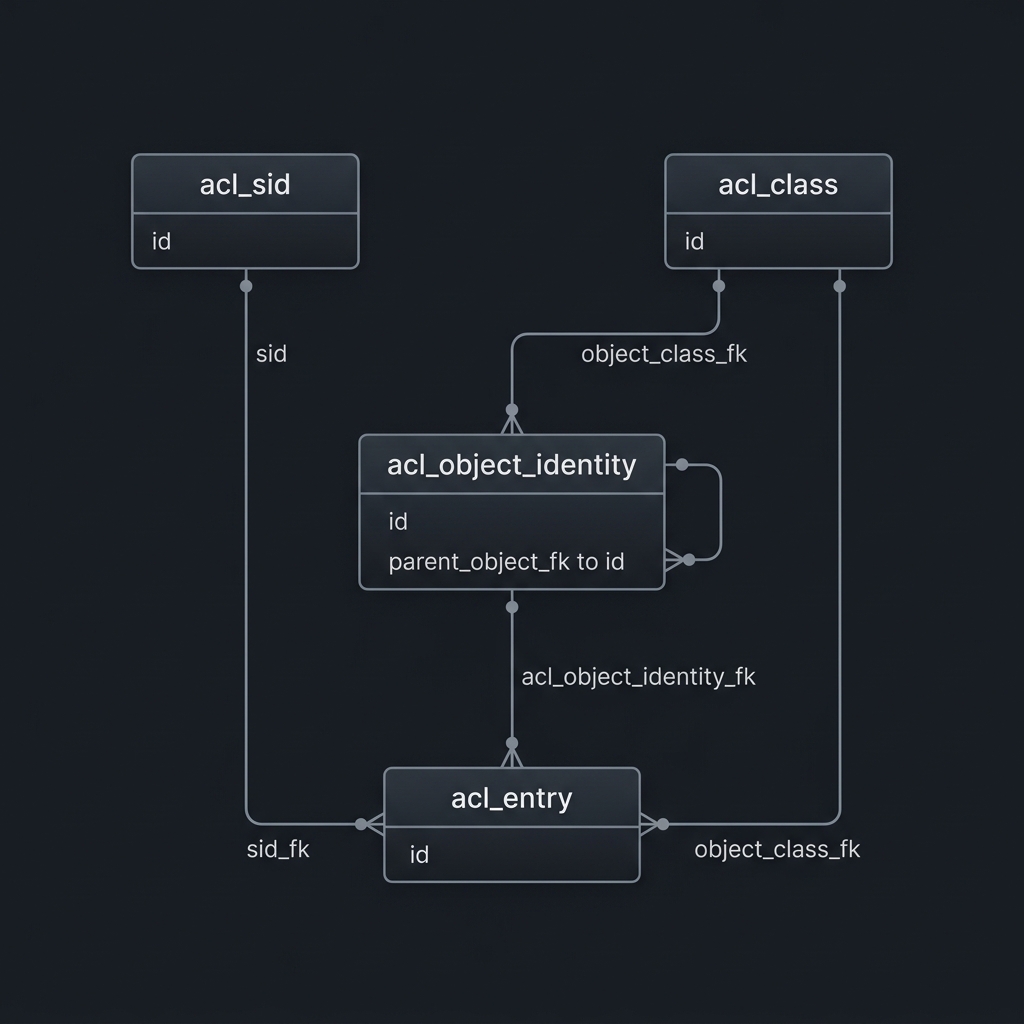
Below are the structural responsibilities of each table in PostgreSQL 16:
acl_class: Stores unique Java class names. Each record maps an internalBIGINTprimary key to the class name string (for example,com.webcodein.security.acl.entity.Document). This table prevents string repetition in the main permission tables.acl_sid: Stores security identities. Each row contains anid, asidstring (the username or role name), and a booleanprincipalflag. A unique constraint ensures that the combination of(sid, principal)is unique.acl_object_identity: Stores individual object instances. It referencesacl_class(id)viaobject_id_classand stores the domain object primary key inobject_id_identity. It also referencesacl_sid(id)to identify the object owner (owner_sid), supports hierarchical ACLs viaparent_object, and flags whether permissions inherit from the parent viaentries_inheriting.acl_entry: Stores the actual access control rules. It links anacl_object_identity(id)with anacl_sid(id), an integermask, a booleangrantingflag, and two audit tracking flags (audit_successandaudit_failure).
Architectural Comparison: Spring Security ACL vs PostgreSQL RLS vs SpiceDB
When designing row-level authorization in modern Java applications, software architects choose between three primary strategies: application-layer ACLs (Spring Security ACL), database-native security (PostgreSQL Row-Level Security), and centralized graph-based authorization (Zanzibar-style ReBAC with SpiceDB). Below is an architectural comparison to help you choose the right approach for your project.
| Architecture Dimension | Spring Security ACL | PostgreSQL Row-Level Security | SpiceDB (Zanzibar ReBAC) |
|---|---|---|---|
| Enforcement Layer | Application Layer (Spring AOP / Method Security) | Database Engine (PostgreSQL Kernel / Query Planner) | External Dedicated Authorization Service (gRPC) |
| Database Compatibility | Agnostic (PostgreSQL, MySQL, Oracle, H2) | PostgreSQL Only (Engine-specific SQL syntax) | Agnostic (CockroachDB, PostgreSQL, MySQL storage) |
| Filter Performance | Requires secondary queries or joins; requires L2 caching | Zero network overhead; rewritten into query plan directly | Sub-millisecond graph evaluation; distributed caching |
| Schema Complexity | High (4 normalized tables, bitmasks, foreign keys) | Low (native CREATE POLICY statements on tables) |
Decoupled (DSL schema defined in schema.zed) |
| Inheritance & Hierarchies | Supported via parent_object pointer in acl_object_identity |
Requires recursive Common Table Expressions (CTEs) | Native transitive relation traversal across millions of nodes |
| Ideal Use Case | Monoliths and modular Spring applications needing audit history | Multi-tenant SaaS backends with strict data boundary isolation | Microservices architectures with complex collaborative permissions |
Implementing Spring Security ACL in Spring Boot 4
Let us implement a secure document management system using Spring Boot 4.0.0, Java 25, Hibernate 7, and PostgreSQL 16. In this service, users create private documents. Only the document owner can view or edit their document. Other authenticated users are strictly blocked.
Step 1: Maven Dependencies
Add the necessary starters to your pom.xml file. We include Spring Web, Spring Security, Spring Data JPA, Spring Cache, Caffeine, and PostgreSQL driver. In test scope, we include Spring Boot Test and Testcontainers.
<dependencies>
    <dependency>
        <groupId>org.springframework.boot</groupId>
        <artifactId>spring-boot-starter-web</artifactId>
    </dependency>
    <dependency>
        <groupId>org.springframework.boot</groupId>
        <artifactId>spring-boot-starter-security</artifactId>
    </dependency>
    <dependency>
        <groupId>org.springframework.security</groupId>
        <artifactId>spring-security-acl</artifactId>
    </dependency>
    <dependency>
        <groupId>org.springframework.boot</groupId>
        <artifactId>spring-boot-starter-data-jpa</artifactId>
    </dependency>
    <dependency>
        <groupId>org.springframework.boot</groupId>
        <artifactId>spring-boot-starter-cache</artifactId>
    </dependency>
    <dependency>
        <groupId>com.github.ben-manes.caffeine</groupId>
        <artifactId>caffeine</artifactId>
    </dependency>
    <dependency>
        <groupId>org.springframework</groupId>
        <artifactId>spring-context-support</artifactId>
    </dependency>
    <dependency>
        <groupId>org.postgresql</groupId>
        <artifactId>postgresql</artifactId>
        <scope>runtime</scope>
    </dependency>
    <dependency>
        <groupId>org.springframework.boot</groupId>
        <artifactId>spring-boot-starter-test</artifactId>
        <scope>test</scope>
    </dependency>
    <dependency>
        <groupId>org.testcontainers</groupId>
        <artifactId>testcontainers-postgresql</artifactId>
        <scope>test</scope>
    </dependency>
</dependencies>
Step 2: PostgreSQL Schema Definition
Create a schema.sql file in src/main/resources/ to initialize the ACL tables in PostgreSQL 16. Note the exact column types:
-- Spring Security ACL PostgreSQL Schema
CREATE TABLE IF NOT EXISTS acl_sid (
    id BIGSERIAL PRIMARY KEY,
    principal BOOLEAN NOT NULL,
    sid VARCHAR(100) NOT NULL,
    CONSTRAINT unique_acl_sid UNIQUE (sid, principal)
);

CREATE TABLE IF NOT EXISTS acl_class (
    id BIGSERIAL PRIMARY KEY,
    class VARCHAR(100) NOT NULL,
    CONSTRAINT uk_acl_class UNIQUE (class)
);

CREATE TABLE IF NOT EXISTS acl_object_identity (
    id BIGSERIAL PRIMARY KEY,
    object_id_class BIGINT NOT NULL,
    object_id_identity VARCHAR(36) NOT NULL,
    parent_object BIGINT,
    owner_sid BIGINT,
    entries_inheriting BOOLEAN NOT NULL,
    CONSTRAINT uk_acl_object_identity UNIQUE (object_id_class, object_id_identity),
    CONSTRAINT fk_acl_object_identity_parent FOREIGN KEY (parent_object) REFERENCES acl_object_identity (id),
    CONSTRAINT fk_acl_object_identity_class FOREIGN KEY (object_id_class) REFERENCES acl_class (id),
    CONSTRAINT fk_acl_object_identity_owner FOREIGN KEY (owner_sid) REFERENCES acl_sid (id)
);

CREATE TABLE IF NOT EXISTS acl_entry (
    id BIGSERIAL PRIMARY KEY,
    acl_object_identity BIGINT NOT NULL,
    ace_order INTEGER NOT NULL,
    sid BIGINT NOT NULL,
    mask INTEGER NOT NULL,
    granting BOOLEAN NOT NULL,
    audit_success BOOLEAN NOT NULL,
    audit_failure BOOLEAN NOT NULL,
    CONSTRAINT unique_acl_entry UNIQUE (acl_object_identity, ace_order),
    CONSTRAINT fk_acl_entry_object FOREIGN KEY (acl_object_identity) REFERENCES acl_object_identity (id),
    CONSTRAINT fk_acl_entry_acl FOREIGN KEY (sid) REFERENCES acl_sid (id)
);

CREATE TABLE IF NOT EXISTS documents (
    id BIGSERIAL PRIMARY KEY,
    content TEXT NOT NULL
);
Step 3: Configuring the ACL Infrastructure Beans
Spring Security ACL requires several supporting beans to manage caching, strategy evaluation, expression handling, and database updates. We configure these beans in AclConfig.java.
Pay close attention to the identity queries configured on JdbcMutableAclService. By default, Spring Security uses HSQLDB syntax (call identity()). In PostgreSQL, you must explicitly set the identity query to use currval with the appropriate sequence, as shown below:
package com.webcodein.security.acl.config;

import org.springframework.cache.concurrent.ConcurrentMapCache;
import org.springframework.context.annotation.Bean;
import org.springframework.context.annotation.Configuration;
import org.springframework.security.access.expression.method.DefaultMethodSecurityExpressionHandler;
import org.springframework.security.access.expression.method.MethodSecurityExpressionHandler;
import org.springframework.security.acls.AclPermissionEvaluator;
import org.springframework.security.acls.domain.AclAuthorizationStrategy;
import org.springframework.security.acls.domain.AclAuthorizationStrategyImpl;
import org.springframework.security.acls.domain.ConsoleAuditLogger;
import org.springframework.security.acls.domain.DefaultPermissionGrantingStrategy;
import org.springframework.security.acls.domain.SpringCacheBasedAclCache;
import org.springframework.security.acls.jdbc.BasicLookupStrategy;
import org.springframework.security.acls.jdbc.JdbcMutableAclService;
import org.springframework.security.acls.jdbc.LookupStrategy;
import org.springframework.security.acls.model.PermissionGrantingStrategy;
import org.springframework.security.core.authority.SimpleGrantedAuthority;

import javax.sql.DataSource;

@Configuration
public class AclConfig {

    @Bean
    public JdbcMutableAclService aclService(DataSource dataSource, LookupStrategy lookupStrategy, SpringCacheBasedAclCache aclCache) {
        JdbcMutableAclService aclService = new JdbcMutableAclService(dataSource, lookupStrategy, aclCache);
        // Configure PostgreSQL sequence retrieval queries to avoid 'call identity()' errors
        aclService.setClassIdentityQuery("select currval(pg_get_serial_sequence('acl_class', 'id'))");
        aclService.setSidIdentityQuery("select currval(pg_get_serial_sequence('acl_sid', 'id'))");
        return aclService;
    }

    @Bean
    public SpringCacheBasedAclCache aclCache(AclAuthorizationStrategy aclAuthorizationStrategy, PermissionGrantingStrategy permissionGrantingStrategy) {
        return new SpringCacheBasedAclCache(new ConcurrentMapCache("aclCache"), permissionGrantingStrategy, aclAuthorizationStrategy);
    }

    @Bean
    public AclAuthorizationStrategy aclAuthorizationStrategy() {
        return new AclAuthorizationStrategyImpl(new SimpleGrantedAuthority("ROLE_ADMIN"));
    }

    @Bean
    public PermissionGrantingStrategy permissionGrantingStrategy() {
        return new DefaultPermissionGrantingStrategy(new ConsoleAuditLogger());
    }

    @Bean
    public LookupStrategy lookupStrategy(DataSource dataSource, SpringCacheBasedAclCache aclCache,
                                         AclAuthorizationStrategy aclAuthorizationStrategy,
                                         PermissionGrantingStrategy permissionGrantingStrategy) {
        return new BasicLookupStrategy(dataSource, aclCache, aclAuthorizationStrategy, permissionGrantingStrategy);
    }

    @Bean
    public MethodSecurityExpressionHandler defaultMethodSecurityExpressionHandler(JdbcMutableAclService aclService) {
        DefaultMethodSecurityExpressionHandler expressionHandler = new DefaultMethodSecurityExpressionHandler();
        AclPermissionEvaluator permissionEvaluator = new AclPermissionEvaluator(aclService);
        expressionHandler.setPermissionEvaluator(permissionEvaluator);
        return expressionHandler;
    }
}
High-Performance Caching with Caffeine
Every time an application evaluates an ACL expression such as hasPermission(#id, 'Document', 'READ'), Spring Security executes queries against the four ACL tables. In high-traffic systems, this creates severe database contention and latency spikes.
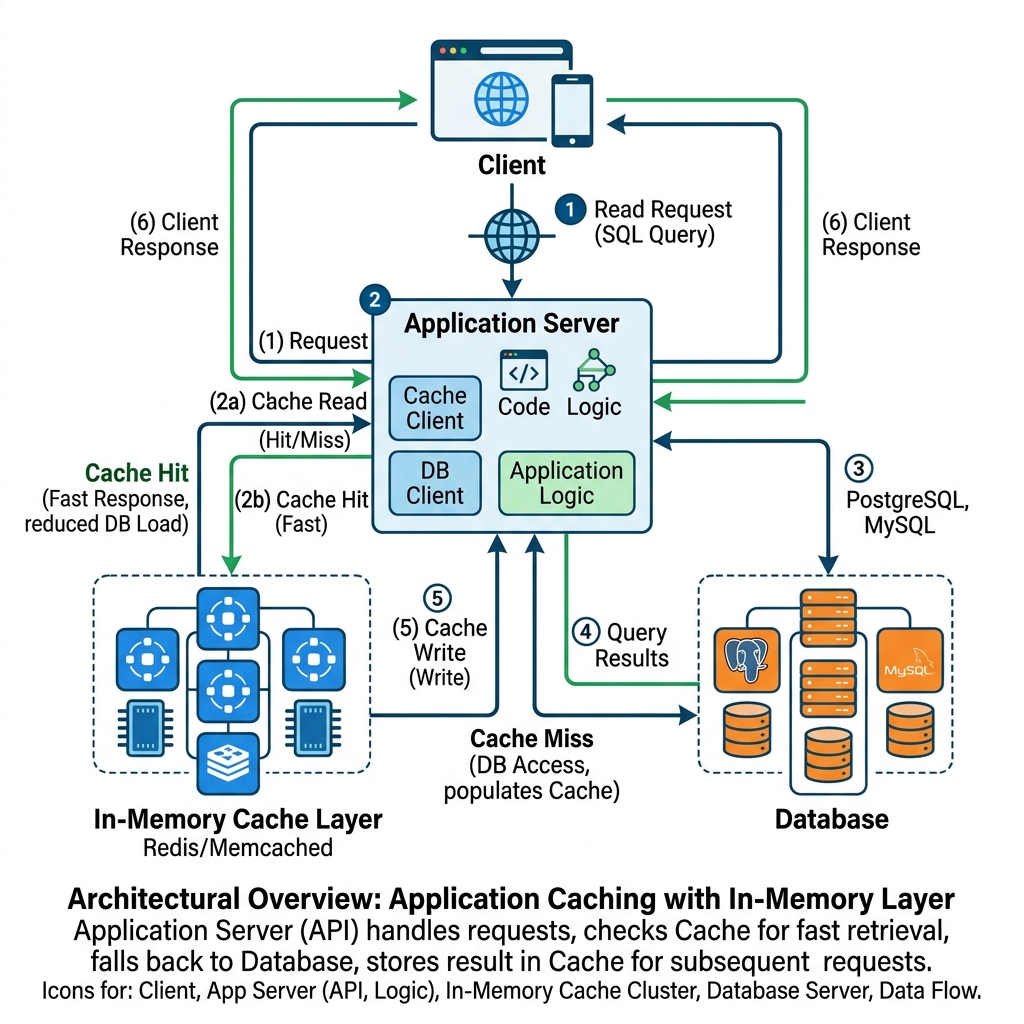
To eliminate this bottleneck, we use Caffeine as an in-memory L1 cache. The SpringCacheBasedAclCache caches evaluated ACL instances by their ObjectIdentity. When a user requests access:
- Spring Security checks the local Caffeine cache.
- If the ACL is present (cache hit), permissions are evaluated in memory in nanoseconds with zero database round-trips.
- If the ACL is missing (cache miss),
BasicLookupStrategyexecutes an optimized SQL query, hydrates the ACL, populates the cache, and evaluates permissions. - When permissions change via
updateAcl()ordeleteAcl(),JdbcMutableAclServiceautomatically evicts the stale record from the cache.
In application.yml, we configure Caffeine with a sensible maximum size and a time-to-live (TTL) expiration:
spring:
  cache:
    type: caffeine
    caffeine:
      spec: maximumSize=5000,expireAfterWrite=300s
Service Layer Implementation with Method Security
With the infrastructure ready, we implement our business logic in DocumentService.java. We enable method security using @EnableMethodSecurity in our security configuration.
package com.webcodein.security.acl.service;

import com.webcodein.security.acl.entity.Document;
import com.webcodein.security.acl.repository.DocumentRepository;
import org.springframework.security.access.prepost.PreAuthorize;
import org.springframework.security.acls.domain.BasePermission;
import org.springframework.security.acls.domain.ObjectIdentityImpl;
import org.springframework.security.acls.domain.PrincipalSid;
import org.springframework.security.acls.model.MutableAcl;
import org.springframework.security.acls.model.MutableAclService;
import org.springframework.security.acls.model.ObjectIdentity;
import org.springframework.security.acls.model.Sid;
import org.springframework.stereotype.Service;
import org.springframework.transaction.annotation.Transactional;

@Service
public class DocumentService {

    private final DocumentRepository documentRepository;
    private final MutableAclService aclService;

    public DocumentService(DocumentRepository documentRepository, MutableAclService aclService) {
        this.documentRepository = documentRepository;
        this.aclService = aclService;
    }

    @Transactional
    public Document createDocument(Document document, String username) {
        // 1. Save the domain entity in the database
        Document savedDoc = documentRepository.save(document);

        // 2. Build the Object Identity and User SID
        ObjectIdentity oi = new ObjectIdentityImpl(Document.class, savedDoc.getId());
        Sid sid = new PrincipalSid(username);

        // 3. Create the ACL and insert READ and WRITE Access Control Entries
        MutableAcl acl = aclService.createAcl(oi);
        acl.insertAce(acl.getEntries().size(), BasePermission.READ, sid, true);
        acl.insertAce(acl.getEntries().size(), BasePermission.WRITE, sid, true);
        aclService.updateAcl(acl);

        return savedDoc;
    }

    @PreAuthorize("hasPermission(#id, 'com.webcodein.security.acl.entity.Document', 'READ')")
    public Document getDocument(Long id) {
        return documentRepository.findById(id)
                .orElseThrow(() -> new RuntimeException("Document not found with id: " + id));
    }

    @PreAuthorize("hasPermission(#id, 'com.webcodein.security.acl.entity.Document', 'WRITE')")
    public Document updateDocument(Long id, String content) {
        Document doc = getDocument(id);
        doc.setContent(content);
        return documentRepository.save(doc);
    }
}
Notice the power of the hasPermission SpEL expression. When an authenticated user calls getDocument(42), Spring Security intercepts the call. The AclPermissionEvaluator checks if the user’s SID has BasePermission.READ on the Document instance with primary key 42. If the permission is missing, Spring Security immediately throws an AccessDeniedException.
Verifying ACL Isolation with Testcontainers
Unit tests with mocks cannot verify whether database queries, sequence names, and bitmask evaluations work correctly against a real database engine. Using Testcontainers and Spring Boot 4, we test our ACL rules against a real PostgreSQL 16 container.
package com.webcodein.security.acl;

import com.webcodein.security.acl.controller.DocumentController;
import com.webcodein.security.acl.entity.Document;
import com.webcodein.security.acl.service.DocumentService;
import org.junit.jupiter.api.Test;
import org.springframework.beans.factory.annotation.Autowired;
import org.springframework.boot.test.context.SpringBootTest;
import org.springframework.boot.testcontainers.service.connection.ServiceConnection;
import org.springframework.security.access.AccessDeniedException;
import org.springframework.security.authentication.UsernamePasswordAuthenticationToken;
import org.springframework.security.core.authority.SimpleGrantedAuthority;
import org.springframework.security.core.context.SecurityContextHolder;
import org.testcontainers.containers.PostgreSQLContainer;
import org.testcontainers.junit.jupiter.Container;
import org.testcontainers.junit.jupiter.Testcontainers;

import java.util.List;

import static org.junit.jupiter.api.Assertions.*;

@SpringBootTest
@Testcontainers
class AclDemoApplicationTests {

    @Container
    @ServiceConnection
    static PostgreSQLContainer<?> postgres = new PostgreSQLContainer<>("postgres:16-alpine");

    @Autowired
    private DocumentService documentService;

    @Autowired
    private DocumentController documentController;

    @Test
    void testAclIsolationBetweenUsers() {
        // 1. Authenticate as user1 and create a document
        SecurityContextHolder.getContext().setAuthentication(
                new UsernamePasswordAuthenticationToken("user1", "password", List.of(new SimpleGrantedAuthority("ROLE_USER")))
        );
        Document doc = documentService.createDocument(new Document("User 1 Confidential"), "user1");
        assertNotNull(doc.getId());

        // 2. user1 can read own document
        Document readByOwner = documentService.getDocument(doc.getId());
        assertEquals("User 1 Confidential", readByOwner.getContent());

        // 3. user1 can update own document
        Document updated = documentService.updateDocument(doc.getId(), "User 1 Updated Content");
        assertEquals("User 1 Updated Content", updated.getContent());

        // 4. Authenticate as user2
        SecurityContextHolder.getContext().setAuthentication(
                new UsernamePasswordAuthenticationToken("user2", "password", List.of(new SimpleGrantedAuthority("ROLE_USER")))
        );

        // 5. user2 must be denied READ access
        assertThrows(AccessDeniedException.class, () -> {
            documentService.getDocument(doc.getId());
        });

        // 6. user2 must be denied WRITE access
        assertThrows(AccessDeniedException.class, () -> {
            documentService.updateDocument(doc.getId(), "Hacked by User 2");
        });
    }
}
Enterprise Production Use Cases
Spring Security ACL is particularly well-suited for enterprise environments with strict compliance and audit requirements:
- Healthcare Clinical Data Isolation (HIPAA): In healthcare management software, doctors and nurses belong to the same organizational role. However, doctors must only access medical charts of patients assigned to their care team. Spring Security ACL grants dynamic read and write access on individual patient records without requiring custom database partition tables.
- Financial Advisory and Wealth Management: Financial planners manage client investment portfolios. Planners must view and rebalance their own client accounts while being strictly restricted from viewing portfolios assigned to peer advisors. ACL permission masks allow granular delegation, such as granting junior assistants read-only access while retaining full administration access for senior partners.
- B2B Enterprise SaaS Collaboration: In project management software, teams share tasks and assets across workspaces. An asset owner can share a document with specific external contractors with read-only permissions while granting read-and-write permissions to internal teammates.
Production Best Practices
To run Spring Security ACL reliably in high-throughput production environments, adhere to these architectural practices:
- Always Maintain L1 and L2 Caching: Never run Spring Security ACL in production without an in-memory cache. Evaluating un-cached permissions on every API request leads to severe database connection pool exhaustion. Configure Caffeine for local instance caching, and consider Redis for distributed cache invalidation across microservice clusters.
- Index Key Columns: In PostgreSQL, ensure composite indexes exist on
acl_object_identity(object_id_class, object_id_identity)andacl_sid(sid, principal). These indexes ensure primary key lookups execute in microseconds. - Implement Batch Permission Loading: When rendering a list of domain objects in a web interface, checking permissions one by one creates an N+1 query problem. Use
LookupStrategy.readAclsById(List<ObjectIdentity>)to batch-load permissions for entire collections in a single round-trip. - Configure Administrative Role Bypass: Administrators typically need access to all domain objects for system maintenance. Configure an
AclAuthorizationStrategyor an expression handler rule that allowsROLE_ADMINto bypass ACL checks entirely. This saves database reads and prevents admin lockouts.
Common Pitfalls and How to Fix Them
Pitfall 1: PostgreSQL ‘procedure identity() does not exist’
Symptom: When calling aclService.createAcl(), the application throws PSQLException: ERROR: procedure identity() does not exist.
Root Cause: JdbcMutableAclService defaults its sequence identity retrieval queries to HSQLDB syntax (call identity()). PostgreSQL does not have an identity() procedure.
Fix: In your AclConfig bean definition, explicitly configure the identity queries to use PostgreSQL’s native currval function:
aclService.setClassIdentityQuery("select currval(pg_get_serial_sequence('acl_class', 'id'))");
aclService.setSidIdentityQuery("select currval(pg_get_serial_sequence('acl_sid', 'id'))");
Pitfall 2: ‘operator does not exist: bigint = character varying’
Symptom: Permission lookups fail with PSQLException: ERROR: operator does not exist: bigint = character varying.
Root Cause: In custom schema scripts, developers often declare acl_object_identity.object_id_identity as BIGINT. However, JdbcMutableAclService passes object identifiers as strings (VARCHAR) to support both numeric and UUID primary keys. PostgreSQL 16 does not have an implicit cast between BIGINT and VARCHAR.
Fix: In schema.sql, declare object_id_identity as VARCHAR(36) NOT NULL (matching the official Spring Security standard schema).
Pitfall 3: Orphaned ACL Records on Entity Deletion
Symptom: When a domain entity is deleted from the application database, its records in acl_object_identity and acl_entry remain forever, bloating the database.
Fix: Spring Data JPA does not automatically cascade deletions into ACL tables because they are managed via JDBC. Always hook into entity deletion events (such as a JPA @PostRemove entity listener or a service wrapper) and call aclService.deleteAcl(new ObjectIdentityImpl(entity), true) to remove the ACL and all associated entries.
Summary and Key Takeaways
Implementing fine-grained, row-level authorization is essential for protecting user privacy in multi-user applications. Spring Security ACL provides a standardized, battle-tested framework for instance-level security:
- Fine-Grained Authorization: Protects individual domain records using declarative SpEL expressions like
hasPermission(#id, 'Document', 'READ'). - Standardized Normalized Schema: Uses four relational tables (
acl_sid,acl_class,acl_object_identity,acl_entry) to maintain security identities, objects, and bitmask permissions. - High-Performance Caching: Using Caffeine with
SpringCacheBasedAclCacheeliminates repetitive database queries and keeps authorization latency low. - Production Hardening: Configuring PostgreSQL sequence queries and declaring
object_id_identityasVARCHAR(36)prevents subtle SQL dialect bugs.
Frequently Asked Questions
What is the main difference between RBAC and ACL in Spring Security?
Role-Based Access Control (RBAC) grants permissions based on broad user roles, such as ROLE_ADMIN or ROLE_USER. All users with that role have identical permissions on secured endpoints. In contrast, Access Control Lists (ACL) evaluate permissions for individual domain instances. In an ACL system, two users with the same role cannot access each other’s private data records because each object maintains its own list of permitted user identities.
How does caching prevent query overhead in Spring Security ACL?
Evaluating ACL permissions requires joining or querying across four relational tables (acl_sid, acl_class, acl_object_identity, and acl_entry). Without caching, every single service method invocation queries the database. Configuring Caffeine with SpringCacheBasedAclCache stores hydrated ACL objects in application memory. Subsequent authorization checks evaluate permissions against in-memory bitmasks in nanoseconds, reducing database query volume by over 95%.
Can Spring Security ACL protect domain objects that use UUIDs instead of numeric IDs?
Yes. The acl_object_identity table declares object_id_identity as VARCHAR(36). Because the column is stored as text, you can pass UUID strings (such as f47ac10b-58cc-4372-a567-0e02b2c3d479) as the identifier to ObjectIdentityImpl. The lookup strategy handles string comparisons natively without requiring any schema changes.
When should I choose PostgreSQL Row-Level Security over Spring Security ACL?
Choose PostgreSQL Row-Level Security (RLS) when all your services access a single PostgreSQL database, and you need ironclad protection against unauthorized SQL queries at the database kernel level. Choose Spring Security ACL when you need database-agnostic code, fine-grained permission delegation between individual users, detailed audit logging, or integration with Spring’s native method security expression ecosystem.
Companion Workshop Code
The complete, runnable source code for this guide—including the Spring Boot 4 service, PostgreSQL 16 schema, Caffeine cache configuration, and Testcontainers integration test suite—is available on GitHub:
Get the Spring Boot 4 ACL Code on GitHub