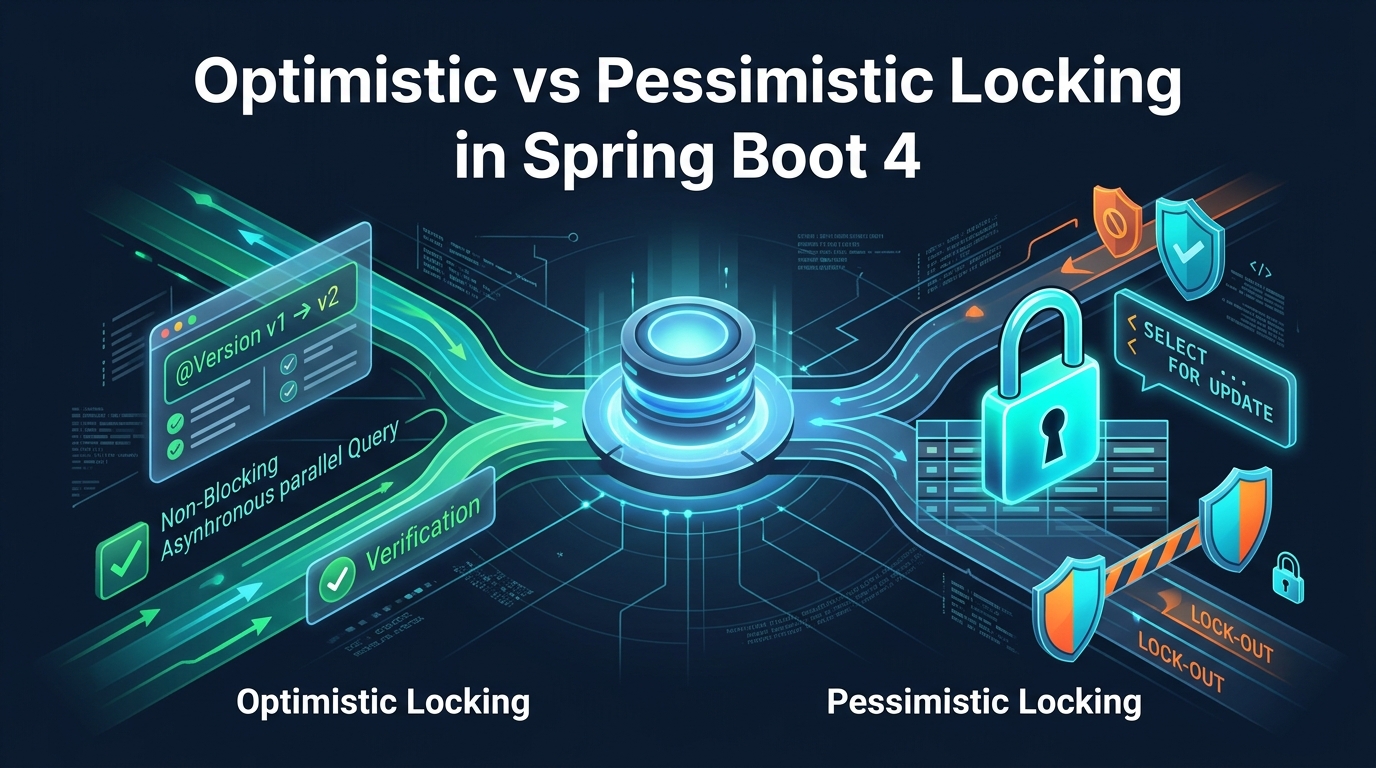
Modern web applications process thousands of requests every second. When multiple users try to update the same database row at the same time, strange bugs happen. Items sell out twice. Account balances drop below zero. Data disappears without any warning.
Developers call this problem a race condition. In relational databases like PostgreSQL, uncoordinated transactions cause lost updates. To protect your business data, you must choose a locking strategy. You can use Optimistic Locking or Pessimistic Locking.
In this comprehensive tutorial, you will learn how to handle race conditions in Spring Boot 4 and Hibernate 7 using Java 25. We will build a complete inventory application from scratch. We will test it against a real PostgreSQL container with Testcontainers.
What You Will Build
You will build a high-concurrency inventory reservation service. The application manages product stock and job tickets under heavy load.
You will implement and compare three concrete strategies:
- Optimistic Locking: Non-blocking version validation using JPA
@Versionwith an automatic retry mechanism. - Pessimistic Locking: Exclusive database-level row locks using
@Lock(LockModeType.PESSIMISTIC_WRITE)to guarantee safe updates without retries. - Non-Blocking Queue Processing: High-throughput ticket processing using PostgreSQL
FOR UPDATE SKIP LOCKED.
| Locking Type | Mechanism | Database Lock? | Best Workload | Primary Risk |
|---|---|---|---|---|
| Optimistic Locking | Version number check (@Version) |
No | High read volume, low conflict | Frequent retries under high contention |
| Pessimistic Write | Row-level lock (SELECT ... FOR UPDATE) |
Yes (Exclusive) | High conflict, financial balances | Connection pool exhaustion, deadlocks |
| Pessimistic Read | Shared lock (FOR SHARE) |
Yes (Shared) | Preventing concurrent updates while reading | Deadlocks if two readers attempt updates |
| Pessimistic SKIP LOCKED | Skip locked rows (FOR UPDATE SKIP LOCKED) |
Yes (Per-row) | Worker queues, job distribution | Skipping uncommitted rows if unordered |
Prerequisites
To follow along with this tutorial, you need:
- JDK 25 installed on your machine.
- Maven 3.9+ for building the project.
- Docker Desktop running for PostgreSQL Testcontainers.
- Your favorite Java IDE (IntelliJ IDEA, Eclipse, or VS Code).
Understanding the Lost Update Anomaly
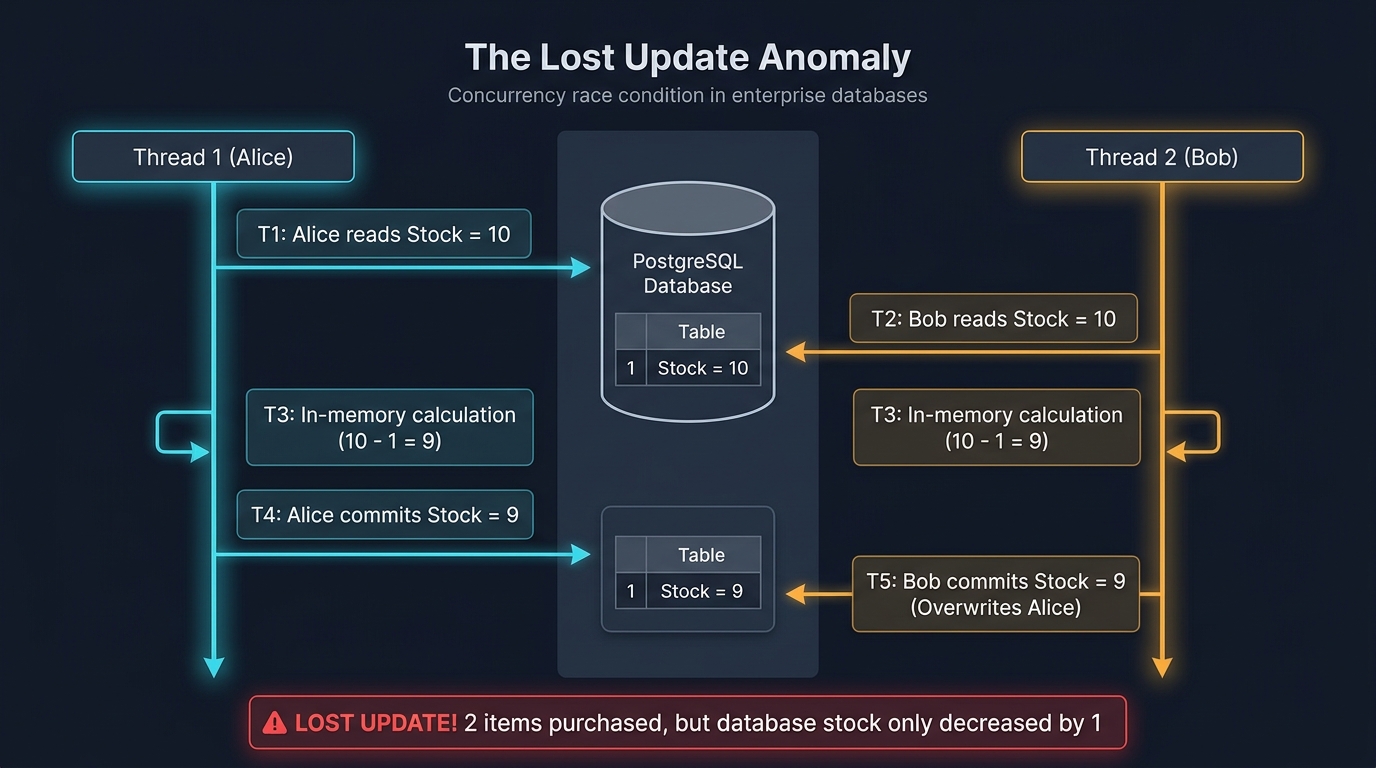
What happens when two users purchase the last item at the exact same millisecond? Without locking, both transactions read the initial stock count. Both calculate the new stock count. The second transaction overwrites the first transaction. One purchase is completely lost from the database.
Look at the execution timeline below:
| Time | Transaction 1 (User Alice) | Transaction 2 (User Bob) | Database State |
|---|---|---|---|
T1 |
Reads product (Stock = 10) | – | Stock = 10 |
T2 |
– | Reads product (Stock = 10) | Stock = 10 |
T3 |
Calculates: 10 – 1 = 9 | Calculates: 10 – 1 = 9 | Stock = 10 |
T4 |
Writes Stock = 9 and commits | – | Stock = 9 |
T5 |
– | Writes Stock = 9 and commits | Stock = 9 (Lost Update!) |
Two items were sold, but the stock only decreased by one. In production, this causes inventory shortages and revenue loss. Let us set up our project to solve this problem.
Step 1: Create the Spring Boot 4 Project
First, create your Maven build file. We use Spring Boot 4.0.0, Hibernate 7.1.8, and Java 25.
Create the pom.xml file in your project root:
<?xml version="1.0" encoding="UTF-8"?>
<project xmlns="http://maven.apache.org/POM/4.0.0" xmlns:xsi="http://www.w3.org/2001/XMLSchema-instance"
         xsi:schemaLocation="http://maven.apache.org/POM/4.0.0 https://maven.apache.org/xsd/maven-4.0.0.xsd">
    <modelVersion>4.0.0</modelVersion>

    <parent>
        <groupId>org.springframework.boot</groupId>
        <artifactId>spring-boot-starter-parent</artifactId>
        <version>4.0.0</version>
        <relativePath/>
    </parent>

    <groupId>com.webcodein.locking</groupId>
    <artifactId>optimistic-pessimistic-locking-spring-boot</artifactId>
    <version>0.0.1-SNAPSHOT</version>
    <name>optimistic-pessimistic-locking-spring-boot</name>
    <description>Optimistic vs Pessimistic Locking in JPA and Hibernate 7 with Spring Boot 4</description>

    <properties>
        <java.version>25</java.version>
    </properties>

    <dependencies>
        <dependency>
            <groupId>org.springframework.boot</groupId>
            <artifactId>spring-boot-starter-web</artifactId>
        </dependency>
        <dependency>
            <groupId>org.springframework.boot</groupId>
            <artifactId>spring-boot-starter-data-jpa</artifactId>
        </dependency>
        <dependency>
            <groupId>com.fasterxml.jackson.core</groupId>
            <artifactId>jackson-databind</artifactId>
        </dependency>
        <dependency>
            <groupId>org.postgresql</groupId>
            <artifactId>postgresql</artifactId>
            <scope>runtime</scope>
        </dependency>

        <dependency>
            <groupId>org.springframework.boot</groupId>
            <artifactId>spring-boot-starter-test</artifactId>
            <scope>test</scope>
        </dependency>
        <dependency>
            <groupId>org.springframework.boot</groupId>
            <artifactId>spring-boot-testcontainers</artifactId>
            <scope>test</scope>
        </dependency>
        <dependency>
            <groupId>org.testcontainers</groupId>
            <artifactId>testcontainers-junit-jupiter</artifactId>
            <scope>test</scope>
        </dependency>
        <dependency>
            <groupId>org.testcontainers</groupId>
            <artifactId>testcontainers-postgresql</artifactId>
            <scope>test</scope>
        </dependency>
    </dependencies>

    <build>
        <plugins>
            <plugin>
                <groupId>org.springframework.boot</groupId>
                <artifactId>spring-boot-maven-plugin</artifactId>
            </plugin>
        </plugins>
    </build>
</project>
Next, configure your database connection properties in src/main/resources/application.properties:
spring.application.name=optimistic-pessimistic-locking-spring-boot

spring.datasource.url=jdbc:postgresql://localhost:5432/locking_db
spring.datasource.username=postgres
spring.datasource.password=postgres
spring.datasource.driver-class-name=org.postgresql.Driver

spring.jpa.hibernate.ddl-auto=create-drop
spring.jpa.show-sql=true
spring.jpa.properties.hibernate.format_sql=true
spring.jpa.properties.hibernate.jdbc.batch_size=20
spring.jpa.open-in-view=false
Disable open-in-view to avoid keeping database connections open across the entire HTTP request lifecycle. If you want to learn more about tuning your database connections, read our guide on HikariCP connection pool tuning in Spring Boot.
Step 2: Define Domain Entities with @Version
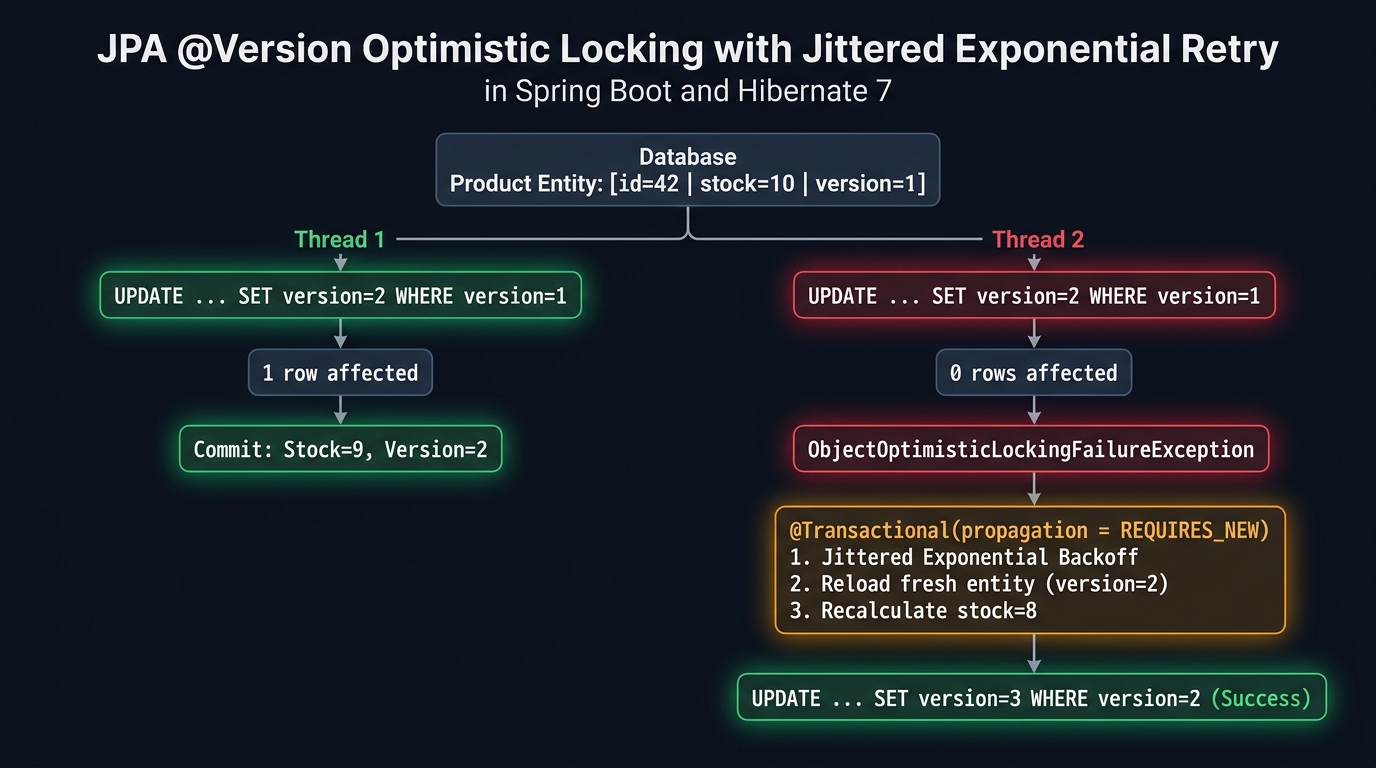
JPA provides built-in optimistic locking through the @Version annotation. Hibernate checks this version column on every update. If another transaction changed the version, Hibernate aborts the update.
Create the Product entity in src/main/java/com/webcodein/locking/entity/Product.java:
package com.webcodein.locking.entity;

import jakarta.persistence.Column;
import jakarta.persistence.Entity;
import jakarta.persistence.GeneratedValue;
import jakarta.persistence.GenerationType;
import jakarta.persistence.Id;
import jakarta.persistence.Table;
import jakarta.persistence.Version;

@Entity
@Table(name = "products")
public class Product {

    @Id
    @GeneratedValue(strategy = GenerationType.IDENTITY)
    private Long id;

    @Column(nullable = false)
    private String name;

    @Column(nullable = false)
    private int stock;

    @Version
    @Column(nullable = false)
    private Long version;

    public Product() {
    }

    public Product(String name, int stock) {
        this.name = name;
        this.stock = stock;
    }

    public Long getId() {
        return id;
    }

    public void setId(Long id) {
        this.id = id;
    }

    public String getName() {
        return name;
    }

    public void setName(String name) {
        this.name = name;
    }

    public int getStock() {
        return stock;
    }

    public void setStock(int stock) {
        this.stock = stock;
    }

    public Long getVersion() {
        return version;
    }

    public void setVersion(Long version) {
        this.version = version;
    }

    public void decrementStock(int quantity) {
        if (this.stock < quantity) {
            throw new IllegalStateException("Insufficient stock for product " + this.name);
        }
        this.stock -= quantity;
    }
}
Notice the @Version annotation on the version field. When you annotate an entity with @Version, Hibernate does the following automatically:
- Initializes the version to
0upon first insert. - Appends a version predicate to the SQL UPDATE statement:
UPDATE products SET stock = ?, version = ? WHERE id = ? AND version = ?. - Increments the version number by 1 during every flush.
- Verifies that the database returned exactly
1updated row. If0rows were updated, Hibernate throws anOptimisticLockException.
Next, create the JobTicket entity in src/main/java/com/webcodein/locking/entity/JobTicket.java. We will use this entity later to demonstrate PostgreSQL SKIP LOCKED:
package com.webcodein.locking.entity;

import jakarta.persistence.Column;
import jakarta.persistence.Entity;
import jakarta.persistence.GeneratedValue;
import jakarta.persistence.GenerationType;
import jakarta.persistence.Id;
import jakarta.persistence.Table;
import jakarta.persistence.Version;

@Entity
@Table(name = "job_tickets")
public class JobTicket {

    @Id
    @GeneratedValue(strategy = GenerationType.IDENTITY)
    private Long id;

    @Column(nullable = false)
    private String payload;

    @Column(nullable = false)
    private String status;

    @Version
    @Column(nullable = false)
    private Long version;

    public JobTicket() {
    }

    public JobTicket(String payload, String status) {
        this.payload = payload;
        this.status = status;
    }

    public Long getId() {
        return id;
    }

    public void setId(Long id) {
        this.id = id;
    }

    public String getPayload() {
        return payload;
    }

    public void setPayload(String payload) {
        this.payload = payload;
    }

    public String getStatus() {
        return status;
    }

    public void setStatus(String status) {
        this.status = status;
    }

    public Long getVersion() {
        return version;
    }

    public void setVersion(Long version) {
        this.version = version;
    }
}
Step 3: Create the Repositories
Now create the repository layer. In Spring Data JPA, you specify pessimistic locks using the @Lock annotation directly on query methods.
Create ProductRepository.java in src/main/java/com/webcodein/locking/repository/ProductRepository.java:
package com.webcodein.locking.repository;

import com.webcodein.locking.entity.Product;
import jakarta.persistence.LockModeType;
import jakarta.persistence.QueryHint;
import org.springframework.data.jpa.repository.JpaRepository;
import org.springframework.data.jpa.repository.Lock;
import org.springframework.data.jpa.repository.Query;
import org.springframework.data.jpa.repository.QueryHints;
import org.springframework.data.repository.query.Param;
import org.springframework.stereotype.Repository;

import java.util.Optional;

@Repository
public interface ProductRepository extends JpaRepository<Product, Long> {

    @Lock(LockModeType.PESSIMISTIC_WRITE)
    @Query("SELECT p FROM Product p WHERE p.id = :id")
    Optional<Product> findByIdWithPessimisticWriteLock(@Param("id") Long id);

    @Lock(LockModeType.PESSIMISTIC_READ)
    @Query("SELECT p FROM Product p WHERE p.id = :id")
    Optional<Product> findByIdWithPessimisticReadLock(@Param("id") Long id);

    @Lock(LockModeType.PESSIMISTIC_WRITE)
    @QueryHints({@QueryHint(name = "jakarta.persistence.lock.timeout", value = "3000")})
    @Query("SELECT p FROM Product p WHERE p.id = :id")
    Optional<Product> findByIdWithPessimisticWriteLockAndTimeout(@Param("id") Long id);
}
Let us examine the lock modes used here:
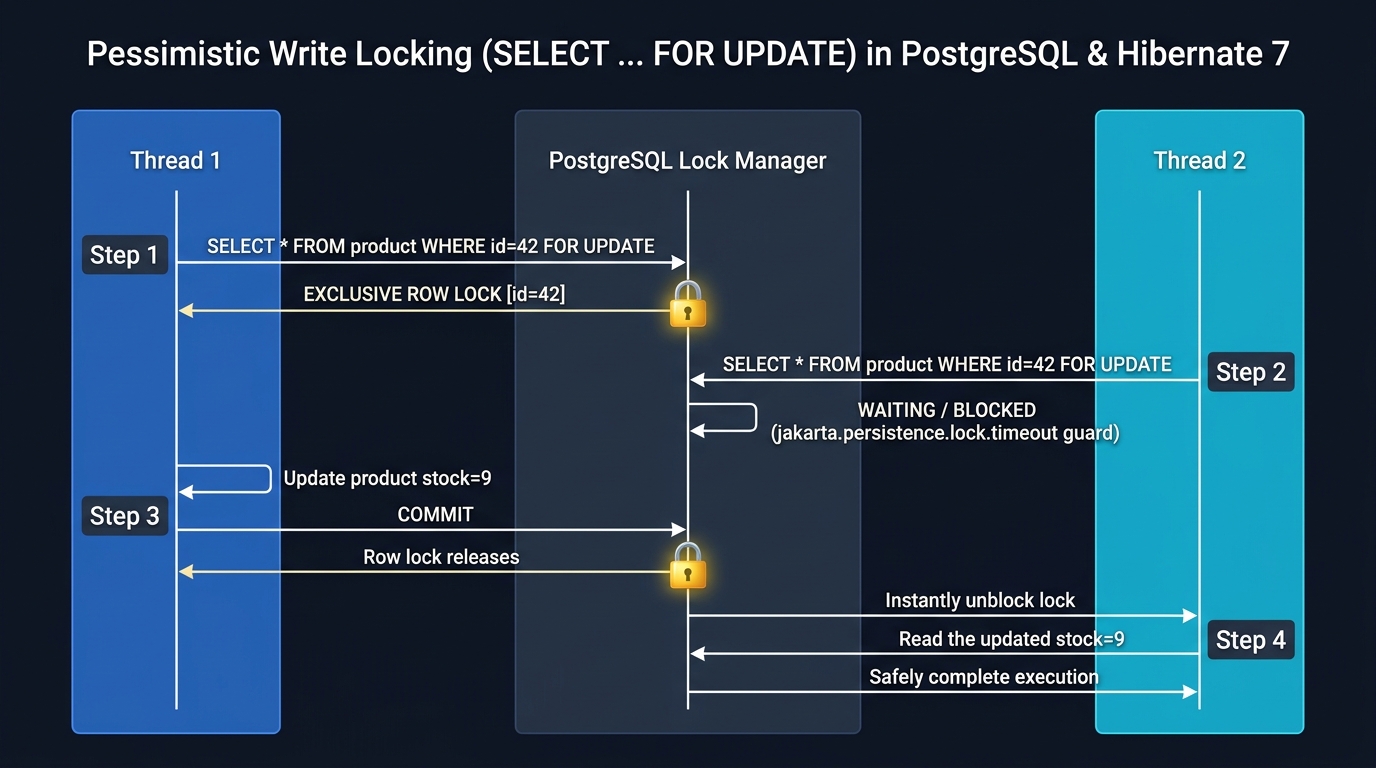
findById(id): Uses default optimistic locking becauseProducthas a@Versionfield. It does not acquire any locks at the database level.@Lock(LockModeType.PESSIMISTIC_WRITE): Tells Hibernate to generate aSELECT ... FOR UPDATESQL statement. PostgreSQL locks the selected row immediately. No other transaction can modify or lock this row until the current transaction commits or rolls back.@Lock(LockModeType.PESSIMISTIC_READ): Generates aSELECT ... FOR SHARESQL statement in PostgreSQL. Other transactions can read the row, but they cannot update it.jakarta.persistence.lock.timeout: Configures the lock acquisition timeout in milliseconds. If another transaction holds the lock for more than 3 seconds, PostgreSQL raises a lock timeout error instead of waiting indefinitely.
For more details on query performance and avoiding fetch issues, check our comprehensive guide on eliminating N+1 query problems in Hibernate 7.
Next, create JobTicketRepository.java in src/main/java/com/webcodein/locking/repository/JobTicketRepository.java:
package com.webcodein.locking.repository;

import com.webcodein.locking.entity.JobTicket;
import org.springframework.data.jpa.repository.JpaRepository;
import org.springframework.data.jpa.repository.Query;
import org.springframework.data.repository.query.Param;
import org.springframework.stereotype.Repository;

import java.util.List;
import java.util.Optional;

@Repository
public interface JobTicketRepository extends JpaRepository<JobTicket, Long> {

    @Query(value = "SELECT * FROM job_tickets WHERE status = :status ORDER BY id ASC LIMIT 1 FOR UPDATE SKIP LOCKED", nativeQuery = true)
    Optional<JobTicket> findNextJobWithSkipLocked(@Param("status") String status);

    List<JobTicket> findByStatus(String status);
}
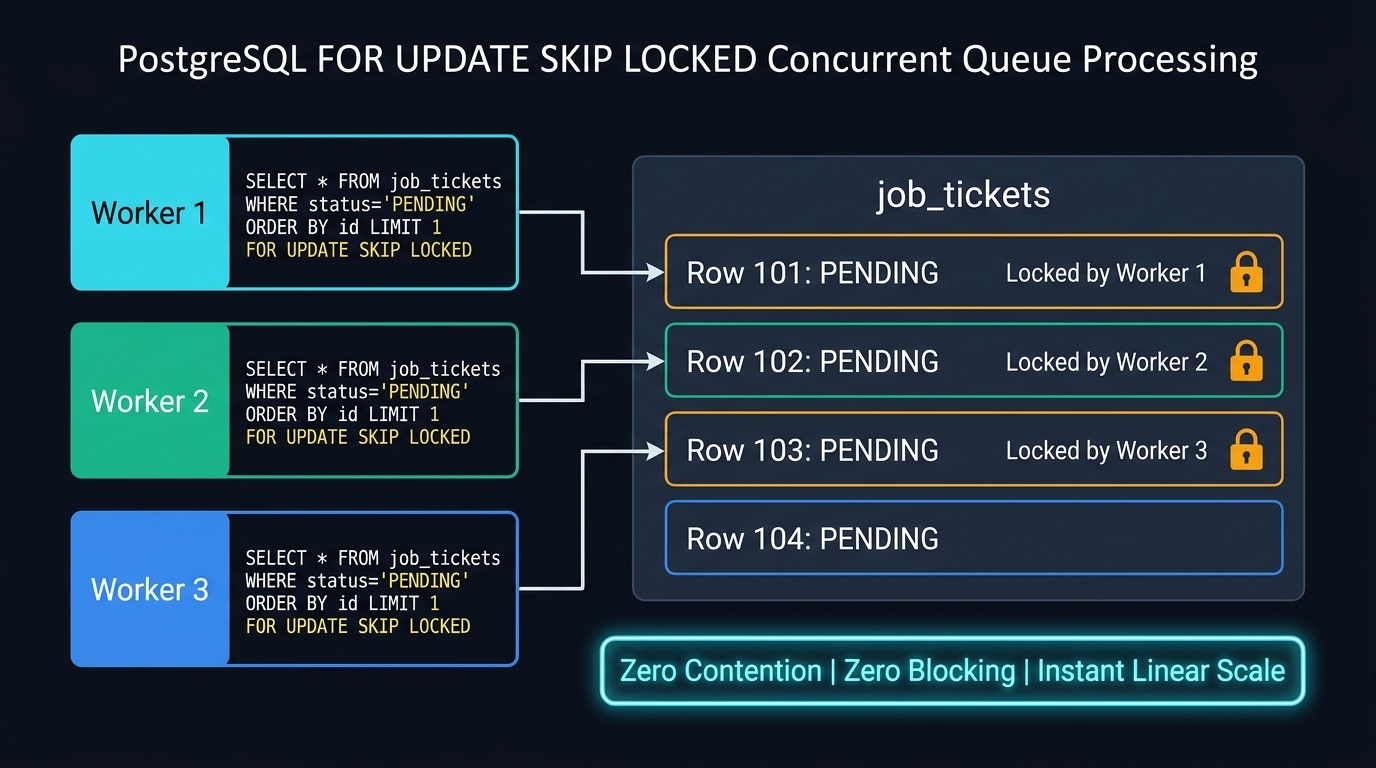
The native query SELECT * FROM job_tickets ... FOR UPDATE SKIP LOCKED is a game-changer for high-concurrency background workers. When multiple threads query for pending jobs at the same time, each thread skips rows already locked by other threads. No thread blocks. Each worker gets a unique ticket immediately.
Step 4: Implement Resilient Optimistic Locking with Retries
Optimistic locking is great because it does not block database connections. However, throwing an error back to the user whenever two requests clash creates a terrible user experience. In production, your application must automatically catch the conflict and retry the transaction.
There is a critical rule when retrying optimistic lock failures: Each retry attempt must execute in a brand-new database transaction. If you retry within the same failed transaction, Hibernate’s persistence context remains marked for rollback or contains stale entity state.
To follow this rule cleanly, create an isolated worker component in src/main/java/com/webcodein/locking/service/OptimisticLockingTransactionWorker.java:
package com.webcodein.locking.service;

import com.webcodein.locking.entity.Product;
import com.webcodein.locking.repository.ProductRepository;
import org.springframework.stereotype.Component;
import org.springframework.transaction.annotation.Propagation;
import org.springframework.transaction.annotation.Transactional;

@Component
public class OptimisticLockingTransactionWorker {

    private final ProductRepository productRepository;

    public OptimisticLockingTransactionWorker(ProductRepository productRepository) {
        this.productRepository = productRepository;
    }

    @Transactional(propagation = Propagation.REQUIRES_NEW)
    public Product executeSingleAttempt(Long productId, int quantity) {
        Product product = productRepository.findById(productId)
                .orElseThrow(() -> new IllegalArgumentException("Product not found: " + productId));

        product.decrementStock(quantity);
        return productRepository.saveAndFlush(product);
    }
}
By using Propagation.REQUIRES_NEW, every attempt gets a clean transaction and a fresh persistence context. Hibernate reloads the updated entity from the database with its newest version number.
Now create the main business service in src/main/java/com/webcodein/locking/service/InventoryService.java:
package com.webcodein.locking.service;

import com.webcodein.locking.entity.Product;
import com.webcodein.locking.repository.ProductRepository;
import org.slf4j.Logger;
import org.slf4j.LoggerFactory;
import org.springframework.orm.ObjectOptimisticLockingFailureException;
import org.springframework.stereotype.Service;
import org.springframework.transaction.annotation.Transactional;

import java.util.concurrent.ThreadLocalRandom;

@Service
public class InventoryService {

    private static final Logger log = LoggerFactory.getLogger(InventoryService.class);

    private final ProductRepository productRepository;
    private final OptimisticLockingTransactionWorker transactionWorker;

    public InventoryService(ProductRepository productRepository,
                            OptimisticLockingTransactionWorker transactionWorker) {
        this.productRepository = productRepository;
        this.transactionWorker = transactionWorker;
    }

    @Transactional
    public Product decrementStockOptimistic(Long productId, int quantity) {
        Product product = productRepository.findById(productId)
                .orElseThrow(() -> new IllegalArgumentException("Product not found with ID: " + productId));

        product.decrementStock(quantity);
        return productRepository.saveAndFlush(product);
    }

    public Product decrementStockOptimisticWithRetry(Long productId, int quantity, int maxRetries) {
        int attempts = 0;
        while (attempts < maxRetries) {
            attempts++;
            try {
                return transactionWorker.executeSingleAttempt(productId, quantity);
            } catch (ObjectOptimisticLockingFailureException ex) {
                log.warn("Optimistic lock conflict on attempt {} for product {}. Retrying...", attempts, productId);
                if (attempts >= maxRetries) {
                    throw ex;
                }
                backoff(attempts);
            }
        }
        throw new IllegalStateException("Max retries exceeded for product " + productId);
    }

    @Transactional
    public Product decrementStockPessimistic(Long productId, int quantity) {
        Product product = productRepository.findByIdWithPessimisticWriteLock(productId)
                .orElseThrow(() -> new IllegalArgumentException("Product not found with ID: " + productId));

        product.decrementStock(quantity);
        return productRepository.saveAndFlush(product);
    }

    private void backoff(int attempt) {
        try {
            long baseDelay = 15L * attempt;
            long jitter = ThreadLocalRandom.current().nextLong(5, 25);
            Thread.sleep(baseDelay + jitter);
        } catch (InterruptedException e) {
            Thread.currentThread().interrupt();
            throw new IllegalStateException("Interrupted during optimistic backoff", e);
        }
    }
}
Notice the backoff method. When multiple threads clash, retrying at the exact same moment causes repeated collisions (known as the thundering herd problem). Adding randomized jitter spreads out the retries so each thread succeeds smoothly.
Now create the queue service in src/main/java/com/webcodein/locking/service/JobQueueService.java:
package com.webcodein.locking.service;

import com.webcodein.locking.entity.JobTicket;
import com.webcodein.locking.repository.JobTicketRepository;
import org.springframework.stereotype.Service;
import org.springframework.transaction.annotation.Transactional;

import java.util.Optional;

@Service
public class JobQueueService {

    private final JobTicketRepository jobTicketRepository;

    public JobQueueService(JobTicketRepository jobTicketRepository) {
        this.jobTicketRepository = jobTicketRepository;
    }

    @Transactional
    public Optional<JobTicket> claimAndProcessNextJob() {
        Optional<JobTicket> pendingTicket = jobTicketRepository.findNextJobWithSkipLocked("PENDING");
        if (pendingTicket.isPresent()) {
            JobTicket ticket = pendingTicket.get();
            ticket.setStatus("COMPLETED");
            return Optional.of(jobTicketRepository.saveAndFlush(ticket));
        }
        return Optional.empty();
    }
}
Step 5: Expose REST Endpoints
Expose HTTP endpoints to test our locking strategies over HTTP. Create InventoryController.java in src/main/java/com/webcodein/locking/controller/InventoryController.java:
package com.webcodein.locking.controller;

import com.webcodein.locking.entity.Product;
import com.webcodein.locking.service.InventoryService;
import org.springframework.http.ResponseEntity;
import org.springframework.web.bind.annotation.PathVariable;
import org.springframework.web.bind.annotation.PostMapping;
import org.springframework.web.bind.annotation.RequestMapping;
import org.springframework.web.bind.annotation.RequestParam;
import org.springframework.web.bind.annotation.RestController;

@RestController
@RequestMapping("/api/inventory")
public class InventoryController {

    private final InventoryService inventoryService;

    public InventoryController(InventoryService inventoryService) {
        this.inventoryService = inventoryService;
    }

    @PostMapping("/products/{id}/decrement-optimistic")
    public ResponseEntity<Product> decrementOptimistic(@PathVariable Long id,
                                                        @RequestParam(defaultValue = "1") int quantity) {
        Product product = inventoryService.decrementStockOptimistic(id, quantity);
        return ResponseEntity.ok(product);
    }

    @PostMapping("/products/{id}/decrement-optimistic-retry")
    public ResponseEntity<Product> decrementOptimisticWithRetry(@PathVariable Long id,
                                                                 @RequestParam(defaultValue = "1") int quantity,
                                                                 @RequestParam(defaultValue = "5") int retries) {
        Product product = inventoryService.decrementStockOptimisticWithRetry(id, quantity, retries);
        return ResponseEntity.ok(product);
    }

    @PostMapping("/products/{id}/decrement-pessimistic")
    public ResponseEntity<Product> decrementPessimistic(@PathVariable Long id,
                                                         @RequestParam(defaultValue = "1") int quantity) {
        Product product = inventoryService.decrementStockPessimistic(id, quantity);
        return ResponseEntity.ok(product);
    }
}
Step 6: Verify Concurrency with Testcontainers
Testing concurrency bugs in unit tests with mock databases is useless. In-memory databases like H2 have different locking behaviors than production databases. We must run our tests against real PostgreSQL using Testcontainers.
Create the integration test in src/test/java/com/webcodein/locking/LockingIntegrationTest.java:
package com.webcodein.locking;

import com.webcodein.locking.entity.JobTicket;
import com.webcodein.locking.entity.Product;
import com.webcodein.locking.repository.JobTicketRepository;
import com.webcodein.locking.repository.ProductRepository;
import com.webcodein.locking.service.InventoryService;
import com.webcodein.locking.service.JobQueueService;
import org.junit.jupiter.api.BeforeEach;
import org.junit.jupiter.api.DisplayName;
import org.junit.jupiter.api.Test;
import org.springframework.beans.factory.annotation.Autowired;
import org.springframework.boot.test.context.SpringBootTest;
import org.springframework.boot.testcontainers.service.connection.ServiceConnection;
import org.springframework.orm.ObjectOptimisticLockingFailureException;
import org.testcontainers.containers.PostgreSQLContainer;
import org.testcontainers.junit.jupiter.Container;
import org.testcontainers.junit.jupiter.Testcontainers;

import java.util.ArrayList;
import java.util.Collections;
import java.util.List;
import java.util.Optional;
import java.util.concurrent.CountDownLatch;
import java.util.concurrent.ExecutorService;
import java.util.concurrent.Executors;
import java.util.concurrent.TimeUnit;
import java.util.concurrent.atomic.AtomicInteger;

import static org.assertj.core.api.Assertions.assertThat;
import static org.assertj.core.api.Assertions.assertThatThrownBy;

@SpringBootTest
@Testcontainers
class LockingIntegrationTest {

    @Container
    @ServiceConnection
    static PostgreSQLContainer<?> postgres = new PostgreSQLContainer<>("postgres:16-alpine");

    @Autowired
    private ProductRepository productRepository;

    @Autowired
    private JobTicketRepository jobTicketRepository;

    @Autowired
    private InventoryService inventoryService;

    @Autowired
    private JobQueueService jobQueueService;

    @BeforeEach
    void cleanDatabase() {
        productRepository.deleteAll();
        jobTicketRepository.deleteAll();
    }

    @Test
    @DisplayName("1. Optimistic Locking: Should detect version mismatch and throw ObjectOptimisticLockingFailureException")
    void shouldThrowOptimisticLockExceptionOnVersionMismatch() {
        Product initial = productRepository.saveAndFlush(new Product("Mechanical Keyboard", 50));
        Long productId = initial.getId();

        // Transaction 1 loads entity at version 0
        Product tx1Product = productRepository.findById(productId).orElseThrow();

        // Transaction 2 loads entity at version 0
        Product tx2Product = productRepository.findById(productId).orElseThrow();

        // Transaction 1 modifies and commits (increments version to 1)
        tx1Product.decrementStock(5);
        productRepository.saveAndFlush(tx1Product);

        // Transaction 2 tries to commit stale state (version 0 instead of current version 1)
        tx2Product.decrementStock(10);
        assertThatThrownBy(() -> productRepository.saveAndFlush(tx2Product))
                .isInstanceOf(ObjectOptimisticLockingFailureException.class);

        // Verify state: only Transaction 1 updates persisted
        Product refreshed = productRepository.findById(productId).orElseThrow();
        assertThat(refreshed.getStock()).isEqualTo(45);
        assertThat(refreshed.getVersion()).isEqualTo(1L);
    }

    @Test
    @DisplayName("2. Optimistic Locking with Retry: High concurrency resolves all updates without lost updates")
    void shouldResolveConcurrentUpdatesUsingOptimisticRetry() throws InterruptedException {
        final int initialStock = 20;
        final int concurrentThreads = 20;
        Product product = productRepository.saveAndFlush(new Product("Gaming Mouse", initialStock));
        final Long productId = product.getId();

        ExecutorService executor = Executors.newFixedThreadPool(concurrentThreads);
        CountDownLatch startGate = new CountDownLatch(1);
        CountDownLatch endGate = new CountDownLatch(concurrentThreads);
        AtomicInteger successCounter = new AtomicInteger(0);

        for (int i = 0; i < concurrentThreads; i++) {
            executor.submit(() -> {
                try {
                    startGate.await();
                    inventoryService.decrementStockOptimisticWithRetry(productId, 1, 30);
                    successCounter.incrementAndGet();
                } catch (Exception e) {
                    // Log or handle unexpected failure
                } finally {
                    endGate.countDown();
                }
            });
        }

        startGate.countDown();
        boolean completed = endGate.await(15, TimeUnit.SECONDS);
        executor.shutdownNow();

        assertThat(completed).isTrue();
        assertThat(successCounter.get()).isEqualTo(concurrentThreads);

        Product finalProduct = productRepository.findById(productId).orElseThrow();
        assertThat(finalProduct.getStock()).isEqualTo(0);
        assertThat(finalProduct.getVersion()).isEqualTo((long) concurrentThreads);
    }

    @Test
    @DisplayName("3. Pessimistic Write Locking: Database row lock serializes high concurrency without retries")
    void shouldSerializeConcurrentUpdatesUsingPessimisticWriteLock() throws InterruptedException {
        final int initialStock = 20;
        final int concurrentThreads = 20;
        Product product = productRepository.saveAndFlush(new Product("UltraWide Monitor", initialStock));
        final Long productId = product.getId();

        ExecutorService executor = Executors.newFixedThreadPool(concurrentThreads);
        CountDownLatch startGate = new CountDownLatch(1);
        CountDownLatch endGate = new CountDownLatch(concurrentThreads);
        AtomicInteger successCounter = new AtomicInteger(0);

        for (int i = 0; i < concurrentThreads; i++) {
            executor.submit(() -> {
                try {
                    startGate.await();
                    inventoryService.decrementStockPessimistic(productId, 1);
                    successCounter.incrementAndGet();
                } catch (Exception e) {
                    // Log failure if any
                } finally {
                    endGate.countDown();
                }
            });
        }

        startGate.countDown();
        boolean completed = endGate.await(15, TimeUnit.SECONDS);
        executor.shutdownNow();

        assertThat(completed).isTrue();
        assertThat(successCounter.get()).isEqualTo(concurrentThreads);

        Product finalProduct = productRepository.findById(productId).orElseThrow();
        assertThat(finalProduct.getStock()).isEqualTo(0);
        assertThat(finalProduct.getVersion()).isEqualTo((long) concurrentThreads);
    }

    @Test
    @DisplayName("4. Pessimistic SKIP LOCKED: Multiple workers claim distinct jobs concurrently without waiting")
    void shouldProcessQueueWithoutBlockingUsingSkipLocked() throws InterruptedException {
        final int totalJobs = 5;
        for (int i = 1; i <= totalJobs; i++) {
            jobTicketRepository.save(new JobTicket("PAYLOAD_" + i, "PENDING"));
        }

        ExecutorService executor = Executors.newFixedThreadPool(totalJobs);
        CountDownLatch startGate = new CountDownLatch(1);
        CountDownLatch endGate = new CountDownLatch(totalJobs);
        List<Long> claimedJobIds = Collections.synchronizedList(new ArrayList<>());

        for (int i = 0; i < totalJobs; i++) {
            executor.submit(() -> {
                try {
                    startGate.await();
                    Optional<JobTicket> claimed = jobQueueService.claimAndProcessNextJob();
                    claimed.ifPresent(ticket -> claimedJobIds.add(ticket.getId()));
                } catch (Exception e) {
                    // Ignore
                } finally {
                    endGate.countDown();
                }
            });
        }

        startGate.countDown();
        boolean completed = endGate.await(10, TimeUnit.SECONDS);
        executor.shutdownNow();

        assertThat(completed).isTrue();
        assertThat(claimedJobIds).hasSize(totalJobs);
        assertThat(claimedJobIds.stream().distinct().count()).isEqualTo(totalJobs);

        List<JobTicket> remainingPending = jobTicketRepository.findByStatus("PENDING");
        assertThat(remainingPending).isEmpty();
    }
}
Now execute the test suite in your terminal:
mvn testYou should see all 4 tests pass successfully:
[INFO] Running com.webcodein.locking.LockingIntegrationTest
[INFO] Tests run: 4, Failures: 0, Errors: 0, Skipped: 0, Time elapsed: 28.79 s -- in com.webcodein.locking.LockingIntegrationTest
[INFO] ------------------------------------------------------------------------
[INFO] BUILD SUCCESS
[INFO] ------------------------------------------------------------------------
Architectural Decision Matrix: Which Lock Should You Choose?
Choosing between Optimistic and Pessimistic locking depends entirely on your workload and business requirements. Use this comparison table to make an informed architectural decision:
| Criteria | Optimistic Locking (@Version) |
Pessimistic Locking (SELECT ... FOR UPDATE) |
|---|---|---|
| Lock Contention | Zero database locks. Threads never block each other in the database. | High database row contention. Competing transactions must wait in line. |
| Contention Handling | Aborts losing transactions with an exception. Requires application retry loops. | Blocks competing transactions until the lock holder commits or rolls back. |
| Throughput | Extremely high throughput for read-heavy workloads (90%+ reads). | Lower throughput under high contention due to queueing and lock waits. |
| Connection Pool Impact | Low. Transactions complete quickly without waiting on external locks. | High. Blocked transactions hold onto database connections longer. |
| Deadlock Risk | Zero database deadlock risk. | Possible if transactions lock multiple rows in different orders. |
| Long “Think Times” | Excellent. A user can open an edit screen for 10 minutes without holding locks. | Unusable. Holding a database row lock across HTTP requests is an anti-pattern. |
| Ideal Real-World Use Case | User profiles, document editing, content management, blog posts. | Bank account transfers, limited flash sale inventory, seat booking. |
For high-concurrency systems such as flash sales, you can also pair pessimistic row locks with Redis distributed token buckets. Explore our in-depth architecture guide on building high-concurrency flash sale backends with Spring Boot and Redis.
Common Mistakes and Best Practices
1. Always Configure Lock Timeouts with Pessimistic Locking
Never call findByIdWithPessimisticWriteLock() without a timeout. If a transaction hangs or a network partition occurs, that row remains locked forever. Other transactions will pile up, depleting your HikariCP connection pool and causing total service outage.
Always specify jakarta.persistence.lock.timeout in your query hints or at the database level.
2. Always Acquire Multiple Locks in Consistent Order
If Transaction A locks Account 1 and then requests Account 2, while Transaction B locks Account 2 and then requests Account 1, PostgreSQL detects a deadlock and terminates one transaction.
Whenever you lock multiple rows in a single transaction, always sort their primary keys in ascending order before acquiring the locks:
// Always sort IDs before locking to guarantee deadlock-free execution
List<Long> sortedAccountIds = accountIds.stream().sorted().toList();
for (Long id : sortedAccountIds) {
    accountRepository.findByIdWithPessimisticWriteLock(id);
}
3. Run Optimistic Retries in Isolated Transactions
Do not catch ObjectOptimisticLockingFailureException inside the same @Transactional method that performed the write. The current transaction is already compromised. Wrap your retry logic around an isolated bean method annotated with @Transactional(propagation = Propagation.REQUIRES_NEW) as demonstrated in Step 4.
Companion Workshop Code
The complete, runnable code for this tutorial—including the Spring Boot 4 service, entity mappings, Docker Compose setup, and Testcontainers test suite—is available in our open-source GitHub workshop repository:
GitHub: WebCodein Workshop – Optimistic vs Pessimistic Locking in Spring Boot 4
Frequently Asked Questions
What data types can I use for the @Version field in Hibernate 7?
JPA and Hibernate 7 support Long, Integer, Short, and java.time.Instant (or java.sql.Timestamp). We recommend using Long because integer types are immune to clock synchronization skew across distributed servers.
What is the difference between PESSIMISTIC_READ and PESSIMISTIC_WRITE?
PESSIMISTIC_READ uses a shared lock (FOR SHARE in PostgreSQL). Multiple transactions can read the row at the same time, but none can update it. PESSIMISTIC_WRITE uses an exclusive lock (FOR UPDATE). Only one transaction can hold the lock; all other readers and writers must wait.
When should I use FOR UPDATE SKIP LOCKED?
Use SKIP LOCKED for concurrent queue processing and job scheduling. It allows multiple worker threads or microservice instances to claim distinct pending tasks simultaneously without waiting or encountering lock contention.
Does Hibernate increment the @Version if only an unowned child entity changes?
By default, Hibernate only increments the version if the entity’s own columns change. If you add a new item to an @OneToMany collection, Hibernate does not increment the parent version unless you explicitly use LockModeType.OPTIMISTIC_FORCE_INCREMENT on the parent query.