
Every Spring Boot application that connects to a SQL database uses a connection pool. By default, Spring Boot uses HikariCP. HikariCP is fast, light, and reliable. However, many developers leave the default settings in production. When traffic grows, applications often crash with the error: HikariPool-1 - Connection is not available, request timed out after 30000ms.
To fix this, many teams increase the pool size to 50 or 100 connections. This is a big mistake. Oversized connection pools hurt performance. They cause high CPU context switching and disk thrashing. In this step-by-step tutorial, you will build a complete Spring Boot 4 service with Java 25 and PostgreSQL. You will learn how to size your pool using mathematical formulas, configure fail-fast timeouts, track live metrics, and detect connection leaks automatically.
What You Will Build
You will build a high-performance order management backend service with Spring Boot 4 and PostgreSQL. You will configure HikariCP according to official database sizing formulas. You will also create endpoints to monitor active connections and simulate real production issues, including slow queries and unclosed connection leaks.
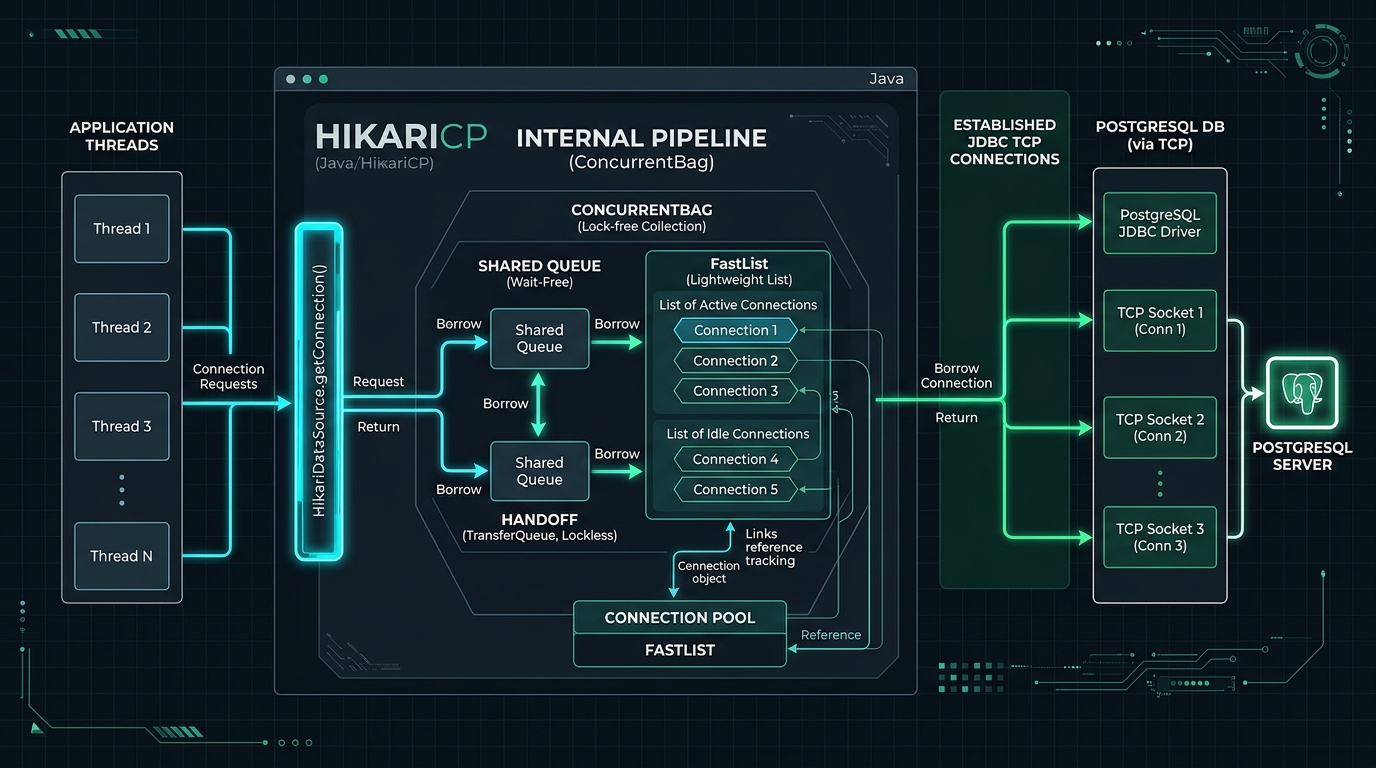
Here is what the system demonstrates:
- Mathematical Sizing: You will calculate the exact pool size for your database hardware instead of guessing.
- Fixed Pool Sizing: You will configure equal minimum and maximum connections to eliminate runtime latency spikes.
- Fail-Fast Timeouts: You will lower connection timeouts from 30 seconds to 3 seconds to protect worker threads.
- Watchdog Leak Detection: You will enable HikariCP’s watchdog to log stack traces when code forgets to close a connection.
- Live Metric Inspection: You will expose live pool statistics through custom endpoints and Spring Boot Actuator.
Prerequisites
Before you begin, make sure you have the following tools installed on your development machine:
- Java Development Kit (JDK) 25: Modern Java with standard LTS capabilities.
- Apache Maven 3.9+: To compile and run the project (or use the included Maven wrapper).
- Docker Desktop: Required for running PostgreSQL and running Testcontainers integration tests.
- cURL or HTTP Client: To test the REST endpoints.
Step 1: Create the Spring Boot Project
First, create a new Maven project. We will use Spring Boot 4.0.0, Spring Data JPA 4, PostgreSQL driver, and Spring Boot Actuator.
Create the pom.xml file in your project root folder:
<?xml version="1.0" encoding="UTF-8"?>
<project xmlns="http://maven.apache.org/POM/4.0.0" xmlns:xsi="http://www.w3.org/2001/XMLSchema-instance"
         xsi:schemaLocation="http://maven.apache.org/POM/4.0.0 https://maven.apache.org/xsd/maven-4.0.0.xsd">
    <modelVersion>4.0.0</modelVersion>

    <parent>
        <groupId>org.springframework.boot</groupId>
        <artifactId>spring-boot-starter-parent</artifactId>
        <version>4.0.0</version>
        <relativePath/>
    </parent>

    <groupId>com.webcodein.hikaricp</groupId>
    <artifactId>hikaricp-connection-pool-tuning-spring-boot</artifactId>
    <version>0.0.1-SNAPSHOT</version>
    <name>hikaricp-connection-pool-tuning-spring-boot</name>
    <description>Production HikariCP Connection Pool Sizing and Leak Detection with Spring Boot 4 and PostgreSQL</description>

    <properties>
        <java.version>25</java.version>
    </properties>

    <dependencies>
        <dependency>
            <groupId>org.springframework.boot</groupId>
            <artifactId>spring-boot-starter-web</artifactId>
        </dependency>
        <dependency>
            <groupId>org.springframework.boot</groupId>
            <artifactId>spring-boot-starter-data-jpa</artifactId>
        </dependency>
        <dependency>
            <groupId>org.springframework.boot</groupId>
            <artifactId>spring-boot-starter-actuator</artifactId>
        </dependency>
        <dependency>
            <groupId>com.fasterxml.jackson.core</groupId>
            <artifactId>jackson-databind</artifactId>
        </dependency>
        <dependency>
            <groupId>org.postgresql</groupId>
            <artifactId>postgresql</artifactId>
            <scope>runtime</scope>
        </dependency>

        <dependency>
            <groupId>org.springframework.boot</groupId>
            <artifactId>spring-boot-starter-test</artifactId>
            <scope>test</scope>
        </dependency>
        <dependency>
            <groupId>org.springframework.boot</groupId>
            <artifactId>spring-boot-test-autoconfigure</artifactId>
            <scope>test</scope>
        </dependency>
        <dependency>
            <groupId>org.springframework.boot</groupId>
            <artifactId>spring-boot-webmvc-test</artifactId>
            <scope>test</scope>
        </dependency>
        <dependency>
            <groupId>org.springframework.boot</groupId>
            <artifactId>spring-boot-testcontainers</artifactId>
            <scope>test</scope>
        </dependency>
        <dependency>
            <groupId>org.testcontainers</groupId>
            <artifactId>testcontainers-junit-jupiter</artifactId>
            <scope>test</scope>
        </dependency>
        <dependency>
            <groupId>org.testcontainers</groupId>
            <artifactId>testcontainers-postgresql</artifactId>
            <scope>test</scope>
        </dependency>
    </dependencies>

    <build>
        <plugins>
            <plugin>
                <groupId>org.springframework.boot</groupId>
                <artifactId>spring-boot-maven-plugin</artifactId>
            </plugin>
        </plugins>
    </build>
</project>
Now, create the main application entry point at src/main/java/com/webcodein/hikaricp/HikariApplication.java:
package com.webcodein.hikaricp;

import com.fasterxml.jackson.databind.ObjectMapper;
import org.springframework.boot.SpringApplication;
import org.springframework.boot.autoconfigure.SpringBootApplication;
import org.springframework.context.annotation.Bean;

@SpringBootApplication
public class HikariApplication {

    public static void main(String[] args) {
        SpringApplication.run(HikariApplication.class, args);
    }

    @Bean
    public ObjectMapper objectMapper() {
        return new ObjectMapper();
    }
}
Let us review the key parts of this setup:
spring-boot-starter-data-jpa: Brings in Hibernate and automatically configures HikariCP as the default DataSource.spring-boot-starter-actuator: Exposes internal metrics about pool connections and wait times.testcontainers-postgresql: Allows us to run realistic integration tests against a real PostgreSQL container.
Step 2: Configure HikariCP with the Production Sizing Formula
How many connections should your application pool have? Most engineers guess a round number like 50 or 100. This is dangerous. A database can only execute as many queries at a single instant as it has CPU cores. When 50 threads compete for 4 CPU cores, the operating system spends more time switching thread contexts than executing SQL.
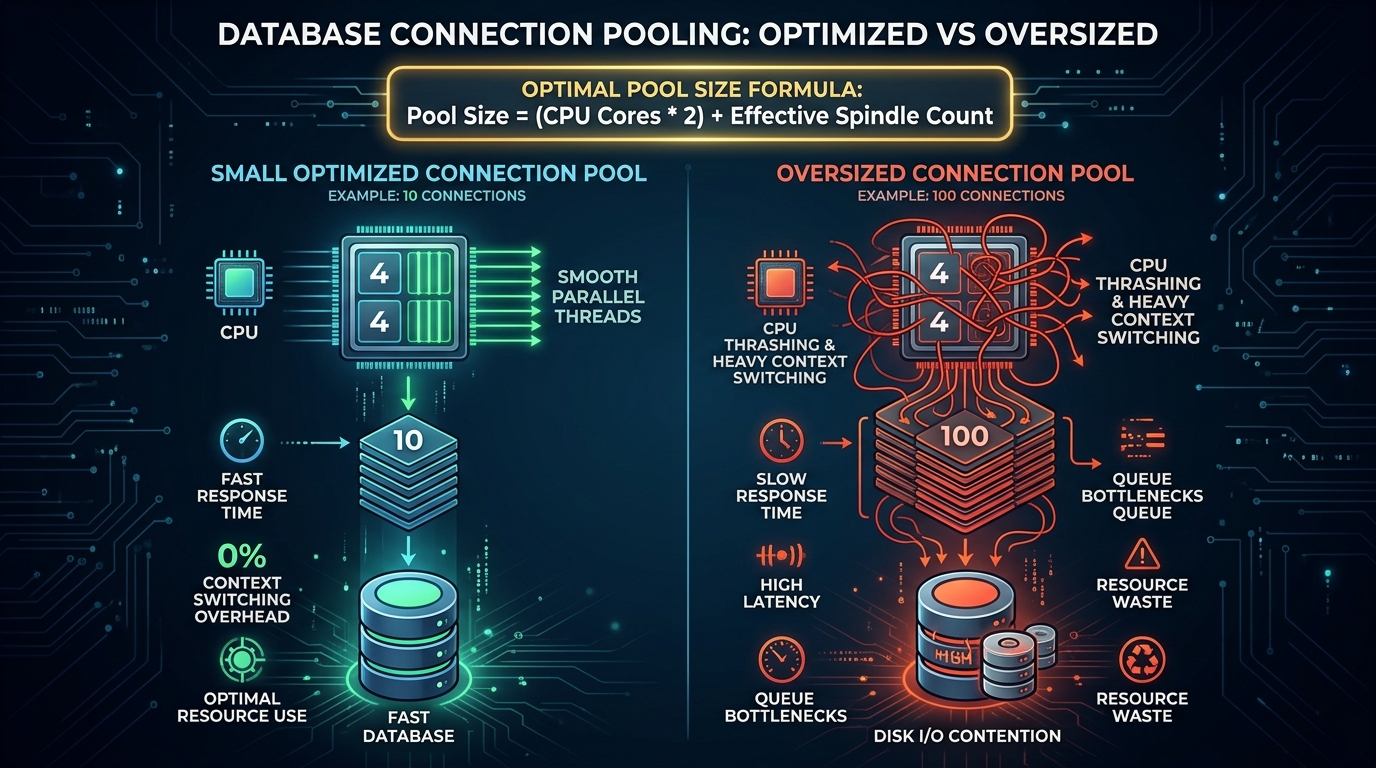
The PostgreSQL development team and the author of HikariCP recommend this formula:
connections = ((core_count * 2) + effective_spindle_count)Let us break down the formula:
- core_count: The number of CPU cores on the database server. If your database runs on a 4-core virtual machine,
core_count = 4. - effective_spindle_count: The number of disk spindles. For modern SSD drives, this value is
1. - Example: For a 4-core database server with an SSD, the formula gives:
(4 * 2) + 1 = 9. A pool size of 10 connections is optimal.
Next, configure your production pool in src/main/resources/application.yml:
spring:
  application:
    name: hikaricp-connection-pool-tuning-spring-boot
  datasource:
    url: jdbc:postgresql://localhost:5432/hikaridb
    username: postgres
    password: postgrespassword
    driver-class-name: org.postgresql.Driver
    hikari:
      pool-name: ProductionHikariPool
      # Formula: ((4 cores * 2) + 1 SSD) = 9 ~ 10 connections
      maximum-pool-size: 10
      # Fixed-size pool avoids connection creation latency during traffic spikes
      minimum-idle: 10
      # Fail-fast timeout: 3 seconds prevents cascading thread pool exhaustion
      connection-timeout: 3000
      # Keep-alive timeout: must be shorter than DB firewall or ALB timeout
      max-lifetime: 1800000
      # Idle timeout: time connection can remain idle in pool
      idle-timeout: 600000
      # Leak detection threshold: 2 seconds logs stack trace of unclosed connections
      leak-detection-threshold: 2000
  jpa:
    hibernate:
      ddl-auto: create-drop
    properties:
      hibernate:
        format_sql: false
        show_sql: false

management:
  endpoints:
    web:
      exposure:
        include: health,info,metrics
  endpoint:
    health:
      show-details: always
  metrics:
    enable:
      hikaricp: true

logging:
  level:
    com.zaxxer.hikari: DEBUG
    com.zaxxer.hikari.pool.ProxyLeakTask: WARN
    com.webcodein.hikaricp: INFO
Let us examine the critical settings:
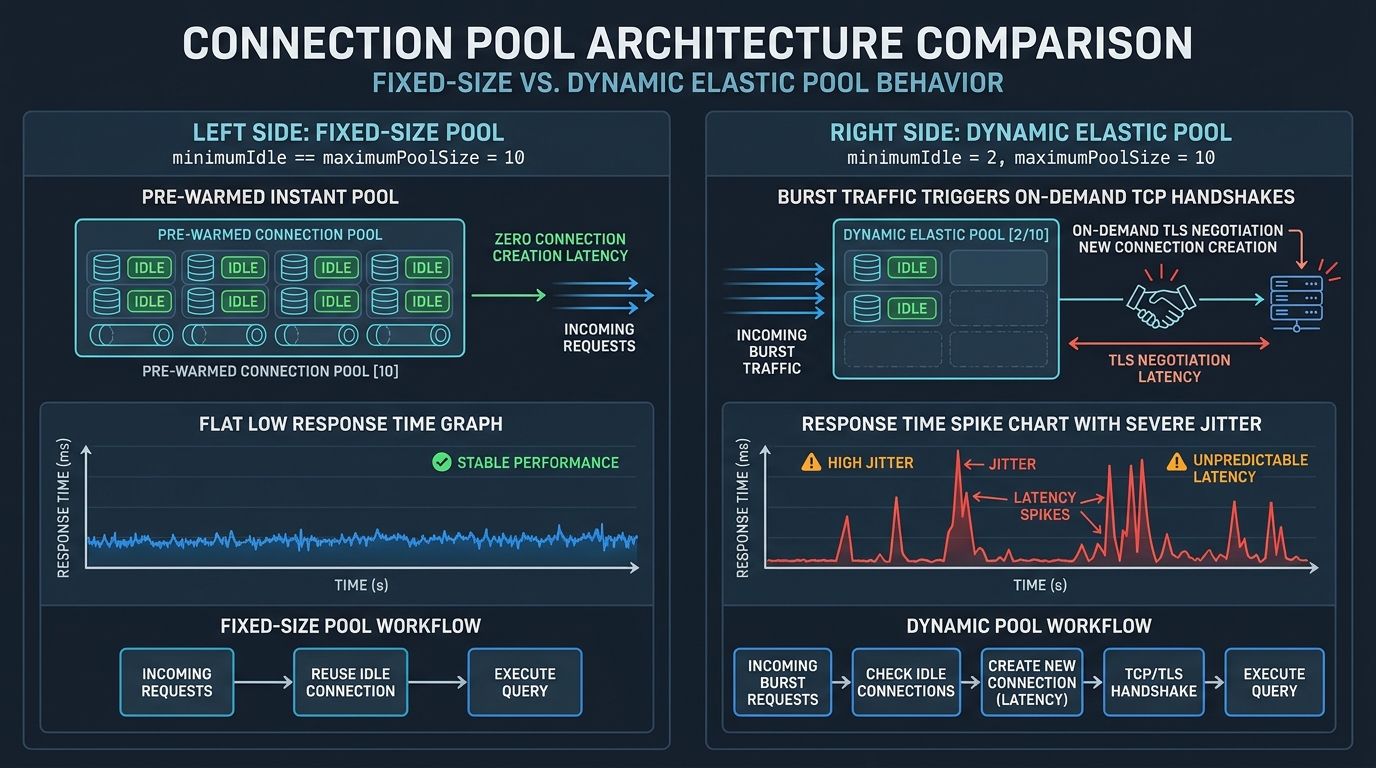
maximum-pool-size: 10: The maximum number of physical connections allowed in the pool.minimum-idle: 10: Setting this equal tomaximum-pool-sizecreates a fixed-size pool. HikariCP warms up all 10 connections immediately. This prevents latency spikes during sudden traffic surges.connection-timeout: 3000: By default, Spring Boot waits 30,000 ms (30 seconds) for a connection. This is too long. If the pool is exhausted, requests will queue up and starve the web server thread pool. Setting this to 3,000 ms fails fast and allows the client to retry.max-lifetime: 1800000: 30 minutes. This should be 2 to 5 minutes shorter than any database or cloud load balancer connection timeout to prevent broken pipe errors.leak-detection-threshold: 2000: If a thread holds a connection longer than 2,000 ms, HikariCP logs a warning with the exact stack trace where the connection was borrowed.
Step 3: Implement the Domain Model and Database Repository
Now, create the database entity. Create src/main/java/com/webcodein/hikaricp/entity/ProductOrder.java:
package com.webcodein.hikaricp.entity;

import jakarta.persistence.Column;
import jakarta.persistence.Entity;
import jakarta.persistence.GeneratedValue;
import jakarta.persistence.GenerationType;
import jakarta.persistence.Id;
import jakarta.persistence.Table;
import java.math.BigDecimal;
import java.time.Instant;

@Entity
@Table(name = "product_orders")
public class ProductOrder {

    @Id
    @GeneratedValue(strategy = GenerationType.IDENTITY)
    private Long id;

    @Column(nullable = false)
    private String customerName;

    @Column(nullable = false)
    private String productCode;

    @Column(nullable = false)
    private BigDecimal amount;

    @Column(nullable = false)
    private String status;

    @Column(nullable = false)
    private Instant createdAt;

    public ProductOrder() {
    }

    public ProductOrder(String customerName, String productCode, BigDecimal amount, String status, Instant createdAt) {
        this.customerName = customerName;
        this.productCode = productCode;
        this.amount = amount;
        this.status = status;
        this.createdAt = createdAt;
    }

    public Long getId() {
        return id;
    }

    public void setId(Long id) {
        this.id = id;
    }

    public String getCustomerName() {
        return customerName;
    }

    public void setCustomerName(String customerName) {
        this.customerName = customerName;
    }

    public String getProductCode() {
        return productCode;
    }

    public void setProductCode(String productCode) {
        this.productCode = productCode;
    }

    public BigDecimal getAmount() {
        return amount;
    }

    public void setAmount(BigDecimal amount) {
        this.amount = amount;
    }

    public String getStatus() {
        return status;
    }

    public void setStatus(String status) {
        this.status = status;
    }

    public Instant getCreatedAt() {
        return createdAt;
    }

    public void setCreatedAt(Instant createdAt) {
        this.createdAt = createdAt;
    }
}
Next, create the Spring Data JPA repository at src/main/java/com/webcodein/hikaricp/repository/ProductOrderRepository.java:
package com.webcodein.hikaricp.repository;

import com.webcodein.hikaricp.entity.ProductOrder;
import org.springframework.data.jpa.repository.JpaRepository;
import org.springframework.data.jpa.repository.Query;
import org.springframework.data.repository.query.Param;
import org.springframework.stereotype.Repository;

import java.util.List;

@Repository
public interface ProductOrderRepository extends JpaRepository<ProductOrder, Long> {

    List<ProductOrder> findByStatus(String status);

    @Query(value = "SELECT pg_sleep(:seconds)", nativeQuery = true)
    void executeSimulatedDatabaseDelay(@Param("seconds") double seconds);
}
Notice the native query SELECT pg_sleep(:seconds). We will use this query later to simulate long-running database transactions and observe pool exhaustion.
Step 4: Expose Real-Time HikariCP Metrics
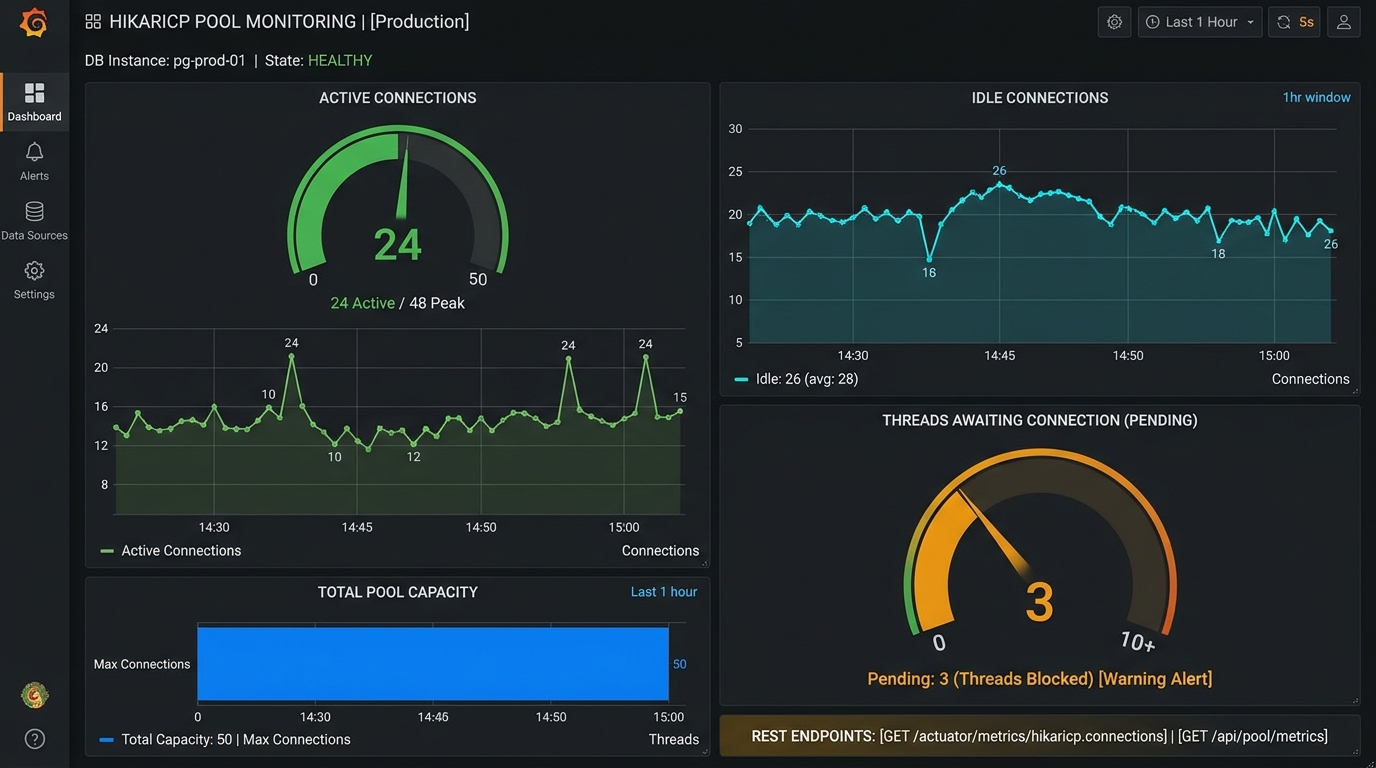
To tune a connection pool accurately, you need visibility. HikariCP registers an internal JMX MXBean (HikariPoolMXBean) that reports real-time metrics. Let us create a DTO and a service to expose these metrics over HTTP.
Create the metrics response record at src/main/java/com/webcodein/hikaricp/dto/PoolMetricsResponse.java:
package com.webcodein.hikaricp.dto;

public record PoolMetricsResponse(
        String poolName,
        int activeConnections,
        int idleConnections,
        int totalConnections,
        int threadsAwaitingConnection,
        int maximumPoolSize,
        int minimumIdle
) {
}
Now, implement the metrics service at src/main/java/com/webcodein/hikaricp/service/PoolMetricsService.java:
package com.webcodein.hikaricp.service;

import com.webcodein.hikaricp.dto.PoolMetricsResponse;
import com.zaxxer.hikari.HikariDataSource;
import com.zaxxer.hikari.HikariPoolMXBean;
import org.slf4j.Logger;
import org.slf4j.LoggerFactory;
import org.springframework.stereotype.Service;

import javax.sql.DataSource;

@Service
public class PoolMetricsService {

    private static final Logger log = LoggerFactory.getLogger(PoolMetricsService.class);

    private final DataSource dataSource;

    public PoolMetricsService(DataSource dataSource) {
        this.dataSource = dataSource;
    }

    public PoolMetricsResponse getPoolMetrics() {
        if (dataSource instanceof HikariDataSource hikariDataSource) {
            HikariPoolMXBean poolMxBean = hikariDataSource.getHikariPoolMXBean();
            int active = poolMxBean != null ? poolMxBean.getActiveConnections() : 0;
            int idle = poolMxBean != null ? poolMxBean.getIdleConnections() : 0;
            int total = poolMxBean != null ? poolMxBean.getTotalConnections() : 0;
            int waiting = poolMxBean != null ? poolMxBean.getThreadsAwaitingConnection() : 0;

            log.debug("HikariCP Metrics - Pool: {}, Active: {}, Idle: {}, Total: {}, Waiting: {}",
                    hikariDataSource.getPoolName(), active, idle, total, waiting);

            return new PoolMetricsResponse(
                    hikariDataSource.getPoolName(),
                    active,
                    idle,
                    total,
                    waiting,
                    hikariDataSource.getMaximumPoolSize(),
                    hikariDataSource.getMinimumIdle()
            );
        }

        return new PoolMetricsResponse("Unknown", 0, 0, 0, 0, 0, 0);
    }
}
Now, expose this through a dedicated REST controller at src/main/java/com/webcodein/hikaricp/controller/PoolMetricsController.java:
package com.webcodein.hikaricp.controller;

import com.webcodein.hikaricp.dto.PoolMetricsResponse;
import com.webcodein.hikaricp.service.PoolMetricsService;
import org.springframework.http.ResponseEntity;
import org.springframework.web.bind.annotation.GetMapping;
import org.springframework.web.bind.annotation.RequestMapping;
import org.springframework.web.bind.annotation.RestController;

@RestController
@RequestMapping("/api/pool")
public class PoolMetricsController {

    private final PoolMetricsService metricsService;

    public PoolMetricsController(PoolMetricsService metricsService) {
        this.metricsService = metricsService;
    }

    @GetMapping("/metrics")
    public ResponseEntity<PoolMetricsResponse> getMetrics() {
        return ResponseEntity.ok(metricsService.getPoolMetrics());
    }
}
When you query GET /api/pool/metrics, you receive a JSON snapshot of the pool:
activeConnections: Connections currently running SQL queries.idleConnections: Pre-warmed connections ready for immediate checkout.threadsAwaitingConnection: Number of HTTP worker threads queued and waiting for a connection. If this number is consistently greater than zero, your pool is saturated.
Step 5: Implement High-Throughput and Slow Query Endpoints
Next, create the order request DTO at src/main/java/com/webcodein/hikaricp/dto/OrderRequest.java:
package com.webcodein.hikaricp.dto;

import java.math.BigDecimal;

public record OrderRequest(
        String customerName,
        String productCode,
        BigDecimal amount
) {
}
Now, create the order processing service at src/main/java/com/webcodein/hikaricp/service/OrderProcessingService.java:
package com.webcodein.hikaricp.service;

import com.webcodein.hikaricp.dto.OrderRequest;
import com.webcodein.hikaricp.entity.ProductOrder;
import com.webcodein.hikaricp.repository.ProductOrderRepository;
import org.slf4j.Logger;
import org.slf4j.LoggerFactory;
import org.springframework.stereotype.Service;
import org.springframework.transaction.annotation.Transactional;

import javax.sql.DataSource;
import java.sql.Connection;
import java.sql.SQLException;
import java.time.Instant;
import java.util.ArrayList;
import java.util.Collections;
import java.util.List;

@Service
public class OrderProcessingService {

    private static final Logger log = LoggerFactory.getLogger(OrderProcessingService.class);

    private final ProductOrderRepository orderRepository;
    private final DataSource dataSource;
    private final List<Connection> leakedConnectionStore = Collections.synchronizedList(new ArrayList<>());

    public OrderProcessingService(ProductOrderRepository orderRepository, DataSource dataSource) {
        this.orderRepository = orderRepository;
        this.dataSource = dataSource;
    }

    @Transactional
    public ProductOrder createOrder(OrderRequest request) {
        log.info("Creating order for customer: {}", request.customerName());
        ProductOrder order = new ProductOrder(
                request.customerName(),
                request.productCode(),
                request.amount(),
                "CONFIRMED",
                Instant.now()
        );
        return orderRepository.save(order);
    }

    @Transactional
    public void processSlowOrder(double delaySeconds) {
        log.info("Executing slow database operation for {} seconds", delaySeconds);
        orderRepository.executeSimulatedDatabaseDelay(delaySeconds);
        log.info("Completed slow database operation");
    }

    /**
     * Intentionally borrows a raw Connection from the pool and does not close it.
     * HikariCP leakDetectionThreshold (2000 ms) will trigger a warning log with stack trace.
     */
    public String simulateConnectionLeak() {
        try {
            log.warn("Simulating connection leak: Borrowing connection and keeping it open");
            Connection connection = dataSource.getConnection();
            leakedConnectionStore.add(connection);
            return "Connection checked out without closing. Leak watchdog will trigger in 2000ms.";
        } catch (SQLException e) {
            log.error("Failed to borrow connection from pool", e);
            throw new RuntimeException("Could not borrow connection from pool", e);
        }
    }

    public void releaseLeakedConnections() {
        log.info("Releasing {} leaked connections", leakedConnectionStore.size());
        synchronized (leakedConnectionStore) {
            for (Connection conn : leakedConnectionStore) {
                try {
                    if (conn != null && !conn.isClosed()) {
                        conn.close();
                    }
                } catch (SQLException e) {
                    log.error("Error closing leaked connection", e);
                }
            }
            leakedConnectionStore.clear();
        }
    }
}
Now, expose these actions via src/main/java/com/webcodein/hikaricp/controller/OrderController.java:
package com.webcodein.hikaricp.controller;

import com.webcodein.hikaricp.dto.OrderRequest;
import com.webcodein.hikaricp.entity.ProductOrder;
import com.webcodein.hikaricp.service.OrderProcessingService;
import org.springframework.http.HttpStatus;
import org.springframework.http.ResponseEntity;
import org.springframework.web.bind.annotation.GetMapping;
import org.springframework.web.bind.annotation.PostMapping;
import org.springframework.web.bind.annotation.RequestBody;
import org.springframework.web.bind.annotation.RequestMapping;
import org.springframework.web.bind.annotation.RequestParam;
import org.springframework.web.bind.annotation.RestController;

import java.util.Map;

@RestController
@RequestMapping("/api/orders")
public class OrderController {

    private final OrderProcessingService orderService;

    public OrderController(OrderProcessingService orderService) {
        this.orderService = orderService;
    }

    @PostMapping
    public ResponseEntity<ProductOrder> createOrder(@RequestBody OrderRequest request) {
        ProductOrder created = orderService.createOrder(request);
        return ResponseEntity.status(HttpStatus.CREATED).body(created);
    }

    @GetMapping("/slow")
    public ResponseEntity<Map<String, Object>> simulateSlowQuery(
            @RequestParam(defaultValue = "1.5") double delaySeconds) {
        orderService.processSlowOrder(delaySeconds);
        return ResponseEntity.ok(Map.of(
                "status", "COMPLETED",
                "simulatedDelaySeconds", delaySeconds
        ));
    }

    @GetMapping("/leak")
    public ResponseEntity<Map<String, String>> simulateConnectionLeak() {
        String message = orderService.simulateConnectionLeak();
        return ResponseEntity.ok(Map.of("message", message));
    }

    @PostMapping("/leak/release")
    public ResponseEntity<Map<String, String>> releaseLeakedConnections() {
        orderService.releaseLeakedConnections();
        return ResponseEntity.ok(Map.of("message", "All simulated leaked connections released"));
    }
}
Step 6: Trigger and Detect Connection Leaks with Watchdog
A connection leak happens when application code borrows a connection from the pool but forgets to close it. In standard Spring Data JPA, transactions manage connections automatically. However, legacy JDBC code, batch jobs, or manual DataSource.getConnection() calls can easily leak connections.
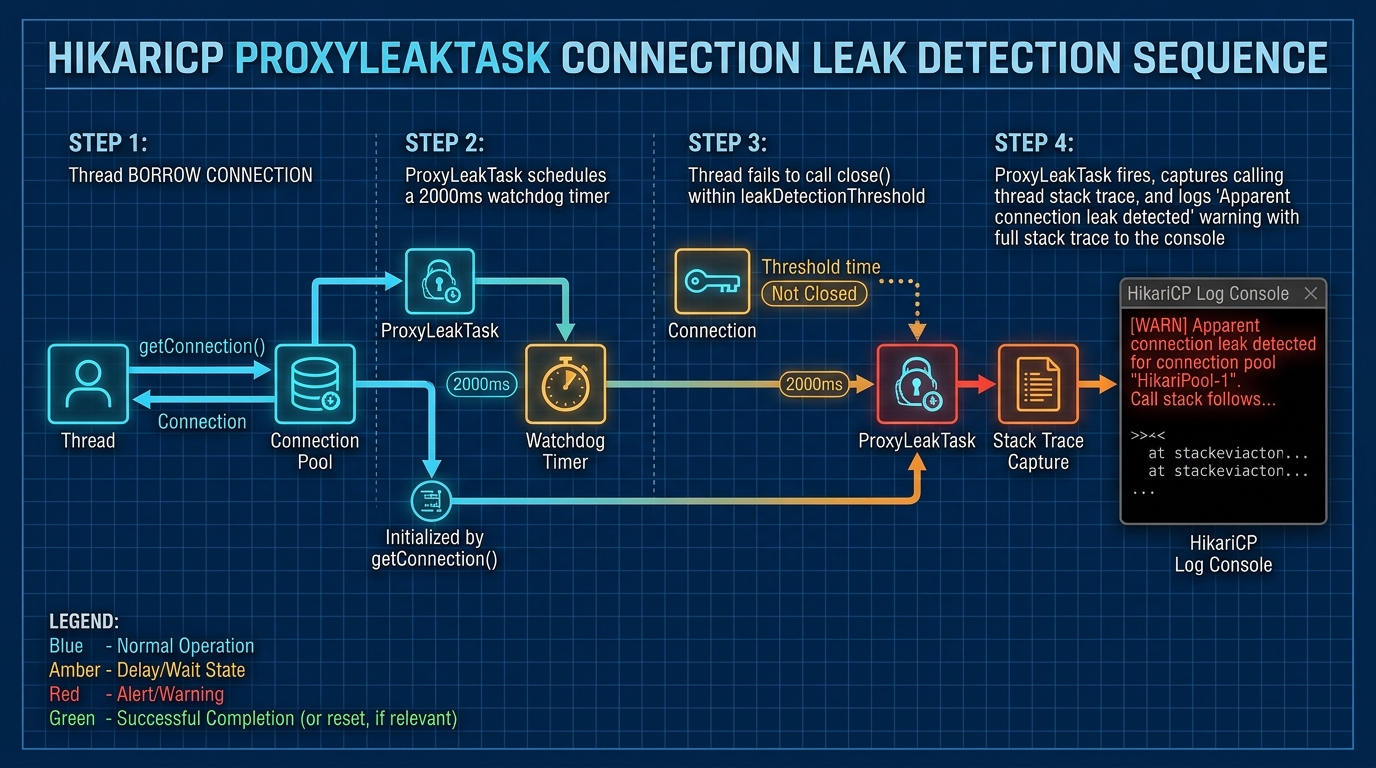
When leak-detection-threshold is enabled (for example, set to 2,000 ms), HikariCP starts a scheduled task called ProxyLeakTask every time a connection is checked out. If the connection is returned within 2,000 ms, the watchdog cancels the task. If the connection remains checked out after 2 seconds, HikariCP logs a warning:
2026-10-23T21:18:49.123+01:00  WARN 4748 --- [hikaricp-connection-pool-tuning-spring-boot] [l-1 leak detector] com.zaxxer.hikari.pool.ProxyLeakTask : Apparent connection leak detected on com.zaxxer.hikari.pool.ProxyConnection@12a34b5f for connection org.postgresql.jdbc.PgConnection@6e7f8a9b, stack trace follows
java.lang.Exception: Apparent connection leak at com.webcodein.hikaricp.service.OrderProcessingService.simulateConnectionLeak(OrderProcessingService.java:55)
    at com.webcodein.hikaricp.controller.OrderController.simulateConnectionLeak(OrderController.java:44)
    at java.base/jdk.internal.reflect.DirectMethodHandleAccessor.invoke(DirectMethodHandleAccessor.java:104)
Because the stack trace points directly to line 55 of OrderProcessingService, you can immediately identify the code responsible for the leak without guessing.
Step 7: Verify with Testcontainers and MockMvc
Now, let us write comprehensive integration tests using Testcontainers and Spring Boot’s MockMvc. We will verify:
- The pool initializes with the correct production settings.
- Fast queries create records and release connections immediately.
- Concurrent client requests execute reliably under load.
- The leak detection watchdog triggers when connections are left open.
Create the test file at src/test/java/com/webcodein/hikaricp/HikariPoolIntegrationTest.java:
package com.webcodein.hikaricp;

import com.fasterxml.jackson.databind.ObjectMapper;
import com.webcodein.hikaricp.dto.OrderRequest;
import com.zaxxer.hikari.HikariDataSource;
import org.junit.jupiter.api.AfterEach;
import org.junit.jupiter.api.DisplayName;
import org.junit.jupiter.api.Test;
import org.springframework.beans.factory.annotation.Autowired;
import org.springframework.boot.test.context.SpringBootTest;
import org.springframework.boot.testcontainers.service.connection.ServiceConnection;
import org.springframework.boot.webmvc.test.autoconfigure.AutoConfigureMockMvc;
import org.springframework.http.MediaType;
import org.springframework.test.web.servlet.MockMvc;
import org.testcontainers.containers.PostgreSQLContainer;
import org.testcontainers.junit.jupiter.Container;
import org.testcontainers.junit.jupiter.Testcontainers;

import javax.sql.DataSource;
import java.math.BigDecimal;
import java.util.ArrayList;
import java.util.List;
import java.util.concurrent.Callable;
import java.util.concurrent.ExecutorService;
import java.util.concurrent.Executors;
import java.util.concurrent.Future;

import static org.assertj.core.api.Assertions.assertThat;
import static org.springframework.test.web.servlet.request.MockMvcRequestBuilders.get;
import static org.springframework.test.web.servlet.request.MockMvcRequestBuilders.post;
import static org.springframework.test.web.servlet.result.MockMvcResultMatchers.jsonPath;
import static org.springframework.test.web.servlet.result.MockMvcResultMatchers.status;

@SpringBootTest(webEnvironment = SpringBootTest.WebEnvironment.MOCK)
@AutoConfigureMockMvc
@Testcontainers
class HikariPoolIntegrationTest {

    @Container
    @ServiceConnection
    static PostgreSQLContainer<?> postgres = new PostgreSQLContainer<>("postgres:16-alpine");

    @Autowired
    private MockMvc mockMvc;

    private final ObjectMapper objectMapper = new ObjectMapper();

    @Autowired
    private DataSource dataSource;

    @AfterEach
    void tearDown() throws Exception {
        mockMvc.perform(post("/api/orders/leak/release"));
    }

    @Test
    @DisplayName("Verify HikariCP production configuration properties")
    void testHikariConfigurationProperties() {
        assertThat(dataSource).isInstanceOf(HikariDataSource.class);
        HikariDataSource hikariDataSource = (HikariDataSource) dataSource;

        assertThat(hikariDataSource.getPoolName()).isEqualTo("ProductionHikariPool");
        assertThat(hikariDataSource.getMaximumPoolSize()).isEqualTo(10);
        assertThat(hikariDataSource.getMinimumIdle()).isEqualTo(10);
        assertThat(hikariDataSource.getConnectionTimeout()).isEqualTo(3000L);
        assertThat(hikariDataSource.getMaxLifetime()).isEqualTo(1800000L);
        assertThat(hikariDataSource.getIdleTimeout()).isEqualTo(600000L);
        assertThat(hikariDataSource.getLeakDetectionThreshold()).isEqualTo(2000L);
    }

    @Test
    @DisplayName("Verify order creation endpoint releases connection back to pool")
    void testCreateOrderSuccessfully() throws Exception {
        OrderRequest request = new OrderRequest("Alice Walker", "PROD-101", new BigDecimal("149.99"));

        mockMvc.perform(post("/api/orders")
                        .contentType(MediaType.APPLICATION_JSON)
                        .content(objectMapper.writeValueAsString(request)))
                .andExpect(status().isCreated())
                .andExpect(jsonPath("$.id").exists())
                .andExpect(jsonPath("$.customerName").value("Alice Walker"))
                .andExpect(jsonPath("$.status").value("CONFIRMED"));

        // Pool metrics endpoint
        mockMvc.perform(get("/api/pool/metrics"))
                .andExpect(status().isOk())
                .andExpect(jsonPath("$.poolName").value("ProductionHikariPool"))
                .andExpect(jsonPath("$.maximumPoolSize").value(10))
                .andExpect(jsonPath("$.minimumIdle").value(10));
    }

    @Test
    @DisplayName("Verify concurrent order processing under pool capacity")
    void testConcurrentOrderProcessing() throws Exception {
        int numberOfRequests = 20;
        ExecutorService executor = Executors.newFixedThreadPool(8);
        List<Callable<Integer>> tasks = new ArrayList<>();

        for (int i = 0; i < numberOfRequests; i++) {
            final int index = i;
            tasks.add(() -> {
                OrderRequest request = new OrderRequest("Customer-" + index, "PROD-BULK", new BigDecimal("49.99"));
                return mockMvc.perform(post("/api/orders")
                                .contentType(MediaType.APPLICATION_JSON)
                                .content(objectMapper.writeValueAsString(request)))
                        .andReturn().getResponse().getStatus();
            });
        }

        List<Future<Integer>> results = executor.invokeAll(tasks);
        executor.shutdown();

        for (Future<Integer> result : results) {
            assertThat(result.get()).isEqualTo(201);
        }
    }

    @Test
    @DisplayName("Verify connection leak simulation and release")
    void testConnectionLeakSimulation() throws Exception {
        mockMvc.perform(get("/api/orders/leak"))
                .andExpect(status().isOk())
                .andExpect(jsonPath("$.message").exists());

        // Wait past leak threshold to trigger watchdog logging
        Thread.sleep(2200);

        mockMvc.perform(post("/api/orders/leak/release"))
                .andExpect(status().isOk());
    }
}
To run the test suite, execute the following command in your terminal:
mvn clean verifyExpected output:
[INFO] Running com.webcodein.hikaricp.HikariPoolIntegrationTest
[INFO] Tests run: 4, Failures: 0, Errors: 0, Skipped: 0, Time elapsed: 20.43 s -- in com.webcodein.hikaricp.HikariPoolIntegrationTest
[INFO] BUILD SUCCESS
Running the Application with Docker Compose
To run the application locally alongside a dedicated PostgreSQL instance, create a Dockerfile in your project root:
FROM eclipse-temurin:25-jdk-alpine AS builder
WORKDIR /app
COPY . .
RUN ./mvnw clean package -DskipTests
FROM eclipse-temurin:25-jre-alpine
WORKDIR /app
COPY /app/target/*.jar app.jar
ENTRYPOINT ["java", "-jar", "app.jar"]Next, create docker-compose.yml:
services:
  postgres:
    image: postgres:16-alpine
    container_name: hikaricp-postgres
    environment:
      POSTGRES_DB: hikaridb
      POSTGRES_USER: postgres
      POSTGRES_PASSWORD: postgrespassword
    ports:
      - "5432:5432"
    healthcheck:
      test: ["CMD-SHELL", "pg_isready -U postgres"]
      interval: 5s
      timeout: 5s
      retries: 5

  app:
    build: .
    container_name: hikaricp-app
    depends_on:
      postgres:
        condition: service_healthy
    ports:
      - "8080:8080"
    environment:
      SPRING_DATASOURCE_URL: jdbc:postgresql://postgres:5432/hikaridb
      SPRING_DATASOURCE_USERNAME: postgres
      SPRING_DATASOURCE_PASSWORD: postgrespassword
Start both containers with a single command:
docker compose up --buildVerify that the pool is running by requesting metrics:
curl http://localhost:8080/api/pool/metricsWhat You Learned
In this tutorial, you mastered production database connection pooling with HikariCP and Spring Boot 4:
- Database Hardware Math: You applied the formula
connections = ((core_count * 2) + effective_spindle_count)to prevent thread context switching. - Fixed Pool Architecture: You eliminated dynamic scaling latency by setting
minimum-idleequal tomaximum-pool-size. - Fail-Fast Protection: You lowered
connection-timeoutfrom 30 seconds to 3 seconds to protect upstream web threads from cascading exhaustion. - Watchdog Leak Detection: You configured
leak-detection-thresholdto catch and log unclosed database connections with exact stack traces. - Automated Testing: You verified connection pool behavior, metrics, and leak recovery using Testcontainers PostgreSQL and MockMvc.
Next Steps
To deepen your backend database and architecture skills, explore these related guides:
- Zero-Downtime Database Migrations in Spring Boot with Flyway: Learn how to refactor database schemas safely under live traffic.
- Building Multi-Tenant SaaS with Hibernate 7 and PostgreSQL Row-Level Security: Enforce complete tenant data isolation within a shared database connection pool.
- Observability with OpenTelemetry and Grafana in Spring Boot 4: Monitor HikariCP connection pool metrics on production Grafana dashboards.
- Building a High-Concurrency Flash Sale Backend with Spring Boot and Redis: Combine database connection pooling with distributed Redis Lua rate limiting.
Companion Code
The complete, runnable source code for this tutorial is available in our public GitHub repository: GitHub: hikaricp-connection-pool-tuning-spring-boot.
Frequently Asked Questions
Why should I not set my connection pool size to 100?
Setting an arbitrarily large pool size (such as 100 connections) degrades performance. If your database server has 4 or 8 CPU cores, it can only execute 4 or 8 queries concurrently. The remaining 92 queries force the CPU to constantly switch thread contexts, increasing CPU cache misses and lock contention on database disk pages. A smaller pool (e.g. 10 to 20 connections) allows the database to process requests faster with minimum latency.
What is the best connection-timeout value for production?
Spring Boot defaults to 30,000 ms (30 seconds). In production, this default causes cascading failures because web requests block for half a minute before failing, quickly exhausting Tomcat or Undertow worker threads. A fail-fast timeout between 2,000 ms and 5,000 ms (2 to 5 seconds) is recommended for web applications.
Does leak-detection-threshold introduce performance overhead?
HikariCP’s leak detection runs on a dedicated lightweight scheduled thread pool (ProxyLeakTask). For typical web workloads, setting leak-detection-threshold to 2,000 ms or higher adds negligible overhead. However, do not set it below 1,000 ms, as normal long queries might trigger false positives.