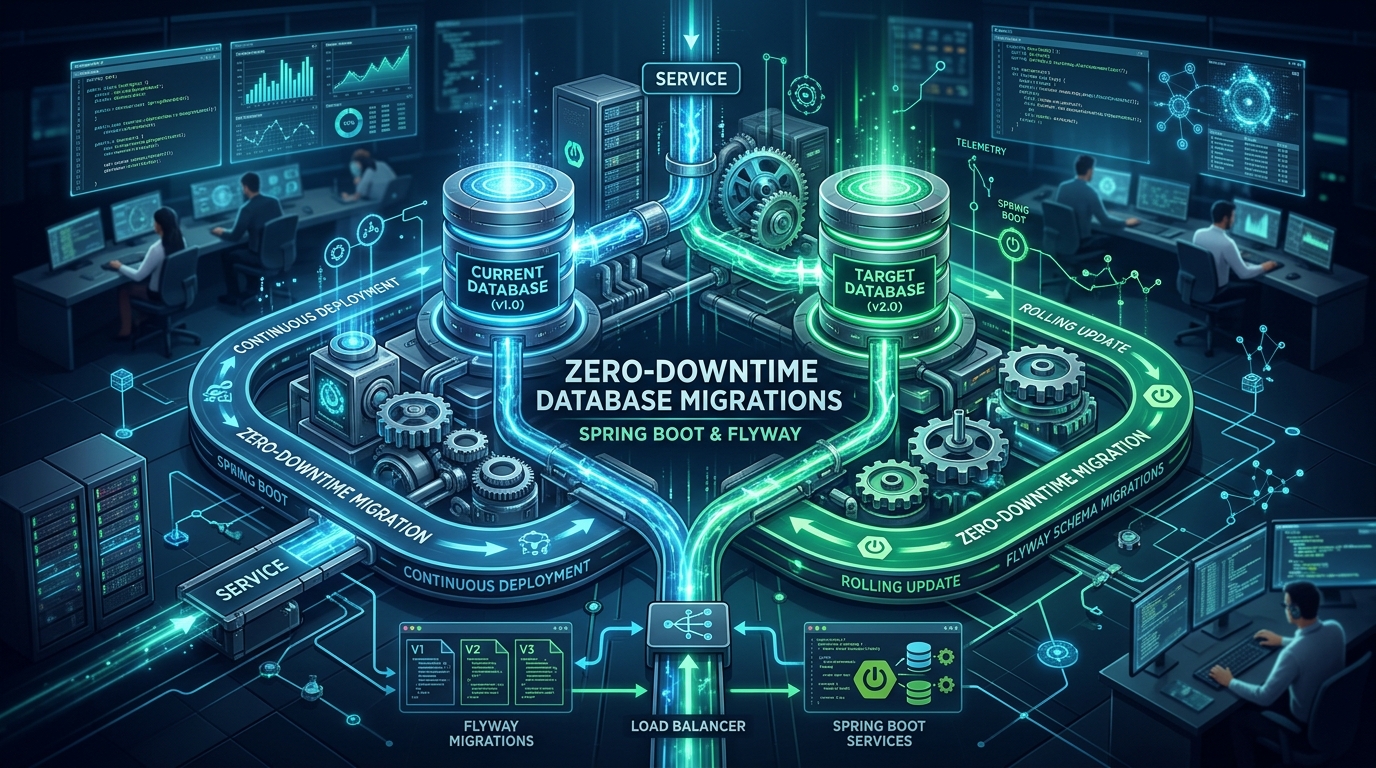
Database migrations are one of the most critical parts of deploying modern web applications. When using standard tools with spring.jpa.hibernate.ddl-auto=update, your application might lock tables, causing immediate downtime for your users. In modern architectures, you need a safe strategy to change your database schema while the application is still running.
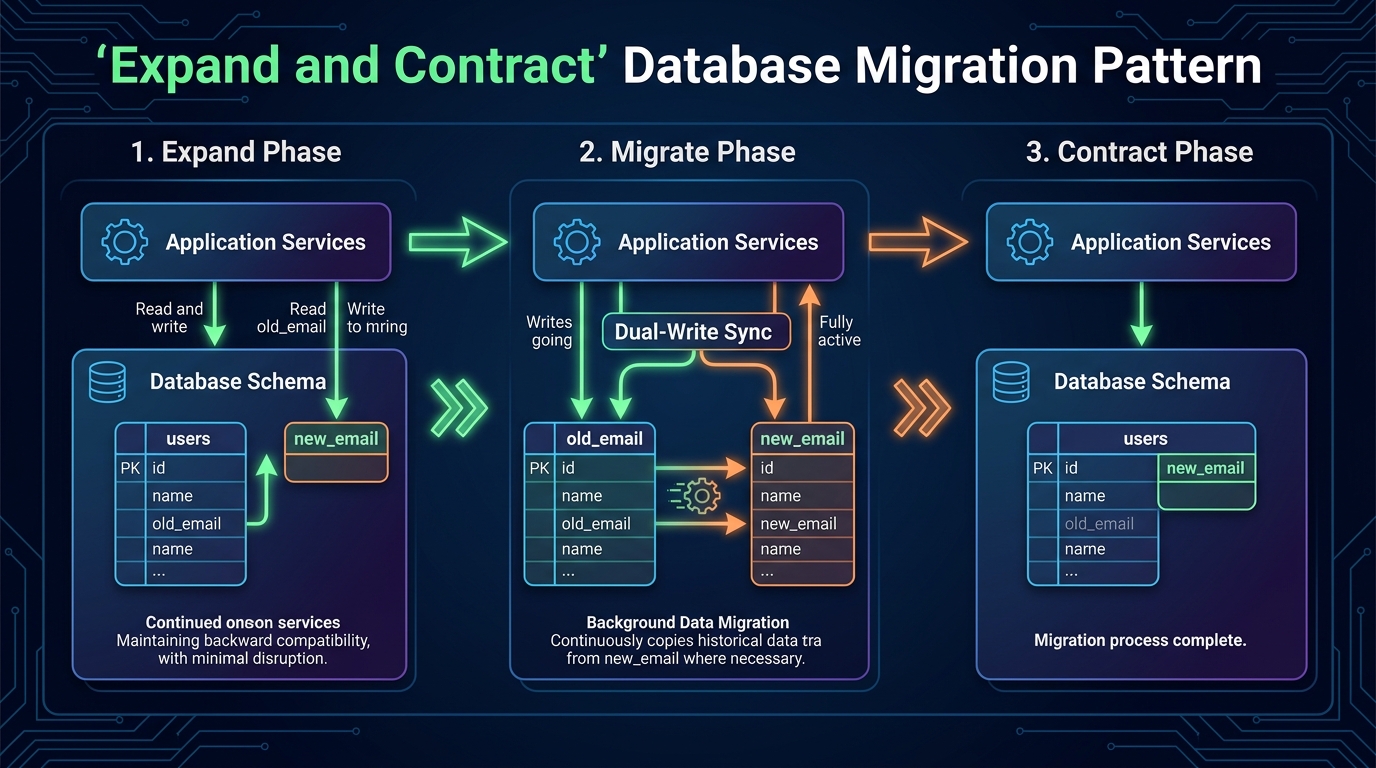
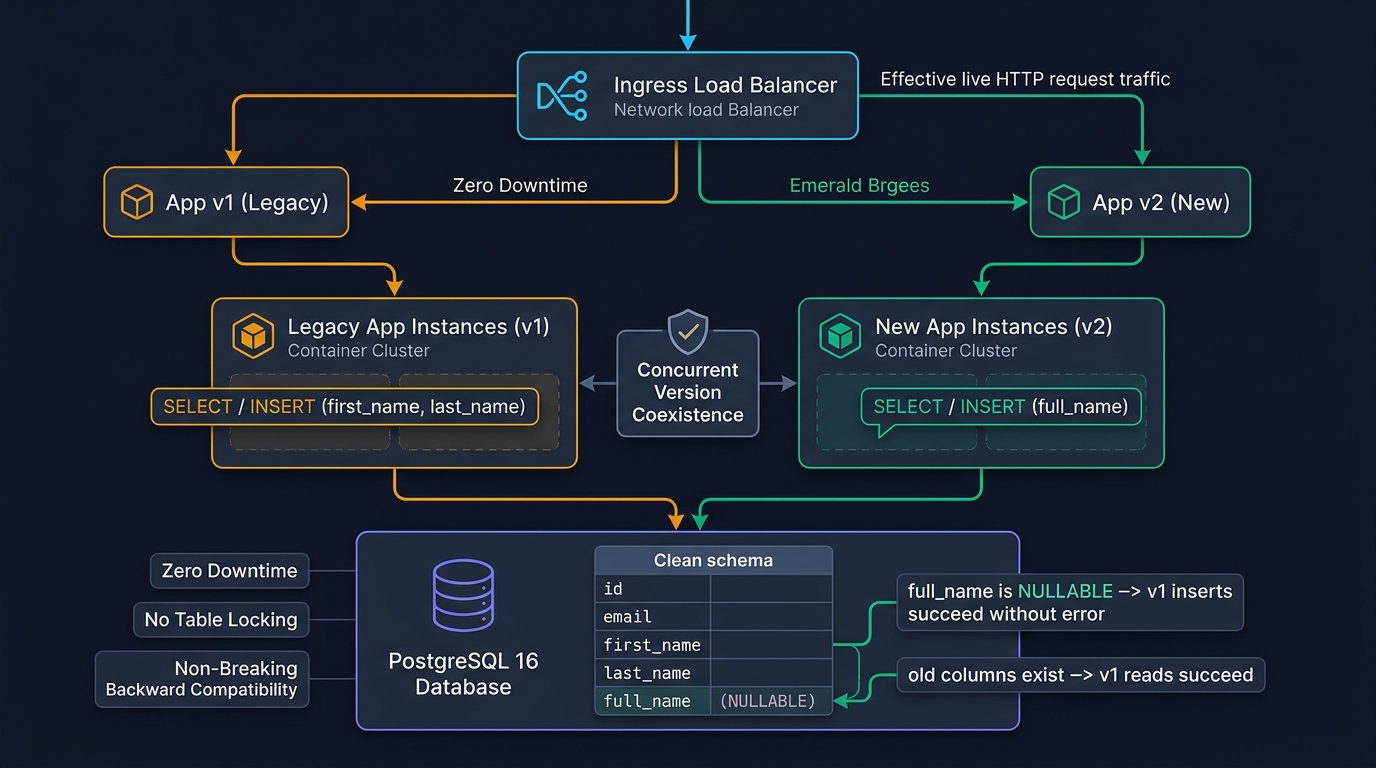
In this step-by-step tutorial, you will learn how to implement zero-downtime database migrations using Spring Boot 4, Java 25, and Flyway. We will use the famous Expand and Contract pattern to seamlessly transition from two separate columns (first_name and last_name) to a single full_name column without ever taking the API offline.
What You’ll Build
You will build a resilient Spring Boot 4 backend that handles database schema evolution in four distinct phases (V1 to V4 Flyway scripts). By the end, you will have a fully functioning PostgreSQL integration test verifying that the database transitions correctly while existing data is safely migrated.
Prerequisites
- JDK 25 or newer.
- Maven 3.9+ for building the project.
- Docker (required to run Testcontainers for our automated integration tests).
- A solid understanding of basic Spring Boot and relational databases.
Step 1: Create the Spring Boot Project
First, we need to set up our Spring Boot 4 project and configure Maven to include Flyway, Spring Data JPA, and PostgreSQL. We will also include Testcontainers to ensure our migrations are tested against a real database.
Create a pom.xml file in your project root:
pom.xml
<?xml version="1.0" encoding="UTF-8"?>
<project xmlns="http://maven.apache.org/POM/4.0.0" ...>
    <modelVersion>4.0.0</modelVersion>
    <parent>
        <groupId>org.springframework.boot</groupId>
        <artifactId>spring-boot-starter-parent</artifactId>
        <version>4.0.0</version>
        <relativePath/>
    </parent>
    <groupId>com.webcodein.flyway</groupId>
    <artifactId>zero-downtime-database-migrations-spring-boot-flyway</artifactId>
    <version>0.0.1-SNAPSHOT</version>
    <properties>
        <java.version>25</java.version>
    </properties>
    <dependencies>
        <dependency>
            <groupId>org.springframework.boot</groupId>
            <artifactId>spring-boot-starter-data-jpa</artifactId>
        </dependency>
        <dependency>
            <groupId>org.springframework.boot</groupId>
            <artifactId>spring-boot-starter-web</artifactId>
        </dependency>
        <dependency>
            <groupId>org.flywaydb</groupId>
            <artifactId>flyway-core</artifactId>
        </dependency>
        <dependency>
            <groupId>org.flywaydb</groupId>
            <artifactId>flyway-database-postgresql</artifactId>
        </dependency>
        <dependency>
            <groupId>org.postgresql</groupId>
            <artifactId>postgresql</artifactId>
            <scope>runtime</scope>
        </dependency>
        <dependency>
            <groupId>org.springframework.boot</groupId>
            <artifactId>spring-boot-starter-test</artifactId>
            <scope>test</scope>
        </dependency>
        <dependency>
            <groupId>org.springframework.boot</groupId>
            <artifactId>spring-boot-testcontainers</artifactId>
            <scope>test</scope>
        </dependency>
        <dependency>
            <groupId>org.testcontainers</groupId>
            <artifactId>testcontainers-junit-jupiter</artifactId>
            <scope>test</scope>
        </dependency>
        <dependency>
            <groupId>org.testcontainers</groupId>
            <artifactId>testcontainers-postgresql</artifactId>
            <scope>test</scope>
        </dependency>
    </dependencies>
</project>
Code Walkthrough:
- We include
spring-boot-starter-data-jpaandspring-boot-starter-webto handle database connections and HTTP requests. flyway-coreandflyway-database-postgresqlare required for Flyway 10+ to interact with PostgreSQL databases.- The Testcontainers dependencies allow us to spin up a disposable Docker-based PostgreSQL database during the Maven build to test our migrations safely.
Step 2: Configure the Application Properties
Next, we must configure Spring Boot to use Flyway and disable Hibernate’s automatic schema updates. In a production environment, relying on Hibernate to update your schema is a massive risk.
src/main/resources/application.properties
spring.application.name=flyway-zero-downtime
spring.jpa.hibernate.ddl-auto=validate
spring.flyway.enabled=true
spring.flyway.baseline-on-migrate=true
Code Walkthrough:
spring.jpa.hibernate.ddl-auto=validate: This strict setting forces Hibernate to check if the database matches its internal entity model. It will crash the app on startup if they don’t match, preventing silent database corruption.spring.flyway.baseline-on-migrate=true: Automatically creates the Flyway metadata table if it does not exist.
Step 3: Programmatic Flyway Execution
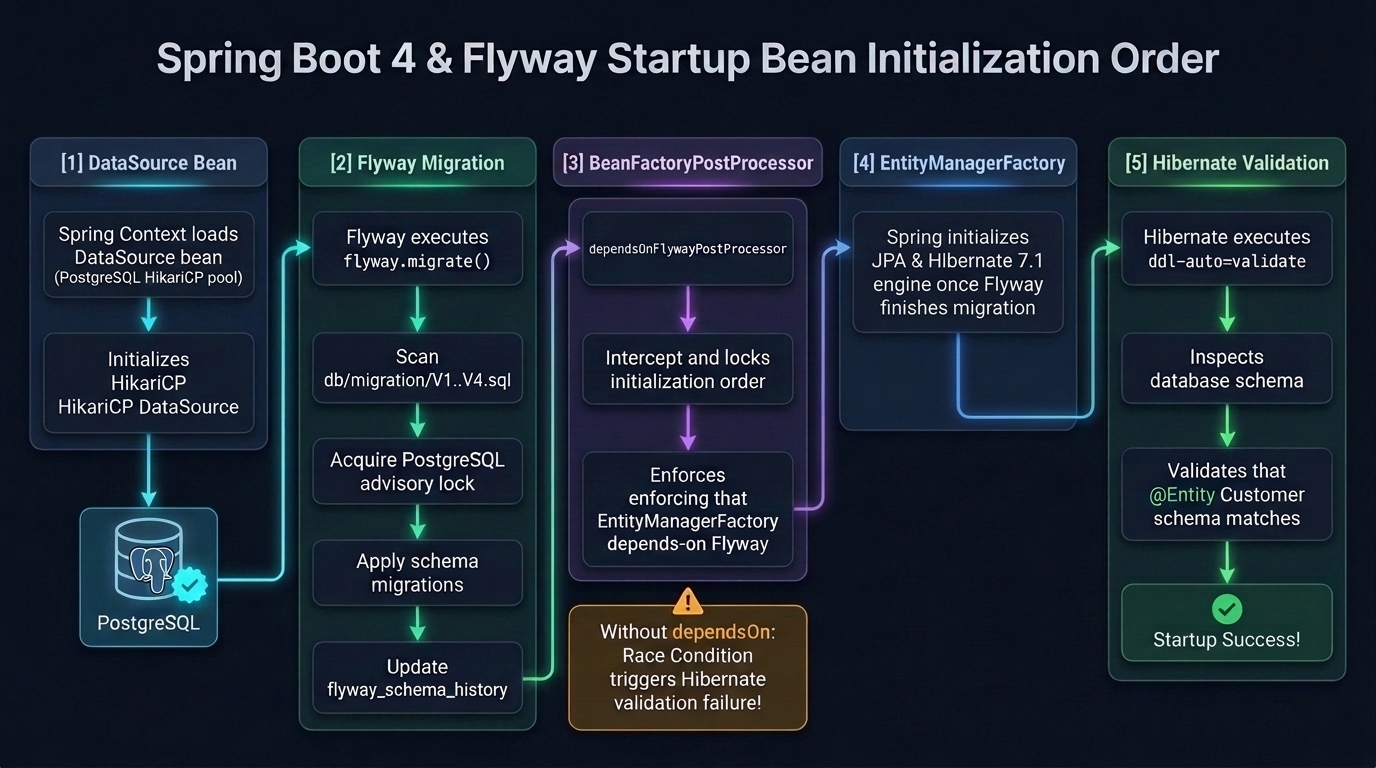
In enterprise Spring Boot applications, running Flyway programmatically gives you full control over execution order before Hibernate initializes. We also configure a BeanFactoryPostProcessor to guarantee that Flyway runs before Hibernate’s EntityManagerFactory attempts schema validation.
src/main/java/com/webcodein/flyway/FlywayConfiguration.java
package com.webcodein.flyway;

import jakarta.persistence.EntityManagerFactory;
import org.flywaydb.core.Flyway;
import org.springframework.beans.factory.config.BeanFactoryPostProcessor;
import org.springframework.context.annotation.Bean;
import org.springframework.context.annotation.Configuration;

import javax.sql.DataSource;

@Configuration
public class FlywayConfiguration {

    @Bean
    public Flyway flyway(DataSource dataSource) {
        Flyway flyway = Flyway.configure()
                .dataSource(dataSource)
                .locations("classpath:db/migration")
                .baselineOnMigrate(true)
                .load();
        flyway.migrate();
        return flyway;
    }

    @Bean
    public static BeanFactoryPostProcessor dependsOnFlywayPostProcessor() {
        return beanFactory -> {
            for (String name : beanFactory.getBeanNamesForType(EntityManagerFactory.class, true, false)) {
                beanFactory.getBeanDefinition(name).setDependsOn("flyway");
            }
        };
    }
}
Step 4: Creating the Baseline (V1)
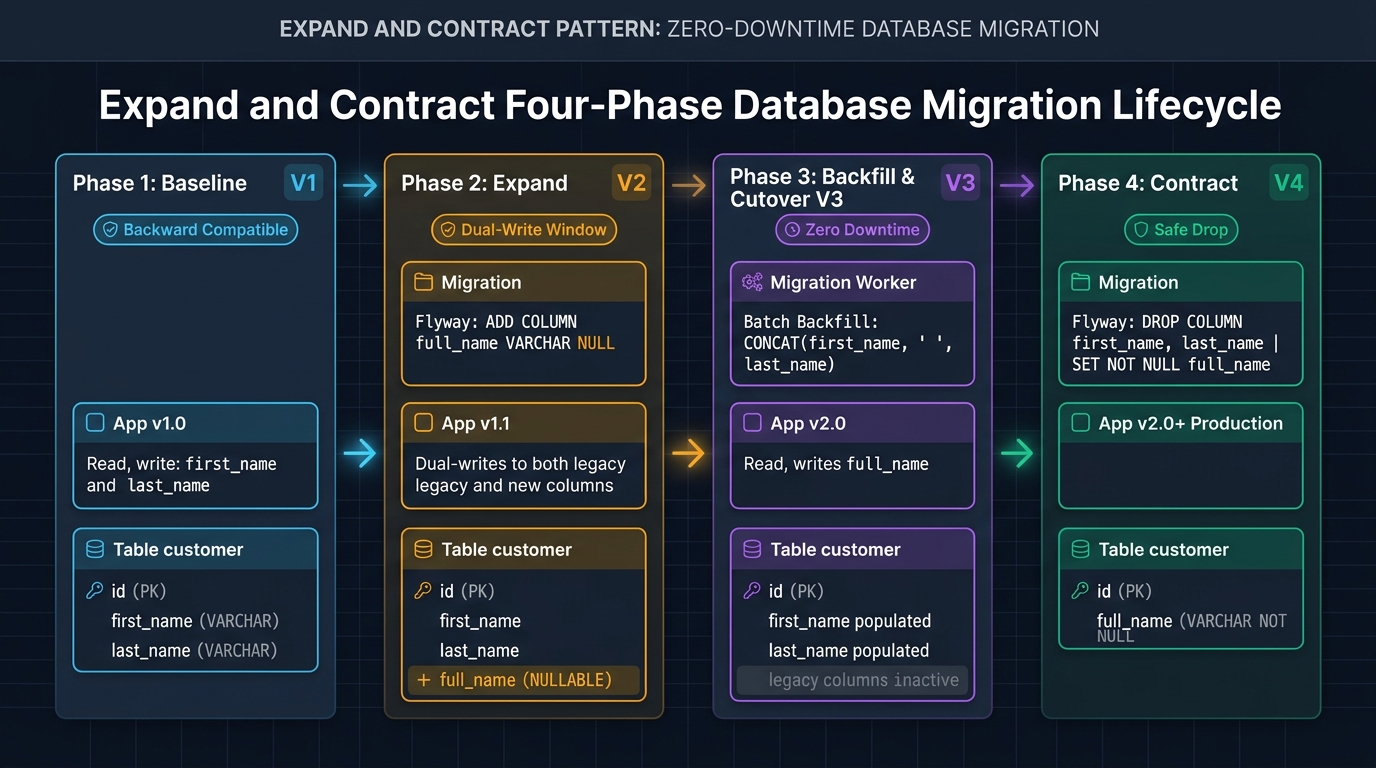
Let’s simulate our initial state. We start with a customer table that stores the user’s name across two distinct columns: first_name and last_name. We also insert some legacy records to simulate a real-world system.
src/main/resources/db/migration/V1__init_customer_table.sql
CREATE TABLE customer (
    id BIGSERIAL PRIMARY KEY,
    email VARCHAR(255) NOT NULL,
    first_name VARCHAR(100),
    last_name VARCHAR(100)
);

-- Insert legacy data
INSERT INTO customer (email, first_name, last_name) VALUES ('john.doe@example.com', 'John', 'Doe');
INSERT INTO customer (email, first_name, last_name) VALUES ('jane.smith@example.com', 'Jane', 'Smith');
Step 5: The Expand Phase (V2)
Now the business requirements have changed: we need a single full_name column. If we immediately drop first_name and last_name, the currently running application will crash because it still tries to read them. Instead, we perform the Expand phase by simply adding the new column. It must be nullable to prevent insertion errors during the transition.
src/main/resources/db/migration/V2__add_full_name_column.sql
ALTER TABLE customer ADD COLUMN full_name VARCHAR(255);Step 6: The Data Migration Phase (V3)
With the new column safely in place, we need to backfill the existing data. In large databases, doing this in a single transaction might lock the table for hours. However, for the sake of simplicity, we will run an UPDATE script. Flyway will execute this as V3.
src/main/resources/db/migration/V3__migrate_existing_data.sql
UPDATE customer
SET full_name = CONCAT(first_name, ' ', last_name)
WHERE full_name IS NULL;
Step 7: The Contract Phase (V4)
Once all application instances are updated and no longer reference the old columns, we execute the Contract phase to clean up our schema. We drop the old columns and enforce data integrity on the new column.
src/main/resources/db/migration/V4__drop_first_and_last_name.sql
ALTER TABLE customer DROP COLUMN first_name;
ALTER TABLE customer DROP COLUMN last_name;

-- Finally, make the new column not null since all data is migrated
ALTER TABLE customer ALTER COLUMN full_name SET NOT NULL;
Step 8: Define the Final State Entity
Now we define our Java 25 @Entity representing the exact final state of the database. Hibernate will validate this model against the V4 database state.
src/main/java/com/webcodein/flyway/Customer.java
package com.webcodein.flyway;

import jakarta.persistence.Entity;
import jakarta.persistence.GeneratedValue;
import jakarta.persistence.GenerationType;
import jakarta.persistence.Id;
import jakarta.persistence.Table;

@Entity
@Table(name = "customer")
public class Customer {

    @Id
    @GeneratedValue(strategy = GenerationType.IDENTITY)
    private Long id;

    private String email;

    private String fullName;

    protected Customer() {}

    public Customer(String email, String fullName) {
        this.email = email;
        this.fullName = fullName;
    }

    public Long getId() {
        return id;
    }

    public String getEmail() {
        return email;
    }

    public String getFullName() {
        return fullName;
    }

    public void setFullName(String fullName) {
        this.fullName = fullName;
    }
}
Step 9: Testing the Migrations using Testcontainers
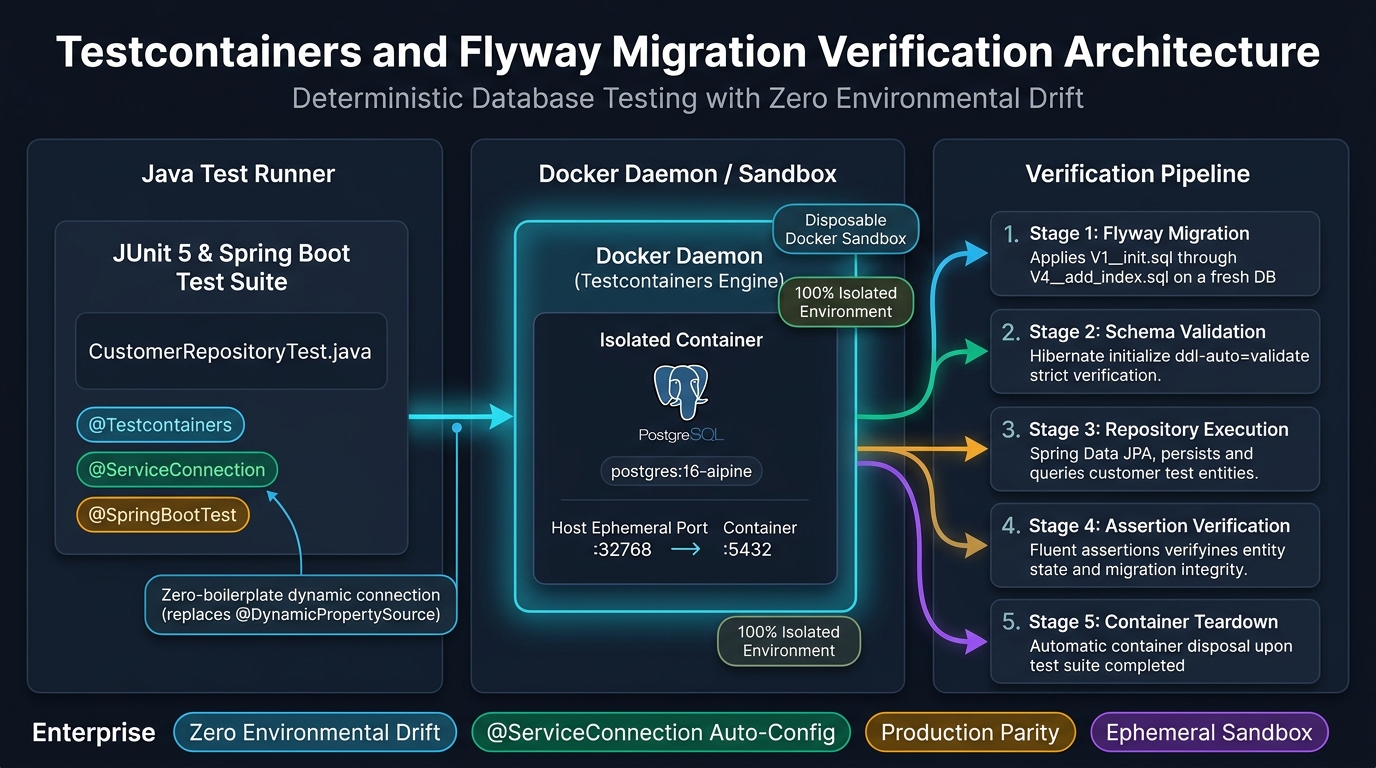
To guarantee that our migrations run flawlessly in production, we write a Spring Boot integration test. This test spins up a fresh PostgreSQL database in a Docker container, runs all four Flyway scripts sequentially, and then tests whether Hibernate correctly reads the migrated legacy data.
src/test/java/com/webcodein/flyway/CustomerRepositoryTest.java
package com.webcodein.flyway;

import org.junit.jupiter.api.Test;
import org.springframework.beans.factory.annotation.Autowired;
import org.springframework.boot.test.context.SpringBootTest;
import org.springframework.boot.testcontainers.service.connection.ServiceConnection;
import org.testcontainers.containers.PostgreSQLContainer;
import org.testcontainers.junit.jupiter.Container;
import org.testcontainers.junit.jupiter.Testcontainers;

import java.util.List;

import static org.assertj.core.api.Assertions.assertThat;

@SpringBootTest
@Testcontainers
class CustomerRepositoryTest {

    @Container
    @ServiceConnection
    static PostgreSQLContainer<?> postgres = new PostgreSQLContainer<>("postgres:16-alpine");

    @Autowired
    private CustomerRepository customerRepository;

    @Test
    void shouldRunFlywayMigrationsAndVerifyDataIsMigrated() {
        // Flyway runs automatically on startup because spring.flyway.enabled=true
        // We know V1 inserted 2 legacy records, and V3 updated them.

        List<Customer> customers = customerRepository.findAll();
        assertThat(customers).hasSize(2);

        Customer john = customers.stream()
                .filter(c -> c.getEmail().equals("john.doe@example.com"))
                .findFirst()
                .orElseThrow();

        assertThat(john.getFullName()).isEqualTo("John Doe");
    }

    @Test
    void shouldSaveNewCustomerWithOnlyFullName() {
        Customer newCustomer = new Customer("alice.wonder@example.com", "Alice Wonder");
        customerRepository.saveAndFlush(newCustomer);

        Customer saved = customerRepository.findById(newCustomer.getId()).orElseThrow();
        assertThat(saved.getFullName()).isEqualTo("Alice Wonder");
    }
}
Code Walkthrough:
@Testcontainersintegrates the JUnit 5 test lifecycle with Docker.@ServiceConnectionis a modern Spring Boot feature that automatically configures thespring.datasource.urlto point to the temporary container, replacing boilerplate property setups.- The test verifies that the legacy ‘John Doe’ record was correctly updated and is accessible using the new
fullNamefield mapping.
Testing the Application
To run the migrations and execute the tests locally, run the following Maven command in your terminal:
./mvnw clean verifyIf Docker is running correctly on your machine, you will see Testcontainers pull the PostgreSQL image, start it, execute Flyway V1 through V4, and finally pass the tests. Your console will output a successful build message.
What You Learned
- How to configure Flyway in a Spring Boot 4 application with explicit startup ordering.
- How to use the Expand and Contract pattern to evolve schemas without locking tables or dropping active traffic.
- How to decouple adding new schema structures from deleting obsolete columns.
- How to use Testcontainers and
@ServiceConnectionto reliably test database migrations against a real PostgreSQL instance.
Next Steps
- Explore advanced Testcontainers capabilities with Spring Boot 4.
- Understand how to implement robust Zero-Mocking TDD using these patterns.
- Learn about concurrency control with Optimistic and Pessimistic Locking in Spring Boot.
Companion Code
The complete workshop code for this tutorial is available on GitHub. You can clone the repository and run the final state of this migration yourself:
Frequently Asked Questions
Why not rely on spring.jpa.hibernate.ddl-auto=update?
Using ddl-auto=update in production is dangerous. Hibernate cannot execute complex transformations, safely backfill existing rows, or guarantee non-blocking column constraints. Furthermore, automatic alterations can lock entire tables during business hours, leading to immediate cascading outages.
How do I handle large table backfills in production?
For tables with millions of rows, running a single UPDATE statement in a Flyway migration will hold exclusive write locks and exhaust database transaction logs. Instead, use background batching workers, paginated queries, or database-specific non-blocking tools (such as pg_repack or gh-ost) to populate the new column incrementally.
What happens if a Flyway migration fails midway?
In databases that support DDL transactions like PostgreSQL, Flyway rolls back the entire failed script. In databases without transactional DDL (like MySQL), the migration marks itself as failed in flyway_schema_history. You must manually repair the schema and run flyway.repair() before restarting your application.