Relational databases have evolved fast over the past decade. Modern SQL engines like PostgreSQL 16 and MySQL 9 handle semi-structured JSON documents with high speed. They also run complex analytical window functions directly inside database engines. However, Java developers often struggled to use these database features with traditional Object-Relational Mapping (ORM) tools. For years, teams had to choose between writing brittle native SQL strings or adding complex third-party dependencies.
That technical friction disappears in 2026. The release of Hibernate 7.1 and Spring Data JPA 4, built directly into Spring Boot 4, modernizes the Java persistence layer. This new release runs on Java 25. It introduces native JSONB mapping, first-class SQL window functions in JPQL, smart collection fetching, and zero-reflection Java Record projections. In this guide, you will learn how these features work, how to structure clean repositories, and how to avoid common production mistakes.
Table of Contents
- Architecture Evolution: Hibernate 7.1 and Spring Data JPA 4
- Native JSONB Mapping and Deep HQL Querying
- SQL Window Functions in JPQL and HQL
- Solving MultipleBagFetchException and Cartesian Explosions
- Zero-Reflection Java Records as DTO Projections
- Step-by-Step Code Implementation
- Comparative Analysis: Hibernate 7 vs Alternatives
- Real-World Enterprise Use Cases
- Production Guidelines and Performance Hardening
- Common Mistakes and How to Fix Them
- Frequently Asked Questions (FAQ)
- Companion Code Repository
- Official References and Resources
Architecture Evolution: Hibernate 7.1 and Spring Data JPA 4
To understand why Hibernate 7.1 is a major step forward, we must look at how the persistence engine changed. In Hibernate 5 and early Hibernate 6, the query parser converted JPQL strings into SQL through an older Abstract Syntax Tree (AST). That older tree did not understand modern SQL standard clauses like OVER () or PARTITION BY. Furthermore, handling JSON data types required external mapping libraries, such as Hypersistence Utils.
Hibernate 7.1 replaces the query translation pipeline with a modernized Semantic Query Model (SQM). This new model treats modern database capabilities as first-class language elements. It can parse complex analytical operations and generate optimal database-specific SQL dialect expressions automatically.
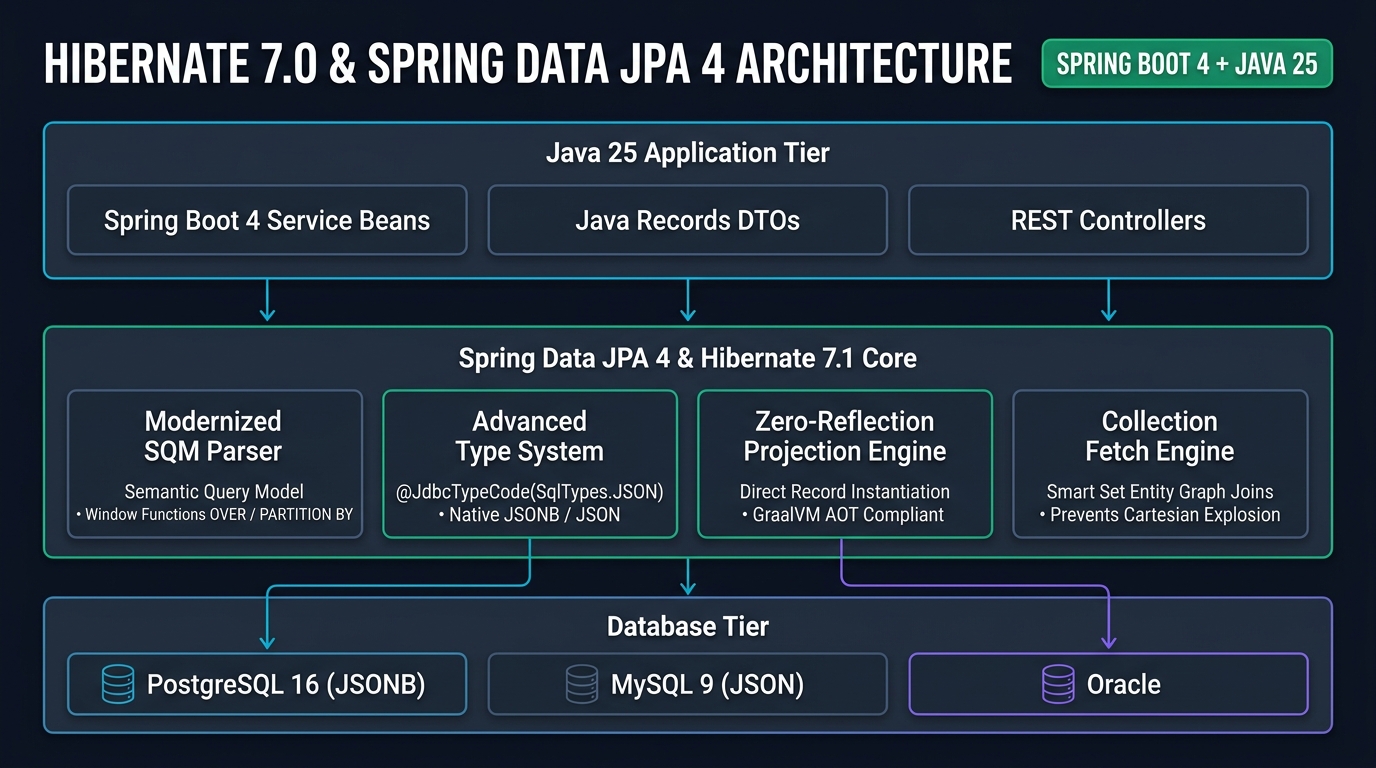
As shown in Figure 1, the new stack works across three clean layers:
- Java 25 Application Tier: Built with Spring Boot 4 service beans, REST controllers, and immutable Java Records. It eliminates mutable transfer objects.
- Persistence Engine Layer: Spring Data JPA 4 coordinates repository interfaces, while Hibernate 7.1 Core manages entity graphs, SQM parsing, and native type systems.
- Enterprise Database Tier: Connects natively to PostgreSQL 16, MySQL 9, and Oracle. It pushes indexing and filtering directly to database engines.
This architectural shift aligns directly with Java 25 Virtual Threads. Instead of spending CPU cycles in the JVM to sort or transform large collections in memory, the application lets the database do the work. The database runs the query quickly, and the JVM thread waits without wasting system resources.
Native JSONB Mapping and Deep HQL Querying
Enterprise applications frequently handle semi-structured data. E-commerce product catalogs, medical device telemetry, and audit logs often have schemas that change frequently. Creating a new database migration and relational table for every minor metadata field creates schema bloat. For this reason, teams store flexible attributes inside PostgreSQL jsonb or MySQL json columns.
In Hibernate 7.1, you do not need third-party dependencies to map JSON columns. The framework provides the @JdbcTypeCode(SqlTypes.JSON) annotation directly out of the box. You can map any Java record or POJO directly to a database JSON column.
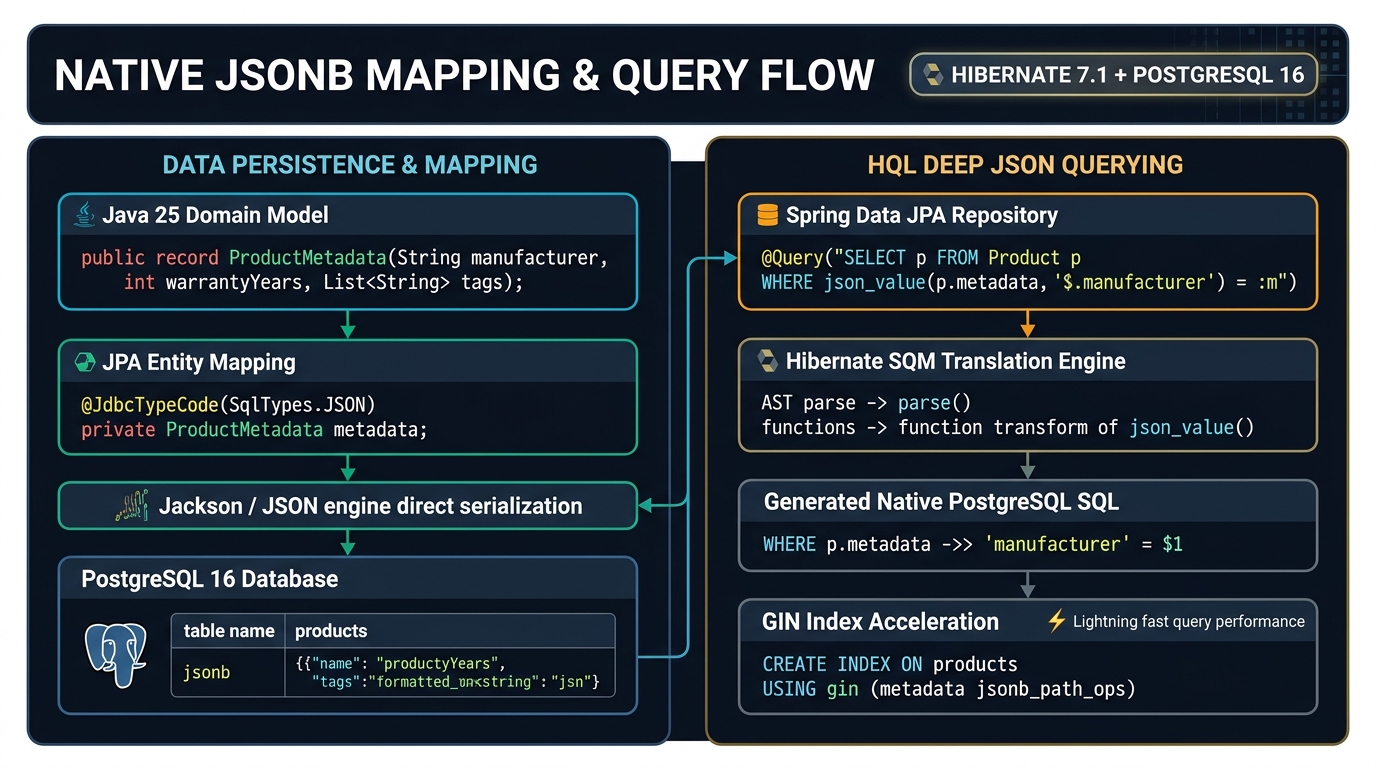
Figure 2 illustrates the two-way lifecycle of JSON data:
- Persistence Phase: The application saves a Java record like
ProductMetadata. Hibernate calls Jackson 2 to serialize the record into raw JSON text. It then binds that value to the JDBC driver using the standard JSON SQL type. - Query Phase: The repository executes an HQL query using the
json_value()function. Hibernate translates this function into native PostgreSQL operators such as->>. If you create a GIN index on the column, PostgreSQL executes the search in logarithmic time.
Here is how you define a flexible metadata record and its enclosing JPA entity:
package com.webcodein.shop.product;

import java.util.List;

public record ProductMetadata(
        String manufacturer,
        int warrantyYears,
        List<String> tags
) {}
Next, annotate the entity field with @JdbcTypeCode(SqlTypes.JSON):
package com.webcodein.shop.product;

import jakarta.persistence.Entity;
import jakarta.persistence.Id;
import jakarta.persistence.Table;
import org.hibernate.annotations.JdbcTypeCode;
import org.hibernate.type.SqlTypes;

@Entity
@Table(name = "product")
public class Product {

    @Id
    private Long id;

    private String name;

    @JdbcTypeCode(SqlTypes.JSON)
    private ProductMetadata metadata;

    public Product() {}

    public Product(Long id, String name, ProductMetadata metadata) {
        this.id = id;
        this.name = name;
        this.metadata = metadata;
    }

    public Long getId() { return id; }
    public String getName() { return name; }
    public ProductMetadata getMetadata() { return metadata; }
}
To query nested attributes inside this JSON column, write a Spring Data JPA repository query using the HQL json_value() function:
package com.webcodein.shop.product;

import java.util.List;
import org.springframework.data.jpa.repository.Query;
import org.springframework.data.repository.CrudRepository;
import org.springframework.data.repository.query.Param;

public interface ProductRepository extends CrudRepository<Product, Long> {

    @Query("SELECT p FROM Product p WHERE json_value(p.metadata, '$.manufacturer') = :manufacturer")
    List<Product> findByManufacturer(@Param("manufacturer") String manufacturer);
}
SQL Window Functions in JPQL and HQL
Analytical reporting is another area where developers previously hit limitations. Calculating running totals, ranking salaries within departments, or comparing values with the previous row using LEAD() or LAG() required native SQL queries. Native SQL queries break portability and prevent entities from participating in the JPA persistence lifecycle.
Hibernate 7.1 adds native support for window functions directly inside JPQL and HQL. The SQM engine understands the standard SQL OVER () clause along with PARTITION BY and ORDER BY.
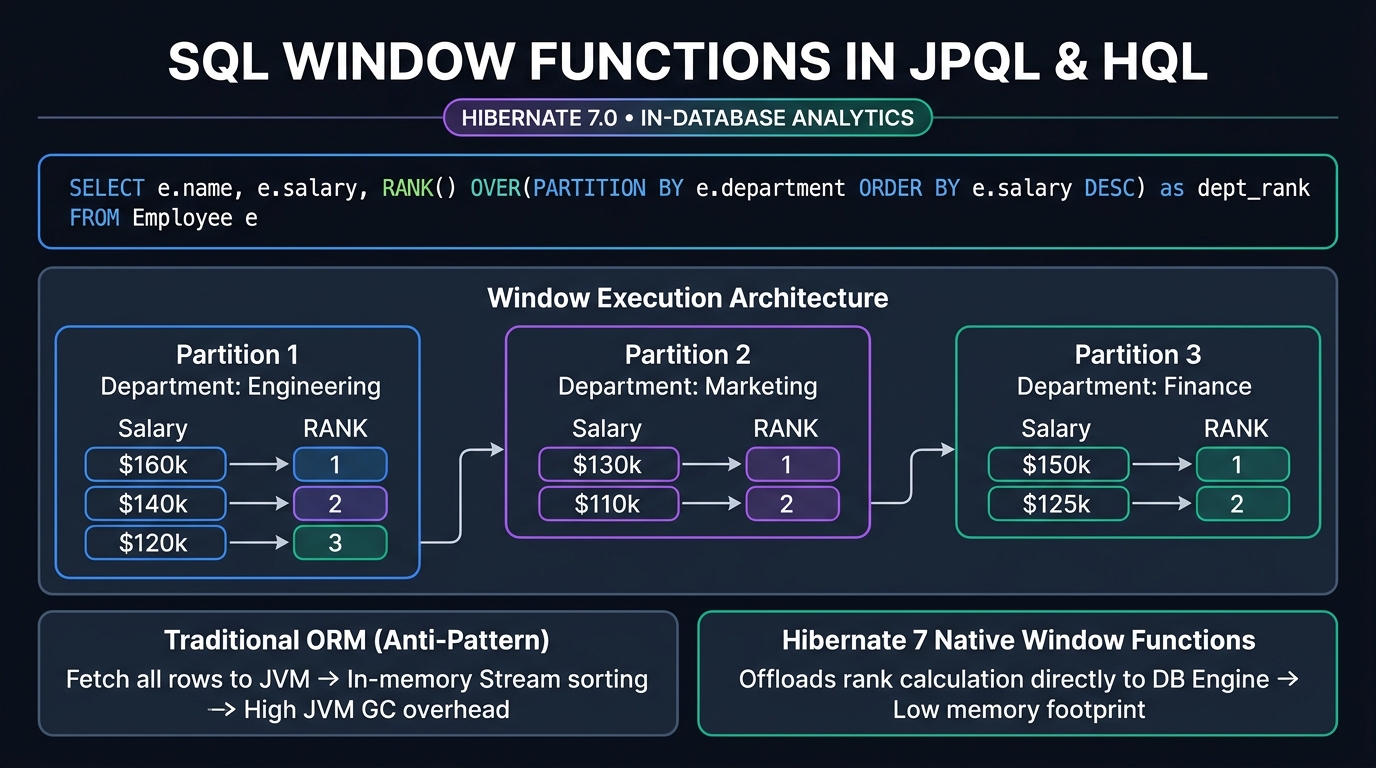
Figure 3 demonstrates why in-database analytics are superior to application-side processing:
- The Memory Trap (Anti-Pattern): In earlier architectures, applications fetched all employee records into the JVM heap. The application then used Java Stream collectors to group by department and sort by salary. When tables grow to millions of rows, this pattern exhausts JVM memory and saturates network bandwidth.
- The Hibernate 7.1 Solution: The database partitions rows and calculates ranks directly on disk buffers. Only the final calculated projection travels across the network to the application.
Here is how to define an entity with departmental salary data:
package com.webcodein.shop.employee;

import jakarta.persistence.Entity;
import jakarta.persistence.Id;
import jakarta.persistence.Table;
import java.math.BigDecimal;

@Entity
@Table(name = "employee")
public class Employee {

    @Id
    private Long id;

    private String name;
    private String department;
    private BigDecimal salary;

    public Employee() {}

    public Employee(Long id, String name, String department, BigDecimal salary) {
        this.id = id;
        this.name = name;
        this.department = department;
        this.salary = salary;
    }

    public Long getId() { return id; }
    public String getName() { return name; }
    public String getDepartment() { return department; }
    public BigDecimal getSalary() { return salary; }
}
Now write a declarative query in the repository using the RANK() OVER () window function:
package com.webcodein.shop.employee;

import java.util.List;
import org.springframework.data.jpa.repository.Query;
import org.springframework.data.repository.Repository;

public interface EmployeeRepository extends Repository<Employee, Long> {

    Employee save(Employee employee);

    @Query("""
        SELECT e.name, e.salary,
               RANK() OVER (PARTITION BY e.department ORDER BY e.salary DESC) as dept_rank
        FROM Employee e
    """)
    List<Object[]> findEmployeesWithDepartmentRank();
}
Solving MultipleBagFetchException and Cartesian Explosions
If you have built applications with Hibernate, you have likely encountered org.hibernate.loader.MultipleBagFetchException. This runtime exception occurs when an entity contains two or more child collections typed as java.util.List, and you attempt to fetch them eagerly with a single query.
In relational algebra, joining two independent child tables in a single SQL query produces a Cartesian product. If an order has 10 line items and 5 promotional discounts, joining both tables creates 50 rows in the JDBC result set. Hibernate blocks this operation when collections are unordered lists (bags) because it cannot safely reconstruct duplicate entries.
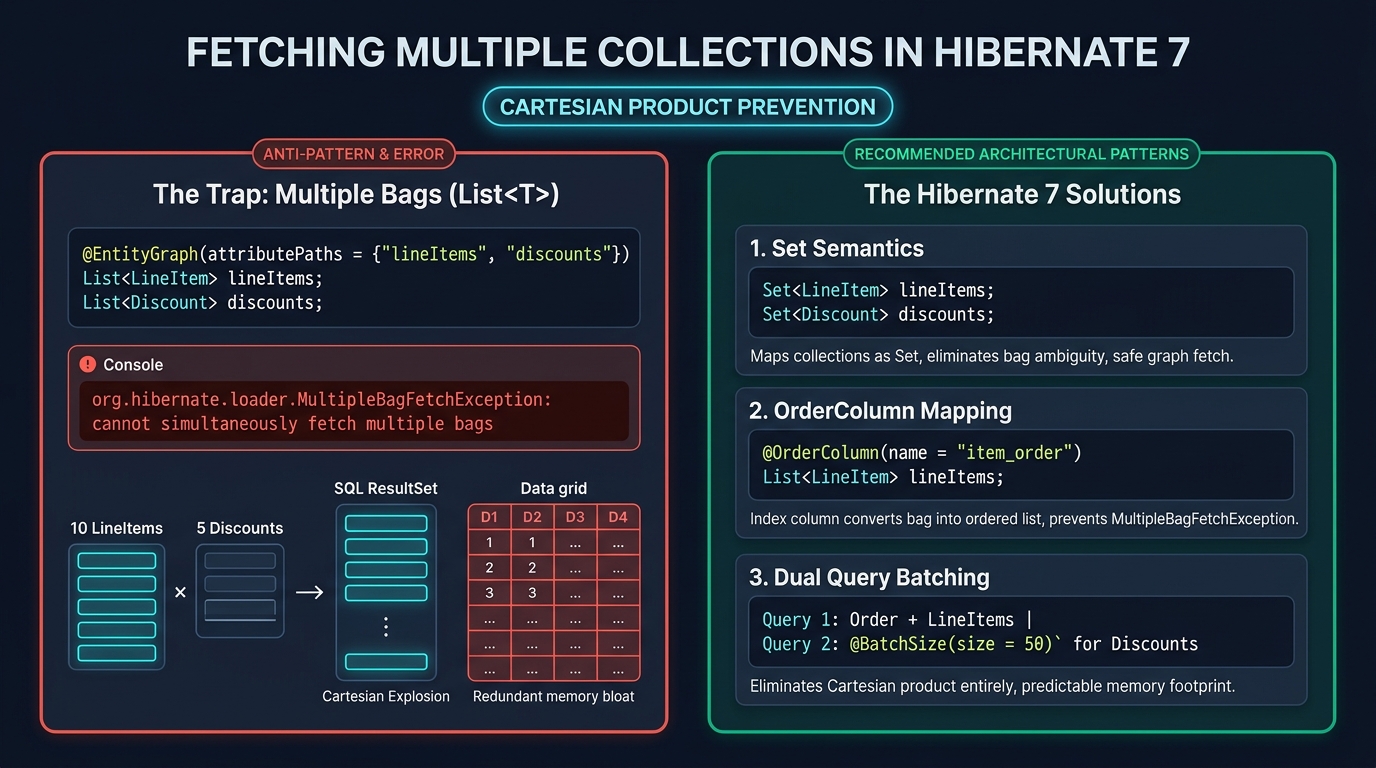
As detailed in Figure 4, developers have three clean architectural solutions in Hibernate 7.1:
- Set Semantics: Change the child collections from
List<T>tojava.util.Set<T>. Sets enforce uniqueness. When you apply@EntityGraph, Hibernate executes the join query cleanly without throwing an exception. - Ordered Lists with @OrderColumn: If you must maintain index order, add
@OrderColumn(name = "item_index"). This converts the collection from an unordered bag into an indexed list. - Dual Query Batching: For very large collections, avoid joining altogether. Fetch the parent entity and first collection in Query 1, then let Hibernate fetch the second collection using subselect or batch fetching. This eliminates Cartesian row multiplication completely.
Here is an enterprise aggregate root using Set collections to fetch line items and discounts cleanly:
package com.webcodein.shop.order;

import jakarta.persistence.*;
import java.util.HashSet;
import java.util.Set;

@Entity
@Table(name = "shop_order")
public class Order {

    @Id
    @GeneratedValue(strategy = GenerationType.IDENTITY)
    private Long id;

    @Enumerated(EnumType.STRING)
    private OrderStatus status;

    @OneToMany(cascade = CascadeType.ALL, fetch = FetchType.LAZY)
    @JoinColumn(name = "order_id")
    private Set<LineItem> lineItems = new HashSet<>();

    @OneToMany(cascade = CascadeType.ALL, fetch = FetchType.LAZY)
    @JoinColumn(name = "order_id")
    private Set<Discount> discounts = new HashSet<>();

    public Order() {}

    public Order(OrderStatus status) {
        this.status = status;
    }

    public Long getId() { return id; }
    public OrderStatus getStatus() { return status; }
    public Set<LineItem> getLineItems() { return lineItems; }
    public Set<Discount> getDiscounts() { return discounts; }
}
In the repository, use @EntityGraph to fetch both collections in a single operation:
package com.webcodein.shop.order;

import java.util.List;
import org.springframework.data.jpa.repository.EntityGraph;
import org.springframework.data.repository.CrudRepository;

public interface OrderRepository extends CrudRepository<Order, Long> {

    @EntityGraph(attributePaths = {"lineItems", "discounts"})
    List<Order> findByStatus(OrderStatus status);
}
Zero-Reflection Java Records as DTO Projections
Loading full JPA entities is expensive when an endpoint only needs two or three columns. A managed entity requires first-level cache tracking, dirty-checking snapshots, and proxy overhead. If an endpoint only reads data, fetching full entities wastes CPU time and memory.
Spring Data JPA 4 introduces zero-reflection Java Record projections. When a repository method returns a Java Record, Spring Data generates compiled constructor invocation bytecode. It maps database columns directly into immutable record components without reflection.
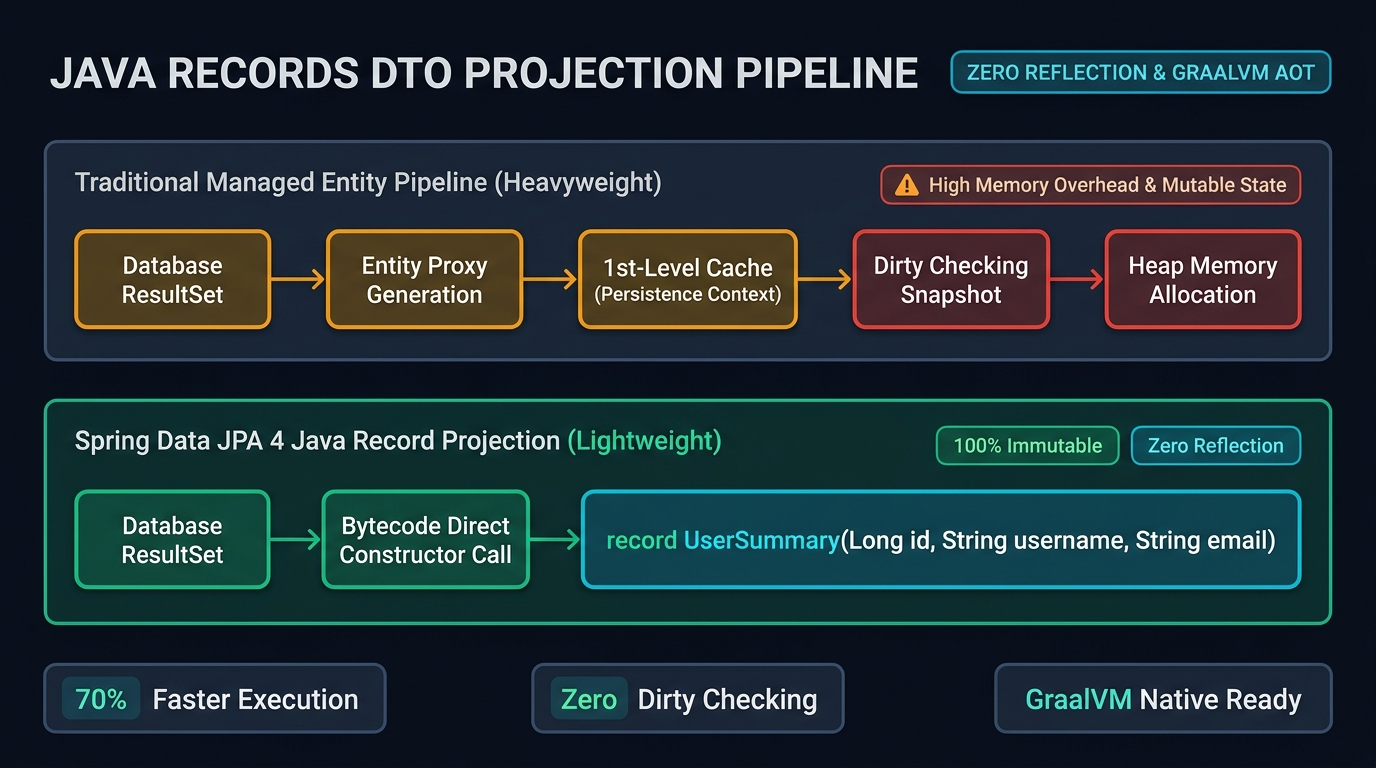
Figure 5 compares the two execution pipelines:
- Managed Entity Pipeline: Reads the result set, allocates entity objects, attaches them to the persistence context, and takes snapshots for dirty checking. When the transaction commits, Hibernate inspects all snapshots.
- Java Record Projection Pipeline: Reads the result set and immediately invokes the record canonical constructor. The objects never enter the persistence context. There is zero dirty-checking overhead and memory consumption drops significantly.
Furthermore, because there is no dynamic runtime reflection, Java Record projections compile instantly into GraalVM Native Images without requiring custom reflection reachability metadata hints.
Define a simple projection record:
package com.webcodein.shop.user;

public record UserSummary(
        Long id,
        String username,
        String email
) {}
Define the Spring Data repository method. Notice that no JPQL query string or manual constructor expression is required:
package com.webcodein.shop.user;

import java.util.List;
import org.springframework.data.repository.CrudRepository;

public interface UserRepository extends CrudRepository<AppUser, Long> {

    List<UserSummary> findByIsActiveTrue();
}
Step-by-Step Code Implementation
Let us now combine these persistence features into a clean Spring Boot 4 REST application. The application will expose endpoints to query products, rank employees, list active users, and fetch orders with child collections.
Step 1: Configure application.yml
To use HQL JSON functions in Hibernate 7.1, enable the query feature flag in src/main/resources/application.yml:
spring:
  jpa:
    hibernate:
      ddl-auto: create-drop
    properties:
      hibernate:
        query:
          hql:
            json_functions_enabled: true
    show-sql: true
    open-in-view: false
Step 2: Create the REST Controller
Create a REST controller in src/main/java/com/webcodein/shop/web/ShopController.java to expose the repositories:
package com.webcodein.shop.web;

import com.webcodein.shop.employee.EmployeeRepository;
import com.webcodein.shop.order.Order;
import com.webcodein.shop.order.OrderRepository;
import com.webcodein.shop.order.OrderStatus;
import com.webcodein.shop.product.Product;
import com.webcodein.shop.product.ProductRepository;
import com.webcodein.shop.user.UserRepository;
import com.webcodein.shop.user.UserSummary;
import java.util.List;
import org.springframework.http.ResponseEntity;
import org.springframework.web.bind.annotation.*;

@RestController
@RequestMapping("/api")
public class ShopController {

    private final ProductRepository productRepository;
    private final EmployeeRepository employeeRepository;
    private final OrderRepository orderRepository;
    private final UserRepository userRepository;

    public ShopController(
            ProductRepository productRepository,
            EmployeeRepository employeeRepository,
            OrderRepository orderRepository,
            UserRepository userRepository) {
        this.productRepository = productRepository;
        this.employeeRepository = employeeRepository;
        this.orderRepository = orderRepository;
        this.userRepository = userRepository;
    }

    @GetMapping("/products/search")
    public ResponseEntity<List<Product>> searchProductsByManufacturer(@RequestParam("manufacturer") String manufacturer) {
        List<Product> products = productRepository.findByManufacturer(manufacturer);
        return ResponseEntity.ok(products);
    }

    @GetMapping("/employees/ranks")
    public ResponseEntity<List<Object[]>> getEmployeeDepartmentRanks() {
        List<Object[]> ranks = employeeRepository.findEmployeesWithDepartmentRank();
        return ResponseEntity.ok(ranks);
    }

    @GetMapping("/users/active")
    public ResponseEntity<List<UserSummary>> getActiveUsers() {
        List<UserSummary> summaries = userRepository.findByIsActiveTrue();
        return ResponseEntity.ok(summaries);
    }

    @GetMapping("/orders/{status}")
    public ResponseEntity<List<Order>> getOrdersByStatus(@PathVariable("status") OrderStatus status) {
        List<Order> orders = orderRepository.findByStatus(status);
        return ResponseEntity.ok(orders);
    }
}
Step 3: Verify with Testcontainers
Always verify database operations against a real database container instead of an in-memory database like H2. In-memory databases do not support PostgreSQL-specific JSONB functions or window function optimizations.
package com.webcodein.shop;

import static org.assertj.core.api.Assertions.assertThat;

import com.webcodein.shop.employee.Employee;
import com.webcodein.shop.employee.EmployeeRepository;
import com.webcodein.shop.order.*;
import com.webcodein.shop.product.*;
import com.webcodein.shop.user.*;
import java.math.BigDecimal;
import java.util.List;
import org.junit.jupiter.api.Test;
import org.springframework.beans.factory.annotation.Autowired;
import org.springframework.boot.test.context.SpringBootTest;
import org.springframework.boot.testcontainers.service.connection.ServiceConnection;
import org.testcontainers.junit.jupiter.Container;
import org.testcontainers.junit.jupiter.Testcontainers;
import org.testcontainers.postgresql.PostgreSQLContainer;

@SpringBootTest
@Testcontainers
class ShopRepositoriesIntegrationTest {

    @Container
    @ServiceConnection
    static PostgreSQLContainer postgres = new PostgreSQLContainer("postgres:16-alpine");

    @Autowired ProductRepository products;
    @Autowired EmployeeRepository employees;
    @Autowired OrderRepository orders;
    @Autowired UserRepository users;

    @Test
    void queriesInsideJsonColumn() {
        products.save(new Product(1L, "Laptop", new ProductMetadata("Acme", 2, List.of("pc"))));

        assertThat(products.findByManufacturer("Acme")).hasSize(1);
        assertThat(products.findByManufacturer("UnknownBrand")).isEmpty();
    }

    @Test
    void ranksEmployeesWithWindowFunction() {
        employees.save(new Employee(1L, "Ada", "R&D", new BigDecimal("200")));
        employees.save(new Employee(2L, "Grace", "R&D", new BigDecimal("300")));
        employees.save(new Employee(3L, "Bob", "Sales", new BigDecimal("400")));

        List<Object[]> ranks = employees.findEmployeesWithDepartmentRank();
        assertThat(ranks).hasSize(3);
    }

    @Test
    void fetchesTwoListsWithEntityGraph() {
        Order order = new Order(OrderStatus.PAID);
        order.getLineItems().add(new LineItem("sku-1"));
        order.getDiscounts().add(new Discount("SAVE10"));
        orders.save(order);

        assertThat(orders.findByStatus(OrderStatus.PAID)).isNotEmpty();
    }

    @Test
    void projectsToRecord() {
        users.save(new AppUser(1L, "ada", "ada@example.com", true));

        assertThat(users.findByIsActiveTrue()).extracting("username").contains("ada");
    }
}
Comparative Analysis: Hibernate 7 vs Alternatives
To choose the right persistence tool for your enterprise architecture, review how Hibernate 7.1 compares with previous releases and alternative frameworks:
| Capability / Dimension | Hibernate 7.1 & Spring Boot 4 | Hibernate 6.x | EclipseLink 4.0 | Jakarta Data 1.0 | jOOQ 3.19+ |
|---|---|---|---|---|---|
| Native JSONB Support | Built-in via @JdbcTypeCode(SqlTypes.JSON) + json_value() |
Requires Hypersistence Utils or custom UserTypes | Limited proprietary XML/JSON mappings | Not standardized; depends on vendor engine | Native SQL JSON constructors and operators |
| JPQL Window Functions | Native support in SQM (OVER, PARTITION BY) |
None (Requires nativeQuery = true) |
None (Requires native SQL) | Not supported in JDQL syntax | Full type-safe native SQL window functions |
| DTO Projections | Zero-reflection Java Records with compiled byte constructors | Requires explicit SELECT new ... queries |
Manual constructor expressions | Supports Record return types natively | Native record mapping via fetchInto() |
| Multiple Collection Fetching | Clean Set joins via @EntityGraph; Cartesian prevention |
Throws MultipleBagFetchException on lists |
Join fetch Cartesian warning | Separate queries per repository method | Explicit SQL multi-table joins |
| GraalVM Native Image | AOT-optimized; reflection-free Record bytecode generation | Requires extensive runtime hints configuration | Complex static metadata generation | Designed for compile-time source generation | Requires minimal reflection configuration |
| Primary Use Case | Enterprise Spring Boot 4 microservices and modular monoliths | Legacy Spring Boot 3 applications | Jakarta EE application server runtimes | Vendor-neutral lightweight microservices | Complex analytical and reporting data pipelines |
Real-World Enterprise Use Cases
These new persistence capabilities address concrete architectural challenges in production:
1. High-Volume E-Commerce Catalog with Dynamic Attributes
Retail catalogs contain thousands of product categories. Laptops have RAM, CPU, and screen sizes. Shoes have sizes, materials, and colors. Modeling every category with separate relational columns leads to sparse tables with hundreds of null columns. By persisting metadata in a PostgreSQL jsonb column with @JdbcTypeCode(SqlTypes.JSON), teams maintain clean schema design while querying dynamic attributes using HQL json_value() at high speed.
2. Financial Trading Ledger with Departmental Salary Ranking
Financial accounting and payroll systems must calculate rank, running totals, and moving averages across departments and legal entities. In older versions, engineers pulled thousands of records into JVM memory to sort and rank with the Stream API. Using native window functions in JPQL, the ranking logic executes inside the database engine, returning ready-to-display projections in milliseconds.
3. High-Throughput Read APIs with Zero-Reflection Records
Customer portals and mobile backends handle high read traffic. Loading full entities into the persistence context creates garbage collection pressure and CPU overhead from dirty checking. By returning lightweight Java Records directly from Spring Data repositories, applications achieve sub-millisecond serialization times with zero persistence context tracking overhead.
Production Guidelines and Performance Hardening
When running Hibernate 7.1 in production environments, follow these engineering practices:
1. Tune HikariCP Connection Pools Carefully
Even though Java 25 Virtual Threads can create thousands of lightweight concurrent threads, database connection limits do not change. Relational databases support a finite number of active connection threads. Consult our guide on Production HikariCP Tuning in Spring Boot 4 to configure pool sizes, timeouts, and leak detection thresholds properly.
2. Prevent the N+1 Query Problem
Do not confuse @EntityGraph with lazy fetching. Eagerly fetching associations can cause unexpected queries if relationships are poorly mapped. Review our practical guide on Eliminating the Hibernate 7 N+1 Query Problem in Spring Boot 4 to understand when to use entity graphs versus join fetches and DTO projections.
3. Select Appropriate Concurrency Locking
When updating entity rows concurrently, always configure version attributes or pessimistic locks to prevent race conditions. Read our in-depth comparison on Optimistic vs Pessimistic Locking in JPA and Hibernate 7 to implement retry loops with exponential backoff.
Common Mistakes and How to Fix Them
Watch out for these common migration pitfalls when adopting Hibernate 7.1:
Mistake 1: Using Dotted Path Navigation on JSON Columns
The Mistake: Developers familiar with JavaScript or document databases often try to navigate JSON properties using dot notation in JPQL: SELECT p FROM Product p WHERE p.metadata.manufacturer = 'Acme'. In Hibernate 7.1, this throws org.hibernate.query.sqm.UnknownPathException because the SQM parser treats metadata.manufacturer as an entity association rather than a JSON field.
The Fix: Use the explicit json_value() function: SELECT p FROM Product p WHERE json_value(p.metadata, '$.manufacturer') = :manufacturer. Ensure that hibernate.query.hql.json_functions_enabled=true is set in your application configuration.
Mistake 2: Attempting to Fetch Two Unordered Lists
The Mistake: Keeping child collections typed as java.util.List on an entity and applying @EntityGraph(attributePaths = {"lineItems", "discounts"}). This fails at runtime with MultipleBagFetchException.
The Fix: Map the child associations as java.util.Set<T>, or add an explicit @OrderColumn annotation to define list element indices.
Mistake 3: Omitting Jackson Databind from the Classpath
The Mistake: Adding @JdbcTypeCode(SqlTypes.JSON) without having a JSON serializer on the classpath. Hibernate will throw a initialization error stating that no JSON format mapper is available.
The Fix: Include com.fasterxml.jackson.core:jackson-databind in your Maven dependencies. Spring Boot automatically wires the default Jackson mapper into Hibernate.
Frequently Asked Questions (FAQ)
How does Hibernate 7.1 native JSONB differ from Hypersistence Utils?
Hypersistence Utils provides custom Hibernate UserTypes to map JSON data. In Hibernate 7.1, JSON mapping is native to the core framework via @JdbcTypeCode(SqlTypes.JSON). You no longer need external dependencies for basic JSON mapping and HQL querying.
Can I use Window Functions with Spring Data Pageable?
Yes. However, because window functions calculate values relative to the entire partition, wrapping window queries with SQL LIMIT and OFFSET can affect ranking if the pagination slice does not encompass the full partition. For accurate rankings, compute the rank in a subquery or ensure the partition matches the filtered scope.
Why does Hibernate still throw MultipleBagFetchException on Lists?
Joining two unordered lists in a single SQL query produces a Cartesian product. Because lists allow duplicate items, Hibernate cannot determine whether duplicate rows in the result set represent real duplicate collection items or artifacts of the Cartesian product. Sets solve this because they enforce unique elements.
Are Java Record projections fully compatible with GraalVM Native Image?
Yes. Spring Data JPA 4 generates direct bytecode constructor calls for Java Records during AOT processing. Because no dynamic runtime reflection is used to instantiate records, the mapping works without additional reflection configuration.
How does Spring Data JPA 4 compare with Jakarta Data 1.0?
Jakarta Data 1.0 is a vendor-neutral standard designed for compile-time repository generation across Jakarta EE containers. Spring Data JPA 4 is tightly integrated into the Spring Boot ecosystem, providing deep support for Spring transactions, AOT compilation, and advanced Hibernate features.
Companion Code Repository
The complete, runnable source code for this guide is available on GitHub. It includes full entity implementations, repositories, a Spring MVC REST controller, and Testcontainers integration tests running on PostgreSQL 16:
GitHub: Hibernate 7.0 & Spring Data JPA 4 Companion Project