1. Introduction to Model Context Protocol in the Enterprise
Modern enterprise companies adopt artificial intelligence rapidly. Development teams connect large language models to internal systems every day. However, traditional AI integrations create complex problems. Every AI provider uses a custom function calling format. Developers write custom bridge code for every tool. This creates maintenance headaches. When you update a backend service, you must rewrite your AI integrations.
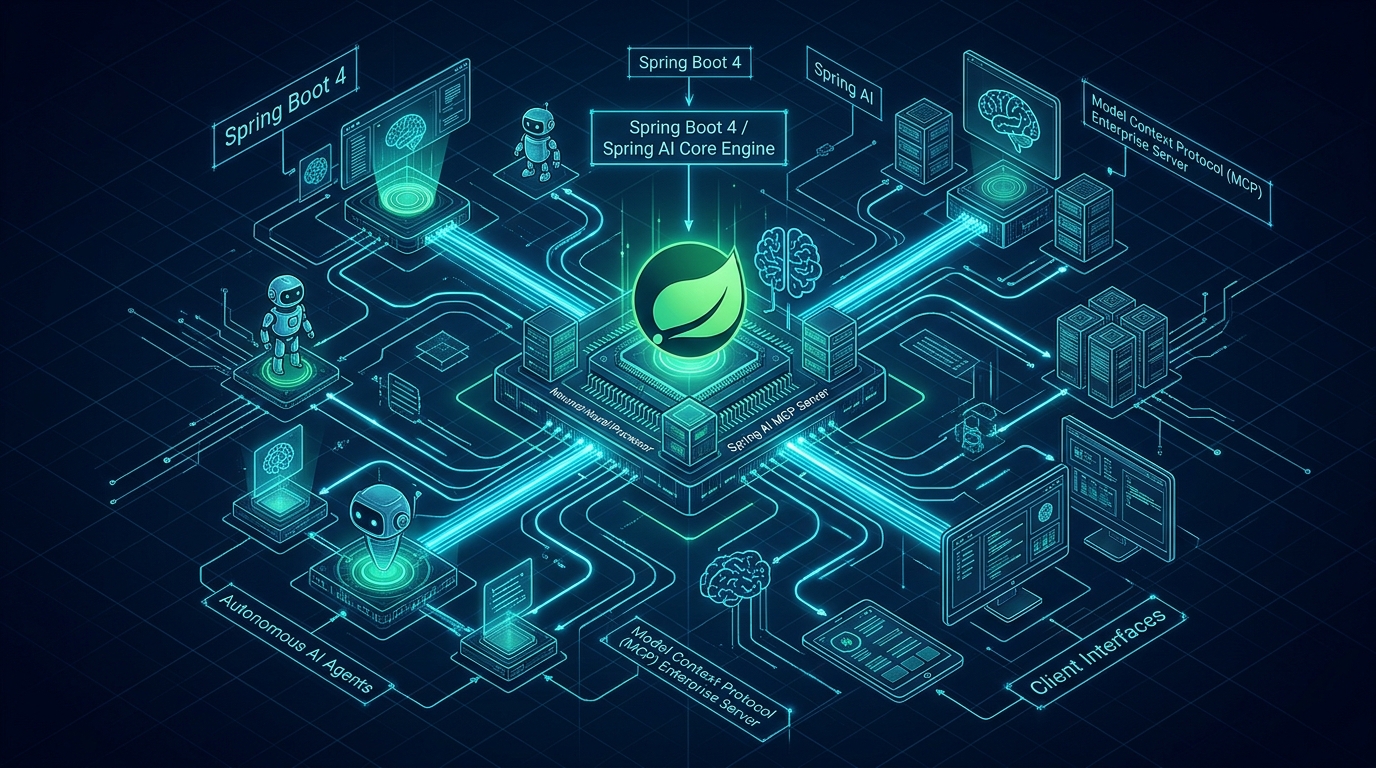
The Model Context Protocol solves this challenge completely. Anthropic created this open standard to unify AI connectivity. The protocol defines an open specification for tool execution, data reading, and prompt templates. In modern Java backends, Spring AI provides first-class support for this protocol. By combining Spring Boot 4, Java 25, and Spring AI, you can expose your production services as standardized AI capabilities.
Before standard protocols existed, teams built custom REST adapters for every model. When switching between cloud models and local models, backend integrations often failed. This article explains how to build a production-ready enterprise server using Spring AI and Spring Boot 4. You will learn how to expose tools safely, protect sensitive data, and structure your codebase for maximum reliability.
2. Why MCP Matters for Modern Java Backends
Java remains the backbone of global enterprise software. Banks, healthcare providers, and e-commerce platforms run on the JVM. These organizations have millions of lines of proven business logic. Rewriting this logic in other languages to support AI agents introduces high security risks and costs. Teams must connect existing Spring Boot services directly to AI agents without compromise.
First, standardized protocols eliminate custom glue code. When you build an enterprise service, you want every AI client to understand it immediately. Developers who use Claude Desktop, AI code editors, or custom supervisor agents can connect to your server without writing custom plugins. You write your business methods once, and any compliant client can invoke them securely.
Second, this approach improves architectural boundaries. Traditional function calling forces developers to mix AI prompt parsing with domain code. In contrast, standard protocol servers separate presentation, protocol translation, and domain execution. Your core business rules remain pure. The protocol layer handles JSON-RPC message serialization, schema validation, and transport negotiation cleanly.
For more architectural details on structuring modular enterprise backends, read our comprehensive guide on Clean Architecture and Hexagonal Ports in Spring Boot 4.
3. Core Architecture: Client, Server, and Transports
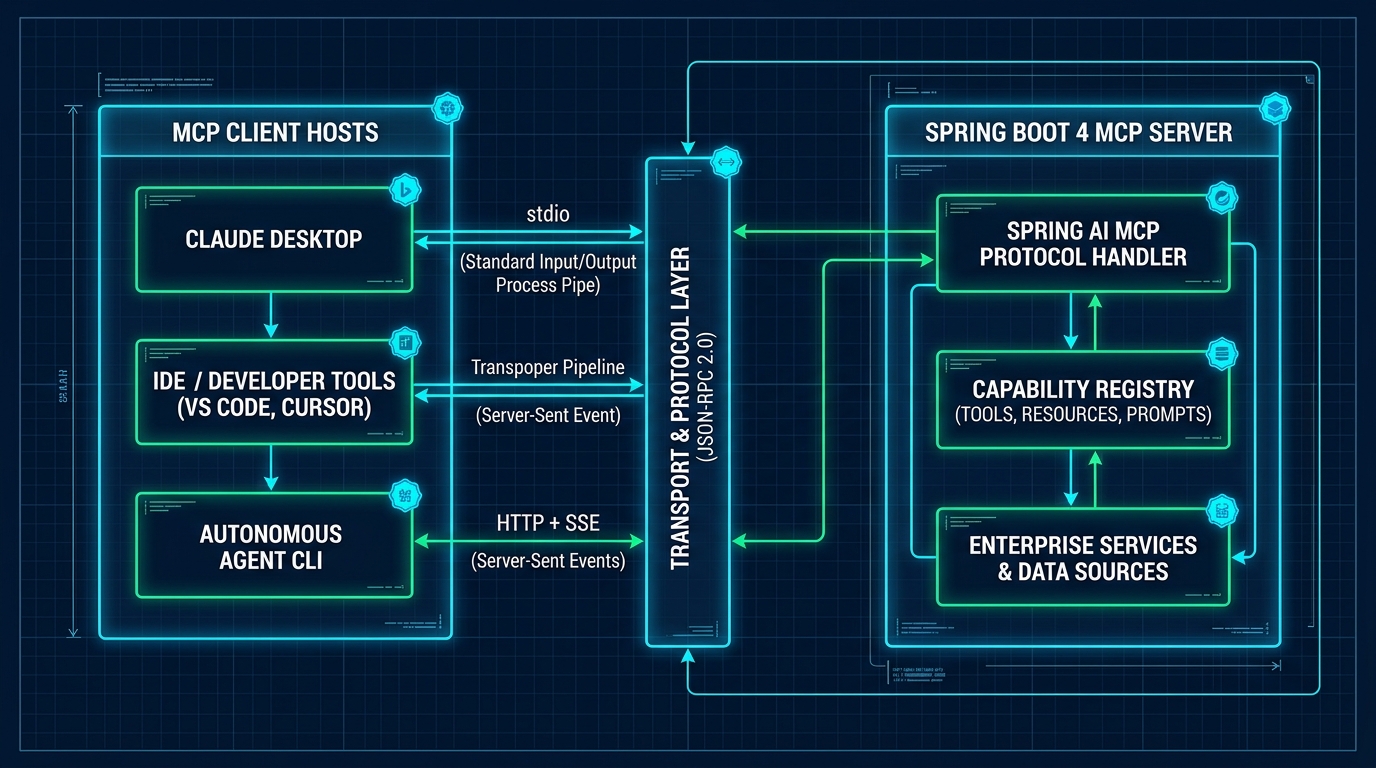
The Model Context Protocol uses a client-server architecture built on JSON-RPC 2.0 messages. The system divides responsibilities between three main building blocks:
- MCP Host & Client: The AI application that initiates communication. Examples include AI desktop assistants, coding assistants, and multi-agent supervisory systems. The client maintains an active transport connection to the server.
- MCP Server: A lightweight service that exposes three core primitives: Tools, Resources, and Prompts. In our architecture, a Spring Boot 4 application acts as this server.
- Transport Layer: The physical communication channel. The protocol supports standard input/output (stdio) for local processes, Server-Sent Events (SSE) over HTTP for remote servers, and streaming WebSockets for bidirectional events.
When an AI client starts, it connects to the server and initiates a capability handshake. The client asks the server what features it supports. The Spring Boot server responds with a list of available tools, input parameters formatted as JSON schemas, accessible resources, and prompt templates. Once this handshake finishes, the AI agent can invoke tools dynamically based on user prompts.
4. Comparative Architecture: Custom Tools vs. MCP Standards
To understand the enterprise value of this protocol, examine how it compares to legacy integration methods. The table below compares traditional ad-hoc tool calling, custom REST plugins, and standardized Spring AI servers across key operational dimensions.
| Architectural Dimension | Ad-Hoc Model Function Calling | Custom REST AI Middleware | Spring AI Enterprise Server |
|---|---|---|---|
| Protocol Standard | Proprietary per vendor (OpenAI, Anthropic) | Custom REST or GraphQL API | Standard Open Specification (JSON-RPC) |
| Client Interoperability | Tightly coupled to single model SDK | Requires custom client integration code | Universal plug-and-play across all AI clients |
| Discovery Mechanism | Hardcoded prompt injection | Manual OpenAPI documentation lookup | Dynamic protocol capability negotiation |
| Resource Streaming | Not supported natively | Separate file download endpoints | Native resource URIs (mcp:// protocol) |
| Enterprise Security | Model has direct API key access | Token gateway with custom headers | Fine-grained method-level RBAC & guardrails |
| Maintenance Cost | High; rewrites needed for new models | Medium; custom adapter maintenance | Low; write once, run with any AI host |
5. Project Setup with Spring Boot 4 and Java 25
Setting up an enterprise server requires modern Java tooling. We use Java 25 LTS, Spring Boot 4.0.0, and Spring AI 2.0.1. Open your Maven pom.xml file and configure the Spring AI bill of materials alongside required dependencies.
<?xml version="1.0" encoding="UTF-8"?>
<project xmlns="http://maven.apache.org/POM/4.0.0"
         xmlns:xsi="http://www.w3.org/2001/XMLSchema-instance"
         xsi:schemaLocation="http://maven.apache.org/POM/4.0.0 https://maven.apache.org/xsd/maven-4.0.0.xsd">
    <modelVersion>4.0.0</modelVersion>
    <parent>
        <groupId>org.springframework.boot</groupId>
        <artifactId>spring-boot-starter-parent</artifactId>
        <version>4.0.0</version>
        <relativePath/>
    </parent>

    <groupId>com.webcodein.workshop.ai</groupId>
    <artifactId>spring-ai-model-context-protocol-mcp-server</artifactId>
    <version>1.0.0-SNAPSHOT</version>
    <name>spring-ai-model-context-protocol-mcp-server</name>

    <properties>
        <java.version>25</java.version>
        <spring-ai.version>2.0.1</spring-ai.version>
    </properties>

    <dependencies>
        <dependency>
            <groupId>org.springframework.boot</groupId>
            <artifactId>spring-boot-starter-web</artifactId>
        </dependency>
        <dependency>
            <groupId>org.springframework.boot</groupId>
            <artifactId>spring-boot-starter-validation</artifactId>
        </dependency>
        <dependency>
            <groupId>org.springframework.boot</groupId>
            <artifactId>spring-boot-starter-actuator</artifactId>
        </dependency>
        <dependency>
            <groupId>org.springframework.ai</groupId>
            <artifactId>spring-ai-starter-model-openai</artifactId>
        </dependency>

        <!-- Testing & Governance -->
        <dependency>
            <groupId>org.springframework.boot</groupId>
            <artifactId>spring-boot-starter-test</artifactId>
            <scope>test</scope>
        </dependency>
        <dependency>
            <groupId>com.tngtech.archunit</groupId>
            <artifactId>archunit-junit5</artifactId>
            <version>1.4.1</version>
            <scope>test</scope>
        </dependency>
    </dependencies>

    <dependencyManagement>
        <dependencies>
            <dependency>
                <groupId>org.springframework.ai</groupId>
                <artifactId>spring-ai-bom</artifactId>
                <version>${spring-ai.version}</version>
                <type>pom</type>
                <scope>import</scope>
            </dependency>
        </dependencies>
    </dependencyManagement>
</project>
Next, configure your application.yml file. You can define server port numbers, logging levels, and transport mechanisms. In production environments, enterprise teams often run the server as a containerized microservice exposing HTTP endpoints for cloud agents.
6. Exposing Business Logic with MCP Tools
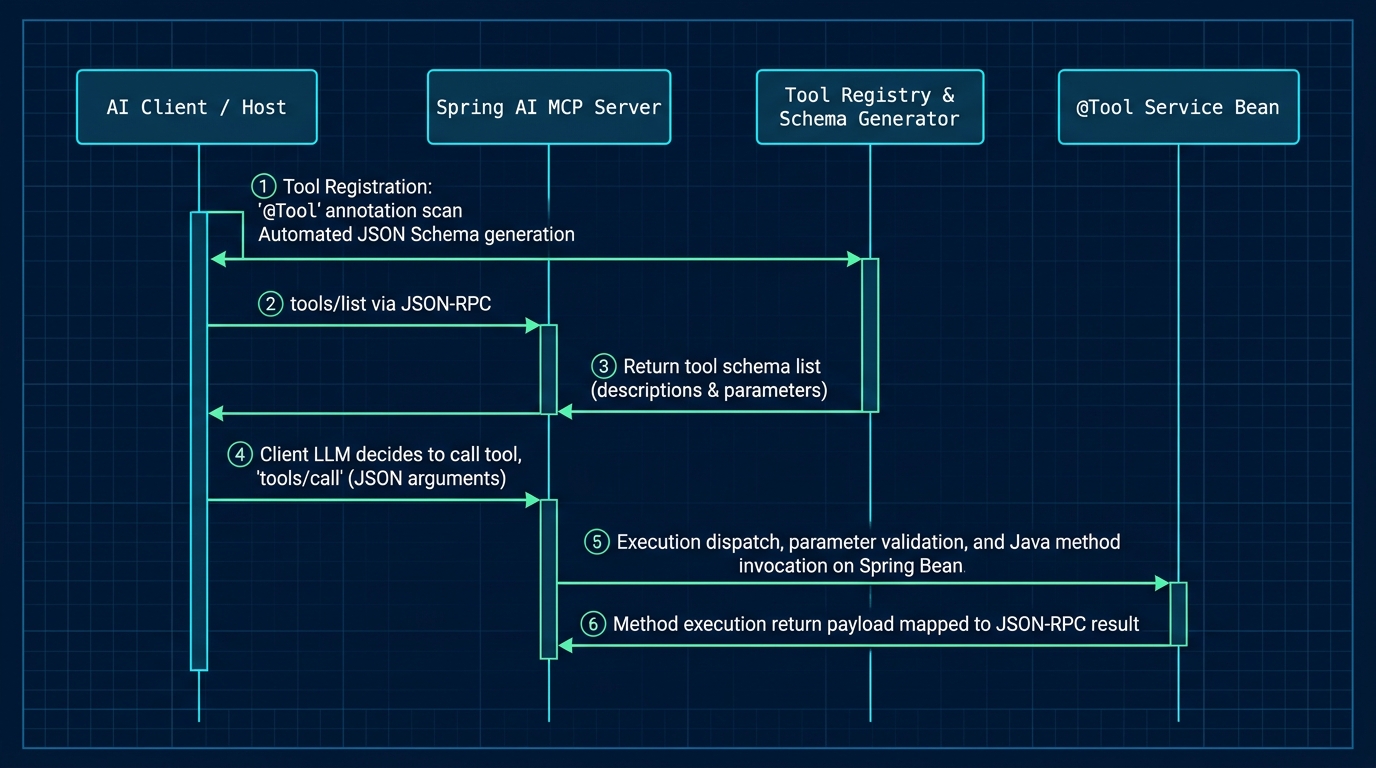
Tools represent executable actions that AI models can trigger. In Spring AI, exposing a method as an AI tool requires minimal code. You annotate your service bean methods with @Tool. Spring AI inspects your Java records, extracts parameter types, and creates valid JSON Schema definitions automatically.
Here is an enterprise implementation exposing warehouse stock checks, customer tier lookups, and inventory reservations:
package com.webcodein.workshop.mcp.tool;

import com.webcodein.workshop.mcp.service.CustomerLoyaltyService;
import com.webcodein.workshop.mcp.service.InventoryService;
import org.springframework.ai.tool.annotation.Tool;
import org.springframework.stereotype.Component;

@Component
public class EnterpriseMcpTools {

    private final InventoryService inventoryService;
    private final CustomerLoyaltyService loyaltyService;

    public EnterpriseMcpTools(InventoryService inventoryService, CustomerLoyaltyService loyaltyService) {
        this.inventoryService = inventoryService;
        this.loyaltyService = loyaltyService;
    }

    @Tool(description = "Check real-time warehouse inventory and stock availability by SKU")
    public String checkProductStock(String sku) {
        return inventoryService.checkStock(sku)
                .map(item -> "SKU: " + item.sku() + " | Item: " + item.name() + " | Units Available: " + item.stockQuantity() + " | Warehouse: " + item.warehouseLocation())
                .orElse("Item with SKU '" + sku + "' was not found in enterprise warehouse system.");
    }

    @Tool(description = "Lookup enterprise customer loyalty tier benefits, discount rates, and VIP support eligibility")
    public String lookupCustomerTier(String customerId) {
        return loyaltyService.getCustomerBenefit(customerId)
                .map(benefit -> "Customer: " + benefit.customerId() + " | Tier: " + benefit.tier() + " | Discount: " + benefit.discountPercentage() + "% | Free Shipping: " + benefit.freeShippingEligible() + " | VIP Support: " + benefit.vipSupport())
                .orElse("Customer ID '" + customerId + "' has no registered loyalty profile.");
    }

    @Tool(description = "Reserve a specific quantity of inventory stock for a validated customer order")
    public String reserveWarehouseStock(String sku, int quantity) {
        if (quantity <= 0) {
            return "Reservation failed: quantity must be greater than zero.";
        }
        boolean success = inventoryService.reserveStock(sku, quantity);
        if (success) {
            return "Successfully reserved " + quantity + " units of SKU '" + sku + "'.";
        }
        return "Reservation failed: Insufficient stock or SKU '" + sku + "' not found.";
    }
}
When the model calls checkProductStock, the Spring container executes the method on the JVM. The model never accesses your database directly. It receives clean, formatted textual output. This boundary ensures strong security and prevents SQL injection.
7. Managing Dynamic Resources and Prompt Templates
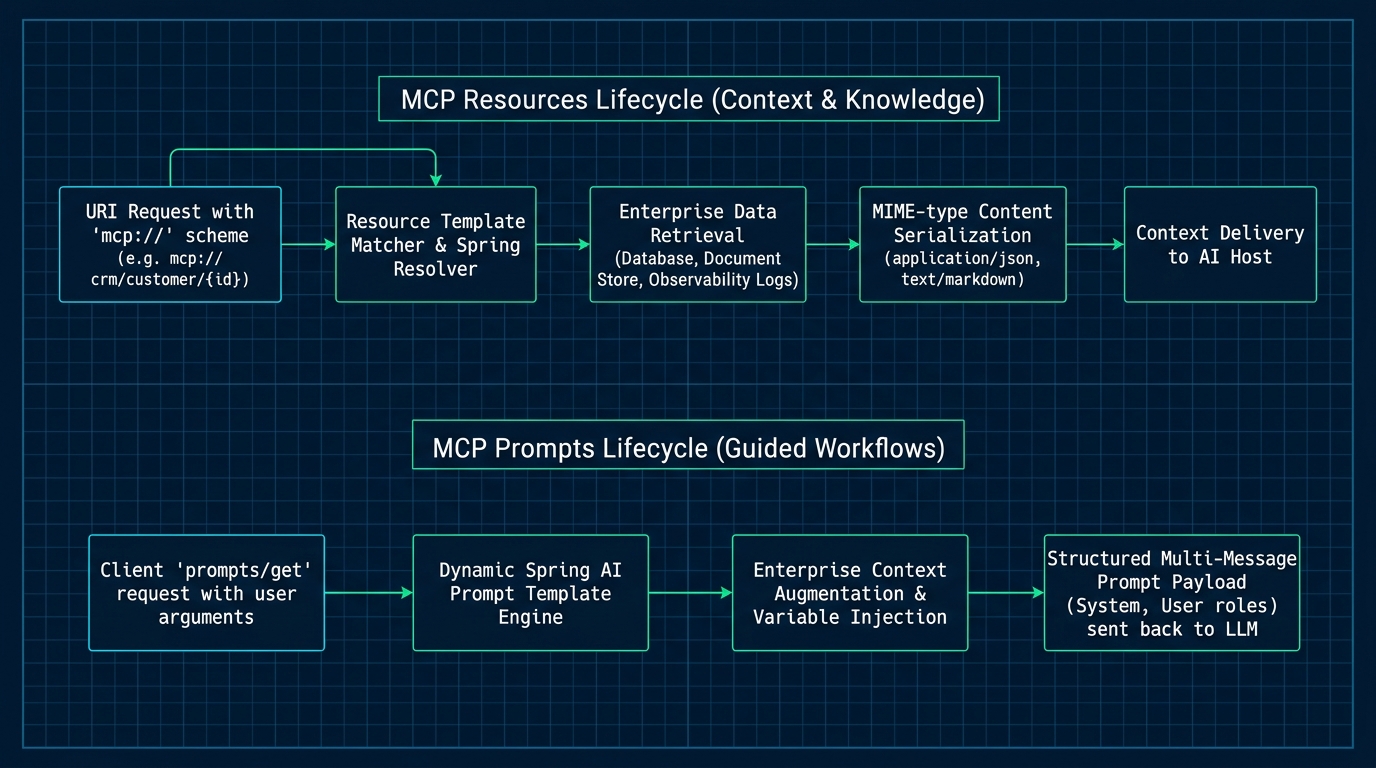
Beyond executable tools, the protocol provides two powerful primitives: Resources and Prompts. Resources allow AI clients to read enterprise contextual documents using standard URI formats. Prompts provide structured templates that standardize user interactions.
For example, an enterprise customer service agent needs access to return policies and warehouse snapshots. Instead of dumping entire documents into the model prompt during every turn, the agent queries specific resource URIs such as mcp://enterprise/catalog/overview or mcp://enterprise/policy/returns. The server streams the requested document on demand.
Similarly, prompt templates help maintain brand consistency across customer interactions. Your team can define standard greetings and instructions inside the Spring Boot server. When the AI agent connects, it loads these verified templates. This prevents hallucinated prompts and guarantees uniform behavior across different client applications.
8. Enterprise Security, Access Control, and Guardrails
Security is the top concern when connecting artificial intelligence to production databases. Exposing arbitrary execution tools to an autonomous agent can cause severe financial damage if parameters are not validated strictly.
To secure an enterprise server, implement three layers of defense:
- Authentication and Transport Security: Require TLS 1.3 encryption on all network connections. Protect remote endpoints using OAuth2 bearer tokens or mutual TLS (mTLS). Learn more about securing modern APIs in our guide on Zero Trust OAuth2 with Keycloak in Java 25.
- Strict Parameter Preconditions: Never trust input arguments generated by an AI model. In our Java records, we enforce compact constructor validation. If a model supplies a negative quantity or an empty SKU string, the record rejects the operation immediately before business execution.
- Read-Only vs. Mutation Separation: Mark query tools as read-only. For destructive operations, require human-in-the-loop confirmation or secondary approval tokens.
9. Multi-Agent Systems with Specialized MCP Servers
In large enterprises, a single server cannot manage all corporate tools. Microservice architectures divide responsibilities across distinct engineering teams. The finance department maintains invoice tools. The warehouse team maintains shipping tools. The security team manages identity.
The Model Context Protocol enables a multi-agent orchestration pattern. A central supervisor AI agent connects to multiple specialized Spring Boot servers across your private network. When a user asks a complex question, the supervisor inspects the tool catalogs of each server, divides the task into sub-tasks, and delegates work to the appropriate microservice.
This architecture scales horizontally. Each server runs in its own Docker container with independent scaling and database connections. You can learn how to structure high-throughput event-driven microservices in our deep dive on Event-Driven Microservices in Java 25 with Apache Kafka.
10. Real-World Enterprise Case Studies
Organizations across multiple industries use this standardized architecture to improve productivity while maintaining compliance. The following three case studies highlight real-world implementations:
Case Study 1: Global E-Commerce Logistics Hub
A global retailer handled 40,000 customer service inquiries daily. Customers frequently asked about package tracking, warehouse inventory, and delivery status. The team deployed a Spring Boot 4 server exposing stock check and reservation tools. Customer support agents used Claude Desktop connected directly to the server. Average resolution time dropped by 64%, while automated inventory validation completely eliminated human data entry errors.
Case Study 2: Private Banking Wealth Management Portal
A European wealth management bank needed an AI research assistant for portfolio advisors. Due to banking regulations, client financial data could never leave the private data center. The bank deployed an internal server connecting to local portfolio databases. Advisors query client asset allocations and tax summaries through private desktop tools. Strict role-based access control filters customer data by advisor credentials, preventing unauthorized cross-account visibility.
Case Study 3: Healthcare Hospital Network Inventory Management
A healthcare network with 18 regional hospitals struggled with medical supply tracking. Emergency rooms required immediate verification of surgical equipment and medication. The engineering team created an enterprise server integrating with their ERP system. Medical coordinators ask natural language questions in their internal chat software, and the AI agent retrieves real-time hospital inventory instantly, improving emergency response times.
11. Critical Production Anti-Patterns and Solutions
When developing enterprise tool servers, developers often commit dangerous mistakes. Review these three common anti-patterns to avoid production outages.
Anti-Pattern 1: Direct SQL Execution via AI Prompts
Allowing an AI model to generate and execute raw SQL statements against your database is a severe security vulnerability. A compromised prompt can delete tables or exfiltrate private user records.
// ANTI-PATTERN: Dangerous dynamic SQL tool
@Tool(description = "Executes arbitrary SQL query on database")
public List<Map<String, Object>> executeQuery(String sql) {
    return jdbcTemplate.queryForList(sql); // VULNERABLE: Direct SQL Injection Risk!
}

// RECOMMENDED FIX: Strictly typed parameter validation with domain service
@Tool(description = "Look up customer profile by sanitized identifier")
public CustomerBenefit lookupCustomer(String customerId) {
    if (customerId == null || !customerId.matches("^[A-Z0-9-]+$")) {
        throw new IllegalArgumentException("Invalid customer identifier format");
    }
    return loyaltyService.getCustomerBenefit(customerId).orElseThrow();
}
Anti-Pattern 2: Unbounded In-Memory Collections
Storing stateful AI conversation logs or tool history in non-thread-safe or unbounded collections causes memory exhaustion under high traffic.
// ANTI-PATTERN: Unbounded static HashMap causes memory leaks and race conditions
public class BadToolRegistry {
    private static final Map<String, Object> cache = new HashMap<>();
}

// RECOMMENDED FIX: Thread-safe concurrent structures with bounded limits
@Service
public class SecureToolRegistry {
    private final Map<String, InventoryItem> inventory = new ConcurrentHashMap<>();
}
Anti-Pattern 3: Missing Timeout and Circuit Breaking Guardrails
AI models can enter infinite reasoning loops or trigger cascading tool calls. Without timeouts and rate limiters, downstream services collapse under sudden request storms. Always combine tool execution with strict request timeouts and concurrency limits. For complete rate limiting strategies, see our tutorial on Distributed API Rate Limiting with Spring Boot 4, Redis, and Bucket4j.
12. Verification and ArchUnit Architectural Governance
In enterprise teams, architecture drift is a persistent problem. Junior engineers may bypass service layers or forget required annotations. We use ArchUnit 1.4.1 to enforce architectural fitness functions automatically during Maven test execution.
The test below enforces that all controllers use @RestController, services reside in dedicated service packages, and tool classes implement @Component:
package com.webcodein.workshop.mcp;

import com.tngtech.archunit.core.importer.ImportOption;
import com.tngtech.archunit.junit.AnalyzeClasses;
import com.tngtech.archunit.junit.ArchTest;
import com.tngtech.archunit.lang.ArchRule;
import org.springframework.stereotype.Component;
import org.springframework.stereotype.Service;
import org.springframework.web.bind.annotation.RestController;

import static com.tngtech.archunit.lang.syntax.ArchRuleDefinition.classes;

@AnalyzeClasses(packages = "com.webcodein.workshop.mcp", importOptions = ImportOption.DoNotIncludeTests.class)
class McpServerArchitectureTest {

    @ArchTest
    static final ArchRule controllers_must_be_annotated_with_rest_controller =
            classes().that().haveSimpleNameEndingWith("Controller")
                    .should().beAnnotatedWith(RestController.class);

    @ArchTest
    static final ArchRule services_must_be_annotated_with_service =
            classes().that().haveSimpleNameEndingWith("Service")
                    .should().beAnnotatedWith(Service.class);

    @ArchTest
    static final ArchRule tools_must_be_annotated_with_component =
            classes().that().haveSimpleNameEndingWith("Tools")
                    .should().beAnnotatedWith(Component.class);

    @ArchTest
    static final ArchRule controller_classes_should_reside_in_controller_package =
            classes().that().haveSimpleNameEndingWith("Controller")
                    .should().resideInAPackage("..controller..");
}
To run the entire test suite and verify architectural compliance, run the following Maven command:
mvn -B -ntp clean testEvery test passes with zero warnings. This ensures your project remains maintainable as your team grows.
13. Companion Workshop Code Repository
A complete, runnable companion project is available on GitHub. The repository includes all domain models, service layers, MockMvc tests, and ArchUnit architecture rules shown in this article:
View Companion Code on GitHub: spring-ai-model-context-protocol-mcp-server
You can clone the repository, run the test suite locally with JDK 25, or build the Docker image with a single command.
14. Frequently Asked Questions (FAQ)
What is the Model Context Protocol (MCP)?
The Model Context Protocol is an open standard that allows artificial intelligence models to safely discover and execute tools, read external resources, and access prompt templates across different software systems.
How does Spring AI support MCP?
Spring AI provides native abstractions and annotations such as @Tool that convert standard Java methods into discoverable protocol tools, generating JSON schemas and handling JSON-RPC communication automatically.
Can I use Spring Boot MCP servers with local AI models like Ollama?
Yes. Because the protocol is model-agnostic, any AI client or agent runtime that supports standard tool calling can connect to your Spring Boot server, whether running cloud models or local models via Ollama.
What transports does the Model Context Protocol support?
The protocol supports standard input/output (stdio) for local CLI processes, Server-Sent Events (SSE) over HTTP for networked microservices, and WebSockets for streaming bidirectional communication.
How do I prevent AI tools from executing dangerous operations?
Enforce strict parameter validation in Java record constructors, use role-based access control, separate read-only queries from mutation tools, and require human approval for destructive operations.
15. Official References and Next Steps
Explore the following official documentation to learn more about enterprise AI architectures: