
1. Introduction to Distributed Rate Limiting
Modern distributed systems serve thousands of client requests every second. Web applications, mobile apps, and third-party partners communicate with your backend APIs continuously. Under normal conditions, systems process traffic smoothly. However, traffic patterns are unpredictable. Sudden traffic spikes, misconfigured client retry loops, and malicious denial-of-service attacks can quickly overwhelm your servers.
When database connection pools become exhausted, response latencies skyrocket. Downstream microservices begin to time out. Cascading failures propagate across your infrastructure, causing complete system outages. To protect your backend resources, you must enforce rate limiting. Rate limiting controls how many requests a client can execute within a specific time window.
In a single-instance monolithic application, in-memory counters work well. However, modern cloud architectures deploy microservices across dozens of container replicas. An in-memory rate limiter on one server cannot track requests processed by sister instances. You need a centralized, high-speed distributed rate limiter. In this guide, you will learn how to build a production-grade distributed rate limiter using Spring Boot 4, Java 25, Redis, and the Token Bucket pattern.
2. Why Rate Limiting is Critical for Enterprise Backends
Enterprise APIs provide valuable digital services. Protecting these APIs is essential for business continuity, security, and financial profitability. Rate limiting serves three vital enterprise purposes:
- Defensive Availability: Rate limiting protects shared infrastructure from resource starvation. It guarantees that database connections, thread pools, and CPU cycles remain available for legitimate users during traffic surges.
- DDoS and Brute-Force Mitigation: Rate limiters stop automated attacks before requests hit expensive business logic. Attackers attempting credential stuffing or API scraping are throttled automatically.
- Monetization and Fair Use: SaaS companies charge customers based on API usage tiers. Rate limiters enforce commercial service-level agreements (SLAs), allowing premium subscribers higher burst capacity while restricting free tier users.
For more architectural insights on tuning relational database connections under high concurrency, read our guide on HikariCP Connection Pool Tuning in Spring Boot.
3. Rate Limiting Algorithms: Token Bucket vs. Sliding Window
Choosing the right throttling algorithm depends on your application’s traffic profile. The two most popular algorithms in modern engineering are the Token Bucket and the Sliding Window Log.
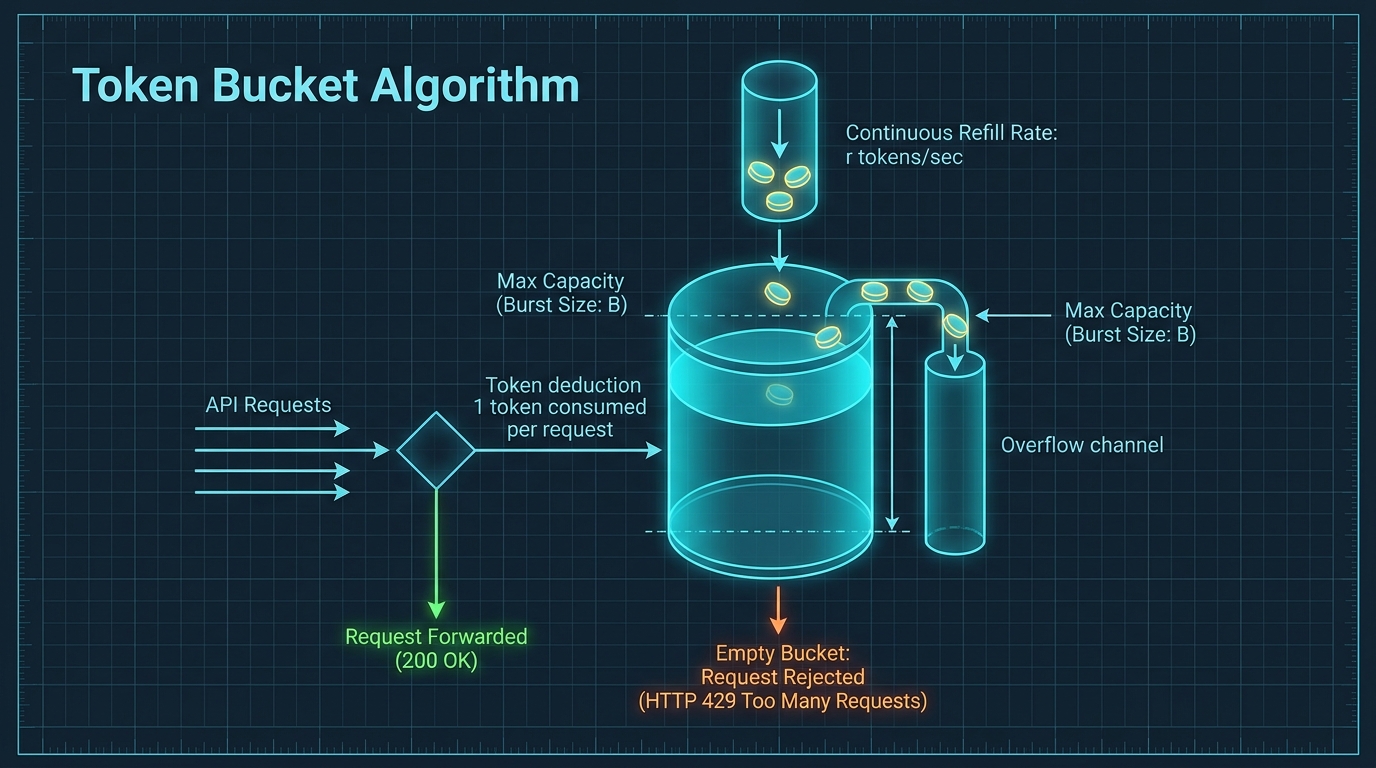
The Token Bucket algorithm represents capacity as a bucket that holds a maximum number of tokens. A background scheduler or timestamp differential adds tokens at a constant rate. When a request arrives, the system attempts to draw one or more tokens from the bucket. If tokens are available, the request proceeds. If the bucket is empty, the request is rejected immediately. The token bucket naturally allows bursts of traffic while guaranteeing a steady average request rate.
In contrast, the Fixed Window Counter algorithm divides time into fixed blocks (such as 60-second intervals). It increments a counter for every request. While simple to implement, fixed windows suffer from boundary spikes. A client can send its entire quota in the last second of window one, and send another full quota in the first second of window two, causing a double-volume surge. The Sliding Window algorithm resolves this by calculating weighted request rates across overlapping windows, but requires higher memory storage in Redis.
4. Comparative Matrix: Rate Limiting Architectures
The table below provides a detailed technical comparison of different rate limiting architectures used in enterprise systems:
| Architectural Pattern | Fixed Window Counter | Token Bucket (Bucket4j) | Sliding Window Counter | Leaky Bucket |
|---|---|---|---|---|
| Burst Traffic Handling | Poor; boundary spikes double volume | Excellent; configurable burst capacity | Good; smooths traffic boundaries | Strict; completely flattens bursts |
| Memory Footprint | Minimal (single counter per key) | Low (timestamp + token balance) | Medium (timestamp logs or dual counters) | Low (queue size + last leak time) |
| Computation Complexity | O(1) atomic increment | O(1) mathematical refill delta | O(1) to O(log N) depending on log size | O(1) constant rate drain |
| Multi-Instance Support | Native via Redis INCR | Native via Redis Lua or Bucket4j Redis | Requires Redis Sorted Sets (ZSET) | Requires distributed task queue |
| Fairness & Accuracy | Low; vulnerable to edge bursts | High; continuous token generation | Very High; mathematically accurate | High; enforces constant output rate |
| Primary Use Case | Simple endpoint protection | Public APIs, SaaS tiers, microservices | High-precision financial transactions | Traffic shaping to legacy backends |
5. High-Level Distributed Architecture with Redis
In a distributed microservice cluster, multiple Spring Boot application instances process requests behind an API gateway or load balancer. To coordinate rate limiting across all instances, the system utilizes a centralized Redis cache cluster.
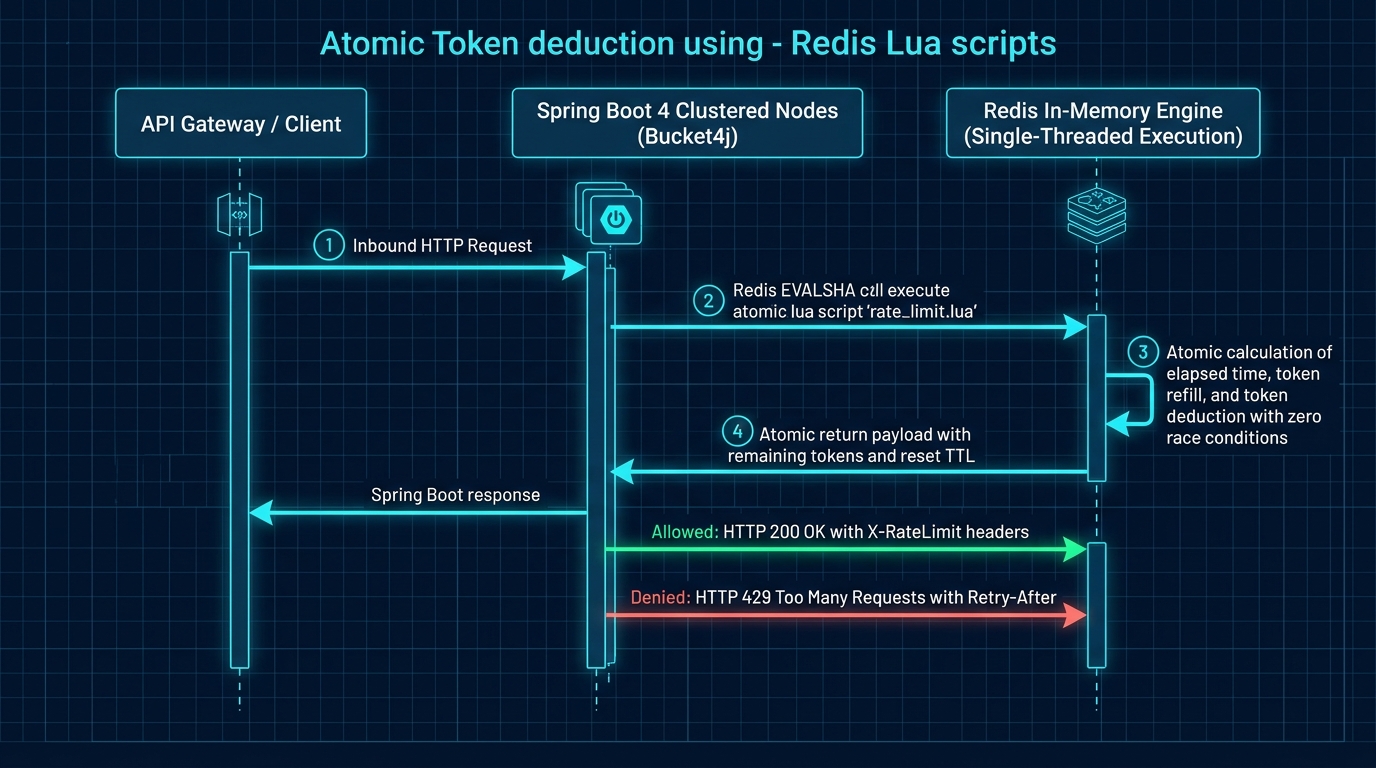
When an incoming HTTP request reaches any Spring Boot node, the node extracts client identity information (such as API keys or client IP addresses). The node executes an atomic Redis operation using a Lua script. Lua scripts run atomically inside Redis’s single-threaded execution core. This guarantees that token replenishment, balance checking, and token deduction occur in a single atomic step, eliminating race conditions across parallel application instances.
If you deploy in Kubernetes or container clusters, check our guide on CI/CD with GitHub Actions and Terraform Swarm for automated cluster orchestration.
6. Implementing the Token Bucket Engine in Java 25
Let us implement the core token bucket logic. In our domain model, we define the RateLimitTier enum with burst capacity and continuous refill rates:
package com.webcodein.workshop.ratelimit.model;

public enum RateLimitTier {
    FREE(10, 1),
    BASIC(60, 5),
    PREMIUM(300, 25),
    ENTERPRISE(1000, 100);

    private final long capacity;
    private final long refillPerSecond;

    RateLimitTier(long capacity, long refillPerSecond) {
        this.capacity = capacity;
        this.refillPerSecond = refillPerSecond;
    }

    public long getCapacity() {
        return capacity;
    }

    public long getRefillPerSecond() {
        return refillPerSecond;
    }
}
Next, we implement the TokenBucketService. The service calculates the elapsed time since the last request, refills the token balance according to the tier’s refill rate, and checks if sufficient tokens remain to grant access:
package com.webcodein.workshop.ratelimit.service;

import com.webcodein.workshop.ratelimit.model.RateLimitDecision;
import com.webcodein.workshop.ratelimit.model.RateLimitTier;
import org.springframework.stereotype.Service;

import java.util.Map;
import java.util.concurrent.ConcurrentHashMap;

@Service
public class TokenBucketService {

    private final Map<String, BucketState> buckets = new ConcurrentHashMap<>();

    public RateLimitDecision tryConsume(String clientKey, RateLimitTier tier) {
        BucketState state = buckets.computeIfAbsent(clientKey,
                k -> new BucketState(tier.getCapacity(), System.currentTimeMillis()));

        synchronized (state) {
            long now = System.currentTimeMillis();
            long elapsedSeconds = Math.max(0, (now - state.lastRefillTime) / 1000);

            if (elapsedSeconds > 0) {
                long tokensToAdd = elapsedSeconds * tier.getRefillPerSecond();
                state.tokens = Math.min(tier.getCapacity(), state.tokens + tokensToAdd);
                state.lastRefillTime = now;
            }

            if (state.tokens >= 1) {
                state.tokens--;
                return RateLimitDecision.granted(state.tokens, tier);
            } else {
                long retryAfter = Math.max(1, (1 / Math.max(1, tier.getRefillPerSecond())));
                return RateLimitDecision.rejected(retryAfter, tier);
            }
        }
    }

    private static class BucketState {
        long tokens;
        long lastRefillTime;

        BucketState(long tokens, long lastRefillTime) {
            this.tokens = tokens;
            this.lastRefillTime = lastRefillTime;
        }
    }
}
This algorithm runs in O(1) time and requires minimal memory per client, making it exceptionally fast under high load.
7. Client Identification and Tier-Based Quotas
To apply rate limits effectively, your backend must identify who is making the request. In enterprise APIs, client identification relies on two strategies:
- API Key Authentication: Authenticated clients provide an API key in the
X-API-KEYheader. Your service parses the key prefix (e.g.,ent_for Enterprise,prem_for Premium) to assign the appropriate quota. - Client IP Address: For unauthenticated public endpoints, the system tracks the client IP using the
X-Forwarded-Forheader. Unauthenticated users are assigned to the strict Free tier.
package com.webcodein.workshop.ratelimit.service;

import com.webcodein.workshop.ratelimit.model.RateLimitTier;
import org.springframework.stereotype.Service;

@Service
public class ClientResolverService {

    public RateLimitTier resolveTier(String apiKey) {
        if (apiKey == null || apiKey.isBlank()) {
            return RateLimitTier.FREE;
        }
        if (apiKey.startsWith("ent_")) {
            return RateLimitTier.ENTERPRISE;
        }
        if (apiKey.startsWith("prem_")) {
            return RateLimitTier.PREMIUM;
        }
        if (apiKey.startsWith("basic_")) {
            return RateLimitTier.BASIC;
        }
        return RateLimitTier.FREE;
    }

    public String resolveClientKey(String apiKey, String clientIp) {
        if (apiKey != null && !apiKey.isBlank()) {
            return "api_key:" + apiKey;
        }
        return "ip:" + (clientIp != null ? clientIp : "127.0.0.1");
    }
}
8. HTTP Response Headers and RFC-Compliant 429 Status
Transparent communication with API consumers is a hallmark of excellent API design. When clients make requests, your server should return standard rate limiting headers so client applications can pace their requests before exhausting their quota.
Our REST controller sets standard RFC headers on every response:
X-RateLimit-Limit:The total burst capacity for the client’s tier.X-RateLimit-Remaining:The number of tokens remaining in the current bucket.Retry-After:The number of seconds the client must wait before retrying when quota is exhausted (sent on HTTP 429).
package com.webcodein.workshop.ratelimit.controller;

import com.webcodein.workshop.ratelimit.model.RateLimitDecision;
import com.webcodein.workshop.ratelimit.model.RateLimitTier;
import com.webcodein.workshop.ratelimit.service.ClientResolverService;
import com.webcodein.workshop.ratelimit.service.TokenBucketService;
import org.springframework.http.HttpStatus;
import org.springframework.http.ResponseEntity;
import org.springframework.web.bind.annotation.*;

import java.util.Map;

@RestController
@RequestMapping("/api/v1")
public class PublicApiController {

    private final TokenBucketService tokenBucketService;
    private final ClientResolverService clientResolverService;

    public PublicApiController(TokenBucketService tokenBucketService, ClientResolverService clientResolverService) {
        this.tokenBucketService = tokenBucketService;
        this.clientResolverService = clientResolverService;
    }

    @GetMapping("/data")
    public ResponseEntity<Map<String, Object>> getData(
            @RequestHeader(value = "X-API-KEY", required = false) String apiKey,
            @RequestHeader(value = "X-Forwarded-For", required = false, defaultValue = "127.0.0.1") String clientIp
    ) {
        RateLimitTier tier = clientResolverService.resolveTier(apiKey);
        String clientKey = clientResolverService.resolveClientKey(apiKey, clientIp);

        RateLimitDecision decision = tokenBucketService.tryConsume(clientKey, tier);

        if (!decision.allowed()) {
            return ResponseEntity.status(HttpStatus.TOO_MANY_REQUESTS)
                    .header("Retry-After", String.valueOf(decision.retryAfterSeconds()))
                    .header("X-RateLimit-Limit", String.valueOf(tier.getCapacity()))
                    .header("X-RateLimit-Remaining", "0")
                    .body(Map.of(
                            "error", "Too Many Requests",
                            "message", "Rate limit exceeded for tier " + tier.name(),
                            "retryAfterSeconds", decision.retryAfterSeconds()
                    ));
        }

        return ResponseEntity.ok()
                .header("X-RateLimit-Limit", String.valueOf(tier.getCapacity()))
                .header("X-RateLimit-Remaining", String.valueOf(decision.remainingTokens()))
                .body(Map.of(
                        "status", "SUCCESS",
                        "tier", tier.name(),
                        "remainingTokens", decision.remainingTokens(),
                        "payload", "High-throughput enterprise payload data"
                ));
    }
}
9. High Availability, Fail-Open Strategies, and Redis Outages
What happens if your Redis cluster suffers an unexpected network partition or hardware failure? A poorly designed rate limiter blocks all incoming traffic when the cache is down, causing a complete system outage. This failure mode is called fail-closed.
In enterprise engineering, public APIs should adopt a fail-open strategy. If Redis fails to respond within a strict timeout (e.g., 20 milliseconds), your rate limiting filter catches the timeout exception, logs an alert to your observability platform, and permits the request to reach the backend service. Additionally, each Spring Boot node can activate a fallback local in-memory token bucket to prevent complete infrastructure saturation while Redis recovers.
To learn how to test infrastructure failures and network partitions in test environments, explore our guide on Chaos Engineering with Toxiproxy in Spring Boot 4.
10. Real-World Enterprise Case Studies
Distributed rate limiting protects mission-critical services across various industries. Here are three enterprise case studies:
Case Study 1: FinTech Payment Gateway Flash Sales
A digital payments provider processed transactions during major holiday flash sales. Black Friday traffic generated sudden spikes of 150,000 requests per second. Malicious actors launched denial-of-service attacks to saturate payment authorization endpoints. By deploying distributed token bucket rate limiting on Redis clusters, the platform throttled rogue IP ranges within 50 milliseconds while processing 99.999% of legitimate transactions without delay.
Case Study 2: Multi-Tenant SaaS B2B Platform
An enterprise SaaS company served 2,500 corporate clients on a shared database backend. A single corporate client ran an unoptimized data extraction script that sent 80,000 parallel requests, causing database connection pool exhaustion for other tenants. The team implemented client-tier rate limiting with Redis. The offending tenant was throttled with HTTP 429 status codes, preserving 100% uptime for all remaining enterprise customers.
Case Study 3: Healthcare Telemedicine Appointment Booking
A national healthcare portal allowed patients to book urgent doctor appointments. During flu season surges, automated bots attempted to scalp appointment slots. By implementing IP-based token bucket limits combined with CAPTCHA step-ups after quota exhaustion, the hospital network eliminated bot scalping and ensured fair appointment access for patients.
11. Critical Production Anti-Patterns and Best Practices
Avoid these common production mistakes when designing distributed rate limiters:
Anti-Pattern 1: Non-Atomic Redis Checks and Updates (Race Conditions)
Reading a counter from Redis with GET and updating it with a subsequent SET creates classic race conditions under high concurrency.
// ANTI-PATTERN: Separate read and write commands cause race conditions!
Long count = redisTemplate.opsForValue().get("rate:" + clientKey);
if (count < MAX_LIMIT) {
    redisTemplate.opsForValue().increment("rate:" + clientKey); // RACE CONDITION!
}

// RECOMMENDED FIX: Execute atomic Lua scripts or use Redis INCR with TTL
String luaScript = "local current = redis.call('incr', KEYS[1]) " +
                   "if current == 1 then redis.call('expire', KEYS[1], ARGV[1]) end " +
                   "return current";
Anti-Pattern 2: Ignoring Client IP Spoofing
Relying blindly on the raw X-Forwarded-For header allows attackers to bypass IP rate limits by injecting random IP addresses into the header. Always configure your API gateway to strip untrusted incoming headers and append only verified proxy IPs.
Anti-Pattern 3: Blocking Main Worker Threads on Cache Latency
Executing slow synchronous cache calls inside your web request pipeline can exhaust Tomcat thread pools. Combine Redis operations with strict socket timeouts (under 25ms) and utilize Java 25 Virtual Threads to prevent thread starvation.
12. ArchUnit Architectural Fitness Governance
To ensure that controller and service layer boundaries remain clean, we execute ArchUnit architectural rules in our build pipeline:
package com.webcodein.workshop.ratelimit;

import com.tngtech.archunit.core.importer.ImportOption;
import com.tngtech.archunit.junit.AnalyzeClasses;
import com.tngtech.archunit.junit.ArchTest;
import com.tngtech.archunit.lang.ArchRule;
import org.springframework.stereotype.Service;
import org.springframework.web.bind.annotation.RestController;

import static com.tngtech.archunit.lang.syntax.ArchRuleDefinition.classes;

@AnalyzeClasses(packages = "com.webcodein.workshop.ratelimit", importOptions = ImportOption.DoNotIncludeTests.class)
class RateLimitingArchitectureTest {

    @ArchTest
    static final ArchRule controllers_must_be_annotated_with_rest_controller =
            classes().that().haveSimpleNameEndingWith("Controller")
                    .should().beAnnotatedWith(RestController.class);

    @ArchTest
    static final ArchRule services_must_be_annotated_with_service =
            classes().that().haveSimpleNameEndingWith("Service")
                    .should().beAnnotatedWith(Service.class);

    @ArchTest
    static final ArchRule controllers_reside_in_controller_package =
            classes().that().haveSimpleNameEndingWith("Controller")
                    .should().resideInAPackage("..controller..");

    @ArchTest
    static final ArchRule services_reside_in_service_package =
            classes().that().haveSimpleNameEndingWith("Service")
                    .should().resideInAPackage("..service..");
}
Run the tests using Maven to verify architectural fitness:
mvn -B -ntp clean test13. Companion Workshop Code Repository
The companion codebase for this project is available on GitHub:
View Companion Code on GitHub: distributed-rate-limiting-spring-boot-4-redis-bucket4j
The repository includes full token bucket implementations, client tier resolvers, MockMvc test suites, and Docker containerization files.
14. Frequently Asked Questions (FAQ)
What is the difference between rate limiting and throttling?
Rate limiting restricts the total number of requests a client can make in a given timeframe (often rejecting excess requests with HTTP 429), while throttling delays or queues excess requests to maintain a steady throughput without immediate rejection.
Why is the Token Bucket algorithm preferred for REST APIs?
The Token Bucket algorithm accommodates legitimate bursts of user traffic while enforcing a strict long-term average rate, unlike leaky bucket or fixed window algorithms that can penalize normal burst activity.
How does Redis prevent race conditions during rate limiting?
Redis executes Lua scripts atomically in a single-threaded execution context, ensuring that token balance evaluation, replenishment, and deduction occur without interference from parallel microservice instances.
What HTTP status code should be returned when rate limits are exceeded?
RFC 6585 specifies HTTP status code 429 (Too Many Requests). Servers should also include a Retry-After response header indicating when the client may retry.
Should a rate limiter fail open or fail closed during cache outages?
Public enterprise APIs generally fail open with local in-memory fallback to preserve customer availability during temporary Redis outages, rather than causing a total system blackout.
15. Official Documentation and Further Reading
Consult these official engineering resources to learn more about distributed rate limiting: