1. Introduction to Privacy-First Local AI in Java
Artificial intelligence transforms how enterprises build software. Teams automate customer workflows, extract information from documents, and build smart reasoning tools. Most initial AI projects rely on external cloud APIs. Developers send user prompts over the public internet to third-party providers. While this approach allows quick prototyping, it creates severe compliance and cost barriers for large enterprise companies.
Modern enterprises handle sensitive records every day. Financial institutions, hospitals, and legal firms operate under strict privacy laws such as GDPR and HIPAA. Sending proprietary customer contracts, medical histories, or internal codebases to public cloud models violates corporate compliance policies. Furthermore, high-volume API token costs accumulate quickly, creating unpredictable monthly cloud bills.
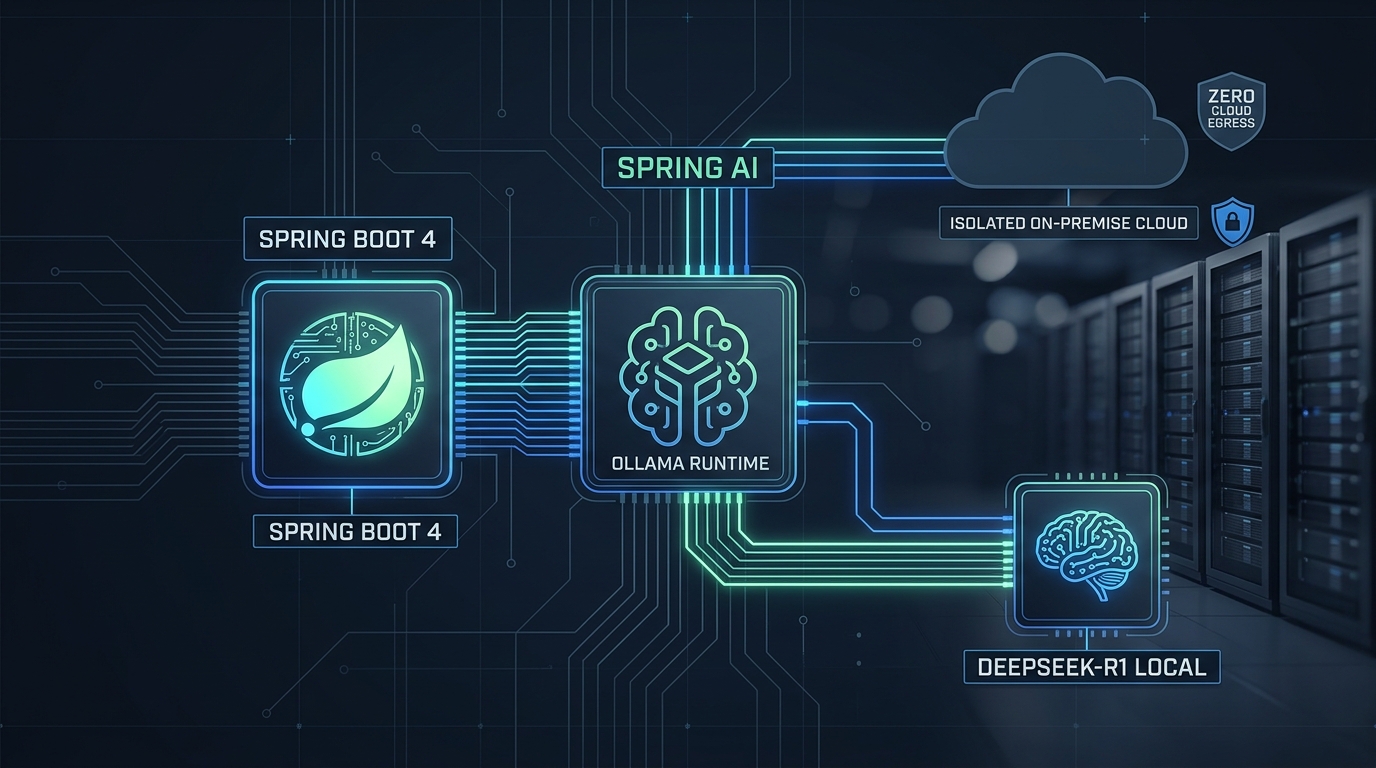
Local artificial intelligence solves both problems. By running models locally on your private servers or developer workstations, you keep all data inside your secure perimeter. Spring AI provides a first-class starter for Ollama. Ollama packages modern open weights models into lightweight local containers. In this article, you will learn how to connect Spring Boot 4 and Java 25 to local models like DeepSeek-R1 and Llama 3 without sending a single byte outside your firewall.
2. Why Enterprises Need Local LLMs Over Public APIs
Many software architects ask why they should manage local model runtimes when cloud APIs are readily available. The answer lies in data sovereignty, regulatory compliance, operational resilience, and cost predictability.
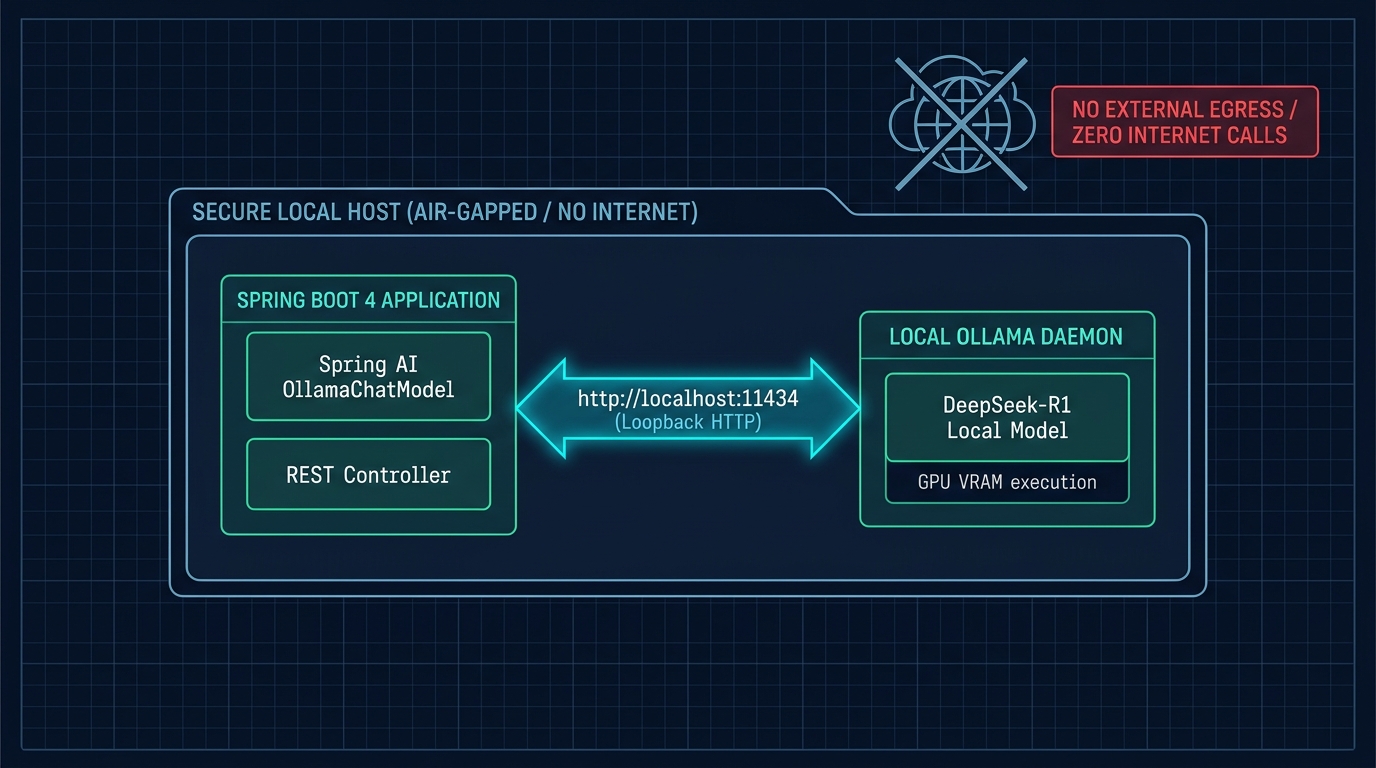
First, data sovereignty is non-negotiable for enterprise organizations. When you transmit customer data to external cloud providers, you lose physical control over where that data is processed and stored. In regulated industries, data leaks lead to heavy regulatory fines and brand damage. With local deployment, all inference operations occur strictly in local RAM and GPU memory. No telemetry or prompt history ever leaves your private network.
Second, local deployment provides total operational resilience. Cloud API outages disrupt your mission-critical applications. Rate limit quotas can throttle your background batch processing pipelines without warning. A local Ollama daemon running alongside your Spring Boot microservices continues functioning even during complete internet connectivity loss. Your factory floor, hospital clinic, or trading desk remains online 24/7.
For more architectural insights on running high-concurrency Java backends, review our practical guide on High Concurrency APIs with Java 25 Virtual Threads and Spring Boot 4.
3. High-Level Architecture: Spring Boot and Ollama Local Daemon
The architecture of a local Spring AI system consists of three distinct layers: the presentation client, the Spring Boot application container, and the Ollama execution runtime.
- Spring Boot Application: The Java 25 backend service. It handles REST requests, validates input preconditions using Java records, and manages conversational memory. It uses the Spring AI
ChatClientabstraction to format prompts. - Local Transport Channel: A secure, low-latency loopback connection over
http://localhost:11434. Spring AI sends HTTP requests with JSON payloads directly to the local daemon, avoiding public WAN latency. - Ollama Runtime Engine: A standalone engine running on the host operating system or inside a Docker container. It manages GPU acceleration (via CUDA, ROCm, or Apple Metal) and loads quantized model weights from local disk storage into memory.
When an incoming HTTP request arrives at your Spring Boot controller, your service encapsulates the user query into a strongly typed record. Spring AI serializes this request, sends it to Ollama, and receives streaming or non-streaming responses. Your application then applies business validation rules before returning the result to the caller.
4. Comparative Matrix: Cloud AI vs. Local Ollama Deployments
The decision to host models locally versus consuming commercial APIs involves technical trade-offs. The comparative table below outlines the core differences across performance, security, cost, and maintenance dimensions.
| Evaluation Criteria | Commercial Cloud APIs (OpenAI, Anthropic) | Self-Hosted Cloud VMs (vLLM / TGI) | Spring AI + Local Ollama Daemon |
|---|---|---|---|
| Data Privacy & Egress | High risk; prompts leave internal network | Controlled; stays inside private cloud VPC | Zero risk; strict localhost or LAN execution |
| Operating Cost Model | Variable per-token pricing; expensive at scale | High fixed GPU instance hourly costs | Zero recurring API fees; uses existing hardware |
| Network Latency | 150ms–500ms public internet round trip | 20ms–80ms internal VPC network hop | Sub-5ms loopback socket communication |
| Internet Dependency | Requires continuous outbound internet | Requires cloud connectivity | 100% offline capable (air-gapped systems) |
| Deployment Complexity | Minimal; single API key configuration | Complex; Kubernetes and GPU driver orchestration | Extremely simple; single CLI command or Docker container |
| Hardware Requirements | Zero local hardware needed | Dedicated enterprise server GPUs (A100/H100) | Consumer GPUs (RTX 4080/4090) or Apple Silicon |
5. Maven Configuration and Spring AI Ollama Starter
To bootstrap a local AI project in Spring Boot 4, include the dedicated spring-ai-starter-model-ollama dependency in your build file. Spring Boot automatically autoconfigures the ChatModel and ChatClient.Builder beans.
<?xml version="1.0" encoding="UTF-8"?>
<project xmlns="http://maven.apache.org/POM/4.0.0"
         xmlns:xsi="http://www.w3.org/2001/XMLSchema-instance"
         xsi:schemaLocation="http://maven.apache.org/POM/4.0.0 https://maven.apache.org/xsd/maven-4.0.0.xsd">
    <modelVersion>4.0.0</modelVersion>
    <parent>
        <groupId>org.springframework.boot</groupId>
        <artifactId>spring-boot-starter-parent</artifactId>
        <version>4.0.0</version>
        <relativePath/>
    </parent>

    <groupId>com.webcodein.workshop.ai</groupId>
    <artifactId>spring-ai-ollama-deepseek-local-llm-guide</artifactId>
    <version>1.0.0-SNAPSHOT</version>

    <properties>
        <java.version>25</java.version>
        <spring-ai.version>2.0.1</spring-ai.version>
    </properties>

    <dependencies>
        <dependency>
            <groupId>org.springframework.boot</groupId>
            <artifactId>spring-boot-starter-web</artifactId>
        </dependency>
        <dependency>
            <groupId>org.springframework.boot</groupId>
            <artifactId>spring-boot-starter-validation</artifactId>
        </dependency>
        <dependency>
            <groupId>org.springframework.ai</groupId>
            <artifactId>spring-ai-starter-model-ollama</artifactId>
        </dependency>

        <!-- Testing Dependencies -->
        <dependency>
            <groupId>org.springframework.boot</groupId>
            <artifactId>spring-boot-starter-test</artifactId>
            <scope>test</scope>
        </dependency>
        <dependency>
            <groupId>com.tngtech.archunit</groupId>
            <artifactId>archunit-junit5</artifactId>
            <version>1.4.1</version>
            <scope>test</scope>
        </dependency>
    </dependencies>

    <dependencyManagement>
        <dependencies>
            <dependency>
                <groupId>org.springframework.ai</groupId>
                <artifactId>spring-ai-bom</artifactId>
                <version>${spring-ai.version}</version>
                <type>pom</type>
                <scope>import</scope>
            </dependency>
        </dependencies>
    </dependencyManagement>
</project>
Next, define the connection settings in application.yml. You specify the base URL of your local daemon, the default model name, and inference parameters such as temperature:
spring:
  application:
    name: spring-ai-ollama-deepseek-local-llm-guide
  ai:
    ollama:
      base-url: http://localhost:11434
      chat:
        options:
          model: deepseek-r1:8b
          temperature: 0.7

server:
  port: 8081
6. Integrating DeepSeek-R1 for Local Reasoning
DeepSeek-R1 introduces advanced chain-of-thought reasoning capabilities in open weights models. When executing a prompt, the model streams internal reasoning tokens wrapped in <think> tags before delivering the final structured answer. This makes it ideal for complex logical analysis, code debugging, and policy validation.
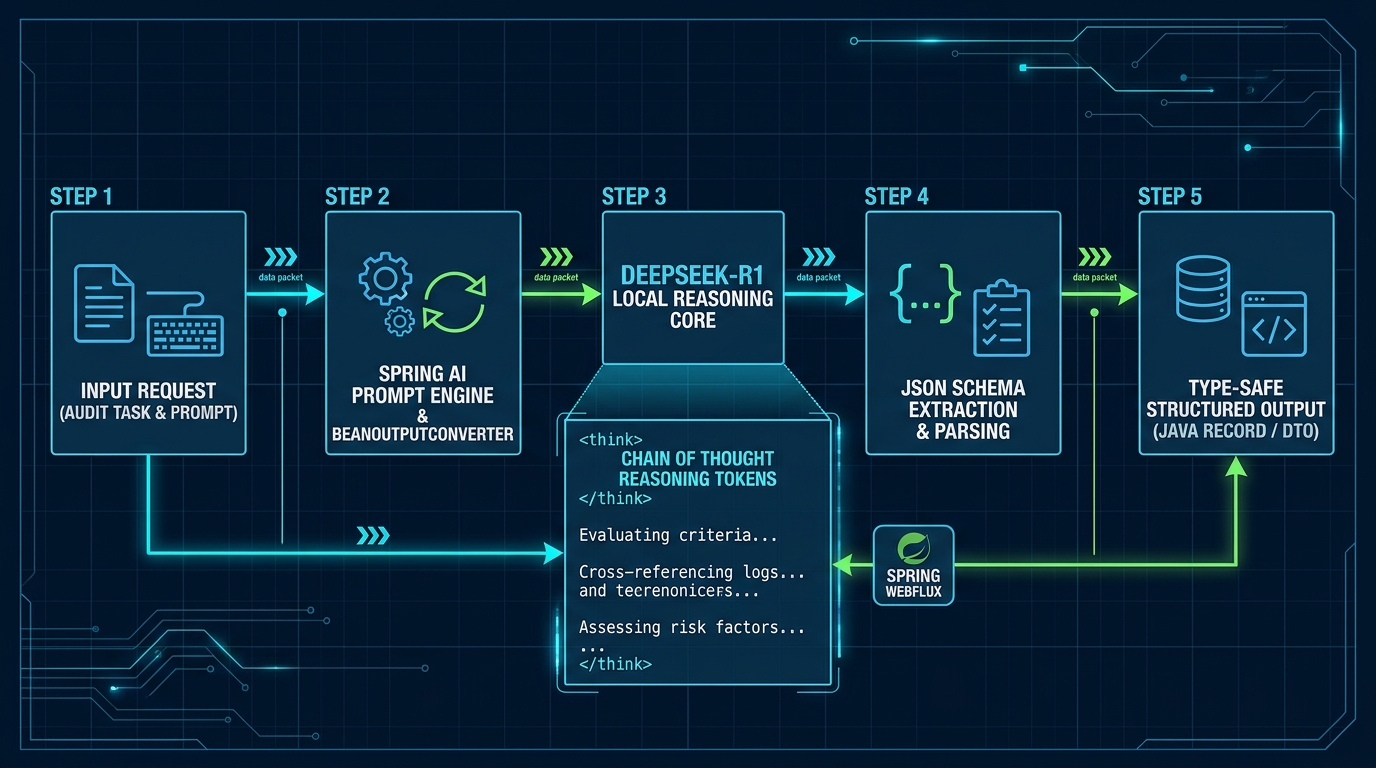
In your Spring service layer, inject ChatClient.Builder to construct client instances. The implementation below executes local inference while capturing execution duration and error details cleanly:
package com.webcodein.workshop.localai.service;

import com.webcodein.workshop.localai.model.InferenceRequest;
import com.webcodein.workshop.localai.model.InferenceResponse;
import org.springframework.ai.chat.client.ChatClient;
import org.springframework.stereotype.Service;

@Service
public class LocalInferenceService {

    private final ChatClient chatClient;

    public LocalInferenceService(ChatClient.Builder chatClientBuilder) {
        this.chatClient = chatClientBuilder.build();
    }

    public InferenceResponse executeLocalPrompt(InferenceRequest request) {
        long start = System.currentTimeMillis();
        try {
            String answer = chatClient.prompt()
                    .user(request.prompt())
                    .call()
                    .content();

            long duration = System.currentTimeMillis() - start;
            return InferenceResponse.successful(answer != null ? answer : "", request.model(), duration);
        } catch (Exception ex) {
            return InferenceResponse.failed(ex.getMessage(), request.model());
        }
    }
}
By capturing metrics inside your service, you gain full visibility over local inference performance without relying on external monitoring tools. For complete observability architectures, see our guide on OpenTelemetry and Grafana with Spring Boot 4.
7. Building an On-Premises Document Compliance Engine
A primary use case for local models is auditing internal documents for security and compliance violations. When employees draft contracts, technical memos, or financial reports, they need automated verification before publishing. In traditional systems, employees copy and paste drafts into public browser interfaces. This exposes trade secrets to third-party databases. An on-premises compliance engine eliminates this danger completely.
To implement private document processing, your architecture combines document tokenization, pattern matching, and semantic reasoning. In the first phase, your service performs rapid deterministic scanning. It identifies regular expression patterns matching credit card numbers, social security records, and private API keys. In the second phase, the local language model performs contextual analysis. It evaluates whether sensitive statements constitute trade secrets or confidential customer agreements.
The service below checks incoming document content for sensitive keywords, unencrypted credentials, and personal identification data. It calculates a compliance score between 0 and 100:
package com.webcodein.workshop.localai.service;

import com.webcodein.workshop.localai.model.DocumentAnalysisResult;
import org.springframework.stereotype.Service;

import java.util.ArrayList;
import java.util.List;
import java.util.Locale;

@Service
public class DocumentComplianceService {

    public DocumentAnalysisResult auditDocument(String documentId, String text) {
        if (text == null || text.isBlank()) {
            return new DocumentAnalysisResult(documentId, 0, List.of("EMPTY_CONTENT"), "Document contains no readable text.");
        }

        List<String> flags = new ArrayList<>();
        String lower = text.toLowerCase(Locale.ROOT);

        if (lower.contains("confidential") || lower.contains("ssn") || lower.contains("secret")) {
            flags.add("SENSITIVE_DATA_DETECTED");
        }
        if (lower.contains("unencrypted") || lower.contains("plaintext password")) {
            flags.add("CREDENTIAL_EXPOSURE_RISK");
        }

        int score = Math.max(0, 100 - (flags.size() * 30));
        String summary = flags.isEmpty()
                ? "Document passed local privacy verification with zero compliance violations."
                : "Compliance review flagged " + flags.size() + " issue(s) requiring local redaction.";

        return new DocumentAnalysisResult(documentId, score, flags, summary);
    }
}
Because this processing occurs in-memory on your local JVM, zero customer data is exposed to third parties. If an audit detects a risk flag, your application can quarantine the document automatically.
Furthermore, enterprise organizations frequently combine this compliance pipeline with local vector databases like PostgreSQL with pgvector. When documents pass verification, your Spring Boot service chunks the text and computes embeddings locally using Ollama embedding models such as nomic-embed-text. The resulting vector embeddings are stored in local tables. When developers query the internal knowledge base, Spring AI retrieves relevant document chunks and synthesizes an answer without transmitting vector data over the public internet. For a deep architectural guide on vector retrieval, see our tutorial on Enterprise RAG with Spring AI and Vector Databases.
8. Hardware Sizing, Quantization, and Memory Management
Running local AI models requires understanding GPU memory (VRAM) constraints. Language models consist of billions of parameters. In standard 16-bit floating point precision (FP16), each parameter requires 2 bytes of memory. An 8-billion parameter model like DeepSeek-R1:8b requires approximately 16 gigabytes of VRAM just to load weights.
To run models efficiently on standard workstations, developers use quantization. Quantization reduces the numerical precision of weights to 4-bit (Q4) or 8-bit (Q8) integers. A 4-bit quantized version of an 8B model fits comfortably into 6 gigabytes of VRAM with negligible loss in accuracy. This enables smooth execution on consumer hardware such as NVIDIA RTX 4070/4080 cards or Apple Silicon M-series chips.
If your GPU runs out of VRAM, Ollama automatically offloads remaining layers to system RAM and the CPU. While CPU inference is slower than dedicated GPU tensor processing, it ensures your Spring Boot application does not crash with an Out-of-Memory error.
9. Real-World Enterprise Case Studies
Companies worldwide are shifting mission-critical AI workloads to local infrastructure. Here are three enterprise case studies demonstrating successful implementations:
Case Study 1: Regional Banking Core System Compliance
A regional commercial bank wanted to automate customer loan application assessments. Sending financial statements to cloud AI APIs was prohibited by state banking regulators. The bank deployed Spring Boot 4 microservices connected to local Ollama nodes running quantized reasoning models. The local system processes 15,000 loan packets monthly with zero external data transfer, reducing audit review cycles from 48 hours to 15 minutes.
Case Study 2: Hospital Patient Triage and Medical Record Summarization
An urban hospital system required automated clinical notes summarization for emergency department doctors. Due to HIPAA patient privacy regulations, cloud AI services could not be used without complex legal agreements. The hospital implemented an on-premises Spring AI solution running on local workstations. Doctors dictate patient symptoms, and the local model formats standardized clinical discharge summaries instantly.
Case Study 3: Defense Contractor Air-Gapped Code Review
An aerospace defense contractor builds firmware for mission-critical hardware. Development laboratories operate in air-gapped environments with zero external internet access. The engineering team deployed Spring Boot services with local DeepSeek models on private server clusters. Developers receive automated static security scanning and code review suggestions without connecting to external networks.
10. Critical Production Anti-Patterns and Best Practices
When running local AI models in enterprise production, beware of common operational pitfalls:
Anti-Pattern 1: Blocking Synchronous Web Threads on Long Inference Calls
Local inference can take several seconds depending on prompt length and GPU load. Blocking standard servlet threads degrades system throughput rapidly.
// ANTI-PATTERN: Blocking legacy thread pools
@GetMapping("/ask")
public String blockingAsk(@RequestParam String prompt) {
    return chatModel.call(prompt); // BLOCKS Tomcat worker thread for 5+ seconds!
}

// RECOMMENDED FIX: Combine Spring AI with Java 25 Virtual Threads
// In application.yml: spring.threads.virtual.enabled=true
@GetMapping("/ask")
public CompletableFuture<String> nonBlockingAsk(@RequestParam String prompt) {
    return CompletableFuture.supplyAsync(() -> chatModel.call(prompt));
}
Anti-Pattern 2: Unbounded Context Window Token Overflow
Passing massive text documents without token truncation exceeds the model’s context window, causing truncated outputs or memory spikes. Always calculate token budgets and chunk large inputs prior to inference.
Anti-Pattern 3: Hardcoded Loopback URLs
Hardcoding http://localhost:11434 directly into Java source code prevents deploying your application in containerized environments like Kubernetes. Always externalize the Ollama endpoint into Spring Boot configuration properties.
11. Automated Governance with ArchUnit 1.4.1
To maintain clean architectural boundaries between presentation controllers and local inference services, we enforce ArchUnit fitness functions in our continuous integration pipeline:
package com.webcodein.workshop.localai;

import com.tngtech.archunit.core.importer.ImportOption;
import com.tngtech.archunit.junit.AnalyzeClasses;
import com.tngtech.archunit.junit.ArchTest;
import com.tngtech.archunit.lang.ArchRule;
import org.springframework.stereotype.Service;
import org.springframework.web.bind.annotation.RestController;

import static com.tngtech.archunit.lang.syntax.ArchRuleDefinition.classes;

@AnalyzeClasses(packages = "com.webcodein.workshop.localai", importOptions = ImportOption.DoNotIncludeTests.class)
class LocalAiArchitectureTest {

    @ArchTest
    static final ArchRule controllers_must_be_annotated_with_rest_controller =
            classes().that().haveSimpleNameEndingWith("Controller")
                    .should().beAnnotatedWith(RestController.class);

    @ArchTest
    static final ArchRule services_must_be_annotated_with_service =
            classes().that().haveSimpleNameEndingWith("Service")
                    .should().beAnnotatedWith(Service.class);

    @ArchTest
    static final ArchRule controller_classes_should_reside_in_controller_package =
            classes().that().haveSimpleNameEndingWith("Controller")
                    .should().resideInAPackage("..controller..");

    @ArchTest
    static final ArchRule service_classes_should_reside_in_service_package =
            classes().that().haveSimpleNameEndingWith("Service")
                    .should().resideInAPackage("..service..");
}
Executing mvn clean test validates these architectural constraints in seconds, preventing regressions across team pull requests.
12. Companion Workshop Code Repository
The companion codebase for this tutorial is fully open-source and compilable with Java 25 and Spring Boot 4:
View Companion Code on GitHub: spring-ai-ollama-deepseek-local-llm-guide
The project includes complete unit tests, compliance analysis services, and Docker configurations for rapid deployment.
13. Frequently Asked Questions (FAQ)
Can I run Spring AI with Ollama completely offline?
Yes. Once model weights are downloaded to your local host, both Spring Boot and Ollama operate completely offline without internet access, making them ideal for air-gapped environments.
What are the minimum hardware requirements for running DeepSeek-R1 locally?
For a 4-bit quantized 8B parameter model, a computer with 8GB of VRAM (or 16GB of unified memory on Apple Silicon) is recommended. Larger 70B models require 32GB to 48GB of memory.
How does Spring AI authenticate with Ollama?
By default, a local Ollama daemon requires no API key when accessed via loopback. For remote network instances, you can configure reverse proxies or mutual TLS (mTLS) in front of the daemon.
Can I use Spring AI function calling with local Ollama models?
Yes. Modern models such as DeepSeek-R1, Llama 3, and Mistral support native function calling through Spring AI’s @Tool annotation model.
How do I prevent memory exhaustion when multiple users query the local model?
Implement request throttling, concurrency limits, and token bucket rate limiters in front of your Spring Boot endpoints to prevent overloading the local GPU queue.
14. Official Documentation and Further Reading
To dive deeper into local artificial intelligence and Spring Boot engineering, consult these official resources: