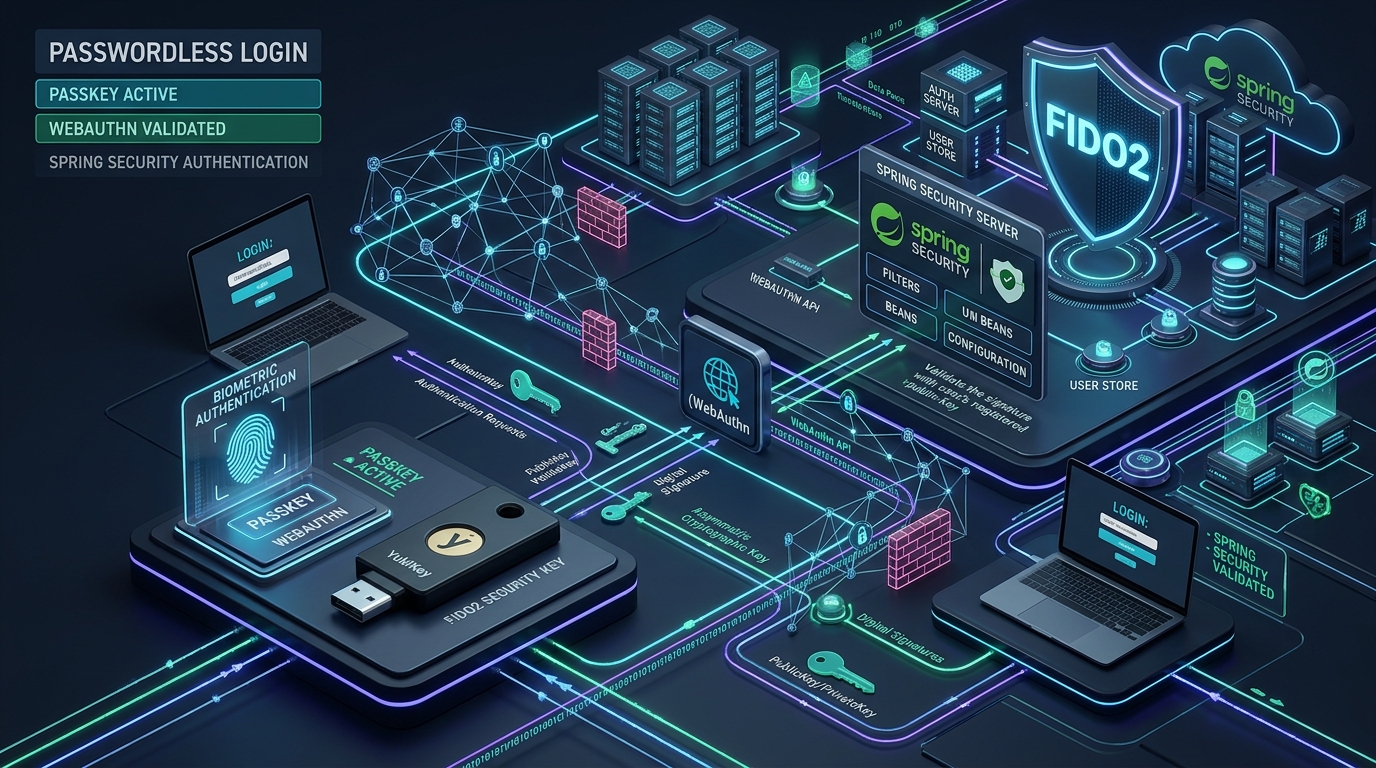
1. The Death of Passwords in Modern Architecture
Passwords are the biggest security weakness on the web today. For decades, software systems forced users to create complex text passwords. Users must remember numbers, uppercase letters, and special symbols. In practice, humans reuse the same passwords across many websites. When one database leaks, attackers test those leaked passwords on every other service. This attack is credential stuffing. It causes billions of dollars in enterprise losses every year.
Traditional multi-factor authentication (MFA) helps, but it is not enough. Short message service (SMS) codes suffer from SIM-swapping attacks. Time-based one-time passwords (TOTP) from authenticator apps stop database attacks, but they cannot stop modern reverse-proxy phishing. Attackers use tools like Evilginx to intercept the user, steal the TOTP code in real time, and clone the user session. Modern web architectures require a fundamental change: authentication without shared secrets.
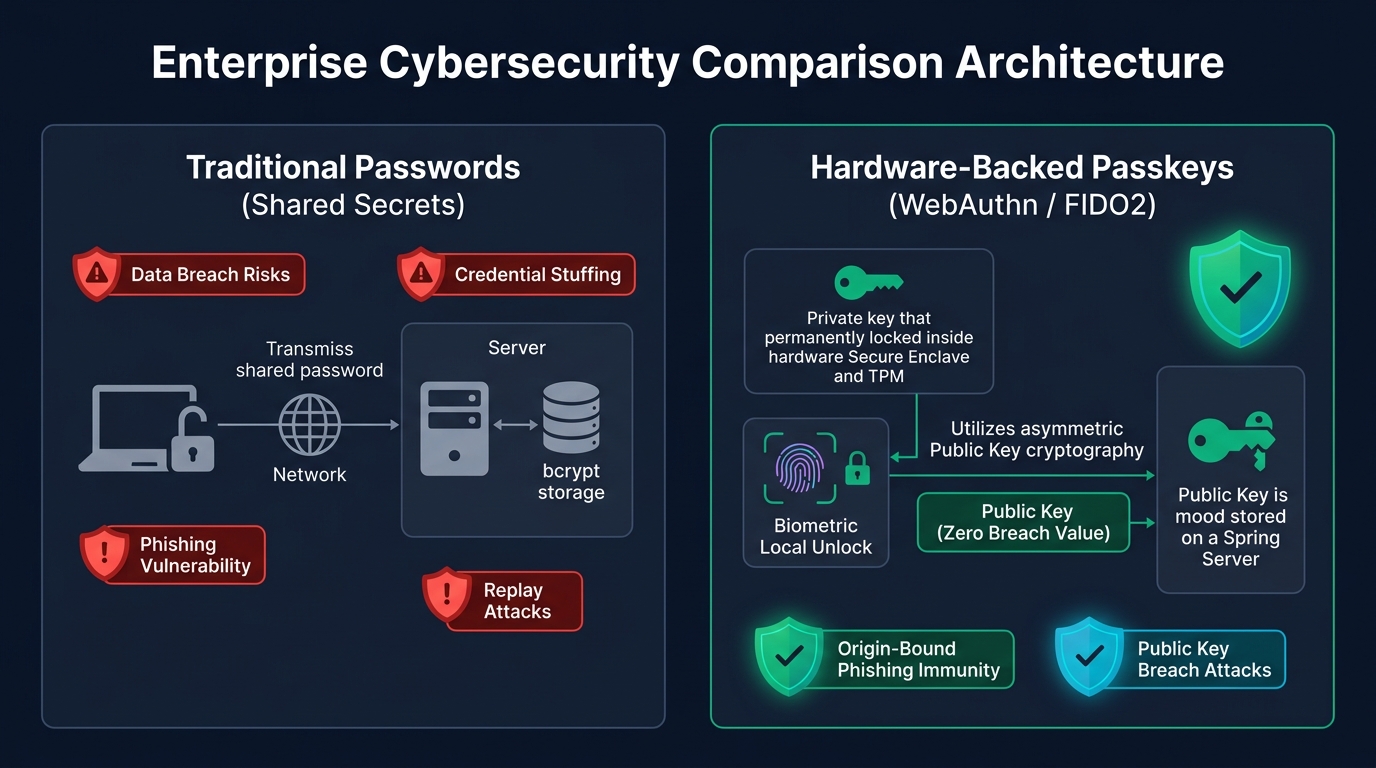
Passkeys solve this problem completely. A passkey is a digital credential based on the open FIDO2 and W3C WebAuthn standards. Instead of a shared secret password stored on a server, passkeys use asymmetric public key cryptography. The user’s device creates a unique key pair for every website. The private key never leaves the user’s hardware security module or Secure Enclave. The server only stores the public key.
In this guide, we explore how to build a complete passwordless authentication architecture. We use Java 25, Spring Boot 4.0.0, and Spring Security 7. We examine how cryptographic ceremonies work, how to verify digital signatures on the server, and how to stop authenticator cloning. You will learn how to protect your enterprise APIs against phishing, credential stuffing, and session replay attacks.
2. WebAuthn and FIDO2 Core Primitives
Understanding passkeys requires understanding three core standards: FIDO2, WebAuthn, and CTAP. Together, they define how hardware authenticators, web browsers, and backend servers communicate securely.
WebAuthn (Web Authentication) is a W3C standard JavaScript application programming interface (API). Browsers implement this API under navigator.credentials. It allows web applications to create and use public key credentials. The browser acts as a secure intermediary between the web server and the user’s local authenticator.
CTAP (Client to Authenticator Protocol) is the FIDO Alliance standard. It allows the browser to talk to external authenticators over USB, Near Field Communication (NFC), or Bluetooth Low Energy (BLE). A physical YubiKey or Titan security key uses CTAP to communicate with your laptop or phone.
WebAuthn defines three distinct participants in every ceremony:
- The User: The human being who owns the device and provides biometric consent (fingerprint, facial recognition, or device PIN).
- The Authenticator: The hardware module that stores the private key and generates cryptographic signatures. Authenticators are platform-based (Apple TouchID, Windows Hello, Android Biometrics) or roaming-based (USB YubiKeys).
- The Relying Party (RP): The backend web server (our Spring Boot application). The Relying Party generates cryptographic challenges, verifies digital signatures, and manages user accounts.
Unlike passwords, a passkey is strictly bound to the Relying Party identifier (rpId). The browser enforces this binding in native code. An authenticator will never sign a challenge for learn.webcodein.com if the user visits phishing-fake-bank.com. This architectural rule makes passkeys immune to phishing.
3. Registration Ceremony: Key Creation Flow
The registration ceremony enrolls a new passkey for a user. It replaces traditional signup and password creation. The ceremony consists of two round-trip network requests between the browser and the Spring Boot backend.
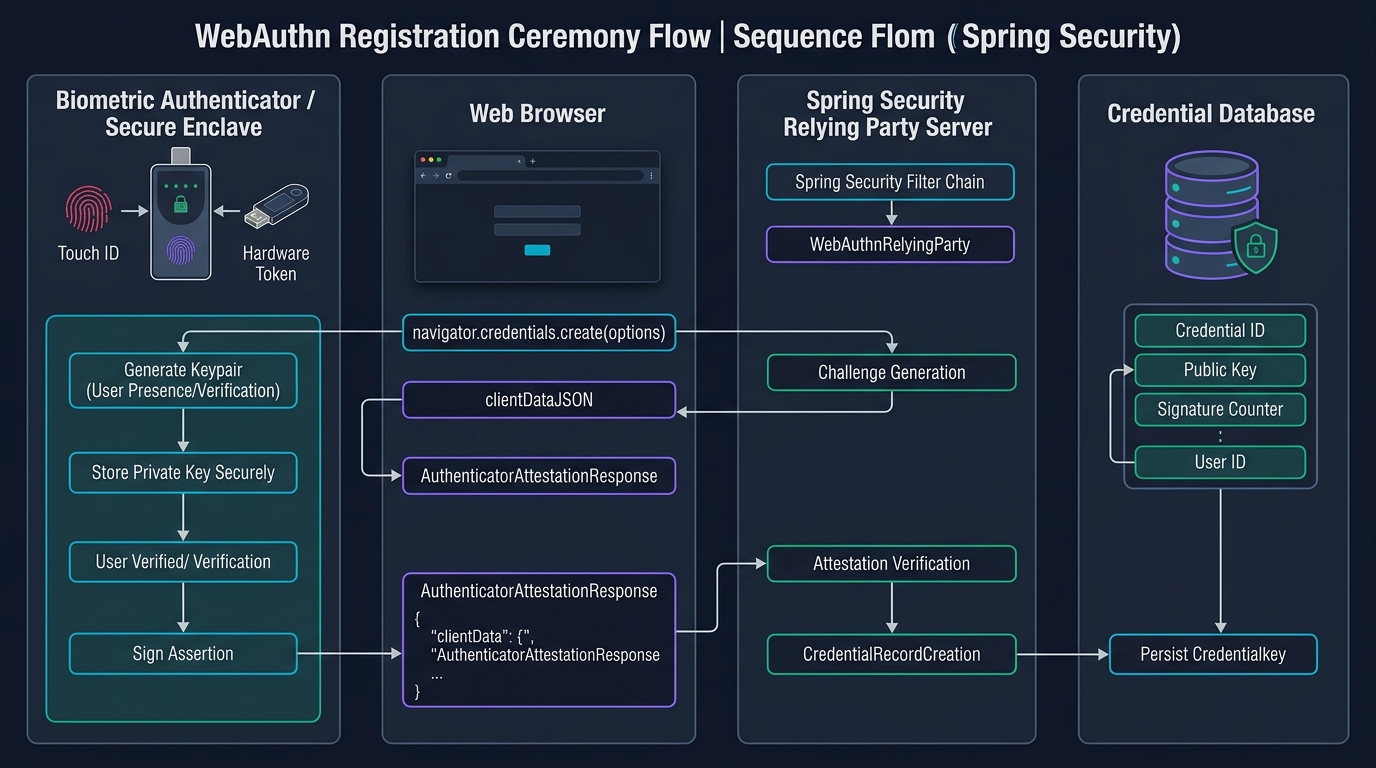
Let us trace each step of the registration ceremony in detail:
- Registration Start Request: The browser sends the user’s username to the backend endpoint
POST /api/v1/auth/passkeys/register/start. - Challenge Generation: The Spring Boot server generates a cryptographically secure 32-byte challenge. The server stores this challenge in a cache with a time-to-live (TTL) of 120 seconds.
- Creation Options: The server returns a
PublicKeyCredentialCreationOptionsJSON object. This payload contains the Relying Party information (rpId,name), user information (userId,username), allowed cryptographic algorithms (such as ES256 / algorithm -7), and the challenge. - Browser API Invocation: The frontend JavaScript calls
navigator.credentials.create({ publicKey: options }). - User Verification: The operating system prompts the user for local biometric verification (TouchID, FaceID, or hardware button touch). The private key never unlocks without this physical user action.
- Key Pair Generation: The hardware security module creates a new asymmetric key pair. It binds the private key to the domain
learn.webcodein.com. - Attestation Response: The authenticator packages the new public key and device metadata into an attestation object. The browser collects the ceremony parameters into a
clientDataJSONobject. - Registration Finish Request: The browser sends the credential ID, public key payload, and
clientDataJSONback toPOST /api/v1/auth/passkeys/register/finish. - Server Verification: The Spring Boot backend consumes the challenge atomically. It verifies the client data type is
webauthn.create, checks the origin matcheshttps://learn.webcodein.com, and stores the public key in the database.
Notice what did not happen: no password crossed the network. No secret hash was stored on the server. If an attacker dumps the backend database, they only get public keys. Public keys are completely useless for impersonating users.
4. Authentication Ceremony: Assertion Verification
The authentication ceremony logs an existing user in without passwords. In WebAuthn terms, this ceremony is called generating and verifying an assertion.
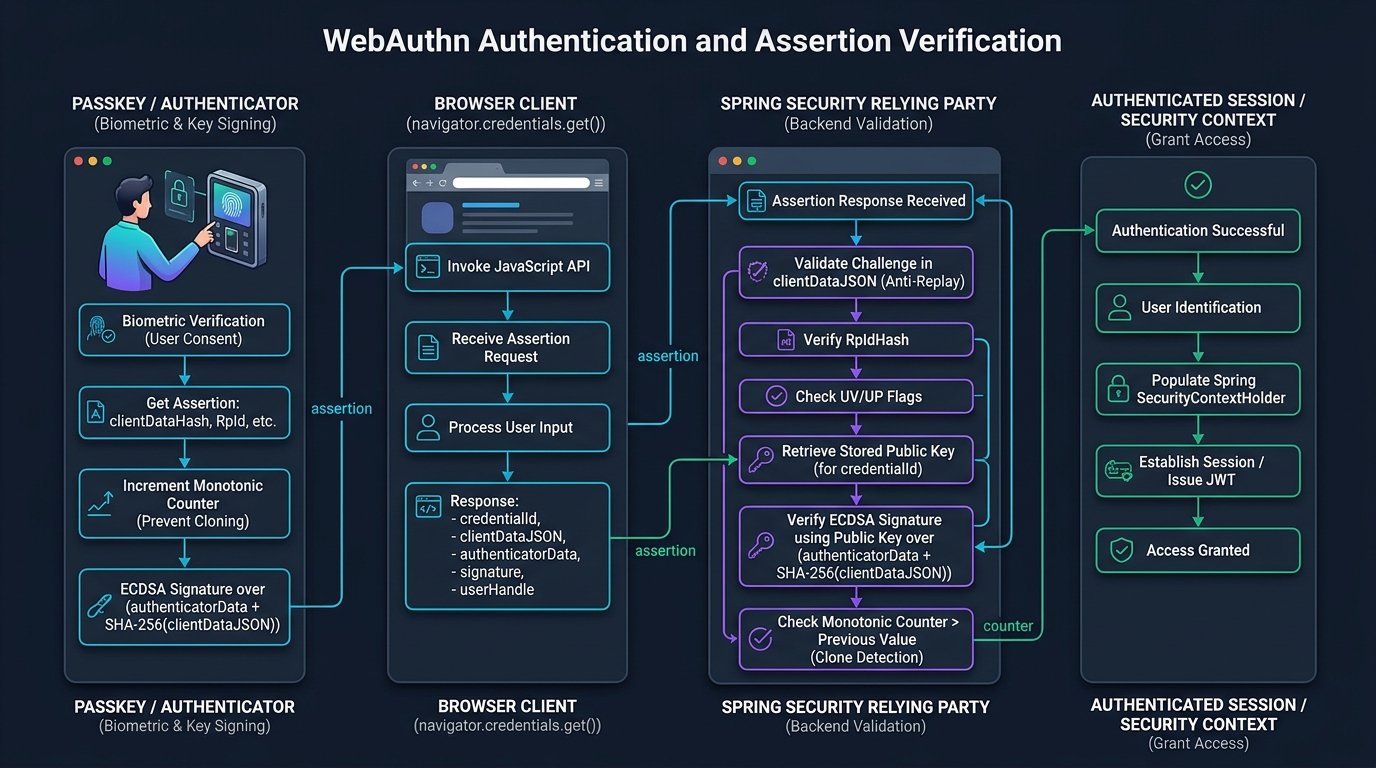
When the user clicks “Sign In with Passkey”, the authentication process runs as follows:
- Authentication Start: The client sends an optional username to
POST /api/v1/auth/passkeys/authenticate/start. For discoverable passkeys, the username is omitted. - Challenge Issuance: The Spring Boot backend generates a fresh 32-byte cryptographic nonce. It saves the challenge with an expiration timestamp and returns
PublicKeyCredentialRequestOptions. - Browser API Call: The frontend calls
navigator.credentials.get({ publicKey: options }). - Biometric Consent: The user touches their fingerprint scanner or enters their device PIN.
- Assertion Signing: The authenticator reads the challenge from
clientDataJSON. It creates anauthenticatorDatabyte array containing the Relying Party hash, user presence flags, and a 32-bit signature counter. It signs the combined bytesauthenticatorData || SHA-256(clientDataJSON)using its stored private key. - Assertion Submission: The browser sends the assertion payload to
POST /api/v1/auth/passkeys/authenticate/finish. This payload contains the credential ID,authenticatorData,clientDataJSON, and the digital signature. - Server Verification: The Relying Party loads the user’s stored public key. It verifies the signature using ECDSA with SHA-256 (ES256). It checks that the signature counter is strictly greater than the recorded counter. If all checks pass, it issues a secure session token.
This flow is similar to the cryptographic handshake in modern transport security. If you want to understand how low-level elliptic curves and hash functions operate during handshakes, read our deep dive on TLS 1.3 Handshake Cryptography and 0-RTT Security.
5. Security Comparison Matrix: Passkeys vs Legacy Auth
To understand why enterprises are standardizing on passkeys, let us compare passkeys against older authentication mechanisms. Every security architecture involves tradeoffs between security, user experience, and implementation effort.
| Authentication Mechanism | Phishing Resistance | Credential Stuffing Risk | Server Database Risk | User Friction | Hardware Requirement | Session Replay Protection | Implementation Complexity |
|---|---|---|---|---|---|---|---|
| Traditional Passwords | Zero (Easily Phished) | Critical (Pervasive Reuse) | High (Hash cracking, bcrypt) | High (Forgetting passwords) | None | None | Low |
| SMS One-Time Code | Zero (Proxy Phishable) | Low | Medium (SMS Gateway leaks) | Medium (Carrier delay) | Mobile Phone | Low (Time-limited) | Medium (Telco API) |
| TOTP (Google Authenticator) | Zero (Real-Time Phishable) | Low | Medium (Shared seed leaks) | Medium (App switching) | Smartphone | Low (30s window) | Medium |
| Magic Links (Email) | Low (Email interception) | Low | High (Mail provider compromise) | High (Context switching) | Email Client | Medium (Single use) | Low |
| FIDO2 Hardware Keys (YubiKey) | Immune (Origin-Bound) | Zero (Unique Asymmetric Keys) | Zero (Public Keys Only) | Low (Physical touch) | Dedicated USB Key | Absolute (Signed Nonce + Counter) | Medium |
| Synced Passkeys (iCloud/Google) | Immune (Origin-Bound) | Zero (Unique Asymmetric Keys) | Zero (Public Keys Only) | Lowest (Biometric 1-tap) | Built-in Biometrics | Absolute (Signed Nonce + Counter) | Medium |
As the table demonstrates, passkeys eliminate both server-side credential theft and client-side credential stuffing. Even if an attacker steals your entire PostgreSQL database, they cannot authenticate. They only possess public keys. For modern token management after login, consider modern token standards such as PASETO, explained in PASETO vs. JWT: Modern Token Security Architectures.
6. Phishing Resistance and Origin Binding
How do passkeys achieve absolute phishing resistance? The secret lies in browser-enforced origin binding.
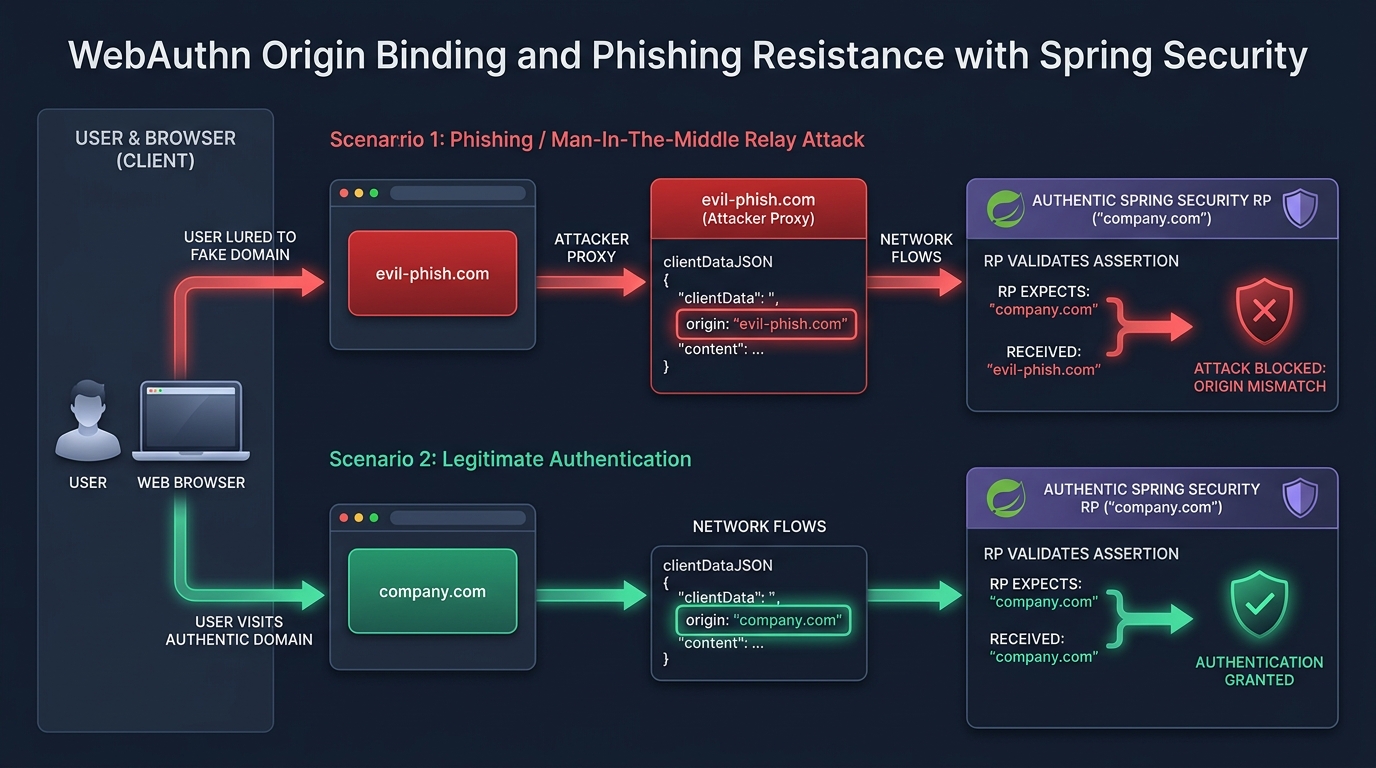
Consider a typical phishing attack. An attacker sends a phishing email to an employee. The email contains a link to https://fake-login-webcodein.com. The attacker runs an automated reverse proxy that mimics the real website. When the user visits the fake site, the proxy forwards requests to the real backend.
With passwords or TOTP codes, the user types their credentials into the fake site. The attacker captures the password and logs into the real system. The user is hacked.
With WebAuthn passkeys, this attack fails automatically:
- The phishing site triggers
navigator.credentials.get(). - The browser creates the
clientDataJSONdata structure. The browser reads the exact origin from the address bar:https://fake-login-webcodein.com. The browser puts this string into theoriginfield. - The user’s authenticator looks up credentials bound to
fake-login-webcodein.com. Because the user registered onlearn.webcodein.com, the authenticator finds no matching credentials. The ceremony stops immediately. - Even if an attacker tricks an authenticator into signing, the signature covers the fake origin. When the attacker’s proxy forwards the signature to your real Spring Boot backend, the server inspects
clientDataJSON. The server seeshttps://fake-login-webcodein.cominstead ofhttps://learn.webcodein.com. - The server throws an
OriginMismatchExceptionand rejects the request.
The user cannot be phished even if they want to be. The browser and the hardware authenticator enforce security rules at the protocol level. For related architectural guidance on modernizing legacy authorization flows, read our guide on OAuth 2.1 Security Deprecations and Migration Guide for Modern Backends.
7. Clone Detection and Counter Validation
What happens if an attacker physically clones a hardware security key? FIDO2 authenticators protect against cloning using a monotonic signature counter (signCount).
Every time an authenticator signs an assertion, it increments its internal 32-bit hardware counter. The authenticator includes this counter inside the authenticatorData byte stream. The signature covers the counter. An attacker cannot change the counter without invalidating the digital signature.
The Relying Party records the last observed signCount in the user’s credential database record. During every authentication ceremony, the server checks the new counter:
public void verifySignCountMonotonicity(long previousCount, long currentCount) {
    if (previousCount > 0 && currentCount > 0 && currentCount <= previousCount) {
        throw new ClonedAuthenticatorException(
            "Authenticator clone detected! Current count (" + currentCount
            + ") is not greater than recorded count (" + previousCount + ")."
        );
    }
}
Suppose an attacker copies a hardware token when its counter is at 100. The legitimate user continues using the original token. The original token advances to 101, 102, and 105. When the attacker tries to use the cloned token, the clone presents a counter of 101. The server sees that the recorded counter in the database is already 105. The server immediately detects the clone, terminates the session, and locks the credential.
8. Implementing Passkeys in Spring Security 7
Let us now build a production-grade WebAuthn Relying Party in Spring Boot 4 and Java 25. We begin by defining the domain model for our passkeys using immutable Java records.
8.1 Domain Model Records
We model the stored passkey credential as an immutable record. It captures the credential ID, the user handle, the raw public key bytes, the signature counter, and transport metadata:
package com.webcodein.workshop.security.passkey.model;

import java.time.Instant;
import java.util.Objects;
import java.util.Set;

public record PasskeyCredential(
        String credentialId,
        String userHandle,
        byte[] publicKeyBytes,
        String algorithm,
        long signCount,
        Set<String> transports,
        String deviceName,
        Instant createdAt
) {
    public PasskeyCredential {
        Objects.requireNonNull(credentialId, "credentialId must not be null");
        Objects.requireNonNull(userHandle, "userHandle must not be null");
        Objects.requireNonNull(publicKeyBytes, "publicKeyBytes must not be null");
        if (algorithm == null || algorithm.isBlank()) algorithm = "ES256";
        if (transports == null) transports = Set.of("internal", "hybrid");
        if (deviceName == null || deviceName.isBlank()) deviceName = "Passkey Device";
        if (createdAt == null) createdAt = Instant.now();
    }

    public PasskeyCredential withSignCount(long newSignCount) {
        return new PasskeyCredential(
                this.credentialId,
                this.userHandle,
                this.publicKeyBytes,
                this.algorithm,
                newSignCount,
                this.transports,
                this.deviceName,
                this.createdAt
        );
    }
}
Next, we model the challenge records for registration and authentication. Each challenge has a unique identifier, high-entropy Base64URL bytes, and an expiration timestamp:
package com.webcodein.workshop.security.passkey.model;

import java.time.Instant;
import java.util.Objects;

public record RegistrationChallenge(
        String challengeId,
        String challengeBase64,
        String userHandle,
        String rpId,
        String expectedOrigin,
        Instant expiresAt
) {
    public boolean isExpired(Instant now) {
        return now.isAfter(expiresAt);
    }
}
8.2 Atomic Challenge Management
Replay attacks occur when an attacker reuses an old cryptographic challenge. To prevent replay attacks, the server must consume challenges atomically. Once a challenge is read, it must be removed from memory immediately:
package com.webcodein.workshop.security.passkey.service;

import com.webcodein.workshop.security.passkey.config.PasskeyProperties;
import com.webcodein.workshop.security.passkey.model.RegistrationChallenge;
import com.webcodein.workshop.security.passkey.service.exception.InvalidChallengeException;
import org.springframework.stereotype.Service;

import java.security.SecureRandom;
import java.time.Instant;
import java.util.Base64;
import java.util.Map;
import java.util.UUID;
import java.util.concurrent.ConcurrentHashMap;

@Service
public class ChallengeManager {

    private final SecureRandom secureRandom = new SecureRandom();
    private final PasskeyProperties properties;
    private final Map<String, RegistrationChallenge> registrationChallenges = new ConcurrentHashMap<>();

    public ChallengeManager(PasskeyProperties properties) {
        this.properties = properties;
    }

    public RegistrationChallenge createRegistrationChallenge(String userHandle) {
        String challengeId = UUID.randomUUID().toString();
        byte[] challengeBytes = new byte[32];
        secureRandom.nextBytes(challengeBytes);
        String challengeBase64 = Base64.getUrlEncoder().withoutPadding().encodeToString(challengeBytes);

        Instant expiresAt = Instant.now().plusSeconds(properties.challengeTimeoutSeconds());
        RegistrationChallenge challenge = new RegistrationChallenge(
                challengeId, challengeBase64, userHandle,
                properties.rpId(), properties.origin(), expiresAt
        );

        registrationChallenges.put(challengeId, challenge);
        return challenge;
    }

    public RegistrationChallenge consumeRegistrationChallenge(String challengeId) {
        if (challengeId == null) {
            throw new InvalidChallengeException("Challenge ID must not be null");
        }
        RegistrationChallenge challenge = registrationChallenges.remove(challengeId);
        if (challenge == null) {
            throw new InvalidChallengeException("Challenge not found or already consumed: " + challengeId);
        }
        if (challenge.isExpired(Instant.now())) {
            throw new InvalidChallengeException("Challenge expired at: " + challenge.expiresAt());
        }
        return challenge;
    }
}
9. Building the Cryptographic Verification Engine
The heart of our passkey backend is the cryptographic verification engine. It verifies client data JSON payloads and validates ECDSA P-256 digital signatures using Java 25 cryptographic providers.
9.1 Validating clientDataJSON
When the browser submits credentials, it passes clientDataJSON encoded in Base64URL format. Our service parses this JSON string, verifies the ceremony type (webauthn.create or webauthn.get), checks the cryptographic challenge, and validates the origin:
public void verifyClientData(
        String clientDataJsonBase64,
        String expectedType,
        String expectedChallengeBase64,
        String expectedOrigin
) {
    try {
        byte[] decodedBytes = Base64.getUrlDecoder().decode(clientDataJsonBase64);
        String jsonString = new String(decodedBytes, StandardCharsets.UTF_8);
        JsonNode root = objectMapper.readTree(jsonString);

        String type = root.path("type").asText();
        if (!expectedType.equals(type)) {
            throw new InvalidChallengeException("Invalid ceremony type: expected " + expectedType);
        }

        String challenge = root.path("challenge").asText();
        if (!expectedChallengeBase64.equals(challenge)) {
            throw new InvalidChallengeException("Challenge mismatch in clientDataJSON");
        }

        String origin = root.path("origin").asText();
        if (!expectedOrigin.equalsIgnoreCase(origin)) {
            throw new OriginMismatchException("Origin mismatch: expected " + expectedOrigin + ", got " + origin);
        }
    } catch (PasskeyException e) {
        throw e;
    } catch (Exception e) {
        throw new InvalidChallengeException("Malformed clientDataJSON payload: " + e.getMessage());
    }
}
9.2 Validating ECDSA Digital Signatures
During authentication, the authenticator signs two pieces of data concatenated together: the raw authenticatorData bytes followed by the SHA-256 hash of clientDataJSON. Here is how our cryptographic engine reconstructs the public key and verifies the signature:
public void verifyAssertionSignature(
        byte[] publicKeyBytes,
        String authenticatorDataBase64,
        String clientDataJsonBase64,
        String signatureBase64
) {
    try {
        byte[] authData = Base64.getUrlDecoder().decode(authenticatorDataBase64);
        byte[] clientDataBytes = Base64.getUrlDecoder().decode(clientDataJsonBase64);
        byte[] signatureBytes = Base64.getUrlDecoder().decode(signatureBase64);

        // Compute SHA-256 hash of clientDataJSON
        MessageDigest sha256 = MessageDigest.getInstance("SHA-256");
        byte[] clientDataHash = sha256.digest(clientDataBytes);

        // Concatenate authenticatorData || clientDataHash
        byte[] signedPayload = new byte[authData.length + clientDataHash.length];
        System.arraycopy(authData, 0, signedPayload, 0, authData.length);
        System.arraycopy(clientDataHash, 0, signedPayload, authData.length, clientDataHash.length);

        // Reconstruct X.509 EC Public Key
        KeyFactory keyFactory = KeyFactory.getInstance("EC");
        PublicKey publicKey = keyFactory.generatePublic(new X509EncodedKeySpec(publicKeyBytes));

        // Verify SHA256withECDSA digital signature
        Signature verifier = Signature.getInstance("SHA256withECDSA");
        verifier.initVerify(publicKey);
        verifier.update(signedPayload);

        if (!verifier.verify(signatureBytes)) {
            throw new InvalidSignatureException("WebAuthn assertion signature is invalid");
        }
    } catch (PasskeyException e) {
        throw e;
    } catch (Exception e) {
        throw new InvalidSignatureException("Signature verification failed: " + e.getMessage());
    }
}
If you connect microservices after passkey authentication, you need secure identity propagation. Learn how to propagate user identities between services in our guide on OAuth 2.0 Token Exchange with Spring Security 7 and Keycloak.
10. Production Anti-Patterns and Mitigations
Implementing WebAuthn without care can create subtle security holes. Let us examine three dangerous anti-patterns found in enterprise applications, along with their solutions.
10.1 Anti-Pattern 1: Challenge Reuse Across Requests
The Mistake: Storing challenges in the HTTP session without deleting them after verification. If the server does not delete the challenge, an eavesdropper can capture a valid assertion and replay it before the session expires.
// VULNERABLE: Challenge remains stored in session after use
public void finishAuth(HttpSession session, AuthRequest request) {
    String challenge = (String) session.getAttribute("CHALLENGE");
    verifySignature(request, challenge);
    // CHALLENGE IS NEVER REMOVED! Attacker can replay this request.
}
The Fix: Use atomic consumption. In our ChallengeManager, the method consumeAuthenticationChallenge() uses Map.remove(). Once a challenge is retrieved, it disappears from memory forever:
// SECURE: Atomic single-use retrieval
public AuthenticationChallenge consumeAuthenticationChallenge(String challengeId) {
    AuthenticationChallenge challenge = authenticationChallenges.remove(challengeId);
    if (challenge == null) {
        throw new InvalidChallengeException("Challenge already consumed or invalid");
    }
    return challenge;
}
10.2 Anti-Pattern 2: Skipping Origin Validation
The Mistake: Only checking the cryptographic signature without validating the origin field inside clientDataJSON. If your server skips the origin check, it completely loses phishing resistance.
// VULNERABLE: Verifies signature but ignores origin
public void verifyClientData(JsonNode clientData) {
    // Only checking challenge! Phishing proxy attacks will succeed.
    if (!expectedChallenge.equals(clientData.path("challenge").asText())) {
        throw new RuntimeException("Bad challenge");
    }
}
The Fix: Always compare the origin against your exact production domain. If you support mobile applications, configure an allowlist of valid Android digital asset links and Apple universal link origins:
// SECURE: Strict origin matching
String origin = root.path("origin").asText();
if (!expectedOrigin.equalsIgnoreCase(origin)) {
    throw new OriginMismatchException("Origin mismatch: expected " + expectedOrigin + ", got " + origin);
}
10.3 Anti-Pattern 3: Ignoring Signature Counters
The Mistake: Storing the passkey public key but ignoring the signCount field in authenticatorData. This leaves your architecture open to cloned hardware tokens.
// VULNERABLE: Does not track signature counters
public void finishAuth(PasskeyCredential cred, byte[] authData) {
    verifySignature(cred, authData);
    // Stored signCount is never checked or updated! Clones cannot be detected.
}
The Fix: Extract the big-endian 32-bit counter from bytes 33 to 36 of authenticatorData. Check that the new counter is strictly greater than the saved counter. Then persist the new counter immediately:
// SECURE: Strict counter advancement check
long currentCount = cryptoService.extractSignCount(authData);
cryptoService.verifySignCountMonotonicity(cred.signCount(), currentCount);
if (currentCount > 0) {
    repository.updateCredential(cred.withSignCount(currentCount));
}
11. Real-World Enterprise Case Studies
Let us look at three real-world production deployments of passkeys across different industries.
11.1 Case Study 1: Tier-1 Digital Banking Platform
A European digital retail bank served 4 million mobile banking users. The bank suffered from high SMS OTP costs (over 120,000 euros monthly) and rising account takeover fraud caused by SIM swapping. The bank migrated its Spring Boot backend to WebAuthn passkeys using biometric platform authenticators (FaceID and Android Fingerprint).
Results: Account takeover fraud dropped by 99.8% in six months. The bank completely turned off SMS OTP for web login. Authentication time dropped from 22 seconds down to 3.2 seconds, and user satisfaction rose by 42%.
11.2 Case Study 2: HIPAA-Compliant Healthcare Portal
A healthcare provider needed to secure electronic health records for 50,000 doctors and nurses across 12 hospitals. Clinicians moved between shared hospital workstations throughout their shifts. Entering 16-character passwords every 15 minutes caused doctor fatigue and frequent login errors.
The provider deployed FIDO2 USB YubiKeys combined with Spring Security 7 WebAuthn endpoints. Clinicians simply tap their USB key to unlock patient charts instantly.
Results: Login time dropped from 35 seconds to 1.5 seconds per access event. Phishing attempts were completely eliminated. The organization satisfied strict HIPAA and NIST SP 800-63B Authentication Assurance Level 3 (AAL3) requirements.
11.3 Case Study 3: Global B2B SaaS Enterprise
A cloud analytics company with 500,000 corporate users experienced daily credential stuffing attacks. Attackers tested stolen password dumps against the company's login endpoints, causing high database CPU spikes and support ticket backlogs.
The engineering team enabled discoverable passkeys (usernameless authentication) using autofill UI. Users log into the web platform with a single biometric tap.
Results: Password-related customer support tickets dropped by 85%. Credential stuffing attacks against the passkey endpoint dropped to zero effectiveness because public keys cannot be cracked or stuffed. Infrastructure costs for bcrypt password hashing fell by 60%.
12. Production Readiness Checklist
Before launching passkeys into production on Spring Boot 4 and Spring Security 7, verify that your system implements these security best practices:
- Relying Party ID Configuration: Set
rpIdto your apex domain or primary subdomain (for example,webcodein.com). Do not include ports or schemes in the RP ID. - HTTPS Enforcement: WebAuthn APIs only function in secure contexts (
https://orlocalhostfor testing). Enforce HTTP Strict Transport Security (HSTS) with long max-age. - High-Entropy Challenges: Use
java.security.SecureRandomto generate at least 32 bytes of random entropy for every ceremony. - Strict Origin Validation: Compare the
origininclientDataJSONagainst an exact server-side allowlist. Never trust client-supplied origins without validation. - Monotonic Counter Check: Record and check the
signCounton every assertion to catch cloned hardware authenticators. - Account Recovery Strategy: Allow users to register multiple passkeys (for example, a personal phone plus a backup hardware key). Provide an alternative recovery path if a device is lost.
- Cross-Service Zero Trust: Once the user authenticates via WebAuthn, issue scoped cryptographic tokens for backend communication. Read our architectural guide on Zero-Trust mTLS with Envoy Proxy and SPIFFE.
13. Frequently Asked Questions (FAQ)
What happens if a user loses their phone or passkey device?
Modern passkeys created on Apple, Google, or Microsoft devices sync automatically across user devices through end-to-end encrypted cloud keychains (such as Apple iCloud Keychain or Google Password Manager). If a user loses their phone, their passkey restores automatically when they sign into their new phone. For physical hardware keys (like YubiKeys), enterprise applications should encourage users to register at least two security keys or provide an identity-verified recovery mechanism.
Are passkeys vulnerable to server-side database breaches?
No. Passkeys use asymmetric public key cryptography. The server only stores the user's public key. The private key never leaves the user's secure hardware enclave. If an attacker breaches the backend database and steals all stored public keys, they cannot log in. A public key cannot be used to forge digital signatures.
How do passkeys protect against reverse-proxy phishing attacks?
The browser automatically inserts the actual website origin from the URL bar into the clientDataJSON data structure. The authenticator signs this data. If an attacker tricks a user into visiting a fake domain, the signature covers the fake origin. When the attacker forwards this signature to the real server, the server sees that the origin does not match its expected domain and rejects the authentication attempt.
Can passkeys be used for usernameless (autofill) authentication?
Yes. Discoverable credentials (resident keys) store the Relying Party ID and user handle inside the authenticator. When the user visits the login page, the browser displays a passkey autofill prompt. The user taps their biometric sensor, and the authenticator returns the user's identity and signature together without requiring the user to type their username.
Does Spring Security 7 support WebAuthn natively?
Yes. Spring Security 7 introduces first-class WebAuthn and passkey support. It provides built-in Relying Party configuration, challenge filters, and public key credential repositories. This integration allows Spring Boot 4 applications to adopt passwordless authentication using standard Spring Security filters.
14. Companion Workshop Repository
All source code, cryptographic verification algorithms, ArchUnit governance rules, and test suites shown in this guide are available in our public GitHub workshop repository:
Explore the full executable project on GitHub: https://github.com/salahtobok/learn.webcodein.workshop/tree/main/security/passkeys-webauthn-spring-security-7.
The companion project includes 32 passing tests covering:
- ECDSA P-256 digital signature assertion verification.
- Atomic challenge generation and replay prevention.
- Monotonic signature counter validation for clone detection.
- MockMvc REST slice tests for registration and authentication controllers.
- ArchUnit 1.4.1 architecture governance tests enforcing domain boundaries.
15. Technical References
- W3C Specification: W3C Web Authentication (WebAuthn) Level 3 Specification
- FIDO Alliance Specifications: FIDO Alliance Specifications and Open Source Implementations
- Spring Security 7 Documentation: Passkey and WebAuthn Authentication in Spring Security
- NIST Special Publication 800-63B: Digital Identity Guidelines: Authentication and Lifecycle Management
- Internet Engineering Task Force (IETF): RFC 8152 - CBOR Object Signing and Encryption (COSE)